

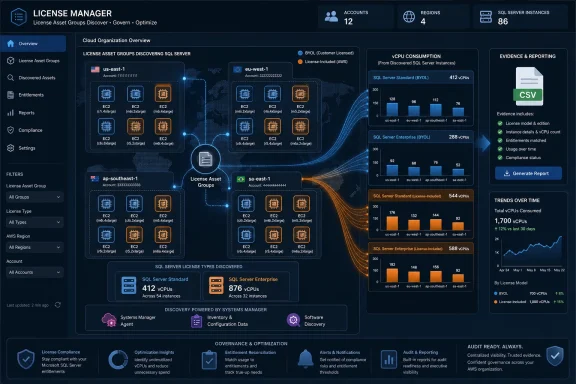
Amazon Web Services has added license asset groups to AWS License Manager so organizations can automatically discover, group, monitor, and report Microsoft SQL Server license usage across AWS accounts and regions, including bring-your-own-license and license-included EC2 deployments measured by vCPU consumption. The practical story is not that AWS invented license management; it is that AWS is admitting the old way was too brittle for the cloud era. SQL Server licensing has always been expensive, but in distributed AWS estates it can also become invisible. License asset groups are AWS’s attempt to turn that invisible liability into something finance, platform teams, and Windows administrators can actually govern.
For years, Microsoft licensing on AWS has lived in a strange middle ground between cloud automation and procurement archaeology. The workloads were elastic, the EC2 instances were scriptable, and the regions multiplied with a click, but the licensing evidence often remained trapped in spreadsheets, tagging conventions, email trails, and one-off discovery scripts. That mismatch is exactly where SQL Server gets dangerous.
SQL Server is not a casual line item in an enterprise bill. It is one of the more consequential pieces of Microsoft infrastructure that companies move to AWS, and it tends to sit underneath applications that are too important to ignore and too old to cleanly refactor. When those deployments use bring-your-own-license rights, the cloud does not remove the licensing obligation; it merely changes the place where the obligation must be proven.
AWS License Manager already existed to help with that problem, but license asset groups push the service in a more native, organization-wide direction. Instead of making every customer stitch together AWS Organizations, Systems Manager, inventory data, reporting jobs, and custom logic, AWS is giving customers a built-in grouping model that can discover and count license-bearing assets across accounts and regions. The new feature does not make Microsoft licensing simple. It makes the sprawl more observable.
That distinction matters. Licensing teams do not need another dashboard that says everything is fine; they need a reliable way to see where Windows and SQL Server are actually running, what edition is installed, and whether the deployment model is BYOL or license included. In cloud estates where accounts are created for every team, application, region, and environment, the first battle is not optimization. It is visibility.
The core tension is familiar to Windows administrators. SQL Server licenses with active Software Assurance can qualify for License Mobility, allowing customers to bring those licenses to shared-tenancy EC2 instances. On AWS, that effectively means the organization can run SQL Server under BYOL terms rather than paying AWS for a license-included SQL Server instance. But the meter still matters: for shared-tenancy EC2, SQL Server core licensing maps to the vCPUs presented to the instance.
That sounds simple until it meets a real AWS Organization. A 16-vCPU instance running BYOL SQL Server consumes 16 SQL Server core licenses, subject to the applicable Microsoft licensing rules. Multiply that across development, test, production, disaster recovery, multiple regions, and dozens of application teams, and the licensing posture becomes a moving target.
License-included instances add another layer. They are often attractive because they convert licensing into a pay-as-you-go infrastructure cost. Customers can use them when they need flexibility, short-lived capacity, or a way to fill gaps beyond their existing license estate. But many organizations run both models at once: BYOL for steady-state production workloads and license-included EC2 for elasticity, projects, testing, or acquisitions.
That hybrid reality is where manual tracking breaks down. The question is no longer “How many SQL Server licenses did we buy?” It becomes “Which instances are using our licenses today, in which accounts, in which regions, with which editions, and at what vCPU count?” A spreadsheet can answer that question only if the environment barely changes. AWS environments rarely stay still long enough to make that comforting fiction useful.
The feature uses rulesets to determine what belongs in a group. AWS supplies managed rulesets for common commercial software, including SQL Server Standard and SQL Server Enterprise. Customers can use those managed rulesets to discover EC2 instances where SQL Server is installed, then organize those findings into license asset groups that reflect how the business wants to track consumption.
For SQL Server, the important customization is the usage dimension. A license asset group can be configured to track by vCPU, which aligns the operational view with the licensing question most administrators actually need to answer. Counting instances is useful, but counting instances alone can be misleading: two SQL Server instances may have wildly different licensing implications if one is a small test box and the other is a large production server.
That is why the AWS workflow centers on creating customized license asset groups for SQL Server Standard and Enterprise, selecting vCPUs as the usage dimension, and enabling discovery across the organization and selected regions. Once configured, License Manager can present the discovered instances, show usage trends, and generate CSV reports. It is not glamorous, but neither are audits. The value is in making the record boring, consistent, and repeatable.
The reliance on AWS Systems Manager is also important. License Manager needs the SSM agent on EC2 instances to inspect what is actually installed. That requirement may sound like plumbing, but it is where many governance projects succeed or fail. A license management service cannot track what it cannot see, and a fragmented Systems Manager footprint will produce a fragmented licensing picture.
But BYOL SQL Server is trickier. AWS usage operation values can show Windows Server as BYOL or Windows Server as license included, and they can show whether SQL Server is license included for particular editions. They do not, however, fully distinguish every BYOL SQL Server edition from billing data alone. A Windows Server instance running BYOL SQL Server may look like Windows from the billing perspective even though SQL Server is installed and consuming customer-owned rights.
That gap is exactly why OS-level discovery matters. License asset groups are not merely reading the bill and applying labels. For BYOL SQL Server, License Manager uses Systems Manager to query the instance and determine the SQL Server edition at the operating system level. That is the only way to bridge the difference between what AWS bills and what Microsoft licensing requires the customer to know.
This is a subtle but critical point for IT pros. Cloud billing data is not the same thing as software inventory, and software inventory is not automatically the same thing as license entitlement. You need all three views to manage the risk: what AWS is charging for, what is installed and running, and what your organization is legally entitled to use.
License asset groups improve the second part of that triangle. They do not magically import Microsoft contract terms, Software Assurance status, special amendments, or enterprise agreement nuance. They can tell you what AWS sees and what is running on EC2. Your licensing team still has to map that usage against entitlement.
License asset groups take that pattern and productize it. That is usually what happens when a cloud provider sees enough customers building the same scaffolding around a service. The custom code becomes a feature. The customer-owned runbook becomes a console workflow. The brittle automation becomes a managed capability with familiar AWS nouns around it.
For large organizations, this matters because licensing governance often falls between teams. Cloud platform teams understand accounts, regions, IAM, and EC2. Database teams understand SQL Server editions and workloads. Procurement understands entitlements and renewals. Security and compliance teams understand audit exposure. Nobody wants to own a fragile script that holds the whole picture together.
A native License Manager feature gives those teams a common object to point at. The license asset group becomes the shared boundary: this is the collection of instances matching these SQL Server rulesets, measured by this dimension, across these accounts and regions. That shared object is more valuable than the UI itself.
The feature also fits AWS’s broader governance pattern. AWS Organizations created the administrative fabric. Systems Manager provides instance-level visibility. License Manager sits on top as a compliance and reporting service. License asset groups are the connective tissue that makes the model feel less like a kit of parts and more like an operating layer.
License asset groups let teams view usage trends over time. AWS highlights separate analytics for instance usage and license usage, with the latter measured in vCPUs when the group is configured that way. That distinction gives finance and infrastructure teams a better basis for decisions than a one-day inventory snapshot.
A single snapshot can be misleading. Development environments may be temporarily powered down. A migration project may temporarily double capacity. Disaster recovery instances may be dormant but still part of a licensing strategy. Analytics over a selected time range are more useful because they expose patterns: steady-state consumption, seasonal peaks, uncontrolled growth, and the difference between BYOL usage and license-included usage.
This is where the CSV report becomes more than a bureaucratic artifact. A downloadable usage report gives procurement something to reconcile against entitlements and forecast against future demand. It gives platform teams a way to identify accounts that are expanding SQL Server footprint outside normal channels. It gives administrators a defensible record when someone asks why a renewal number is going up.
The bigger point is that license asset groups shift the discussion from estimation to measurement. That does not eliminate judgment, but it changes the meeting. Instead of arguing about whose spreadsheet is current, teams can argue about what the measured usage means and what to do about it.
The risk for customers is false confidence. A dashboard showing BYOL SQL Server consumption across an AWS Organization is a major improvement over guesswork, but it does not prove that every workload is correctly licensed. It proves that the discovered workloads match the configured rules and are being counted according to the selected dimension.
There are also practical limits. Discovery depends on Systems Manager agent coverage and permissions. Cross-account visibility depends on AWS Organizations setup. Regional discovery must include the regions where licensed software actually runs. Instances that are misconfigured, unmanaged, isolated, or outside expected accounts can still create blind spots.
Administrators should treat the initial rollout as a discovery project, not a checkbox exercise. If License Manager suddenly reports fewer SQL Server instances than expected, that may be good news — or it may mean SSM coverage is incomplete. If it reports more, that may reveal forgotten workloads, shadow IT, old test systems, or applications whose SQL Server dependencies were not well documented.
The best implementation pattern is iterative. Enable discovery, create groups, review results with database and platform owners, resolve gaps, then use reporting as an ongoing governance process. License asset groups are the beginning of a cleaner operating model, not the end of the licensing conversation.
The AWS usage operation examples show how intertwined the Windows and SQL licensing models can become. An instance might be Windows Server license included with SQL Server BYOL. Another might be Windows Server and SQL Server Standard both license included. Another might have Windows Server and SQL Server Enterprise license included. From an operations perspective, those are all Windows machines running database workloads. From a licensing and cost perspective, they are very different assets.
That is why centralized discovery is useful for administrators who are not directly responsible for procurement. If a team resizes a SQL Server EC2 instance, the licensing footprint changes. If a workload moves from Standard to Enterprise, the financial and compliance implications change. If a region is added for resiliency, the organization may have duplicated capacity faster than the license owner realizes.
License asset groups make those changes more visible. They can show which instances are discovered, which account and region they belong to, and how usage changes over time. That gives Windows and database administrators a better chance to catch drift before it becomes a renewal surprise.
It also creates an incentive to clean up operational hygiene. Systems Manager coverage, account structure, tagging, region governance, and instance naming all become more valuable when they feed a license management process. Licensing has always been treated as administrative overhead, but in cloud operations it increasingly depends on the same telemetry and control planes used for security and reliability.
That is the real promise here. License asset groups reduce the need to build a bespoke inventory process just to understand SQL Server usage across AWS. They give customers managed rulesets, cross-account and cross-region discovery, usage dimensions, analytics, and reports. Those are practical pieces of machinery, not marketing abstractions.
The feature also reflects a broader shift in cloud management. The first wave of cloud adoption rewarded speed: launch the instance, migrate the app, scale the environment. The current wave rewards control: know what is running, know who owns it, know what it costs, know whether it is compliant. License asset groups belong to that second wave.
For AWS, this is also a way to make EC2 more palatable for Microsoft-heavy enterprises. Many of those customers still run significant SQL Server estates and are not ready to move every database to a cloud-native managed service. If AWS can make SQL Server on EC2 easier to govern, it reduces one of the objections to keeping or expanding those workloads on AWS.
For Microsoft, the picture is more complicated. Azure remains the most natural landing zone for many Microsoft workloads, particularly when licensing benefits, hybrid rights, and platform integration are part of the calculation. But AWS does not need to make SQL Server licensing painless to compete. It only needs to make it manageable enough that customers feel they can operate confidently outside Microsoft’s cloud.
The AWS workflow gives teams a pattern they can repeat. Enable organization and region discovery. Create a customized SQL Server license asset group using managed rulesets. Track by vCPU. Review discovered EC2 instances. Use analytics to understand trends. Generate CSV reports for the periods that matter. Delete groups or reports when they are no longer needed.
That process is not revolutionary, but it is legible. It can be documented, delegated, audited, and repeated. In governance, legibility is power.
The feature also gives organizations a way to separate two questions that are often conflated. One question is “What SQL Server usage do we have on AWS?” License asset groups can help answer that. The second is “Are we properly licensed for that usage?” That requires entitlement data, Microsoft contract knowledge, and human review. By making the first question easier, AWS gives customers more time and better evidence to answer the second.
The most useful lessons are practical rather than philosophical:
AWS License Manager license asset groups are not a cure for Microsoft licensing complexity, and no serious administrator should pretend otherwise. But they are a meaningful step toward making SQL Server usage on AWS measurable, reviewable, and less dependent on tribal knowledge. As enterprises keep spreading Microsoft workloads across cloud accounts, regions, and purchasing models, the winners will be the teams that can turn licensing from a last-minute scramble into a continuously observed system.
 AWS Turns a Spreadsheet Problem Into a Control Plane Problem
For years, Microsoft licensing on AWS has lived in a strange middle ground between cloud automation and procurement archaeology. The workloads were elastic, the EC2 instances were scriptable, and the regions multiplied with a click, but the licensing evidence often remained trapped in spreadsheets, tagging conventions, email trails, and one-off discovery scripts. That mismatch is exactly where SQL Server gets dangerous.SQL Server is not a casual line item in an enterprise bill. It is one of the more consequential pieces of Microsoft infrastructure that companies move to AWS, and it tends to sit underneath applications that are too important to ignore and too old to cleanly refactor. When those deployments use bring-your-own-license rights, the cloud does not remove the licensing obligation; it merely changes the place where the obligation must be proven.
AWS License Manager already existed to help with that problem, but license asset groups push the service in a more native, organization-wide direction. Instead of making every customer stitch together AWS Organizations, Systems Manager, inventory data, reporting jobs, and custom logic, AWS is giving customers a built-in grouping model that can discover and count license-bearing assets across accounts and regions. The new feature does not make Microsoft licensing simple. It makes the sprawl more observable.
That distinction matters. Licensing teams do not need another dashboard that says everything is fine; they need a reliable way to see where Windows and SQL Server are actually running, what edition is installed, and whether the deployment model is BYOL or license included. In cloud estates where accounts are created for every team, application, region, and environment, the first battle is not optimization. It is visibility.
SQL Server Is the Licensing Test Case AWS Cannot Avoid
AWS’s focus on SQL Server is not accidental. Among Microsoft workloads on AWS, SQL Server is one of the clearest examples of a product whose licensing model collides with cloud-scale operational habits. EC2 instances can be launched, resized, stopped, replaced, and replicated across regions far faster than traditional licensing processes were designed to handle.The core tension is familiar to Windows administrators. SQL Server licenses with active Software Assurance can qualify for License Mobility, allowing customers to bring those licenses to shared-tenancy EC2 instances. On AWS, that effectively means the organization can run SQL Server under BYOL terms rather than paying AWS for a license-included SQL Server instance. But the meter still matters: for shared-tenancy EC2, SQL Server core licensing maps to the vCPUs presented to the instance.
That sounds simple until it meets a real AWS Organization. A 16-vCPU instance running BYOL SQL Server consumes 16 SQL Server core licenses, subject to the applicable Microsoft licensing rules. Multiply that across development, test, production, disaster recovery, multiple regions, and dozens of application teams, and the licensing posture becomes a moving target.
License-included instances add another layer. They are often attractive because they convert licensing into a pay-as-you-go infrastructure cost. Customers can use them when they need flexibility, short-lived capacity, or a way to fill gaps beyond their existing license estate. But many organizations run both models at once: BYOL for steady-state production workloads and license-included EC2 for elasticity, projects, testing, or acquisitions.
That hybrid reality is where manual tracking breaks down. The question is no longer “How many SQL Server licenses did we buy?” It becomes “Which instances are using our licenses today, in which accounts, in which regions, with which editions, and at what vCPU count?” A spreadsheet can answer that question only if the environment barely changes. AWS environments rarely stay still long enough to make that comforting fiction useful.
The New Feature Is Really About Evidence
License asset groups are containers for license-bearing resources, but the more important word is not group. It is evidence. AWS is trying to give customers a way to generate auditable, repeatable records of software usage without forcing them to invent a custom compliance platform.The feature uses rulesets to determine what belongs in a group. AWS supplies managed rulesets for common commercial software, including SQL Server Standard and SQL Server Enterprise. Customers can use those managed rulesets to discover EC2 instances where SQL Server is installed, then organize those findings into license asset groups that reflect how the business wants to track consumption.
For SQL Server, the important customization is the usage dimension. A license asset group can be configured to track by vCPU, which aligns the operational view with the licensing question most administrators actually need to answer. Counting instances is useful, but counting instances alone can be misleading: two SQL Server instances may have wildly different licensing implications if one is a small test box and the other is a large production server.
That is why the AWS workflow centers on creating customized license asset groups for SQL Server Standard and Enterprise, selecting vCPUs as the usage dimension, and enabling discovery across the organization and selected regions. Once configured, License Manager can present the discovered instances, show usage trends, and generate CSV reports. It is not glamorous, but neither are audits. The value is in making the record boring, consistent, and repeatable.
The reliance on AWS Systems Manager is also important. License Manager needs the SSM agent on EC2 instances to inspect what is actually installed. That requirement may sound like plumbing, but it is where many governance projects succeed or fail. A license management service cannot track what it cannot see, and a fragmented Systems Manager footprint will produce a fragmented licensing picture.
Billing Codes Were Never Enough
One of the more revealing parts of AWS’s SQL Server guidance is the discussion of usage operation codes. AWS billing data can identify certain license-included SQL Server deployments cleanly. For example, Windows Server with SQL Server Standard license included uses a different usage operation from Windows Server with SQL Server Enterprise license included. That makes the AWS bill useful as a rough classifier for some deployment types.But BYOL SQL Server is trickier. AWS usage operation values can show Windows Server as BYOL or Windows Server as license included, and they can show whether SQL Server is license included for particular editions. They do not, however, fully distinguish every BYOL SQL Server edition from billing data alone. A Windows Server instance running BYOL SQL Server may look like Windows from the billing perspective even though SQL Server is installed and consuming customer-owned rights.
That gap is exactly why OS-level discovery matters. License asset groups are not merely reading the bill and applying labels. For BYOL SQL Server, License Manager uses Systems Manager to query the instance and determine the SQL Server edition at the operating system level. That is the only way to bridge the difference between what AWS bills and what Microsoft licensing requires the customer to know.
This is a subtle but critical point for IT pros. Cloud billing data is not the same thing as software inventory, and software inventory is not automatically the same thing as license entitlement. You need all three views to manage the risk: what AWS is charging for, what is installed and running, and what your organization is legally entitled to use.
License asset groups improve the second part of that triangle. They do not magically import Microsoft contract terms, Software Assurance status, special amendments, or enterprise agreement nuance. They can tell you what AWS sees and what is running on EC2. Your licensing team still has to map that usage against entitlement.
AWS Is Replacing Custom Glue With Native Governance
The most important competitive move here is not against Microsoft. It is against the accumulated mess of customer-built license tracking systems. AWS previously documented approaches that combined License Manager, Systems Manager, AWS Organizations, automation, and reporting workflows to track SQL Server usage centrally. Those approaches could work, but they also required engineering effort, maintenance, and operational discipline.License asset groups take that pattern and productize it. That is usually what happens when a cloud provider sees enough customers building the same scaffolding around a service. The custom code becomes a feature. The customer-owned runbook becomes a console workflow. The brittle automation becomes a managed capability with familiar AWS nouns around it.
For large organizations, this matters because licensing governance often falls between teams. Cloud platform teams understand accounts, regions, IAM, and EC2. Database teams understand SQL Server editions and workloads. Procurement understands entitlements and renewals. Security and compliance teams understand audit exposure. Nobody wants to own a fragile script that holds the whole picture together.
A native License Manager feature gives those teams a common object to point at. The license asset group becomes the shared boundary: this is the collection of instances matching these SQL Server rulesets, measured by this dimension, across these accounts and regions. That shared object is more valuable than the UI itself.
The feature also fits AWS’s broader governance pattern. AWS Organizations created the administrative fabric. Systems Manager provides instance-level visibility. License Manager sits on top as a compliance and reporting service. License asset groups are the connective tissue that makes the model feel less like a kit of parts and more like an operating layer.
The Procurement Angle Is Bigger Than the Compliance Angle
Compliance is the obvious pitch, but procurement planning may be the more immediate payoff. SQL Server renewals are expensive, and many organizations approach them with a murky sense of how much capacity is actually being used. That is how companies overbuy, underbuy, or discover usage problems only when a renewal deadline or audit request forces the issue.License asset groups let teams view usage trends over time. AWS highlights separate analytics for instance usage and license usage, with the latter measured in vCPUs when the group is configured that way. That distinction gives finance and infrastructure teams a better basis for decisions than a one-day inventory snapshot.
A single snapshot can be misleading. Development environments may be temporarily powered down. A migration project may temporarily double capacity. Disaster recovery instances may be dormant but still part of a licensing strategy. Analytics over a selected time range are more useful because they expose patterns: steady-state consumption, seasonal peaks, uncontrolled growth, and the difference between BYOL usage and license-included usage.
This is where the CSV report becomes more than a bureaucratic artifact. A downloadable usage report gives procurement something to reconcile against entitlements and forecast against future demand. It gives platform teams a way to identify accounts that are expanding SQL Server footprint outside normal channels. It gives administrators a defensible record when someone asks why a renewal number is going up.
The bigger point is that license asset groups shift the discussion from estimation to measurement. That does not eliminate judgment, but it changes the meeting. Instead of arguing about whose spreadsheet is current, teams can argue about what the measured usage means and what to do about it.
The Feature Helps, But It Does Not Outsource Licensing Judgment
AWS is careful to frame license asset groups as tracking and reporting infrastructure, not as a substitute for understanding Microsoft’s licensing terms. That caution is warranted. SQL Server licensing can depend on edition, version, Software Assurance, License Mobility eligibility, deployment model, tenancy, minimum core requirements, and contract-specific rights. A tool that counts vCPUs is powerful, but it is not a licensing lawyer.The risk for customers is false confidence. A dashboard showing BYOL SQL Server consumption across an AWS Organization is a major improvement over guesswork, but it does not prove that every workload is correctly licensed. It proves that the discovered workloads match the configured rules and are being counted according to the selected dimension.
There are also practical limits. Discovery depends on Systems Manager agent coverage and permissions. Cross-account visibility depends on AWS Organizations setup. Regional discovery must include the regions where licensed software actually runs. Instances that are misconfigured, unmanaged, isolated, or outside expected accounts can still create blind spots.
Administrators should treat the initial rollout as a discovery project, not a checkbox exercise. If License Manager suddenly reports fewer SQL Server instances than expected, that may be good news — or it may mean SSM coverage is incomplete. If it reports more, that may reveal forgotten workloads, shadow IT, old test systems, or applications whose SQL Server dependencies were not well documented.
The best implementation pattern is iterative. Enable discovery, create groups, review results with database and platform owners, resolve gaps, then use reporting as an ongoing governance process. License asset groups are the beginning of a cleaner operating model, not the end of the licensing conversation.
Windows Administrators Get a Clearer Map of Cloud Drift
For WindowsForum readers, the Windows angle is worth emphasizing. SQL Server on AWS is rarely just a database story. It is also a Windows Server story, an EC2 operations story, an identity and patching story, and often a migration story involving applications that were born in the data center and later moved to cloud infrastructure.The AWS usage operation examples show how intertwined the Windows and SQL licensing models can become. An instance might be Windows Server license included with SQL Server BYOL. Another might be Windows Server and SQL Server Standard both license included. Another might have Windows Server and SQL Server Enterprise license included. From an operations perspective, those are all Windows machines running database workloads. From a licensing and cost perspective, they are very different assets.
That is why centralized discovery is useful for administrators who are not directly responsible for procurement. If a team resizes a SQL Server EC2 instance, the licensing footprint changes. If a workload moves from Standard to Enterprise, the financial and compliance implications change. If a region is added for resiliency, the organization may have duplicated capacity faster than the license owner realizes.
License asset groups make those changes more visible. They can show which instances are discovered, which account and region they belong to, and how usage changes over time. That gives Windows and database administrators a better chance to catch drift before it becomes a renewal surprise.
It also creates an incentive to clean up operational hygiene. Systems Manager coverage, account structure, tagging, region governance, and instance naming all become more valuable when they feed a license management process. Licensing has always been treated as administrative overhead, but in cloud operations it increasingly depends on the same telemetry and control planes used for security and reliability.
AWS Is Selling Simplicity Into a Market Built on Complexity
There is an irony in AWS pitching license asset groups as simplification. Microsoft licensing remains complex, AWS billing remains detailed, and enterprise cloud estates remain sprawling. No single feature changes that. But simplification in enterprise IT rarely means making the underlying domain simple; it means reducing the number of places where humans must manually reconcile inconsistent views of reality.That is the real promise here. License asset groups reduce the need to build a bespoke inventory process just to understand SQL Server usage across AWS. They give customers managed rulesets, cross-account and cross-region discovery, usage dimensions, analytics, and reports. Those are practical pieces of machinery, not marketing abstractions.
The feature also reflects a broader shift in cloud management. The first wave of cloud adoption rewarded speed: launch the instance, migrate the app, scale the environment. The current wave rewards control: know what is running, know who owns it, know what it costs, know whether it is compliant. License asset groups belong to that second wave.
For AWS, this is also a way to make EC2 more palatable for Microsoft-heavy enterprises. Many of those customers still run significant SQL Server estates and are not ready to move every database to a cloud-native managed service. If AWS can make SQL Server on EC2 easier to govern, it reduces one of the objections to keeping or expanding those workloads on AWS.
For Microsoft, the picture is more complicated. Azure remains the most natural landing zone for many Microsoft workloads, particularly when licensing benefits, hybrid rights, and platform integration are part of the calculation. But AWS does not need to make SQL Server licensing painless to compete. It only needs to make it manageable enough that customers feel they can operate confidently outside Microsoft’s cloud.
The Real Win Is Fewer Surprises at Renewal Time
The most concrete benefit of license asset groups is not that a console page looks cleaner. It is that organizations should be able to walk into SQL Server renewal and compliance discussions with fewer surprises. That is a modest-sounding goal, but in enterprise software it is a major operational improvement.The AWS workflow gives teams a pattern they can repeat. Enable organization and region discovery. Create a customized SQL Server license asset group using managed rulesets. Track by vCPU. Review discovered EC2 instances. Use analytics to understand trends. Generate CSV reports for the periods that matter. Delete groups or reports when they are no longer needed.
That process is not revolutionary, but it is legible. It can be documented, delegated, audited, and repeated. In governance, legibility is power.
The feature also gives organizations a way to separate two questions that are often conflated. One question is “What SQL Server usage do we have on AWS?” License asset groups can help answer that. The second is “Are we properly licensed for that usage?” That requires entitlement data, Microsoft contract knowledge, and human review. By making the first question easier, AWS gives customers more time and better evidence to answer the second.
The Console Button That Changes the Audit Conversation
AWS’s new SQL Server license tracking pattern will not eliminate licensing anxiety, but it should make the anxiety more productive. Instead of relying on periodic manual hunts through accounts and regions, administrators can use License Manager to maintain a continuously updated view of SQL Server assets and vCPU consumption.The most useful lessons are practical rather than philosophical:
- Organizations running SQL Server on EC2 should treat license asset groups as a visibility layer, not as proof that their Microsoft entitlements are sufficient.
- BYOL SQL Server tracking depends on instance-level discovery, so Systems Manager coverage and permissions are foundational requirements.
- vCPU-based reporting is more useful than instance counting for SQL Server because instance sizes directly affect license consumption.
- Mixed BYOL and license-included deployments should be expected in real environments, and the reporting model needs to distinguish them clearly.
- Usage reports are most valuable when they are generated regularly and reconciled against procurement records before renewal deadlines.
- Regional and account-level discovery settings must match the actual AWS footprint, or the resulting license picture will be incomplete.
AWS License Manager license asset groups are not a cure for Microsoft licensing complexity, and no serious administrator should pretend otherwise. But they are a meaningful step toward making SQL Server usage on AWS measurable, reviewable, and less dependent on tribal knowledge. As enterprises keep spreading Microsoft workloads across cloud accounts, regions, and purchasing models, the winners will be the teams that can turn licensing from a last-minute scramble into a continuously observed system.
References
- Primary source: Amazon Web Services (AWS)
Published: 2026-05-19T10:40:13.285161
Automated license tracking for Microsoft SQL Server across AWS accounts and regions using license asset groups | Microsoft Workloads on AWS
Amazon Web Services (AWS) recently announced license asset groups as a new feature for AWS License Manager to help you track license usage in a single AWS account or across different AWS accounts and regions in your AWS Organization. In our previous blog post, we explained how you can utilize...aws.amazon.com - Related coverage: docs.aws.amazon.com
Understanding AWS License Manager license asset groups - AWS License Manager
License asset groups in AWS License Manager provide centralized license management across AWS regions and accounts within an organization, offering consolidated visibility, automated notifications, and comprehensive reporting for software license compliance.docs.aws.amazon.com
- Related coverage: oneuptime.com
How to Use AWS License Manager with EC2 and RDS
Manage software licenses across your AWS environment using AWS License Manager to track usage, enforce limits, and stay compliant with EC2 and RDS.oneuptime.com
- Related coverage: docs.amazonaws.cn

