

Windows Server 2022 on AWS EC2 delivers familiar Windows enterprise capabilities inside Amazon’s elastic compute fabric, but building robust, performant, and cost‑efficient Windows architectures in the cloud requires more than lift‑and‑shift thinking — it demands an understanding of how compute, storage, networking, identity, security, and management services interact with Windows‑native features such as Storage Spaces Direct (S2D), Failover Clustering, ReFS, and container support.
Windows Server 2022 is widely used by organizations that need Windows‑centric services, legacy application compatibility, and modern security and container features. Running it on Amazon EC2 means the OS becomes a guest on AWS’s virtualized platform — commonly on Nitro‑based hosts — where AWS offloads many I/O and security functions to dedicated hardware to improve performance and isolation for guest VMs. This abstraction lets administrators focus on OS configuration and application architecture instead of physical hardware maintenance.
AWS exposes Windows Server 2022 to customers via Amazon Machine Images (AMIs), which provide preconfigured OS images (including License‑Included AMIs) so teams can deploy consistent instances across regions and accounts. AMI defaults and Nitro/UEFI compatibility influence instance selection and root disk choices (gp3 by default on modern AMIs), so planning those defaults into capacity and cost models is important.
However, the choice of patterns must be deliberate: validate lab performance claims with a representative PoC, confirm licensing assumptions, and weigh operational complexity against managed alternatives. When planned and governed correctly, Windows Server 2022 on EC2 can modernize infrastructure without abandoning the operational and application investments tied to Windows.
Source: ipsnews.net https://ipsnews.net/business/2025/1...aws-ec2-architecture-and-core-concepts/?amp=1
 Background / Overview
Windows Server 2022 is widely used by organizations that need Windows‑centric services, legacy application compatibility, and modern security and container features. Running it on Amazon EC2 means the OS becomes a guest on AWS’s virtualized platform — commonly on Nitro‑based hosts — where AWS offloads many I/O and security functions to dedicated hardware to improve performance and isolation for guest VMs. This abstraction lets administrators focus on OS configuration and application architecture instead of physical hardware maintenance.AWS exposes Windows Server 2022 to customers via Amazon Machine Images (AMIs), which provide preconfigured OS images (including License‑Included AMIs) so teams can deploy consistent instances across regions and accounts. AMI defaults and Nitro/UEFI compatibility influence instance selection and root disk choices (gp3 by default on modern AMIs), so planning those defaults into capacity and cost models is important.
Core architecture components
Compute: EC2 instance types and Nitro
- EC2 instance families are sized for vCPU, memory, network bandwidth, and local/NVMe storage characteristics; Windows Server 2022 behaves like any other guest but benefits most from Nitro‑backed instance types and enhanced networking options (ENA, EFA) for high throughput and low latency.
- Nitro System offloads networking, EBS, and security functions to hardware / firmware, reducing hypervisor overhead and enabling features such as UEFI boot on modern Windows AMIs. Choose Nitro‑compatible families for production Windows workloads unless a specific legacy BIOS AMI is required.
- Auto Scaling groups enable horizontal scaling of Windows server fleets (stateless app tiers or VM scale sets), while instance resizing (stop/change type) supports vertical scaling for stateful workloads. Design Auto Scaling and state management for session affinity, licensing, and configuration drift.
Storage: EBS, snapshots, and Windows filesystems
- Amazon Elastic Block Store (EBS) provides persistent block volumes for system and data disks. Windows sees EBS as standard disks and can format them with NTFS or ReFS; choose volume types (gp3, io2, io2 Block Express, st1) based on required latency, IOPS, and throughput. EBS snapshots create point‑in‑time backups stored in S3 and are central to backup and disaster recovery strategies.
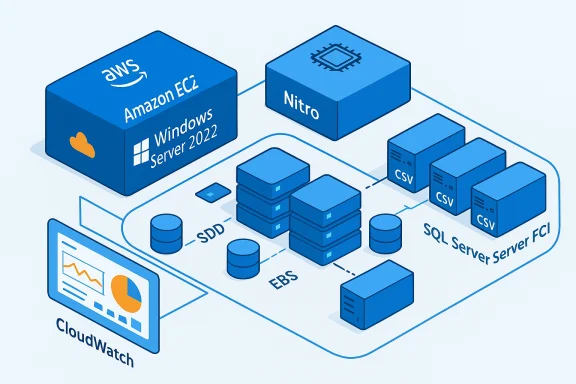
- For clustered, high‑performance Windows storage, Storage Spaces Direct (S2D) can aggregate multiple EBS volumes across nodes to present shared storage semantics to SQL Server FCIs or clustered workloads. This guest‑cluster approach uses Windows’ replication layer, enabling multi‑AZ resilience even when managed shared storage options are constrained to fewer AZs. S2D requires careful selection of instance NICs, EBS types, and cluster networking to meet I/O and latency needs.
- Snapshots and application‑consistent backups must use VSS‑aware approaches for SQL Server and other transactional workloads; combine AWS Backup or scheduled EBS snapshots with Windows backup best practices.
Networking: VPCs, ENIs, and load balancing
- Windows Server instances live inside a Virtual Private Cloud (VPC) where subnets, route tables, security groups, and NACLs define reachability. Each instance has one or more Elastic Network Interfaces (ENIs); secondary IPs are commonly used for Windows cluster virtual IPs or SQL network names in multi‑subnet clusters.
- For latency‑sensitive cluster replication (S2D), use enhanced networking (ENA) or Elastic Fabric Adapter (EFA) where supported, and choose instance NICs that support SR‑IOV and RDMA/SMB Direct to reduce CPU overhead and jitter. Separate subnets for cluster, management, and client networks are recommended to limit blast radius.
- Elastic Load Balancing (Application and Network Load Balancers) distribute client traffic across Windows Server instances while supporting SSL/TLS termination, WebSocket or TCP connections, and cross‑AZ balancing for high availability. Combine with health checks and Auto Scaling for resiliency.
Identity and access
- Windows Server on EC2 can join Active Directory forests hosted on EC2, use AWS Managed Microsoft AD, or integrate with on‑premises AD via VPN/Direct Connect. Identity choice affects Group Policy application, authentication flows, and secure channel design.
- IAM roles attached to EC2 instances supply temporary AWS credentials to agents inside the Windows guest (Systems Manager, S3, Secrets Manager), removing the need to store AWS keys in the OS. Least‑privilege IAM role design is essential to reduce attack surface.
Management and automation
- AWS Systems Manager reduces reliance on RDP for day‑two operations by enabling patching, Run Command, State Manager, Inventory, and Session Manager access. Systems Manager integration is a core operational control and prerequisite for several EC2‑level automation features designed for SQL Server HA and license management.
- Infrastructure‑as‑Code (CloudFormation, CDK, Terraform) should be used to provision AMIs, EC2 instances, networking, and IAM roles. Bake hardened AMIs and automate instance registration with Systems Manager and monitoring stacks as part of golden image pipelines.
Running Windows Server 2022 workloads: patterns and tradeoffs
Lift‑and‑shift versus replatform and modernize
- Lift‑and‑shift is fast but often preserves legacy operational model and licensing friction. Replatforming (e.g., moving databases to managed RDS/Amazon Aurora) or modernizing (containers on ECS/EKS, Windows Containers) can lower operational burden but requires code and operational changes. Perform a PoC and workload benchmarking (Diskspd, SQLbench) against intended EC2 instance families and EBS types before widespread migration.
- Windows Containers are supported on Windows Server 2022, but image sizes and orchestration differences mean containerization will usually be an effortful migration rather than an automatic lift. Use container improvements as a driver for modernization where it fits.
High availability and multi‑AZ clustering
- AWS infrastructure enables multi‑AZ resilience by placing EC2 instances in separate Availability Zones, but shared storage options have constraints: Amazon FSx Multi‑AZ/FSx for Windows is typically a two‑AZ active/standby design, and EBS Multi‑Attach is AZ‑limited. For true three‑AZ Windows FCIs, many organizations implement Storage Spaces Direct (S2D) guest clusters that replicate data at the software layer across EBS volumes on each node. This provides a path to three‑AZ resilience but raises complexity.
- Windows Failover Clustering, S2D, and SQL Server FCIs retain familiar operational semantics for DBAs, but S2D demands low‑latency cluster networks, instance choices that support RDMA/SMB Direct, and careful EBS volume planning. Test SMB/SMB Direct counters, CSV latency, and per‑node CPU to detect storage network bottlenecks.
- For many customers, managed services such as Amazon RDS for SQL Server or FSx reduce operational risk compared to guest clusters, but they come with feature and cost tradeoffs; weigh those against licensing and management overhead.
Licensing and cost considerations
- License‑Included (LI) AMIs include Windows Server licensing in the hourly instance cost and are the default choice for many cloud deployments. Bring‑Your‑Own‑License (BYOL) has restrictions, and Microsoft licensing rules since 2019 have narrowed BYOL scenarios in shared tenancy; Dedicated Hosts and specific programs remain exceptions. Model TCO carefully and include OS license delta in comparisons with managed services.
- SQL Server licensing in HA topologies can be a major cost driver. AWS provides automation that can waive SQL License‑Included charges for passive nodes under strict SSM‑driven checks in two‑node configurations, but the feature has prerequisites (SSM agent, instance role permissions, and topology limits) and is unsuitable for readable secondaries or multi‑region passive replicas. Maintain audit evidence for licensing posture and telemetry.
- Instance right‑sizing, Reserved Instances / Savings Plans, and CPU optimization (vCPU tuning or disabling hyperthreading where supported) are useful levers to reduce compute costs while meeting performance targets. Include EBS IOPS and throughput costs (gp3 baseline vs io2 guarantees) in financial models for storage‑heavy workloads.
Security and governance
- AWS follows a shared responsibility model: AWS secures the global infrastructure and hypervisor boundary while customers secure the guest OS, applications, and data. Windows Server 2022 includes enhanced security features (Secure Boot, VBS, Credential Guard, modern encryption defaults) that reduce attack surface immediately after boot, but they must be complemented with VPC controls, security groups, IAM least privilege, and patch management.
- Harden SMB settings, enforce SMB signing, and restrict NTLM where feasible. When using automated SQL HA license waivers or Systems Manager workflows, ensure the instance IAM role is narrowly scoped and that Systems Manager agents are current and monitored. Document and retain logs for compliance and licensing audits.
- Centralize telemetry in CloudWatch and SIEM, and use Systems Manager for patch orchestration and configuration compliance. Avoid embedding long‑lived credentials in the operating system; prefer IAM roles and Secrets Manager for secrets with rotation configured.
Operational recommendations and deployment checklist
- Confirm licensing path early (LI vs BYOL) and include OS and SQL license assumptions in TCO calculations.
- Choose Nitro‑based instance families and validate UEFI compatibility for chosen AMIs; use BIOS AMIs only where necessary.
- Run a focused PoC with production‑like EBS types, instance families, and network paths using Diskspd/SQLbench to measure latency, IOPS, and CPU under realistic queues.
- If implementing S2D guest clusters, pick instances with enhanced networking and RDMA capability, separate cluster subnets, and multiple identical EBS volumes per node; enable SMB Direct and SMB Multichannel.
- Register all instances with Systems Manager before scaling; attach narrow IAM instance profiles required for automation and monitoring.
- Implement automated, VSS‑aware backup schedules (AWS Backup or snapshot lifecycle policies) and test restore procedures.
- Enforce least‑privilege IAM roles and collect SSM/CloudWatch logs for audit trails and license verification.
Strengths, risks, and critical analysis
Notable strengths
- Familiarity and compatibility: Windows Server 2022 keeps the Windows stack and tooling that enterprises know, making lift‑and‑shift and incremental modernization practical.
- Performance potential: When paired with Nitro instances, NVMe/EBS gp3/io2, and enhanced networking, Windows Server workloads can achieve high IOPS and throughput; Microsoft lab numbers indicate substantial gains in specific scenarios, and AWS Nitro reduces guest overhead. However, lab results are workload and configuration dependent.
- Operational integrations: AWS Systems Manager, CloudWatch, and IaC tooling enable scalable, automatable operations for Windows fleets, reducing management friction compared with traditional datacenter operations.
Important risks and caveats
- Operational complexity for guest clusters: S2D across EC2 nodes can achieve multi‑AZ resilience but requires rigorous networking, instance selection, and testing. For many teams, managed options (FSx, RDS) provide simpler and more supportable paths. Design choices here materially affect operational load and reliability.
- Licensing pitfalls: Microsoft licensing rules are nuanced; relying on automation (e.g., passive SQL LI waivers) requires strict compliance with prerequisites and robust telemetry to defend audit periods. Misconfigured readable secondaries, hidden workloads on passive nodes, or instance size mismatches can create unexpected license obligations. Treat license automation as a cost‑optimization tool that requires governance.
- Vendor lab vs. real world: Performance claims (for NVMe/IOPS or new Windows Server features) frequently come from controlled lab tests; expect variance and validate using your instance family, EBS configuration, and realistic workload profile. Do not assume vendor lab numbers will directly translate to your production environment.
- Support matrix and validation: Running complex Windows storage topologies on EC2 combines behaviors from Microsoft, AWS, and specific hardware/firmware — validate supportability with both vendors for your chosen instance and EBS configuration. Unsupported combinations may create gaps during incident response.
Practical example: three‑node S2D SQL Server FCI on EC2 (concise)
- Topology: three Windows Server 2022 EC2 instances, each in a separate AZ, domain‑joined, with multiple attached EBS volumes per node. Enable Failover Clustering and Storage Spaces Direct, claim local EBS disks into S2D pool, present CSV/ReFS volumes to SQL Server FCI. Use a cloud or file share witness for quorum, and ensure secondary IPs for network names. This pattern gives true three‑AZ VM‑level resilience but must be validated for RDMA/SMB Direct and production IOPS/latency.
- Key operational steps: provision Nitro instance types, attach gp3/io2 volumes, domain join, install Failover Clustering features, validate cluster, run Enable‑ClusterStorageSpacesDirect, configure CSV/ReFS, install SQL Server FCI. Test failovers and restore paths extensively.
Conclusion
Windows Server 2022 on AWS EC2 offers enterprises a proven path to run Windows workloads in a cloud‑native, scalable way while preserving Windows‑centric features and management models. The combination of Nitro‑based compute, EBS block storage, VPC networking, Systems Manager automation, and Windows Server capabilities such as S2D, ReFS, and container support creates many architectural options — from simple web tiers to complex multi‑AZ clustered databases.However, the choice of patterns must be deliberate: validate lab performance claims with a representative PoC, confirm licensing assumptions, and weigh operational complexity against managed alternatives. When planned and governed correctly, Windows Server 2022 on EC2 can modernize infrastructure without abandoning the operational and application investments tied to Windows.
Source: ipsnews.net https://ipsnews.net/business/2025/1...aws-ec2-architecture-and-core-concepts/?amp=1
