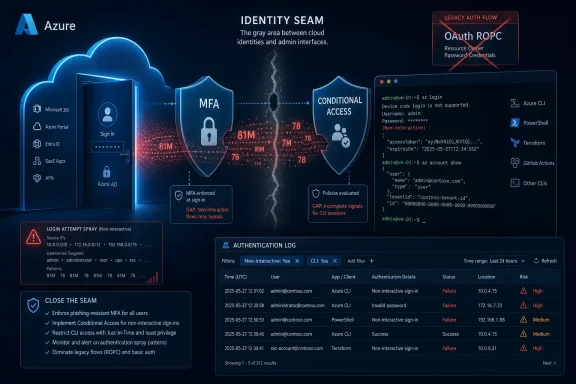
Huntress says an automated password-spray campaign that began on June 12, 2026, targeted Microsoft Azure CLI authentication and produced more than 81 million login attempts, compromising 78 Microsoft accounts across 64 organizations by late June. The campaign is not remarkable because password spraying is novel; it is remarkable because it found the gap between what many tenants believed MFA meant and what their Conditional Access policies actually enforced. In that gap sits one of cloud identity’s most stubborn truths: a tenant can be “protected by MFA” in the dashboard and still be exposed where old authentication flows remain reachable.
The Security Affairs write-up, based on Huntress reporting, describes a brute-force story that is less cinematic than most breach narratives and more useful because of it. The attackers did not need malware, phishing pages, token theft, or a bespoke exploit chain. They needed old username-and-password pairs, scale, and a Microsoft identity path that could still exchange those credentials for a token.
That path was the Resource Owner Password Credentials grant, usually shortened to ROPC. In plain terms, ROPC lets a client submit a username and password directly to the token endpoint and receive a user-delegated token if the credentials are valid. It is the kind of OAuth flow that made more sense in an earlier era of “trusted” first-party clients and automation than it does in an era of phishing-resistant MFA, passwordless sign-in, and conditional access sprawl.
The campaign reportedly focused on Azure CLI authentication. That matters because Azure CLI is not a random consumer app sitting at the edge of the enterprise; it is a tool used by developers, administrators, DevOps engineers, consultants, and managed service providers to touch cloud resources. A compromised account with useful Azure permissions can quickly become more than an inbox problem.
The brutal lesson is that the attackers did not need every account to work. Password spraying is a low-yield business by design: try a small number of likely passwords across a very large population, avoid obvious lockout thresholds, and wait for the inevitable weak or reused credential. At 81 million attempts, even a tiny success rate can become operationally meaningful.
Attribution here should be handled carefully. An autonomous system, a rented address range, or an infrastructure provider is not the same thing as a named threat actor, and the difference matters. Cloud attacks regularly move through hosting providers, proxy networks, bulletproof-ish infrastructure, and short-lived allocations that tell defenders where the traffic came from, not necessarily who sat behind the keyboard.
But operationally, the infrastructure detail is still important. A concentrated IPv6 source range gives defenders something concrete to hunt for, block, and correlate. It also illustrates why the security industry’s old IPv4 instincts are aging badly; IPv6 space gives attackers room to spread attempts across huge address ranges while still retaining centralized control.
For admins, the uncomfortable part is that the infrastructure signal is helpful only after the campaign is visible. If the real defense depends on noticing one provider’s IPv6 range after millions of attempts, the tenant has already ceded the initiative. The better defense is to make the authentication path itself hostile to password-only token minting.
That does not mean MFA is broken. It means MFA is not a magic property that applies to a tenant merely because an administrator created a policy with “require MFA” somewhere in the name. Conditional Access is a rules engine, and rules engines do exactly what they are configured to do, including preserving the gaps nobody intended to create.
The reported failure modes will feel familiar to anyone who has inherited a mature Microsoft 365 tenant. Some organizations scoped MFA to particular applications, such as admin portals, rather than all cloud resources. Others applied stronger controls only to admin accounts, leaving ordinary users as softer targets. Some relied on location conditions that were only as reliable as IP geolocation, which is a shaky foundation when an address can be classified differently by different vendors.
Two organizations reportedly had MFA in report-only mode. That detail is almost too perfect because it captures a recurring enterprise anti-pattern: the control exists, the dashboard looks busy, and the audit conversation sounds mature, but enforcement never arrives. Report-only mode is useful for testing; it is not a security boundary.
The attacker’s edge was not that MFA prompts were defeated. It was that the flow did not reliably arrive at a place where a prompt could do its job. ROPC is hostile to the modern interactive sign-in model because it handles raw credentials at the token endpoint instead of walking the user through an authorization experience that can naturally enforce second factors, device posture, risk checks, and consent.
The reason is boring and therefore powerful: compatibility. Enterprises have scripts, tools, old clients, service integrations, vendor products, and migration leftovers that were built around direct credential exchange. Microsoft can discourage the pattern and tighten the defaults, but killing legacy authentication paths abruptly risks breaking production workflows in ways customers will notice immediately.
This is the cloud identity version of a familiar Windows story. The platform vendor moves toward a more secure future, but the installed base drags history along behind it. Every deprecation becomes a negotiation among security teams, application owners, help desks, compliance departments, and the one business-critical workflow nobody has documented since 2018.
Attackers understand that negotiation. They do not need to argue for the old behavior in a change advisory board. They simply test whether it is still available.
Many organizations have spent years teaching administrators not to perform privileged work in browsers from unmanaged machines. Yet command-line tooling often receives a different cultural treatment. It is “for technical users,” which can lead to misplaced trust: if someone knows how to use a CLI, the thinking goes, they must also be operating in a safer context.
That assumption is backwards. CLI access can be more automation-friendly, more scriptable, and more opaque to casual review than browser sessions. A token obtained through a command-line client may not create the same visible user experience that would alarm an employee staring at an unexpected MFA prompt or unfamiliar login page.
This is why restricting Azure CLI access for non-admin users, as Huntress reportedly recommends, is not merely a cleanup task. It is a privilege-design question. If a user does not need programmatic access to Azure resources, leaving that path open because it is part of the default toolchain is an unnecessary bet against credential reuse.
The Huntress findings point to that complexity. MFA scoped to admin portals makes sense if the organization’s immediate fear is administrative takeover. MFA for admins but not users makes sense if the organization is phasing in controls to reduce support pain. Trusted locations make sense if the business has stable office networks. Report-only mode makes sense before enforcement.
The problem is that attackers do not attack the intention behind these choices. They attack the effective policy surface. If ordinary users are excluded, ordinary users become the door. If a legacy client app type is missed, that client type becomes the door. If trusted locations are broad or misclassified, geography becomes the door.
This is the trap of partial hardening. It creates enough security posture to reassure internal stakeholders, but not enough coverage to survive an adversary who tests the edges. In identity security, the edges are now the product.
Campaigns like this show the password still sits in the basement, connected to load-bearing beams. The attackers replayed old username-and-password combinations because old credentials still work often enough to justify massive automation. Breach data remains useful because organizations remain inconsistent about password reuse, password resets, and strong authentication coverage.
That does not mean passwordless investments are wasted. It means the migration is incomplete, and incomplete migrations create hybrid risk. A user may sign in day to day with modern prompts and still have an account configuration, app path, or legacy flow where a password can be exchanged for access.
The enterprise habit of treating identity modernization as a series of projects rather than a continuous exposure-management problem is part of the issue. “We rolled out MFA” is not a final state. It is a claim that must be tested against every meaningful authentication path.
A tenant with thousands of failed attempts and no valid credentials is noisy, but the security outcome is different from a tenant with fewer attempts and one successful token issuance. Volume-based alerting can flood defenders with the most obvious pain while burying the most consequential event. For managed service providers watching many tenants, that distinction matters.
The better signal is the transition from failure to success, especially when the success uses a suspicious client, unfamiliar network, impossible geography, or a flow that should be rare in the environment. Defenders should care deeply about accounts that generate many failures and then authenticate successfully, but they should care even more when the successful authentication grants access to cloud management surfaces.
This is where identity telemetry needs to become more operational. Sign-in logs cannot be a compliance archive that someone opens after the incident. They need to drive response logic that understands which flows are allowed, which users should ever use them, and which combinations should be treated as hostile by default.
The hard part is the tenant as it exists, not the tenant as a clean reference architecture. There will be break-glass accounts, service accounts masquerading as users, old scripts with embedded credentials, contractors in strange groups, apps nobody owns, and executives whose exceptions were granted during a crisis and never revisited. Every exception has a history. Attackers do not care.
Administrators should resist the urge to treat this as another narrow indicator-of-compromise exercise. Blocking the reported IPv6 range may be prudent, and hunting for the specific campaign pattern is sensible. But if the root problem is that password-only token flows remain available to ordinary users, the next infrastructure provider can recreate the same pressure from somewhere else.
The more durable response is to inventory where ROPC and similar legacy patterns still exist, decide whether any of them are defensible, and then enforce the decision technically. If a workflow breaks because it depended on direct password exchange, that breakage is useful information. It reveals an authentication dependency that was already a security liability.
But Microsoft cannot fully solve the customer-specific last mile without breaking things customers still use. That is the tension at the center of Entra ID security. The vendor can build better defaults and clearer warnings, yet a tenant with old exceptions, partial Conditional Access, and permissive client paths can still present a workable target.
This is also why “shared responsibility” can sound like a cliché and still be true. Microsoft runs the identity platform, but customers define many of the policies that decide whether a credential is enough. In this campaign, the decisive distinction appears to have been less about whether an organization owned MFA licenses and more about whether its enforcement model covered the route the attacker chose.
The next stage of cloud identity security will likely be less tolerant of that distinction. It will not be enough to say that users have MFA registered or that admins are protected. Security teams will need to prove that there is no meaningful password-only path to valuable tokens for the populations that matter.
The most concrete lessons are operational rather than philosophical:
 The Attack Worked Because It Asked the Right Door, Not Because It Picked the Best Lock
The Security Affairs write-up, based on Huntress reporting, describes a brute-force story that is less cinematic than most breach narratives and more useful because of it. The attackers did not need malware, phishing pages, token theft, or a bespoke exploit chain. They needed old username-and-password pairs, scale, and a Microsoft identity path that could still exchange those credentials for a token.That path was the Resource Owner Password Credentials grant, usually shortened to ROPC. In plain terms, ROPC lets a client submit a username and password directly to the token endpoint and receive a user-delegated token if the credentials are valid. It is the kind of OAuth flow that made more sense in an earlier era of “trusted” first-party clients and automation than it does in an era of phishing-resistant MFA, passwordless sign-in, and conditional access sprawl.
The campaign reportedly focused on Azure CLI authentication. That matters because Azure CLI is not a random consumer app sitting at the edge of the enterprise; it is a tool used by developers, administrators, DevOps engineers, consultants, and managed service providers to touch cloud resources. A compromised account with useful Azure permissions can quickly become more than an inbox problem.
The brutal lesson is that the attackers did not need every account to work. Password spraying is a low-yield business by design: try a small number of likely passwords across a very large population, avoid obvious lockout thresholds, and wait for the inevitable weak or reused credential. At 81 million attempts, even a tiny success rate can become operationally meaningful.
LSHIY’s IPv6 Firehose Shows How Cheap Identity Abuse Has Become
According to the report, the traffic came almost entirely from the IPv6 range 2a0a:d683::/32, associated with LSHIY LLC and AS32167. Huntress also tied LSHIY to AS955 and noted that third-party sources associated the relevant IPv6 space with China, while the company lists business addresses in Hong Kong, Wuhan, and New York. Huntress reportedly contacted the company through its abuse channel and received no response.Attribution here should be handled carefully. An autonomous system, a rented address range, or an infrastructure provider is not the same thing as a named threat actor, and the difference matters. Cloud attacks regularly move through hosting providers, proxy networks, bulletproof-ish infrastructure, and short-lived allocations that tell defenders where the traffic came from, not necessarily who sat behind the keyboard.
But operationally, the infrastructure detail is still important. A concentrated IPv6 source range gives defenders something concrete to hunt for, block, and correlate. It also illustrates why the security industry’s old IPv4 instincts are aging badly; IPv6 space gives attackers room to spread attempts across huge address ranges while still retaining centralized control.
For admins, the uncomfortable part is that the infrastructure signal is helpful only after the campaign is visible. If the real defense depends on noticing one provider’s IPv6 range after millions of attempts, the tenant has already ceded the initiative. The better defense is to make the authentication path itself hostile to password-only token minting.
MFA Failed Where It Was Policy Theater Rather Than Policy Coverage
The most damning number in the report is not 81 million. It is 15. Of the 23 businesses reportedly hit during the June 22 spike, 15 had MFA implemented and enforced through Conditional Access Policy, yet accounts were still compromised.That does not mean MFA is broken. It means MFA is not a magic property that applies to a tenant merely because an administrator created a policy with “require MFA” somewhere in the name. Conditional Access is a rules engine, and rules engines do exactly what they are configured to do, including preserving the gaps nobody intended to create.
The reported failure modes will feel familiar to anyone who has inherited a mature Microsoft 365 tenant. Some organizations scoped MFA to particular applications, such as admin portals, rather than all cloud resources. Others applied stronger controls only to admin accounts, leaving ordinary users as softer targets. Some relied on location conditions that were only as reliable as IP geolocation, which is a shaky foundation when an address can be classified differently by different vendors.
Two organizations reportedly had MFA in report-only mode. That detail is almost too perfect because it captures a recurring enterprise anti-pattern: the control exists, the dashboard looks busy, and the audit conversation sounds mature, but enforcement never arrives. Report-only mode is useful for testing; it is not a security boundary.
The attacker’s edge was not that MFA prompts were defeated. It was that the flow did not reliably arrive at a place where a prompt could do its job. ROPC is hostile to the modern interactive sign-in model because it handles raw credentials at the token endpoint instead of walking the user through an authorization experience that can naturally enforce second factors, device posture, risk checks, and consent.
ROPC Is the Zombie Flow Microsoft Can Warn About but Not Instantly Kill
Microsoft’s own documentation has long advised against ROPC, noting that it is incompatible with MFA and that more secure alternatives should be used where possible. OAuth 2.1 has moved the industry further away from password grants, treating them as legacy baggage rather than a pattern for new applications. None of that means the flow vanishes from the real world on a date convenient to defenders.The reason is boring and therefore powerful: compatibility. Enterprises have scripts, tools, old clients, service integrations, vendor products, and migration leftovers that were built around direct credential exchange. Microsoft can discourage the pattern and tighten the defaults, but killing legacy authentication paths abruptly risks breaking production workflows in ways customers will notice immediately.
This is the cloud identity version of a familiar Windows story. The platform vendor moves toward a more secure future, but the installed base drags history along behind it. Every deprecation becomes a negotiation among security teams, application owners, help desks, compliance departments, and the one business-critical workflow nobody has documented since 2018.
Attackers understand that negotiation. They do not need to argue for the old behavior in a change advisory board. They simply test whether it is still available.
Azure CLI Turns a Password Spray Into a Cloud Control-Plane Problem
The reference to Azure CLI gives this campaign sharper teeth than a generic Microsoft account spray. Azure CLI is used to manage subscriptions, resources, identities, storage, compute, Kubernetes clusters, key vaults, and more. The value of a compromised account depends on its permissions, but the possible blast radius can be high.Many organizations have spent years teaching administrators not to perform privileged work in browsers from unmanaged machines. Yet command-line tooling often receives a different cultural treatment. It is “for technical users,” which can lead to misplaced trust: if someone knows how to use a CLI, the thinking goes, they must also be operating in a safer context.
That assumption is backwards. CLI access can be more automation-friendly, more scriptable, and more opaque to casual review than browser sessions. A token obtained through a command-line client may not create the same visible user experience that would alarm an employee staring at an unexpected MFA prompt or unfamiliar login page.
This is why restricting Azure CLI access for non-admin users, as Huntress reportedly recommends, is not merely a cleanup task. It is a privilege-design question. If a user does not need programmatic access to Azure resources, leaving that path open because it is part of the default toolchain is an unnecessary bet against credential reuse.
Conditional Access Has Become a Product, a Language, and a Trap
Conditional Access is one of Microsoft’s most important security controls, but it is also a place where complexity accumulates faster than clarity. Policies are written against users, groups, resources, client apps, platforms, locations, risks, device states, authentication strengths, and exclusions. Each dimension can be reasonable on its own while the combined policy set becomes difficult to reason about.The Huntress findings point to that complexity. MFA scoped to admin portals makes sense if the organization’s immediate fear is administrative takeover. MFA for admins but not users makes sense if the organization is phasing in controls to reduce support pain. Trusted locations make sense if the business has stable office networks. Report-only mode makes sense before enforcement.
The problem is that attackers do not attack the intention behind these choices. They attack the effective policy surface. If ordinary users are excluded, ordinary users become the door. If a legacy client app type is missed, that client type becomes the door. If trusted locations are broad or misclassified, geography becomes the door.
This is the trap of partial hardening. It creates enough security posture to reassure internal stakeholders, but not enough coverage to survive an adversary who tests the edges. In identity security, the edges are now the product.
The Password Is Supposed to Be Dead, Yet It Keeps Authenticating the Enterprise
For more than a decade, the industry has talked as though passwords are on their way out. Microsoft, Google, Apple, and the FIDO ecosystem have pushed passkeys and phishing-resistant sign-in. Enterprises have adopted authenticator apps, conditional access, risk-based controls, and identity protection tooling. The rhetoric says the password is fading.Campaigns like this show the password still sits in the basement, connected to load-bearing beams. The attackers replayed old username-and-password combinations because old credentials still work often enough to justify massive automation. Breach data remains useful because organizations remain inconsistent about password reuse, password resets, and strong authentication coverage.
That does not mean passwordless investments are wasted. It means the migration is incomplete, and incomplete migrations create hybrid risk. A user may sign in day to day with modern prompts and still have an account configuration, app path, or legacy flow where a password can be exchanged for access.
The enterprise habit of treating identity modernization as a series of projects rather than a continuous exposure-management problem is part of the issue. “We rolled out MFA” is not a final state. It is a claim that must be tested against every meaningful authentication path.
Detection by Volume Alone Points at the Wrong Fire
Huntress reportedly argues that detection should prioritize credential validity rather than spray volume alone. That is a subtle but important point. The loudest tenants are not necessarily the most compromised tenants; they may simply be the easiest for automated spraying infrastructure to keep hammering.A tenant with thousands of failed attempts and no valid credentials is noisy, but the security outcome is different from a tenant with fewer attempts and one successful token issuance. Volume-based alerting can flood defenders with the most obvious pain while burying the most consequential event. For managed service providers watching many tenants, that distinction matters.
The better signal is the transition from failure to success, especially when the success uses a suspicious client, unfamiliar network, impossible geography, or a flow that should be rare in the environment. Defenders should care deeply about accounts that generate many failures and then authenticate successfully, but they should care even more when the successful authentication grants access to cloud management surfaces.
This is where identity telemetry needs to become more operational. Sign-in logs cannot be a compliance archive that someone opens after the incident. They need to drive response logic that understands which flows are allowed, which users should ever use them, and which combinations should be treated as hostile by default.
The Fix Is Straightforward Until It Meets the Tenant
The technical recommendations are not mysterious. Conditional Access should cover all users, all relevant resources, and all client app types. Legacy or password-based flows should be blocked where possible. Azure CLI access should be limited to users who need it. Strong authentication should be enforced in ways that actually bind to the authentication paths attackers can reach.The hard part is the tenant as it exists, not the tenant as a clean reference architecture. There will be break-glass accounts, service accounts masquerading as users, old scripts with embedded credentials, contractors in strange groups, apps nobody owns, and executives whose exceptions were granted during a crisis and never revisited. Every exception has a history. Attackers do not care.
Administrators should resist the urge to treat this as another narrow indicator-of-compromise exercise. Blocking the reported IPv6 range may be prudent, and hunting for the specific campaign pattern is sensible. But if the root problem is that password-only token flows remain available to ordinary users, the next infrastructure provider can recreate the same pressure from somewhere else.
The more durable response is to inventory where ROPC and similar legacy patterns still exist, decide whether any of them are defensible, and then enforce the decision technically. If a workflow breaks because it depended on direct password exchange, that breakage is useful information. It reveals an authentication dependency that was already a security liability.
Microsoft’s Security Baseline Is Moving, but Customers Still Own the Last Mile
Microsoft has been tightening identity defaults for years, and the direction of travel is obvious. Legacy authentication is being boxed in. MFA requirements are expanding across administrative surfaces. ROPC is discouraged. Newer tooling is being pushed toward modern authentication libraries and flows that support stronger controls.But Microsoft cannot fully solve the customer-specific last mile without breaking things customers still use. That is the tension at the center of Entra ID security. The vendor can build better defaults and clearer warnings, yet a tenant with old exceptions, partial Conditional Access, and permissive client paths can still present a workable target.
This is also why “shared responsibility” can sound like a cliché and still be true. Microsoft runs the identity platform, but customers define many of the policies that decide whether a credential is enough. In this campaign, the decisive distinction appears to have been less about whether an organization owned MFA licenses and more about whether its enforcement model covered the route the attacker chose.
The next stage of cloud identity security will likely be less tolerant of that distinction. It will not be enough to say that users have MFA registered or that admins are protected. Security teams will need to prove that there is no meaningful password-only path to valuable tokens for the populations that matter.
The Practical Lesson Is Hidden in the Policy Edges
For WindowsForum readers, the campaign’s relevance extends beyond Azure shops with large cloud estates. Microsoft identity is the connective tissue for Windows endpoints, Microsoft 365, Azure, Intune, Defender, Power Platform, and a growing stack of administrative tooling. A weakness in Entra authentication policy is rarely isolated to one neat product boundary.The most concrete lessons are operational rather than philosophical:
- Organizations should review whether Conditional Access policies apply to all users, all cloud resources, and all client app types needed to block password-only authentication paths.
- Tenants should treat report-only MFA policies as unfinished work, not as compensating controls.
- Administrators should investigate whether Azure CLI sign-ins are expected for each user population and restrict that access where it is not needed.
- Security teams should hunt for successful authentications following repeated failures, especially when the client, flow, IP range, or geography does not match normal behavior.
- Legacy OAuth and basic-auth-style dependencies should be inventoried as production risks, not merely as technical debt.
- Blocking the reported infrastructure may reduce immediate noise, but eliminating exposed legacy flows is the control that survives the next campaign.
References
- Primary source: Security Affairs
Published: Wed, 01 Jul 2026 14:15:00 GMT
Azure CLI Targeted in LSHIY Password Spray Campaign Across 64 Orgs - Security Affairs
LSHIY password spray campaign hit Azure CLI with 81M attempts, compromising 78 accounts by bypassing MFA via OAuth ROPC flow.securityaffairs.com
- Related coverage: goiabada.dev
Resource Owner Password Credentials Flow | Goiabada
OAuth2 ROPC grant for legacy applications requiring direct username/password authentication.goiabada.dev
- Related coverage: dev.auth0.com
Resource Owner Password Flow
Learn how the Resource Owner Password flow works and why you should use it for highly-trusted applications.dev.auth0.com - Related coverage: scottbrady.io
Don't use the OAuth password grant type
Learn why you should not use OAuth's Resource Owner Password Credentials (ROPC) grant.www.scottbrady.io - Related coverage: stackoverflow.com
Azure AD Authentication through restful api - Stack Overflow
I'm now working with the Azure AD authentication through this two samples, and it's all worked fine:

Sample1
Sample2

But is there any way to authenticate Azure AD with restful API like below?
POSTstackoverflow.com
- Related coverage: tbs.tech
- Official source: techcommunity.microsoft.com
- Related coverage: acloudguy.com
- Official source: azure.microsoft.com
- Official source: cdn-dynmedia-1.microsoft.com