

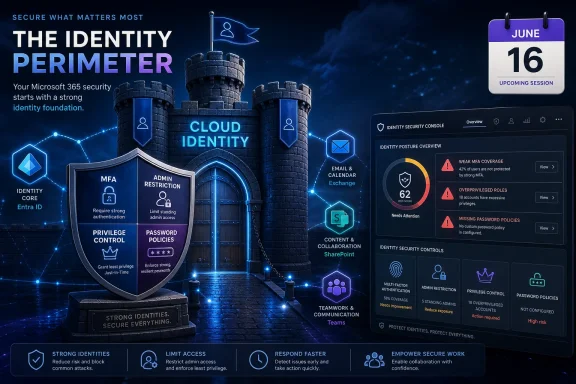
Huntress says early testing of its Identity Security Posture Management capabilities across hundreds of Microsoft 365 environments found frequent identity-control gaps, including weak MFA coverage, insufficient administrator restrictions, user privilege overreach, and missing password policies, ahead of a June 16 session on the findings. The numbers are not a breach report, and they are not a peer-reviewed census of Microsoft 365 security. But they are a useful snapshot of a problem Windows admins already know too well: cloud identity has become the new perimeter, and too many tenants are still being run as if defaults were a security strategy.
The uncomfortable part is not that Microsoft 365 can be misconfigured. Any platform with Entra ID, Conditional Access, Exchange Online, SharePoint, Teams, app consent, external sharing, role assignments, authentication methods, and legacy workflows is going to accumulate sharp edges. The uncomfortable part is that many of the weaknesses Huntress highlights are mundane, preventable, and still widespread enough to make identity compromise an everyday risk rather than an edge case.
For years, the small-business security pitch was built around malware: stop the malicious executable, isolate the infected endpoint, clean up the workstation, and move on. That world has not disappeared, but the center of gravity has shifted. In Microsoft 365 environments, attackers increasingly want a valid login, a session token, a mailbox, a consented app, or an administrator path that looks boring enough to avoid detection.
That is why Huntress’ figures land with force. According to the summarized post, 66 percent of organizations in the sample lacked recommended MFA configurations, 59 percent were missing key restrictions on administrator accounts, 55 percent had standard users able to perform some admin functions, and 25 percent lacked basic password management policies. Even if the sample is tilted toward organizations already interested in Huntress’ early-access program, those are not exotic failure modes.
They are the identity equivalent of leaving RDP open to the internet in 2016. The names have changed, the console is prettier, and the defaults are more complicated, but the operating principle is the same: attackers do not need cinematic zero-days when routine administrative convenience gives them a path.
Microsoft has spent the last several years trying to push customers toward stronger identity baselines. The company has expanded security defaults, promoted Conditional Access, pushed phishing-resistant authentication for administrators, and moved toward mandatory MFA for important admin portals and Azure management actions. That matters, but it does not erase the gap between what Microsoft recommends, what Microsoft enforces, and what a real tenant actually looks like after years of exceptions, migrations, MSP handoffs, and “temporary” policies that became permanent.
But dismissing the findings as marketing would be too easy. Security vendors often overstate novelty, yet they also sit on telemetry that individual customers never get to see in aggregate. Huntress’ target market—managed service providers, smaller businesses, and lean IT teams—is exactly the population where Microsoft 365 security debt tends to accumulate fastest.
The reason is structural. A small organization may have the same identity attack surface as a larger enterprise: privileged accounts, mailbox access, file sharing, SaaS integrations, guest users, OAuth consent, password resets, administrator roles, and conditional access logic. What it usually lacks is the dedicated identity engineering team to keep all of that tuned.
That is the opening for managed posture tools. Huntress is arguing that identity hardening should not be a quarterly spreadsheet exercise or a once-a-year secure score review. It should be continuously checked, normalized against a maintained framework, and translated into actions a small IT shop can actually complete.
Admins know the loopholes. There are users excluded from policies because of a broken workflow. There are legacy protocols or app paths that do not behave the way the business assumes. There are third-party identity providers, federated setups, stale authentication methods, and break-glass accounts that were created correctly and then never revisited. There are conditional access policies in report-only mode long after everyone forgot why.
Microsoft’s own MFA enforcement makes this distinction clearer rather than less important. Requiring MFA for admin portals helps close one high-value door, but it does not mean every user, app, and workflow in the tenant is protected in the way defenders imagine. It also does not solve phishing-resistant authentication by itself, nor does it cure overprivileged accounts or sloppy role assignments.
In that sense, Huntress’ MFA finding should be read less as “organizations forgot the obvious thing” and more as “identity control is not a checkbox.” The attacker only needs the path that policy authors missed.
Every admin has seen the pattern. A global administrator account was created for a migration and never removed. A help desk role was broadened because someone needed to move quickly during an outage. An MSP account has more rights than it needs because role granularity takes time. A break-glass account exists, but nobody is quite sure whether it is monitored, licensed, excluded correctly, or protected with a modern authentication method.
In Microsoft 365, those decisions compound. A compromised administrator can create new accounts, change authentication methods, consent to applications, alter mailbox rules, weaken policies, or create persistence that survives the initial cleanup. The blast radius is not confined to a single laptop; it can stretch across mail, files, identity, and business process.
This is where posture management becomes more than security-score theater. A tool that simply says “reduce privilege” is not worth much. A tool that can identify which accounts hold sensitive roles, which policies apply to them, where exceptions exist, and what remediation is likely to break real workflows begins to solve the problem administrators actually have.
A user who can register applications, consent to risky permissions, invite guests broadly, create groups without guardrails, change authentication details, or manage certain resources may not have a shiny global administrator badge. But attackers care about outcomes, not labels. If a standard account can create a foothold, widen access, or weaken visibility, it has operational value.
This is also where cloud productivity platforms punish old mental models. On a domain-joined Windows network, administrators once had a comparatively crisp sense of privilege boundaries. In Microsoft 365, permission is scattered across Entra roles, workload-specific admin roles, group ownership, app consent, mailbox delegation, SharePoint permissions, Teams settings, and external collaboration controls.
The result is a tenant that may look fine from one console and alarming from another. An IT department can honestly believe it has only a few administrators while dozens or hundreds of users retain powers that matter in an attack chain. Posture management tools are attractive precisely because they promise to stitch those scattered privileges into a coherent risk picture.
Microsoft has rightly moved the conversation away from arbitrary password expiration and toward smarter controls: block weak passwords, require MFA, monitor risky sign-ins, and prefer stronger authentication methods. But “password policy” in the real world still encompasses the basics: preventing trivial credentials, handling resets safely, avoiding shared admin passwords, and ensuring old assumptions do not survive in hybrid identity.
For small and midsize environments, password weakness often pairs with other gaps. A tenant with poor MFA enforcement may also have inconsistent reset procedures. An organization with broad admin privilege may also have stale privileged accounts. A business that never reviewed app consent may also have legacy practices around shared credentials and emergency access.
That is why identity posture should be assessed as a system. A single weak setting may be survivable. A cluster of weak settings becomes an attack path.
The problem is that Microsoft 365 must serve everyone. A five-person law office, a 200-seat manufacturer, a multinational enterprise, a school district, and an MSP-managed nonprofit may all use the same identity platform in radically different ways. Defaults can reduce the worst failures, but they cannot fully model each organization’s tolerance for guest access, location restrictions, admin workflow, break-glass design, app consent, or device trust.
That creates a gap between platform capability and customer reality. Microsoft can provide the controls, but customers must still decide what the controls should mean in their tenant. In many small businesses, that decision is made implicitly by whoever last touched the admin center.
Huntress is positioning ISPM as a bridge across that gap. Its pitch is not merely that it can find misconfigurations, but that it can wrap Microsoft 365 hardening in a managed framework that updates as guidance, attacker behavior, and platform features change. Whether customers should outsource that judgment is a fair debate, but the demand signal is easy to understand.
That scale problem is exactly why Microsoft 365 misconfiguration persists. The correct answer may be known, but repeating it consistently across dozens or hundreds of tenants is hard. One tenant has a legacy scanner workflow. Another has a line-of-business app using an outdated sign-in pattern. Another has executives who travel constantly and resist stricter access rules. Another has no budget for premium licensing.
ISPM tools promise consistency without pretending every tenant is identical. The practical value is not the dashboard; it is the ability to spot drift, prioritize fixes, and turn identity hygiene into a repeatable managed service. For MSPs, that may be as important commercially as it is technically, because customers increasingly expect security outcomes rather than just device maintenance.
The danger is that posture management becomes another badge on a sales sheet. If the tool only produces findings that nobody remediates, it becomes a prettier version of the reports admins already ignore. The winners in this category will be the products that reduce work, not just identify it.
But for administrators, the more immediate message is not about Huntress’ growth prospects. It is about backlog. The findings imply that many organizations still have unfinished work in areas that are already well understood: MFA enforcement, privileged access, standard-user permissions, password controls, and configuration drift.
That backlog has security consequences, but it also has business consequences. A compromised Microsoft 365 tenant can mean fraudulent invoices, exposed files, mailbox exfiltration, poisoned email threads, malicious forwarding rules, vendor impersonation, internal phishing, regulatory reporting, and days of cleanup. The attack may begin with identity, but the damage lands in finance, legal, operations, and trust.
This is why identity posture is no longer a specialist concern. In a Microsoft 365 environment, it is business continuity work.
That prioritization is where many security programs stall. An admin can open a portal and find dozens of recommendations, some urgent, some noisy, some licensing-dependent, and some risky to change without business context. If everything is critical, nothing is critical. If every fix requires a meeting, nothing gets fixed.
The best identity posture guidance starts with attack paths. Protect privileged accounts first. Make sure MFA is actually enforced where it matters. Reduce standard-user capabilities that enable persistence or escalation. Review external access and app consent. Monitor break-glass accounts. Remove stale roles. Then keep checking, because Microsoft 365 is not static.
If Huntress can turn its early-access data into a clear remediation order for lean teams, the product story becomes stronger. If the message stays at the level of “many tenants are misconfigured,” it will be true but less useful.
That shift is still culturally incomplete. Many organizations treat Microsoft 365 as a subscription bundle rather than an operating environment. They manage users, licenses, mailboxes, and Teams, but they do not always manage the identity architecture as a living security boundary. Attackers have adapted faster than many defenders.
The vocabulary is catching up. ISPM, ITDR, SSPM, posture management, identity resilience—some of it is vendor branding, and some of it overlaps awkwardly. But underneath the acronyms is a simple proposition: if identity is where attackers enter, then identity configuration must be continuously understood, hardened, and watched.
For Windows shops, that means the admin center is no longer back-office plumbing. It is part of the security stack.
Huntress’ findings are a commercial signal, but they are also a warning flare for the Windows ecosystem: the next wave of defensive work is less about discovering some unknown class of attack than closing the dull, durable gaps that attackers already know how to use. Microsoft will keep tightening defaults, vendors will keep packaging posture management, and administrators will keep living with the consequences of yesterday’s exceptions. The organizations that fare best will be the ones that stop treating identity hardening as a project and start treating it as maintenance on the front door.
The uncomfortable part is not that Microsoft 365 can be misconfigured. Any platform with Entra ID, Conditional Access, Exchange Online, SharePoint, Teams, app consent, external sharing, role assignments, authentication methods, and legacy workflows is going to accumulate sharp edges. The uncomfortable part is that many of the weaknesses Huntress highlights are mundane, preventable, and still widespread enough to make identity compromise an everyday risk rather than an edge case.
 The Microsoft 365 Security Story Has Moved From Malware to Misconfiguration
For years, the small-business security pitch was built around malware: stop the malicious executable, isolate the infected endpoint, clean up the workstation, and move on. That world has not disappeared, but the center of gravity has shifted. In Microsoft 365 environments, attackers increasingly want a valid login, a session token, a mailbox, a consented app, or an administrator path that looks boring enough to avoid detection.That is why Huntress’ figures land with force. According to the summarized post, 66 percent of organizations in the sample lacked recommended MFA configurations, 59 percent were missing key restrictions on administrator accounts, 55 percent had standard users able to perform some admin functions, and 25 percent lacked basic password management policies. Even if the sample is tilted toward organizations already interested in Huntress’ early-access program, those are not exotic failure modes.
They are the identity equivalent of leaving RDP open to the internet in 2016. The names have changed, the console is prettier, and the defaults are more complicated, but the operating principle is the same: attackers do not need cinematic zero-days when routine administrative convenience gives them a path.
Microsoft has spent the last several years trying to push customers toward stronger identity baselines. The company has expanded security defaults, promoted Conditional Access, pushed phishing-resistant authentication for administrators, and moved toward mandatory MFA for important admin portals and Azure management actions. That matters, but it does not erase the gap between what Microsoft recommends, what Microsoft enforces, and what a real tenant actually looks like after years of exceptions, migrations, MSP handoffs, and “temporary” policies that became permanent.
Huntress Is Selling a Product, but the Pain Is Real
The obvious caveat is that Huntress is not a neutral academic observer. It is highlighting early-access findings for a product category it wants to sell: Identity Security Posture Management, or ISPM. That means the framing is commercial, the sample is self-selecting, and the published percentages should not be treated as universal measurements of every Microsoft 365 tenant.But dismissing the findings as marketing would be too easy. Security vendors often overstate novelty, yet they also sit on telemetry that individual customers never get to see in aggregate. Huntress’ target market—managed service providers, smaller businesses, and lean IT teams—is exactly the population where Microsoft 365 security debt tends to accumulate fastest.
The reason is structural. A small organization may have the same identity attack surface as a larger enterprise: privileged accounts, mailbox access, file sharing, SaaS integrations, guest users, OAuth consent, password resets, administrator roles, and conditional access logic. What it usually lacks is the dedicated identity engineering team to keep all of that tuned.
That is the opening for managed posture tools. Huntress is arguing that identity hardening should not be a quarterly spreadsheet exercise or a once-a-year secure score review. It should be continuously checked, normalized against a maintained framework, and translated into actions a small IT shop can actually complete.
MFA Is No Longer the Finish Line
The 66 percent MFA figure is the one most likely to catch attention, because MFA has become the blunt-force answer to almost every identity conversation. If an organization does not have MFA, the advice is obvious: turn it on. But the harder lesson of Microsoft 365 security is that “MFA enabled” and “MFA correctly enforced” are very different things.Admins know the loopholes. There are users excluded from policies because of a broken workflow. There are legacy protocols or app paths that do not behave the way the business assumes. There are third-party identity providers, federated setups, stale authentication methods, and break-glass accounts that were created correctly and then never revisited. There are conditional access policies in report-only mode long after everyone forgot why.
Microsoft’s own MFA enforcement makes this distinction clearer rather than less important. Requiring MFA for admin portals helps close one high-value door, but it does not mean every user, app, and workflow in the tenant is protected in the way defenders imagine. It also does not solve phishing-resistant authentication by itself, nor does it cure overprivileged accounts or sloppy role assignments.
In that sense, Huntress’ MFA finding should be read less as “organizations forgot the obvious thing” and more as “identity control is not a checkbox.” The attacker only needs the path that policy authors missed.
Administrator Accounts Remain the Crown Jewels Nobody Wants to Inventory
The reported 59 percent gap around administrator restrictions may be the more serious number. MFA is visible, marketable, and widely understood by executives. Administrator hygiene is messier, less glamorous, and often entangled with operational fear.Every admin has seen the pattern. A global administrator account was created for a migration and never removed. A help desk role was broadened because someone needed to move quickly during an outage. An MSP account has more rights than it needs because role granularity takes time. A break-glass account exists, but nobody is quite sure whether it is monitored, licensed, excluded correctly, or protected with a modern authentication method.
In Microsoft 365, those decisions compound. A compromised administrator can create new accounts, change authentication methods, consent to applications, alter mailbox rules, weaken policies, or create persistence that survives the initial cleanup. The blast radius is not confined to a single laptop; it can stretch across mail, files, identity, and business process.
This is where posture management becomes more than security-score theater. A tool that simply says “reduce privilege” is not worth much. A tool that can identify which accounts hold sensitive roles, which policies apply to them, where exceptions exist, and what remediation is likely to break real workflows begins to solve the problem administrators actually have.
Standard Users With Admin-Like Powers Are a Symptom, Not a Footnote
Huntress’ claim that 55 percent of environments had standard users able to perform admin functions is the kind of finding that sounds vague until you have cleaned up a tenant. Microsoft 365 is full of delegated capabilities that are not always perceived as “admin” by business users but can carry real security consequences.A user who can register applications, consent to risky permissions, invite guests broadly, create groups without guardrails, change authentication details, or manage certain resources may not have a shiny global administrator badge. But attackers care about outcomes, not labels. If a standard account can create a foothold, widen access, or weaken visibility, it has operational value.
This is also where cloud productivity platforms punish old mental models. On a domain-joined Windows network, administrators once had a comparatively crisp sense of privilege boundaries. In Microsoft 365, permission is scattered across Entra roles, workload-specific admin roles, group ownership, app consent, mailbox delegation, SharePoint permissions, Teams settings, and external collaboration controls.
The result is a tenant that may look fine from one console and alarming from another. An IT department can honestly believe it has only a few administrators while dozens or hundreds of users retain powers that matter in an attack chain. Posture management tools are attractive precisely because they promise to stitch those scattered privileges into a coherent risk picture.
Password Policy Is Boring Until It Becomes the Breach Narrative
The 25 percent figure for missing basic password management policies may seem less dramatic than the MFA and admin findings, especially in a world moving toward passkeys and phishing-resistant authentication. But passwords remain the residue of every imperfect migration. They are still used, reused, reset, sprayed, phished, synchronized, cached, and forgotten.Microsoft has rightly moved the conversation away from arbitrary password expiration and toward smarter controls: block weak passwords, require MFA, monitor risky sign-ins, and prefer stronger authentication methods. But “password policy” in the real world still encompasses the basics: preventing trivial credentials, handling resets safely, avoiding shared admin passwords, and ensuring old assumptions do not survive in hybrid identity.
For small and midsize environments, password weakness often pairs with other gaps. A tenant with poor MFA enforcement may also have inconsistent reset procedures. An organization with broad admin privilege may also have stale privileged accounts. A business that never reviewed app consent may also have legacy practices around shared credentials and emergency access.
That is why identity posture should be assessed as a system. A single weak setting may be survivable. A cluster of weak settings becomes an attack path.
Microsoft’s Defaults Are Improving, but Defaults Cannot Know Your Business
Microsoft deserves credit for moving more security controls into the mainstream. Security defaults, Conditional Access templates, admin MFA enforcement, Entra recommendations, secure score, and stronger authentication methods all reflect a platform vendor trying to drag an enormous customer base toward safer behavior. The problem is not that Microsoft has ignored identity security.The problem is that Microsoft 365 must serve everyone. A five-person law office, a 200-seat manufacturer, a multinational enterprise, a school district, and an MSP-managed nonprofit may all use the same identity platform in radically different ways. Defaults can reduce the worst failures, but they cannot fully model each organization’s tolerance for guest access, location restrictions, admin workflow, break-glass design, app consent, or device trust.
That creates a gap between platform capability and customer reality. Microsoft can provide the controls, but customers must still decide what the controls should mean in their tenant. In many small businesses, that decision is made implicitly by whoever last touched the admin center.
Huntress is positioning ISPM as a bridge across that gap. Its pitch is not merely that it can find misconfigurations, but that it can wrap Microsoft 365 hardening in a managed framework that updates as guidance, attacker behavior, and platform features change. Whether customers should outsource that judgment is a fair debate, but the demand signal is easy to understand.
The MSP Angle Makes the Findings More Consequential
For WindowsForum readers who work in managed services, the Huntress data should feel less like a surprise and more like a mirror. MSPs inherit tenants with uneven histories. They onboard clients that have been through previous providers, rushed migrations, merger cleanup, and licensing compromises. They must secure many environments without turning every customer into a bespoke identity-engineering project.That scale problem is exactly why Microsoft 365 misconfiguration persists. The correct answer may be known, but repeating it consistently across dozens or hundreds of tenants is hard. One tenant has a legacy scanner workflow. Another has a line-of-business app using an outdated sign-in pattern. Another has executives who travel constantly and resist stricter access rules. Another has no budget for premium licensing.
ISPM tools promise consistency without pretending every tenant is identical. The practical value is not the dashboard; it is the ability to spot drift, prioritize fixes, and turn identity hygiene into a repeatable managed service. For MSPs, that may be as important commercially as it is technically, because customers increasingly expect security outcomes rather than just device maintenance.
The danger is that posture management becomes another badge on a sales sheet. If the tool only produces findings that nobody remediates, it becomes a prettier version of the reports admins already ignore. The winners in this category will be the products that reduce work, not just identify it.
Investors See a Market; Admins See the Backlog
The TipRanks framing naturally points investors toward demand for identity posture products. That is reasonable. Microsoft 365 is deeply embedded, identity attacks remain common, and small and midsize organizations have fewer people to manage an increasingly complex control plane. A vendor that can make hardening feel operationally manageable has an obvious market.But for administrators, the more immediate message is not about Huntress’ growth prospects. It is about backlog. The findings imply that many organizations still have unfinished work in areas that are already well understood: MFA enforcement, privileged access, standard-user permissions, password controls, and configuration drift.
That backlog has security consequences, but it also has business consequences. A compromised Microsoft 365 tenant can mean fraudulent invoices, exposed files, mailbox exfiltration, poisoned email threads, malicious forwarding rules, vendor impersonation, internal phishing, regulatory reporting, and days of cleanup. The attack may begin with identity, but the damage lands in finance, legal, operations, and trust.
This is why identity posture is no longer a specialist concern. In a Microsoft 365 environment, it is business continuity work.
The June 16 Session Is Really About Prioritization
Huntress’ planned June 16 session gives the company a chance to do more than recite alarming percentages. The useful question is not whether misconfigurations exist. They do. The useful question is which ones matter most, which fixes are safest to automate, and which controls create the highest reduction in attacker opportunity for the least operational pain.That prioritization is where many security programs stall. An admin can open a portal and find dozens of recommendations, some urgent, some noisy, some licensing-dependent, and some risky to change without business context. If everything is critical, nothing is critical. If every fix requires a meeting, nothing gets fixed.
The best identity posture guidance starts with attack paths. Protect privileged accounts first. Make sure MFA is actually enforced where it matters. Reduce standard-user capabilities that enable persistence or escalation. Review external access and app consent. Monitor break-glass accounts. Remove stale roles. Then keep checking, because Microsoft 365 is not static.
If Huntress can turn its early-access data into a clear remediation order for lean teams, the product story becomes stronger. If the message stays at the level of “many tenants are misconfigured,” it will be true but less useful.
The Tenant Is the New Endpoint
Windows admins used to talk about hardening images: the golden desktop, the secure baseline, the endpoint configuration that kept fleets predictable. Microsoft 365 now needs similar discipline. The tenant itself is a managed asset, and its configuration deserves the same seriousness once reserved for servers and workstations.That shift is still culturally incomplete. Many organizations treat Microsoft 365 as a subscription bundle rather than an operating environment. They manage users, licenses, mailboxes, and Teams, but they do not always manage the identity architecture as a living security boundary. Attackers have adapted faster than many defenders.
The vocabulary is catching up. ISPM, ITDR, SSPM, posture management, identity resilience—some of it is vendor branding, and some of it overlaps awkwardly. But underneath the acronyms is a simple proposition: if identity is where attackers enter, then identity configuration must be continuously understood, hardened, and watched.
For Windows shops, that means the admin center is no longer back-office plumbing. It is part of the security stack.
The Numbers Point to a Familiar Microsoft 365 Cleanup List
The practical lesson from Huntress’ early-access snapshot is not that every organization needs the same product tomorrow. It is that Microsoft 365 hardening needs to become more systematic, especially in environments without dedicated identity staff.- Organizations should verify that MFA is enforced through effective policies rather than assuming that enrollment statistics prove real protection.
- Administrator accounts should be inventoried, restricted, monitored, and separated from daily user activity wherever possible.
- Standard users should not retain permissions that allow them to create risky identity, application, or collaboration changes without review.
- Password and authentication-method policies should be reviewed as part of a broader identity program, not treated as legacy housekeeping.
- MSPs should treat tenant posture drift as a managed-service problem that requires repeatable checks across customer environments.
- Security tools should be judged by whether they help teams remediate safely, not merely by how many findings they can generate.
Huntress’ findings are a commercial signal, but they are also a warning flare for the Windows ecosystem: the next wave of defensive work is less about discovering some unknown class of attack than closing the dull, durable gaps that attackers already know how to use. Microsoft will keep tightening defaults, vendors will keep packaging posture management, and administrators will keep living with the consequences of yesterday’s exceptions. The organizations that fare best will be the ones that stop treating identity hardening as a project and start treating it as maintenance on the front door.
References
- Primary source: TipRanks
Published: 2026-06-04T06:17:14.629265
Huntress Highlights Identity Security Gaps in Microsoft 365 Environments - TipRanks.com
A LinkedIn post from Huntress highlights data gathered during Early Access testing of its Identity Security Posture Management (ISPM) capabilities across hundreds o...www.tipranks.com
- Related coverage: support.huntress.io
Huntress Managed ISPM (Early Access) Readiness and Requirements – Huntress Support
TEAM: Huntress Managed ITDR, ISPMPRODUCT: Huntress ISPMENVIRONMENT: Microsoft 365SUMMARY: How to prepare and enroll for Early Access into...support.huntress.io - Related coverage: huntress.com
Managed ISPM: Microsoft 365 Identity Hardening, Done for You | Huntress
Huntress Managed ISPM closes misconfigurations, risky access, and policy drift before attackers can exploit them. Expert-managed. Continuously enforced. Always improving your posture.www.huntress.com - Related coverage: feedback.huntress.com
Lock down Microsoft 365 identities with Managed ISPM, now in free Early Access for ITDR tenants | Huntress Changelog
Huntress Managed Identity Security Posture Management (ISPM) is now in free Early Access for qualifying Huntress partners and customers using Managed ITDR infeedback.huntress.com - Related coverage: wisdominterface.com
The State of Identity Security in 2025 A Survey of 600 Security Professionals 2
PDF documentwww.wisdominterface.com
