

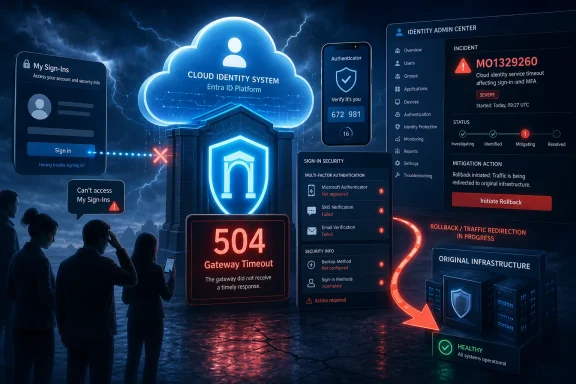
Microsoft resolved a Microsoft 365 service incident on June 1, 2026, after some users were blocked from reaching the My Sign-Ins portal, setting up multifactor authentication, and managing sign-in security settings because requests returned 504 Gateway Timeout errors. The outage was not long, but it landed in one of the least forgiving corners of Microsoft’s cloud: identity. When the page that helps users prove who they are goes dark, the failure is not merely a portal inconvenience. It is a reminder that modern security often depends on a surprisingly small number of shared control planes.
The incident, tracked in the Microsoft 365 admin center as MO1329260, was eventually blamed on a cache configuration change and complicated by mitigation attempts that shifted traffic onto alternative infrastructure. Microsoft says service was restored after it rolled back those mitigation actions and redirected traffic back to the original infrastructure. That sounds tidy in retrospect, but the operational story is messier: a resilience maneuver appears to have introduced enough additional load to make a degraded service harder to stabilize.
A broken collaboration app is disruptive. A broken identity experience is existential. The My Sign-Ins portal is where many work and school users review sign-in activity, manage security information, and register authentication methods that may be required before they can access the rest of their Microsoft 365 estate.
That gives the portal a peculiar role in the enterprise stack. It is both a user-facing webpage and part of the security onboarding path. If a user needs to register Microsoft Authenticator, change a phone number, review suspicious sign-in activity, or complete an MFA setup flow, the portal is not optional plumbing. It is the front door to the mechanisms that guard the front door.
This is why a 504 error matters more here than it would on a low-stakes account settings page. A gateway timeout typically means an intermediate service waited too long for an upstream component to respond. To the user, it looks like a browser failure. To an administrator, it is a sign that the service path behind the page is not answering quickly enough to complete the request.
Microsoft’s own description of the incident indicates that affected users saw 504 Gateway Timeout errors, failed MFA setup attempts, and trouble accessing sign-in activity or authentication settings. In practical terms, that means some users were blocked at the exact moment they were trying to comply with the security policies their organizations had put in place.
In identity services, caching is particularly delicate because the underlying data is both high-volume and security-sensitive. The system must respond quickly, but it must also respect freshness, policy state, user changes, tenant configuration, authentication method status, and regional routing. The line between “efficient” and “incorrect” can be thin.
A cache issue does not have to mean cached data was wrong. It can mean that cache misses increased, that traffic was routed in an inefficient pattern, that backend services were hit harder than expected, or that a change altered how requests were distributed across infrastructure. Microsoft has not published that level of detail, so the right reading is cautious: the company has identified the general class of trigger, not a full postmortem.
Still, the shape of the outage fits a common cloud failure mode. A configuration change creates pressure. A mitigation shifts traffic. The shifted traffic produces high CPU and memory consumption. Regional demand rises, in this case reportedly as European usage increased during peak hours. The service then struggles not because one machine failed, but because the service envelope no longer has enough headroom to absorb normal demand plus mitigation overhead.
That bet does not always pay off. Healthy infrastructure is not necessarily ready infrastructure. It may be healthy under its existing load but unable to absorb a surge. It may have cold caches, different regional traffic patterns, or bottlenecks that only appear when requests arrive in a new shape.
Microsoft ultimately rolled back the mitigation actions and redirected traffic to the original infrastructure. That is a striking outcome because it suggests the fallback path was not the cleanest path to recovery. Sometimes the fastest way out of a cloud incident is not to keep pushing traffic away from the apparent source of trouble, but to unwind the changes that made the system unstable in the first place.
For administrators reading the service-health entry, the lesson is not that failover is bad. It is that failover must be treated as a regularly tested operating condition, not a theoretical design feature. If a platform can fail over only when demand is low, or only when caches are already warm, the resilience plan may be less resilient than it looks.
But mandatory security controls create mandatory dependencies. If users are required to set up MFA, the MFA setup path must be available, observable, and supportable. If administrators require users to re-register authentication methods after a device change or suspected compromise, the registration experience becomes a recovery mechanism. When it fails, the organization’s security posture can temporarily work against availability.
This is the paradox of modern identity. The more seriously an organization takes authentication, Conditional Access, passwordless sign-in, and device-aware controls, the more it depends on the identity provider’s own management surfaces. A user who cannot complete MFA setup is not simply delayed. They may be locked out of email, Teams, SharePoint, business apps, admin portals, or line-of-business systems that federate through Microsoft Entra ID.
The outage did not mean every Microsoft 365 user was unable to sign in. The reported impact centered on the My Sign-Ins portal and related security settings. But for the affected slice of users, especially those onboarding, recovering access, changing devices, or responding to a security prompt, that distinction may have offered little comfort.
Yet there is a structural irony here. The people most capable of reading the service-health details are administrators who can still reach the admin center. End users seeing a timeout at the security portal may not know whether the problem is their browser, their network, their tenant, their account, or Microsoft itself. In smaller organizations, the same person who needs to fix access may be the person blocked by the access issue.
That is why identity incidents need unusually clear external communication. Microsoft’s status channels and admin-center posts are better than silence, but the target audience is fragmented. Some admins live in service health dashboards. Some watch social channels. Some learn about outages from users. Some learn from third-party reporting after the fact.
The most mature organizations treat Microsoft’s service health as one input, not the whole incident picture. They correlate user reports, sign-in logs, help-desk tickets, conditional access failures, and vendor advisories. During an identity-adjacent outage, speed matters less than correctly distinguishing “our policy broke” from “the cloud provider’s security portal is timing out.”
But it is still fair to call this a security event in the operational sense. The affected service is part of how users manage authentication methods and inspect sign-in activity. If users cannot set up MFA, rotate methods, or view recent sign-ins, the organization temporarily loses some ability to enforce and maintain its identity hygiene.
For security teams, that means the incident belongs in the same mental category as broken password reset flows, failed device compliance checks, or authentication provider degradations. These are not always breaches, but they can create windows of confusion and delay. Attackers thrive in confusion, especially when users are already expecting unusual authentication prompts or support instructions.
The right response is not panic. It is process. Help desks should know how to verify whether MFA registration failures are platform-wide. Administrators should know which users are in the middle of registration campaigns. Security teams should watch for opportunistic phishing that references the outage. And organizations should maintain break-glass accounts that are protected, monitored, and excluded from brittle day-to-day dependencies where appropriate.
That matters because identity workflows already make users nervous. When an MFA setup fails, many users assume they did something wrong. They reinstall Authenticator, delete registrations, open multiple browser sessions, or ask a colleague for a workaround. Those reactions can turn a platform incident into a support mess.
Microsoft has improved its account and security portals over the years, but outage messaging remains a weak spot across the industry. A user-facing security portal should be able to fail with a message that says the service is temporarily unavailable, that the issue is on the provider side, and that security settings have not necessarily changed. That kind of messaging is difficult during partial outages, but it is also exactly when users need it.
There is an argument that exposing too much status detail to unauthenticated users creates security risk. That is true at the margins. But a generic timeout is the opposite extreme: it leaks almost nothing while helping almost nobody. The best answer is a minimal, controlled status experience that reduces user-driven chaos without revealing sensitive tenant data.
That does not mean organizations can locally host Microsoft’s identity controls or eliminate cloud dependency. They cannot. But they can plan around the dependency. They can stage MFA registration campaigns rather than forcing every user through a portal at the same hour. They can document alternate administrator-assisted registration paths. They can maintain support scripts for distinguishing user error from service degradation.
They can also prepare messaging in advance. A short internal advisory that says “Microsoft’s security info portal is currently experiencing service issues; do not delete your Authenticator app; retry later; contact the help desk only if you are locked out of a critical system” can prevent a cascade of self-inflicted recovery problems. The outage itself may be Microsoft’s responsibility, but the confusion layer often belongs to the customer.
For larger tenants, the bigger question is whether identity operations are monitored with the same seriousness as network and endpoint operations. MFA registration success rates, authentication method changes, sign-in failures, and help-desk ticket spikes are not just security metrics. They are availability signals.
That subtlety is what makes incidents like MO1329260 worth examining. This was not a dramatic, all-users-down collapse. It was a targeted failure in an account security experience. But because that experience sits at the intersection of user trust, security compliance, and access recovery, it has outsized operational significance.
Microsoft’s explanation also shows how tightly coupled performance engineering and security operations have become. A cache configuration change is not a security-policy decision, yet it affected MFA setup. A traffic failover decision is not an identity-design decision, yet it affected access to sign-in settings. The infrastructure beneath security controls is now part of the security control.
That is the cloud bargain in miniature. Customers outsource complexity to a provider with global infrastructure and deep operational expertise. In return, they inherit provider-side failure modes that may be difficult to observe, impossible to fix directly, and painful to explain to end users.
The incident, tracked in the Microsoft 365 admin center as MO1329260, was eventually blamed on a cache configuration change and complicated by mitigation attempts that shifted traffic onto alternative infrastructure. Microsoft says service was restored after it rolled back those mitigation actions and redirected traffic back to the original infrastructure. That sounds tidy in retrospect, but the operational story is messier: a resilience maneuver appears to have introduced enough additional load to make a degraded service harder to stabilize.
 Identity Outages Hurt Because They Arrive Before the Workday Starts
A broken collaboration app is disruptive. A broken identity experience is existential. The My Sign-Ins portal is where many work and school users review sign-in activity, manage security information, and register authentication methods that may be required before they can access the rest of their Microsoft 365 estate.That gives the portal a peculiar role in the enterprise stack. It is both a user-facing webpage and part of the security onboarding path. If a user needs to register Microsoft Authenticator, change a phone number, review suspicious sign-in activity, or complete an MFA setup flow, the portal is not optional plumbing. It is the front door to the mechanisms that guard the front door.
This is why a 504 error matters more here than it would on a low-stakes account settings page. A gateway timeout typically means an intermediate service waited too long for an upstream component to respond. To the user, it looks like a browser failure. To an administrator, it is a sign that the service path behind the page is not answering quickly enough to complete the request.
Microsoft’s own description of the incident indicates that affected users saw 504 Gateway Timeout errors, failed MFA setup attempts, and trouble accessing sign-in activity or authentication settings. In practical terms, that means some users were blocked at the exact moment they were trying to comply with the security policies their organizations had put in place.
The Cache Change Is the Small Lever With a Long Shadow
Microsoft attributed the incident to a recent cache configuration change. That explanation is plausible and, for anyone who has operated large-scale web services, almost painfully familiar. Caches are supposed to absorb load, shorten request paths, and protect backend systems from being hit repeatedly for the same data. A bad cache configuration can do the opposite.In identity services, caching is particularly delicate because the underlying data is both high-volume and security-sensitive. The system must respond quickly, but it must also respect freshness, policy state, user changes, tenant configuration, authentication method status, and regional routing. The line between “efficient” and “incorrect” can be thin.
A cache issue does not have to mean cached data was wrong. It can mean that cache misses increased, that traffic was routed in an inefficient pattern, that backend services were hit harder than expected, or that a change altered how requests were distributed across infrastructure. Microsoft has not published that level of detail, so the right reading is cautious: the company has identified the general class of trigger, not a full postmortem.
Still, the shape of the outage fits a common cloud failure mode. A configuration change creates pressure. A mitigation shifts traffic. The shifted traffic produces high CPU and memory consumption. Regional demand rises, in this case reportedly as European usage increased during peak hours. The service then struggles not because one machine failed, but because the service envelope no longer has enough headroom to absorb normal demand plus mitigation overhead.
Failover Was Supposed to Help, Then Became Part of the Story
The most revealing detail is not that Microsoft made a cache configuration change. It is that the attempted failover to alternative healthy infrastructure reportedly led to high CPU and memory usage. In cloud marketing, failover is often treated like a button marked “restore service.” In real operations, failover is a bet that the target environment has enough capacity, the right warm state, and the correct dependencies to handle traffic immediately.That bet does not always pay off. Healthy infrastructure is not necessarily ready infrastructure. It may be healthy under its existing load but unable to absorb a surge. It may have cold caches, different regional traffic patterns, or bottlenecks that only appear when requests arrive in a new shape.
Microsoft ultimately rolled back the mitigation actions and redirected traffic to the original infrastructure. That is a striking outcome because it suggests the fallback path was not the cleanest path to recovery. Sometimes the fastest way out of a cloud incident is not to keep pushing traffic away from the apparent source of trouble, but to unwind the changes that made the system unstable in the first place.
For administrators reading the service-health entry, the lesson is not that failover is bad. It is that failover must be treated as a regularly tested operating condition, not a theoretical design feature. If a platform can fail over only when demand is low, or only when caches are already warm, the resilience plan may be less resilient than it looks.
MFA Has Become Mandatory Enough That Its Setup Path Is Critical Infrastructure
The outage lands at an awkward time for Microsoft because the company has spent years pushing customers toward stronger authentication. That push is broadly correct. Password-only access is too weak for the threat environment most organizations face, and MFA remains one of the most effective baseline defenses against account takeover.But mandatory security controls create mandatory dependencies. If users are required to set up MFA, the MFA setup path must be available, observable, and supportable. If administrators require users to re-register authentication methods after a device change or suspected compromise, the registration experience becomes a recovery mechanism. When it fails, the organization’s security posture can temporarily work against availability.
This is the paradox of modern identity. The more seriously an organization takes authentication, Conditional Access, passwordless sign-in, and device-aware controls, the more it depends on the identity provider’s own management surfaces. A user who cannot complete MFA setup is not simply delayed. They may be locked out of email, Teams, SharePoint, business apps, admin portals, or line-of-business systems that federate through Microsoft Entra ID.
The outage did not mean every Microsoft 365 user was unable to sign in. The reported impact centered on the My Sign-Ins portal and related security settings. But for the affected slice of users, especially those onboarding, recovering access, changing devices, or responding to a security prompt, that distinction may have offered little comfort.
The Admin Center Incident ID Was Useful, But Visibility Still Depends on Access
Microsoft tracked the issue under incident ID MO1329260 in the Microsoft 365 admin center. For enterprise IT, that kind of service-health record is essential. It gives administrators a common reference point, separates tenant-specific troubleshooting from platform incidents, and helps help desks avoid wasting hours on local causes when the problem is upstream.Yet there is a structural irony here. The people most capable of reading the service-health details are administrators who can still reach the admin center. End users seeing a timeout at the security portal may not know whether the problem is their browser, their network, their tenant, their account, or Microsoft itself. In smaller organizations, the same person who needs to fix access may be the person blocked by the access issue.
That is why identity incidents need unusually clear external communication. Microsoft’s status channels and admin-center posts are better than silence, but the target audience is fragmented. Some admins live in service health dashboards. Some watch social channels. Some learn about outages from users. Some learn from third-party reporting after the fact.
The most mature organizations treat Microsoft’s service health as one input, not the whole incident picture. They correlate user reports, sign-in logs, help-desk tickets, conditional access failures, and vendor advisories. During an identity-adjacent outage, speed matters less than correctly distinguishing “our policy broke” from “the cloud provider’s security portal is timing out.”
This Was Not a Security Breach, But It Was a Security Event
There is no indication from the available reporting that the outage was caused by an attack or that user credentials were exposed. That distinction matters. A service availability incident should not be inflated into a breach without evidence.But it is still fair to call this a security event in the operational sense. The affected service is part of how users manage authentication methods and inspect sign-in activity. If users cannot set up MFA, rotate methods, or view recent sign-ins, the organization temporarily loses some ability to enforce and maintain its identity hygiene.
For security teams, that means the incident belongs in the same mental category as broken password reset flows, failed device compliance checks, or authentication provider degradations. These are not always breaches, but they can create windows of confusion and delay. Attackers thrive in confusion, especially when users are already expecting unusual authentication prompts or support instructions.
The right response is not panic. It is process. Help desks should know how to verify whether MFA registration failures are platform-wide. Administrators should know which users are in the middle of registration campaigns. Security teams should watch for opportunistic phishing that references the outage. And organizations should maintain break-glass accounts that are protected, monitored, and excluded from brittle day-to-day dependencies where appropriate.
The User Experience Still Makes Microsoft’s Cloud Feel Too Opaque
A 504 Gateway Timeout is technically precise and practically unhelpful. It tells the user that something upstream did not respond in time. It does not tell the user whether to retry, wait, call IT, switch networks, clear cache, use another browser, or stop trying because repeated attempts are pointless.That matters because identity workflows already make users nervous. When an MFA setup fails, many users assume they did something wrong. They reinstall Authenticator, delete registrations, open multiple browser sessions, or ask a colleague for a workaround. Those reactions can turn a platform incident into a support mess.
Microsoft has improved its account and security portals over the years, but outage messaging remains a weak spot across the industry. A user-facing security portal should be able to fail with a message that says the service is temporarily unavailable, that the issue is on the provider side, and that security settings have not necessarily changed. That kind of messaging is difficult during partial outages, but it is also exactly when users need it.
There is an argument that exposing too much status detail to unauthenticated users creates security risk. That is true at the margins. But a generic timeout is the opposite extreme: it leaks almost nothing while helping almost nobody. The best answer is a minimal, controlled status experience that reduces user-driven chaos without revealing sensitive tenant data.
Enterprises Should Treat Identity Portals Like Dependencies, Not Websites
The incident should nudge administrators to revisit a habit that remains surprisingly common: treating user security portals as documentation links rather than production dependencies. If your MFA rollout plan assumes users can always reach the registration page, your rollout plan has a single point of operational failure.That does not mean organizations can locally host Microsoft’s identity controls or eliminate cloud dependency. They cannot. But they can plan around the dependency. They can stage MFA registration campaigns rather than forcing every user through a portal at the same hour. They can document alternate administrator-assisted registration paths. They can maintain support scripts for distinguishing user error from service degradation.
They can also prepare messaging in advance. A short internal advisory that says “Microsoft’s security info portal is currently experiencing service issues; do not delete your Authenticator app; retry later; contact the help desk only if you are locked out of a critical system” can prevent a cascade of self-inflicted recovery problems. The outage itself may be Microsoft’s responsibility, but the confusion layer often belongs to the customer.
For larger tenants, the bigger question is whether identity operations are monitored with the same seriousness as network and endpoint operations. MFA registration success rates, authentication method changes, sign-in failures, and help-desk ticket spikes are not just security metrics. They are availability signals.
Microsoft’s Cloud Reliability Story Is Now an Identity Story
Microsoft 365 reliability used to be discussed mostly in terms of Exchange Online mail flow, Teams meetings, OneDrive sync, and SharePoint access. Those remain important, but identity has become the keystone. When Entra-adjacent services degrade, the blast radius can be subtle, uneven, and emotionally louder than the raw incident scope suggests.That subtlety is what makes incidents like MO1329260 worth examining. This was not a dramatic, all-users-down collapse. It was a targeted failure in an account security experience. But because that experience sits at the intersection of user trust, security compliance, and access recovery, it has outsized operational significance.
Microsoft’s explanation also shows how tightly coupled performance engineering and security operations have become. A cache configuration change is not a security-policy decision, yet it affected MFA setup. A traffic failover decision is not an identity-design decision, yet it affected access to sign-in settings. The infrastructure beneath security controls is now part of the security control.
That is the cloud bargain in miniature. Customers outsource complexity to a provider with global infrastructure and deep operational expertise. In return, they inherit provider-side failure modes that may be difficult to observe, impossible to fix directly, and painful to explain to end users.
The Practical Read From MO1329260
The lesson from this incident is not that Microsoft 365 is uniquely fragile or that MFA is a mistake. The lesson is that security enrollment and recovery paths need the same operational planning as the applications they protect.- Organizations should assume that MFA registration portals can become temporarily unavailable and should document what users and help desks should do when setup fails for reasons outside the tenant.
- Administrators should monitor Microsoft 365 service health during spikes in authentication setup failures before changing Conditional Access policies or resetting user methods at scale.
- MFA rollout campaigns should avoid unnecessary concentration of users in a single registration window, especially across regions with predictable peak usage periods.
- Break-glass administrator accounts should be maintained, protected, and tested so that a user-facing identity portal outage does not become an administrative lockout.
- Help-desk playbooks should distinguish between failed authentication, failed registration, and failed access to the security management portal, because each problem has a different recovery path.
- Security teams should watch for phishing and social-engineering attempts that exploit user confusion during authentication-related outages.
References
- Primary source: Windows Report
Published: 2026-06-02T09:42:05.993482

Microsoft Resolves My Sign-Ins Outage That Blocked MFA Setup
Microsoft fixed an outage affecting My Sign-Ins access and MFA setup after a cache configuration change caused failures.
windowsreport.com
- Official source: support.microsoft.com
Sign in to Microsoft 365 | Microsoft Support
Learn how to sign in to Office or Microsoft 365 from a desktop application or your web browser.support.microsoft.com - Official source: learn.microsoft.com
Sign in to the Microsoft 365 admin center for volume licensing | Microsoft Learn
Learn how to sign in to the Microsoft 365 admin center to manage volume licensing agreements, software downloads, and license keys.learn.microsoft.com - Related coverage: bleepingcomputer.com
Microsoft fixes outage affecting MFA setup, MySignIn service
Microsoft is working to address an ongoing incident preventing customers from setting up multi-factor authentication (MFA) or accessing the My Sign-Ins platform.www.bleepingcomputer.com - Related coverage: matricedigitale.it
Microsoft risolve outage MFA e MySignIn dopo errori 504 su Microsoft 365 - Matrice Digitale
Microsoft ripristina MySignIn e MFA dopo un outage che ha impedito la gestione dell'autenticazione multifattore su Microsoft 365.www.matricedigitale.it - Related coverage: isecurify.co
iSecurify - Microsoft MFA Down – 504 Gateway Timeout Errors Disrupting MFA Access for U.S. Users - iSecurify - Your Security Our Responsibility : iSecurify
Enterprise Cyber Security Solution Provider www.isecurify.co
- Official source: cdn.techcommunity.microsoft.com
- Related coverage: app-direct-www-cloudfront.s3.amazonaws.com
- Official source: download.microsoft.com

