

Microsoft’s one-line advisory that “Azure Linux includes this open‑source library and is therefore potentially affected” is accurate for the product it names — and at the same time it is not a categorical guarantee that no other Microsoft product can include the same vulnerable component.
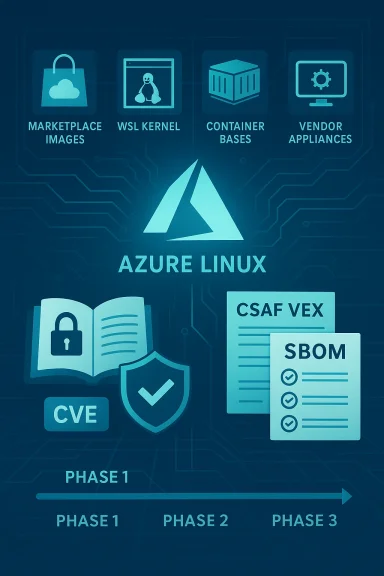
Microsoft began publishing machine‑readable CSAF/VEX attestations in a phased rollout (starting with Azure Linux), and for a number of recent open‑source CVEs its public CVE pages contain the sentence the user quoted. That wording signals two important facts at once: Microsoft has completed an inventory for the named product (Azure Linux) and found the upstream library in question there; and Microsoft will update the CVE/VEX records if it later discovers the same library in additional Microsoft products.
This operational pattern — attest product-by-product rather than asserting company‑wide absence — is increasingly common among large vendors because it is both pragmatic and verifiable. Inventorying and mapping every binary artifact, SBOM, image, and package across a multi‑product ecosystem is a heavy, phased task; the CSAF/VEX approach gives definitive answers for the artifacts that have been inspected, and leaves everything else in an unknown state until they are verified.
That distinction matters in mixed estates where administrators consume a variety of Microsoft‑branded artifacts. An unpatched vulnerable library anywhere in an environment can be a foothold for denial‑of‑service, information leakage, or code execution depending on the bug and how the library is used.
If you rely on Microsoft artifacts heavily, track MSRC CVE pages and the company’s VEX/CSAF feeds programmatically so you can rapidly map any future attestation updates to your internal asset inventory.
The practical path forward is clear: apply Microsoft’s Azure Linux updates immediately if you run those images, perform artifact‑level verification across your estate (with an emphasis on Marketplace images, container bases, WSL distributions, and appliance images), and adopt SBOM and pipeline checks to make future discovery and remediation faster and more deterministic. Until Microsoft expands its CSAF/VEX attestations to cover additional products, the responsibility to discover and remediate non‑attested artifacts lies with the customers and their security teams.
Source: MSRC Security Update Guide - Microsoft Security Response Center
 Background / Overview
Microsoft began publishing machine‑readable CSAF/VEX attestations in a phased rollout (starting with Azure Linux), and for a number of recent open‑source CVEs its public CVE pages contain the sentence the user quoted. That wording signals two important facts at once: Microsoft has completed an inventory for the named product (Azure Linux) and found the upstream library in question there; and Microsoft will update the CVE/VEX records if it later discovers the same library in additional Microsoft products.This operational pattern — attest product-by-product rather than asserting company‑wide absence — is increasingly common among large vendors because it is both pragmatic and verifiable. Inventorying and mapping every binary artifact, SBOM, image, and package across a multi‑product ecosystem is a heavy, phased task; the CSAF/VEX approach gives definitive answers for the artifacts that have been inspected, and leaves everything else in an unknown state until they are verified.
What Microsoft’s sentence actually means
Two separate claims in one short sentence
- Definitive attestation for Azure Linux: Microsoft inspected Azure Linux build outputs (packages and images) and mapped the upstream open‑source component to the CVE. That makes Azure Linux a confirmed carrier for the purpose of remediation and prioritization.
- A process commitment: Microsoft will expand its machine‑readable attestations and update CVE mappings if additional Microsoft products are later found to ship the same component. This is a promise to extend transparency, not a declaration of exclusivity.
What it does not mean
- It does not mean Azure Linux is the only Microsoft artifact that could contain the library. Many Microsoft images, managed appliances, container bases, and SDK distributions reuse or repackage upstream components; until each of those artifacts is inventoried, they should be treated as unverified rather than proven clean.
Why defenders should care (operational implications)
The practical consequence of the attestation model is straightforward: if you run Azure Linux images published and maintained by Microsoft, treat them as in‑scope and apply Microsoft’s updates promptly. But if you run other Microsoft‑supplied artifacts — Marketplace images, WSL kernels, vendor appliances, container base images, SDK images, or internal builds derived from Microsoft packages — you must not assume those artifacts are clean just because they are not named in the MSRC entry. Absence of attestation is not evidence of absence.That distinction matters in mixed estates where administrators consume a variety of Microsoft‑branded artifacts. An unpatched vulnerable library anywhere in an environment can be a foothold for denial‑of‑service, information leakage, or code execution depending on the bug and how the library is used.
Technical verification: how to determine exposure in your environment
If you are responsible for securing assets that consume Microsoft artifacts, the reliable way to determine exposure is by artifact‑level verification. The following checklist gives concrete steps you can take to verify whether a particular image, container, VM SKU, or appliance includes the library in question.Quick inventory questions (high level)
- Which exact Microsoft artifact are you running? (Example: Azure Linux image azl3, a Marketplace image named X, a Microsoft‑curated container image Y, or the WSL2 kernel shipped with Windows.)
- Is the artifact an upstream distribution image or a vendor‑curated product image?
- Does the artifact include the library as a packaged dependency, as a bundled binary, or as embedded source in another component?
Concrete verification steps (per artifact)
- Inspect the package database inside the image
- For RPM‑based images run: rpm -qa | grep -i <library‑name>.
- For Debian/Ubuntu images run: dpkg -l | grep -i <library‑name>.
- This is the fastest authoritative check for distro images and package‑managed artifacts.
- Query the package manifest of the image without booting
- For container images: use skopeo / umoci / docker save + tar inspection to list packages or check the packaging manifest.
- Many image registries include package metadata that can be parsed.
- Search file system contents for known library filenames or strings
- Use grep, find, or ripgrep to match library names, exported symbols, or upstream version strings in /usr/lib, /usr/local/lib, /usr/bin, and vendor folders.
- For interpreted language libraries (Python, Node, Ruby) look for package.json, requirements.txt, pip freeze output, or gemspecs.
- Inspect binary linkage and symbol tables
- Use ldd, readelf, or objdump to find linked libraries; use strings to scan for version markers in static binaries.
- This reveals vendor‑bundled static libraries that package scanners might miss.
- Review the SBOM (Software Bill of Materials) or CSAF/VEX output if available
- Microsoft has begun publishing CSAF/VEX attestations; if an artifact’s SBOM is available, check it for the library and the specific committed version ranges. If the artifact is not yet covered by Microsoft’s VEX feed, rely on local artifact inspection.
- Use container / image scanners and software composition analysis (SCA)
- Run multiple scanners (Snyk, Trivy, Clair, commercial options) to detect packages and versions. Cross‑compare results to avoid blind spots. Remember that different scanners use different package parsing heuristics and may disagree.
- For Windows‑hosted Linux artifacts (WSL, Hyper‑V images), extract the image and apply the same checks above
- WSL distributions and embedded kernels may contain userland packages or compiled libraries. Don’t assume Windows packaging excludes Linux dependencies.
Verification caveats and pitfalls
- Package names differ across distributions: the same upstream library can be packaged under different names or combined into meta‑packages; rely on upstream library filenames and known file paths where possible.
- Static linking and vendoring: vendors sometimes embed upstream code inside other packages; this makes detection harder and requires string/symbol scanning or full SBOM analysis.
- Transitive dependencies: a library may be present only as a transient dependency of a higher‑level package; scanning the full dependency tree is necessary for comprehensive coverage.
Detection and hunting across a Microsoft‑delivered estate
Hunting for a vulnerable library in a hybrid environment requires both breadth and some prioritized checks. The following pragmatic strategy focuses on the most likely places the vulnerable component would appear if it were reused beyond Azure Linux images.Priority locations to check
- Azure Marketplace images (both Microsoft‑published and third‑party images distributed through Microsoft channels).
- Microsoft‑maintained container base images and example/sample images used in official docs or quickstarts.
- WSL2 / WSL distributions that Microsoft packages or recommends.
- Managed appliances, edge images, or internal Microsoft‑curated appliance images shipped to customers.
- Developer SDKs, CI/CD images, and sample code in Microsoft repositories that are used to build production artifacts.
Automated sweep recipe (suggested)
- Enumerate all Microsoft artifacts in use (images, containers, VMs, appliances).
- Run a multi‑scanner sweep (Trivy + Snyk + distro package checks) against all images and saved VM snapshots.
- Extract SBOMs where present and query them for the library name and vulnerable version ranges.
- For artifacts flagged as ambiguous (no package metadata, static vendor code), perform targeted filesystem string scans for upstream version fingerprints and symbols.
- Triage results: prioritize externally exposed services, multi‑tenant hosts, and long‑lived front‑end processes for remediation.
Remediation: what to do if you find the library
If your verification shows the library is present and in a vulnerable version, follow these prioritized actions:- Patch the artifact with the vendor’s fixed package immediately (if Microsoft publishes one for Azure Linux, apply it). For other artifacts, apply the upstream patched version or a distro package that backports the fix.
- If immediate patching is not possible, apply mitigations:
- For parsing libraries used in network paths, add input filtering, rate‑limiting, or disable the vulnerable feature where feasible.
- For interpreted language libraries, set sandboxing, limit allowed format strings, and avoid passing untrusted data into formatting APIs.
- Rebuild images and containers after updating build manifests to ensure the fixed library is embedded in new artifacts.
- Rotate credentials and secrets for high‑risk services if memory disclosure or potential code execution is credible in your threat model.
- Monitor for signs of exploitation (crashes, abnormal process restarts, anomalous network traffic) and apply compensating controls (isolate workloads if needed).
Risk analysis: strengths and residual risks in Microsoft’s approach
Notable strengths
- Product‑level attestation is verifiable and actionable. When Microsoft says an artifact it maintains includes a vulnerable component, that gives Azure Linux customers a clear remediation path backed by vendor updates. The CSAF/VEX approach supports automation and deterministic decisions for those covered artifacts.
- Phased rollout is pragmatic: inventorying huge fleets of artifacts takes time; starting with Azure Linux allows Microsoft to deliver high‑quality attestations instead of imperfect blanket claims.
Potential risks and limitations
- Attestation coverage is incomplete during rollout. Until MSRC publishes attestations for each product family, defenders must assume un‑attested artifacts are unknown and should verify them independently. This creates an operational burden for customers who consume many different Microsoft artifacts.
- Vendor‑embedded or statically linked code can evade simple package checks. Static analysis, SBOMs, and symbol/string inspection are necessary to detect vendored copies of vulnerable upstream code.
- Multiple ecosystems: the same upstream library may exist across different packaging systems (RPM, deb, PyPI, npm, etc.), increasing the complexity of detection and mitigation.
Practical recommendations (for security teams and operators)
- Treat Microsoft’s attestation for Azure Linux as authoritative and act on it immediately for affected Azure Linux images. Don’t delay patching because the attestation also signals vendor‑published fixes are forthcoming or available.
- Assume any Microsoft artifact that reuses Azure Linux packaging or CBL‑Mariner derivatives may inherit the same packages. Prioritize Marketplace images, Microsoft‑curated containers, and appliance images for inspection.
- Automate artifact inspection into CI/CD: add package and SBOM checks into build pipelines so that new image builds fail if they contain known vulnerable versions. Use multiple scanners to reduce false negatives.
- Maintain an internal inventory of Microsoft‑provided artifacts in use. Without a clear inventory, it’s impossible to know whether you’re exposed to a library Microsoft has not yet attested.
- Push for SBOMs and VEX/CSAF coverage from vendors and third‑party image suppliers. SBOMs dramatically reduce the time to answer “is this artifact affected?” and support automated remediation.
How to interpret future Microsoft updates
Microsoft has been explicit: when it discovers additional products that include the implicated upstream component, it will update the CVE and its machine‑readable VEX/CSAF attestations. That means the set of “Microsoft products known to include the library” is expected to expand as Microsoft completes more product inventories. Until then, the proper defensive posture is to treat non‑attested Microsoft artifacts as unverified and to verify them yourself if they are in scope for your environment.If you rely on Microsoft artifacts heavily, track MSRC CVE pages and the company’s VEX/CSAF feeds programmatically so you can rapidly map any future attestation updates to your internal asset inventory.
Conclusion
To answer the user’s question succinctly and with the nuance defenders need: no — Azure Linux is not necessarily the only Microsoft product that can include the vulnerable open‑source library. It is the only Microsoft product Microsoft has publicly attested so far to include the component, which makes Azure Linux a definitive remediation target. Absence of public mention for other Microsoft products is an absence of attestation, not proof of absence; therefore operators must verify other Microsoft artifacts they run rather than assume they are safe.The practical path forward is clear: apply Microsoft’s Azure Linux updates immediately if you run those images, perform artifact‑level verification across your estate (with an emphasis on Marketplace images, container bases, WSL distributions, and appliance images), and adopt SBOM and pipeline checks to make future discovery and remediation faster and more deterministic. Until Microsoft expands its CSAF/VEX attestations to cover additional products, the responsibility to discover and remediate non‑attested artifacts lies with the customers and their security teams.
Source: MSRC Security Update Guide - Microsoft Security Response Center
