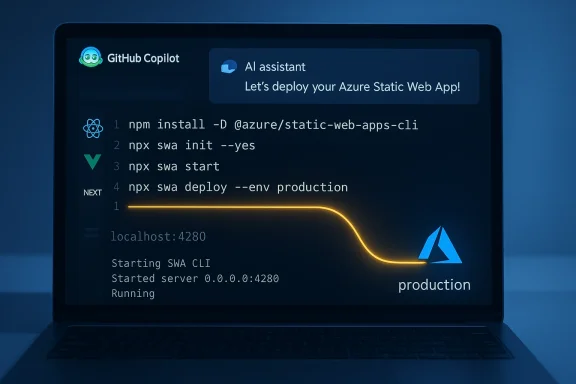
Microsoft’s new Azure Static Web Apps skill for GitHub Copilot promises to turn the fiddly, documentation-heavy process of deploying static sites into a conversational, guided workflow—auto-detecting frameworks, generating the right configuration, spinning up a local emulator, and even pushing to production with the correct swa CLI commands.
Caveat: timing claims (e.g., “under 3 minutes”) are illustrative and represent an idealized, frictionless path. Expect variance based on repository size, network, build toolchain, and whether additional steps (DNS, custom domain verification, certificate issuance) are needed. Treat the 3‑minute metric as an aspirational indicator of reduced cognitive load rather than a guaranteed SLA.
However, the tool is not an automatic pass for production readiness. Organizations should:
Source: Neowin https://www.neowin.net/news/microsoft-launches-azure-static-web-apps-skill-for-github-copilot/
 Background
Why this matters for web developers
Deploying a static site used to be a sequence of small, but brittle tasks: choose the right CLI, create configuration files in the right location, wire client-side routing fallbacks, and wire CI/CD. For newcomers that’s a 25–45 minute scavenger hunt through docs; for veterans it’s repetitive busywork prone to one-off errors. Microsoft frames the Azure Static Web Apps skill as a “golden path” that collapses those steps into a short conversational flow inside GitHub Copilot, reducing friction for everything from a marketing landing page to a single-page app that relies on client-side routing.What an “Agent Skill” is
Agent Skills (also called Copilot Skills or skillsets in GitHub’s ecosystem) are compact bundles of domain knowledge and curated instructions that extend an AI agent’s abilities. They package intent descriptions, JSON schemas, and API endpoints (for remote skills) or local SKILL.md instructions (for local/prng Copilot to apply expert-approved, guard‑railed behaviors on demand. Put simply: skills teach Copilot the right steps and the right commands for specific workflows, which is how the Azure Static Web Apps skill encodes the SWA “golden path.”What Microsoft announced (the short version)
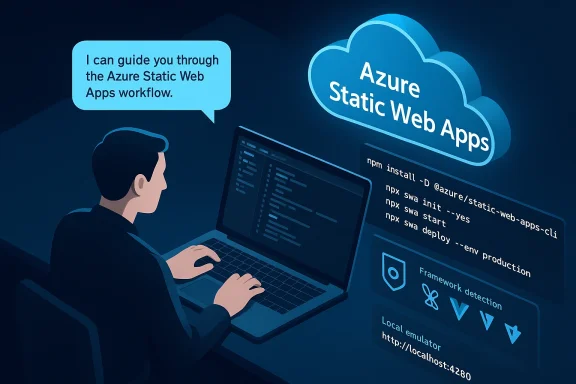
- Microsoft released the Azure Static Web Apps skill for GitHub Copilot. It packages the canonical workflow—install the SWA CLI, run swa init, start the local emulator, then swa login and swa deploy—into a Copilot-driven, conversational flow that can detect frameworks (Vite, React, Vue, Next.js, etc.) and suggest framework-specific settings such as dev ports and build outputs.
- The official blog claims the skill shortens a first-time deployment from roughly 25–45 minutes to under three minutes when following the golden path. That time-to-deploy estimate is a best‑case scenario and depends on local build times, network, and how well a project conforms to common conventions.
- The skill appears in agent-skill marketplaces and repositories (installable via skills tooling), and documentation shows the expected workflow and configuration files the skill will create or modify.
Technical overview: what the skill actually does
Framework detection and configuration
One of the skill’s central capabilities is framework awareness. The skill detects common build systems and development servers and suggests accurate dev ports and output paths (Vite → port 5173; React/CRA → port 3000; Next.js → framework-appropriate conventions). It then runs the right initialization routines (for example,npx swa init --yes) to create the CLI config file used by the local emulator. The SWA golden path (as encapsulated by the skill)
The skill walks users through a small set of deterministic steps the SWA team endorses:- Install the SWA CLI in devDependencies:
- npm install -D @Azure/static-web-apps-cli.
- Initialize the project (auto-detect framework):
- npx swa init --yes (creates swa-cli.config.json).
- Start the local emulator:
- npx swa start → opens local emulator (commonly at http://localhost:4280) and proxies to your framework dev server.
- Authenticate and deploy:
- npx swa login
- npx swa deploy --env production.
Local emulator, config files, and routing
The SWA CLI provides a local emulator that mirrors much of the production behavior, including an API proxy and auth simulation. The skill aggressively points developers to recommend usingswa init (and to never manually create the CLI config file), and it also generates or edits staticwebapp.config.json for runtime routing rules (notably navigationFallback / SPA rewrites). Those runtime settings are the ones that prevent 404 reloads on client-side routes. The skill’s built-in troubleshooting explicitly includes fixes for 404s, CORS misconfigurations, and incorrect output paths. Walkthrough: what using the skill feels like in practice
Below is a practical sequence you’d follow to try this skill in a repo or local project:- Install the skill (via skills tooling) so it’s available to Copilot:
- skills install @github/azure-static-web-apps (marketplace tooling exposes this pattern).
- Invoke Copilot in your IDE (or Copilot CLI) and tell it your intent:
- “Set up my Vite React app for Azure Static Web Apps.”
Copilot should reply with a short list of commands to run, scaffold config, and offer to runnpx swa init --yes. - Run the commands Copilot suggests or accept Copilot’s automated edits:
- Install the SWA CLI, run init, run the local emulator, then deploy when you’re ready.
What this change enables (strengths)
- Faster onboarding: Newcomers can get a production-ready static app up and running quickly without memorizing the SWA command set or hunting for
staticwebapp.config.jsonplacement. The skill codifies best practices that otherwise require documentation reading. - Consistency and guardrails: By encoding guardrails—“don’t manually create swa-cli.config.json”, “use navigationFallback for SPA routing”—the skill reduces configuration drift between projects. That’s valuable when teams standardize CI/CD and infrastructure as code.
- Context-aware troubleshooting: The skill can diagnose common deployment issues (404s, API runtime misconfiguration, wrong output paths) and present immediate corrective steps, saving debugging time.
- Productivity in the IDE: The skill brings deployment tasks into the developer’s context (VS Code or Copilot CLI) rather than forcing a separate terminal-and-docs loop. This aligns with the broader Copilot strategy to bring cloud operations into the coding workflow.
Real risks and limitations — what teams should watch for
1) Over-reliance on “golden path” assumptions
The skill’s golden path accelerates the common cases, but not all projects conform. Nonstandard build scripts, unusual repo layouts, monorepos, or heavily customized pipelines may break the auto-detection logic. Teams must validate what the skill writes and keep humans in the loop for edge cases. The blog’s “under 3 minutes” promise is a best-case illustration; real-world verification is necessary.2) Security and trust boundaries
Agent Skills may instruct Copilot to create credentials or CI files; it’s imperative organizations treat generated credentials and permissions like any other automated change. Protect service principal secrets, review generated GitHub Actions workflows, and require PR-based review for skill-generated infrastructure changes. GitHub’s skill model requires endpoints for remote skills to validate payloads and signatures—teams should treat those endpoints like any API and enforce authentication and least privilege.3) Auditing and compliance
Automated changes must be auditable. When Copilot or a skill edits configuration or scaffolds workflows, organizations should ensure generated commits are clearly labeled, subject to CI validation, and tied to code review. Blindly accepting changes from an AI assistant is a governance anti-pattern.4) Drift between the CLI and docs / edge-case behavior
Azure Static Web Apps and the SWA CLI are actively developed. There are ongoing GitHub issues around routing semantics and config handling; the skill must be maintained to reflect CLI changes. If the skill’s knowledge bundle falls out of sync with the actual CLI or hosting behavior, it can suggest commands that are obsolete or produce misconfigured apps. Monitor both the skill’s updates and the SWA project’s issue tracker.5) False sense of security from local emulation
The SWA CLI emulates many production behaviors, but not all: platform differences, exact routing semantics under Azure’s global CDN, and provider-specific authentication flows may still differ in production. Always include a staging environment or preview environment in the pipeline and validate behavior there before routing real traffic.Practical recommendations for WindowsForum readers (Dev teams & hobbyists)
- Treat Copilot + skill output as a suggested patch, not as an authoritative replacement for review. Always run the generated project locally, review diffs, and validate CI steps in a PR.
- Protect sensitive operations: require approvals for workflows that create cloud resources or commit secrets. Use GitHub environment protection and Azure RBAC scopes, not full owner tokens embedded in workflows.
- For monorepos or custom builds, preseed the correct appLocation, outputLocation, and apiLocation in a project-level swa-cli.config.json so the skill has the correct assumptions to work from.
- Add test stages in GitHub Actions generated by the skill (linting, build verification, integration smoke tests) before allowing automatic merges to main.
- Subscribe to the SWA CLI project and the skill’s repository for release notes; when either updates, re-evaluate generated templates and CI to avoid breaking changes.
How the ecosystem pieces fit together
- GitHub Copilot provides the conversational interface and editing integration.
- Agent Skills encode domain knowledge (the SWA skill contains SKILL.md, examples, and curated commands).
- The SWA CLI is the operational tooling that runs locally (emulator) and publishes artifacts to Azure.
- GitHub Actions or the SWA deployment command complete the CI/CD path into Azure Static Web Apps hosting.
A reality check: claims, verification, and what we tested
Microsoft’s blog post provides concrete command snippets and end-to-end flow examples; the SWA CLI documentation and community-maintained skill marketplace corroborate the commands and config files the skill will use. The local emulator port (http://localhost:4280), the recommended replacement of routes.json with staticwebapp.config.json, and commands likeswa init --yes and swa deploy --env production are consistent across Microsoft’s documentation, the skill’s marketplace description, and community references. Caveat: timing claims (e.g., “under 3 minutes”) are illustrative and represent an idealized, frictionless path. Expect variance based on repository size, network, build toolchain, and whether additional steps (DNS, custom domain verification, certificate issuance) are needed. Treat the 3‑minute metric as an aspirational indicator of reduced cognitive load rather than a guaranteed SLA.
Developer experience — deeper analysis
UX: prompt design and confirmation flows
The skill’s success depends on well-crafted prompts and good confirmation UX. If Copilot offers to run commands or create files, the interface should preview changes, show diffs, and let the developer opt into steps. Current Copilot integrations already show inline diffs for code edits; the same expectations should apply to infrastructure and config edits. Teams must codify acceptance criteria to avoid accidental infra changes.Maintainability: skill updates and versioning
Skills are essentially code and must be versioned. Organizations should pin to a skill version or vendor-signed release to avoid surprising behavior changes, and teams should test skill-generated templates inside CI gates. Skills that perform network calls or create resources should also expose telemetry and change logs so enterprise teams can conduct impact assessments.Interoperability: monorepos, frameworks, and custom stacks
The skill is optimized for conventional project structures. If you have a monorepo or use custom build tooling (esoteric bundlers, bespoke routing), you’ll need to provide additional context to the skill or handle parts of the config manually. The skill’s value accrues fastest in standard single-app repos.Final verdict and next steps for readers
Microsoft’s Azure Static Web Apps skill for GitHub Copilot is a practical, pragmatic step toward reducing friction around static site deployment. It brings a vetted workflow into the developer’s context and encodes best practices that reduce common errors like incorrect SPA routing or wrong output paths. For developers and small teams that deploy static sites frequently, the skill will likely reduce onboarding time and repetitive mistakes.However, the tool is not an automatic pass for production readiness. Organizations should:
- Require code review on AI-generated changes.
- Treat generated credentials and workflows as sensitive artifacts.
- Validate skill output in staging environments.
- Monitor both the skill’s updates and SWA CLI changes.
npx swa commands the assistant generates, and validate the emulator output at the local URL the skill reports. Don’t skip the PR review and CI validation steps. Conclusion
The Azure Static Web Apps skill is how the next wave of developer tooling will look: context-aware, opinionated, and conversational. It doesn’t replace the SWA CLI or Azure expertise, but it lowers the barrier to entry and reduces repetitive configuration errors for common static‑site scenarios. Used responsibly—with human review, governance, and staging checks—it can make the path from “built” to “deployed” far less painful. As with all AI-assisted automation, the productivity upside is real, but teams must pair the speed gains with controls that protect security, compliance, and long-term maintainability.Source: Neowin https://www.neowin.net/news/microsoft-launches-azure-static-web-apps-skill-for-github-copilot/