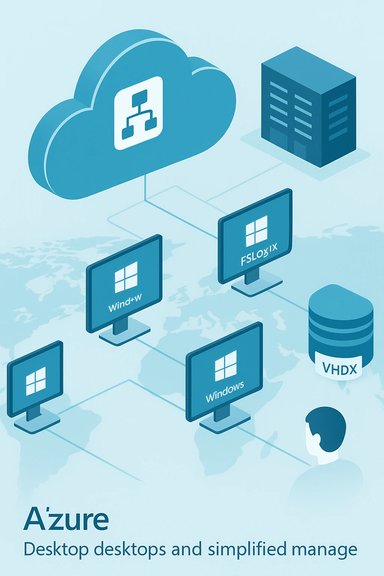
Microsoft’s Azure-based Windows Virtual Desktop (WVD) represents a significant pivot in how enterprises can deliver full Windows and Office experiences from the cloud — a managed, multi-session Windows 10 platform optimized for Office 365 ProPlus with built-in migration paths for Windows 7 workloads and deep ties into Azure’s compute, storage and security services. The service promises rapid deployment, simplified management (Microsoft hosts the brokering, gateway and diagnostics layers), and a licensing model that separates the WVD management service from the underlying Azure compute and storage costs — a combination Microsoft says reduces friction for organizations moving desktop workloads into Azure.
Windows Virtual Desktop was first publicly previewed as Microsoft’s fully managed desktop- and app-virtualization service on Azure after an initial private preview. The platform was positioned from the outset as a different kind of cloud VDI: instead of just hosting single-user VM instances, WVD introduced a multi-session Windows 10 experience — a unique edition of Windows 10 that supports concurrent user sessions on the same VM while maintaining the modern Windows 10 desktop semantics and Office compatibility. Microsoft tied this capability to Office 365 ProPlus performance optimizations and offered a path to virtualize Windows 7 instances on Azure with free Extended Security Updates (ESU) during the migration window. The service matured quickly from preview to general availability and has been extended via a partner ecosystem (Citrix, VMware partners, FSLogix integration and other ISVs and SIs) to accommodate enterprises with existing virtualization stacks and third-party tooling needs. Microsoft’s narrative: host the platform management on Azure, let customers pick the VM sizes and storage tools they prefer, and integrate security and identity using the Microsoft 365 stack.
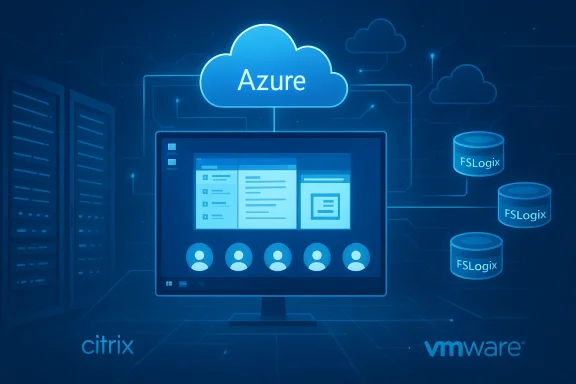
The combination of FSLogix, Office optimizations, and partners like Citrix and VMware gives IT leaders options: adopt WVD as the primary desktop platform, use it as an Azure-backed option alongside existing virtualization estates, or leverage partners to maintain legacy tooling while getting Azure’s elasticity. Independent coverage and early reporting confirmed Microsoft’s core claims about multi-session Windows 10, Office 365 optimizations, and Windows 7 ESU availability when WVD launched. However, some caveats matter in decision-making. The most important are network readiness, app compatibility, and accurate cost modeling. The promise of “deploy in minutes” is real for getting management and host VMs online, but enterprise projects still require careful migration planning, testing, and governance to avoid surprise costs or service disruptions. The Windows 7 ESU provision was and remains a helpful tactical bridge, but it should not be treated as a substitute for an application modernization plan.
The real-world value — lower operational overhead, improved Office performance in non-persistent environments, and a practical migration path for Windows 7 workloads — depends on disciplined piloting, a rigorous assessment of app compatibility, and careful financial modeling of Azure consumption. When those prerequisites are met, WVD can deliver strong flexibility and scale for modern desktop needs; without them, the platform risks becoming another under-optimized cloud bill or a compatibility headache.
Source: BetaNews Microsoft launches Azure-based Windows Virtual Desktop for running Windows in the cloud
 Background
Windows Virtual Desktop was first publicly previewed as Microsoft’s fully managed desktop- and app-virtualization service on Azure after an initial private preview. The platform was positioned from the outset as a different kind of cloud VDI: instead of just hosting single-user VM instances, WVD introduced a multi-session Windows 10 experience — a unique edition of Windows 10 that supports concurrent user sessions on the same VM while maintaining the modern Windows 10 desktop semantics and Office compatibility. Microsoft tied this capability to Office 365 ProPlus performance optimizations and offered a path to virtualize Windows 7 instances on Azure with free Extended Security Updates (ESU) during the migration window. The service matured quickly from preview to general availability and has been extended via a partner ecosystem (Citrix, VMware partners, FSLogix integration and other ISVs and SIs) to accommodate enterprises with existing virtualization stacks and third-party tooling needs. Microsoft’s narrative: host the platform management on Azure, let customers pick the VM sizes and storage tools they prefer, and integrate security and identity using the Microsoft 365 stack. What Windows Virtual Desktop actually delivers
Key technical capabilities
- Windows 10 Enterprise multi-session — a cloud-only SKU that enables multiple simultaneous interactive user sessions on a single VM image while preserving the full Windows 10 desktop experience. This is distinct from using Windows Server with RDS to serve desktop sessions and is a central differentiator Microsoft emphasizes.
- Office 365 ProPlus optimization — application-level optimizations and the integration of FSLogix (acquired by Microsoft) to improve Office profile performance, reduce logon times, and manage user profiles in non-persistent desktop environments. FSLogix containers allow Outlook caches, OneDrive data, and other profile artifacts to be mounted efficiently for virtualized sessions.
- Windows 7 Extended Security Updates on Azure — customers who must maintain Windows 7 for legacy app compatibility can virtualize Windows 7 on WVD and receive free ESUs for a limited transition window, giving organizations time to modernize without immediate exposure to unpatched vulnerabilities. Microsoft set a time-limited ESU period for Windows 7 workloads running in the service.
- Managed control plane — Microsoft hosts the connection broker, gateway, diagnostics and management layers as a service on Azure; customers run the session host VMs under their own Azure subscriptions and pay Azure compute/storage costs. This is a SaaS-style separation: the management plane is provided at no additional charge while consumption-based Azure resources are billed to the customer.
- Extensible partner ecosystem — integrations by Citrix, VMware, and ISVs allow existing management and tooling investments to extend to WVD. Citrix, for example, can deliver Citrix Cloud services on top of WVD to provide layered management and user experience features.
Deployment model and licensing basics
Windows Virtual Desktop’s economics are built on two parts: the WVD management service (hosted by Microsoft) and the Azure-hosted session hosts (which live in the customer’s subscription). Microsoft’s communications state that customers who already have eligible Microsoft 365 or Windows licensing (for example Microsoft 365 F1/E3/E5, Windows 10 Enterprise E3/E5, or Windows VDA) can access the WVD service without purchasing separate WVD licenses — the only charges are the underlying Azure compute, storage and networking consumption. Microsoft also points IT teams toward cost-optimizations such as Azure Reserved Instances for predictable savings. That said, licensing details and eligibility can be complex in hybrid or multi-vendor scenarios and should be validated against contract terms.Why this matters for enterprises: benefits and operational advantages
Faster deployments, simplified operations
Microsoft positions WVD as the fastest way to stand up Windows desktops in the cloud because the management components are delivered as a service. IT teams no longer need to build and operate the brokering, gateway, diagnostic and connection layers — Microsoft runs those — which lowers operational overhead and reduces time-to-first-desktop. Customers still select VM sizes, storage tiers and network topologies in their Azure subscriptions, but the elimination of an in-house brokering stack is a meaningful simplification for many orgs.Continuity for legacy apps — Windows 7 ESUs on Azure
Older applications that cannot be easily recompiled or recontainerized remain a major migration blocker. Microsoft’s approach of allowing Windows 7 images to run in WVD with Extended Security Updates moves the security burden while keeping legacy apps available and supported for a transition period. This is particularly useful for regulated industries where app rewrite projects can take years. The ESU offer is time-bound and aimed at buy time for migration rather than an indefinite lifeline.Office 365 performance and profile strategy
FSLogix integration addresses one of virtualization’s longest-standing pains: profile management. By containerizing user profiles and mounting them as-needed, organizations can eliminate long logon times and inconsistent Office behavior across non-persistent VMs. Microsoft’s emphasis on Office 365 ProPlus optimization is not just marketing: in practice, the FSLogix approach materially improves Outlook and OneDrive user experiences compared with traditional roaming profile approaches.Cost control with Azure tooling
Because customers control the session host VMs in their subscription, they can apply standard Azure cost strategies: Reserved Instances, spot/low-priority VMs for non-critical workloads, auto-scale tooling, and careful selection of VM types for CPU and memory profiles. Microsoft highlights potential savings using multi-session Windows 10 (consolidating users onto fewer VMs) and Azure Reserved Instances for predictable workloads. Practical cost outcomes depend heavily on user density, application profiles, and network design.Technical deep dive: how WVD fits into an Azure architecture
Control plane vs. data plane
The WVD control plane — brokering, web gateway, diagnostics and the management APIs — is delivered and maintained by Microsoft. Customer-owned session hosts (the data plane) are standard Azure VMs running Windows 10 Enterprise multi-session, Windows 7, or Windows Server. This split has two implications:- Microsoft updates and secures the broker and connection infrastructure.
- Customers retain control and responsibility for the compute, storage, network configuration, and OS images used by their session hosts.
VM sizing and image considerations
Any Azure VM family (including GPU-enabled SKUs) can be used as a session host, but Microsoft published recommendations (for example D-series VMs) for common task-worker profiles and suggests the Windows 10 Enterprise multi-session images in the Azure Gallery for optimized Office behavior. For persistent VDI use cases, single-user Windows 10 VMs are supported as well. Administrators should measure latency, user density and application memory/CPU requirements when mapping users to VM sizes.Profile storage and FSLogix containers
FSLogix redirects user profiles and Office caches into a VHD(X) container that is attached at session logon — this reduces repeated profile copies and dramatically improves the performance of Outlook and OneDrive in non-persistent environments. This container-based approach is now Microsoft-offered to WVD users as a core part of the Office virtualization story.Real-world use cases and customer scenarios
- Firstline and remote workers — organizations that want to give secure Windows app access to mobile or low-cost devices can host desktops in Azure and deliver a consistent, centrally managed environment.
- Regulated industries — financial and healthcare orgs that require strong control over data residency and compliance can centralize data in Azure while using conditional access and integrated Microsoft 365 protections.
- Legacy app containment — firms with critical Windows 7-only line-of-business apps can virtualize those apps within Azure and buy time to rewrite or re-platform them without exposing on-prem endpoints to unpatched vulnerabilities.
- Temporary or seasonal scaling — companies that need to spin up user capacity seasonally (call centers, retail support) can use Azure elasticity to expand and shrink capacity without on-prem capital spend.
Strengths — what Microsoft got right
- Integration with Azure’s ecosystem gives organizations access to global regions, advanced networking (Azure Virtual Network), diagnostics, and identity controls without having to stitch together disparate components.
- A genuine multi-session Windows 10 offering fills a gap for customers who wanted the familiarity of a full Windows 10 desktop without the per-user VM overhead associated with classic single-session VDI or Windows Server RDS approaches. Microsoft’s multi-session engineering is a real differentiator.
- FSLogix integration addresses profile and Office performance issues that historically plagued virtual desktop deployments.
- Built-in migration path for Windows 7 gives enterprises an architected transition route rather than forcing an immediate lift-and-shift or paying for on-prem patching indefinitely.
Risks and limitations — what IT teams must scrutinize
Data residency and preview-era caveats
During early preview phases, Microsoft hosted WVD control-plane data in specific Azure regions (initially US East 2 for the public preview). Enterprises with strict data residency requirements should confirm where management telemetry and metadata are stored in production and whether that aligns with regulatory obligations. Data localization expanded at GA, but customers must validate region placement during design and contracting.Network design and latency
Remote desktop performance is sensitive to network latency and packet loss. Moving desktops to Azure relocates the compute to a Microsoft datacenter; organizations must ensure their WAN, SD-WAN or regional connectivity provides sufficiently low latency for the expected user base, especially for multimedia-heavy or high-interactivity applications.Application compatibility and licensing complexity
Not all Windows applications behave identically in a multi-session environment. Some legacy installers, licensing dongles, or device-dependent drivers can break in a virtualized, multi-user environment. Administrators must test application compatibility rigorously before migration. Equally, the licensing labyrinth (enterprise agreements, VDA, RDS CALs, Microsoft 365 entitlements) still requires careful interpretation for hybrid and non-standard licensing scenarios. Microsoft’s licensing guidance is the authoritative source, and organizations should involve licensing specialists.Cost misestimation risk
While the WVD management plane is free, the Azure compute/storage/network bill can exceed expectations if user density or VM selection is sub-optimal. Storage IOPS needs (for FSLogix disks), GPU-backed VMs, or always-on persistent desktops increase cost. It is vital to model expected concurrency, use Azure cost tools and pilot representative user loads to validate assumptions. Some third-party analyses early on suggested typical task-worker Azure costs could be relatively low, but real-world outcomes vary widely by workload.The ecosystem: partners, tooling and migration aids
Microsoft built WVD to be extendable and to respect existing partner investments. Key ecosystem components include:- Citrix and VMware integrations for customers who want to keep Citrix/VMware management or user experience layers while leveraging WVD’s multi-session and Azure-native features.
- FSLogix to manage user profiles and Office caching efficiently, now part of Microsoft’s set of virtualization tools.
- Marketplace and ISV tooling for printing, monitoring, app layering, assessment and DaaS packaging, helping professional services firms deliver turnkey migration projects.
Recommendations for IT leaders and architects
- Identify representative pilot groups. Start with non-critical knowledge-worker or task-worker cohorts to validate user density and VM sizing.
- Test application compatibility. Use pilot VMs to exercise persistent and non-persistent scenarios, licensing checks, and device redirection (printers, USB).
- Model costs conservatively. Include FSLogix storage IOPS, peak concurrency, and potential GPU needs. Use Azure Cost Management and consider Reserved Instances for baseline workloads.
- Validate regional compliance. Confirm where control-plane metadata resides and whether that meets corporate and regulatory rules for data residency.
- Retain a hybrid strategy. For some apps, on-prem remains necessary; a hybrid approach provides flexibility and reduces migration risk.
- Engage licensing expertise. Licensing nuances (e.g., which Microsoft 365 or Windows SKUs permit WVD access) must be validated against contractual terms for peace of mind.
Final analysis — strategic fit and long-term outlook
Windows Virtual Desktop accelerated Microsoft’s cloud-first desktop strategy by converting the management plane into a Microsoft-hosted service while leaving customers in control of the session-host resources and Azure billing. The decision to introduce a multi-session Windows 10 SKU addressed a historical gap in the virtualization market: giving users a true Windows 10 experience while increasing consolidation density compared with single-session VDI.The combination of FSLogix, Office optimizations, and partners like Citrix and VMware gives IT leaders options: adopt WVD as the primary desktop platform, use it as an Azure-backed option alongside existing virtualization estates, or leverage partners to maintain legacy tooling while getting Azure’s elasticity. Independent coverage and early reporting confirmed Microsoft’s core claims about multi-session Windows 10, Office 365 optimizations, and Windows 7 ESU availability when WVD launched. However, some caveats matter in decision-making. The most important are network readiness, app compatibility, and accurate cost modeling. The promise of “deploy in minutes” is real for getting management and host VMs online, but enterprise projects still require careful migration planning, testing, and governance to avoid surprise costs or service disruptions. The Windows 7 ESU provision was and remains a helpful tactical bridge, but it should not be treated as a substitute for an application modernization plan.
Conclusion
Azure-based Windows Virtual Desktop reshaped cloud VDI by combining a managed control plane, Windows 10 multi-session, Office 365 optimizations and a partner-forward approach into a single Azure-native offering. For organizations wrestling with legacy apps, compliance needs, or the operational cost of managing on-prem virtualization infrastructure, WVD offers a compelling toolset to migrate desktops and apps to Azure while preserving user experience and enforcing modern security and identity controls.The real-world value — lower operational overhead, improved Office performance in non-persistent environments, and a practical migration path for Windows 7 workloads — depends on disciplined piloting, a rigorous assessment of app compatibility, and careful financial modeling of Azure consumption. When those prerequisites are met, WVD can deliver strong flexibility and scale for modern desktop needs; without them, the platform risks becoming another under-optimized cloud bill or a compatibility headache.
Source: BetaNews Microsoft launches Azure-based Windows Virtual Desktop for running Windows in the cloud