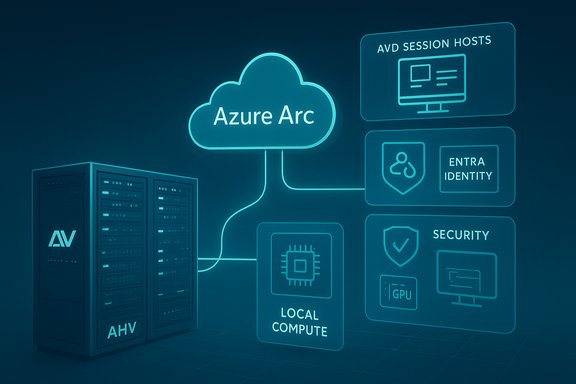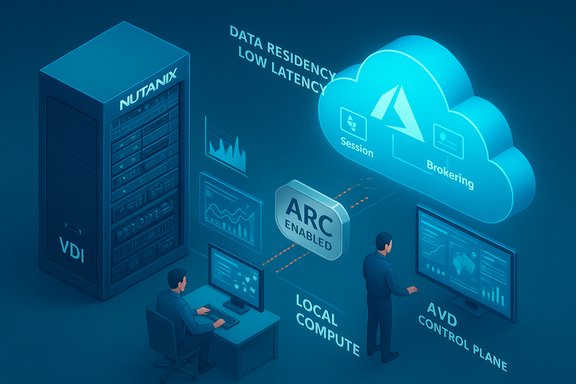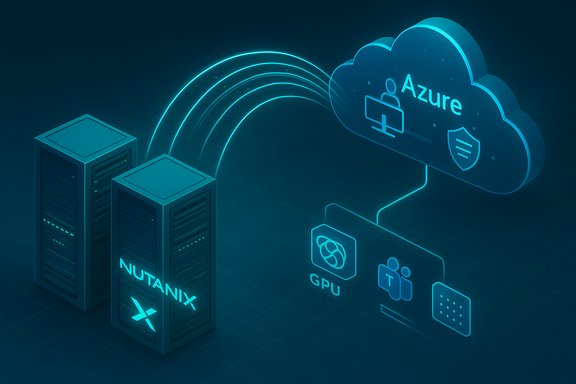
Nutanix and Microsoft have taken a significant step toward a more flexible, partner-driven VDI landscape by announcing that the Nutanix Cloud Platform will support Azure Virtual Desktop (AVD) for hybrid environments, enabling organizations to run AVD session hosts on-premises on Nutanix AHV while using Azure for brokering, management, and cloud-native integrations.
Background / Overview
The announcement, revealed during Microsoft Ignite 2025, builds on two converging trends: enterprises’ desire to avoid lock‑in to a single deployment model, and Microsoft’s push to expand AVD beyond cloud‑native Azure deployments into hybrid topologies using Azure Arc. The new hybrid AVD capability lets customers use Arc‑Enabled Servers to register on‑premises VMs as AVD session hosts, which in turn allows partners such as Nutanix to provide lifecycle, provisioning, and session‑host operations for environments that must remain local for performance, sovereignty, or compliance reasons.This move is positioned as a preview capability: Nutanix has confirmed support for AVD on Nutanix AHV is under development, while Microsoft has published the limited‑preview framework called Azure Virtual Desktop for hybrid environments, listing Nutanix among launch partners alongside other tooling vendors. The preview is explicitly designed to broaden customers’ options — enabling on‑prem AHV, VMware vSphere, Hyper‑V, or even physical Windows Server hosts to participate in the AVD control plane.
What Microsoft and Nutanix Actually Announced
Microsoft: AVD for hybrid environments (Azure Arc + AVD)
Microsoft’s AVD hybrid announcement introduces a model where Azure Arc‑enabled servers can act as AVD session hosts. The control plane (brokering, management, identity integration, and user access) remains in Azure, while session hosts live where organizations prefer — on‑premises or in alternate clouds. Microsoft positioned this as a limited preview with partner integrations to provide provisioning and lifecycle capabilities for non‑Azure hypervisors and infrastructure.Key bullet points about Microsoft’s hybrid AVD model:
- AVD control plane remains cloud‑hosted in Azure; session hosts can register via Azure Arc.
- Hybrid host types include Hyper‑V, Nutanix AHV, VMware vSphere, physical Windows Servers, and other Arc‑compatible hosts.
- VM lifecycle management on hybrid hosts can be delivered by partner tools rather than the Azure native provisioning pipeline.
- The preview excludes some cloud‑only features (for example, Windows 11 Enterprise Multi‑Session is not supported in the hybrid preview).
Nutanix: AVD on AHV (under development)
Nutanix announced that the Nutanix Cloud Platform will support AVD session hosts running on Nutanix AHV, integrating their hypervisor and management stack with Microsoft’s hybrid AVD framework. Nutanix frames the capability around hybrid flexibility, performance for latency‑sensitive workloads, and compliance concerns that drive on‑premises deployments in regulated industries.What Nutanix is promising:
- Ability to run AVD session hosts on‑premises on Nutanix AHV.
- Use of Azure brokering and management (via Azure Arc) while preserving local control and performance.
- Improved options for burst scaling and disaster recovery by combining AHV with Azure resources (including Nutanix Cloud Clusters on Azure for hybrid mobility).
- Integration with Microsoft 365, Teams optimizations, and Microsoft Entra identity services through the AVD control plane.
Why this matters: Strategic and technical implications
1) Choice without vendor lock‑in — a practical breakthrough
One of the clearest benefits is giving enterprises a real choice in where session hosts run. Organizations with large investments in Nutanix infrastructure (or with strict data‑residency rules) can keep session hosts local, while still using Microsoft’s cloud‑native management, policy, and security integrations. That lowers migration friction and makes hybrid AVD attractive for phased cloud transformations.2) Better fit for regulated industries
Finance, healthcare, government, and other regulated sectors frequently need hard guarantees about where data resides. Running session hosts on AHV inside a local data center enables:- Tighter control over storage and networking.
- Easier certification against regional regulations and industry standards.
- Reduced legal exposure by keeping sensitive workloads in local facilities.
3) Performance and graphics workloads
Nutanix emphasizes on‑prem performance benefits for latency‑sensitive and graphics‑intensive VDI workloads. Keeping session hosts close to users and to on‑premises services can reduce latency and improve experience for demanding applications, such as CAD, 3D visualization, or financial trading desktops.4) Hybrid scale and DR through Azure
Organizations can combine on‑prem AHV VMs with Azure for burst capacity and disaster recovery. Nutanix Cloud Clusters (NC2) on Azure let customers migrate or scale workloads into Azure infrastructure without refactoring applications, providing a path for temporary scale‑out or failover.Partner ecosystem: tooling, monitoring, automation
Microsoft explicitly positioned partner tooling as a core component of the hybrid preview. The initial launch partner set includes management and performance vendors that provide lifecycle, monitoring, and automation capabilities for non‑Azure environments. That partner approach matters because Azure’s native AVD provisioning is tightly integrated with Azure resource management; bringing non‑Azure hosts into that choreography requires lifecycle tooling from partners.Partners in the preview bring:
- Provisioning and image management for on‑prem hosts.
- Real‑time performance monitoring and user‑experience telemetry.
- Automated testing, capacity planning, and cost‑control tooling.
- Integration with identity and policy engines (Microsoft Entra, conditional access).
Licensing and functional limitations — what to watch closely
This hybrid path increases flexibility, but it also introduces several important constraints and real‑world caveats that IT teams must evaluate before committing.Windows 11 Enterprise Multi‑Session limitation
In the initial preview, Windows 11 Enterprise Multi‑Session is not supported for hybrid session hosts. That has concrete implications:- Multi‑session density and licensing economics that many AVD customers rely on are unavailable in hybrid host pools.
- Organizations that depend on Windows 11 Multi‑Session for high‑density VDI must stay on Azure or Azure Local for that capability, at least initially.
Licensing complexity
AVD access and OS entitlement still require the appropriate Microsoft licensing. Typical entitlements include Microsoft 365 E3/E5, Windows Enterprise SKUs, or Windows Virtual Desktop rights built into certain subscriptions. If session hosts run Windows Server, RDS CALs or other licensing mechanisms may be required. Key considerations:- Ensure user subscriptions or RDS CALs are correctly assigned and validated.
- Understand that license validation may require connectivity to Microsoft services.
- Shared‑computer activation for Microsoft 365 Apps and FSLogix profile strategies must be validated in a hybrid context.
Preview status and support matrix
- The Nutanix support for AVD is currently under development; there is no GA date and no full joint support matrix published yet.
- Organizations should treat the preview as not production‑ready for critical workloads until joint documentation and support commitments are published.
- Confirm support boundaries: who handles incidents that span AHV hypervisor issues and AVD control plane problems — Nutanix, Microsoft, or both? Expect the need for defined joint support processes.
Operational and security considerations
Connectivity and control plane dependencies
Hybrid AVD keeps the management and brokering plane in Azure, which means on‑prem session hosts must maintain reliable, secure connectivity to Azure. Operationally:- Design resilient network connectivity to Azure, including redundant internet paths or ExpressRoute where required.
- Plan for scenarios where cloud connectivity is degraded — what is the impact on new sessions and existing sessions?
- Review firewall and proxy rules to permit Azure Arc, Microsoft Entra, and AVD control traffic.
Identity and access
Integration with Microsoft Entra (Azure AD) and conditional access policies remains central to identity control. Hybrid deployments must ensure:- Session hosts can join or register with Microsoft Entra as required.
- Conditional access and multifactor authentication flows are validated across on‑prem and cloud endpoints.
Monitoring, telemetry, and user experience
AVD relies on telemetry (user experience, latency, CPU, GPU usage) to operate well. Partners and Nutanix will need to provide:- Real‑time monitoring that maps to AVD user‑experience KPIs.
- Alerting and capacity automation to avoid poor user experiences during peak demand.
- Integration with FSLogix profile telemetry to detect profile mounting failures and other common VDI failure modes.
Security posture and compliance
While running session hosts on‑prem may make compliance audits easier, hybrid architectures also introduce new exposure:- The attack surface includes both the on‑prem virtual infrastructure and the Azure control plane.
- Azure Arc registration and cross‑tenant management must be implemented with least‑privilege principles.
- Data flows between on‑prem storage and Azure (for backup, profile storage, or DR) must be secured and documented.
Deployment guidance: practical steps for pilots and rollouts
- Start with a small pilot using non‑critical user groups to validate:
- Session host registration via Azure Arc.
- Identity integration (Microsoft Entra) and conditional access.
- FSLogix profile mounting and Microsoft 365 shared activation.
- Validate network and latency characteristics from user locations to the on‑prem data center and to Azure control endpoints.
- Confirm licensing entitlements and license activation flows for Microsoft 365 and Windows.
- Test application compatibility, especially GPU drivers and vendor‑licensed apps (Adobe, Autodesk, etc., and ensure licensing works in shared and single‑session models.
- Measure user experience and use partner monitoring tools to collect telemetry and build baseline KPIs.
- Design DR and burst scenarios using Nutanix Cloud Clusters (NC2) on Azure or alternative cloud options; validate failover and failback processes.
Risks, unknowns and where to be cautious
- Production readiness: This is a preview path. Nutanix support for AVD on AHV is under development and lacks documented GA support and joint operational playbooks. Treat the preview as experimental until both vendors publish firm support and runbooks.
- Feature parity: Cloud‑native AVD features may not be available in hybrid mode (e.g., Windows 11 Multi‑Session absent in preview). Expect feature differences and plan accordingly.
- Support responsibility: Hybrid incidents cross vendor boundaries. Define escalation and incident ownership before wide deployment.
- Licensing nuance: Licensing interactions between Microsoft 365, Windows client rights, RDS CALs, and third‑party vendor licenses (e.g., Adobe) can introduce surprises during activation and compliance checks.
- Operational complexity: Running dual management planes (Prism/Prism Central + Azure) can create friction; automation and tooling from partners will be crucial to simplify operations.
- Unverifiable or vendor‑collected claims: Some quoted partner statements or channel‑level anecdotes (e.g., local partner demand trends or specific local executive quotes) may not appear in the official press materials. These should be validated with local partner contacts before relying on them for procurement decisions.
Who benefits most — and who should wait
Beneficiaries:- Organizations with strict data‑residency or sovereign cloud requirements that cannot put session hosts into public Azure.
- Enterprises with significant Nutanix AHV footprints seeking to modernize VDI without wholesale migration.
- Regulated industries needing on‑prem control while leveraging Microsoft identity and security services.
- Organizations that depend on Windows 11 Enterprise Multi‑Session density economics.
- Teams that lack the networking maturity or support SLA to ensure resilient connectivity to Azure control planes.
- Deployments that require immediate, GA‑backed joint support across Nutanix and Microsoft for mission‑critical desktops.
Commercial and channel impact
For Nutanix partners and managed service providers, hybrid AVD creates new revenue opportunities:- Migration projects that keep existing hardware investments while modernizing management and security stacks.
- Managed AVD hosting using Nutanix as the substrate for regulated customers.
- Hybrid DR and burst services leveraging Nutanix Cloud Clusters on Azure to provide integrated failover.
- Clarify support scopes and SLAs with customers.
- Invest in tooling and automation that bridge Prism/Prism Central and the Azure control plane.
- Up‑skill around Azure Arc, Microsoft Entra, and AVD management even when the session hosts remain on‑premises.
Final assessment and recommended approach
The Nutanix + Microsoft hybrid AVD announcement is a pragmatic, industry‑savvy step that acknowledges the realities of enterprise infrastructure: many organizations want cloud benefits without surrendering local control. The preview opens a compelling technical path for regulated and latency‑sensitive VDI workloads to stay on‑premises while tapping Azure’s identity, security, and brokering services.That said, the preview status, functional gaps (notably no Windows 11 Multi‑Session in hybrid), and the need for rigorous interoperability and support playbooks mean this is not yet a drop‑in replacement for cloud AVD in production. Enterprises should pursue a cautious, test‑driven adoption:
- Treat the hybrid AVD on AHV capability as a controlled pilot in 2025–early‑2026, not a mass rollout vehicle.
- Validate licensing, performance, and user‑experience with representative workloads.
- Insist on written support commitments and joint operational runbooks from vendors before migrating mission‑critical VDI estates.
- Consider hybrid AVD as part of a staged migration strategy that leverages Nutanix NC2 and Azure for burst and DR scenarios.
Conclusion
The Nutanix‑backed hybrid AVD preview marks a turning point in enterprise desktop virtualization: it broadens the choices available to organizations and brings hybrid multicloud realities into the mainstream AVD story. For customers and partners, the opportunity is clear — but so is the need for caution. Rigorous pilots, clear support agreements, and careful licensing validation will be essential to realize the promise of on‑prem AVD session hosts running on Nutanix AHV without trading away the operational simplicity and advanced capabilities provided by Azure’s cloud control plane.
Source: ARNnet Microsoft Azure virtual desktop to get Nutanix support in hybrid cloud - ARN