

BackupChain is expanding its Hyper-V backup capabilities with an update aimed squarely at Windows Server administrators who need faster incremental protection, lower storage consumption, simplified recovery, and greater assurance that a backup chain will actually restore. The release positions the long-running Windows-focused platform as a practical Veeam alternative for small and midsize organizations, managed service providers, and IT teams that want capable Hyper-V protection without adopting a larger enterprise backup stack.
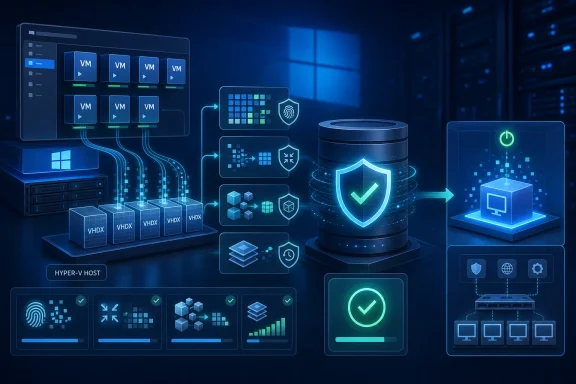
At the center of the announcement are four closely related improvements: redesigned compression and deduplication, Hyper-V Resilient Change Tracking support, single-pass recovery workflows, and a new Deep Verification capability for virtual machine backups. None of those features is meaningful in isolation. Together, however, they address the recurring realities of virtual infrastructure: backup windows are shrinking, virtual disks are growing, retention requirements are expanding, and a technically “successful” backup job is not necessarily a recoverable backup.
For Windows Server 2025 and Windows 11 environments running Hyper-V, the update deserves attention not because it reinvents host-based backup, but because it leans more heavily into Microsoft’s native virtualization and change-tracking architecture while emphasizing operational simplicity. That combination may appeal to organizations that view backup software as essential infrastructure rather than another complex platform requiring specialized administration.
BackupChain has built its identity around Windows backup, physical and virtual machine protection, disk imaging, file-level backup, and storage-efficient incremental processing. Its newest Hyper-V enhancements continue that approach, focusing on the environments many smaller IT departments already operate:
Still, the phrase “Veeam alternative” needs context. Veeam is a broad data protection ecosystem with extensive enterprise integrations, orchestration, monitoring, cloud options, and support for large-scale heterogeneous environments. BackupChain is not trying to mirror every aspect of that model. Instead, it is presenting a more focused proposition: strong Windows and Hyper-V backup capabilities, flexible storage destinations, compression-driven retention efficiency, and a licensing approach designed to be easier for smaller organizations to absorb.
That narrower scope can be a strength. It can also become a limitation for businesses that require a single platform spanning diverse hypervisors, Kubernetes deployments, SaaS applications, immutable object storage, and highly automated disaster recovery runbooks.
A virtual machine is also more than its main
A proper Hyper-V backup workflow should aim to provide:
That gap between backup completion and recovery confidence is where BackupChain’s newly emphasized Deep Verification feature is intended to matter.
Before RCT, backup products often relied more heavily on host-level Volume Shadow Copy Service behavior, checkpoints, or broad scans of virtual disk files to determine what had changed. Those approaches could work, but they could also introduce higher overhead, longer backup windows, and more pressure on storage and network resources.
For administrators, the practical benefits are clear:
That technical foundation supports BackupChain’s claim that RCT-enabled Hyper-V backup can run not only on Windows Server hosts but also on Windows 10 and Windows 11 Hyper-V systems. This is useful for labs, branch offices, software development environments, training setups, and smaller deployments where a Windows client machine is operating as a local virtualization host.
Administrators should verify several areas before expecting dramatic gains:
The platform has long emphasized in-file delta compression and deduplication-style incremental processing for large files such as virtual disks and databases. The goal is to avoid repeatedly storing unchanged portions of the same VHDX, VMDK, database file, or file server dataset.
When backup data consumes less space, an organization can potentially:
Already compressed formats, encrypted data, multimedia files, and some database workloads can yield less benefit than file shares containing many redundant documents, installers, templates, or similar operating system images. High churn workloads can also produce larger increments than expected.
Windows Server 2025 itself adds additional storage capabilities, including ReFS-native deduplication and compression options for supported scenarios. That creates an interesting opportunity but also a planning requirement: administrators must understand whether they are using backup-software compression, file system optimization, or both, and how the combined design affects performance, capacity estimates, troubleshooting, and recovery.
The right answer is not automatically “enable every compression layer.” It is to test the backup target under realistic workload conditions and ensure enough free capacity remains for retention growth, temporary operations, and emergency recovery staging.
The exact recovery workflow will depend on the backup type, target host, storage path, and desired outcome. But the principle is compelling: an administrator should be able to select a restore point and bring a VM back online without manually assembling components from multiple backup layers or navigating an unnecessarily fragmented restore process.
IT teams should still document:
That is exactly the kind of function backup products should prioritize. Storage media can degrade, repositories can become corrupted, credentials can expire, retention rules can remove a needed restore point, and a chain of incrementals can become difficult to trust if it has never been tested.
Organizations should treat verification as one layer in a broader resilience program:
A strong design usually includes:
Administrators should apply core safeguards:
The addition of Hyper-V RCT support should help make incremental protection more efficient on supported Windows Server and Windows client Hyper-V hosts. Redesigned compression and deduplication aim to improve the storage economics of keeping more recovery points. Single-pass restores target a simpler route back to service, while Deep Verification addresses the uncomfortable but essential question behind every backup job: will this data actually recover?
For smaller Windows-centric environments, that package makes BackupChain a credible Hyper-V backup option and a potentially compelling Veeam alternative. Its appeal is strongest where administrators value directness, flexible backup destinations, storage efficiency, and a lower-overhead toolset over the broader ecosystem features of enterprise-scale platforms.
The important caveat is that no product announcement should replace validation in the field. Organizations considering the update should test backup performance, compression behavior, repository growth, RCT compatibility, restore workflows, and verification results using their own workloads. In backup and disaster recovery, the most persuasive feature is not a promise of speed or simplicity. It is a proven, repeatable restoration when the business needs it most.
At the center of the announcement are four closely related improvements: redesigned compression and deduplication, Hyper-V Resilient Change Tracking support, single-pass recovery workflows, and a new Deep Verification capability for virtual machine backups. None of those features is meaningful in isolation. Together, however, they address the recurring realities of virtual infrastructure: backup windows are shrinking, virtual disks are growing, retention requirements are expanding, and a technically “successful” backup job is not necessarily a recoverable backup.
For Windows Server 2025 and Windows 11 environments running Hyper-V, the update deserves attention not because it reinvents host-based backup, but because it leans more heavily into Microsoft’s native virtualization and change-tracking architecture while emphasizing operational simplicity. That combination may appeal to organizations that view backup software as essential infrastructure rather than another complex platform requiring specialized administration.
 Overview: A Windows-Centric Backup Strategy
BackupChain has built its identity around Windows backup, physical and virtual machine protection, disk imaging, file-level backup, and storage-efficient incremental processing. Its newest Hyper-V enhancements continue that approach, focusing on the environments many smaller IT departments already operate:- Windows Server 2025
- Windows Server 2022, 2019, and 2016
- Windows 11 and supported Windows desktop Hyper-V hosts
- Hyper-V deployments on standalone hosts, clustered infrastructure, and Cluster Shared Volumes
- Virtual machines backed by VHD and VHDX storage
- Local, removable, network, and FTP/FTPS backup targets
Still, the phrase “Veeam alternative” needs context. Veeam is a broad data protection ecosystem with extensive enterprise integrations, orchestration, monitoring, cloud options, and support for large-scale heterogeneous environments. BackupChain is not trying to mirror every aspect of that model. Instead, it is presenting a more focused proposition: strong Windows and Hyper-V backup capabilities, flexible storage destinations, compression-driven retention efficiency, and a licensing approach designed to be easier for smaller organizations to absorb.
That narrower scope can be a strength. It can also become a limitation for businesses that require a single platform spanning diverse hypervisors, Kubernetes deployments, SaaS applications, immutable object storage, and highly automated disaster recovery runbooks.
Why Hyper-V Backup Is Still a Difficult Problem
Hyper-V backup is often described as simple because the host can protect virtual machines without an agent installed inside every guest. In practice, the underlying workflow is more demanding. A useful backup product must coordinate application consistency, virtual machine configuration, virtual disks, checkpoints, storage paths, retention, and recovery operations without creating unacceptable production impact.A virtual machine is also more than its main
.vhdx file. A complete VM backup must account for the virtual machine’s configuration, virtual disks, and the state information needed to recreate or restore it safely. For workloads such as Microsoft SQL Server, Exchange Server, Active Directory, and line-of-business applications, consistency requirements add another layer of concern.The difference between a copied VM and a recoverable VM
A basic file copy of a virtual disk may be useful in some narrow circumstances, but it is not a substitute for a coordinated backup. Copying files while a VM is active can result in inconsistent data, missed configuration elements, or recovery complications when checkpoint files and related state are involved.A proper Hyper-V backup workflow should aim to provide:
- A recognizable restore point for the VM
- Application-consistent processing where supported and required
- Protection for configuration and virtual disk data
- Efficient incremental operations after the initial backup
- A documented path to restore on the original or a replacement host
- Validation that the stored recovery data remains usable
That gap between backup completion and recovery confidence is where BackupChain’s newly emphasized Deep Verification feature is intended to matter.
Hyper-V Resilient Change Tracking Brings a More Efficient Incremental Model
The biggest technical element of the update is expanded support for Hyper-V Resilient Change Tracking, commonly called RCT. This is Microsoft’s change-tracking technology for virtual disks and is fundamental to efficient modern Hyper-V backup designs.Before RCT, backup products often relied more heavily on host-level Volume Shadow Copy Service behavior, checkpoints, or broad scans of virtual disk files to determine what had changed. Those approaches could work, but they could also introduce higher overhead, longer backup windows, and more pressure on storage and network resources.
What RCT actually changes
RCT allows backup software to identify the changed portions of supported virtual hard disks since a defined tracking point. Instead of treating an entire multi-terabyte VHDX as new data during every backup cycle, a backup application can request the ranges that have changed and process the increment more selectively.For administrators, the practical benefits are clear:
- Less data read from production storage
- Less data written to the backup repository
- Reduced backup traffic across the network
- Shorter incremental backup windows
- Lower impact on hosts with large virtual disks
- Better scalability as VM counts and disk sizes grow
That technical foundation supports BackupChain’s claim that RCT-enabled Hyper-V backup can run not only on Windows Server hosts but also on Windows 10 and Windows 11 Hyper-V systems. This is useful for labs, branch offices, software development environments, training setups, and smaller deployments where a Windows client machine is operating as a local virtualization host.
The conditions behind the headline
RCT is valuable, but it is not a magic switch that makes every backup fast. Its usefulness depends on the virtual machine configuration, Hyper-V version, disk layout, workload churn, storage performance, and the backup application’s own implementation.Administrators should verify several areas before expecting dramatic gains:
- Host and guest compatibility
The Hyper-V host must support the applicable backup APIs, and virtual machine configuration versions should be appropriate for the environment. - Virtual disk design
VHDX-based VM storage is typically the expected path for modern Hyper-V functionality. Legacy disk formats, shared-disk scenarios, and unusual storage architectures can have different operational constraints. - Change rate
RCT reduces unnecessary processing, but a highly active database or transaction-heavy server may still generate substantial incremental data. - Repository performance
Faster incremental capture does not solve a slow backup target. USB disks, low-bandwidth WAN links, saturated NAS devices, and undersized RAID arrays can remain bottlenecks. - Retention design
Efficient increments can reduce daily storage consumption, yet long retention windows still need thoughtful capacity planning.
Compression and Deduplication Target the Storage Cost Problem
BackupChain also says it has redesigned its deduplication engine to reduce storage use while improving backup speed. This is an appealing promise at a time when virtual disks routinely grow into the hundreds of gigabytes or multiple terabytes, while organizations are asked to preserve more restore points for longer.The platform has long emphasized in-file delta compression and deduplication-style incremental processing for large files such as virtual disks and databases. The goal is to avoid repeatedly storing unchanged portions of the same VHDX, VMDK, database file, or file server dataset.
Why backup-side efficiency matters
Storage efficiency is not merely an accounting issue. It shapes the entire backup strategy.When backup data consumes less space, an organization can potentially:
- Keep more restore points on local storage
- Maintain longer retention periods without immediately expanding capacity
- Copy backup data to an offsite location more efficiently
- Use smaller or less expensive repository hardware
- Reduce the duration of backup replication or rotation tasks
- Improve the practicality of a 3-2-1 backup strategy
Compression is not always free
The caution is that compression and deduplication always involve trade-offs. They consume CPU, memory, and I/O resources. The storage savings may also vary widely by workload.Already compressed formats, encrypted data, multimedia files, and some database workloads can yield less benefit than file shares containing many redundant documents, installers, templates, or similar operating system images. High churn workloads can also produce larger increments than expected.
Windows Server 2025 itself adds additional storage capabilities, including ReFS-native deduplication and compression options for supported scenarios. That creates an interesting opportunity but also a planning requirement: administrators must understand whether they are using backup-software compression, file system optimization, or both, and how the combined design affects performance, capacity estimates, troubleshooting, and recovery.
The right answer is not automatically “enable every compression layer.” It is to test the backup target under realistic workload conditions and ensure enough free capacity remains for retention growth, temporary operations, and emergency recovery staging.
Single-Pass Restores Address the Moment That Actually Matters
A backup product earns its value during recovery, not during a scheduled job that quietly completes overnight. BackupChain’s announcement highlights single-pass restores, a term intended to describe a simpler VM recovery experience with fewer intermediate stages.The exact recovery workflow will depend on the backup type, target host, storage path, and desired outcome. But the principle is compelling: an administrator should be able to select a restore point and bring a VM back online without manually assembling components from multiple backup layers or navigating an unnecessarily fragmented restore process.
Reducing restore friction
A straightforward restore workflow can be particularly valuable in small IT teams where the person restoring a server may not be a dedicated backup engineer. During an outage, clarity matters. The administrator needs to know:- Which VM restore point is being selected
- Whether the recovery will overwrite an existing machine or create a clone
- Where virtual disks will be stored
- Whether the VM can be restored to a different host
- How networking will be handled before powering on the recovered workload
- Whether application validation is required after boot
Recovery still requires planning
“Single-pass” should not be confused with zero-decision recovery. A clean restore process does not eliminate the need for a recovery plan.IT teams should still document:
- Recovery priorities
Identify which virtual machines must be restored first. Domain services, authentication, DNS, databases, application servers, and file services have dependencies. - Recovery time objectives
Define how quickly each workload must return. A full VM restore from a local repository has a different recovery profile than an offsite transfer over a constrained connection. - Recovery point objectives
Decide how much data loss is acceptable. Daily backup schedules may be insufficient for transaction-heavy applications. - Network isolation procedures
Restored machines can create conflicts if they return with the same hostnames, IP addresses, or directory roles as live production systems. - Application-level validation
A VM that starts successfully is not automatically an application that has recovered successfully.
Deep Verification Is the Most Important New Promise
The standout feature in BackupChain’s announcement may be Deep Verification, which the company describes as complete backup-chain validation performed while normal backup operations continue. The stated objective is to confirm that a virtual machine’s backup data remains consistent and recoverable without requiring a full VM restoration.That is exactly the kind of function backup products should prioritize. Storage media can degrade, repositories can become corrupted, credentials can expire, retention rules can remove a needed restore point, and a chain of incrementals can become difficult to trust if it has never been tested.
Verification versus restoration testing
It is useful to distinguish between several levels of backup assurance:- Job success: The backup task ended without reporting an error.
- File or block verification: The product checks that stored data can be read and matches expected integrity information.
- Backup-chain verification: The product evaluates the relationship between full backups, incrementals, metadata, and restore dependencies.
- Boot or application test: A recovered VM is started in an isolated environment and tested for operating system and application functionality.
What Deep Verification cannot replace
Even comprehensive backup-chain validation cannot replace periodic recovery drills. A valid backup chain does not prove that a business application will start, that network access will work, that a license server will respond, or that users can complete their most critical workflows.Organizations should treat verification as one layer in a broader resilience program:
- Run automated verification routinely.
- Restore representative VMs on a scheduled basis.
- Test high-priority applications in an isolated network.
- Confirm that recovery documentation is current.
- Record actual recovery times.
- Review the results with business owners, not only IT staff.
A Credible Veeam Alternative for the Right Environment
BackupChain’s Veeam alternative positioning will resonate most strongly with organizations that do not need an expansive enterprise data protection ecosystem. The platform’s stated value lies in reducing cost and management overhead while retaining meaningful protection features for Windows and Hyper-V.Where BackupChain may fit well
The release appears well suited to these scenarios:- Small and midsize businesses with one or several Hyper-V hosts
- Windows Server 2025 deployments seeking host-based VM backup
- Branch offices with local Hyper-V infrastructure
- Managed service providers supporting Windows-centric customer environments
- Test labs and development environments using Windows 11 Hyper-V
- Organizations that prefer perpetual licensing over recurring platform complexity
- Teams that need flexible targets such as local disks, NAS, network shares, or FTP/FTPS destinations
- Administrators who value granular recovery and direct Windows integration
Where larger platforms retain an advantage
Organizations should be candid about where a smaller, Windows-oriented platform may not be enough. Enterprises with complex backup requirements may prioritize features such as:- Broad multi-cloud integration
- Object-storage immutability workflows
- Large-scale centralized reporting
- Advanced role-based access control
- Tenant isolation and service-provider automation
- Policy-driven orchestration across hundreds or thousands of workloads
- Extensive third-party application integrations
- Sophisticated ransomware recovery features
- Cross-platform coverage beyond Windows and mainstream virtualization
Practical Deployment Guidance for Windows Server Administrators
The update provides a good reason to reassess Hyper-V backup design rather than merely install a new version and keep existing assumptions. Backup architecture should reflect the organization’s actual recovery needs.Start with a protected-workload inventory
Document every VM, its owner, its business purpose, its dependencies, and its required recovery point and recovery time objectives. It is common for a company to discover that several apparently low-priority virtual machines support authentication, monitoring, line-of-business printing, scheduled data transfers, or other services that complicate restoration.Separate backup targets from production storage
A backup stored on the same host and same storage subsystem as the VM may help with accidental deletion, but it does little against host failure, storage corruption, ransomware, fire, theft, or administrative error. At minimum, critical Hyper-V environments need backup copies outside the immediate failure domain.A strong design usually includes:
- A local backup repository for rapid recovery
- A separate offsite or otherwise isolated copy
- Retention appropriate to compliance and operational requirements
- Monitoring that alerts on failed jobs, missed jobs, and repository capacity
- Periodic restore testing
Protect the backup system itself
Backup software, backup repositories, and credentials are now high-value ransomware targets. The backup server should not be treated as an ordinary workstation or file server.Administrators should apply core safeguards:
- Use separate administrative credentials for backup management.
- Restrict interactive access to backup infrastructure.
- Patch the host operating system and backup application promptly.
- Segment backup repositories where practical.
- Monitor for unusual deletion activity or retention-policy changes.
- Store at least one recovery copy beyond the reach of ordinary domain administration.
- Protect encryption keys, passwords, and recovery documentation.
The Bottom Line
BackupChain’s latest Hyper-V backup update is notable because it concentrates on the operational fundamentals that Windows Server administrators deal with every day: shrinking backup windows, expanding VM storage, rising retention pressure, recovery complexity, and uncertainty over whether a completed backup is truly usable.The addition of Hyper-V RCT support should help make incremental protection more efficient on supported Windows Server and Windows client Hyper-V hosts. Redesigned compression and deduplication aim to improve the storage economics of keeping more recovery points. Single-pass restores target a simpler route back to service, while Deep Verification addresses the uncomfortable but essential question behind every backup job: will this data actually recover?
For smaller Windows-centric environments, that package makes BackupChain a credible Hyper-V backup option and a potentially compelling Veeam alternative. Its appeal is strongest where administrators value directness, flexible backup destinations, storage efficiency, and a lower-overhead toolset over the broader ecosystem features of enterprise-scale platforms.
The important caveat is that no product announcement should replace validation in the field. Organizations considering the update should test backup performance, compression behavior, repository growth, RCT compatibility, restore workflows, and verification results using their own workloads. In backup and disaster recovery, the most persuasive feature is not a promise of speed or simplicity. It is a proven, repeatable restoration when the business needs it most.
References
- Primary source: EIN Presswire
Published: 2026-07-24T23:09:12+00:00
BackupChain Expands Hyper-V Backup for Windows Server 2025 as a Veeam Alternative
BackupChain adds faster compression, Hyper-V change tracking, single-pass restores, and Deep Verification for Hyper-V backups on Windows Server and Windows 11.www.einpresswire.com
- Related coverage: backupchain.com
Windows Server 2025 Backup Software for Physical & Virtual Server
The best Windows Server backup software solution for physical and virtual Windows Server with deduplication and remote features. Free trial backupchain.com
- Official source: learn.microsoft.com
Hyper-V Replica overview | Microsoft Learn
Replicate virtual machines between Hyper-V hosts using Hyper-V Replica as part of a business continuity and disaster recovery (BCDR) strategy.learn.microsoft.com - Related coverage: hyper-v-backup.backupchain.com
File Server Backup Software for Windows | BC Blog
 hyper-v-backup.backupchain.com
- Official source: download.microsoft.com
