

The BazarLoader “call me back” campaign weaponized a little-known Windows 10 installation pathway — the ms-appinstaller/AppInstaller.exe flow — to deliver AppX packages that silently installed BazarBackdoor, abused legitimate Windows tooling for execution, and relied on cookie-based command-and-control traffic to profile and persist on compromised hosts. The attack chain abused the Windows App Installer mechanism to make a convincing, signed-looking app package appear legitimate, then used living‑off‑the‑land helpers (regsvr32, Timeout/choice, msedge, PowerShell) to inject and execute payloads — a combination that bypassed simple file-based detection and highlighted gaps in how digital signatures and installer UI are presented to users. Early reporting and analysis by Sophos documented the infection steps and indicators, and Microsoft subsequently classified the underlying installer weakness as CVE‑2021‑43890 and issued mitigations and patches.
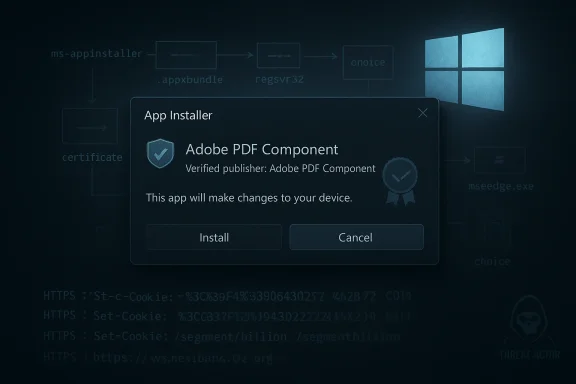
Attackers in the BazarLoader campaign turned that convenience into a liability by crafting an .appinstaller XML that referenced a malicious .appxbundle hosted on cloud storage. Triggering the ms-appinstaller: link causes the browser to hand the install request off to AppInstaller.exe, which performs the download and then presents an install UI to the user. Because the UI shows display strings from within the bundle (application name, publisher string, icon), attackers can present forged “Adobe PDF Component” branding while the package’s signing certificate points to an unrelated or opaque publisher name — a discrepancy that ordinary users don’t see during the prompt. Sophos’ step‑by‑step analysis reproduces this entire flow, showing how a short email lure leads to an ms-appinstaller link that calls AppInstaller.exe and begins the silent chain that ends in BazarBackdoor.
In the broader threat landscape, this attack is part of a string of campaigns that weaponize trusted OS features and high-fidelity UI lures (for example, fake Windows Update or full-screen “human verification” pages) to trick users into running code that abuses signed binaries. Community archives show related abuse patterns where legitimate utilities are used to bootstrap malware in memory or via scripted commands.
However, the attack also exposed weaknesses defenders can realistically exploit:
BazarLoader’s ms-appinstaller trick is a reminder that convenience features can be converted into attack surfaces overnight — and that defenders must treat installation pathways, not just executable files, as potential vectors. The technical community’s rapid sharing of indicators and Microsoft’s CVE response curtailed this specific campaign, but the underlying lessons remain: validate install sources, restrict who can install software, log installer launches, and look for living‑off‑the‑land execution patterns. Security teams should use the detection and mitigation checklist above to prioritize protections, update policies to limit ms-appinstaller usage where unnecessary, and make behavioral telemetry the cornerstone of detection for installer-driven threats.
Source: Sophos BazarLoader ‘call me back’ attack abuses Windows 10 Apps mechanism
 Background
The Windows App Installer (AppX) and the ms-appinstaller protocol
Windows 10 supports AppX/AppXBUNDLE packages — a modern packaging format used for Store apps and distribution of certain desktop apps. The Windows App Installer (AppInstaller.exe) can be invoked from a browser via the ms-appinstaller: URI scheme to download a small XML (.appinstaller) file which in turn points to a larger .appxbundle for installation. That behavior is intended to let vendors provide an installation experience that looks native to Windows users, including a UI that shows a publisher and app description during install.Attackers in the BazarLoader campaign turned that convenience into a liability by crafting an .appinstaller XML that referenced a malicious .appxbundle hosted on cloud storage. Triggering the ms-appinstaller: link causes the browser to hand the install request off to AppInstaller.exe, which performs the download and then presents an install UI to the user. Because the UI shows display strings from within the bundle (application name, publisher string, icon), attackers can present forged “Adobe PDF Component” branding while the package’s signing certificate points to an unrelated or opaque publisher name — a discrepancy that ordinary users don’t see during the prompt. Sophos’ step‑by‑step analysis reproduces this entire flow, showing how a short email lure leads to an ms-appinstaller link that calls AppInstaller.exe and begins the silent chain that ends in BazarBackdoor.
Why this vector mattered
This isn’t a memory-only exploit or a zero-day in Edge — it’s social engineering plus a trusted OS mechanism. The ms-appinstaller path converts a clicked link into a native installer flow, and the installer UI can be manipulated to display convincing branding and publisher strings drawn from the package manifest. Without a clear cross-check of who actually issued the certificate versus what’s displayed to the user, the process leverages the user’s trust in Microsoft-supplied UI and cloud-hosted assets to get victims to click “Open” and “Install.” The result is an installer-based delivery that leaves behind a nested executable payload that can then use legitimate Windows utilities to load and run code.The attack chain: step-by-step technical breakdown
1) The lure: short, urgent, and personalized
- Attackers sent short emails crafted to provoke an emotional reaction — a “customer complaint” claim, recipient name and organization included, and an imperative to “call me back.”
- The message included a link that did not begin with https:// but with ms-appinstaller:, which is not commonly recognised by end users. Clicking that link is what kicks the native installer into motion. Sophos’ analysis reproduces this exact social-engineering angle and the ms-appinstaller trigger.
2) The ms-appinstaller XML and the .appxbundle
- The ms-appinstaller link points to a small XML text file named something like Adobe.appinstaller. That XML contains metadata (including an indicated publisher name and a code-signing reference) and the URL to a larger .appxbundle file (Adobe_1.7.0.0_x64.appxbundle in Sophos’ samples).
- The .appxbundle is simply a ZIP-like archive containing one or more .appx payloads and a manifest (AppxManifest.xml/AppsManifest.xml) that drives the installer UI. Attackers populated the manifest with display strings like “Adobe PDF Component” and an Adobe icon so the install dialog appears authentic, while the actual signing certificate embedded in the bundle named an unrelated issuer (Systems Accounting Limited in the Sophos sample). Sophos confirmed the certificate details and noted suspicious registration data for the referenced organization.
3) Nested payload extraction and unsigned executables
- Inside the .appxbundle is an .appx (which is, again, a ZIP) that includes the real payload in a subfolder (UpdateFix/SecurityFix.exe in the examined sample). The appx-level executable was not code-signed, despite the bundle-level certificate claiming a publisher. This mismatch is key: the bundle carried a signing certificate while the contained executable was unsigned — a red flag that automated installers and users may not notice.
4) Execution using Windows utilities (regsvr32, Timeout, choice)
- When the installer runs, it launches SecurityFix.exe. That executable downloads a malicious DLL to %TEMP% and uses regsvr32.exe to execute it via COM registration entry-points — a common LOLBIN technique to run code through a signed Windows binary. The initial DLL runs briefly, spawns a child that uses Timeout.exe and choice.exe to delay execution in successive stages, and then runs regsvr32 with seemingly randomized function names. The deliberate use of legitimate console utilities helps evade some detections while adding execution delays to frustrate automated sandboxes. Sophos captured the successive regsvr32/Timeout/choice chain and process lineage.
5) Injection into msedge.exe and headless browser context
- After the regsvr32 steps complete, the malicious code injects into a headless instance of msedge.exe and uses the browser context to execute additional commands. At this point the implant is active in the context of a trusted process — increasing stealth and complicating simple process-based blocking. Sophos saw the BazarBackdoor payload running inside msedge.exe and observed it spawn PowerShell and other profiling tools from that context.
6) Unusual C2: cookies as command-and-control
- BazarBackdoor/BazarLoader communicates over HTTPS, but rather than burying commands in the body or in standard JSON payloads, this family uses cookie headers as its transport mechanism. The malware emits GET/POST requests with cookie data containing exfiltrated system information, and it receives commands in Set-Cookie response headers. The C2 traffic pattern is noisy — many requests go to seemingly unrelated domains and to non-existent pages with numeric query strings. Sophos documented the characteristic URIs (for example /segment/billion or /recite/drink) and the cookie-based command syntax that the operators used.
Verification and cross-references
The core technical claims in this article — the ms-appinstaller invocation, the .appinstaller → .appxbundle chain, the nested unsigned executable, the regsvr32/Timeout/choice execution cadence, and cookie-based C2 — were reproduced and documented by Sophos’ Andrew Brandt in the original write‑up. Independent reporting summarized the same technique, noting the novel use of the Windows App Installer mechanism for malware delivery. Microsoft subsequently investigated reports of AppX installer spoofing and assigned the issue CVE‑2021‑43890, acknowledging that specially crafted packages were being leveraged by Emotet/TrickBot/BazarLoader campaigns and publishing guidance and updates. CERT‑EU and other vulnerability trackers also summarized the issue and recommended mitigations such as disabling the ms-appinstaller protocol and using application control policies until patches were applied. These cross-checked sources substantiate the chain-of-events and the systemic weaknesses in installer UI and metadata validation.In the broader threat landscape, this attack is part of a string of campaigns that weaponize trusted OS features and high-fidelity UI lures (for example, fake Windows Update or full-screen “human verification” pages) to trick users into running code that abuses signed binaries. Community archives show related abuse patterns where legitimate utilities are used to bootstrap malware in memory or via scripted commands.
Why the delivery method works — and why it should worry defenders
- Trusted UI, low friction: The App Installer UI looks native and asks users to confirm an installation. Users conditioned to accept system dialogs may not inspect nuances like the actual certificate owner versus the displayed publisher. Attackers exploit that cognitive shortcut.
- Signed bundle vs. unsigned payload: A bundle-level certificate can make the package appear signed even when the contained binaries are unsigned or unrelated. That mismatch undermines how many users and some security tools infer trust.
- Living-off-the‑land execution: Using regsvr32, Timeout, choice, and msedge for code execution reduces obvious artifact creation, evades signature-only detection, and blends malicious activity into normal process trees.
- Novel C2 channel: Cookie headers as a command plane are unusual and can slip past simple defenders who only look at request bodies or DNS hostnames. The use of Set-Cookie responses to send instructions is subtle and dataset-specific to this family.
Detection, mitigation, and a practical playbook
Short-term mitigations (immediately actionable)
- Block or disable the ms-appinstaller protocol at scale. Microsoft and CERT advisories listed disabling ms-appinstaller as a mitigation during active exploitation. This prevents ms-appinstaller: links in emails or webpages from launching AppInstaller.exe.
- Enforce application control: Use AppLocker or Windows Defender Application Control to restrict installation of AppX/AppXBUNDLE packages to trusted administrators or explicitly allowed publishers. Create rules that block Microsoft.DesktopAppInstaller_8wekyb3d8bbwe where appropriate.
- Block non-admin installs: Enable Group Policy settings such as BlockNonAdminUserInstall to prevent non-administrative users from installing AppX packages. This reduces the success rate for social-engineered installs.
Detection signals to hunt for
- Unexpected invocation of AppInstaller.exe that is initiated by a browser process (Edge/Chrome) or ms-appinstaller: URI launches.
- regsvr32.exe executing with command lines that reference temp-sited DLLs or nonstandard export names and random function identifiers.
- Short-lived DLL registrations followed by process-spawn chains into msedge.exe and unexpected PowerShell instances launched from browser process parents.
- Outbound HTTPS requests with unusual target paths and repetitive numeric query strings and payload encoded into cookie headers; matching Set-Cookie responses containing opaque looking command tokens.
- AppX/AppxBundle files in user-download locations or temporary folders, or an AppxManifest declaring an unexpected publisher displayed to the user. Sophos’ IoCs and behavioral traces include many of these indicators.
Remediation steps if you suspect infection
- Isolate the host from the network to prevent further C2 beaconing.
- Collect memory and process dumps focusing on msedge.exe, regsvr32.exe, and any child PowerShell processes for forensic analysis.
- Search for AppX/AppxBundle files and the AppInstaller.exe invocation traces in process logs and event logs.
- Remove persistent artifacts and any scheduled tasks; ensure injected processes are terminated; perform credential resets for accounts accessed from the host.
- Hunt for lateral movement indicators — the profiling commands (disk, CPU, RAM, net view /all) observed in Sophos’ recordings suggest operators were mapping network resources.
The digital‑signature problem: why a certificate doesn’t mean “good”
Sophos’ analysis showed the malicious .appxbundle referenced a certificate issued to “Systems Accounting Limited,” and that certificate made the package appear signed in the bundle-level metadata even though the nested executable was not signed and the registered organization appeared dubious. This demonstrates two linked weaknesses:- Visual or semantic cues in the App Installer UI are easy to spoof because display strings and icons are rendered from the manifest, not cross‑checked against the certificate authority’s identity in a user-facing way.
- Certificate issuance processes can be abused by attackers who register entities or use intermediaries to obtain code-signing certificates; a certificate by itself is not a guarantee of legitimacy unless the certificate issuance is coupled with robust vetting and downstream checks.
Broader implications and risk outlook
- Expect attackers to reapply this pattern: Once a novel delivery mechanism is publicly demonstrated and effective, other operators borrow the pattern. AppX and similar installer flows present a repeatable opportunity.
- Social engineering remains the primary infection vector: Technical mitigations reduce risk but do not eliminate user-driven attack surfaces. User awareness training that emphasizes scrutiny of unexpected installation prompts remains essential.
- The living-off-the-land trend continues: Abuse of signed Microsoft binaries, browser processes, and console utilities continues to complicate EDR/AV responsiveness. Behavioral detection, process ancestry, and network flow analysis must be emphasized. Community reporting and threat intelligence (IoC sharing) is critical to keep pace.
Concrete recommendations for organizations
- Patch and update: Apply Microsoft’s App Installer updates and ensure App Installer is updated to the patched versions referenced by Microsoft/MSRC. Confirm that ms-appinstaller protocol handling is hardened in your environment.
- Harden install posture: Restrict who can install AppX packages. Use Group Policy (BlockNonAdminUserInstall), AppLocker/WDAC policies, and consider turning off App Installer where unnecessary.
- Monitor atypical installer invocations: Instrument logging to capture ms-appinstaller: launches, AppInstaller.exe invocations, regsvr32 calls, and browser-to-regsvr32 execution chains for triage.
- Network controls: Use egress filtering and HTTPS inspection where feasible to flag unusual cookie-based C2 patterns and block known malicious infrastructure. Endpoint telemetry should be set to capture and export suspicious process trees to centralized analysis tools.
- Threat intel and IoC ingestion: Consume reputable vendor IoCs (Sophos published relevant indicators), but prioritize behavioral detections since filenames, hosts, and certificates change quickly.
Closing analysis: strengths, limits, and remaining questions
The “call me back” campaign is notable for its elegant combination of social engineering, OS-level convenience features, and living‑off‑the‑land execution. Its strengths are clear: it leverages a user-trusted installer UX, abuses certificate-driven appearances, and uses signed Windows tooling to bootstrap execution — all while relying on cookie-based C2 that blends into normal HTTPS flows.However, the attack also exposed weaknesses defenders can realistically exploit:
- The ms-appinstaller flow is an obvious chokepoint: disabling the protocol or locking down App Installer fixes the immediate vector. Microsoft and security authorities recommended and implemented such mitigations.
- The cookie-based C2 channel, while clever, produces distinctive noise patterns (repeated requests to odd URIs, Set-Cookie responses carrying commands) that network defenders can hunt for. Behavioral detection plus egress control will catch many infections.
BazarLoader’s ms-appinstaller trick is a reminder that convenience features can be converted into attack surfaces overnight — and that defenders must treat installation pathways, not just executable files, as potential vectors. The technical community’s rapid sharing of indicators and Microsoft’s CVE response curtailed this specific campaign, but the underlying lessons remain: validate install sources, restrict who can install software, log installer launches, and look for living‑off‑the‑land execution patterns. Security teams should use the detection and mitigation checklist above to prioritize protections, update policies to limit ms-appinstaller usage where unnecessary, and make behavioral telemetry the cornerstone of detection for installer-driven threats.
Source: Sophos BazarLoader ‘call me back’ attack abuses Windows 10 Apps mechanism
