

The Hindustan Times roundup of “Best computer desktop offering speed and seamless performance: Top 10 picks for multitasking and smooth workflow” delivers a practical, value‑focused list of plug‑and‑play desktop bundles that prioritize SSD responsiveness, sensible memory, and ready‑to‑use monitors — an approach that will suit students, home workers, and small offices — but buyers must verify SKUs, check expandability, and budget small upgrades to turn these budget builds into durable daily drivers.
The Hindustan Times piece assembles ten budget and value desktop bundles (assembled systems and branded prebuilds) aimed at everyday productivity: office work, online learning, content editing, and light gaming. The selections repeatedly emphasize a common recipe for perceived speed: a modern midrange CPU (Intel Core i3/i5 or Core i7 in a few builds), at least 8 GB of RAM in the base configuration, and an SSD (128–512 GB) used as the operating system drive, sometimes paired with a larger HDD for mass storage. Bundled 19–22‑inch monitors and basic peripherals make these attractive for buyers who want minimal setup friction.
This editorial approach mirrors broader reviewer consensus: “feel‑fast” desktops are built around SSDs, dual‑channel RAM, and a CPU with enough cores/clock to keep the UI responsive while background tasks run. Independent buyer guides and test labs repeatedly return to the same practical checklist — NVMe/SSD for OS, 16 GB RAM as the practical multitasking baseline, and confirmable upgrade paths — advice that the roundup echoes.
Practical verification: when a pick ships with a mechanical HDD (for instance some i7 and i3 bundles in the roundup), independent guidance recommends an immediate NVMe or SATA SSD upgrade (256–512 GB) for the OS — this single change often outranks other hardware upgrades for perceived speed.
However, the article’s limitations include incomplete SKU disclosures and a few entries shipping with older CPU generations or HDD‑only storage. These are not fatal flaws — but they require verification and, in some cases, the buyer to budget for a small post‑purchase upgrade to reach the practical targets above. The roundup itself cautions buyers to confirm SKUs and warranty details before purchase.
To get the smoothest possible workflow from one of these systems:
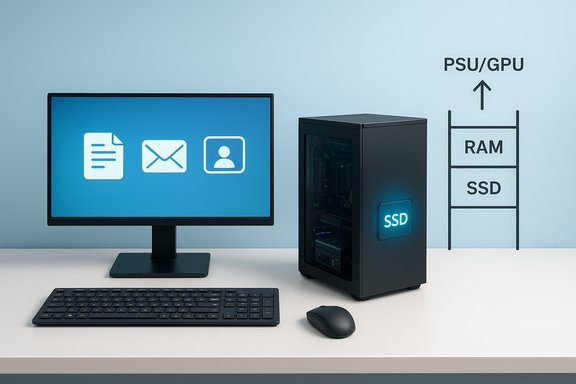
The practical takeaway: prioritize SSD + 16 GB RAM + a recent midrange CPU, verify the SKU and warranty, and apply the simple upgrade ladder (SSD → RAM → PSU/GPU) to convert a low‑cost, ready‑to‑use desktop into a long‑lived, high‑value workstation that supports reliable multitasking and a truly seamless workflow.
Source: Hindustan Times Best computer desktop offering speed and seamless performance: Top 10 picks for multitasking and smooth workflow
 Background / Overview
The Hindustan Times piece assembles ten budget and value desktop bundles (assembled systems and branded prebuilds) aimed at everyday productivity: office work, online learning, content editing, and light gaming. The selections repeatedly emphasize a common recipe for perceived speed: a modern midrange CPU (Intel Core i3/i5 or Core i7 in a few builds), at least 8 GB of RAM in the base configuration, and an SSD (128–512 GB) used as the operating system drive, sometimes paired with a larger HDD for mass storage. Bundled 19–22‑inch monitors and basic peripherals make these attractive for buyers who want minimal setup friction.This editorial approach mirrors broader reviewer consensus: “feel‑fast” desktops are built around SSDs, dual‑channel RAM, and a CPU with enough cores/clock to keep the UI responsive while background tasks run. Independent buyer guides and test labs repeatedly return to the same practical checklist — NVMe/SSD for OS, 16 GB RAM as the practical multitasking baseline, and confirmable upgrade paths — advice that the roundup echoes.
What the roundup lists (clear summary)
Below is a distilled and verified list of the headline systems the article covers, with the key specs reported in the original piece and the article’s stated reasons to buy or avoid each one.- DZAB assembled desktop (i5, 16 GB, 512 GB SSD, 19‑inch) — Smooth multitasking; fast SSD boot; assembled components; trial Windows 11 and bundled Office.
- LG assembled desktop (i3, 8 GB, 500 GB SSD, 19‑inch LG monitor) — Simple, dependable for basic productivity; no optical drive; entry‑level graphics.
- INTECHVISION desktop (i3, 8 GB, 500 GB SATA, 19‑inch) — Affordable everyday performance; arrives with trial Windows 10 and Office.
- ZEBRONICS desktop (i5, 16 GB, 500 GB SSD, 19‑inch) — Strong multitasking performance; no dedicated GPU.
- ENTWINO desktop (i5, 16 GB, 500 GB SATA, 22‑inch) — Larger monitor for comfortable long sessions; stable day‑to‑day performance.
- FusionIT desktop (i7, 8 GB, 500 GB HDD, 19‑inch Acer monitor) — High single‑thread CPU performance; recommended SSD upgrade.
- ZEBRONICS i3 (3rd Gen) (8 GB, 500 GB HDD + 128 GB SSD) — Dual‑drive balance; preloaded Windows 11 and Office 2021.
- TECH Assemblers i3 (2nd Gen Core i3 2120, 8 GB, 500 GB + 128 GB SSD, Windows 10 Pro) — Value dual‑drive setup; older CPU generation.
- DZAB i3 (8 GB, 128 GB SSD, 19‑inch) — Compact, fast boot; limited storage.
- ZEBRONICS i5 (8 GB, 128 GB SSD + 500 GB HDD, 19‑inch) — Balanced SSD + HDD; integrated graphics.
Technical verification: what the evidence shows
SSD vs HDD — the single most impactful swap
Multiple reviews and buyer guides cited in independent testing confirm that installing the operating system and frequently used applications on an SSD yields the most noticeable improvement in day‑to‑day responsiveness. Boot times, application launch latency, and general UI fluidity are governed more by storage latency and throughput than by modest differences in CPU frequency once you’re in the midrange. The Hindustan Times picks reflect this: most “fast” models include an SSD (or at least a small SSD + HDD hybrid).Practical verification: when a pick ships with a mechanical HDD (for instance some i7 and i3 bundles in the roundup), independent guidance recommends an immediate NVMe or SATA SSD upgrade (256–512 GB) for the OS — this single change often outranks other hardware upgrades for perceived speed.
How much RAM: 8 GB vs 16 GB
The article lists many systems with 8 GB base memory and several with 16 GB. Across testing reports and buyer guidance, 16 GB is the practical baseline for a smooth multitasking experience in 2025 — especially with modern browsers, video conferencing, and cloud sync services running concurrently. Systems with 8 GB are workable for lighter users but will show pressure under heavy tab counts, background syncing, or moderate editing tasks. The roundup’s emphasis on models that ship with 16 GB (or are upgradeable) aligns with this consensus.Processor recommendations for multitasking
For responsive UI and solid multitasking headroom, Core i5 / Ryzen 5 or better is the sweet spot for most users. Core i7 / Ryzen 7 matters for CPU‑bound heavier workloads, but real‑world snappiness depends on the storage and memory configuration as much as raw CPU nominal speed. The Hindustan Times advice to prefer i5/i7 or AMD Ryzen 5/7 for multitasking is consistent with independent lab guidance.Dedicated GPU: when you need one
Integrated graphics are sufficient for office work, video streaming, and light photo editing. For gaming at higher resolutions, 3D design, or GPU‑accelerated video rendering, a discrete GPU becomes necessary. The reviewed picks purposefully avoid high‑end GPUs — they’re positioned as productivity machines rather than gaming workstations — and the roundup repeatedly flags the absence of dedicated GPUs as a “watch for” point. This is consistent with broader review guidance: allocate budget to a GPU if gaming or GPU‑accelerated creative workflows are primary.Critical analysis — strengths, blind spots, and buyer risk
Strengths that make these picks sensible
- Plug‑and‑play convenience: Many bundles include a monitor, keyboard, and mouse and ship with Windows preinstalled, saving setup time for non‑technical buyers.
- Value orientation: These systems focus on the practical combination of SSD responsiveness and adequate RAM rather than over‑spec’d GPUs or premium chassis materials. That gives good day‑to‑day value for students and office users.
- Upgrade-friendly targets: Several towers and assembled systems leave room for RAM and storage upgrades; the article provides an explicit upgrade ladder to extend useful life.
Blind spots and risks buyers must watch
- SKU fragmentation: The same product name can ship with significantly different CPUs, storage and RAM depending on region or retailer. The roundup notes this and urges SKU verification before purchase. Buyers should confirm the exact model string and spec sheet.
- Proprietary or low‑wattage PSUs: Some budget prebuilt towers use non‑standard PSUs or low wattage units that limit future GPU upgrades. If you plan to add a discrete GPU later, verify PSU wattage and standard connectors first.
- Software and activation concerns: Several assembled systems ship with trial copies of Windows and Office or unclear software warranty terms — verify activation status and ask about licensing/warranty coverage. The article flags lack of software warranty in some entries.
- Small SSD boot drives: 128 GB SSDs are fast but can fill quickly with OS, apps, and updates. Confirm available expansion bays, extra M.2 slots, or spare 2.5‑inch bays before committing.
Actionable upgrade plan (step‑by‑step)
If you buy one of the value desktops from the roundup and want a machine that stays useful for 3–5 years, follow this prioritized ladder of upgrades (practical, cost‑effective):- Install a 256–512 GB NVMe SSD (or SATA SSD if NVMe slots aren’t available) and make it the OS drive. This provides the largest perceptual speed boost.
- Add RAM to reach 16 GB total (prefer dual‑channel configuration with matching sticks). This gives headroom for heavy browser use and video calls.
- If you plan GPU‑heavy work or gaming, check case size and PSU capacity. Upgrade the PSU first if wattage or connectors are inadequate, then add a midrange GPU.
- Use the original HDD as archival storage or replace it with a larger HDD after SSD is dedicated to OS/apps. External drives or a NAS are alternative options for media libraries.
How to validate the seller’s claim: a buyer’s checklist
Before clicking “buy,” confirm the following items — these are the most common points where hype or product pages can mislead:- Exact SKU string and full spec sheet (CPU model + generation, RAM configuration, SSD type — NVMe vs SATA, and SSD capacity). Do not rely on headline product names alone.
- Storage distribution: which drive is the SSD, and is it NVMe? Confirm whether the 500 GB is SSD or HDD. The performance difference is substantial.
- Warranty coverage: hardware warranty length, software activation warranty, and return policy. Assembled or boutique sellers may have limited or different policies than OEMs.
- PSU wattage and upgradeability: essential if you plan to add a discrete GPU later. Ask whether the PSU is standard ATX and what connectors it provides.
- Physical expandability: number of RAM slots free, M.2 slots, and spare 3.5/2.5 bays. This determines whether you can follow the recommended upgrade ladder.
Who these systems are for — and who should look elsewhere
- Ideal buyers: students, remote workers, families, and small offices who need a reliable, low‑cost desktop for web research, document editing, video calls, and light photo/video editing. The included monitors and preinstalled OS make these systems low‑friction choices.
- Not ideal: serious gamers targeting 1440p/4K frame rates, professionals doing heavy GPU‑accelerated rendering or 3D modeling, and users requiring guaranteed enterprise‑grade service level agreements. For those users, a desktop with a discrete GPU, larger power envelope, and brand warranty with onsite support is the safer route.
Verified recommendations and prioritized specs (practical targets)
When you evaluate any “best desktop” list — including this Hindustan Times roundup — use these practical, cross‑checked targets:- CPU: Intel Core i5 or i7 (recent generations) or AMD Ryzen 5 or 7 (5000 series or later) for balanced multitasking and responsiveness.
- RAM: 16 GB as the practical baseline for multitasking; 8 GB is acceptable for light users.
- Storage: NVMe SSD for OS (256–512 GB recommended) + optional HDD for mass storage (1 TB+). Confirm NVMe vs SATA.
- GPU: Integrated graphics are fine for productivity; discrete GPUs (Nvidia or AMD) needed for gaming and heavy GPU acceleration.
- Connectivity: At least one USB‑C, HDMI/DisplayPort, Ethernet (1 GbE or 2.5 GbE for heavy local transfers), and front ports for convenience.
Notable strengths of the Hindustan Times approach — and where it must be read with caution
The roundup’s practical strength is its focus on real, day‑to‑day responsiveness rather than headline component specs alone: it favors SSDs, sensible memory, and usable monitors. For mainstream users, this yields machines that “get out of the way” and let you work. It also gives a straightforward shopping psychology: prefer SSD, then RAM, then GPU.However, the article’s limitations include incomplete SKU disclosures and a few entries shipping with older CPU generations or HDD‑only storage. These are not fatal flaws — but they require verification and, in some cases, the buyer to budget for a small post‑purchase upgrade to reach the practical targets above. The roundup itself cautions buyers to confirm SKUs and warranty details before purchase.
Final verdict — how to turn a budget desktop into a seamless daily workhorse
The Hindustan Times top‑10 picks do a good job of identifying practical, low‑friction desktop bundles that deliver immediate value for students and productivity‑focused users. Their emphasis on SSD responsiveness and sensible RAM levels aligns with independent buyer guidance and makes these systems efficient for everyday workloads.To get the smoothest possible workflow from one of these systems:
- Verify the SKU and confirm the SSD is NVMe (or at least SATA SSD) and that the listed 500 GB is not a mechanical drive unless paired with an SSD boot drive.
- If the system ships with only 8 GB RAM, plan to upgrade to 16 GB in the first 30–90 days. Dual‑channel matched sticks are preferred.
- Put the OS and core apps on a 256–512 GB SSD first; use an HDD for archival storage if needed.
- Confirm PSU and case compatibility before planning a future discrete GPU upgrade.
The practical takeaway: prioritize SSD + 16 GB RAM + a recent midrange CPU, verify the SKU and warranty, and apply the simple upgrade ladder (SSD → RAM → PSU/GPU) to convert a low‑cost, ready‑to‑use desktop into a long‑lived, high‑value workstation that supports reliable multitasking and a truly seamless workflow.
Source: Hindustan Times Best computer desktop offering speed and seamless performance: Top 10 picks for multitasking and smooth workflow
