

PCMag UK’s 2025 roundup of budget notebooks surfaces a clear theme: inexpensive no longer means disposable. From class-leading Chromebooks to repairable convertibles and entry-level gaming rigs, the list shows buyers can now choose purpose-built value rather than settling for a stripped-down laptop that will frustrate them in months. The guide singles out the Acer Aspire 3 as the current “best cheap Windows laptop,” highlights Chromebooks such as the Asus Chromebook Plus family for web-first users, and elevates the Framework Laptop 12 as the standout option for sustainability and long-term value—recommendations that reflect real shifts in component quality, battery efficiency, and design priorities across the entry tiers.
Budget laptop shopping in 2025 looks different than it did five years ago. Manufacturers have standardized faster low-power CPUs, NVMe SSDs, better Wi‑Fi, and higher-capacity batteries into price tiers that used to include only eMMC storage and feeble Celeron chips. The result: a buyer can now get a usable Windows machine, a Chromebook with near-laptop responsiveness, or a repairable modular system without paying flagship prices. The PCMag UK guide organizes picks by use case—battery life, sustainability, convertible versatility, ChromeOS value—and recommends specific models for students, DIY tinkerers, budget gamers, and mainstream office users.
This article walks through the notable picks, verifies key claims against independent reviews and manufacturer specifications, and provides practical buying guidance so you don’t trade short‑term savings for long‑term regret.
At the same time, systemic risks persist:
The budget laptop market is maturing. Whether you want the simplest, cheapest Chromebook that’ll last a school year, a modular Framework device you can keep and upgrade, or a gaming Katana that brings 1080p frame rates without a retail‑level bill, sensible choices exist. Read the SKU details, check independent battery and display tests, and buy for the usage you actually have—not for the headline price.
Source: PCMag UK The Best Cheap Laptops for 2025
 Background / Overview
Budget laptop shopping in 2025 looks different than it did five years ago. Manufacturers have standardized faster low-power CPUs, NVMe SSDs, better Wi‑Fi, and higher-capacity batteries into price tiers that used to include only eMMC storage and feeble Celeron chips. The result: a buyer can now get a usable Windows machine, a Chromebook with near-laptop responsiveness, or a repairable modular system without paying flagship prices. The PCMag UK guide organizes picks by use case—battery life, sustainability, convertible versatility, ChromeOS value—and recommends specific models for students, DIY tinkerers, budget gamers, and mainstream office users.This article walks through the notable picks, verifies key claims against independent reviews and manufacturer specifications, and provides practical buying guidance so you don’t trade short‑term savings for long‑term regret.
What “Best Cheap” Means in 2025
- Value, not minimalism. The best budget laptops now balance usable performance (often Intel Core or AMD Ryzen U-series), at least 8 GB RAM, and NVMe storage in many SKUs, rather than defaulting to 4 GB/eMMC.
- Chromebooks are still a value leader for web-first users because ChromeOS runs well on modest silicon and OEMs can spend BOM money on display, battery and build rather than expensive Windows licensing.
- Modularity and repairability—once niche—are now recognized as ways to save money long-term and reduce e‑waste. Framework’s 12‑inch convertible is the clearest mainstream example. Independent reviews confirm its repairability and modular port approach while noting trade-offs in display color and runtime.
Key Picks — Quick Takes and Reality Checks
Acer Aspire 3 — PCMag UK’s “Best Cheap Windows Laptop”
PCMag positions the Acer Aspire 3 as an exceptional budget all‑rounder: snappy day‑to‑day performance, Wi‑Fi 6 support, and long battery life all for under $500. That claim matches the model’s positioning in retailer spec sheets and multiple buyer guides that list it as a strong value offering in the under‑$500 band. However, independent spec/retailer pages and vendor MobileMark figures show wide variance in battery claims depending on SKU and testing method; vendor listings typically show MobileMark-style runtimes in the 11–13.5 hour band for certain configurations rather than the “nearly 17 hours” figure that sometimes circulates in roundups. Treat the very-long battery claims with caution and verify the SKU and independent test numbers before assuming flagship-like endurance. Why that matters: marketing battery numbers often come from idealized test rigs. If you need a full workday unplugged, check independent battery tests for the exact SKU (screen brightness, CPU, and cell size matter).Framework Laptop 12 — Best for Sustainability & Repairability
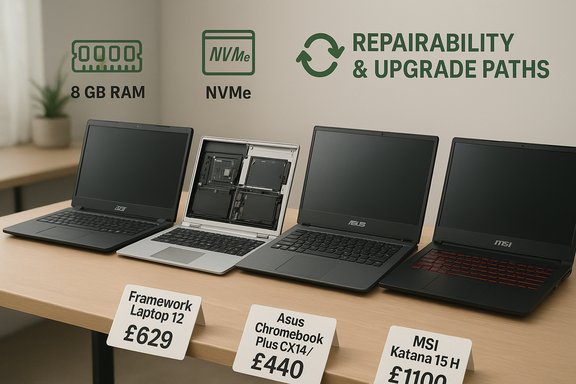
Framework’s new 12‑inch convertible takes the company’s modular, user‑serviceable philosophy into a tablet‑friendly form factor. Reviews consistently praise its repairability, swappable ports, and the company’s commitment to replacement parts and mainboard upgrades—an uncommon selling point in the consumer market. Independent outlets confirm:- The Framework 12 offers tool‑accessible modules, replaceable battery and mainboard, and a modular port system that lets you change port types after purchase.
- Durability and edge protection were improved with overmolded rubberized edges, which reviewers described as a welcome addition for a commuter‑grade convertible.
Asus Chromebook Plus CX14 / CX34 Family — Best Chromebook Value
Asus’ Chromebook Plus lineup (including the CX14 and CX34 clamshells) balances higher‑tier Chromebooks’ responsiveness with prices often under $500. Manufacturer and press materials show options with Intel Core/i3‑class silicon, 8 GB RAM, and UFS/SSD storage in Chromebook Plus SKUs—consistent with PCMag’s recommendation that Chromebook Plus models are the smarter, longer‑lasting Chromebook choice. Computex and retail spec sheets list 8 GB LPDDR configurations, 128 GB UFS/SSD, and modern I/O including USB‑C PD and FHD touch panels in select SKUs. Independent reviews and retail deals corroborate that the CX14/CX34 variants provide real Windows-like responsiveness within ChromeOS constraints. Practical note: Chromebook Plus devices are worth the bump in price for users comfortable in Google’s ecosystem—better local performance, improved AI and camera features, and longer software support windows than the bottom-tier Chromebooks.Dell Inspiron 14 2‑in‑1 (7445) — Best Budget Convertible Windows 2‑in‑1
Dell’s Inspiron 14 2‑in‑1 scores as a stylish, well‑rounded convertible that outclasses many budget hybrids in battery life, build, and speaker quality. If you want genuine tablet flexibility plus Windows compatibility, this remains one of the more realistic budget picks—even though it’s not a premium Surface alternative. Independent coverage and review notes confirm its solid design-per-dollar proposition, with the usual caveat: display quality and thermals will lag premium convertibles.MSI Katana 15 HX — Best Cheap Gaming Laptop
MSI packs surprisingly good 1080p gaming chops into price-conscious chassis with the Katana 15 HX. Reviews show the RTX 5050 (mobile) paired with an HX‑class CPU can deliver playable frame rates at 1080p, and modern Nvidia features like DLSS (and frame generation variants) substantially help performance/visual fidelity tradeoffs. But reviewers consistently note a dim panel, limited storage (512 GB typical), heat under sustained load, and middling battery life—all predictable tradeoffs in entry gaming laptops. Independent tests from Tom’s Hardware and other hands‑on reviews back up those performance and thermal characteristics. Buy this if you want real PC gaming on a budget and accept heavier thumps in noise/heat and the need for external storage or a cooling pad.Lenovo Chromebook Duet Gen 9 / Lenovo ThinkBook 16 Gen 7 / Apple MacBook Air (M1) — Niche Picks
- Lenovo Chromebook Duet Gen 9: A solid detachable tablet-first Chromebook option for students and kids—good build, included keyboard cover and stylus, and excellent portability. Good for classroom workflows but not for heavy multitasking or local storage needs.
- Lenovo ThinkBook 16 Gen 7: A sensible desktop-replacement for small businesses that need a large screen, numeric pad, and straightforward performance at a budget price. Expect an economy-class display but comfortable typing and broad port options.
- MacBook Air (M1): Still a very attractive entry Mac for buyers wanting Apple’s build and battery efficiency at reduced prices—particularly for students who don’t need the latest M‑series features. PCMag’s inclusion of last‑generation Airs as value picks is consistent with current retail discounts.
Deep Dive: Strengths, Tradeoffs, and Risks
Strengths across the list
- Realistic specs for real-world tasks. Modern entry models reliably include SSDs, adequate RAM, and modern Wi‑Fi—so web browsing, video calls, documents, and casual media work feel snappy.
- Chromebooks as pragmatic choices. For cloud-first users, Chromebooks now often deliver longer battery life, better keyboards, and a perception of speed that beats the cheapest Windows boxes.
- Repairability is tangible value. Devices like the Framework Laptop 12 (and Framework 13 before it) show repairable design can materially extend device lifespan and lower total cost of ownership for some buyers. Independent reviews praise Framework’s modularity even while noting display and runtime compromises.
Common tradeoffs and risks
- SKU variability: Model names can hide wide hardware differences. The same “Aspire 3” or “Inspiron 14” family name may include multiple CPUs, memory sizes, and panels; ensure the exact SKU has the RAM, SSD, and panel you expect. Manufacturer and retailer SKU codes must match.
- Battery marketing vs reality: Lab-run “up to” numbers are frequently optimistic. For Acer’s Aspire family, vendor MobileMark claims often differ from independent testers’ real‑world runtime measurements; verify the SKU-specific independent tests for realistic expectations.
- Display quality is the Achilles’ heel: Many budget systems use lower-brightness, narrow‑gamut panels. That’s fine for email and docs, but it degrades streaming, photo work, and outdoor readability. If media or photo tasks matter, prioritize IPS/OLED or higher nit ratings.
- Thermals on budget gaming rigs: Entry gaming laptops squeeze powerful chips into thin, inexpensive chassis; they run hot and loud under load and often restrict sustained performance. Expect noisy fans and consider external cooling or a higher‑tier chassis for prolonged gaming.
- Upgrade paths vary. Some budget laptops offer SO‑DIMM slots and spare M.2 bays; others solder RAM and limit future upgrades. If longevity matters, prefer models with user‑replaceable storage/RAM or buy higher specs up front.
Buying Basics: What to Prioritize on a Budget
CPU and performance
- Opt for modern low‑power chips (Intel Core U-series, AMD Ryzen U, or Apple M-series for Mac buyers) if you need more than basic browsing. Cheap Intel N or Celeron chips are fine for very light use or Chromebooks.
- For gaming, prioritize GPU/TDP and thermal headroom over raw CPU core count.
Memory and storage
- Aim for 8 GB RAM in Windows machines; 16 GB if you intend to keep the machine 3+ years or run heavier multitasking.
- Prefer NVMe SSDs over eMMC. Chromebooks can get by with smaller local storage thanks to cloud integration, but Windows users should not accept 32/64 GB eMMC unless budget is the overriding concern.
Battery life
- Treat manufacturer “up to” numbers as best-case. Look for independent test results for the SKU you plan to buy. If you need a full school/workday unplugged, validate with real-world mixed‑use tests.
Ports and connectivity
- USB‑C is increasingly common even on budget laptops; it may support charging and display output.
- HDMI and SD slots are convenient but less guaranteed. Check the port mix if dongles matter to your workflow.
Displays
- If color and brightness matter: prioritize IPS or OLED and 300+ nits where possible.
- Budget machines often use lower-brightness panels; that’s acceptable for document work but limiting outdoors or for creators.
Chromebooks vs Windows vs macOS
- Choose Chromebook if you live in the browser and value battery and affordability.
- Choose Windows if you need specific desktop apps, more storage flexibility, or gaming options.
- Choose macOS (even used or discounted M1 Air) if you value Apple’s ecosystem, sustained performance per watt, and resale value.
How to Shop: Practical, Money‑Saving Steps
- Confirm the exact SKU and compare manufacturer spec pages to retailer listings; this avoids surprises on RAM, panel type, and storage.
- Prefer refurbished business-class units (certified ThinkPads, EliteBooks, Latitudes) when your budget is extreme—these can offer better keyboards and repairability than new ultra-cheap consumer machines, provided you get a warranty.
- When buying a Chromebook, Chromebook Plus models represent a good mid‑band choice—better hardware and extra Google features justify the premium if you plan to keep the device longer.
- Watch holiday sales and certified refurbished channels for midrange machines dipping into budget territory—this is often the fastest path to a genuinely better laptop for “budget” money.
Final Verdict: Who Should Buy What
- Buy the Acer Aspire 3 variant if you want the best pure Windows value right now—but verify the SKU’s battery tests rather than relying on a single headline runtime. Expect solid daily performance for office work and streaming at very friendly prices.
- Buy the Framework Laptop 12 if you prioritize repairability and the ability to upgrade components over time. It’s an investment in longevity and sustainability, not the cheapest upfront price or the most color‑accurate screen.
- Buy an Asus Chromebook Plus CX14/CX34 if you want ChromeOS performance closer to a mainstream laptop—these deliver excellent value for students and cloud-first professionals.
- Buy the MSI Katana 15 HX only if gaming at 1080p is important and you accept heat/noise tradeoffs; it’s among the best price‑to‑performance gaming entries but not an ultraportable.
- Consider certified refurbished business laptops for the best keyboard/build-for-price in extreme budgets; insist on seller warranties and battery health reports.
Closing Analysis — Strengths and Systemic Risks
The most encouraging takeaway from PCMag UK’s budget roundup is that mainstream OEMs are shipping genuinely usable devices at accessible prices: SSDs, modern processors, and capable battery life are now normal in the under‑$500 band. That fundamentally changes the calculus for first-time buyers, students, and families.At the same time, systemic risks persist:
- SKU confusion remains the largest single source of buyer disappointment; identical family names can mask sub‑par or premium variants.
- Panel and battery variance across SKUs means two units with the same model name can offer very different day‑to‑day experiences.
- Upfront price vs total cost of ownership: cheaper up front doesn’t always win if you’re forced to replace a device in 18 months rather than upgrading an existing, repairable machine.
The budget laptop market is maturing. Whether you want the simplest, cheapest Chromebook that’ll last a school year, a modular Framework device you can keep and upgrade, or a gaming Katana that brings 1080p frame rates without a retail‑level bill, sensible choices exist. Read the SKU details, check independent battery and display tests, and buy for the usage you actually have—not for the headline price.
Source: PCMag UK The Best Cheap Laptops for 2025
