• Thread Author
Cheap doesn't have to mean compromise: 2025's best cheap desktop PCs prove that you can get sensible performance, modern connectivity, and real-world upgrade paths without breaking the bank.

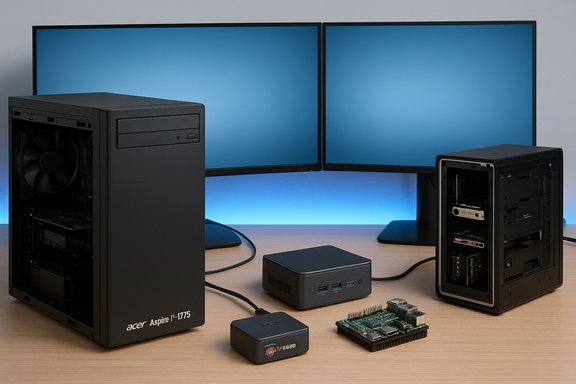
A tech desk with dual monitors and several computer components: a large desktop tower, a mini PC, and a Raspberry Pi board.Background / Overview​

The budget desktop market in 2025 is broader and more interesting than most buyers realize. Compact mini‑PCs, space‑saving all‑in‑ones, and conventionally styled towers all compete in the sub‑$1,000 band, and the winners are those that balance components, ports, and upgrade potential. PCMag UK's roundup of "best cheap desktop PCs" leans heavily on use‑case framing—who each model is actually for—and that practical emphasis remains the best way to shop this segment.
This feature expands on the PCMag picks and testing methodology, verifies the most important technical claims against vendor and independent reviews, and offers pragmatic buying advice for shoppers who want the best budget desktop PC in 2025. It covers the mainstream tower favorite, compact mini‑PCs, the surprising Raspberry Pi option for tinkerers, modular desktop alternatives for DIY orientated buyers, and the key upgrade and accessory considerations that determine long‑term satisfaction.

Why a “cheap desktop PC” can be the best value​

Cheap desktops in 2025 are not throwaway machines. Advances in CPU microarchitecture, integrated graphics, and NVMe storage have raised the performance baseline: even an inexpensive prebuilt can boot fast, handle office workloads, and deliver snappy web performance. PCMag's testing methodology emphasizes repeatable benchmarks, feature checks, and upgradeability — all sensible signals when evaluating value.
Key platform realities buyers should accept:
  • Expect modern I/O: USB‑C, at least one M.2 NVMe slot, and Wi‑Fi 6E are now common in good budget builds.
  • Treat 16GB RAM as the practical baseline for longevity; 8GB is workable but will feel constrained for multitasking.
  • GPU choices matter more than CPU choices for gaming: integrated graphics are fine for general use; discrete GPUs are required for comfortable 1080p gaming at higher settings.

The mainstream pick: Acer Aspire TC‑1775 — best cheap desktop for most buyers​

PCMag UK and other reviewers highlight the Acer Aspire TC‑1775 series as the best mainstream budget desktop: an attractively priced tower with a current‑generation Intel CPU, NVMe storage, front USB‑C, and two M.2 slots for future expansion.
What to verify (and what independent sources confirm)
  • Acer’s official spec sheet lists the TC‑1775‑UR11 (and UR12 variants) with an Intel Core i5‑14400, 8–16GB DDR5, 512GB PCIe Gen4 NVMe SSD, Wi‑Fi 6E, and a 300W power supply. Those specs are posted on Acer’s product page.
  • Windows Central’s hands‑on review (the TC‑1775 was tested in mainstream retail SKUs) confirms the platform strengths and calls out the same upgrade caveats: modest internal room, a proprietary PSU in some SKUs, and the need to swap the base 8GB to 16GB if you plan multitasking.
Why this matters
  • The Aspire TC‑1775 is the archetypal budget tower: modern CPU cores, a fast NVMe boot drive, decent front I/O, and two M.2 slots that let you add storage later. It’s an excellent buy for everyday users who want a dependable desktop that can be upgraded modestly. But confirm the exact SKU you buy—Acer ships multiple RAM/storage variants—and budget for a RAM upgrade if you can.
Caveat
  • Some cheaper variants use a 300W or lower PSU and non‑standard chassis connectors; that can limit future discrete GPU upgrades. Verify PSU wattage and connector availability if a GPU upgrade is in your mid‑term plan.

Best mini‑PCs: how tiny boxes changed the budget game​

Mini‑PCs in 2025 are compelling alternatives to towers. They save desk space, often include enough ports for multiple monitors, and for many users deliver laptop‑class CPU performance in palm‑sized packages. Two standout mini picks from the budget roundup deserve verification.

Geekom A6 — best cheap mini desktop for space‑conscious buyers​

Why it appears on buyer lists
  • The Geekom A6 delivers an AMD Ryzen 7 6800H, integrated Radeon 680M graphics, generous port selection, 32GB DDR5 and a 1TB NVMe SSD in some SKUs—an unusual value mix for a palm‑sized PC. PCMag and other guides call it a go‑to affordable small desktop.
Independent verification
  • TechRadar's review confirms the A6’s Ryzen 7 6800H CPU, Radeon 680M graphics, 32GB DDR5 (upgradeable), 1TB PCIe Gen4 NVMe SSD, Wi‑Fi 6E, and 2.5GbE. That review notes the compact all‑metal design and strong everyday performance.
  • Windows Central’s evaluation echoes the same spec list and emphasizes Geekom’s value‑focused pricing and decent port array for multi‑monitor setups.
What to expect
  • The A6 is a great value for office productivity, video streaming, multiple monitors, and light content work. But mini‑PCs often trade upgradeability for compactness; while the A6 uses SO‑DIMMs and M.2, some cheaper rivals solder parts down—confirm the exact SKU before purchase.

Asus NUC 15 Pro+ — best compact pro mini with premium features​

What makes it notable
  • The NUC 15 Pro+ (Asus' continuation of the NUC line) brings Intel Core Ultra Series 2 processors, Intel Wi‑Fi 7, Thunderbolt 4, and a quad‑4K display capability into a compact chassis—features that push small systems into professional territory. Asus’ press materials and product pages emphasize AI TOPS and quiet thermal design.
Independent context
  • Asus’ official press release and product page detail the Core Ultra options, Wi‑Fi 7 support, and a premium thermal/port layout aimed at pros who want a small, fully featured desktop. That positioning makes the NUC 15 Pro+ a serious option for small business and creative professionals who need dense connectivity and serviceable performance.
Buyer note
  • These advanced mini machines can be expensive in higher SKUs; pick a base configuration that matches your needs and budget, because the top Core Ultra + large RAM configs push prices out of the "budget" band quickly.

DIY and modular: Raspberry Pi and Framework Desktop for tinkerers and pros​

Raspberry Pi 5 — the ultimate budget tinkerer's desktop​

The Pi is explicitly a hobbyist platform: very low cost but requiring hands‑on setup and Linux familiarity. PCMag frames the Pi as “strictly for enthusiasts,” and independent testing broadly agrees.
Verified technical improvements (official and independent)
  • The Raspberry Pi Foundation’s product brief confirms the Pi 5 uses a quad‑core Arm Cortex‑A76 at 2.4GHz, a VideoCore VII GPU with Vulkan support, and new RP1 I/O silicon that improves USB and MIPI handling; it supports dual 4Kp60 HDMI outputs and new M.2 HAT options for NVMe storage.
  • Tom’s Hardware’s benchmark testing shows the Pi 5 is roughly 2×–3× faster than Pi 4 in many workloads and benefits strongly from active cooling for sustained performance.
Why recommend it
  • For makers, embedded projects, and very light desktop tasks where price and customizability matter more than polish, the Pi 5 is unmatched. For most shoppers who want a ready‑to‑use desktop with Windows compatibility and minimal tinkering, a small prebuilt mini‑PC is a better fit.
Caution
  • The Pi’s software stack, accessory requirements, and niche nature make it inappropriate as a primary family PC for non‑technical users.

Framework Desktop — modular, repairable, and pricey​

Positioning
  • Framework’s Desktop is a modular, compact desktop aimed at tinkerers who want near‑bare‑bones customization and professionals who value repairability and AI‑oriented memory bandwidth. PCMag and other outlets highlight it as a premium modular option rather than a throwaway budget device.
Independent verification (specs and caveats)
  • Reviews from Tom’s Hardware, PCWorld, and Tom’s Guide confirm the Framework Desktop uses AMD Ryzen AI Max series APUs (Max 385 / Max+ 395), comes with soldered LPDDR5X memory in multiple fixed capacities (32–128GB), includes integrated Radeon 8060S graphics, and starts around $1,099 for the lowest configuration—prices rise quickly once SSDs, fan kits, and expansion cards are added. These reviews consistently call out that memory is soldered (limiting certain upgrade paths) and that the product is intended for users who appreciate modular expansion in other domains.
Who should consider Framework
  • Engineers, AI hobbyists, Linux users, and buyers who want a compact user‑serviceable chassis with unusual configuration options. It’s not a budget pick in the pure price sense; it’s a value pick for repairability and modularity if you plan to leverage its unique expansion model.

Gaming on a budget: the hybrid approach and tradeoffs​

Budget gaming desktops often walk a tightrope between component cost and real‑world performance. A few 2025 models use mobile CPUs inside tiny desktops to reduce cost and noise; Asus’ TUF Gaming T500 is the clearest example.
  • The Asus TUF Gaming T500 mixes a laptop‑class Intel Core i7‑13620H with an RTX 5060 Ti desktop GPU to produce a compact, quiet gaming desktop. Asus’ product materials emphasize lower power draw and a smaller footprint; independent reviews, however, flag thermal and upgradeability tradeoffs (mobile CPU soldering, restricted PSU options).
Practical guidance
  • If you prioritize quiet, compact 1080p gaming, these hybrid designs can be excellent.
  • If you want upgrade legs (swap CPU in the future, or add a larger GPU), choose a standard ATX/mATX tower with a full‑sized PSU instead.
  • Confirm the unit’s PSU rating and physical clearance for any GPU you might add later—some budget towers ship with undersized or proprietary PSUs that preclude serious future GPU upgrades.

What to look for in any budget desktop purchase​

Form factor and upgrade path​

  • Tower (ATX/mATX): easiest to upgrade—RAM, storage, GPU, PSU replacements are usually straightforward.
  • Mini‑PC: compact and quiet but limited upgradeability; verify whether RAM is on SO‑DIMMs or soldered.
  • All‑in‑One (AIO): clean and space‑saving, often includes peripherals—but internal access is limited and parts are rarely user‑replaceable.

CPUs and graphics​

  • For general use: modern Intel Core i3/i5 (13th/14th Gen) or AMD Ryzen 3/5 are adequate.
  • For light gaming and multitasking: aim for 16GB RAM and at least a Ryzen 5 / Core i5 with roomy SSD.
  • If gaming is primary, allocate budget to the GPU rather than the CPU; discrete GPUs are the most impactful single upgrade for gaming workloads.

Memory and storage​

  • 8GB works but 16GB is the practical sweet spot; 32GB helps heavy multitasking or light content creation.
  • Prefer NVMe PCIe Gen4 SSDs where affordable; 512GB is an acceptable minimum for most users, 1TB recommended for gamers and creators.

Connectivity and peripherals​

  • Look for at least one USB‑C (10Gbps or better), Wi‑Fi 6E (or Wi‑Fi 7 for premium mini PCs), and a 2.5GbE port if you expect heavy local storage transfer loads.
  • All‑in‑ones include monitors and peripherals which can save upfront costs—useful for families and plug‑and‑play buyers. PCMag’s AIO pick highlights this exact benefit.

Accessories and final purchase checklist​

  • If your machine doesn’t include a monitor, expect to spend $100+ for a functional 1080p 24‑inch panel; discounts and refurbished panels can shave costs.
  • Consider an external SSD or NAS for media libraries rather than paying premium cost for a large internal SSD.
  • Ask about warranty terms and onsite service options if downtime matters; boutique vendors often include longer warranty windows and more personalized support.
  • Confirm the exact SKU: model names sometimes mask different CPUs, NPUs, screens, or memory capacities. PCMag and independent outlets repeatedly warn about SKU fragmentation—verify the SKU string before you buy.

Quick recommendations by shopper profile​

  • Best cheap desktop PC for most buyers: Acer Aspire TC‑1775 — strong baseline hardware and easy incremental upgrades for storage and RAM. Verify PSU if you plan a GPU later.
  • Best mini PC for space‑savers: Geekom A6 — small, capable, and well‑priced with Ryzen 7 6800H and 32GB options; great for multiple displays and home‑office use.
  • Best modular/designer pick: Framework Desktop — modular, repairable, and aimed at tinkerers or AI researchers willing to pay for flexibility. Confirm memory configuration at purchase.
  • Best AIO for families or plug‑and‑play buyers: Dell 24 AIO (EC24250) — integrated display and peripherals make setup painless; a solid family hub option when desk space matters.
  • Best Pi‑based DIY desktop: Raspberry Pi 5 — cheapest path to a customizable desktop or project machine; not a mainstream family computer but excellent for makers.

Critical analysis: strengths, risks and long‑term thinking​

Strengths across the budget segment
  • Budget desktops deliver excellent price‑to‑performance for everyday tasks when compared to equivalent laptops.
  • Mini‑PCs have matured to a point where desktop‑class workflows (multi‑monitor office use, HTPC duties) are realistic.
  • Integration of Wi‑Fi 6E/Wi‑Fi 7, USB‑C, and NVMe storage in lower tiers makes even cheap systems feel current.
Risks and recurring traps
  • SKU fragmentation: brand names mask wide internal variance—don’t buy by model name alone. Inspect the SKU to confirm CPU, RAM, SSD, NPU (for on‑device AI), and port layout.
  • Proprietary PSUs and odd form factors: cheap prebuilt towers and small desktops sometimes use non‑standard PSUs and proprietary connectors that block easy upgrades.
  • Pricing volatility for GPUs: discrete graphics pricing still fluctuates; if gaming is a priority, either budget for a higher initial outlay or be prepared to buy last‑gen cards when prices dip.
When to prioritize longevity over sticker price
  • If you need a machine for several years of heavy multitasking, budget to start at 16GB RAM and at least a 512GB NVMe drive.
  • If you anticipate adding a discrete GPU later, choose a case with industry‑standard PSU form factor and sufficient wattage.

Conclusion​

Budget desktop PCs in 2025 are diverse and, in many cases, surprisingly capable. The right cheap desktop PC depends on use case: the Acer Aspire TC‑1775 is the dependable, upgradeable mainstream pick; compact mini‑PCs like the Geekom A6 pack laptop‑class power into pocket‑sized boxes; the Raspberry Pi 5 remains the unbeatable low‑cost tinkerer's platform; and modular offerings like the Framework Desktop serve niche buyers who prize repairability and AI capability over the lowest possible price. PCMag UK’s practical, case‑by‑case approach to selecting winners holds up under independent verification, but buyers must still verify SKUs, PSU headroom, and upgrade paths before purchase to avoid common, costly surprises.
In short: define the tasks you actually need the PC to perform, confirm the precise SKU and upgrade limits, and allocate your budget where it pays off most (RAM and storage for general use, GPU for gaming). Do that and a cheap desktop PC can be the best long‑term value on your desk in 2025.

Source: PCMag UK The Best Cheap Desktop PCs for 2025
 

When Google shipped Gemini 3 on 18 November 2025, the headlines rightly celebrated a step change in reasoning, multimodality, and developer tooling—but the more consequential shift for enterprises is structural: AI is no longer a standalone tool a company uses; AI has become the layer the business runs on. That transition rewires the corporate attack surface and elevates model access, integrations, and agent capabilities to the level of an enterprise perimeter. This article explains why Gemini 3 and its agentic Workspace integrations matter to security teams, what real-world threats have already emerged, how hardening a model differs from hardening the platform around it, and the concrete steps IT and security leaders must adopt now to secure the new AI perimeter.

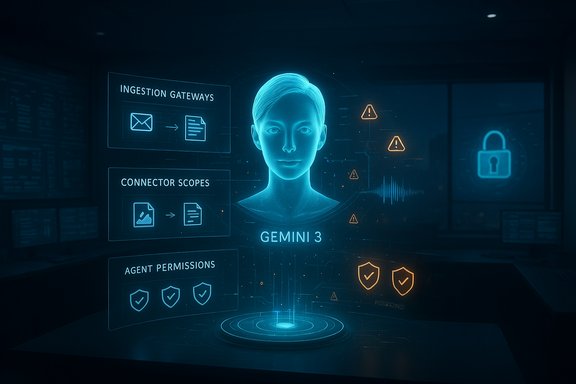
A futuristic holographic interface labeled Gemini 3 shows a user portrait with security panels and alerts.Background: from feature to backbone​

The last three years saw assistants move from “useful add-on” to embedded execution layer inside productivity suites. Microsoft Copilot has long illustrated this trend by surface-integrating AI into Outlook, Teams, Word, and Excel—letting models read mailboxes, summarize threads, and call business APIs. Gemini 3 accelerates that pattern inside Google’s environment by shipping with native Workspace integrations and early agentic functions that can read, route, call APIs, and trigger automations across Docs, Drive, Gmail, and collaboration surfaces.
This is important for two reasons. First, models tied into email, shared documents, calendars, and storage now have authorized reach into the systems that run day-to-day operations. Second, when models are allowed to act—not just to answer—failure modes cross from confidentiality and data-leak risks into operational integrity, availability, and compliance incidents.
What changed with Gemini 3 is not only the model’s problem-solving ability but the degree to which Google’s product design treats the model as a native execution agent inside enterprise workflows. That design choice shortens the path from a poisoned piece of content to a real-world action inside an organization.

The new attack surface: ingestion, modality, and agency​

Indirect prompt injection: the invisible exploit​

A critical and underappreciated shift is the rise of indirect prompt injection (IPI). Traditional prompt injection is visible: an attacker types instructions into a chat box and tries to override system prompts. Indirect prompt injection operates invisibly—by poisoning the data the AI ingests from external sources the model routinely reads: webpages, PDFs, email signatures, embedded metadata, and MCP (Model Context Protocol) tool descriptions.
Why this matters with Gemini 3: when an assistant is designed to read a shared doc, fetch a file from Drive, or consume tool metadata from an integration, a single crafted fragment of text or an invisible string inside a PDF can reframe the model’s subsequent behavior. In agentic contexts, that redirection can lead to API calls, file moves, automated replies, or even code execution—without the user ever seeing the malicious input.
Companies can no longer think only about the prompt box as an attack vector; every ingestion surface is now an entry point into operational workflows.

Multimodality multiplies vectors​

Gemini 3’s multimodal abilities—native image, audio, and document interpretation—are central to its productivity value. They are also the reason the attack surface grows non-linearly.
  • Images can carry embedded text or typographic artifacts that visually instruct a model.
  • Audio can be crafted so that transcription looks benign while the model infers a hidden instruction from acoustic cues or nontextual features.
  • PDFs and embedded media can include metadata or structure that models interpret as instructions.
These modalities introduce attack vectors that traditional email gateways, DLP systems, and endpoint protections were not designed to inspect. Visual prompt injection, typographic attacks, and adversarial audio are not hypothetical: security research and repeated red‑team exercises show reliable ways to steer even aligned multimodal models using cleverly prepared media.

Agentic behavior turns exposure into operational risk​

Agentic AI—systems that take actions on behalf of users—changes risk calculus. When assistants can call APIs, create or edit documents, send messages, and orchestrate workflows, they become actors inside the environment. That means a single misconfiguration or overbroad permission grants an attacker far more potency than before.
Agentic risks to prioritize:
  • Overbroad permissions: Agents granted everything from read access to action permissions can escalate a trivial content manipulation into major damage.
  • Unclear scopes: Ambiguous or poorly documented connector scopes create blind spots where agents execute unintended actions.
  • Lack of monitoring: Without tooling that logs and validates agent actions, detection of stealthy or delayed exploit paths is slow.
  • Unvalidated outputs: If an agent takes actions based on model output without a verification layer, errors and manipulations become operational incidents rather than “model hallucinations.”

What the early security research shows​

Security teams are no longer in the thought-experiment phase—real incidents and validated research illustrate the threats.
  • Indirect prompt injection has moved from theory to practice in multiple examined cases: poisoned web content has caused summarizers to leak sensitive tokens; maliciously crafted documents have steered internal assistants; and metadata manipulations in tool integration protocols have created execution paths for remote code execution in some agentic IDEs.
  • Multimodal prompt injection and typographic attacks (embedding text inside images, subtle overlays, or zero-width characters) can reliably bypass superficial filters and drive model compliance when vision-language modules prioritize text or typographic content.
  • Agentic tool chains that use shared protocols—such as the Model Context Protocol (MCP)—can amplify risk when server-provided metadata, tool descriptions, or resource lists are not validated. MCP standardizes tool exposure to models, and while that makes integration easier, it also creates standardized choke points attackers can target.
Security researchers and vendor-led red teams have documented concrete vulnerabilities, and at least one widely published CVE demonstrates how a pathology in an AI-integrated IDE’s file handling allowed prompt-injection-driven file overwrite and remote code execution. These are not hypothetical attack trees; they are live vulnerabilities and published incidents that confirm the mechanics are possible in real deployments.

Gemini 3 Pro: stronger base model, but not a panacea​

Early internal evaluations reported by vendor security teams suggest Gemini 3 Pro provides meaningful hardening against certain classes of attacks—especially in direct content extraction and instruction-override scenarios. Configurations that force the model to self-review or route responses through an additional “self-judge” layer appear to reduce successful jailbreaks in controlled tests.
However, several crucial caveats apply:
  • Model robustness is only one layer. Configuration choices, integration patterns, and system architecture determine real-world exposure.
  • Hardening through additional reasoning or self-judgement commonly increases computation cost—materially raising inference prices and latency for guarded configurations.
  • Public, independently reproduced benchmarks comparing models’ resilience are limited; internal vendor tests are useful signal but are not a replacement for enterprise-level adversarial testing tailored to specific deployment architectures.
  • Some forms of indirect prompt injection and multimodal manipulation remain difficult to detect and stop with model-only defenses.
In short: Gemini 3 Pro can be a stronger foundation, but it is not a security strategy. The operational perimeter is the composition of the model and everything it can access.

Enterprise readiness: the current gap​

Surveys and vendor preparedness reports converge on a disquieting picture: adoption of generative AI is outpacing organizational readiness. Many organizations have:
  • Rapidly enabled assistants and connectors to accelerate productivity.
  • Not completed guardrail designs that treat ingestion surfaces as untrusted.
  • Not implemented continuous adversarial testing for multimodal inputs.
  • Not instrumented agent calls and outputs with robust auditability and verification.
Where teams have made progress, the pattern is consistent: the most resilient deployments combine strict identity and access management for agent permissions, fine-grained connector scopes, provenance tagging of inputs, and runtime verification layers that intercept and validate high-risk actions.

What security leaders need to do now: a pragmatic checklist​

The new perimeter demands a mix of architectural principles, operational controls, and governance. The following is a prioritized, practical program for security and IT leaders to adapt to the Gemini‑era enterprise.

1. Treat all external content as untrusted​

  • Tag inputs by provenance (web, internal, user-uploaded, system).
  • Isolate untrusted content into separate context windows; do not blend trusted system prompts and untrusted data.

2. Apply least privilege and strict connector scopes​

  • Use narrow, explicit scopes for agent and model connectors.
  • Require escalation and manual approval for any expansions of scope.
  • Limit high-risk actions (code execution, privileged API calls, bulk data exports) behind multi-party approvals.

3. Enforce input sanitization and provenance validation​

  • Normalize and sanitize media and documents before ingestion.
  • Detect typographic oddities, zero-width characters, and invisible layers in images and PDFs.
  • Use defensive OCR and multi-engine transcription to cross-check audio inputs.

4. Add layered output verification​

  • Implement a secondary validation step before any agent-triggered action executes.
  • Use deterministic checks (schemas, allow-lists) for tool-call arguments and API parameters.
  • Require human-in-the-loop for high-impact outputs and irreversible operations.

5. Monitor, log, and audit agent behavior​

  • Record all model inputs, tool calls, and agent outputs in immutable logs with provenance metadata.
  • Alert on anomalous sequences: unexpected tool calls, unusual egress destinations, or sudden permission escalations.

6. Red-team continuously with multimodal focus​

  • Test realistic adversarial media: images, audio, PDFs, HTML injections, and MCP metadata manipulations.
  • Include adversarial RAG (retrieval-augmented generation) and memory poisoning scenarios.
  • Measure time-to-detection and time-to-remediation as operational KPIs.

7. Build governance and incident response for AI​

  • Create board-level reporting and CISO-level ownership for AI risk.
  • Update incident response runbooks to cover model-induced or agentic incidents, including compromised agents and data exfiltration via model outputs.
  • Integrate credential rotation and egress control as automated remediation steps for confirmed IPI incidents.

8. Adopt a toolchain of AI-aware defenses​

  • Use specialist controls for MCP servers and other agent protocol endpoints that validate schemas and resource listings.
  • Deploy multimodal content scanning engines that detect adversarial overlays and anomalous audio patterns.
  • Employ model-agnostic wrappers that tag, filter, and vet content before it reaches reasoning models.

Risk trade-offs and operational realities​

Hardening models and agentic flows involves trade-offs that security and product teams must deliberate:
  • Performance and cost: Extra reasoning, self-judgement chains, and output-validation loops increase compute and latency. Teams must weigh real-time UX needs versus safety and cost.
  • Usability vs control: Restrictive scopes reduce automation value. Aim for scoped automation with escalation patterns rather than blanket policy bans that undermine adoption.
  • Detection vs prevention: Some attacks are almost impossible to fully prevent without losing multimodal functionality; invest accordingly in fast, high‑fidelity detection and rollback capabilities.
  • Vendor trust vs internal control: Native Workspace integrations promise deep productivity gains but reduce transparency. Prefer architectures that provide both vendor-managed productivity and internal guardrails (e.g., internal MCP servers, proxy validation layers).

Strategic principles for long-term resilience​

Beyond the checklist, organizations should orient to three strategic principles that will determine success over the next decade.
  • Architecture-first defense: Security must shift left into integration design. Treat the system around the model as the primary defense perimeter: trust boundaries, ingestion pipelines, and tool-call validation are where adversaries will look first.
  • Continuous adversarial posture: The attacker’s tempo now includes automated model-driven reconnaissance. Continuous adversarial testing, not periodic audits, is required to match that tempo.
  • Organizational ownership: AI security is a cross-functional operating discipline—product, engineering, security, legal, and risk must share responsibility and metrics. Board-level engagement is needed because AI decisions now affect operations, compliance, and reputation.

What to watch next (and what remains uncertain)​

The field is evolving fast. Signals to watch include:
  • How vendors expose model context and tool metadata in standardized protocols and how those protocols evolve to include provenance and validation primitives.
  • Whether mainstream multimodal detectors (visual watermarking, SynthID-style signatures) mature enough to reliably mark generated content and help distinguish untrusted media.
  • How the economics of hardened model configurations shape adoption: will enterprises accept higher inference costs for guarded agents, or will they favor lower-cost models plus heavier external guardrails?
Some vendor claims and early tests are promising but still need independent replication. Internal evaluation results and vendor-hosted demos provide valuable data points, but enterprises must build their own red teams and tests that reflect their specific data, processes, and threat model. Similarly, early public CVEs and published incident reports validate the attack models—but the precise risk for a given organization depends on how deeply the model is integrated, which connectors are used, and how agent privileges were configured.

Conclusion: the perimeter moved—so must the defense​

Gemini 3’s practical significance for enterprises lies less in headline benchmark numbers and more in where the model sits inside corporate operations. When models are embedded into mail, docs, storage, and agentic flows, they become part of the control plane. That shift creates a new, largely invisible perimeter: the collection of ingestion surfaces, connectors, and agent privileges that determine what a model can see and do.
Securing that perimeter is an architectural and operational challenge—not merely a matter of adopting a “safer” model. The model is a component; the perimeter is everything around it. Practical defenses require provenance-aware ingestion, strict least-privilege connectors, layered verification before actions execute, comprehensive logging and monitoring, and continuous adversarial testing that includes multimodal scenarios.
For executives and CISOs, the question has changed from “How smart is our AI?” to “What is our AI allowed to do—and who ensures it behaves safely when it does it?” Treating that question as a board- and C-suite-level imperative will determine whether your organization captures the productivity upside of agentic AI or succumbs to a wave of operational incidents that could have been prevented with architecture-first defenses.

Source: Check Point Blog AI Has Become the New Enterprise Perimeter — and Gemini 3 Pro Just Proved It - Check Point Blog
 

Dell’s blunt warning on the company’s Q3 earnings call — that the Windows 11 transition is trailing Windows 10’s comparable migration by “10–12 points” — has exposed a widening gap between Microsoft’s upgrade expectations and real-world buying behavior, with direct consequences for OEMs, enterprise IT planners, and the overall PC refresh cycle.

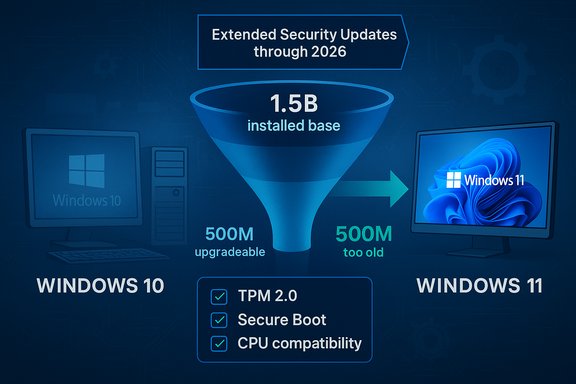
Blue infographic showing Windows 10 to 11 upgrade funnel with 1.5B installed base.Background​

Microsoft formally ended mainstream support for Windows 10 in mid‑October 2025 and rolled out a consumer Extended Security Updates (ESU) program that lets individual users buy or enroll for a one‑year bridge through October 13, 2026. The ESU program can be accessed via the Settings enrollment wizard, is free in some scenarios (or redeemable with Microsoft Rewards points), and explicitly covers only critical and important security updates — not feature updates or general technical support. Meanwhile, market trackers show that Windows 11 has moved past Windows 10 in desktop share in 2025, but that headline masks an uneven migration landscape: large pools of Windows 10 users remain on older hardware or are delaying upgrades for economic, compatibility, or policy reasons. StatCounter’s monthly data for October 2025 recorded Windows 11 at roughly 55% of desktop Windows usage and Windows 10 at about 42%, but those totals do not resolve the crucial difference between pre‑loaded OEM installs and the installed base of working devices that enterprises and consumers are still using.

What Dell actually said — and why it matters​

Jeffrey Clarke, Dell’s chief operating officer, told investors that “we have not completed the Windows 11 transition,” and that the company’s view puts the current migration roughly 10–12 percentage points behind where the Windows 10 migration was at a comparable stage. He framed the situation as both a near‑term headwind to consumer PC demand and a longer runway of opportunity for replacements tied to AI‑capable hardware. Clarke also offered an installed‑base estimate: roughly 1.5 billion Windows PCs in the field, of which he said about 500 million are capable of running Windows 11 but have not been upgraded, and another roughly 500 million are four years old or older and cannot run Windows 11 without hardware change. Dell described that pool as “rich opportunities” for future upgrades even as the firm forecasts flat consumer PC sales in the near term, citing component cost pressures and cautious buyer behavior. The raw numbers and phrasing come directly from management during the Q&A on the earnings call. Why the Dell comment matters: OEMs and channel partners price and plan inventory, promotions, and product roadmaps around the expected PC refresh cycle. When an OEM as large as Dell says the conversion tail from Windows 10 to Windows 11 is lagging relative to prior cycles, that’s not just a line item in guidance — it’s a signal that operating‑system timing is reshaping demand, and that Microsoft’s usual end‑of‑support leverage is weaker than in previous transitions.

Overview: Windows 10 ESU — the safety valve Microsoft introduced​

Microsoft’s consumer Extended Security Updates (ESU) program is an explicit policy response to migration friction. It was engineered as a short bridge that:
  • Provides critical and important security updates for eligible Windows 10 devices through October 13, 2026.
  • Is available via an enrollment wizard in Settings, can be free if users sync PC settings to a Microsoft account, redeemable with 1,000 Microsoft Rewards points, or purchasable for a one‑time fee (roughly $30 USD in many regions).
  • Does not include feature updates, enhancements, or technical support, and excludes commercial scenarios (enterprises have separate ESU terms).
Practical implication: Microsoft reduced the immediate pressure on households and smaller users to buy new hardware the moment Windows 10 mainstream support ended. But ESU is explicitly temporary and limited in scope. Organizations and security‑conscious users should treat ESU as a stopgap — not a substitute for long‑term migration planning or hardware renewal.

Why Windows 11 adoption is slower than Microsoft expected​

Multiple structural factors converge to make this migration unusual compared with past Windows refreshes.

1) Hardware gatekeeping: TPM, UEFI, and the CPU lists​

Windows 11’s minimum system requirements deliberately emphasize security primitives: TPM 2.0, UEFI with Secure Boot, and compatibility with Microsoft’s supported CPU lists. Those checks are simple to describe but messy in practice: large swaths of otherwise serviceable machines fall into a gray area where they either lack firmware settings enabled, possess an older CPU model that Microsoft did not include in the supported list, or simply ship without modern TPM firmware. Microsoft’s official requirements list and guidance remain the authoritative reference on this point. The net effect is twofold: many users cannot upgrade without hardware changes, and many enterprises avoid upgrades that could introduce driver or application compatibility problems. The hardware‑based gating also created a visible political and environmental backlash: critics argue the policy forces otherwise functional machines into premature replacement cycles, accelerating e‑waste. Those concerns amplified consumer resistance to what already felt like a disruptive UI and workflow change.

2) Enterprise inertia and compatibility risk​

Enterprises have deliberately decoupled OS migrations from monthly security patches for years. For corporate IT, the decision to switch is often governed by app compatibility, image and driver validation, regulatory constraints, and multi‑year refresh schedules. Many organizations therefore treat Windows 11 as a multi‑year program rather than a one‑off upgrade — a dynamic that reduces the velocity of migration even when the vendor’s end‑of‑support deadline is looming. Dell’s channel visibility makes this conservative adoption behavior visible early to OEMs.

3) Consumer sentiment and perceived value​

For many consumers, Windows 10 delivered acceptable stability and performance. Windows 11’s visual redesign, change in workflows, and a perception of added telemetry or mandatory Microsoft account interactions made the upgrade feel less urgent or worthwhile. Mindshare matters: when the next OS does not present a compelling value differential for everyday tasks, users defer. The ESU option simply extended that window of deferral.

4) Economic and geopolitical pressure on PC prices​

The PC industry is wrestling with an unusual combination of component cost inflation (notably DRAM and NAND) and the capital‑intensity of AI‑targeted silicon. As Dell noted, path‑dependent pricing decisions and the rising cost of higher‑end components narrow the OEMs’ ability to stimulate demand through aggressive discounts. That makes buyers more price‑sensitive and more likely to postpone purchases, even when an OS deadline approaches.

What the numbers actually show (context, not contradiction)​

It’s tempting to treat a single quoted metric — “10–12 points behind” — as definitive. It isn’t. There are at least two things to reconcile:
  • Market share milestones: StatCounter’s monthly snapshots show Windows 11 surpassing Windows 10 in aggregated desktop usage in 2025, reflecting the combined effect of OEM preloads and enterprise rollouts. That milestone is real, but it doesn’t negate Dell’s observation about migration velocity in the installed base or the post‑support upgrade funnel.
  • Installed base composition: Dell’s figures emphasize a split inside the installed base: machines that are physically capable of running Windows 11 but haven’t upgraded, and machines that are too old to be eligible. That composition shapes buying decisions: if half of the “opportunity” is blocked by hardware, OEMs can only convert a fraction of the remainder without convincing users to buy new systems. Dell’s statements were read in investor context and reflect what the company says it sees in channels and pipelines.
Put simply: adoption headlines and channel‑level migration economics are related but different metrics. Both are necessary to understand the full picture.

OEM and channel consequences: inventory, promotions, and the AI PC pivot​

OEMs and retailers plan volumes and discounts months in advance. When a major upgrade cycle underperforms relative to plan, firms must rebalance:
  • Inventory mix: Push more aggressive trade‑in and recycling incentives; shift assortments to Copilot+/AI‑capable SKUs to create new value props.
  • Pricing strategies: Use targeted subsidies for education or business segments most likely to upgrade, while protecting margins in components‑tight segments.
  • Messaging: Reframe the upgrade pitch away from “mandatory security” to “productivity, AI, and user experience” benefits that justify immediate spend.
Dell’s investor messaging explicitly couples the Windows 11 lag with a broader agenda: convert that installed base over time while positioning newer, AI‑accelerated machines as the growth engine — not a near‑term panacea. That’s a pragmatic stance: even if migration stalls, demand will periodically reset around natural refresh cycles and AI‑driven feature sets.

Security, risk, and the shortcut economy​

The stall in organic upgrades has side effects that matter for users and security professionals.
  • Extended Security Updates are a bridge, not a cure: ESU gives time, not modern features or technical support. Users on extended support must accept that core platform innovation and compatibility improvements will not arrive on Windows 10.
  • Third‑party bypasses are a growing hazard: Tools that let people install Windows 11 on unsupported hardware have proliferated. While they can be attractive to enthusiasts, malicious actors have weaponized fake installers and hostile copies of legitimate bypass utilities, increasing the risk of malware and supply‑chain compromise. Those threats magnify when a significant share of users is motivated to find shortcuts off the official upgrade path.
  • E‑waste and sustainability: The enforcement of hardware requirements sparked a public debate about planned obsolescence and environmental impact. For users already sensitive to sustainability, forced hardware turnover is a reputational risk for the entire ecosystem and a practical reason to delay upgrades. OEMs must balance commercial imperatives with credible recycling and trade‑in programs to avoid backlash.

Practical guidance for IT managers and consumers​

For enterprises​

  • Audit installed applications and drivers against Windows 11 compatibility lists; prioritize mission‑critical apps for testing.
  • Align migration with normal hardware refresh cycles and depreciation schedules; avoid short‑term forced purchases.
  • Treat ESU as a contingency fund — budget for it only where immediate migration cost or risk justifies the expense.

For consumers and small businesses​

  • Check the PC Health Check tool or OEM guidance to confirm Windows 11 eligibility before buying new hardware.
  • If staying on Windows 10 through ESU, enroll through Settings (or the offered free methods) to receive critical updates through October 13, 2026.
  • Avoid untrusted bypass tools — the malware risk and future update implications are nontrivial.

What Microsoft and OEMs could — and should — do next​

  • Refine messaging and incentives: Rather than leaning solely on end‑of‑support deadlines, combine security messaging with clear, tangible productivity and AI benefits that justify an immediate upgrade for both consumers and enterprise buyers.
  • Broaden upgrade pathways without undermining security: Offer validated, low‑cost hardware upgrade packages (e.g., TPM module kits where feasible) or certified imaging services that reduce friction for capable but misconfigured systems.
  • Strengthen trade‑in and refurb programs: Make device replacement socially and financially easier while ensuring secure data wiping and responsible recycling to blunt e‑waste criticism.
  • Tackle compatibility uncertainty: Expand and publicize detailed compatibility testing tools and partner certifications for enterprise apps so IT departments can plan with confidence rather than fear of regressions.
Some of these moves are already in motion (ESU, OEM trade‑ins, Copilot/AI marketing), but Dell’s Q3 remarks show that a patchwork approach still leaves meaningful parts of the installed base unconvinced. Proactivity, not just sanctions or deadlines, will be required to accelerate adoption without collateral damage.

Strengths and downsides of the current posture​

Strengths​

  • Microsoft’s focus on endpoint security has real technical benefits — TPM + Secure Boot + UEFI are meaningful defenses.
  • ESU buys time for cautious organizations and consumers to plan migrations rather than panicking at a single cutover date.
  • OEMs can reframe the narrative around AI capabilities and new hardware benefits to open new, non‑deadline purchase drivers.

Risks and weaknesses​

  • Migration momentum is fragile: headline market share gains can obscure the stubbornness of the installed base; OEM revenue timing suffers as a result.
  • Security fragmentation: prolonged dual‑state ecosystems (large Windows 10 pools plus Windows 11 fleets) complicate patch management and supply‑chain defenses.
  • Reputational and environmental costs: hardware gating policies carry a political cost when they accelerate perceived obsolescence and e‑waste.

Verdict: a slower transition, but not a dead end​

Dell’s commentary is an honest market read: the Windows 11 transition is proceeding, but not at a clean, linear pace that previous Windows migrations enjoyed. That has near‑term implications for OEM revenue patterns, inventory planning, and marketing programs. It also forces a recalibration of Microsoft’s playbook: deadlines and mandatory requirements are necessary for long‑term security posture, but they are not sufficient to create demand in a market that increasingly assesses upgrades against cost, compatibility risk, and sustainability. For buyers and IT teams, the math is straightforward: ESU offers breathing room, but staying on older software indefinitely is an inferior security posture. For Microsoft and OEMs, the opportunity is to turn what looks like a shortfall into a multi‑year conversion program built on clearer value, easier upgrade paths, and responsible hardware lifecycle management. Dell has signaled the timing mismatch; the broader industry must choose whether to treat that as an obstacle or a roadmap.
Conclusion
Dell’s public assessment crystallizes an uncomfortable truth for the PC ecosystem: modern platform transitions are shaped by more than feature lists and support calendars — they are social, economic, and environmental processes. Windows 11 adoption has crossed important share thresholds, but the migration still leaves hundreds of millions of users in limbo. Managing that liminality is the industry’s immediate task: protect users who stay on Windows 10, make upgrades simpler and more attractive, and use responsible disposal and trade‑in programs to limit e‑waste. The next 12–24 months will show whether Microsoft and its OEM partners can translate technical requirements and marketing narratives into a practical, broadly acceptable path forward.
Source: vice.com Dell Points Out That People Aren't Adopting Windows 11 as Quickly as Windows 10
 

Back
Top