

Cheap doesn't have to mean compromise: 2025's best cheap desktop PCs deliver practical performance, modern ports, and sensible upgrade paths for everyday work, study, media, and light gaming while keeping your budget intact.
The budget desktop market in 2025 is more diverse and capable than many shoppers expect. Traditional mid‑towers, compact mini‑PCs, all‑in‑ones (AIOs), modular kits, and even single‑board computers now occupy useful niches for users who prioritize price, desk space, or repairability. Advances in CPU microarchitecture, integrated graphics, and NVMe storage have pushed the baseline performance upward: a sub‑$700 tower can boot quickly, handle office workloads, and outpace systems that cost far more only a couple of generations ago. PCMag's practical, use‑case‑driven approach to picking winners remains relevant, and the same criteria—performance per dollar, ports, upgrade potential, and real‑world usability—are what separate the good budget buys from the junk.
This feature expands on those picks, verifies critical technical claims where possible, and gives readers an actionable buying checklist so a cheap desktop becomes a long‑lasting value purchase rather than a short‑term stopgap. Key takeaways first: check the exact SKU before you buy, treat 16GB RAM as the longevity baseline, prefer NVMe SSDs (512GB+) where possible, and confirm PSU wattage if you plan a future discrete GPU upgrade.
At the same time, buyers should be aware of recurring traps: SKU fragmentation (the same model name can represent multiple very different configurations), proprietary power supplies and non‑standard chassis that limit upgrades, and volatile discrete‑GPU pricing for those whose gaming needs may outgrow integrated graphics. The next sections walk through the standout picks and their practical strengths and tradeoffs.
Pros:
Who should buy it: remote workers, freelancers, or small business buyers procuring many identical small desktops for call centers, point‑of‑sale stations, or shared desks. It’s a great Mac mini–style alternative for Windows users who want a small footprint without sacrificing general performance.
Pros:
Why pick it: when you need professional I/O density (Thunderbolt 4, multiple display outputs, advanced networking), but you still want a compact desktop that fits into tight workstations or shared environments.
Pros:
Pros:
Pros:
Pros:
Pros:
Be pragmatic about price claims: advertised starting prices are often for the lowest RAM and storage variants. Whenever possible, buy the SKU with upgrade headroom (spare M.2 slots, at least one free DIMM slot, or a standard PSU) so you can incrementally improve the system rather than discarding it when demands grow.
Source: PCMag Australia The Best Cheap Desktop PCs for 2025
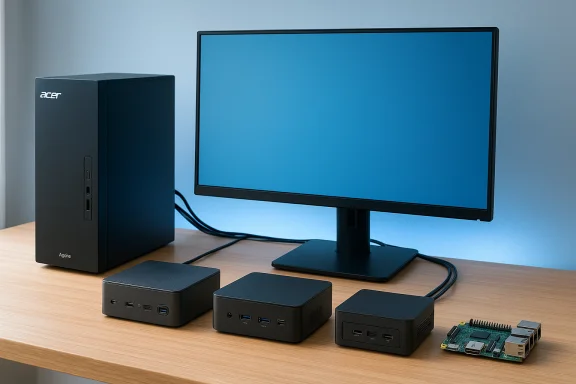 Overview
The budget desktop market in 2025 is more diverse and capable than many shoppers expect. Traditional mid‑towers, compact mini‑PCs, all‑in‑ones (AIOs), modular kits, and even single‑board computers now occupy useful niches for users who prioritize price, desk space, or repairability. Advances in CPU microarchitecture, integrated graphics, and NVMe storage have pushed the baseline performance upward: a sub‑$700 tower can boot quickly, handle office workloads, and outpace systems that cost far more only a couple of generations ago. PCMag's practical, use‑case‑driven approach to picking winners remains relevant, and the same criteria—performance per dollar, ports, upgrade potential, and real‑world usability—are what separate the good budget buys from the junk.This feature expands on those picks, verifies critical technical claims where possible, and gives readers an actionable buying checklist so a cheap desktop becomes a long‑lasting value purchase rather than a short‑term stopgap. Key takeaways first: check the exact SKU before you buy, treat 16GB RAM as the longevity baseline, prefer NVMe SSDs (512GB+) where possible, and confirm PSU wattage if you plan a future discrete GPU upgrade.
Background: Why budget desktops still matter
Small form factor PCs and budget towers alike benefit from two steady trends: more efficient processors and cheaper, faster NVMe storage. That combination raises the floor for everyday responsiveness—faster boot times, snappier multitasking, and smoother web and media use—even in low‑cost systems. Meanwhile, mini‑PCs that reuse mobile laptop silicon have achieved notebook‑class CPU performance in palm‑sized cases, making them attractive for home office and HTPC scenarios where space and noise matter more than upgradeability. PCMag’s testing emphasizes repeatable benchmarks plus usability checks—noise, ports, and serviceability—which are particularly informative when evaluating cheap prebuilt systems.At the same time, buyers should be aware of recurring traps: SKU fragmentation (the same model name can represent multiple very different configurations), proprietary power supplies and non‑standard chassis that limit upgrades, and volatile discrete‑GPU pricing for those whose gaming needs may outgrow integrated graphics. The next sections walk through the standout picks and their practical strengths and tradeoffs.
The field: Best cheap desktops and who they’re for
Acer Aspire TC‑1775 — Best cheap desktop for most buyers
For shoppers who want a traditional tower with straightforward upgrade options and the best blend of price and capability, the Acer Aspire TC‑1775 is the archetypal pick. It pairs current‑generation Intel silicon with NVMe storage, front USB‑C convenience, and reasonable internal expandability—features that matter most to mainstream buyers.- Typical verified specs reported for TC‑1775 SKUs:
- Intel Core i5‑14400 (mainline 14th‑gen Core i5 variant)
- 8–16GB DDR5 (many retail SKUs ship with 8GB)
- 512GB PCIe Gen4 NVMe SSD
- Wi‑Fi 6E and front USB‑C
- Two M.2 slots and a single PCIe x16 slot
- Frequently paired with a modest 300W internal PSU in base models.
Pros:
- Easy to find at retail and often heavily discounted
- Straightforward upgrade path for RAM and storage
- Useful front I/O including USB‑C
- Base RAM is often only 8GB
- PSU may be underpowered for serious GPU upgrades
- Some chassis use proprietary connectors that complicate full aftermarket upgrades
Geekom A6 Mini — Best mini PC for space‑savers and budget fleet desktops
If space is at a premium, mini‑PCs like the Geekom A6 deliver surprising value. In many SKUs the A6 pairs an AMD Ryzen 7 6800H with Radeon 680M integrated graphics, 32GB DDR5, and a 1TB NVMe SSD—specs that historically would have cost significantly more for a full‑size desktop. Independent hands‑on reviews confirm the A6’s compact metal chassis, useful port selection (including 2.5GbE on many SKUs), and strong everyday performance for office work and media.Who should buy it: remote workers, freelancers, or small business buyers procuring many identical small desktops for call centers, point‑of‑sale stations, or shared desks. It’s a great Mac mini–style alternative for Windows users who want a small footprint without sacrificing general performance.
Pros:
- Excellent price‑to‑performance for everyday tasks
- Multiple video outputs and multi‑monitor support
- Often ships with SO‑DIMM slots and M.2 NVMe for limited upgrades
- Limited internal room compared with towers
- Verify whether memory is SO‑DIMM or soldered in your chosen SKU
- Less headroom for big GPU upgrades
Asus NUC 15 Pro+ — Best for pro mini desktop shoppers
The Asus NUC 15 Pro+ continues the NUC lineage with premium connectivity, Core Ultra CPU options, Wi‑Fi 7, and Thunderbolt connectivity—making it a compelling choice for professionals who need dense ports and quieter operation in a small package. Asus positions the NUC 15 Pro+ for creatives and small businesses that need compact but capable hardware. Product materials and independent coverage emphasize the NUC’s professional feature set and serviceable thermal design.Why pick it: when you need professional I/O density (Thunderbolt 4, multiple display outputs, advanced networking), but you still want a compact desktop that fits into tight workstations or shared environments.
Pros:
- High connectivity and professional feature set
- Intel Core Ultra options for AI and compute acceleration
- Quiet, compact design for office use
- Premium SKUs can push pricing out of the strictly “budget” bracket
- Less friendly to aftermarket GPU upgrades
Asus TUF Gaming T500MV — Best cheap gaming (compact) desktop
Budget gaming towers are difficult to configure well, but the Asus TUF Gaming T500MV checks off the essentials: a compact chassis, a mobile‑class high‑performance CPU in a space‑saving design, and an entry‑level discrete GPU option in some configurations. Using a laptop‑grade CPU (an H‑series mobile part) enables a smaller case and quieter operation while still delivering respectable 1080p gaming performance when paired with an appropriate GPU. Reviewers applaud the balance of noise, size, and price for dorm rooms and tight living spaces where acoustics and footprint matter.Pros:
- Space‑efficient and quiet
- Competitive 1080p performance in budget configurations
- Focused design for gaming in constrained environments
- Mobile CPU choices limit traditional upgrade paths
- If you expect to upgrade to a larger GPU later, confirm PSU and case compatibility
Dell 24 AIO (EC24250) — Best budget all‑in‑one for families and plug‑and‑play buyers
For buyers who want a monitor and PC in one package, the Dell 24 All‑in‑One is a no‑fuss option with a large integrated screen, bundled keyboard and mouse, and a simple setup. AIOs trade expandability for convenience, but for many families and plug‑and‑play environments that’s an advantage—no separate monitor to buy and less cable chaos. The Dell 24 AIO is positioned as an affordable family desktop with practical everyday performance and a better than average webcam.Pros:
- All‑in‑one simplicity and bundled peripherals
- Large integrated display for the price
- Good webcam and fewer parts to configure
- Limited internal upgradeability
- Screen resolution and component quality can be modest at the lowest price points
Raspberry Pi 5 — Best for DIY tinkerers and ultra‑cheap projects
The Raspberry Pi has never been a mainstream family desktop, but the Pi 5 raises the bar further for small, affordable DIY projects. It’s the best low‑cost way to get a functional computer for hobby development, home automation, media servers, or classroom tinkering. The tradeoff is clear: you’ll need to comfort with Linux, additional accessories, and manual configuration to turn the board into a usable desktop. For the right audience, though, the Pi 5’s improved CPU, GPU, and storage options make it the most compelling Pi yet.Pros:
- Extremely low entry cost and tremendous hobby value
- Small, power‑efficient, and flexible for projects
- Excellent community and software resources
- Not a drop‑in replacement for a mainstream desktop
- Requires additional peripherals, storage, and configuration
Framework Desktop — Best for DIY lovers and repairability advocates
For tinkerers and buyers who prioritize repairability and component‑level customization, the Framework Desktop is a unique option. It’s modular by design: you can buy a near‑bare‑bones mainboard and tower and add your own RAM, storage, and OS. It’s an inherently more expensive route than a low‑end prebuilt, but for those who value repairability, standard components, and the ability to iterate hardware over years, Framework’s platform is compelling. Expect to pay a premium for that flexibility.Pros:
- Exceptional repairability and upgradeability
- Standard, user‑replaceable parts
- Ideal for Linux users, DIYers, and niche professional workloads
- Higher starting price than many cheap prebuilt desktops
- Requires some hardware know‑how
Budget PC form factors: what size do you need?
Form factor determines upgradeability, noise, and where the machine fits in your space. Choose deliberately:- Mini‑PC: best for space saving, media streaming, and light productivity. Expect limited upgrade paths but excellent port density on many models.
- AIO: great for family hubs and tidy desks where you want the monitor and PC together; internal access is limited.
- Micro/mid/tower: more room for upgrades—RAM, multiple M.2 or 2.5" drives, and discrete GPUs if the PSU and chassis allow. Towers offer the best long‑term value if you want to upgrade over time.
- Single‑board (Raspberry Pi): unbeatable price and tiny size, but best for projects and learning rather than replacing a full‑time family desktop.
What to prioritize in a budget desktop
These are the components and specs that will most affect everyday experience and future proofing.- CPU: modern Core i3/i5 (13th/14th Gen) or Ryzen 3/5 are adequate for general tasks; Core i5/Ryzen 5 is the practical sweet spot. Intel Core Ultra (Arrow Lake) is beginning to appear in mini/SFF pros but will take time to filter to entry models.
- Memory: 8GB is the bare minimum; 16GB is the recommended baseline for multitasking longevity. If your budget allows, 32GB helps for content creation or heavy multitasking.
- Storage: prefer NVMe SSDs; 512GB is the minimum practical size for everyday use; 1TB is better if you store games or media locally. Many budget towers provide a spare M.2 or 2.5" bay for future expansion.
- Graphics: integrated GPUs handle web, streaming, and productivity; discrete GPUs are essential for comfortable 1080p+ gaming or 3D work. If gaming is your priority, invest in the GPU first.
- Connectivity: at least one USB‑C (10Gbps or better), Wi‑Fi 6E (or Wi‑Fi 7 on premium mini PCs), and a 2.5GbE port if you plan heavy local NAS transfers.
Internal upgrades: realistic expectations
Towers are the most friendly for upgrades; mini‑PCs and AIOs are not. Common upgrade paths and caveats:- RAM: the easiest and often cheapest longevity upgrade. Confirm if memory is SO‑DIMM and whether there are free slots.
- Storage: adding an M.2 NVMe drive is usually straightforward in towers and many mini‑PCs. Verify available slots.
- GPU: only viable if the chassis has a PCIe x16 slot and the PSU provides adequate wattage and connectors. Many budget systems ship with
 00W PSUs or proprietary power options; confirm before assuming you can add a large discrete GPU.
Accessories and real costs: what you still need to buy
A cheap desktop often excludes the monitor and sometimes peripherals. Expect to spend:- Monitor: decent 1080p 24‑inch panels start around $100–$130; 1440p or color‑accurate displays cost more.
- Keyboard & mouse: basic combos can be included with towers, but consider an ergonomic keyboard and a quality mouse if you work long hours.
- External storage: external SSDs or a NAS are often more cost‑effective ways to store large media libraries than buying large internal SSDs at retail.
A concise buying checklist (step‑by‑step)
- Define the primary use case (general productivity, family hub, light gaming, pro work).
- Pick the form factor that matches your space: tower for upgrades, mini for desk‑saving, AIO for simplicity.
- Confirm the exact SKU string—CPU, RAM, storage, NPU/AI features, and PSU wattage. Do not purchase based on a model name alone.
- Target at least 16GB RAM and a 512GB NVMe SSD for general longevity.
- If gaming, allocate the largest share of the budget to the GPU and confirm PSU and chassis compatibility before adding a discrete card.
- Budget separately for a monitor and peripherals if the system does not include them.
- Check warranty terms and extended coverage only if downtime or hardware replacement costs are significant.
Risks, recurring traps, and what to watch for
- SKU fragmentation: the same model name often hides widely different internals—double‑check the SKU before buying.
- Proprietary PSUs and odd chassis: these can block future GPU or PSU swaps and increase long‑term cost. Always open the vendor spec sheet or a teardown review to confirm.
- Price volatility for GPUs: if you expect to add a GPU later, anticipate fluctuating prices and purchase windows around new product launches or seasonal sales.
- Unverifiable claims: be cautious with marketing claims about “AI acceleration” or TOPS figures; real‑world gains depend heavily on software support and application integration. If a vendor touts on‑die NPUs or Copilot certification, verify that the apps you use can actually leverage those features. When such claims aren't clearly documented or benchmarked, treat them as aspirational rather than guaranteed.
Final analysis: strengths, where money matters, and practical recommendations
Budget desktops in 2025 deliver a surprising amount of capability for modest prices. The real winners balance modern I/O, NVMe storage, and upgradeability. For most buyers, spending on RAM (to reach 16GB) and a fast NVMe SSD yields the most noticeable long‑term improvement in everyday use. For gamers, prioritize GPU spend; for small‑office fleets or space‑constrained users, prioritize compact, well‑connected mini‑PCs like the Geekom A6 or the NUC 15 Pro+. For tinkerers who enjoy repairability, the Framework Desktop is an exceptional albeit more expensive way to ensure component longevity and easier servicing.Be pragmatic about price claims: advertised starting prices are often for the lowest RAM and storage variants. Whenever possible, buy the SKU with upgrade headroom (spare M.2 slots, at least one free DIMM slot, or a standard PSU) so you can incrementally improve the system rather than discarding it when demands grow.
Conclusion
Cheap desktop PCs no longer have to be disposable. With sensible choices—prioritizing RAM, NVMe storage, and an upgrade‑friendly chassis where possible—2025’s budget field offers long‑lasting value across a variety of use cases. From the dependable Acer Aspire TC‑1775 tower to space‑saving champions like the Geekom A6 and pro‑oriented mini workhorses such as the Asus NUC 15 Pro+, there’s a practical, affordable desktop for almost every buyer profile. DIY enthusiasts still have the Raspberry Pi 5 for projects and the Framework Desktop for repairable modular builds, while AIOs like the Dell 24 provide plug‑and‑play simplicity for families. Confirm your exact SKU, verify PSU and upgrade options if you plan to evolve the machine, and treat value as a combination of immediate capability and future flexibility. Do this and a “cheap” desktop PC can be the best long‑term investment on your desk in 2025.Source: PCMag Australia The Best Cheap Desktop PCs for 2025
