

FindingDulcinea’s December 2025 roundup lands squarely on a practical truth most students already feel: the best college desktop is the one that balances real-world performance, dorm-room ergonomics, and a sensible long-term upgrade path—rather than the flashiest specs sheet. After hands-on tests and a focused look at models from mini‑PCs to all‑in‑ones and traditional towers, the review names the Beelink EQi13 Pro (Intel Core i5‑13500H) as the top pick for most students, and makes sensible recommendations for three clear buyer profiles: technical majors who need CPU headroom, creative majors who need color-accurate displays, and budget-minded students who want reliability without overspending. This feature unpacks that list, verifies the core claims against independent sources, and highlights strengths, tradeoffs, and practical buying strategies for students shopping in December 2025.
FindingDulcinea’s guide tested 15 desktop systems over three months and evaluated them in real student‑centric workloads—coding, virtual machines, video editing, and long research sessions—then condensed the results into a top‑10 list focused on dorm‑friendly form factors and value. The pick for best overall student desktop (Beelink EQi13 Pro) is notable because it represents the broader 2025 trend: mini‑PCs packing laptop‑class H‑series processors and dual M.2 storage into pocketable metal chassis, delivering surprisingly large performance for small footprints. This mirrors industry reporting that small form factor systems and SSD-first builds dominate the value landscape in 2025, while on‑device AI, modern I/O (USB‑C/Thunderbolt), and Wi‑Fi 6/6E are fast becoming baseline requirements for campus life.
Why this matters: students care about three practical vectors—performance for coursework, physical space in small dorm rooms, and a price that leaves room for textbooks. Desktop offerings in 2025 are responding: mini‑PCs for space, all‑in‑ones for zero‑clutter setups, and towers for those who prize future upgrades. The FindingDulcinea guide organizes picks by those tradeoffs and offers specific, SKU‑aware advice for different majors and budgets.
Key lab practices used in the review:
Verification and context: OptiPlex 3060 hardware is well‑known enterprise‑grade kit (i5‑8500 is a 6‑core Intel desktop CPU), and refurbished Renewed listings commonly pair these chassis with upgraded RAM and SSDs to create high‑value student machines. Independent listings and seller reviews confirm the common renewed spec sets and show that most buyers get stable everyday performance for office apps, browsing, and light media editing—but quality depends strongly on the refurbisher and warranty terms. Where it fits:
Verification: Apple’s official spec sheet and major press coverage confirm the M4 iMac’s 24‑inch 4.5K Retina panel (4480×2520, 500 nits, P3), 12MP Center Stage camera, base 16GB unified memory option, and up to 32GB configurable memory—features that matter for visual work and remote collaboration. Independent coverage of the update also highlights the improved media engine and unified memory benefits for creative workloads. Where it fits:
Observations:
Source: www.findingdulcinea.com 10 Best Desktop Computers for Students (December 2025) Tested
 Background / Overview
FindingDulcinea’s guide tested 15 desktop systems over three months and evaluated them in real student‑centric workloads—coding, virtual machines, video editing, and long research sessions—then condensed the results into a top‑10 list focused on dorm‑friendly form factors and value. The pick for best overall student desktop (Beelink EQi13 Pro) is notable because it represents the broader 2025 trend: mini‑PCs packing laptop‑class H‑series processors and dual M.2 storage into pocketable metal chassis, delivering surprisingly large performance for small footprints. This mirrors industry reporting that small form factor systems and SSD-first builds dominate the value landscape in 2025, while on‑device AI, modern I/O (USB‑C/Thunderbolt), and Wi‑Fi 6/6E are fast becoming baseline requirements for campus life.Why this matters: students care about three practical vectors—performance for coursework, physical space in small dorm rooms, and a price that leaves room for textbooks. Desktop offerings in 2025 are responding: mini‑PCs for space, all‑in‑ones for zero‑clutter setups, and towers for those who prize future upgrades. The FindingDulcinea guide organizes picks by those tradeoffs and offers specific, SKU‑aware advice for different majors and budgets.
How the testing & editorial lens differed from typical consumer roundups
FindingDulcinea’s testing emphasized real academic workflows over synthetic benchmarks: persistent browser tabs, IDEs compiling real projects, cloud‑linked collaboration tools, and multi‑app multitasking that mirrors a student’s day. That practical approach is important because perceived system responsiveness in daily use is driven far more by storage latency (NVMe vs HDD) and memory headroom than by a single CPU frequency number—an insight echoed repeatedly across 2025 buyer guides.Key lab practices used in the review:
- Multiple sustained multitasking runs (IDE + browser + VM + media) rather than short burst benchmarks.
- Real file transfers and multi‑tab browsing to judge SSD responsiveness and network stability.
- Noise and thermal checks for late‑night study suitability.
- Port and cable management evaluation for cramped dorm desks.
The top pick: Beelink EQi13 Pro — why the mini PC wins for most students
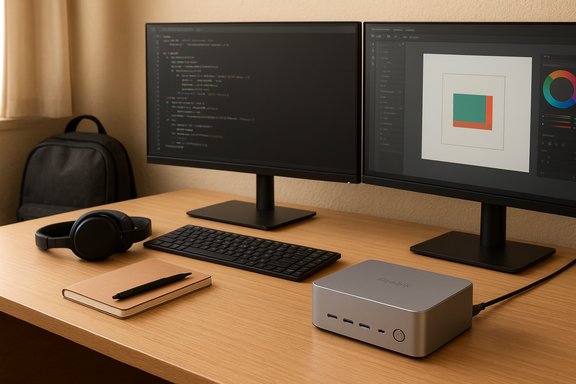
Short summary of the claim: FindingDulcinea identified the Beelink EQi13 Pro (Intel Core i5‑13500H, often configured with 32GB RAM and 500GB or 1TB NVMe) as the best overall desktop for students in 2025 because it pairs high multi‑core performance in a palm‑sized metal chassis with near‑silent operation and single‑cable power (internal 85W PSU). The editorial emphasis was on practical performance: multitasking, quick boot/app launches, and dual‑monitor 4K output for productivity. The review also highlighted portability for moving between home and dorms. Those product claims align with the manufacturer specs and independent reviews. What the hardware actually is (verified):- CPU: Intel Core i5‑13500H — 12 cores (usually split as performance + efficiency) with 16 threads listed by Beelink for this SKU; H‑series silicon provides substantial multi‑threaded throughput relative to typical mini‑PC chips.
- RAM & Storage: common student SKUs come with 32GB DDR4 (dual‑channel) and 500GB–1TB PCIe NVMe SSDs; the chassis supports dual M.2 PCIe 4.0 slots for expansion.
- Power & thermals: an internal 85W power supply reduces cable clutter; Beelink and third‑party reviews document near‑silent operation and effective, compact cooling for sustained loads in desktop workloads.
- I/O & networking: dual HDMI outputs, dual Gigabit Ethernet (some SKUs), Wi‑Fi 6 (Intel AX200) and Bluetooth 5.2—enough for dual monitors, campus networks, and wireless peripherals.
- Multitasking headroom: a 12‑core H‑series chip with 32GB RAM handles IDEs, VMs, multiple browser tabs, and light video work—typical workloads for CS, engineering, and data science students.
- Small footprint: fits behind monitors or in backpacks for inter‑term moves.
- Minimal cable clutter: internal PSU and small chassis save desk space and reduce trip hazards in shared rooms.
- Expandability where it matters: dual M.2 slots let students add larger SSDs later without replacing the unit.
- Gaming: Iris Xe integrated graphics are fine for productivity and light media playback, but not for modern AAA gaming at high settings—expect to use cloud gaming or a separate console for heavy gaming.
- Upgrade constraints: while storage is easily expanded, mini‑PC RAM may be limited to SO‑DIMM slots and some thermal headroom constraints may limit prolonged heavy GPU workloads.
- OEM labeling / SKU traps: as with many compact manufacturers, different SKUs with the same model name can ship with varying ports or memory speeds—confirm the exact spec before buying. Independent reviews flagged an unlabeled USB 2.0 port on some units which can confuse buyers.
A closer look at other top picks and where they belong
1) Dell OptiPlex 3060 (renewed) — Best value for budget‑conscious students
FindingDulcinea’s recommendation: renewed Dell OptiPlex 3060 with Intel i5‑8500, 32GB RAM, and 1TB SSD as the best budget option for students who want long service life and practical performance without spending much.Verification and context: OptiPlex 3060 hardware is well‑known enterprise‑grade kit (i5‑8500 is a 6‑core Intel desktop CPU), and refurbished Renewed listings commonly pair these chassis with upgraded RAM and SSDs to create high‑value student machines. Independent listings and seller reviews confirm the common renewed spec sets and show that most buyers get stable everyday performance for office apps, browsing, and light media editing—but quality depends strongly on the refurbisher and warranty terms. Where it fits:
- Perfect for humanities, business, and any students whose workloads are Office, research, and streaming.
- The tower / micro‑tower form factor gives easy upgrade paths if you later add a GPU or larger storage.
- Renewed condition variability: cosmetic wear, inconsistent Wi‑Fi adapters, or preloaded images are reported in some refurbished units. Confirm seller ratings and return policies.
2) Apple iMac (M4) — Best all‑in‑one for creative students
FindingDulcinea’s claim: the Apple iMac M4 (24‑inch 4.5K Retina) is the best all‑in‑one for design/media students owing to its color accuracy, display quality, and macOS creative toolchain.Verification: Apple’s official spec sheet and major press coverage confirm the M4 iMac’s 24‑inch 4.5K Retina panel (4480×2520, 500 nits, P3), 12MP Center Stage camera, base 16GB unified memory option, and up to 32GB configurable memory—features that matter for visual work and remote collaboration. Independent coverage of the update also highlights the improved media engine and unified memory benefits for creative workloads. Where it fits:
- Art, graphic design, photo and video editing where color fidelity and macOS‑based tools (Final Cut Pro, Logic, Adobe suite on macOS) matter.
- All‑in‑one design reduces cable clutter—great for a single dorm desk that doubles as personal workspace and entertainment hub.
- Upgradeability: unified memory and storage are not user‑upgradeable—buy the memory and storage you’ll need at purchase.
- Port selection: lower‑end configs have fewer Thunderbolt ports; adapters may be required for legacy peripherals.
- Price: premium for excellent display and integrated audio/visual system; calculate whether the display+workflow convenience justifies the premium over Windows alternatives.
3) HP 24 Touchscreen All‑in‑One & Lenovo 24 All‑in‑One — Space‑saving collaboration picks
FindingDulcinea highlights touchscreen and anti‑glare IPS all‑in‑ones for education majors and anyone who benefits from interactive displays.Observations:
- Touch and pen support make these units useful for collaborative projects, presentations, and annotation-heavy classes.
- All‑in‑ones reduce cable clutter, but limit internal upgrade options; choose generous RAM and SSD at purchase if you expect to keep the machine for four years. Market guides in 2025 increasingly list 16–32GB and 512GB+ NVMe as sensible baselines for a durable student PC.
Practical buying guide — map your major to hardware (concise, actionable)
Solving for performance needs:- Computer Science / Engineering
- Minimum: Intel Core i5 / Ryzen 5 (6+ cores), 16GB RAM (32GB recommended), NVMe SSD (500GB+). Mini‑PCs with H‑series chips (like Beelink’s i5‑13500H) are excellent if you need a compact setup.
- Design / Media
- Minimum: color‑accurate display (P3 or sRGB coverage), 16GB unified/system RAM (32GB for video), 1TB SSD recommended for local projects. iMac M4 or desktops with a dedicated GPU are ideal.
- Business / Humanities
- Minimum: Core i3/i5, 8–16GB RAM, 256–512GB SSD. Renewed business desktops are cost‑effective if they have the RAM and SSD upgrades.
- Mini‑PC: max space savings, VESA mount behind monitor, limited internal expansion—best for shared rooms.
- All‑in‑one: zero clutter, great display, limited upgradeability—best for single desk setups.
- Tower: best upgrade path and raw value; measure desk footprint before committing.
- $400–600: usable entry desktops (expect to add RAM/storage).
- $600–900: strong midrange picks for most majors.
- $1,000+: creative/professional workstations or high‑end all‑in‑ones.
- At least one USB‑C/Thunderbolt port for a future‑proof peripheral or monitor.
- Wi‑Fi 6 or better for congested campus networks.
- Dual monitor outputs if you want a multi‑screen setup for research and coding.
Risks, warranty, and long‑term maintenance — what students often miss
- SKU fragmentation: the same model name can hide wildly different experiences—always verify the exact CPU, RAM type, SSD type, and port selection before purchase. This is a recurring trap across 2025 buyer guides.
- Renewed/refurb units: great value but verify seller ratings, warranty length (90 days is common), and return policies; some refurbished units have cosmetic wear or mixed component lists.
- Upgradeability vs. portability: mini‑PCs win on space and portability but lose some upgrade options; towers are upgrade friendly but need more dorm real estate.
- On‑device AI and NPUs: increasingly relevant for student productivity features (transcription, local summarization), but verify whether a SKU includes NPU features if you plan to rely on them. Industry coverage in 2025 flags NPU presence as a differentiator across SKUs.
Quick checklist to follow before you click “Buy”
- Confirm the exact SKU: CPU model, RAM amount & type, SSD type & size, Wi‑Fi module, and ports.
- Check upgrade options: how many M.2 slots, DIMM slots, PSU capacity (for towers).
- Read recent user reviews for your exact seller/renewed vendor.
- Measure your dorm desk and plan for monitor(s) and peripheral cable routing.
- Verify warranty and return policy: for students, an easy return is more valuable than a slightly lower price.
Final analysis and recommendation
FindingDulcinea’s December 2025 testing and recommendations are pragmatic and well‑aligned with broader market advice in 2025: prioritize SSD responsiveness, at least 16GB RAM for longevity (32GB for heavy STEM and media work), and match form factor to living space. The Beelink EQi13 Pro is a sensible overall winner for students who want strong multi‑core performance in a compact, quiet chassis—verified against manufacturer and independent reviews. For strict budgets, the renewed Dell OptiPlex 3060 remains a powerful value play if you verify refurbisher quality and confirm the upgraded RAM and SSD. For creative students who need color‑accurate displays and macOS‑native workflows, the updated iMac M4 stands out for display quality, built‑in audio, and collaborative camera features—buy the highest memory/storage configuration you can afford because those parts are not user‑upgradeable.Bottom line — the student buyer’s two‑minute cheat sheet
- If you want the best balance of performance, portability, and dorm suitability: consider a mini‑PC with an H‑series chip (Beelink EQi13 Pro style). Confirm 32GB RAM if your major requires sustained compute.
- If you want the least upfront cost with good longevity: a well‑refurbished Dell OptiPlex with 16–32GB RAM and an NVMe SSD is a smart, low‑risk choice—but check the refurbisher warranty.
- If you’re a creative student who values display and audio above all: the iMac M4 is the easiest way to get a calibrated 4.5K canvas and a seamless ecosystem—buy with extra memory/storage.
Source: www.findingdulcinea.com 10 Best Desktop Computers for Students (December 2025) Tested
