

There is a strong case for treating BIOS and UEFI maintenance as a priority task in 2026, and the reason is not just vague “best practice” advice. Microsoft has confirmed that the original Secure Boot certificates introduced in 2011 begin expiring in June 2026, and devices that do not receive the newer certificate set in time can drift into a degraded security state that limits future boot-chain protections. That makes firmware upkeep more than a stability habit; it becomes part of keeping a PC’s trust model intact. On top of that, Microsoft and OEMs have been rolling out certificate updates automatically for many systems, but a non-trivial minority will still need manual attention or a vendor-specific firmware update path.
UEFI is the modern firmware layer that initializes hardware and hands control to the operating system, and Secure Boot is one of the most important security mechanisms it enforces. Microsoft’s documentation describes UEFI firmware updates as part of the Windows platform, and the boot process depends on that early trust chain before Windows itself ever loads. In plain terms, if the firmware layer is stale, every later layer of protection starts from a weaker foundation.
The current urgency comes from a long-planned certificate lifecycle event, not a sudden bug. Microsoft says the 2011-era Secure Boot certificates are expiring beginning in June 2026, with later expirations extending into October 2026 for some of the chain elements. The company has also emphasized that for most devices, the refresh is being delivered through normal Windows servicing, but a fraction of machines may need a separate firmware update from the device manufacturer before those new certificates can be applied.
That distinction matters because “BIOS update” is often used as shorthand for several very different processes. On a prebuilt Windows PC, the safest route is usually the manufacturer’s own update utility, while custom-built systems typically require checking the motherboard model and downloading firmware directly from the board vendor. The article’s practical advice aligns with what Microsoft and OEMs have been saying: firmware updates are deeply hardware-specific, and using the wrong package can cause serious failure.
Apple fits into the same conversation, but with a different model. Apple does not expose a BIOS-style configuration experience on Apple silicon Macs, and firmware updates are generally bundled into macOS updates rather than handled as a separate user-facing process. In other words, Mac users still need to stay current, but the maintenance path is simpler and more centralized.
Before going any further, it is worth underlining the core message: this is not a panic story. Microsoft has also said that if a device misses the new Secure Boot certificates before the old ones expire, the PC will continue to function and existing software will keep running, but it will miss out on future boot-level protections and updates. That is a meaningful difference between “your PC will die” and “your PC will become less secure over time.”
If malware ever gets its hooks into the firmware layer, the consequences can be severe. Microsoft’s own support pages and related vendor advisories point to firmware compromise as a way attackers can persist below the operating system and evade ordinary cleanup methods. That is why platform-level refreshes matter so much: they close attack paths that OS patches cannot reach on their own.
That also explains why generic advice can be dangerous. A tool intended for one board revision may not work on another, and in the worst case, an interrupted flash can leave the motherboard unusable. This is one of the rare maintenance tasks where “close enough” is not close enough.
OEMs have been preparing for this for some time. Microsoft says device manufacturers have been collaborating on a standards-based approach, and many systems are already receiving the new certificate material automatically through regular Windows updates. Still, Microsoft’s own language makes clear that not every device can be handled transparently.
This is also where enterprise and consumer worlds diverge sharply. Microsoft says most managed devices will be handled automatically, but organizations with custom images, older hardware, or restricted update policies may need to intervene manually. Consumers often assume Windows Update covers everything; in reality, firmware and boot trust often sit one layer below the OS.
The article’s warning about rootkits is not alarmist, but it does need nuance. A missing update does not automatically mean an active attack is underway; it means the PC’s defenses are no longer being maintained at the level where those defenses start. That distinction matters because the problem is primarily preventive, not diagnostic.
That said, the transition itself creates risk. If a device misses the new trust material before the old certs phase out, it may still boot, but it could lose future boot-chain servicing or face limitations in validating newer signed components. In security terms, that is the kind of debt that becomes expensive later.
This is particularly relevant for custom PCs. Enthusiasts may assume a recent operating system and modern drivers are enough, but motherboard vendors still control the initialization logic. If the platform firmware is out of date, the rest of the stack may never get a clean start.
Still, it is important not to oversell the upside. Firmware updates are rarely dramatic performance boosters in the way a new GPU or SSD can be. Their value is usually cumulative: fewer glitches, cleaner boot behavior, and better support for the hardware you already own.
Some manufacturers instead publish a standalone BIOS updater on their support site. That is normal, but it also raises the stakes: you must match the updater to the exact model and revision. Guessing is not a strategy here.
A good rule is to back up critical files before you start. Even though the chances of failure are small, a firmware flash goes wrong in exactly the kind of way you do not want to discover during a workday. If you rely on the machine for daily productivity, treat the update like a maintenance window.
The upside is choice. The downside is fragmentation. Different OEMs, different update tools, different support windows, different certificate states — it all creates more room for confusion.
That means fewer manual decisions for users. It also means Apple controls the timing more tightly, which is a benefit for consistency but less flexible for power users. As a result, Mac firmware maintenance is often less visible than on Windows, but it is still happening under the hood.
A consumer who ignores updates for years is the person most likely to be caught out by this shift. The old “I’ll update when something breaks” approach is risky when the thing that needs updating is the boot trust chain itself. By the time the issue is visible, the window to be proactive may already have narrowed.
Admins also have to worry about unsupported machines, stale images, and devices that missed earlier servicing milestones. Those are exactly the systems most likely to need manual intervention or manufacturer support. The enterprise burden is not just installation; it is exception management.
If you have been treating BIOS updates as optional housekeeping, 2026 is the year to reconsider that habit. The new Secure Boot certificate schedule turns firmware from an obscure background component into a deadline-driven security dependency, and that makes timely updates one of the smartest things you can do for a Windows PC right now.
Source: Pocket-lint You need to update your PC’s BIOS right now - here’s why
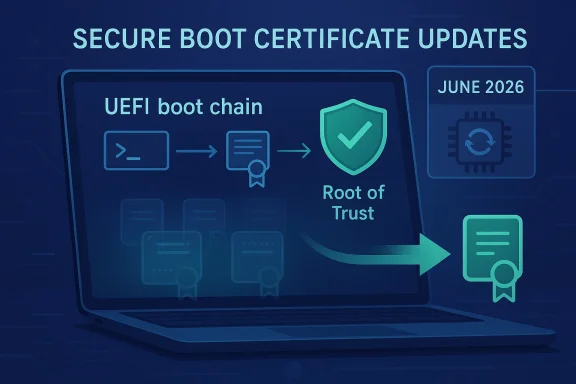 Background
UEFI is the modern firmware layer that initializes hardware and hands control to the operating system, and Secure Boot is one of the most important security mechanisms it enforces. Microsoft’s documentation describes UEFI firmware updates as part of the Windows platform, and the boot process depends on that early trust chain before Windows itself ever loads. In plain terms, if the firmware layer is stale, every later layer of protection starts from a weaker foundation.The current urgency comes from a long-planned certificate lifecycle event, not a sudden bug. Microsoft says the 2011-era Secure Boot certificates are expiring beginning in June 2026, with later expirations extending into October 2026 for some of the chain elements. The company has also emphasized that for most devices, the refresh is being delivered through normal Windows servicing, but a fraction of machines may need a separate firmware update from the device manufacturer before those new certificates can be applied.
That distinction matters because “BIOS update” is often used as shorthand for several very different processes. On a prebuilt Windows PC, the safest route is usually the manufacturer’s own update utility, while custom-built systems typically require checking the motherboard model and downloading firmware directly from the board vendor. The article’s practical advice aligns with what Microsoft and OEMs have been saying: firmware updates are deeply hardware-specific, and using the wrong package can cause serious failure.
Apple fits into the same conversation, but with a different model. Apple does not expose a BIOS-style configuration experience on Apple silicon Macs, and firmware updates are generally bundled into macOS updates rather than handled as a separate user-facing process. In other words, Mac users still need to stay current, but the maintenance path is simpler and more centralized.
Before going any further, it is worth underlining the core message: this is not a panic story. Microsoft has also said that if a device misses the new Secure Boot certificates before the old ones expire, the PC will continue to function and existing software will keep running, but it will miss out on future boot-level protections and updates. That is a meaningful difference between “your PC will die” and “your PC will become less secure over time.”
What BIOS and UEFI Actually Do
BIOS is still the word most people use, but UEFI is the real standard in modern PCs. Microsoft’s firmware guidance makes clear that the UEFI layer is responsible for installing firmware updates and participating in the platform’s boot and security framework. It is the system that wakes the hardware, verifies the boot path, and decides what gets trusted before Windows starts.The boot chain starts here
Secure Boot is the signature-checking gatekeeper that verifies low-level boot components. Microsoft’s support material and OEM guidance both frame those certificate updates as part of keeping the trust chain intact, especially when firmware or boot managers need to accept newer signed components. That makes firmware maintenance a security control, not just a compatibility chore.If malware ever gets its hooks into the firmware layer, the consequences can be severe. Microsoft’s own support pages and related vendor advisories point to firmware compromise as a way attackers can persist below the operating system and evade ordinary cleanup methods. That is why platform-level refreshes matter so much: they close attack paths that OS patches cannot reach on their own.
Why the motherboard matters
A BIOS or UEFI image is baked into the motherboard’s flash memory, so one update package rarely fits all systems. Microsoft’s documentation on UEFI firmware updates shows that firmware delivery is tied to the OEM and the device’s own capsule-update support, which is why device-specific tools and validation matter so much. A Lenovo laptop, a Dell desktop, and a custom-built workstation may all use different update paths even if they all run Windows 11.That also explains why generic advice can be dangerous. A tool intended for one board revision may not work on another, and in the worst case, an interrupted flash can leave the motherboard unusable. This is one of the rare maintenance tasks where “close enough” is not close enough.
- Firmware is hardware-specific, not universal.
- Secure Boot depends on certificates stored in firmware variables.
- The wrong update path can block booting or brick a board.
- Vendor utilities are usually safer than manual flashing for novices.
Why Microsoft Is Pushing This Now
Microsoft did not wake up in 2026 and decide to make firmware people nervous. The company has been warning that the 2011 Secure Boot certificates are reaching the end of their planned lifecycle for months, and it has published guidance for IT professionals, organizations, and server administrators well before the expiration window. The timing reflects cryptographic lifecycle planning, not a rushed emergency.The 2026 certificate deadline
The key deadline is the start of June 2026, when the original Microsoft Secure Boot certificates begin expiring. Microsoft says devices that receive the newer certificates in time will keep operating normally, while those that miss the refresh may be unable to trust future boot-level security updates in the same way. That is a subtle but important shift: the danger is not instant shutdown, but a gradual erosion of security posture.OEMs have been preparing for this for some time. Microsoft says device manufacturers have been collaborating on a standards-based approach, and many systems are already receiving the new certificate material automatically through regular Windows updates. Still, Microsoft’s own language makes clear that not every device can be handled transparently.
Why firmware updates are part of the story
For a subset of PCs, the new certificate data cannot be applied until the firmware itself is updated. Microsoft and several OEMs have warned that the certificate rollout may depend on motherboard firmware support or a vendor update that exposes the right Secure Boot state to Windows servicing. That is why a BIOS update can be necessary even if the immediate issue seems to be “just” certificate expiration.This is also where enterprise and consumer worlds diverge sharply. Microsoft says most managed devices will be handled automatically, but organizations with custom images, older hardware, or restricted update policies may need to intervene manually. Consumers often assume Windows Update covers everything; in reality, firmware and boot trust often sit one layer below the OS.
The practical takeaway
If your PC is older, unsupported, or built from mixed-generation parts, you should not assume the machine will quietly sort this out by itself. Microsoft’s own guidance and partner documentation repeatedly stress that updated firmware and the new certificate family must both be in place for full benefit. In practice, that means checking the motherboard or OEM support page now rather than waiting for a failure later.- June 2026 is the key start date.
- Some expirations extend into October 2026.
- Most modern systems should update automatically.
- Older or unmanaged systems may need manual intervention.
Security Is the Main Reason to Care
The strongest argument for keeping BIOS or UEFI current is security, and Microsoft’s framing makes that explicit. Secure Boot exists to make sure only trusted components load before the operating system takes over, and the new certificate chain is meant to preserve that trust as the old signatures age out. Without that refresh, the boot chain becomes less capable of enforcing modern protections.Firmware compromise is harder to clean up
Firmware-level malware is nasty because it lives below the OS and can persist across reinstallation. Microsoft’s secure boot and firmware documentation consistently treats this layer as part of the root of trust, which is why certificate renewal and firmware validation are such a big deal. A boot-time compromise can be invisible to standard antivirus tools and sometimes to the user entirely.The article’s warning about rootkits is not alarmist, but it does need nuance. A missing update does not automatically mean an active attack is underway; it means the PC’s defenses are no longer being maintained at the level where those defenses start. That distinction matters because the problem is primarily preventive, not diagnostic.
Digital signatures expire for a reason
Certificate lifetimes are not arbitrary bureaucracy. Microsoft, OEMs, and the broader ecosystem need the ability to rotate trust anchors periodically so attackers cannot rely on old cryptographic assumptions forever. A good security system is one that can change its own keys without collapsing.That said, the transition itself creates risk. If a device misses the new trust material before the old certs phase out, it may still boot, but it could lose future boot-chain servicing or face limitations in validating newer signed components. In security terms, that is the kind of debt that becomes expensive later.
Why this is different from ordinary patching
A normal Windows update mostly affects the operating system. A BIOS or UEFI update can affect the hardware trust path that Windows depends on, and Microsoft’s firmware update platform is built around that early-stage integration. That is why people often forget about it until a problem lands on their desk.- Secure Boot protects the earliest part of startup.
- Firmware compromise can survive OS reinstallations.
- Expired certificates can weaken future trust.
- Missing this update is a long-term exposure issue, not just a convenience issue.
Compatibility and Performance Benefits Still Matter
Security is the headline, but it is not the only reason to update. Firmware updates can improve hardware detection, fix component compatibility, and sometimes refine power or thermal behavior. Microsoft’s firmware guidance and OEM documentation both note that updates may be required for correct support of newer components or better platform stability.Hardware detection is often firmware-bound
If you install a new CPU, SSD, or other component and the machine behaves oddly, the problem may be lower-level than drivers can fix. A motherboard firmware update can change how the system identifies hardware, initializes storage, or negotiates boot order. That is one reason builders often check the board vendor’s changelog before upgrading.This is particularly relevant for custom PCs. Enthusiasts may assume a recent operating system and modern drivers are enough, but motherboard vendors still control the initialization logic. If the platform firmware is out of date, the rest of the stack may never get a clean start.
Boot speed and efficiency
Vendors sometimes use firmware updates to smooth startup behavior or reduce unnecessary overhead. That can mean faster POST times, cleaner hardware handoff, or modest power improvements in certain states. These are not flashy gains, but they can make a machine feel more refined.Still, it is important not to oversell the upside. Firmware updates are rarely dramatic performance boosters in the way a new GPU or SSD can be. Their value is usually cumulative: fewer glitches, cleaner boot behavior, and better support for the hardware you already own.
When a BIOS update is the only fix
If you have already exhausted driver updates, OS updates, and peripheral troubleshooting, the firmware becomes the obvious next layer. BIOS-level issues are often the ones that produce freezes, unexplained shutdowns, black-screen boots, or hardware not appearing at all. When problems are systemic rather than app-specific, firmware deserves attention.- Better hardware compatibility.
- Cleaner boot behavior.
- Modest efficiency gains.
- Fewer low-level glitches.
- Support for newer components.
How to Check and Update Safely
The first step is identifying your exact system. Microsoft and OEM guidance show that update tooling is model-specific, so you need the precise motherboard or device family before downloading anything. On Windows, you can open System Information and look for the BaseBoard details to identify the motherboard.The safest path on OEM PCs
For prebuilt systems, the vendor’s own utility is usually the best route. Lenovo Vantage, Dell SupportAssist, HP Support Assistant, and similar tools are designed to match firmware updates to the correct machine family. That reduces the odds of applying the wrong package.Some manufacturers instead publish a standalone BIOS updater on their support site. That is normal, but it also raises the stakes: you must match the updater to the exact model and revision. Guessing is not a strategy here.
The DIY PC route
For custom machines, you usually have to visit the motherboard maker’s support page and compare the board model against the firmware release notes. Microsoft’s UEFI documentation reinforces that firmware update delivery depends on the platform and its own update infrastructure. If the vendor offers a built-in flashing tool from within the BIOS, that is often easier and safer than doing it from within Windows.A good rule is to back up critical files before you start. Even though the chances of failure are small, a firmware flash goes wrong in exactly the kind of way you do not want to discover during a workday. If you rely on the machine for daily productivity, treat the update like a maintenance window.
A simple update checklist
- Identify the exact PC or motherboard model.
- Visit the official vendor support page.
- Read the changelog and prerequisites carefully.
- Back up important data and suspend unnecessary work.
- Plug in power and avoid interruptions during the flash.
- Reboot and confirm the firmware version changed successfully.
Windows, Apple, and Different Update Philosophies
Windows PCs and Macs handle firmware differently, and that difference shapes how users experience updates. On Windows, firmware is distributed through a mix of OEM tools, Windows Update mechanisms, and vendor-specific flash utilities. On Apple hardware, the firmware path is much more centralized.Windows is modular by design
Microsoft’s platform supports firmware packages that can be delivered through driver packages and the UEFI UpdateCapsule process. That flexibility is useful because the Windows ecosystem spans many vendors and hardware generations. It is also why Windows update behavior can vary so much from one PC to another.The upside is choice. The downside is fragmentation. Different OEMs, different update tools, different support windows, different certificate states — it all creates more room for confusion.
Apple keeps the path narrower
Apple’s support materials describe macOS software updates as the central mechanism for keeping the system current, and Apple’s platform security materials emphasize the integrated design of hardware, software, and firmware on Apple devices. On modern Macs, firmware updates are effectively folded into the broader OS update flow.That means fewer manual decisions for users. It also means Apple controls the timing more tightly, which is a benefit for consistency but less flexible for power users. As a result, Mac firmware maintenance is often less visible than on Windows, but it is still happening under the hood.
Why the distinction matters to users
Windows users are more likely to need to think actively about BIOS/UEFI updates because the path is vendor-dependent. Mac users are more likely to encounter firmware as part of a routine system update and simply move on. Neither approach is universally better; they reflect different product philosophies and ecosystem constraints.- Windows: flexible, fragmented, vendor-specific.
- Mac: centralized, bundled, more opaque.
- Both: firmware still matters.
- Both: delay can create security debt.
Enterprise vs Consumer Impact
The Secure Boot certificate transition is an enterprise story and a consumer story at the same time, but the consequences differ. For everyday users, the goal is simple: keep the PC updated and let Microsoft or the OEM handle the refresh automatically whenever possible. For IT departments, it is a fleet-management exercise with exception handling, inventory, and remediation plans.Consumers
Most home users will never need to manually manage certificate variables or firmware trust anchors. If the PC is reasonably current and supported, Windows Update and OEM utilities should do most of the work automatically. That is good news, but it should not invite complacency.A consumer who ignores updates for years is the person most likely to be caught out by this shift. The old “I’ll update when something breaks” approach is risky when the thing that needs updating is the boot trust chain itself. By the time the issue is visible, the window to be proactive may already have narrowed.
IT administrators
For enterprise teams, Microsoft has published detailed guidance and a staged rollout strategy, including high-confidence device buckets and automatic application of the new certificates on managed systems. That sounds reassuring, but it also means the organization needs accurate device metadata and consistent update policies.Admins also have to worry about unsupported machines, stale images, and devices that missed earlier servicing milestones. Those are exactly the systems most likely to need manual intervention or manufacturer support. The enterprise burden is not just installation; it is exception management.
Mixed environments
The hardest case is the mixed one: a small business with a few older laptops, a handful of custom desktops, and no formal patching system. That environment is common, and it is where “automatic” becomes a fuzzy promise. Microsoft’s guidance implies that some devices can be handled quietly, but others will need a human to notice the gap and act.- Consumers need to stay current.
- Enterprises need inventory and policy control.
- Stale or unsupported devices are the weak link.
- Mixed fleets need extra scrutiny.
Strengths and Opportunities
The upside of this firmware push is that it gives users and administrators a concrete reason to audit a maintenance layer many people ignore until it bites them. Microsoft’s automatic rollout path should protect a large share of systems, and the industry-wide coordination means OEMs have had time to prepare. There is also a broader benefit: a refreshed trust chain is better than leaving old cryptographic anchors in place indefinitely.- Stronger pre-boot security.
- Better long-term certificate hygiene.
- Potentially smoother hardware compatibility.
- More visible OEM support workflows.
- Improved alignment between Windows servicing and firmware readiness.
- A chance to clean up aging PCs before June 2026.
- Reduced risk of boot-chain drift on managed fleets.
Risks and Concerns
The biggest risk is not that every PC will suddenly stop booting. Microsoft has already said that missed devices will continue to run, at least initially, which makes the issue easy to underestimate. The real danger is that affected machines slowly lose their ability to receive or validate future boot-level protections, leaving users with a weaker security posture and fewer repair options later.- Older PCs may miss the rollout window.
- Unsupported devices may require manual firmware work.
- Wrong BIOS files can brick a motherboard.
- Interrupted updates remain catastrophic.
- Enterprises may discover hidden gaps in their asset inventory.
- Users may confuse “still works” with “fully protected.”
- Vendors may vary in how clearly they communicate readiness.
Looking Ahead
The next few months will likely determine how smooth this transition feels in practice. Microsoft has already begun the rollout, and the key question is whether the automatic path reaches enough devices before the 2011 certificates start expiring in June 2026. If the ecosystem keeps moving in sync, most users will barely notice; if it does not, support forums will become the front line.What to watch
- OEM firmware advisories for older motherboard models.
- Microsoft update notes that mention Secure Boot certificate delivery.
- Signs that specific PC families need manual BIOS updates.
- Enterprise guidance for unmanaged or offline systems.
- Any reports of devices missing the 2023 certificate set.
- Follow-up OEM tools that simplify readiness checks.
If you have been treating BIOS updates as optional housekeeping, 2026 is the year to reconsider that habit. The new Secure Boot certificate schedule turns firmware from an obscure background component into a deadline-driven security dependency, and that makes timely updates one of the smartest things you can do for a Windows PC right now.
Source: Pocket-lint You need to update your PC’s BIOS right now - here’s why
