

BOSGAME is bringing Intel’s new entry-level Wildcat Lake platform to the mini PC market with the E6 ECO, a compact Windows desktop built around the Intel Core 3 Processor 304. The system is scheduled for global availability on August 15, 2026, and it arrives with an unusually current feature set for a value-oriented machine: an NPU for local AI acceleration, Wi-Fi 7, Bluetooth 5.4, dual 2.5GbE networking, USB-C display output, and support for three displays.
The announcement matters because the BOSGAME E6 ECO is not another minor refresh of the familiar Intel N100 or N-series mini PC formula. It uses a newer platform with a more capable CPU design, substantially faster connectivity options, improved integrated graphics features, and dedicated AI hardware. At its listed $379.99 configuration with 12GB of LPDDR5X memory and a 512GB NVMe SSD, it also targets the crowded space between ultra-cheap N-series systems and more expensive Ryzen or Core Ultra mini PCs.
That positioning creates both opportunity and uncertainty. The E6 ECO looks like a potentially well-rounded compact PC for office work, remote learning, streaming, light home-server duties, and multi-monitor productivity. Yet buyers should be careful not to mistake its AI credentials or next-generation platform label for workstation-class performance. The Core 3 304 remains a low-power chip with just five CPU cores and a very modest integrated GPU configuration.
BOSGAME describes the E6 ECO as part of its Ecolite Series, a product line intended to prioritize compact sizing, everyday responsiveness, and lower energy use. The strategy is straightforward: give users a small desktop that can remain on a desk, behind a monitor, or near a television without occupying the space or drawing the power of a traditional tower PC.
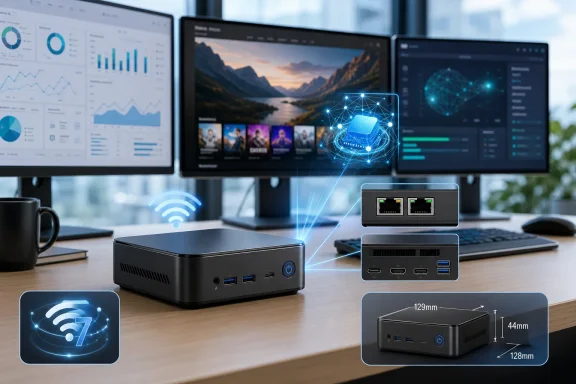
The hardware is contained in a chassis measuring 129 × 128 × 44 mm. That is small enough to fit comfortably beside a display, in a media cabinet, or in a shared family workspace. It is also close in size to several established N100 and N150 mini PCs, which makes the more recent Intel platform inside the E6 ECO the product’s primary differentiator.
BOSGAME’s original announcement identified dual Gigabit Ethernet ports, but the company’s own storefront listing describes the production configuration as having dual 2.5GbE LAN. If that specification carries through to retail units, it is a meaningful upgrade. Dual 2.5GbE ports are more useful for fast local storage access, network appliance projects, and small-office networking than ordinary Gigabit Ethernet connections.
The company is presenting the E6 ECO as a general-purpose Windows mini PC rather than a gaming machine or a high-end AI workstation. That framing is appropriate. Its strongest appeal is likely to be its balance of desktop flexibility and low-power design, not raw benchmark dominance.
The Core 3 304 has a configuration that deserves close attention:
That configuration may sound limited compared with mainstream laptop processors, but it represents an important step forward for the low-power mini PC segment. Many inexpensive mini PCs are still based on older architectures or use Intel N-series silicon that lacks an NPU altogether. Wildcat Lake gives the E6 ECO a more modern foundation for Windows 11, AI-aware applications, browser-heavy workloads, and low-power multitasking.
For the E6 ECO, BOSGAME’s dual heat-pipe cooling system and hydraulic-bearing fan will play an important role. A mini PC may use the same processor as another model but provide a notably different experience if its cooling system is too small or its firmware limits sustained power.
The company claims the E6 ECO is designed for quiet operation, with dual copper heat pipes and a silent hydraulic-bearing fan. That is encouraging, but the claim should be treated as a design objective rather than a guarantee until independent thermal and noise testing is available. Compact PCs often perform well in short bursts while becoming warmer or louder under sustained compilation, backups, video encoding, or large file transfers.
Those figures are technically meaningful, but they require context.
The Core 3 304 supports multiple AI-related frameworks and runtimes, including:
However, the distinction that matters is between Microsoft Copilot and the more demanding Copilot+ PC category. The E6 ECO’s 15 TOPS NPU does not meet the 40+ TOPS NPU threshold associated with Copilot+ PCs and their exclusive local AI experiences.
That means buyers should not expect this mini PC to provide the entire Copilot+ feature set, including hardware-dependent experiences such as Recall, advanced local image creation capabilities, and other features tied to the higher-performance NPU class. The E6 ECO is better described as an AI-capable Windows mini PC, not a Copilot+ PC.
That is not necessarily a negative. For a lower-cost compact desktop, 15 TOPS is still more AI acceleration than users receive from most legacy mini PCs. But accurate expectations matter. The NPU should improve compatibility with supported applications and selected Windows features, rather than turn the system into a high-end local AI appliance.
There are caveats. The E6 ECO itself does not have a built-in laptop webcam, so users will need an external camera. Hardware acceleration also depends on BOSGAME supplying the necessary driver support and on Microsoft enabling features for the platform. Mini PC buyers should therefore see NPU-backed Studio Effects as a potentially useful bonus rather than a guaranteed out-of-box feature.
For a low-power mini PC, the display engine is more important than the gaming potential. The E6 ECO supports up to three displays, using a combination of:
Intel’s hardware media support is a stronger selling point. The processor includes AV1 encode and decode capability, Intel Quick Sync Video, and 4K-class display output. For video playback, streaming, web conferencing, and lighter creator tasks, that is more relevant than gaming frame rates.
Even without a Wi-Fi 7 router, modern wireless hardware can still matter. Better network radios, improved latency handling, and support for newer standards may help the E6 ECO remain viable for longer than systems built around older Wi-Fi 5 or Wi-Fi 6 modules.
Bluetooth 5.4 is equally welcome for keyboards, mice, headsets, speakers, controllers, and smart-home accessories. The benefit is not dramatic in isolation, but it reinforces the product’s identity as a current-generation desktop rather than a repackaged older design.
Dual Ethernet ports can be useful for:
At the same time, prospective owners should confirm exactly what BOSGAME means by Power Delivery in the final product documentation. A USB-C port may support Power Delivery for peripherals without allowing the mini PC itself to be powered through USB-C. Those are very different capabilities. The listed specification should not be assumed to mean that the system can replace its dedicated power adapter with a USB-C charger.
Twelve gigabytes is an unusual amount in a Windows desktop. It is more comfortable than 8GB for routine multitasking, but it sits below the increasingly common 16GB baseline for new Windows systems. For students, families, office workers, and streaming-focused users, it should be workable. For users who regularly keep large browser sessions, use Adobe applications, run virtual machines, edit video, or work with local AI tools, it may become a constraint.
The larger issue is the use of LPDDR5X, which usually indicates soldered memory rather than user-replaceable SO-DIMMs. BOSGAME has not clearly detailed memory expansion options in the announcement material. That means buyers should assume the installed memory could be permanent until the company explicitly confirms upgradeability.
This is one of the E6 ECO’s most important potential drawbacks. The processor itself supports considerably more memory, but the system-level configuration determines what buyers can actually use. A compact chassis and soldered LPDDR5X can aid efficiency and reduce board complexity, yet non-upgradeable 12GB memory limits the machine’s long-term flexibility.
The company’s focus on quiet computing is appropriate for the E6 ECO’s target audience. A home-office PC that whines during a video conference or ramps up constantly while browsing is distracting, even if it scores well in short synthetic tests.
Its value depends heavily on what arrives in the retail box. A configuration with Windows 11, a decent 512GB SSD, dual 2.5GbE, Wi-Fi 7, a usable USB-C implementation, and effective cooling would make the price easier to justify. A non-upgradeable 12GB memory ceiling, limited storage expansion, or immature firmware could weaken that argument.
The company’s August 15 global launch date also means final regional pricing, warranty terms, configuration choices, and retailer availability still need to be confirmed. Mini PC buyers should compare the shipping model’s full port layout, memory arrangement, storage specifications, and support policy rather than relying on early promotional language alone.
Its most important strengths are clear: a new Intel platform, low 15W base power, compact dimensions, useful display options, and connectivity that could support both conventional desktop work and more specialized network-focused tasks. The dedicated 15 TOPS NPU also makes it better prepared for AI-aware Windows applications than older low-cost mini PCs.
The caveats are equally clear. This is not a Copilot+ PC, not a gaming mini PC, and not a substitute for a higher-core-count workstation. The 12GB LPDDR5X configuration is adequate rather than generous, and uncertainty over memory upgradeability, storage expansion, USB-C power behavior, and retail configuration details deserves attention.
For users seeking a compact Windows 11 PC for work, education, media, and everyday multitasking, the BOSGAME E6 ECO could become one of the more interesting Wildcat Lake mini PCs to watch. Its success will come down to whether BOSGAME can turn its strong early specification list into a polished, quiet, reliable system at the promised price.
The announcement matters because the BOSGAME E6 ECO is not another minor refresh of the familiar Intel N100 or N-series mini PC formula. It uses a newer platform with a more capable CPU design, substantially faster connectivity options, improved integrated graphics features, and dedicated AI hardware. At its listed $379.99 configuration with 12GB of LPDDR5X memory and a 512GB NVMe SSD, it also targets the crowded space between ultra-cheap N-series systems and more expensive Ryzen or Core Ultra mini PCs.
That positioning creates both opportunity and uncertainty. The E6 ECO looks like a potentially well-rounded compact PC for office work, remote learning, streaming, light home-server duties, and multi-monitor productivity. Yet buyers should be careful not to mistake its AI credentials or next-generation platform label for workstation-class performance. The Core 3 304 remains a low-power chip with just five CPU cores and a very modest integrated GPU configuration.
 Overview: A New Ecolite Mini PC With a Modern Platform
BOSGAME describes the E6 ECO as part of its Ecolite Series, a product line intended to prioritize compact sizing, everyday responsiveness, and lower energy use. The strategy is straightforward: give users a small desktop that can remain on a desk, behind a monitor, or near a television without occupying the space or drawing the power of a traditional tower PC.The hardware is contained in a chassis measuring 129 × 128 × 44 mm. That is small enough to fit comfortably beside a display, in a media cabinet, or in a shared family workspace. It is also close in size to several established N100 and N150 mini PCs, which makes the more recent Intel platform inside the E6 ECO the product’s primary differentiator.
BOSGAME’s original announcement identified dual Gigabit Ethernet ports, but the company’s own storefront listing describes the production configuration as having dual 2.5GbE LAN. If that specification carries through to retail units, it is a meaningful upgrade. Dual 2.5GbE ports are more useful for fast local storage access, network appliance projects, and small-office networking than ordinary Gigabit Ethernet connections.
The company is presenting the E6 ECO as a general-purpose Windows mini PC rather than a gaming machine or a high-end AI workstation. That framing is appropriate. Its strongest appeal is likely to be its balance of desktop flexibility and low-power design, not raw benchmark dominance.
The Intel Core 3 304 and the Wildcat Lake Shift
Not Simply Another N-Series Processor
The Intel Core 3 Processor 304 belongs to Intel’s Core processor family and is based on the platform previously known by the codename Wildcat Lake. Intel positions Wildcat Lake as a mobile and embedded-oriented platform, but mini PC vendors are increasingly adapting it for compact desktop systems.The Core 3 304 has a configuration that deserves close attention:
- Five CPU cores
- One Performance-core
- Four Low Power Efficient-cores
- Five processing threads
- Up to 4.3GHz maximum turbo frequency
- 6MB Intel Smart Cache
- 15W processor base power
- 35W maximum turbo power
- Intel 18A manufacturing process
That configuration may sound limited compared with mainstream laptop processors, but it represents an important step forward for the low-power mini PC segment. Many inexpensive mini PCs are still based on older architectures or use Intel N-series silicon that lacks an NPU altogether. Wildcat Lake gives the E6 ECO a more modern foundation for Windows 11, AI-aware applications, browser-heavy workloads, and low-power multitasking.
What the 15W Rating Really Means
The 15W base power specification should not be confused with a hard ceiling on power use. Intel rates the Core 3 304 for a 35W maximum turbo power, and system makers can tune how aggressively a chip boosts depending on cooling, firmware settings, and power delivery.For the E6 ECO, BOSGAME’s dual heat-pipe cooling system and hydraulic-bearing fan will play an important role. A mini PC may use the same processor as another model but provide a notably different experience if its cooling system is too small or its firmware limits sustained power.
The company claims the E6 ECO is designed for quiet operation, with dual copper heat pipes and a silent hydraulic-bearing fan. That is encouraging, but the claim should be treated as a design objective rather than a guarantee until independent thermal and noise testing is available. Compact PCs often perform well in short bursts while becoming warmer or louder under sustained compilation, backups, video encoding, or large file transfers.
Everyday Performance Should Be the Priority
For the intended audience, the Core 3 304 should be a capable fit for tasks such as:- Microsoft 365 and Google Workspace productivity
- Web browsing with many open tabs
- Video meetings in Teams, Zoom, or similar software
- 4K media playback and streaming
- Home-office document workflows
- Light photo editing
- Schoolwork and web-based learning platforms
- Basic programming and development environments
- Lightweight network services
- Digital signage and kiosk deployments
AI Boost: Useful Hardware, But Not a Copilot+ PC
One of the E6 ECO’s headline specifications is Intel AI Boost, including an NPU rated at up to 15 TOPS of INT8 performance. Intel also rates the Core 3 304’s integrated GPU at 9 TOPS, producing approximately 24 TOPS of combined NPU and GPU AI capability.Those figures are technically meaningful, but they require context.
What the NPU Can Do
An NPU, or Neural Processing Unit, is specialized hardware designed to run certain AI inference tasks more efficiently than a CPU. In practical terms, it can potentially reduce power draw and free the main processor for other work when compatible applications use it.The Core 3 304 supports multiple AI-related frameworks and runtimes, including:
- OpenVINO
- Windows ML
- DirectML
- ONNX Runtime
- WebNN
Copilot Availability Is Not the Same as Copilot+ Status
BOSGAME says the E6 ECO supports Microsoft Copilot and other AI-assisted productivity tools. That statement is broadly fair: Copilot can be used on a wide range of Windows PCs, including systems without a dedicated NPU.However, the distinction that matters is between Microsoft Copilot and the more demanding Copilot+ PC category. The E6 ECO’s 15 TOPS NPU does not meet the 40+ TOPS NPU threshold associated with Copilot+ PCs and their exclusive local AI experiences.
That means buyers should not expect this mini PC to provide the entire Copilot+ feature set, including hardware-dependent experiences such as Recall, advanced local image creation capabilities, and other features tied to the higher-performance NPU class. The E6 ECO is better described as an AI-capable Windows mini PC, not a Copilot+ PC.
That is not necessarily a negative. For a lower-cost compact desktop, 15 TOPS is still more AI acceleration than users receive from most legacy mini PCs. But accurate expectations matter. The NPU should improve compatibility with supported applications and selected Windows features, rather than turn the system into a high-end local AI appliance.
Windows Studio Effects May Be Selectively Available
The NPU can also improve support for certain Windows Studio Effects. Basic AI-assisted meeting features such as background effects, automatic framing, standard eye contact, and voice focus may be available on compatible Windows configurations with suitable drivers and attached hardware.There are caveats. The E6 ECO itself does not have a built-in laptop webcam, so users will need an external camera. Hardware acceleration also depends on BOSGAME supplying the necessary driver support and on Microsoft enabling features for the platform. Mini PC buyers should therefore see NPU-backed Studio Effects as a potentially useful bonus rather than a guaranteed out-of-box feature.
Graphics and Display Output: Built for Workspaces, Not Gaming
The Core 3 304 includes Intel Graphics with one Xe-core and a maximum dynamic frequency of up to 2.3GHz. Intel rates the GPU at 9 TOPS for INT8 AI work, and it supports modern graphics APIs including DirectX 12, OpenGL 4.6, and OpenCL 3.0.For a low-power mini PC, the display engine is more important than the gaming potential. The E6 ECO supports up to three displays, using a combination of:
- HDMI 2.0
- DisplayPort 1.4
- USB-C with DisplayPort output
Three Displays Change the Character of a Mini PC
Triple-display support can make the E6 ECO an appealing option for several scenarios:- A home-office workstation with two monitors plus a television or presentation screen
- A reception desk displaying business applications and messaging tools
- A financial or research workspace with spreadsheets, dashboards, and web tools
- A classroom setup with a primary display and projector
- A digital signage deployment where multiple screens need simple content playback
Gaming Expectations Should Remain Conservative
The one-Xe-core graphics configuration is not designed for modern AAA gaming. Lightweight esports games, older titles, cloud gaming, retro emulation, and lower-demand 3D workloads may be feasible with appropriately modest settings. Newer games will likely require low resolutions, very low graphics settings, or streaming from another device.Intel’s hardware media support is a stronger selling point. The processor includes AV1 encode and decode capability, Intel Quick Sync Video, and 4K-class display output. For video playback, streaming, web conferencing, and lighter creator tasks, that is more relevant than gaming frame rates.
Connectivity Is One of the E6 ECO’s Strongest Arguments
The best mini PCs are often defined by their ports as much as their processor. BOSGAME appears to understand that the E6 ECO needs more than a modern CPU to stand out in a competitive category.Wi-Fi 7 and Bluetooth 5.4
The system is listed with Wi-Fi 7 and Bluetooth 5.4. Wi-Fi 7 is a forward-looking inclusion for an entry-level desktop, although users will need a compatible router and suitable network conditions to benefit from its full potential.Even without a Wi-Fi 7 router, modern wireless hardware can still matter. Better network radios, improved latency handling, and support for newer standards may help the E6 ECO remain viable for longer than systems built around older Wi-Fi 5 or Wi-Fi 6 modules.
Bluetooth 5.4 is equally welcome for keyboards, mice, headsets, speakers, controllers, and smart-home accessories. The benefit is not dramatic in isolation, but it reinforces the product’s identity as a current-generation desktop rather than a repackaged older design.
Dual 2.5GbE Is More Than a Spec Sheet Extra
If BOSGAME ships the E6 ECO with the dual 2.5GbE configuration shown on its storefront, the networking hardware could become one of the system’s most compelling advantages.Dual Ethernet ports can be useful for:
- Faster access to a NAS or home server
- Small-office network segmentation
- Router and firewall experimentation
- Virtual lab environments
- File sharing between two local networks
- Redundant or dedicated network connections
- Media workflows involving large local files
USB-C Is Welcome, But Buyers Should Check the Fine Print
The full-function USB-C port supports:- 10Gbps data transfer
- DisplayPort output
- Power Delivery
At the same time, prospective owners should confirm exactly what BOSGAME means by Power Delivery in the final product documentation. A USB-C port may support Power Delivery for peripherals without allowing the mini PC itself to be powered through USB-C. Those are very different capabilities. The listed specification should not be assumed to mean that the system can replace its dedicated power adapter with a USB-C charger.
Memory and Storage: The 12GB Question
BOSGAME’s store listing identifies the E6 ECO configuration as including 12GB of LPDDR5X memory and a 512GB NVMe SSD. The storage capacity is sensible for a compact everyday Windows PC, but the memory choice is more complicated.Twelve gigabytes is an unusual amount in a Windows desktop. It is more comfortable than 8GB for routine multitasking, but it sits below the increasingly common 16GB baseline for new Windows systems. For students, families, office workers, and streaming-focused users, it should be workable. For users who regularly keep large browser sessions, use Adobe applications, run virtual machines, edit video, or work with local AI tools, it may become a constraint.
The larger issue is the use of LPDDR5X, which usually indicates soldered memory rather than user-replaceable SO-DIMMs. BOSGAME has not clearly detailed memory expansion options in the announcement material. That means buyers should assume the installed memory could be permanent until the company explicitly confirms upgradeability.
This is one of the E6 ECO’s most important potential drawbacks. The processor itself supports considerably more memory, but the system-level configuration determines what buyers can actually use. A compact chassis and soldered LPDDR5X can aid efficiency and reduce board complexity, yet non-upgradeable 12GB memory limits the machine’s long-term flexibility.
Storage Still Needs Clarification
The 512GB NVMe SSD is a more conventional inclusion, but important details remain unconfirmed:- Is the internal M.2 slot user-accessible?
- Does the SSD use PCIe 3.0 or PCIe 4.0?
- Is there room for a second internal drive?
- Are higher-capacity retail configurations planned?
- Does the system include a Windows 11 license, and if so, which edition?
Cooling, Noise, and Sustained Performance
BOSGAME’s cooling design uses dual copper heat pipes and a hydraulic-bearing fan. In a 15W-class mini PC, that should be enough for normal use, assuming sensible power tuning and adequate airflow through the chassis.The company’s focus on quiet computing is appropriate for the E6 ECO’s target audience. A home-office PC that whines during a video conference or ramps up constantly while browsing is distracting, even if it scores well in short synthetic tests.
Why Independent Testing Will Matter
Cooling claims are difficult to assess from an announcement alone. There are several areas where hands-on reviews will be more informative than a specification sheet:- Sustained CPU performance during long workloads rather than short turbo bursts.
- Fan noise at idle, during streaming, and under heavier multitasking.
- Surface temperatures on the case around the processor and exhaust vents.
- Power draw at idle and during full load.
- Thermal throttling behavior after extended stress tests.
- Firmware quality, including sleep, wake, USB, Wi-Fi, and display compatibility.
Who Should Consider the BOSGAME E6 ECO?
The E6 ECO has a clear prospective audience. It is most compelling for users who want a smaller, newer, more connected alternative to basic N100-class mini PCs without paying for a higher-tier Core Ultra or Ryzen AI system.A Strong Fit for These Users
The system should be particularly attractive for:- Home-office users needing several displays and quiet daily performance
- Students who want a compact Windows 11 desktop for research, assignments, and video calls
- Families looking for a shared desktop for browsing, streaming, and schoolwork
- Small businesses requiring compact workstations for office software and web-based services
- Media users who want a small 4K-capable living-room PC
- Networking enthusiasts interested in dual 2.5GbE connectivity
- Digital signage operators needing a compact multi-display system
- Windows users upgrading from older Celeron, Pentium, or N-series mini PCs
Buyers Who Should Look Higher Up the Market
The E6 ECO is less suited to workloads that depend on many CPU threads, powerful graphics, large amounts of RAM, or expansive internal storage. Buyers should consider a higher-tier mini PC if they need:- Serious 4K video editing
- Modern local PC gaming
- 3D modeling and rendering
- Multiple virtual machines
- Frequent code compilation
- Large local AI models
- Heavy Adobe Creative Cloud workflows
- Professional workstation reliability requirements
- Upgradeable memory beyond the listed 12GB
The Value Proposition Depends on Final Retail Details
At a listed price of $379.99, the BOSGAME E6 ECO occupies a competitive position. It is not cheap enough to compete solely on price with entry-level N100 systems, but it has a substantially more modern platform, better wireless connectivity, dedicated AI acceleration, and potentially dual 2.5GbE networking.Its value depends heavily on what arrives in the retail box. A configuration with Windows 11, a decent 512GB SSD, dual 2.5GbE, Wi-Fi 7, a usable USB-C implementation, and effective cooling would make the price easier to justify. A non-upgradeable 12GB memory ceiling, limited storage expansion, or immature firmware could weaken that argument.
The company’s August 15 global launch date also means final regional pricing, warranty terms, configuration choices, and retailer availability still need to be confirmed. Mini PC buyers should compare the shipping model’s full port layout, memory arrangement, storage specifications, and support policy rather than relying on early promotional language alone.
A Promising Entry-Level Mini PC With Sensible Limits
The BOSGAME E6 ECO stands out because it treats entry-level mini PC buyers as users who still need modern connectivity, practical AI hardware, and multi-display flexibility. The Intel Core 3 304 brings Wildcat Lake into a compact desktop form factor, while Wi-Fi 7, Bluetooth 5.4, USB-C display support, and dual 2.5GbE networking make the system look more current than many budget competitors.Its most important strengths are clear: a new Intel platform, low 15W base power, compact dimensions, useful display options, and connectivity that could support both conventional desktop work and more specialized network-focused tasks. The dedicated 15 TOPS NPU also makes it better prepared for AI-aware Windows applications than older low-cost mini PCs.
The caveats are equally clear. This is not a Copilot+ PC, not a gaming mini PC, and not a substitute for a higher-core-count workstation. The 12GB LPDDR5X configuration is adequate rather than generous, and uncertainty over memory upgradeability, storage expansion, USB-C power behavior, and retail configuration details deserves attention.
For users seeking a compact Windows 11 PC for work, education, media, and everyday multitasking, the BOSGAME E6 ECO could become one of the more interesting Wildcat Lake mini PCs to watch. Its success will come down to whether BOSGAME can turn its strong early specification list into a polished, quiet, reliable system at the promised price.
References
- Primary source: xiaomitoday.com
Published: 2026-07-23T21:02:13+00:00
Loading…
xiaomitoday.com - Related coverage: intel.com
Loading…
www.intel.com - Related coverage: cnx-software.com
Loading…
www.cnx-software.com - Related coverage: edc.intel.com
Loading…
edc.intel.com - Related coverage: pchardware.org
Loading…
pchardware.org - Related coverage: tomshardware.com
Intel launches Wildcat Lake as Core Series 3 for value laptops and edge systems — six consumer SKUs built on 18A promise 'all-day' battery life | Tom's Hardware
Six consumer SKUs ship today on Intel 18A.www.tomshardware.com