

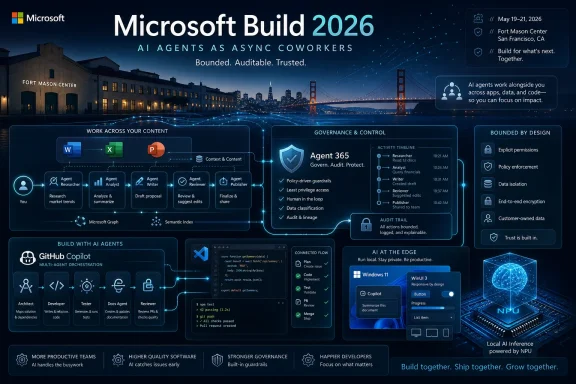
Microsoft opens Build 2026 on June 2 at San Francisco’s Fort Mason Center with Satya Nadella’s keynote centered on AI agents, Office 365 Copilot’s Agent Mode, GitHub Copilot, Azure AI Foundry, and Windows local AI rather than Windows 12 or new PC hardware. The choice of venue matters less than the choice of default: Microsoft is no longer pitching AI as a sidebar in productivity software. It is trying to make agents the operating model for work, development, administration, and eventually the Windows desktop itself.
For the past three years, Microsoft’s AI story has mostly been told through the word Copilot. It was a useful brand because it sounded safe, subordinate, and familiar: a helper beside the human, not a process acting on its own. Build 2026 marks the point where that framing starts to feel too small for what Microsoft is trying to sell.
Nadella’s reported description of agents as “async coworkers” is the meaningful phrase. A copilot waits for a prompt and returns output. An agent receives a goal, gathers context, uses tools, crosses application boundaries, and may keep working after the user has moved on.
That distinction is not semantic. It changes how organizations think about identity, compliance, software architecture, licensing, and risk. A chatbot can be audited like an application feature; an agent starts to look more like a user, a service account, a workflow engine, and a junior employee all at once.
Microsoft’s strategic bet is that the next platform shift will not be a new operating system splash screen. It will be the relocation of work from human-operated apps into persistent software actors that can read, write, schedule, summarize, execute, and escalate. Build is the company’s annual opportunity to tell developers where the platform is going, and this year the answer is blunt: build for agents, or build around them.
That is exactly why the default matters. Optional features are experiments; defaults are strategy. If Agent Mode is what users see first, Microsoft is nudging them away from one-shot prompts and toward delegated work.
In Word, that means a drafting assistant that can reason across source materials, comments, prior versions, and organizational context. In Excel, it points toward agents that can investigate data, generate models, explain anomalies, and keep iterating instead of merely producing a formula. In PowerPoint, it means the slide generator is no longer just a content machine but a packaging layer for work performed elsewhere.
The risk is that Office users often do not know where application boundaries begin and end. If an agent can read a spreadsheet, consult email, update a presentation, and prepare a Teams message, it has become part of the workflow fabric. That creates real value, but it also makes provenance harder to explain when something goes wrong.
Microsoft’s pitch is that enterprise users want fewer blank canvases and more completed tasks. The quiet counterargument from administrators is that completed tasks require accountability. If an agent produces a flawed forecast or sends a misleading summary, the organization will not blame the model in the abstract. It will blame the controls around the model.
That distinction is essential for IT pros. Enterprises already struggle with unmanaged SaaS, overprivileged service accounts, stale OAuth grants, and shadow automation. AI agents take all of those old problems and add natural-language instruction, tool use, model uncertainty, and memory.
Agent 365 is Microsoft’s answer to a question every security team is now asking: if agents behave like users and applications, where do they live in the identity and security stack? Microsoft’s response is predictable but commercially powerful. Put them under Microsoft governance, attach them to Microsoft identity, observe them through Microsoft security tooling, and manage them as part of the Microsoft 365 estate.
That is sensible architecture, but it is also classic platform leverage. The more agentic work moves through Microsoft 365, Entra, Purview, Defender, Copilot Studio, and Azure AI Foundry, the harder it becomes to treat agents as a neutral layer above vendors. Microsoft is not merely responding to the agent trend; it is trying to define the administrative surface of the trend.
For customers, the practical question is whether Agent 365 becomes a meaningful safety layer or another premium SKU required to make the rest of the stack tolerable. Microsoft’s history gives skeptics reason to watch closely. Some of the company’s best security ideas have arrived as upsell paths, and many organizations will ask whether agent governance should be a paid add-on or a baseline requirement in an AI-first productivity suite.
That absence is not a lack of Windows strategy. It is the strategy. Microsoft is trying to turn Windows 11 into a living AI platform rather than burn marketing capital on a new major version number.
This is a more pragmatic choice than it may look. Windows 10’s end-of-support pressure has already pushed many reluctant PCs toward Windows 11, while enterprises are still digesting hardware requirements, migration work, and the uneven state of Windows 11’s user experience. A Windows 12 reveal in 2026 would risk resetting the conversation before Microsoft has finished repairing the current one.
The old Windows playbook was version-led. A new release carried the story: Windows 95, XP, 7, 10, 11. The new playbook is capability-led, with Windows positioned as the local execution layer for AI models, agents, silicon-specific acceleration, and native app development.
That is less glamorous than a new Start menu animation in a keynote reel. It is also more consequential. If Microsoft succeeds, the next Windows transition may feel less like an OS upgrade and more like a gradual redefinition of what the PC is allowed to do on the user’s behalf.
On-device model execution gives Microsoft a Windows story that cloud-only AI cannot provide. Local inference can reduce latency, preserve privacy-sensitive context, support offline scenarios, and take advantage of NPUs shipping in modern PCs. It also gives developers a reason to care about Windows APIs again.
Foundry Local is important in that context because it suggests Microsoft wants a pipeline from cloud model development to local deployment. Azure AI Foundry can be the place where models, agents, evaluations, and orchestration live. Windows can become the place where parts of that intelligence run close to the user, the files, the devices, and the UI.
This does not mean the cloud becomes less important. Microsoft’s economics still favor Azure consumption, and the most capable models will remain heavily cloud-dependent. But local AI gives Windows a sharper role than “the thing under Teams and Edge.”
For administrators, local AI also complicates management. A model running on a laptop is not just another desktop app. It may process sensitive files, invoke local tools, retain context, and operate outside the clean telemetry boundaries of a centralized SaaS service. The same feature that improves privacy by keeping data on device can also reduce visibility if the platform controls are weak.
Rudy Huyn’s move to form a team focused on 100 percent native Windows apps landed because it addressed a long-running complaint from Windows enthusiasts and developers. Microsoft has spent years asking developers to care about native Windows experiences while shipping too many first-party surfaces that felt like web views in costume. That contradiction damaged trust.
The reported WinUI 3 performance improvements in File Explorer are therefore more than benchmark trivia. Fewer allocations, fewer function calls, and less time spent in framework code translate into the kind of responsiveness users actually notice. Performance work at the framework level compounds across every app and shell surface built on top of it.
The Start menu rebuild matters for the same reason. Start is not just a launcher; it is one of the most emotionally loaded surfaces in Windows. If Microsoft wants users to accept AI entry points in Start, the taskbar, and system search, those surfaces must first feel fast, native, and under control.
There is an irony here. Microsoft is pushing toward a future in which agents may do more work without visible UI, yet it is rediscovering the importance of high-quality native UI at the same time. That is not a contradiction. The more invisible automation becomes, the more users need trustworthy visible surfaces for consent, review, interruption, and correction.
VS Code is the natural theater for that transition. It is where Microsoft can blend local project context, cloud-hosted models, terminal workflows, GitHub identity, issue tracking, pull requests, and Azure deployment targets. A single chat panel is no longer enough for that ambition.
Copilot CLI reaching general availability earlier this year fits the pattern. The terminal is where developers and administrators already perform consequential actions. Giving Copilot a stronger terminal presence moves it closer to real execution, not just suggestion.
That is productive and dangerous in equal measure. A code suggestion can be ignored. A terminal agent can install packages, alter configuration, run migrations, rotate credentials, deploy infrastructure, or delete resources if permissions and guardrails allow it. The UX must make the difference between recommendation and action painfully clear.
Reports that Microsoft may introduce a new coding model to expand Copilot adoption are credible in strategic terms even if the final branding remains unknown before the keynote. GitHub Copilot is too important to rely entirely on generic model competition. Microsoft needs models tuned for repository-scale reasoning, tool use, code review, and enterprise policy constraints if it wants Copilot to become a default development layer rather than a clever assistant.
OpenClaw’s prominence in the agent conversation has helped force that issue into the open. Local agents with broad system access can interact with files, browsers, credentials, developer tools, and business systems. If they ingest hostile instructions or operate with excessive privileges, the damage path is obvious.
The industry’s first instinct has often been to talk about model safety, but agent safety is not the same thing. A model may refuse a harmful request in isolation and still participate in a dangerous workflow if the surrounding agent framework mishandles permissions, memory, tool descriptions, or user confirmation. The system boundary matters more than the chat transcript.
Microsoft’s challenge is to make bounded action feel like an engineering discipline rather than a keynote slogan. Developers need patterns for scoped permissions, reversible operations, policy enforcement, audit logs, sandboxing, human approval, and least-privilege tool access. Administrators need ways to discover agents they did not deploy and constrain agents they did.
This is where the agent era stops being magical and starts looking like every other computing era. The demo arrives first; the management model arrives later; the security model arrives after the first wave of fear. Build 2026 suggests Microsoft wants to collapse that timeline before enterprises decide agents are too risky to deploy broadly.
But no major platform keynote is ever free of theater. Build exists to align developers with Microsoft’s roadmap, and Microsoft’s roadmap increasingly runs through paid Copilot tiers, Azure consumption, premium Microsoft 365 bundles, GitHub subscriptions, and security add-ons. The technical story and the commercial story are inseparable.
That does not make the strategy illegitimate. Microsoft has real assets: Office distribution, Windows reach, GitHub’s developer footprint, Azure infrastructure, Entra identity, Defender telemetry, and a massive enterprise sales channel. Few companies can connect productivity, development, cloud, endpoint, and security into one agent platform.
The question is whether that integration becomes empowering or enclosing. Developers want open protocols, portable agents, flexible model choice, and local execution where it makes sense. Microsoft wants all of that to work best when attached to its identity, management, and cloud stack.
Build 2026 will likely be full of gestures toward openness: model choice, open-source frameworks, protocol support, integration with external tools, and local workflows. The real test will come later, when customers discover which features work broadly and which become meaningfully better only inside the Microsoft estate.
The near-term work is not glamorous. Organizations need inventories of where agents can operate, which data they can access, which actions they can perform, and which logs prove what happened. That sounds like ordinary governance, but agents blur the categories administrators have traditionally relied on.
A human user has intent but limited speed. A service account has speed but a predefined purpose. An agent may have delegated intent, high speed, broad context, and adaptive behavior. Treating that as merely another app registration will not be enough.
Data governance will become the bottleneck. Microsoft 365 Copilot already exposed how messy enterprise permissions can be when AI makes hidden access visible. Agents raise the stakes because they do not just summarize what they can see; they may act on it.
That means the organizations best prepared for Agent Mode will not be the ones with the most enthusiastic AI steering committees. They will be the ones with clean identity practices, disciplined SharePoint permissions, useful sensitivity labels, mature endpoint controls, and a culture of testing automation before unleashing it.
A customizable Start menu in late-May Insider builds may look like ordinary polish, but it sits inside a broader shift. Start, search, taskbar, Copilot, local models, and native UI are converging into a new interaction layer. The PC is becoming a place where users ask, delegate, review, and interrupt—not just launch apps.
That future can go well or badly. A good version feels like a faster, more personal Windows that lets power users automate safely and lets ordinary users accomplish more without surrendering control. A bad version feels like Clippy with filesystem access, advertising instincts, and enterprise licensing complexity.
Microsoft has not yet earned the benefit of the doubt on Windows UX restraint. The company has repeatedly mixed useful features with unwanted prompts, cloud nudges, account pressure, and inconsistent settings migrations. If agents become another surface for upsell and interruption, users will revolt long before they appreciate the platform architecture.
The hopeful sign is the renewed attention to native performance and local capability. Windows users do not merely want AI. They want a system that feels responsive, coherent, private where possible, and respectful of local control. If Microsoft understands that, Build 2026 could be remembered less as an AI hype event and more as the start of a better Windows development cycle.
That map is ambitious because it touches nearly every Microsoft constituency. Information workers get Agent Mode in familiar apps. Developers get multi-agent coding workflows and local AI tooling. Administrators get a new control plane to evaluate. Security teams get a fresh class of risk. Windows users get incremental platform changes that may matter more than a version bump.
The tension is that each constituency defines success differently. Microsoft wants adoption and platform gravity. Developers want capability without lock-in. IT wants control without another licensing maze. Users want productivity without losing agency.
Those goals can coexist, but only if Microsoft treats agentic AI as infrastructure rather than sparkle. Infrastructure must be observable, governable, debuggable, reversible, and boring in the best possible way. The more autonomous the software becomes, the less tolerance customers will have for mystery.
For WindowsForum readers, the practical take is narrower and more immediate:
 Microsoft Moves the Center of Gravity from Copilot to Coworker
For the past three years, Microsoft’s AI story has mostly been told through the word Copilot. It was a useful brand because it sounded safe, subordinate, and familiar: a helper beside the human, not a process acting on its own. Build 2026 marks the point where that framing starts to feel too small for what Microsoft is trying to sell.Nadella’s reported description of agents as “async coworkers” is the meaningful phrase. A copilot waits for a prompt and returns output. An agent receives a goal, gathers context, uses tools, crosses application boundaries, and may keep working after the user has moved on.
That distinction is not semantic. It changes how organizations think about identity, compliance, software architecture, licensing, and risk. A chatbot can be audited like an application feature; an agent starts to look more like a user, a service account, a workflow engine, and a junior employee all at once.
Microsoft’s strategic bet is that the next platform shift will not be a new operating system splash screen. It will be the relocation of work from human-operated apps into persistent software actors that can read, write, schedule, summarize, execute, and escalate. Build is the company’s annual opportunity to tell developers where the platform is going, and this year the answer is blunt: build for agents, or build around them.
Office Becomes the First Battlefield Because It Already Owns the Work
Agent Mode becoming the default across several Office 365 Copilot products is the most important claim in the Build preview because Office is where Microsoft can make agents feel ordinary. Word, Excel, and PowerPoint are not exotic developer sandboxes. They are the daily machinery of budgets, proposals, sales decks, legal drafts, status reports, and executive decision-making.That is exactly why the default matters. Optional features are experiments; defaults are strategy. If Agent Mode is what users see first, Microsoft is nudging them away from one-shot prompts and toward delegated work.
In Word, that means a drafting assistant that can reason across source materials, comments, prior versions, and organizational context. In Excel, it points toward agents that can investigate data, generate models, explain anomalies, and keep iterating instead of merely producing a formula. In PowerPoint, it means the slide generator is no longer just a content machine but a packaging layer for work performed elsewhere.
The risk is that Office users often do not know where application boundaries begin and end. If an agent can read a spreadsheet, consult email, update a presentation, and prepare a Teams message, it has become part of the workflow fabric. That creates real value, but it also makes provenance harder to explain when something goes wrong.
Microsoft’s pitch is that enterprise users want fewer blank canvases and more completed tasks. The quiet counterargument from administrators is that completed tasks require accountability. If an agent produces a flawed forecast or sends a misleading summary, the organization will not blame the model in the abstract. It will blame the controls around the model.
Agent 365 Is Microsoft’s Attempt to Sell the Guardrails Before the Crash
Agent 365 reaching general availability on May 1 gives Build 2026 its enterprise backbone. Without it, Microsoft’s agent story would sound like another round of AI exuberance: powerful demos, vague governance, and a lot of “trust us” energy. With it, Microsoft can argue that it is building not just agents but a management plane for agents.That distinction is essential for IT pros. Enterprises already struggle with unmanaged SaaS, overprivileged service accounts, stale OAuth grants, and shadow automation. AI agents take all of those old problems and add natural-language instruction, tool use, model uncertainty, and memory.
Agent 365 is Microsoft’s answer to a question every security team is now asking: if agents behave like users and applications, where do they live in the identity and security stack? Microsoft’s response is predictable but commercially powerful. Put them under Microsoft governance, attach them to Microsoft identity, observe them through Microsoft security tooling, and manage them as part of the Microsoft 365 estate.
That is sensible architecture, but it is also classic platform leverage. The more agentic work moves through Microsoft 365, Entra, Purview, Defender, Copilot Studio, and Azure AI Foundry, the harder it becomes to treat agents as a neutral layer above vendors. Microsoft is not merely responding to the agent trend; it is trying to define the administrative surface of the trend.
For customers, the practical question is whether Agent 365 becomes a meaningful safety layer or another premium SKU required to make the rest of the stack tolerable. Microsoft’s history gives skeptics reason to watch closely. Some of the company’s best security ideas have arrived as upsell paths, and many organizations will ask whether agent governance should be a paid add-on or a baseline requirement in an AI-first productivity suite.
The Absence of Windows 12 Is the Message
The easiest Build 2026 headline would have been Windows 12. Microsoft appears determined not to provide it. Reports ahead of the event say the company has no Windows 12 announcement on the agenda, and Windows watchers have pushed the earliest realistic window into 2027.That absence is not a lack of Windows strategy. It is the strategy. Microsoft is trying to turn Windows 11 into a living AI platform rather than burn marketing capital on a new major version number.
This is a more pragmatic choice than it may look. Windows 10’s end-of-support pressure has already pushed many reluctant PCs toward Windows 11, while enterprises are still digesting hardware requirements, migration work, and the uneven state of Windows 11’s user experience. A Windows 12 reveal in 2026 would risk resetting the conversation before Microsoft has finished repairing the current one.
The old Windows playbook was version-led. A new release carried the story: Windows 95, XP, 7, 10, 11. The new playbook is capability-led, with Windows positioned as the local execution layer for AI models, agents, silicon-specific acceleration, and native app development.
That is less glamorous than a new Start menu animation in a keynote reel. It is also more consequential. If Microsoft succeeds, the next Windows transition may feel less like an OS upgrade and more like a gradual redefinition of what the PC is allowed to do on the user’s behalf.
Local AI Gives Windows a Reason to Matter Again
For years, Windows has been squeezed between cloud services above it and browser-based apps running through it. Microsoft’s own reliance on web wrappers often made the OS feel like a host for cross-platform compromises rather than the best place to run native software. The Build 2026 focus on Windows local AI is an attempt to reverse that perception.On-device model execution gives Microsoft a Windows story that cloud-only AI cannot provide. Local inference can reduce latency, preserve privacy-sensitive context, support offline scenarios, and take advantage of NPUs shipping in modern PCs. It also gives developers a reason to care about Windows APIs again.
Foundry Local is important in that context because it suggests Microsoft wants a pipeline from cloud model development to local deployment. Azure AI Foundry can be the place where models, agents, evaluations, and orchestration live. Windows can become the place where parts of that intelligence run close to the user, the files, the devices, and the UI.
This does not mean the cloud becomes less important. Microsoft’s economics still favor Azure consumption, and the most capable models will remain heavily cloud-dependent. But local AI gives Windows a sharper role than “the thing under Teams and Edge.”
For administrators, local AI also complicates management. A model running on a laptop is not just another desktop app. It may process sensitive files, invoke local tools, retain context, and operate outside the clean telemetry boundaries of a centralized SaaS service. The same feature that improves privacy by keeping data on device can also reduce visibility if the platform controls are weak.
Native Windows Apps Become Part of the AI Argument
The WinUI 3 push may sound like a separate developer-platform story, but it is tightly connected to the agent narrative. If Windows is going to host local AI experiences, agents, and richer on-device workflows, the shell and app platform cannot feel sluggish, inconsistent, or web-wrapped into mediocrity.Rudy Huyn’s move to form a team focused on 100 percent native Windows apps landed because it addressed a long-running complaint from Windows enthusiasts and developers. Microsoft has spent years asking developers to care about native Windows experiences while shipping too many first-party surfaces that felt like web views in costume. That contradiction damaged trust.
The reported WinUI 3 performance improvements in File Explorer are therefore more than benchmark trivia. Fewer allocations, fewer function calls, and less time spent in framework code translate into the kind of responsiveness users actually notice. Performance work at the framework level compounds across every app and shell surface built on top of it.
The Start menu rebuild matters for the same reason. Start is not just a launcher; it is one of the most emotionally loaded surfaces in Windows. If Microsoft wants users to accept AI entry points in Start, the taskbar, and system search, those surfaces must first feel fast, native, and under control.
There is an irony here. Microsoft is pushing toward a future in which agents may do more work without visible UI, yet it is rediscovering the importance of high-quality native UI at the same time. That is not a contradiction. The more invisible automation becomes, the more users need trustworthy visible surfaces for consent, review, interruption, and correction.
GitHub Copilot Is Becoming a Team, Not a Text Box
Build’s GitHub Copilot sessions point to the same shift happening in software development. The original Copilot value proposition was autocomplete with uncanny timing. The next version is a multi-agent development environment in which different agents can plan, code, test, review, document, and operate across repositories and infrastructure.VS Code is the natural theater for that transition. It is where Microsoft can blend local project context, cloud-hosted models, terminal workflows, GitHub identity, issue tracking, pull requests, and Azure deployment targets. A single chat panel is no longer enough for that ambition.
Copilot CLI reaching general availability earlier this year fits the pattern. The terminal is where developers and administrators already perform consequential actions. Giving Copilot a stronger terminal presence moves it closer to real execution, not just suggestion.
That is productive and dangerous in equal measure. A code suggestion can be ignored. A terminal agent can install packages, alter configuration, run migrations, rotate credentials, deploy infrastructure, or delete resources if permissions and guardrails allow it. The UX must make the difference between recommendation and action painfully clear.
Reports that Microsoft may introduce a new coding model to expand Copilot adoption are credible in strategic terms even if the final branding remains unknown before the keynote. GitHub Copilot is too important to rely entirely on generic model competition. Microsoft needs models tuned for repository-scale reasoning, tool use, code review, and enterprise policy constraints if it wants Copilot to become a default development layer rather than a clever assistant.
The Security Story Has Finally Caught Up with the Demo
The Build session on safe, bounded agent actions may be one of the event’s most important, even if it does not generate the flashiest headlines. The central problem is simple: agents become useful when they can act, and they become risky for the same reason. Read-only AI is a search problem; tool-using AI is a security problem.OpenClaw’s prominence in the agent conversation has helped force that issue into the open. Local agents with broad system access can interact with files, browsers, credentials, developer tools, and business systems. If they ingest hostile instructions or operate with excessive privileges, the damage path is obvious.
The industry’s first instinct has often been to talk about model safety, but agent safety is not the same thing. A model may refuse a harmful request in isolation and still participate in a dangerous workflow if the surrounding agent framework mishandles permissions, memory, tool descriptions, or user confirmation. The system boundary matters more than the chat transcript.
Microsoft’s challenge is to make bounded action feel like an engineering discipline rather than a keynote slogan. Developers need patterns for scoped permissions, reversible operations, policy enforcement, audit logs, sandboxing, human approval, and least-privilege tool access. Administrators need ways to discover agents they did not deploy and constrain agents they did.
This is where the agent era stops being magical and starts looking like every other computing era. The demo arrives first; the management model arrives later; the security model arrives after the first wave of fear. Build 2026 suggests Microsoft wants to collapse that timeline before enterprises decide agents are too risky to deploy broadly.
Microsoft’s “No Fluff” Build Is Still a Sales Pitch
The “no fluff” framing is savvy because developers have grown allergic to AI theater. They have seen too many stage demos where a model produces a full-stack application, a perfect presentation, or a business plan without encountering legacy code, authentication, compliance, permissions, flaky APIs, or a confused product owner. Microsoft knows it needs credibility with a technical audience.But no major platform keynote is ever free of theater. Build exists to align developers with Microsoft’s roadmap, and Microsoft’s roadmap increasingly runs through paid Copilot tiers, Azure consumption, premium Microsoft 365 bundles, GitHub subscriptions, and security add-ons. The technical story and the commercial story are inseparable.
That does not make the strategy illegitimate. Microsoft has real assets: Office distribution, Windows reach, GitHub’s developer footprint, Azure infrastructure, Entra identity, Defender telemetry, and a massive enterprise sales channel. Few companies can connect productivity, development, cloud, endpoint, and security into one agent platform.
The question is whether that integration becomes empowering or enclosing. Developers want open protocols, portable agents, flexible model choice, and local execution where it makes sense. Microsoft wants all of that to work best when attached to its identity, management, and cloud stack.
Build 2026 will likely be full of gestures toward openness: model choice, open-source frameworks, protocol support, integration with external tools, and local workflows. The real test will come later, when customers discover which features work broadly and which become meaningfully better only inside the Microsoft estate.
Enterprise IT Gets the Bill for the Agent Era
For sysadmins and IT leaders, the agent shift lands as another layer on top of an already crowded Microsoft roadmap. Windows 11 migration, Windows 10 aftermath, endpoint security, Entra governance, Teams sprawl, Copilot licensing, data classification, and cloud cost management are not solved problems. Agents arrive anyway.The near-term work is not glamorous. Organizations need inventories of where agents can operate, which data they can access, which actions they can perform, and which logs prove what happened. That sounds like ordinary governance, but agents blur the categories administrators have traditionally relied on.
A human user has intent but limited speed. A service account has speed but a predefined purpose. An agent may have delegated intent, high speed, broad context, and adaptive behavior. Treating that as merely another app registration will not be enough.
Data governance will become the bottleneck. Microsoft 365 Copilot already exposed how messy enterprise permissions can be when AI makes hidden access visible. Agents raise the stakes because they do not just summarize what they can see; they may act on it.
That means the organizations best prepared for Agent Mode will not be the ones with the most enthusiastic AI steering committees. They will be the ones with clean identity practices, disciplined SharePoint permissions, useful sensitivity labels, mature endpoint controls, and a culture of testing automation before unleashing it.
Windows Enthusiasts Should Watch the Shell, Not the Version Number
For Windows enthusiasts, the temptation is to treat Build 2026 as disappointing because it is not a Windows 12 event. That misses the more interesting story. Microsoft is modifying the meaning of Windows without changing the nameplate.A customizable Start menu in late-May Insider builds may look like ordinary polish, but it sits inside a broader shift. Start, search, taskbar, Copilot, local models, and native UI are converging into a new interaction layer. The PC is becoming a place where users ask, delegate, review, and interrupt—not just launch apps.
That future can go well or badly. A good version feels like a faster, more personal Windows that lets power users automate safely and lets ordinary users accomplish more without surrendering control. A bad version feels like Clippy with filesystem access, advertising instincts, and enterprise licensing complexity.
Microsoft has not yet earned the benefit of the doubt on Windows UX restraint. The company has repeatedly mixed useful features with unwanted prompts, cloud nudges, account pressure, and inconsistent settings migrations. If agents become another surface for upsell and interruption, users will revolt long before they appreciate the platform architecture.
The hopeful sign is the renewed attention to native performance and local capability. Windows users do not merely want AI. They want a system that feels responsive, coherent, private where possible, and respectful of local control. If Microsoft understands that, Build 2026 could be remembered less as an AI hype event and more as the start of a better Windows development cycle.
The Fort Mason Agenda Redraws Microsoft’s Map
The concrete story from Build 2026 is not a single product launch. It is the alignment of Microsoft’s major platforms around agents as a default assumption. Office becomes the user-facing proving ground, Agent 365 becomes the governance layer, GitHub Copilot becomes the developer implementation surface, Azure AI Foundry becomes the model and orchestration platform, and Windows becomes the local runtime.That map is ambitious because it touches nearly every Microsoft constituency. Information workers get Agent Mode in familiar apps. Developers get multi-agent coding workflows and local AI tooling. Administrators get a new control plane to evaluate. Security teams get a fresh class of risk. Windows users get incremental platform changes that may matter more than a version bump.
The tension is that each constituency defines success differently. Microsoft wants adoption and platform gravity. Developers want capability without lock-in. IT wants control without another licensing maze. Users want productivity without losing agency.
Those goals can coexist, but only if Microsoft treats agentic AI as infrastructure rather than sparkle. Infrastructure must be observable, governable, debuggable, reversible, and boring in the best possible way. The more autonomous the software becomes, the less tolerance customers will have for mystery.
The Practical Read from a Build That Starts Before the Demos
The first day of Build will produce announcements, demos, model names, and probably a few phrases that Microsoft’s marketing teams will repeat for the next year. The useful signal is already visible in the agenda. Microsoft is preparing developers and customers for a world where agents are no longer preview features orbiting the real products; they are becoming the products’ operating mode.For WindowsForum readers, the practical take is narrower and more immediate:
- Microsoft is using Build 2026 to make agents the main story across Office, Azure, GitHub, and Windows rather than reserving AI for isolated Copilot features.
- Office 365 Copilot’s Agent Mode default matters because it moves AI from reactive assistance toward delegated work inside everyday business documents.
- Agent 365 is positioned as the enterprise governance layer for discovering, managing, and securing agents before they become another form of shadow IT.
- Windows 12 is not the event; Windows local AI, Foundry Local, WinUI 3, and Start menu modernization are the Windows story to watch.
- GitHub Copilot’s trajectory is toward multi-agent development workflows that can operate across editors, terminals, repositories, and Azure infrastructure.
- The biggest unresolved issue is not whether agents can act, but whether Microsoft can make those actions bounded, auditable, reversible, and understandable.
References
- Primary source: Technobezz
Published: 2026-06-01T23:25:31.595183
Loading…
www.technobezz.com - Related coverage: techradar.com
Windows 12 at Build 2026: What to expect
What Build 2026 signals about the future of the Windowswww.techradar.com
- Related coverage: tomsguide.com
Loading…
www.tomsguide.com - Related coverage: windowscentral.com
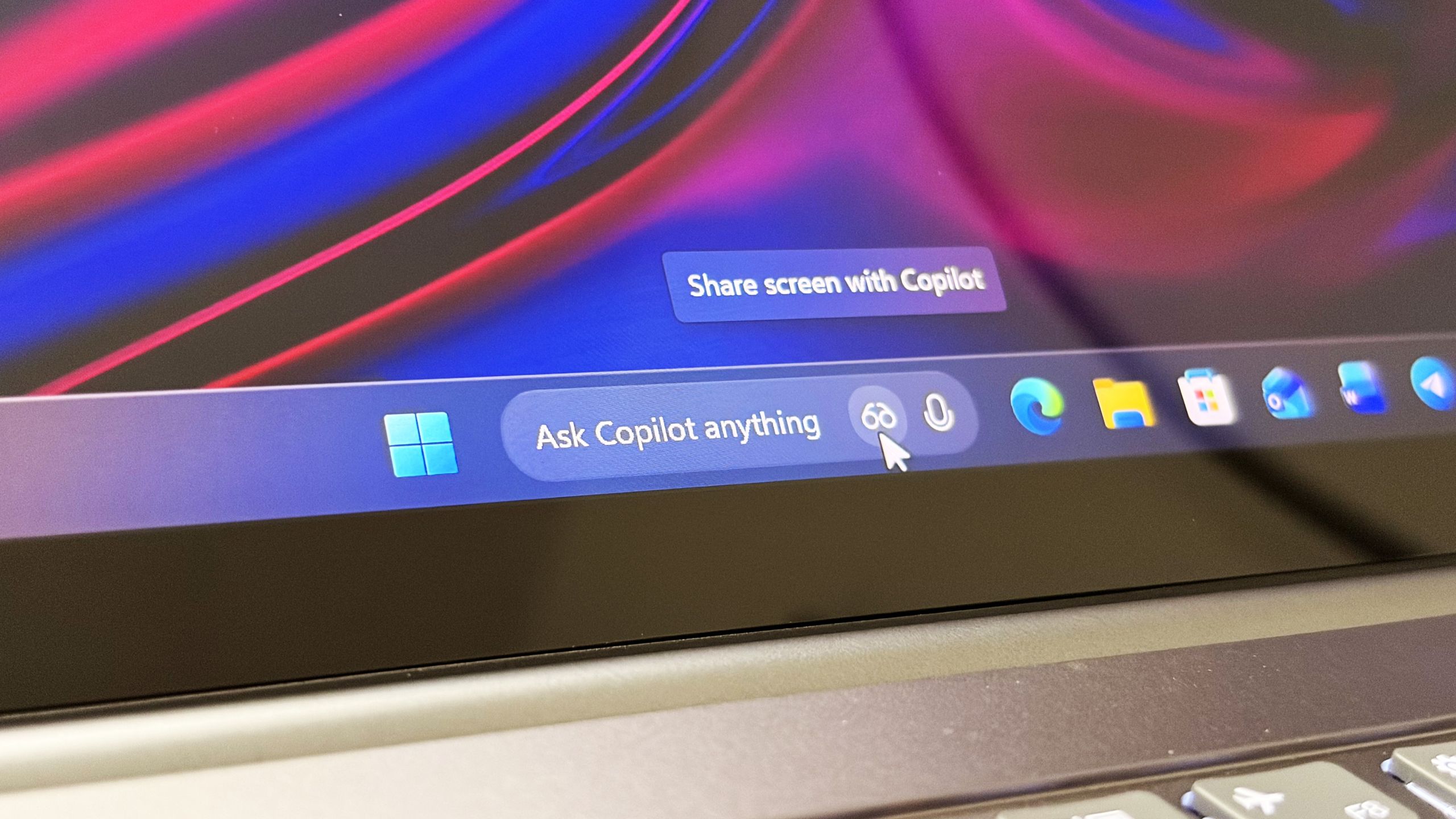
Microsoft confirms Ask Copilot is still coming to Windows 11's Taskbar this summer
First announced last year, a new document has confirmed that Microsoft's upcoming "Ask Copilot" feature for Windows 11's Taskbar is arriving mid-2026. www.windowscentral.com
- Official source: blogs.microsoft.com

Introducing the First Frontier Suite built on Intelligence + Trust - The Official Microsoft Blog
Today Microsoft is announcing: Wave 3 of Microsoft 365 Copilot Expanded model diversity with Claude and next-gen OpenAI models available today General availability of Agent 365 on May 1 for $15 per user General availability of the new Microsoft 365 E7: The Frontier Suite on May 1 for $99 per... blogs.microsoft.com
- Related coverage: doolpa.com
Loading…
doolpa.com
- Official source: microsoft.com
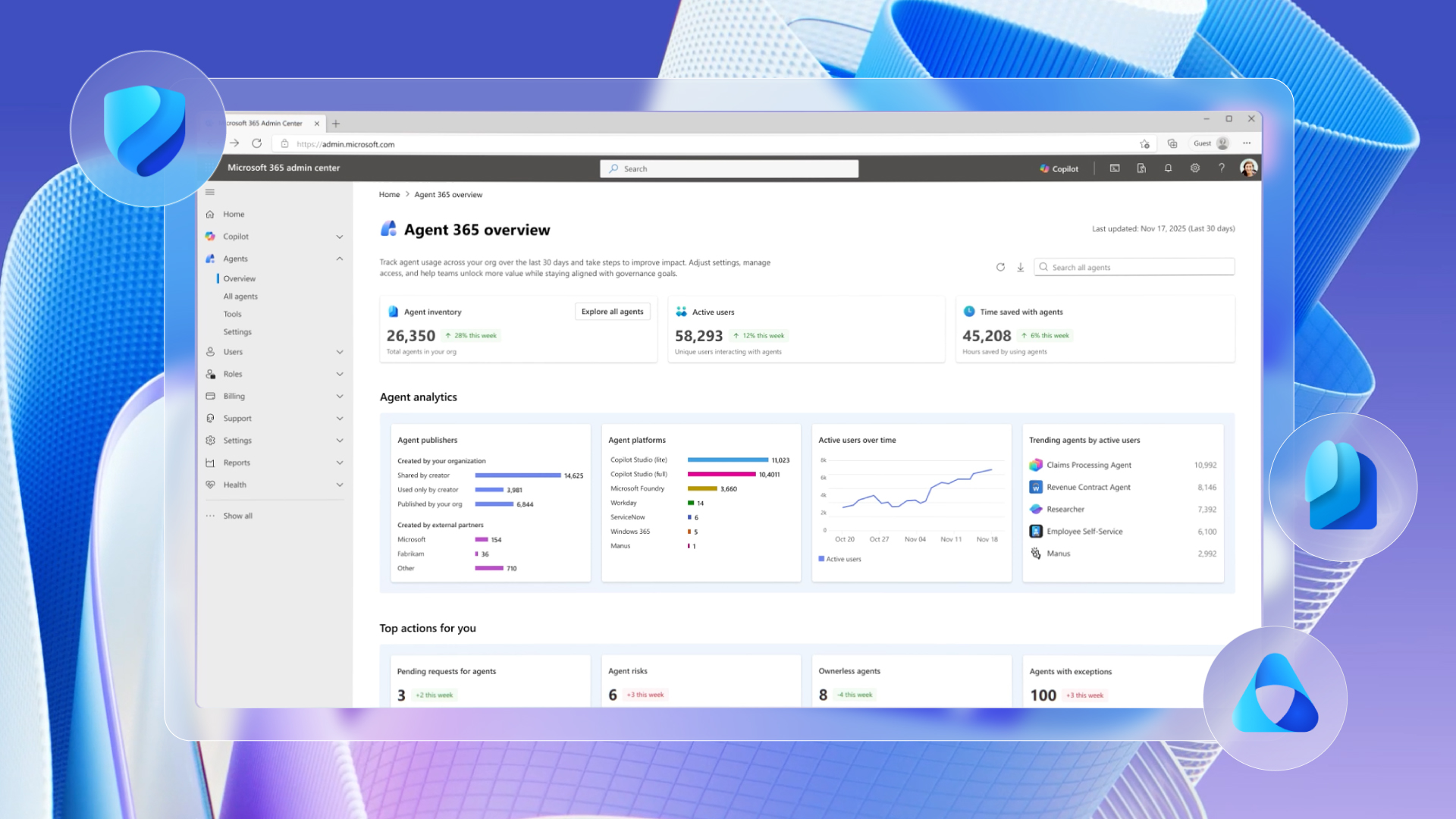
Secure agentic AI for your Frontier Transformation | Microsoft Security Blog
Learn more about how Microsoft Agent 365 and Microsoft 365 E7 can help secure your Frontier Transformation.www.microsoft.com - Related coverage: architectnow.net

Microsoft 365 E7 + Agent 365: the 30-day plan for IT leaders
Microsoft 365 E7 Frontier Suite and Agent 365 reached GA May 1, 2026. The 30-day re-sequence IT leaders should run before their next renewal.www.architectnow.net
- Official source: techcommunity.microsoft.com
Ask questions: May 12 live Agent 365 AMA | Microsoft Community Hub
May 12, 2026 at 9 AM PT is our next "Ask Microsoft Anything" with the Agent 365 team. techcommunity.microsoft.com
- Related coverage: notebookcheck.com
Microsoft Build 2026: Das erwartet Zuschauer bei der Keynote am 2. Juni
Die Microsoft Build 2026 beginnt am 2. Juni in San Francisco. Im Mittelpunkt stehen KI-Agenten, Neuerungen für GitHub Copilot sowie lokale KI-Funktionen für Windows. Das können Entwickler von der Konferenz erwarten. www.notebookcheck.com
- Related coverage: veriland.co.uk

Microsoft Agent 365 Explained: What It Is, How to Get In, and Why It Matters Before May 1
Microsoft Agent 365 brings every AI agent in your tenant under enterprise-grade identity, security, and governance. Here is what the programme offers, how to enrol via the Frontier preview, and what mid-market businesses should do before general availability on 1 May 2026.veriland.co.uk
- Related coverage: andrew.ooo
Loading…
andrew.ooo - Official source: build.microsoft.com

Microsoft Build
Go deep on real code and real systems with the teams building and scaling AI at Microsoft Build, June 2–3, 2026, in San Francisco and online.build.microsoft.com
- Related coverage: pcworld.com

No Windows 12 at Build, but Microsoft has something else up its sleeve
Microsoft's Pavan Davuluri confirmed Windows 12 won't appear at Build 2026, but the new Surface Laptop Ultra with Nvidia N1X might steal the show. www.pcworld.com
- Related coverage: licensingschool.co.uk
Loading…
www.licensingschool.co.uk - Related coverage: notebookcheck.net

Windows 11 Insider Build 26300.8553 finally lets you customize the Start menu
Windows 11 Insider Preview Build 26300.8553 brings a modular Start menu with Small, Large, and Automatic size presets and new privacy tools to the Experimental channel. www.notebookcheck.net
- Official source: learn.microsoft.com
Loading…
learn.microsoft.com - Related coverage: windowsreport.com
Loading…
windowsreport.com - Related coverage: windowslatest.com
Loading…
www.windowslatest.com - Official source: devblogs.microsoft.com

Microsoft Agent Framework at BUILD 2026 | Microsoft Agent Framework
Watch Microsoft Agent Framework sessions at Build 2026 (June 2–3). Explore multi-agent systems, agent harness patterns, observability, evals, and open-source governance. devblogs.microsoft.com
- Related coverage: pcgamer.com
Loading…
www.pcgamer.com - Related coverage: windowsforum.com

Windows 11 Insider Build 26300.8553 Adds Highly Configurable Start Menu Controls
Microsoft released Windows 11 Insider Preview Build 26300.8553 on May 29, 2026, bringing a redesigned, highly configurable Start menu to the Experimental channel, while Beta Build 26220.8544 shipped alongside it without the same Start customization controls for now. The change matters because... windowsforum.com