

Microsoft is extending Dynamics 365 Business Central with Copilot and autonomous AI agents across the 2025 release wave, bringing built-in automation for sales orders, payables, invoice matching, summaries, and partner-built agent scenarios to its cloud ERP customers. The move is less about adding a chatbot to accounting software than about turning routine business records into action surfaces. For small and midsize companies, that makes Business Central one of Microsoft’s most important proving grounds for whether enterprise AI can escape the demo stage and survive contact with approval chains, dirty data, and month-end close.
For years, enterprise software vendors treated AI as a layer above the real system of record. It summarized emails, drafted responses, or helped users search documentation, but the transaction itself still lived behind familiar forms, permissions, and workflows. Business Central’s latest Copilot-and-agents push changes that posture: the AI is no longer merely advising the user about the ERP system; it is being invited to participate in the work of the ERP system.
That distinction matters. A sales order created from a customer email is not just a productivity trick. A vendor invoice matched against purchase orders is not just a clever OCR workflow. These are accounting-adjacent events that affect inventory, cash flow, tax treatment, customer commitments, and audit evidence.
Microsoft’s bet is that the boring middle of business operations is exactly where AI agents can justify themselves. The pitch is not that Copilot will invent a new business model overnight. It is that it can compress the long tail of repetitive tasks that make ERP systems expensive to operate: reading attachments, finding records, matching values, drafting documents, and routing exceptions.
That is a more credible claim than the “AI will run your company” hype cycle, but it is also harder to execute. In ERP, being mostly right is often not good enough. The work is repetitive because it is controlled, and it is controlled because errors have consequences.
That sounds simple until you remember how real customer orders arrive. Some customers use product names instead of item numbers. Some forward old emails with new quantities buried three messages deep. Some ask for a “same as last time” order, while others attach spreadsheets that do not match the ERP’s item master.
The agent therefore has to do more than extract text. It has to reason across customer records, item catalogs, pricing, availability, and prior behavior. It has to know when it is confident enough to proceed and when it should ask a human to resolve ambiguity.
This is where Business Central’s AI story becomes interesting for WindowsForum’s audience of administrators and implementers. The successful deployment is not the one where an agent dazzles in a canned demo. It is the one where the agent fails safely, leaves a useful trace, and does not create more work for the operations team than it saves.
The most important metric will not be how many orders the agent can touch. It will be how many orders it can advance without producing downstream corrections, credit memos, shipment delays, or support tickets. That is the difference between automation and merely moving manual labor from data entry to cleanup.
Microsoft’s release positioning describes a familiar but valuable workflow: read vendor invoices, identify the vendor, match invoices to purchase orders or accounts, prepare documents, and route items for approval. If that works reliably, it attacks one of the most persistent sources of clerical friction in midsize finance departments.
The catch is that invoice matching is not a pure document-understanding problem. It is a business-policy problem disguised as a document problem. An invoice can be legible and still be wrong. It can match a purchase order in total but not by line. It can use a vendor’s preferred item code while the buyer uses an internal SKU. It can include freight, discounts, tax, or partial shipments that are legitimate but not obvious.
That makes human approval a feature, not a concession. Microsoft and its partners are emphasizing logged activity and review points because finance leaders will not accept a black box that silently posts transactions. The agent must behave less like a rogue clerk and more like a junior processor whose work is visible, correctable, and bounded by policy.
For practitioners, this means the implementation conversation shifts from “Can AI read the invoice?” to “Can our process absorb AI-created drafts?” That requires approval UIs, exception queues, audit trails, permissions, and escalation rules. The AI model may be the headline, but the workflow architecture will decide whether the deployment survives.
That is a significant shift for the Business Central ecosystem. The product has always depended heavily on partners, industry templates, and ISV extensions. If agents are to become a normal part of ERP, Microsoft needs those same partners to build vertical workflows: construction billing, distribution replenishment, manufacturing exceptions, nonprofit grants, field-service handoffs, and dozens of other processes that do not fit cleanly into a generic demo.
MCP is important here because it gives agents a standardized way to discover and use business capabilities exposed by the system. Rather than hard-coding every interaction into a bespoke integration, the agent can operate against described tools and APIs. That is the theory, at least.
In practice, extensibility will be judged by how well the platform handles mess. Partners will need to decide which operations an agent may perform, what data it can see, how tools are described, and how to prevent a vague natural-language request from becoming a risky transaction. The more powerful the agent, the more carefully its action surface must be designed.
This is where Microsoft’s platform story has a real advantage over isolated AI startups. Business Central already lives inside Microsoft’s identity, security, Power Platform, and Dynamics ecosystem. The same gravity that keeps customers in Microsoft 365 can make Business Central agents easier to govern than one-off bots glued to a database.
But gravity is not the same as elegance. Admins will need to watch licensing, capacity, environment linking, connector behavior, data access, and message consumption. If agent development becomes another maze of Power Platform entitlements and tenant-level exceptions, the partner channel may carry the complexity that Microsoft’s marketing leaves out.
AI agents make those questions harder and more important. A human user can be trained, disciplined, or questioned. An agent needs an observable chain of prompts, inputs, retrieved records, decisions, confidence signals, tool calls, and human approvals. Without that trace, AI automation becomes a compliance liability.
Microsoft appears to understand this, at least in product direction. The emphasis on metadata, logged actions, and human oversight reflects the reality that finance, audit, and operations teams will not accept “the AI did it” as an explanation. They need to know which data the agent used, which step it performed, and where a person remained accountable.
This is also where organizations may discover that AI increases short-term review work before it reduces it. Early deployments are likely to create more exceptions, more approvals, and more policy discussions. That is not necessarily failure. It is the normal cost of turning tacit human judgment into managed automation.
The dangerous implementation is the one that tries to skip this phase. If a company deploys an agent into a poorly documented process with weak master data and unclear approval authority, the agent will amplify the ambiguity. It will not fix the process; it will expose it.
For Windows administrators and Microsoft 365 teams, this is where ERP AI stops being solely an application project. Identity, access governance, information architecture, retention policies, and document hygiene all become part of the AI readiness checklist. An agent that can see too little will be useless. An agent that can see too much may become a security and compliance problem.
The Microsoft ecosystem encourages users to think of Copilot as a unified assistant spanning apps, but organizations still need sharp boundaries. A sales-order workflow should not accidentally reason over irrelevant Teams chatter. A payables workflow should not infer vendor payment changes from uncontrolled documents. A support document should not override the authoritative ERP record.
That requires a discipline many midsize organizations have postponed. SharePoint libraries need owners. Teams sprawl needs control. Business Central permissions need review. Master data maintenance needs to be treated as a prerequisite for automation rather than an administrative afterthought.
The irony is that AI may finally force companies to clean up the boring parts of their digital estate. If Copilot becomes the interface to business operations, then messy data stops being a nuisance hidden behind experienced staff. It becomes a visible constraint on automation.
This distinction matters because overpromising autonomy can poison otherwise useful projects. Finance teams do not need a magical AP robot to justify investment. They need fewer keystrokes, faster exception handling, better matching, and more consistent audit evidence. Sales operations teams do not need an agent to negotiate customer relationships. They need it to convert routine order requests into clean drafts.
The organizations that get value fastest will probably avoid grand transformation language. They will choose constrained workflows with high volume, structured outcomes, and obvious review points. They will measure cycle time, exception rate, rework, and user confidence. They will treat the agent as a process participant rather than a replacement for process design.
That is why order processing and invoice matching are sensible launch scenarios. They are common, expensive enough to matter, repetitive enough to automate, and bounded enough to govern. They also generate clear evidence of whether the agent is helping: fewer touches per order, faster invoice approval, reduced unmatched transactions, and cleaner queues.
The harder question is whether Microsoft can make these improvements feel native rather than bolted on. Business Central users do not want another pane that explains what they still have to do manually. They want the system to absorb friction without hiding risk. That is a much narrower target than AI marketing usually admits.
If partners build credible agents around those realities, Business Central’s AI story could become a platform shift. If they mostly repackage demos, it will remain a feature wave. The difference will be visible in the marketplace: useful vertical extensions, repeatable deployment patterns, test tooling, governance templates, and implementation playbooks.
Copilot Studio gives partners an accessible development surface, but accessibility cuts both ways. Low-code tools can accelerate useful automation, and they can also produce fragile workflows that nobody fully owns. The more agents interact with financial and operational records, the less tolerance there is for “citizen developer” enthusiasm without lifecycle management.
Microsoft’s test tooling for Copilot extensions is therefore more than a developer convenience. It signals that agents need to be tested like software, not merely configured like macros. Prompt changes, API changes, permission changes, and model behavior shifts can all affect outcomes.
For IT leaders, the partner question should be blunt: show the failure paths. A good Business Central AI partner should be able to demonstrate how the agent handles missing data, duplicate vendors, partial matches, ambiguous customer requests, permission denial, and audit review. Happy-path demos are table stakes. Exception design is the product.
But the larger cost may appear in operations. Someone has to monitor queues, resolve exceptions, maintain data mappings, update prompts or tool descriptions, validate agent behavior after upgrades, and train users not to blindly accept AI-generated work. That labor does not vanish because a model is involved.
There is also a support burden. When a traditional workflow fails, admins can inspect rules, logs, permissions, and job queues. When an agent behaves unexpectedly, troubleshooting may require a wider lens: input quality, retrieved context, model interpretation, connector results, and policy constraints. The debugging surface expands.
That does not make the technology a bad deal. It means ROI calculations need to include the governance layer. A company that saves 20 hours of manual invoice entry but creates 15 hours of exception review and administrative babysitting has not transformed much. A company that saves 20 hours and creates five hours of higher-quality review has.
The winners will be the organizations that treat agent operations as a real function. That may sound heavy for midsize businesses, but it can be lightweight if designed deliberately. The mistake is assuming the agent is self-managing because it is called autonomous.
The strongest signal will be adoption in high-volume workflows. If customers use agents for sales orders, payables, and matching at scale, that suggests the tools are solving real pain. If adoption stays limited to pilots and conference demos, the gap between AI promise and ERP reality remains wide.
The second signal will be partner-built agents that do more than wrap a generic prompt around a standard API. Useful ISV extensions should encode business context, not just expose more buttons to a language model. The platform’s extensibility will be proven by repeatable vertical solutions, not by the number of possible integrations on a slide.
The third signal will be audit acceptance. If organizations can use AI metadata and transaction visibility to satisfy review, approval, and compliance expectations, automation will accelerate. If auditors, controllers, or managers demand parallel manual checks, the agents may simply add another layer of review.
The fourth signal will be user behavior. Experienced staff are quick to detect tools that create subtle rework. If they trust the drafts, matches, and recommendations enough to change their routines, Microsoft has something durable. If they treat Copilot as an occasionally interesting suggestion engine, the impact will be marginal.
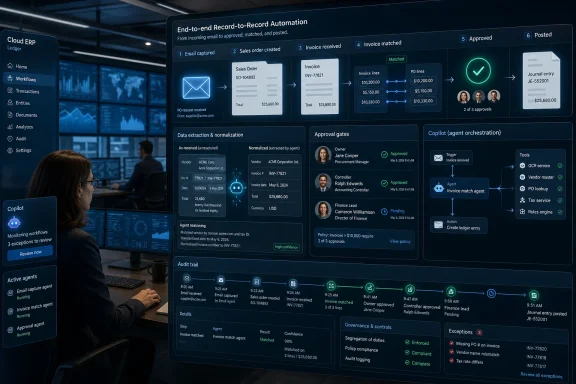 Microsoft Moves AI From the Side Panel Into the Ledger
For years, enterprise software vendors treated AI as a layer above the real system of record. It summarized emails, drafted responses, or helped users search documentation, but the transaction itself still lived behind familiar forms, permissions, and workflows. Business Central’s latest Copilot-and-agents push changes that posture: the AI is no longer merely advising the user about the ERP system; it is being invited to participate in the work of the ERP system.That distinction matters. A sales order created from a customer email is not just a productivity trick. A vendor invoice matched against purchase orders is not just a clever OCR workflow. These are accounting-adjacent events that affect inventory, cash flow, tax treatment, customer commitments, and audit evidence.
Microsoft’s bet is that the boring middle of business operations is exactly where AI agents can justify themselves. The pitch is not that Copilot will invent a new business model overnight. It is that it can compress the long tail of repetitive tasks that make ERP systems expensive to operate: reading attachments, finding records, matching values, drafting documents, and routing exceptions.
That is a more credible claim than the “AI will run your company” hype cycle, but it is also harder to execute. In ERP, being mostly right is often not good enough. The work is repetitive because it is controlled, and it is controlled because errors have consequences.
The Sales Order Agent Is a Test of Trust, Not Just Recognition
The Sales Order Agent is the cleanest example of Microsoft’s strategy. It is designed to read incoming customer communications and help turn them into sales orders inside Business Central. In the best case, a customer sends a normal email, the agent identifies the buyer, products, quantities, and delivery details, and the system prepares the order with less manual typing.That sounds simple until you remember how real customer orders arrive. Some customers use product names instead of item numbers. Some forward old emails with new quantities buried three messages deep. Some ask for a “same as last time” order, while others attach spreadsheets that do not match the ERP’s item master.
The agent therefore has to do more than extract text. It has to reason across customer records, item catalogs, pricing, availability, and prior behavior. It has to know when it is confident enough to proceed and when it should ask a human to resolve ambiguity.
This is where Business Central’s AI story becomes interesting for WindowsForum’s audience of administrators and implementers. The successful deployment is not the one where an agent dazzles in a canned demo. It is the one where the agent fails safely, leaves a useful trace, and does not create more work for the operations team than it saves.
The most important metric will not be how many orders the agent can touch. It will be how many orders it can advance without producing downstream corrections, credit memos, shipment delays, or support tickets. That is the difference between automation and merely moving manual labor from data entry to cleanup.
Payables Automation Puts AI Where Finance Teams Are Most Suspicious
The Payables Agent is more provocative because accounts payable is already a battlefield of partial automation. Many organizations have OCR tools, email inbox rules, approval workflows, EDI feeds, and vendor portals. Yet AP teams still spend large amounts of time resolving exceptions because invoices rarely behave exactly as the procurement process intended.Microsoft’s release positioning describes a familiar but valuable workflow: read vendor invoices, identify the vendor, match invoices to purchase orders or accounts, prepare documents, and route items for approval. If that works reliably, it attacks one of the most persistent sources of clerical friction in midsize finance departments.
The catch is that invoice matching is not a pure document-understanding problem. It is a business-policy problem disguised as a document problem. An invoice can be legible and still be wrong. It can match a purchase order in total but not by line. It can use a vendor’s preferred item code while the buyer uses an internal SKU. It can include freight, discounts, tax, or partial shipments that are legitimate but not obvious.
That makes human approval a feature, not a concession. Microsoft and its partners are emphasizing logged activity and review points because finance leaders will not accept a black box that silently posts transactions. The agent must behave less like a rogue clerk and more like a junior processor whose work is visible, correctable, and bounded by policy.
For practitioners, this means the implementation conversation shifts from “Can AI read the invoice?” to “Can our process absorb AI-created drafts?” That requires approval UIs, exception queues, audit trails, permissions, and escalation rules. The AI model may be the headline, but the workflow architecture will decide whether the deployment survives.
Copilot Studio Turns Business Central Into an Agent Platform
The built-in agents are only one half of the story. Microsoft is also positioning Business Central as something partners and developers can extend through Copilot Studio, connectors, and the Model Context Protocol, or MCP. In plain terms, Microsoft wants Business Central records and actions to become usable tools for custom agents.That is a significant shift for the Business Central ecosystem. The product has always depended heavily on partners, industry templates, and ISV extensions. If agents are to become a normal part of ERP, Microsoft needs those same partners to build vertical workflows: construction billing, distribution replenishment, manufacturing exceptions, nonprofit grants, field-service handoffs, and dozens of other processes that do not fit cleanly into a generic demo.
MCP is important here because it gives agents a standardized way to discover and use business capabilities exposed by the system. Rather than hard-coding every interaction into a bespoke integration, the agent can operate against described tools and APIs. That is the theory, at least.
In practice, extensibility will be judged by how well the platform handles mess. Partners will need to decide which operations an agent may perform, what data it can see, how tools are described, and how to prevent a vague natural-language request from becoming a risky transaction. The more powerful the agent, the more carefully its action surface must be designed.
This is where Microsoft’s platform story has a real advantage over isolated AI startups. Business Central already lives inside Microsoft’s identity, security, Power Platform, and Dynamics ecosystem. The same gravity that keeps customers in Microsoft 365 can make Business Central agents easier to govern than one-off bots glued to a database.
But gravity is not the same as elegance. Admins will need to watch licensing, capacity, environment linking, connector behavior, data access, and message consumption. If agent development becomes another maze of Power Platform entitlements and tenant-level exceptions, the partner channel may carry the complexity that Microsoft’s marketing leaves out.
The Audit Trail Becomes the Product
The most consequential phrase in this rollout is not “generative AI.” It is transaction-level visibility. In ERP, the record of what happened is often as important as the action itself. Who changed the vendor bank account? Who approved the invoice? Why was a price overridden? What evidence supported the match?AI agents make those questions harder and more important. A human user can be trained, disciplined, or questioned. An agent needs an observable chain of prompts, inputs, retrieved records, decisions, confidence signals, tool calls, and human approvals. Without that trace, AI automation becomes a compliance liability.
Microsoft appears to understand this, at least in product direction. The emphasis on metadata, logged actions, and human oversight reflects the reality that finance, audit, and operations teams will not accept “the AI did it” as an explanation. They need to know which data the agent used, which step it performed, and where a person remained accountable.
This is also where organizations may discover that AI increases short-term review work before it reduces it. Early deployments are likely to create more exceptions, more approvals, and more policy discussions. That is not necessarily failure. It is the normal cost of turning tacit human judgment into managed automation.
The dangerous implementation is the one that tries to skip this phase. If a company deploys an agent into a poorly documented process with weak master data and unclear approval authority, the agent will amplify the ambiguity. It will not fix the process; it will expose it.
Clean Data Becomes the New Desktop Standard
Business Central’s AI features also reinforce an unglamorous truth: the quality of the agent depends on the quality of the business data it can reach. Copilot may draw context from emails, Teams conversations, documents, and Dynamics records, but none of that helps if customer names are inconsistent, item records are stale, vendor mappings are incomplete, or permissions are too broad.For Windows administrators and Microsoft 365 teams, this is where ERP AI stops being solely an application project. Identity, access governance, information architecture, retention policies, and document hygiene all become part of the AI readiness checklist. An agent that can see too little will be useless. An agent that can see too much may become a security and compliance problem.
The Microsoft ecosystem encourages users to think of Copilot as a unified assistant spanning apps, but organizations still need sharp boundaries. A sales-order workflow should not accidentally reason over irrelevant Teams chatter. A payables workflow should not infer vendor payment changes from uncontrolled documents. A support document should not override the authoritative ERP record.
That requires a discipline many midsize organizations have postponed. SharePoint libraries need owners. Teams sprawl needs control. Business Central permissions need review. Master data maintenance needs to be treated as a prerequisite for automation rather than an administrative afterthought.
The irony is that AI may finally force companies to clean up the boring parts of their digital estate. If Copilot becomes the interface to business operations, then messy data stops being a nuisance hidden behind experienced staff. It becomes a visible constraint on automation.
Microsoft Is Selling Autonomy, But Customers Are Buying Supervised Work
The word “autonomous” appears frequently in Microsoft’s agent narrative, but the near-term value proposition is better understood as supervised work. The agent drafts, matches, suggests, prepares, and routes. The human reviews, approves, corrects, and tunes. That may sound less futuristic, but it is far more realistic.This distinction matters because overpromising autonomy can poison otherwise useful projects. Finance teams do not need a magical AP robot to justify investment. They need fewer keystrokes, faster exception handling, better matching, and more consistent audit evidence. Sales operations teams do not need an agent to negotiate customer relationships. They need it to convert routine order requests into clean drafts.
The organizations that get value fastest will probably avoid grand transformation language. They will choose constrained workflows with high volume, structured outcomes, and obvious review points. They will measure cycle time, exception rate, rework, and user confidence. They will treat the agent as a process participant rather than a replacement for process design.
That is why order processing and invoice matching are sensible launch scenarios. They are common, expensive enough to matter, repetitive enough to automate, and bounded enough to govern. They also generate clear evidence of whether the agent is helping: fewer touches per order, faster invoice approval, reduced unmatched transactions, and cleaner queues.
The harder question is whether Microsoft can make these improvements feel native rather than bolted on. Business Central users do not want another pane that explains what they still have to do manually. They want the system to absorb friction without hiding risk. That is a much narrower target than AI marketing usually admits.
Partners Will Decide Whether This Is a Feature Wave or a Platform Shift
Business Central’s customer base is broad, fragmented, and partner-led. That makes Microsoft’s AI ambitions unusually dependent on implementation firms, ISVs, and consultants. A generic agent can handle generic processes, but ERP value often lives in the local adaptation: industry rules, regional compliance, customer-specific pricing, document layouts, and legacy integrations.If partners build credible agents around those realities, Business Central’s AI story could become a platform shift. If they mostly repackage demos, it will remain a feature wave. The difference will be visible in the marketplace: useful vertical extensions, repeatable deployment patterns, test tooling, governance templates, and implementation playbooks.
Copilot Studio gives partners an accessible development surface, but accessibility cuts both ways. Low-code tools can accelerate useful automation, and they can also produce fragile workflows that nobody fully owns. The more agents interact with financial and operational records, the less tolerance there is for “citizen developer” enthusiasm without lifecycle management.
Microsoft’s test tooling for Copilot extensions is therefore more than a developer convenience. It signals that agents need to be tested like software, not merely configured like macros. Prompt changes, API changes, permission changes, and model behavior shifts can all affect outcomes.
For IT leaders, the partner question should be blunt: show the failure paths. A good Business Central AI partner should be able to demonstrate how the agent handles missing data, duplicate vendors, partial matches, ambiguous customer requests, permission denial, and audit review. Happy-path demos are table stakes. Exception design is the product.
The Costs Will Hide in Operations Before They Show Up in Licensing
Microsoft’s licensing and consumption model will get attention, especially where Copilot Studio messages, prepaid capacity, or premium features enter the picture. That scrutiny is justified. AI features that look bundled at first can still create planning headaches when usage scales or when custom agents cross product boundaries.But the larger cost may appear in operations. Someone has to monitor queues, resolve exceptions, maintain data mappings, update prompts or tool descriptions, validate agent behavior after upgrades, and train users not to blindly accept AI-generated work. That labor does not vanish because a model is involved.
There is also a support burden. When a traditional workflow fails, admins can inspect rules, logs, permissions, and job queues. When an agent behaves unexpectedly, troubleshooting may require a wider lens: input quality, retrieved context, model interpretation, connector results, and policy constraints. The debugging surface expands.
That does not make the technology a bad deal. It means ROI calculations need to include the governance layer. A company that saves 20 hours of manual invoice entry but creates 15 hours of exception review and administrative babysitting has not transformed much. A company that saves 20 hours and creates five hours of higher-quality review has.
The winners will be the organizations that treat agent operations as a real function. That may sound heavy for midsize businesses, but it can be lightweight if designed deliberately. The mistake is assuming the agent is self-managing because it is called autonomous.
The Useful Signals Will Come From the Back Office, Not the Launch Deck
The next year of Business Central AI adoption should be judged by operational evidence rather than announcement volume. Microsoft has placed the pieces: built-in Copilot features, autonomous agents, Copilot Studio extensibility, MCP access, and a partner ecosystem hungry for new services. Now the hard part begins.The strongest signal will be adoption in high-volume workflows. If customers use agents for sales orders, payables, and matching at scale, that suggests the tools are solving real pain. If adoption stays limited to pilots and conference demos, the gap between AI promise and ERP reality remains wide.
The second signal will be partner-built agents that do more than wrap a generic prompt around a standard API. Useful ISV extensions should encode business context, not just expose more buttons to a language model. The platform’s extensibility will be proven by repeatable vertical solutions, not by the number of possible integrations on a slide.
The third signal will be audit acceptance. If organizations can use AI metadata and transaction visibility to satisfy review, approval, and compliance expectations, automation will accelerate. If auditors, controllers, or managers demand parallel manual checks, the agents may simply add another layer of review.
The fourth signal will be user behavior. Experienced staff are quick to detect tools that create subtle rework. If they trust the drafts, matches, and recommendations enough to change their routines, Microsoft has something durable. If they treat Copilot as an occasionally interesting suggestion engine, the impact will be marginal.
The ERP Agent Scorecard Writes Itself
The practical story is not whether Business Central now “has AI.” It does. The real story is whether its AI can take responsibility for well-defined slices of business work without eroding the controls that made ERP valuable in the first place.- Organizations should begin with narrow, high-volume workflows such as sales order intake, invoice matching, and payables preparation rather than broad promises of autonomous operations.
- Implementation teams should design approval gates, exception queues, and review screens before agents touch sensitive financial or operational records.
- Data owners should treat clean customer, vendor, item, and document metadata as prerequisites for useful Copilot behavior.
- Partners and ISVs should be judged by their exception handling and audit design, not by polished happy-path demonstrations.
- IT administrators should expect agent governance to span Business Central, Microsoft 365, Power Platform, identity, permissions, and capacity planning.
- Finance and operations leaders should measure rework, exception rates, approval latency, and user trust alongside raw automation volume.
References
- Primary source: Let's Data Science
Published: 2026-05-21T12:11:07.339149
Business Central Integrates Copilot and AI Agents | Let's Data Science
Reported facts: Multiple industry sources describe Microsoft Dynamics 365 **Business Central** 2026 Wave 1 (BC28) as delivering deeper **Copilot** integration and new, built-in AI agents such as the **Sales Order Agent** and **Payables Agent** (MSDynamicsWorld; Stoneridge Software). Stoneridge... letsdatascience.com
- Official source: learn.microsoft.com
Overview of Dynamics 365 Business Central 2025 release wave 1 | Microsoft Learn
Overview of Dynamics 365 Business Central 2025 release wave 1learn.microsoft.com - Related coverage: randgroup.com
Key features and updates in the 2025 release wave 1 of Business Central | Rand Group
Discover the key features and updates in the 2025 Release Wave 1 for Dynamics 365 Business Central from AI inoovations to enhanced reporting.www.randgroup.com - Related coverage: dynamicscon.com
- Related coverage: cegeka.com
2025 Microsoft Release Wave 1: Dynamics 365 Business Central
The best updates of Microsoft Release Wave 1 (2025) for Business Central. Check them out now!www.cegeka.com - Related coverage: dynamics.tensoft.com
New Features in Business Central 2025 Release Wave 1: Part One
Business Central 2025 Release Wave 1 is available now and brings some exciting features around AI, financial reportingdynamics.tensoft.com
- Related coverage: citydynamics.com
