

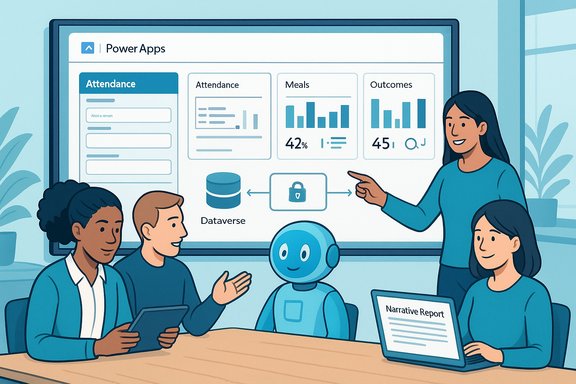
Centro de la Familia’s move from a brittle, third‑party reporting setup to an AI‑augmented Power Platform solution is a practical blueprint for nonprofits that need to do more with less—dramatically faster reporting, lower recurring costs, and a clear line of sight into program outcomes.
Background / Overview
Centro de la Familia is a long‑standing Head Start grantee operating dozens of centers that serve children and families across several states. The organization faced two typical but acute problems: a legacy vendor system (ChildPlus) that limited data ownership and reporting flexibility, and heavy manual effort to prepare mandated reports for federal and state agencies. Those constraints meant staff spent precious hours on paperwork rather than on direct services.To address the problem, Centro partnered with JourneyTeam to rebuild their operational and reporting workflow on Microsoft’s Power Platform. The result, branded internally as C‑FIT, is a Power Apps front end with Power BI dashboards, a Dataverse backend for tenant‑scoped data, and an agent built with Microsoft Copilot Studio that automates narrative report generation and note summarization. The published case materials and the vendor video describe a measured outcome: a 5× reduction in routine administrative time, a 54% cut in ongoing software costs, and report‑generation timelines reduced from hours to minutes. These claims are documented in both JourneyTeam’s case materials and Microsoft’s customer story for Centro de la Familia.
Why this matters: compliance, control, and mission focus
Nonprofits operating Head Start programs carry compliance obligations and reporting schedules that are data‑heavy and time sensitive. When the system that supplies data is a third‑party black box, organizations risk recurring reporting failures, brittle dashboards, and unexpected vendor‑side changes that break critical reports. Centro’s experience is a case study in the operational and financial costs of that model: recurring integration breakages, limited customization, and per‑child pricing that scaled costs with program size. JourneyTeam and Microsoft materials underline the shift in priorities that can occur when the organization owns its data model and reporting workflows—less time on administrative tasks and more on service delivery.Technical architecture: C‑FIT explained
Core components
- Power Apps (C‑FIT front end) — a low‑code interface optimized for Family Service Specialists and teachers to capture attendance, meals, health checks, assessments, and behavior notes. The app was designed with user input from content‑area specialists to keep screens simple and training short.
- Dataverse (data store and access control) — acts as the canonical tenant data fabric, providing schema, security, and audit trails so each Centro center can have secure, role‑based access without repeated exports. This avoids the “reporting depends on a vendor change” problem Centro experienced previously.
- Power BI (reporting and dashboards) — interactive dashboards for center managers to track KPIs, trends in child outcomes, and compliance metrics in near real‑time.
- Copilot Studio agent (report automation) — a custom agent embedded into C‑FIT (via an iframe in the app) that prompts staff during family interactions, summarises case notes, and generates narrative reports for submission or review. According to the published case, this agent reduced the time to compile reports from hours to minutes.
How the agent works (practical pattern)
The agent follows the common “agentic” pattern Microsoft and partners now describe: monitor a trigger or user prompt, gather context from Dataverse and tenant knowledge sources, reason using a grounded prompt or knowledge index, validate (often using deterministic checks or a human validation station), and then act (generate a narrative, populate a report, or start a Power Automate flow). This architecture converts systems of record into systems of action and is the recommended pattern for production agent deployments.Verified outcomes and numbers
Both JourneyTeam and Microsoft’s customer story list the same headline outcomes for Centro de la Familia:- 5× reduction in time spent on daily administrative burdens (teachers moved from roughly five minutes per daily task to about one minute).
- 54% reduction in software costs by moving from the previous vendor’s per‑child pricing to a per‑user pricing model on the Power Platform.
- Report generation compressed from hours to minutes after embedding a Copilot Studio agent to summarize notes and populate narratives.
User experience and adoption
A striking practical win for Centro was user adoption. The C‑FIT interface was built with direct input from teachers and managers, focusing on consolidating multiple forms and reducing navigation complexity. Reported outcomes include:- Training time cut from weeks to 1–2 hours for most users.
- Broad adoption across centers: JourneyTeam’s case notes indicate ~300 app users and operational coverage for 1,200+ children in 27 centers—numbers that match Centro’s published profile.
Governance, security, and compliance — what Centro did right
Moving from a third‑party SaaS to an in‑tenant Power Platform solution raises governance questions and responsibilities. Centro’s implementation leverages Microsoft platform controls and follows recommended patterns that partners and Microsoft highlight for agentic Copilot solutions:- Tenant‑scoped data grounding: Dataverse ensures agents reason over tenant data while respecting user identity and Entra ID permissions. This reduces hallucination risk by grounding responses in authorized content.
- Role‑based access controls: Data access is governed per center and per role, eliminating the need to export or request external reports for regular operations.
- Validation stations and human‑in‑the‑loop: Agents are designed to generate drafts or suggestions that can be validated by staff before final submission—an indispensable design for compliance workflows. Copilot Studio provides authoring patterns for validation and observability.
- Platform security primitives: Integration with Microsoft Entra, Purview classification, and tenant audit logging gives teams the tools required to meet regulatory expectations for data protection and retention. Microsoft emphasizes DLP, environment separation (dev/test/prod), and explicit connector policies as essential operational controls.
Risks and practical limitations
Centro’s success is instructive, but it also highlights common risks organizations must manage when introducing agentic Copilots into production workflows:- Vendor‑reported metrics vs independent validation. The headline figures come from vendors and Microsoft’s customer story. They are credible and consistent across the vendor ecosystem, but organizations should expect to validate metrics with their own pilots and measurement frameworks before assuming identical gains.
- Hallucinations and grounding failures. Generative agents require robust retrieval grounding (Dataverse, knowledge indexes, deterministic checks) to avoid plausible but incorrect outputs. Design guardrails and validation stations for any output that affects compliance or client services.
- Agent sprawl and lifecycle management. Ease of creation (Copilot Studio’s low‑code environment) increases the risk of many undocumented agents running with excessive privileges. Treat agents like software: catalog them, assign owners and budgets, and monitor run history and telemetry.
- Cost volatility (runtime consumption). Agentic Copilot execution consumes runtime credits (Copilot Credits / consumption units). Organizations should budget for consumption alongside per‑user licensing to avoid surprise costs, and validate any vendor messaging around pooled credits or SKU bundling before full scale roll‑out. Licensing and consumption models have been in flux as the market matures—confirm contractual and technical details with Microsoft or your partner.
- Legacy system integration brittleness. Where agents simulate UI interactions (the “computer use” pattern) to reach legacy systems with no APIs, automation can be brittle and require frequent maintenance when vendor interfaces change. Isolate and test these automations carefully.
A practical rollout checklist (recommended)
- Define a narrowly scoped pilot with measurable KPIs (e.g., reduce report assembly time by X%).
- Assemble a cross‑functional team: business owner, Power Platform maker, Copilot Studio author, security/compliance lead, and operations owner.
- Prepare and clean data in Dataverse; define schema and security groups.
- Build an agent in Copilot Studio that drafts outputs but requires human validation before write‑back for compliance records.
- Enforce least‑privilege connector policies, DLP, and Purview classification for knowledge connectors.
- Instrument telemetry and observability — log prompts, outputs, and outcomes; set alerts for drift.
- Run a controlled pilot, measure KPIs, collect qualitative user feedback, and iterate.
Why Centro’s approach is relevant to other nonprofits and public programs
Centro’s story is not just about technology; it’s about operational control and mission prioritization. Key transferable lessons:- Own your data model. Shifting reporting and analytics to an in‑tenant model avoids recurring vendor breakages and gives programs direct control over dashboards, KPIs, and indicator design.
- Design with frontline users. Including teachers and family service specialists in the design process reduces training time, increases adoption, and produces better screens for daily workflows.
- Automate what’s painful, not what’s strategic. Use agents to eliminate repetitive, time‑consuming tasks (note summarization, draft reports) and keep human judgment where it matters—client interaction, sensitive approvals, and strategic decisions.
- Plan governance before scale. The relative ease of agent creation is a double‑edged sword: rapid impact followed by potential operational risk unless agents are treated as first‑class assets.
What Centro and JourneyTeam plan next
JourneyTeam and Centro are both public about plans to expand the C‑FIT approach: JourneyTeam is preparing Copilot Studio training programs and workshops so Centro’s staff can manage and extend agents themselves, and both organizations have discussed packaging the solution for other Head Start providers. That emphasis on internal capability building—training local staff to author and maintain agents—reduces long‑term vendor dependence and accelerates continuous improvement.Critical assessment — strength, sustainability, and risk mitigation
Centro’s C‑FIT is a strong, modern answer to a common nonprofit problem: disparate data, brittle reporting, and disproportionate time spent on compliance. The strengths are clear:- Tangible efficiency gains that free staff to focus on people rather than paperwork.
- Cost model improvement from per‑child to per‑user licensing and in‑tenant ownership of dashboards and reports.
- Practical governance leveraging Dataverse, Entra, Purview, and Copilot Studio validation patterns to meet compliance needs.
- Instrument observability now: logging, evaluation, and retraining loops should be a living practice. Agents are not “set and forget.”
- Budget for consumption: monitor and forecast Copilot Credits and runtime consumption in addition to per‑user licensing.
- Enforce lifecycle governance: require approvals, ownership, testing, and scheduled audits for every agent.
Conclusion
Centro de la Familia’s C‑FIT initiative is a compelling real‑world example of how the Power Platform plus Copilot Studio can convert labor‑intensive reporting into near‑real‑time, governed automation. The combined story—documented by JourneyTeam and published in Microsoft’s customer materials and featured in industry coverage—offers a reproducible path: migrate to tenant‑owned data, design with frontline staff, apply agentic Copilot patterns for drafting and summarization, and embed governance, observability, and human validation into the lifecycle.The headline lessons are practical: own the data, automate the repetitive, protect the sensitive, and measure everything. For nonprofits and public programs wrestling with compliance and scarce staff time, Centro’s approach shows that modern low‑code tools plus responsible agent design can meaningfully accelerate impact while keeping control where it belongs—inside the organization and focused on mission.
Source: MSDynamicsWorld.com Accelerating Impact with AI: Centro de la Familia’s Copilot Reporting Solution
