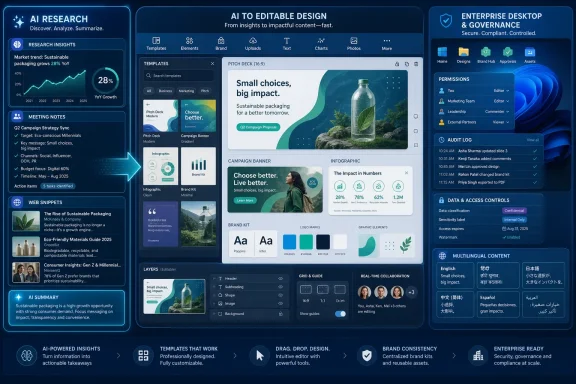
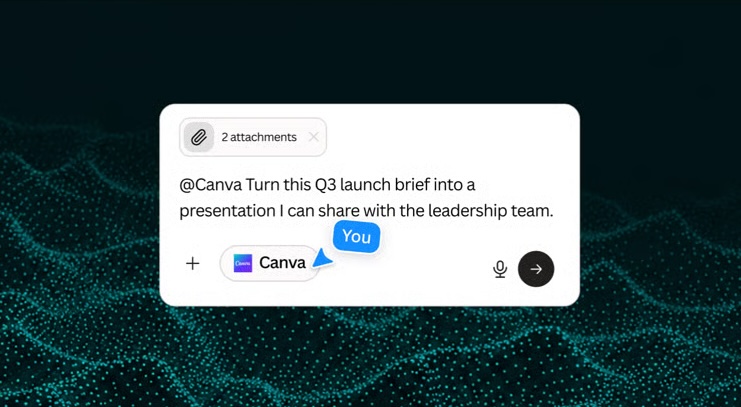
Canva launched a Perplexity Computer connector in early June 2026 that lets eligible Perplexity subscribers turn AI-generated research, meeting notes, strategy briefs, performance data, and business documents into editable Canva presentations, campaigns, infographics, brand kits, and templates inside the Perplexity workflow. The announcement is not just another “AI can make slides” demo. It is a signal that the next fight in productivity software is over the handoff between thinking and publishing. Canva wants to own the moment when rough intelligence becomes something a team can actually ship.
The important part of Canva’s Perplexity integration is not that it generates graphics. Canva has been building AI design features for years, and the market is already crowded with tools that can produce a passable social tile from a prompt. The more consequential move is that Canva is inserting itself into the place where many AI workflows currently stall: after the model has produced useful material, but before a human has turned it into usable collateral.
That gap is deceptively expensive. A sales team can ask an AI assistant to summarize a call, analyze the customer’s pain points, and draft a proposal outline. A founder can generate a launch plan from market research. A marketing manager can turn web trends and performance data into campaign angles. But someone still has to copy the output, choose a format, create slides, adjust brand elements, rewrite copy, align objects, and prepare the work for colleagues or customers.
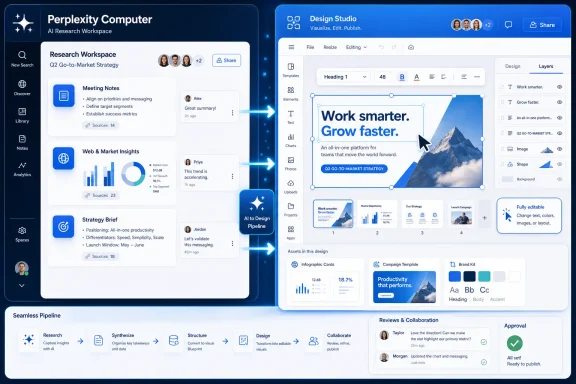
Canva’s pitch is that this last mile should not feel like a separate job. If Perplexity Computer can gather context, orchestrate models, and produce a structured brief, Canva wants that brief to become a designed artifact without leaving the AI workspace. That is the difference between AI as a clever drafting assistant and AI as a production pipeline.
The strategic bet is obvious: the company that controls the final format controls a large part of the workday. Text can be copied anywhere. A designed deck, campaign kit, infographic, or reusable brand template tends to live where it was made.
The integration works through Perplexity’s Connectors page, where eligible users can link an existing Canva account. Once connected, the workflow can move from brief to design asset with far less manual transfer. Canva says the resulting assets remain editable in Canva, which is the detail that matters most for real teams.
Editable output is the dividing line between a toy and a workflow. A static AI-generated image of a slide is a dead end if the copy is wrong, the customer logo changes, legal asks for a disclaimer, or the brand team wants a different hierarchy. An editable Canva file, by contrast, can be reviewed, commented on, revised, localized, duplicated, and reused.
That also helps explain why Canva is valuable to Perplexity. Research tools are under pressure to become agents that do work, not just answer questions. But the end product of business research is often not another answer. It is a deck, a one-pager, a social campaign, a proposal, or a board update. Perplexity gets closer to action by handing off to a design platform that already has a large base of non-designers trained to publish.
The Canva-Perplexity connector is built for that mundane, high-volume work. A seasonal trend report can become a campaign package. A client meeting can become a proposal. A sales lead can become a tailored pitch deck. A performance summary can become an internal update. These are not exotic use cases, which is precisely why they matter.
For small businesses, the handoff is often not assigned to a specialist. The founder, account manager, operations lead, or social media generalist does it between other tasks. Canva’s success has always come from lowering the penalty for not having a full creative department. The Perplexity connector extends that same logic into AI-generated knowledge work.
The result is not likely to replace polished agency work or professional design systems at the high end. It is more likely to compress the routine production cycle for the vast middle of business communication. That is where most decks, graphics, and proposals live: not as masterpieces, but as good-enough artifacts that need to be clear, on-brand, and done by Thursday.
That list tells the story. Canva does not appear to be betting that users will conduct all AI work inside Canva itself. Instead, it is making Canva available wherever AI-assisted planning, writing, research, and automation are happening. In other words, Canva wants to be the design layer for the agentic software stack.
This is a pragmatic strategy. The AI assistant market is moving too quickly for any one productivity company to assume users will stay inside a single interface. Some teams will use ChatGPT. Others will standardize on Microsoft Copilot because of Microsoft 365. Others will prefer Claude for writing or Perplexity for research. Canva’s answer is to meet those workflows rather than force them back through Canva’s front door.
There is also a defensive logic here. If AI assistants become capable of generating serviceable visual assets on their own, Canva risks being treated as an optional finishing tool. By embedding itself into those assistants early, Canva keeps the final editable artifact connected to its own platform. The AI assistant may initiate the work, but Canva remains the place where the work becomes durable.
Those figures are partly marketing, but they frame the scale of the bet. Canva is not chasing a niche audience of prompt engineers or design hobbyists. It is trying to make AI-generated creative production normal for the small businesses and teams that already use templates, brand kits, and collaborative editing as daily infrastructure.
The opportunity is substantial because the pain is real. Most small teams do not lack ideas; they lack time, consistency, and production capacity. AI can increase the volume of drafts, but that can also increase the amount of unfinished work. A workspace full of generated briefs is not much help if every brief becomes another formatting chore.
The risk is that Canva and Perplexity could simply accelerate the production of mediocre collateral. If every meeting note becomes a deck and every trend becomes a campaign, teams may drown in polished noise. The best version of this workflow reduces friction without removing judgment. The worst version makes it easier to publish before anyone has thought hard about whether the output should exist.
A generated answer in an AI chat is ephemeral. It may be useful, but it is not necessarily governed, formatted, or ready for circulation. A Canva design can be placed into a shared workspace, revised by a team, aligned with a brand kit, exported into required formats, and reused as a template. That makes it more compatible with the practical bureaucracy of modern work.
This is also where Canva’s collaboration model matters. Marketing, sales, HR, education, and operations teams already use Canva as a shared production space. Connecting Perplexity to Canva gives those teams a way to bring AI-assisted research into a familiar editing environment rather than creating yet another island of output.
For larger organizations, the familiar concerns remain. Any workflow that connects internal documents, meeting notes, performance data, web research, and generated content raises questions about permissions, retention, data boundaries, and auditability. The announcement’s availability for Perplexity Enterprise Pro and Enterprise Max subscribers suggests the companies know that business adoption will depend on more than a clever demo.
That narrows the initial audience but strengthens the business case. Paying Perplexity users are more likely to have repeat workflows, business context, and a reason to turn analysis into deliverables. They are also more likely to value integrations that save time across multiple tools.
The language support is broader than a narrow U.S.-centric rollout. Canva says the connector supports 11 languages: English, Hindi, French, German, Japanese, Korean, Chinese, Portuguese, Spanish, Italian, and Russian. That aligns with Canva’s global small-business and creator base, and it hints at a larger ambition to make AI-generated design workflows less dependent on English-first prompting.
Still, availability is not the same as adoption. Teams will need to decide whether the connector produces assets that are good enough to become part of real workflows. The promise is speed. The test will be whether the first draft is close enough that editing it feels faster than starting from an existing Canva template.
That puts Microsoft in an interesting position. Copilot is one of Canva’s existing integration targets, and Microsoft is aggressively embedding AI across Windows and Microsoft 365. But the Canva-Perplexity partnership shows that significant AI workflows can form outside Microsoft’s own productivity stack while still running perfectly well on Windows PCs.
For users, that may be a benefit. A Windows laptop can become the host for a modular AI workflow that includes Perplexity for research, Canva for design, Microsoft 365 for documents and mail, and a browser as the connective tissue. The downside is that governance becomes more fragmented. Every additional AI workspace adds another place where business data may flow, permissions may differ, and output may need review.
Sysadmins and IT managers should resist the temptation to view this as “just a design tool.” The moment a connector can ingest business briefs and produce customer-facing material, it becomes part of the information supply chain. That makes it relevant to security policy, data classification, acceptable-use rules, and vendor management.
The integration automates the translation layer between analysis and communication. That work has traditionally been spread across junior marketers, sales operations staff, executive assistants, founders, consultants, and managers. They are the people who turn “here are the findings” into “here is the deck.” Canva is not merely democratizing design here; it is industrializing a common office chore.
Professional designers may still feel the effects. If teams can generate more first drafts internally, designers may be pulled later into the process as reviewers, system builders, or brand guardians rather than as the first stop for every asset. That can be healthy when it removes low-value production work. It can be damaging when it encourages organizations to bypass expertise until a brand has already been diluted.
The healthiest division of labor is obvious but not guaranteed. AI can produce drafts, Canva can make them editable, and humans can decide what is accurate, persuasive, tasteful, and appropriate. The companies selling these tools tend to emphasize the first two parts. Organizations adopting them will need discipline around the third.
App switching is not just a UX annoyance. It is where context is lost. A user moves from research notes to a design tool, then reinterprets the brief, searches for a template, pastes text, trims copy, hunts for visuals, checks brand colors, asks a teammate for feedback, and exports a file. Every step is an opportunity for delay or degradation.
By connecting Perplexity Computer to Canva, the companies are trying to preserve intent from the research phase into the design phase. The brief does not sit inert in a chat window. It becomes the seed of a file that can be edited and shared. That is a meaningful shift from AI as a conversational endpoint to AI as a workflow trigger.
The danger is that automation can hide the seams without removing the underlying complexity. If a brief is based on weak research, outdated internal data, or a hallucinated assumption, a polished Canva output may make it look more trustworthy than it is. Visual confidence can outrun factual confidence. That is a problem every AI-to-publishing workflow will have to confront.
That is why the Perplexity Computer partnership is more significant than a conventional plugin. It connects two different forms of AI labor. Perplexity handles the gathering and structuring of information. Canva handles the visual packaging and reuse. Together, they point toward software agents that do not merely answer, but assemble.
This does not mean the output will always be good. AI-generated design still struggles with specificity, taste, hierarchy, and the subtle demands of brand systems. Many users have learned that a prompt can produce something visually plausible but strategically empty. The connector will be judged not by launch screenshots, but by how often teams keep the generated asset instead of deleting it and starting over.
The competitive pressure will be intense. Adobe, Microsoft, Google, OpenAI, Anthropic, and a long list of startups all have incentives to own pieces of this workflow. Canva’s advantage is that it already sits close to the publishing moment for a massive base of non-specialist users. Perplexity’s advantage is that it has become a recognizable brand for AI-assisted research. The partnership is a logical attempt to make those advantages compound.
 Canva Is Chasing the Most Valuable Minute in the AI Workflow
The important part of Canva’s Perplexity integration is not that it generates graphics. Canva has been building AI design features for years, and the market is already crowded with tools that can produce a passable social tile from a prompt. The more consequential move is that Canva is inserting itself into the place where many AI workflows currently stall: after the model has produced useful material, but before a human has turned it into usable collateral.That gap is deceptively expensive. A sales team can ask an AI assistant to summarize a call, analyze the customer’s pain points, and draft a proposal outline. A founder can generate a launch plan from market research. A marketing manager can turn web trends and performance data into campaign angles. But someone still has to copy the output, choose a format, create slides, adjust brand elements, rewrite copy, align objects, and prepare the work for colleagues or customers.
Canva’s pitch is that this last mile should not feel like a separate job. If Perplexity Computer can gather context, orchestrate models, and produce a structured brief, Canva wants that brief to become a designed artifact without leaving the AI workspace. That is the difference between AI as a clever drafting assistant and AI as a production pipeline.
The strategic bet is obvious: the company that controls the final format controls a large part of the workday. Text can be copied anywhere. A designed deck, campaign kit, infographic, or reusable brand template tends to live where it was made.
Perplexity Supplies the Research Engine, Canva Supplies the Surface Area
Perplexity Computer is being positioned as a multi-model AI workspace that can synthesize inputs from meeting notes, web research, internal files, performance data, and other business context. That makes it a natural partner for Canva, because Canva’s value begins when information needs a visual shape. Perplexity can help decide what the message is; Canva can help decide how that message looks when it leaves the building.The integration works through Perplexity’s Connectors page, where eligible users can link an existing Canva account. Once connected, the workflow can move from brief to design asset with far less manual transfer. Canva says the resulting assets remain editable in Canva, which is the detail that matters most for real teams.
Editable output is the dividing line between a toy and a workflow. A static AI-generated image of a slide is a dead end if the copy is wrong, the customer logo changes, legal asks for a disclaimer, or the brand team wants a different hierarchy. An editable Canva file, by contrast, can be reviewed, commented on, revised, localized, duplicated, and reused.
That also helps explain why Canva is valuable to Perplexity. Research tools are under pressure to become agents that do work, not just answer questions. But the end product of business research is often not another answer. It is a deck, a one-pager, a social campaign, a proposal, or a board update. Perplexity gets closer to action by handing off to a design platform that already has a large base of non-designers trained to publish.
The Real Product Is the Handoff
Every enterprise software generation has its own version of the handoff problem. Documents had to become emails. Emails had to become tasks. Spreadsheets had to become dashboards. Now AI-generated analysis has to become something formatted, branded, and reviewable.The Canva-Perplexity connector is built for that mundane, high-volume work. A seasonal trend report can become a campaign package. A client meeting can become a proposal. A sales lead can become a tailored pitch deck. A performance summary can become an internal update. These are not exotic use cases, which is precisely why they matter.
For small businesses, the handoff is often not assigned to a specialist. The founder, account manager, operations lead, or social media generalist does it between other tasks. Canva’s success has always come from lowering the penalty for not having a full creative department. The Perplexity connector extends that same logic into AI-generated knowledge work.
The result is not likely to replace polished agency work or professional design systems at the high end. It is more likely to compress the routine production cycle for the vast middle of business communication. That is where most decks, graphics, and proposals live: not as masterpieces, but as good-enough artifacts that need to be clear, on-brand, and done by Thursday.
Canva’s AI Strategy Is Becoming an Ecosystem Strategy
Canva is not treating Perplexity as a one-off integration. The company has been placing its design engine inside the major AI environments where users are already asking for help. Its current integration roster includes Claude, ChatGPT, Microsoft Copilot, Gemini, and now Perplexity Computer.That list tells the story. Canva does not appear to be betting that users will conduct all AI work inside Canva itself. Instead, it is making Canva available wherever AI-assisted planning, writing, research, and automation are happening. In other words, Canva wants to be the design layer for the agentic software stack.
This is a pragmatic strategy. The AI assistant market is moving too quickly for any one productivity company to assume users will stay inside a single interface. Some teams will use ChatGPT. Others will standardize on Microsoft Copilot because of Microsoft 365. Others will prefer Claude for writing or Perplexity for research. Canva’s answer is to meet those workflows rather than force them back through Canva’s front door.
There is also a defensive logic here. If AI assistants become capable of generating serviceable visual assets on their own, Canva risks being treated as an optional finishing tool. By embedding itself into those assistants early, Canva keeps the final editable artifact connected to its own platform. The AI assistant may initiate the work, but Canva remains the place where the work becomes durable.
The Numbers Are Meant to Reassure, but They Also Raise the Stakes
Canva says content creation has become the top reason small businesses adopt AI, and it points to research suggesting that 74 percent of small businesses rely on digital platforms to compete with larger organizations. The company also says its own AI usage has tripled over the past year. Perplexity, meanwhile, has reportedly crossed 100 million monthly active users, while Canva says its global user base exceeds 250 million across 190 countries.Those figures are partly marketing, but they frame the scale of the bet. Canva is not chasing a niche audience of prompt engineers or design hobbyists. It is trying to make AI-generated creative production normal for the small businesses and teams that already use templates, brand kits, and collaborative editing as daily infrastructure.
The opportunity is substantial because the pain is real. Most small teams do not lack ideas; they lack time, consistency, and production capacity. AI can increase the volume of drafts, but that can also increase the amount of unfinished work. A workspace full of generated briefs is not much help if every brief becomes another formatting chore.
The risk is that Canva and Perplexity could simply accelerate the production of mediocre collateral. If every meeting note becomes a deck and every trend becomes a campaign, teams may drown in polished noise. The best version of this workflow reduces friction without removing judgment. The worst version makes it easier to publish before anyone has thought hard about whether the output should exist.
Editable AI Output Is the Feature Enterprises Will Care About
For IT and operations leaders, the connector’s most important promise is not creative magic. It is manageability. Editable Canva assets fit into existing review, collaboration, and brand-control processes in a way that raw AI output usually does not.A generated answer in an AI chat is ephemeral. It may be useful, but it is not necessarily governed, formatted, or ready for circulation. A Canva design can be placed into a shared workspace, revised by a team, aligned with a brand kit, exported into required formats, and reused as a template. That makes it more compatible with the practical bureaucracy of modern work.
This is also where Canva’s collaboration model matters. Marketing, sales, HR, education, and operations teams already use Canva as a shared production space. Connecting Perplexity to Canva gives those teams a way to bring AI-assisted research into a familiar editing environment rather than creating yet another island of output.
For larger organizations, the familiar concerns remain. Any workflow that connects internal documents, meeting notes, performance data, web research, and generated content raises questions about permissions, retention, data boundaries, and auditability. The announcement’s availability for Perplexity Enterprise Pro and Enterprise Max subscribers suggests the companies know that business adoption will depend on more than a clever demo.
The Subscription Gate Tells Us Who This Is Really For
The connector is available to Perplexity Pro, Max, Enterprise Pro, and Enterprise Max subscribers. That matters because it puts the integration behind paid Perplexity tiers rather than presenting it as a broad consumer feature. The target user is not merely someone making a birthday invitation or a casual poster. It is someone who already sees Perplexity as part of a paid knowledge-work stack.That narrows the initial audience but strengthens the business case. Paying Perplexity users are more likely to have repeat workflows, business context, and a reason to turn analysis into deliverables. They are also more likely to value integrations that save time across multiple tools.
The language support is broader than a narrow U.S.-centric rollout. Canva says the connector supports 11 languages: English, Hindi, French, German, Japanese, Korean, Chinese, Portuguese, Spanish, Italian, and Russian. That aligns with Canva’s global small-business and creator base, and it hints at a larger ambition to make AI-generated design workflows less dependent on English-first prompting.
Still, availability is not the same as adoption. Teams will need to decide whether the connector produces assets that are good enough to become part of real workflows. The promise is speed. The test will be whether the first draft is close enough that editing it feels faster than starting from an existing Canva template.
Windows Users Will Meet This in the Browser Before They Meet It in the OS
For WindowsForum readers, the operating-system angle is indirect but important. Canva and Perplexity are both largely cross-platform, browser-forward services, and that means the most meaningful productivity changes may arrive without a Windows update, a new Office build, or a desktop application upgrade. The browser is once again the deployment channel for a new layer of work.That puts Microsoft in an interesting position. Copilot is one of Canva’s existing integration targets, and Microsoft is aggressively embedding AI across Windows and Microsoft 365. But the Canva-Perplexity partnership shows that significant AI workflows can form outside Microsoft’s own productivity stack while still running perfectly well on Windows PCs.
For users, that may be a benefit. A Windows laptop can become the host for a modular AI workflow that includes Perplexity for research, Canva for design, Microsoft 365 for documents and mail, and a browser as the connective tissue. The downside is that governance becomes more fragmented. Every additional AI workspace adds another place where business data may flow, permissions may differ, and output may need review.
Sysadmins and IT managers should resist the temptation to view this as “just a design tool.” The moment a connector can ingest business briefs and produce customer-facing material, it becomes part of the information supply chain. That makes it relevant to security policy, data classification, acceptable-use rules, and vendor management.
The Design Profession Is Not the Only One Being Automated
It is tempting to frame the Canva-Perplexity connector as another skirmish in the debate over AI and designers. That is too narrow. The more immediate automation target is not the senior designer producing a campaign identity from scratch. It is the routine assembly work performed by everyone else.The integration automates the translation layer between analysis and communication. That work has traditionally been spread across junior marketers, sales operations staff, executive assistants, founders, consultants, and managers. They are the people who turn “here are the findings” into “here is the deck.” Canva is not merely democratizing design here; it is industrializing a common office chore.
Professional designers may still feel the effects. If teams can generate more first drafts internally, designers may be pulled later into the process as reviewers, system builders, or brand guardians rather than as the first stop for every asset. That can be healthy when it removes low-value production work. It can be damaging when it encourages organizations to bypass expertise until a brand has already been diluted.
The healthiest division of labor is obvious but not guaranteed. AI can produce drafts, Canva can make them editable, and humans can decide what is accurate, persuasive, tasteful, and appropriate. The companies selling these tools tend to emphasize the first two parts. Organizations adopting them will need discipline around the third.
The Connector Is Also a Bet Against App Switching
The phrase “without leaving your workflow” appears so often in software marketing that it can sound meaningless. In this case, it is the product. Canva and Perplexity are trying to collapse a chain of small interruptions that collectively consume hours.App switching is not just a UX annoyance. It is where context is lost. A user moves from research notes to a design tool, then reinterprets the brief, searches for a template, pastes text, trims copy, hunts for visuals, checks brand colors, asks a teammate for feedback, and exports a file. Every step is an opportunity for delay or degradation.
By connecting Perplexity Computer to Canva, the companies are trying to preserve intent from the research phase into the design phase. The brief does not sit inert in a chat window. It becomes the seed of a file that can be edited and shared. That is a meaningful shift from AI as a conversational endpoint to AI as a workflow trigger.
The danger is that automation can hide the seams without removing the underlying complexity. If a brief is based on weak research, outdated internal data, or a hallucinated assumption, a polished Canva output may make it look more trustworthy than it is. Visual confidence can outrun factual confidence. That is a problem every AI-to-publishing workflow will have to confront.
The AI Design Race Is Moving From Generation to Orchestration
The first wave of AI design tools competed on generation: who could make the prettiest image, the fastest slide, or the most surprising mockup from a prompt. The next wave is about orchestration. It asks which tool can take messy business context, choose the right format, apply brand constraints, produce editable output, and keep the work inside a collaborative loop.That is why the Perplexity Computer partnership is more significant than a conventional plugin. It connects two different forms of AI labor. Perplexity handles the gathering and structuring of information. Canva handles the visual packaging and reuse. Together, they point toward software agents that do not merely answer, but assemble.
This does not mean the output will always be good. AI-generated design still struggles with specificity, taste, hierarchy, and the subtle demands of brand systems. Many users have learned that a prompt can produce something visually plausible but strategically empty. The connector will be judged not by launch screenshots, but by how often teams keep the generated asset instead of deleting it and starting over.
The competitive pressure will be intense. Adobe, Microsoft, Google, OpenAI, Anthropic, and a long list of startups all have incentives to own pieces of this workflow. Canva’s advantage is that it already sits close to the publishing moment for a massive base of non-specialist users. Perplexity’s advantage is that it has become a recognizable brand for AI-assisted research. The partnership is a logical attempt to make those advantages compound.
The Practical Read on Canva’s Perplexity Play
The announcement is easy to overhype if it is treated as a magical content machine. It is more useful to view it as a workflow compression tool that may save teams from the repetitive mechanics of turning research into collateral. The value will depend on how well organizations define inputs, review outputs, and keep humans responsible for claims that leave the company.- Canva is now Perplexity Computer’s only design partner, giving Perplexity users a direct path from AI-generated briefs to editable Canva assets.
- The connector is available to Perplexity Pro, Max, Enterprise Pro, and Enterprise Max subscribers rather than all free users.
- The most practical use cases are routine business deliverables such as pitch decks, proposals, social campaigns, infographics, brand kits, and reusable templates.
- The integration matters because the generated output remains editable in Canva, making it more useful for collaboration, brand control, and review.
- IT teams should treat this as part of the business content workflow, not as a harmless creative add-on, because it may touch internal documents, meeting notes, and customer-facing material.
- The bigger trend is Canva positioning itself as the design layer across AI ecosystems, including Claude, ChatGPT, Copilot, Gemini, and now Perplexity Computer.
References
- Primary source: TechJuice
Published: 2026-06-06T11:51:06.291354

Canva and Perplexity Partner for AI-Powered Design Creation
Canva now integrates with Perplexity Computer, letting users turn AI-generated research and briefs into editable designs instantly. www.techjuice.pk
- Related coverage: canva.com
- Related coverage: 9to5mac.com

Canva launches Perplexity Computer connector - 9to5Mac
Perplexity subscribers who work in design can now add a Canva connector to the Computer platform, allowing Perplexity’s desktop agent to autonomously turn data and prompts into editable Canva assets. 9to5mac.com
- Related coverage: machash.com

Canva launches Perplexity Computer connector
Perplexity subscribers who work in design can now add a Canva connector to the Computer platform, allowing Perplexity’s desktop agent to autonomously turn data and prompts into… machash.com
- Related coverage: aispectrumindia.com

Canva Integrates Design and AI Capabilities into Perplexity Computer
Canva Integrates Design and AI Capabilities into Perplexity Computeraispectrumindia.com
- Related coverage: techradar.com

Why Canva's AI push is no different to its core principles of democratizing design
AI won't replace designers, but instead increase demand for creative expertise as more people gain access to design tools.www.techradar.com
- Related coverage: solanonapasbdc.org
- Related coverage: sacra-pdfs.s3.us-east-2.amazonaws.com
- Related coverage: openlab.citytech.cuny.edu
- Related coverage: molloy.edu