Canva Brings Brand Aware AI Design to Claude and ChatGPT via MCP

  • Thread Author
Canva’s brand-aware design capabilities are now surfacing directly inside AI assistants — first in Anthropic’s Claude and, as of a February 5, 2026 update, inside ChatGPT — letting users generate editable, on‑brand Canva projects from a single chat prompt.

Background​

Canva’s recent announcements mark another step in a multi‑year evolution: from simple template libraries to an AI‑driven design platform that can create editable, multi‑layer projects that preserve brand rules, templates, and layout metadata. That shift has been enabled by several technical building blocks Canva introduced over the past year, including an internal design model that understands layers and objects, and a platform connector called the Model Context Protocol (MCP) that exposes scoped, writable access to a user’s Canva workspace.
The immediate news thread is straightforward: Canva expanded its Claude connector with an “on‑brand design generation” capability in late January 2026, and then extended the same notion to ChatGPT via the Canva app, which allows ChatGPT users to request design outputs that automatically apply a user’s Brand Kit. That means fonts, colours, logos and locked templates can be honored at generation time — not as a manual cleanup step afterward.

What changed — the practical product shift​

From flat images to editable, brand‑aware outputs​

Historically, AI-assisted visual generation produced flat outputs: PNGs or JPEGs that required manual adjustments to match a brand. Canva’s design model and MCP approach instead return editable Canva files: layered documents that preserve text blocks, images, placeholders, and brand‑locked elements so teams can continue refining them in the Canva editor. That preserves reuse and fidelity in a way that image‑only pipelines cannot.

Where the assistants fit in​

AI assistants are now more than conversation windows — they can act as the orchestrator that turns chat into artifacts. With Canva connected via MCP, assistants like Claude, ChatGPT, and other MCP-enabled assistants can:
  • Generate a full presentation or set of social graphics using a Brand Kit.
  • Resize and reformat existing designs for different channels.
  • Search a user’s Canva workspace and summarize content or extract assets for reuse.
  • Return an editable design into the user’s Canva Projects so it can be opened and polished.
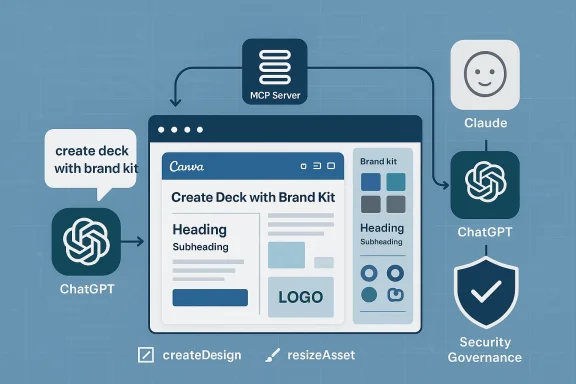
These are not superficial integrations: the assistant issues structured intents (createDesign, resizeAsset, fillTemplate) to Canva’s MCP server, which performs the requested operation inside Canva’s backend and returns an actionable, editable project. Multiple independent explainers and internal analyses confirm this “chat‑to‑app” flow is the defining characteristic of MCP‑driven connectors.

Why this matters for teams and creators​

Speed without the last‑mile pain​

The most immediate— and concrete — benefit is time saved. Non‑designers can create a client‑ready pitch deck or social campaign scaffolded by their brand rules in minutes rather than hours. Because outputs are editable, the result is a working artifact rather than a static mock. That reduces handoffs and accelerates iterations.

Consistency at scale​

Applying Brand Kits at generation time enforces brand integrity from the very first draft. For regulated industries, franchise networks, and enterprises with strict identity controls, this reduces the risk that customer‑facing materials drift from approved color palettes, fonts, and logos. Enterprises can thus scale creative output without proportionally scaling brand policing.

Interoperability and multi‑assistant parity​

Because MCP is a protocol adopted by multiple platforms, the same brand‑aware Canva backend can be exposed across different assistants. That reduces vendor lock‑in for design generation workflows and allows organizations to pick the assistant that best fits a use case (e.g., an internal Copilot experience vs. an external agent). Multiple independent reports confirm that Claude, ChatGPT apps, and other assistants are integrating via Canva’s MCP endpoints.

The technical plumbing: Model Context Protocol (MCP) and security design​

MCP in brief​

The Model Context Protocol is effectively a connector standard that lets an assistant call into an app’s backend using structured, scoped intents. Authorization is typically OAuth‑style and scope‑limited: the assistant only receives the permissions the user grants (for example, design:read or design:write). MCP is designed to return actionable artifacts — not just descriptive text — enabling assistants to produce real files in the connected app.

Scoped authorization and audit trails​

When an assistant requests a design action, users will be prompted to connect their Canva account and grant granular scopes. Proper governance hinges on:
  • Ensuring admin‑level controls can restrict who authorizes connectors.
  • Confirming where audit logs are stored (Canva, the assistant vendor, or both).
  • Mapping connector actions to enterprise DLP, retention and access policies.
Organizations that treat writable connectors like any other high‑privilege integration will avoid the most severe governance pitfalls. Practical recommendations follow below.

Strengths and immediate benefits — an evaluated list​

  • Rapid first drafts: Create a full presentation or suite of social assets from a few bullets.
  • Editable, layered outputs: Returned projects retain structure and are ready for human refinement.
  • Brand enforcement: Brand Kits are applied at generation time, cutting post‑production fixes.
  • Reduced context switching: Teams can stay in one conversational flow from brief to artifact.
  • Searchable design memory: Assistants can find and summarize existing Canva projects to avoid reinventing assets.
Each of these benefits maps directly to real productivity metrics for marketing and sales teams: fewer revision cycles, faster client delivery, and lower reliance on centralized design teams for routine assets. Independent reporting and vendor announcements corroborate these claims.

Risks, unknowns, and governance concerns​

While the productivity upside is real, the model introduces new risk surfaces that IT and legal teams must address.

1. Data residency and training exposure​

A key question for enterprise data protection is whether design data or user prompts will be retained and used to train models. Public descriptions of MCP emphasize scoped, OAuth‑based access, but contractual guarantees about non‑training and data retention are a procurement negotiation for any organization handling IP, PHI, or regulated content. Several third‑party explainers urge enterprises to seek explicit non‑training clauses when onboarding these connectors.

2. OAuth consent attacks and permission creep​

Users in the flow may grant broad permissions casually. Attackers can exploit this tendency via phishing or social engineering to obtain persistent OAuth tokens. Enterprises should enforce admin consent, SSO, and conditional access for connector provisioning.

3. Hallucinations and content accuracy​

Assistants can create persuasive but incorrect slide copy, charts, or labeling. Visual artifacts derived from bad inputs or erroneous data remain visually credible and can propagate misinformation quickly. Always require human review for outward‑facing claims.

4. Licensing and copyright ambiguity in generated assets​

Generated imagery or recommended assets may trigger licensing issues if not properly labeled. Organizations should validate whether generated or suggested images include licensed stock, third‑party content, or derivative elements that require rights clearance.

5. Availability and staged rollouts​

Although multiple outlets report MCP‑based Canva integrations in Claude and ChatGPT, and third‑party coverage suggests Copilot integrations are surfacing, availability is likely to be staged by region, subscription tier, or tenant settings. Verify in your tenant before planning a broad rollout.

Practical guidance for Windows and Microsoft 365 administrators​

If you manage enterprise Windows environments or Microsoft 365 tenants, treat writable connectors as high‑impact integrations and follow a staged governance approach.
  1. Require admin consent for enabling third‑party connectors and log all approval events.
  2. Enforce SSO + MFA for accounts that can approve connector consent; use Conditional Access policies to limit which users can provision the integration.
  3. Map connector logs to your SIEM and Purview/audit pipelines to retain provenance for created and modified assets.
  4. Negotiate contractual non‑training guarantees and data retention terms if the tenant will process IP, PHI, or sensitive customer data.
  5. Pilot with a small, instrumented group (30–90 days) and collect metrics on time‑to‑draft, revision counts, and content quality issues.
These steps convert a promising productivity feature into a manageable, auditable capability that matches enterprise compliance expectations.

Real‑world workflows and prompt recipes​

Below are representative workflows organizations can expect to use once the connector is enabled and permissions granted. These examples show the natural language prompts that map to actionable Canva intents.
  • Prompt: “Canva: create a 10‑slide investor update using our Brand Kit ‘AcmeCorp‑Primary’ — include a cover, roadmap, metrics slide, and team headshots.” Expected result: a generated, editable Canva presentation saved to the user’s Projects with brand colours and fonts applied.
  • Prompt: “Canva, make 5 LinkedIn carousel posts from this blog excerpt, use corporate blue and our brand font, and export as 1080×1350 PNGs.” Expected result: five editable files sized correctly and returned with options to download or open in Canva.
  • Prompt: “Find our last Q4 sales deck and create a version sized 16:9 with speaker notes summarizing key metrics.” Expected result: assistant searches the user’s Canva projects, summarizes, and produces a reformatted draft.
These recipes reflect the intent semantics the MCP server is designed to accept and the end‑to‑end user experience reported in vendor blogs and independent explainers.

Verification and cross‑checking the big claims​

Good journalism — and good procurement — requires cross‑verification. Key claims from Canva’s release and related reporting include:
  • Claim: Claude was the first assistant to support on‑brand generation via Canva. Verified: Canva’s newsroom explicitly states Claude is the first assistant to receive the expanded connector. Independent coverage in Lifewire and The Verge confirms Claude’s earlier integration.
  • Claim: ChatGPT now supports the Canva integration with Brand Kit application. Verified: Business Wire / StreetInsider reported the extension to ChatGPT on February 5, 2026; that release aligns with Canva’s own messaging about expanding across assistants. Cross‑checked with reporting syndication and the Canva newsroom.
  • Claim: Canva’s MCP Server has produced “over 12 million designs” via assistants. Verified partially: this figure appears in press material and syndication outlets repeating Canva’s corporate numbers. While press statements are legitimate primary claims, treat absolute numeric totals as vendor disclosures that should be validated during procurement conversations if they influence licensing or capacity planning. For independent confirmation, look for corroborating platform telemetry or third‑party analytics that track referral flows from assistants to Canva.
Where claims depend solely on vendor press releases, flag them as vendor‑reported and recommend contractual verification prior to generous operational commitments.

Competitive and market context​

Canva’s move is consistent with a broader industry trend: creative platforms are embedding generative AI and exposing programmatic connectors so assistants can act inside user workspaces. Microsoft, Anthropic, OpenAI and other vendors are placing similar bets on connectorized assistants that can act, not just suggest. This is a feature race with governance implications: accessible creative tooling plus deep integrations accelerates adoption but multiplies policy surfaces for legal and security teams.
For Windows users and Microsoft‑centric organizations this matters particularly because Copilot and PowerPoint already offer integrated slide generation; adding Canva as a design‑first partner gives teams a second production path that emphasizes templates and brand enforcement over PowerPoint’s native fidelity for Office‑centric exports. That can be complementary — Copilot may generate a quick, data‑accurate slide while Canva supplies templated, brand‑forward visuals — but it requires coordination around exports, file provenance, and canonical asset repositories.

Implementation checklist — a practical roadmap for IT teams​

  • Start small: Pilot with one marketing pod and one sales pod for 30–90 days. Instrument time‑to‑first‑draft and revision counts.
  • Contractually lock non‑training and data retention terms where needed for IP or regulated data.
  • Require admin consent; prevent users from approving connector installations unless explicitly authorized.
  • Map audit trails for actions taken by assistants and retain those logs in your security archives.
  • Build a human‑in‑the‑loop QA gate for outward‑facing assets to check factual claims, licensing, and export fidelity.
Following this roadmap turns a useful creative accelerator into a controlled production capability rather than an uncontrolled shadow IT flow.

Limitations and what to watch for next​

  • Expect staged rollouts: features will appear unevenly across assistants, tenant policies, and subscription tiers. Confirm availability in your tenant before planning a launch.
  • Export fidelity: complex animations, embedded data, and advanced PowerPoint features may still require manual work. Treat AI outputs as starting points, not drop‑in final masters.
  • Legal clarity on generated imagery remains unsettled in many jurisdictions; cover licensing in vendor contracts when commercial reuse matters.
Product roadmaps discussed in vendor and third‑party reporting suggest upcoming capabilities such as autofilling branded templates with structured data, deeper in‑design edits from assistants, and richer tenant controls; expect those features to appear incrementally and often behind higher subscription tiers.

Conclusion​

Canva’s expansion of brand‑aware generation into AI assistants represents a meaningful productivity advance: assistants can now produce editable, brand‑aligned visual artifacts that dramatically reduce the friction between idea and shareable asset. For creators and small teams this is transformative; for enterprises it is an opportunity that must be approached with careful governance. The technical glue — Canva’s design model and the Model Context Protocol — makes the integration possible and repeatable across assistants, but it also concentrates risk in OAuth consent flows, data residency, and content provenance.
Prudent adopters will pilot the feature, require admin consent, instrument usage, and impose human QA on all outward‑facing content. Done right, these connectors will shift a lot of routine creative work from expensive specialist time to fast, assisted drafts — freeing human designers for higher‑value creative decisions while preserving brand integrity from the first draft.

Source: StreetInsider Canva Brings On-Brand Designs Directly into AI Assistants
 

Canva’s decision to push true on‑brand design generation into AI chat workflows — first with Anthropic’s Claude and now inside ChatGPT and other assistants via its Model Context Protocol (MCP) connector — is more than a neat feature add; it’s a structural nudge that could remake how teams create, review, and publish branded content at scale. /www.canva.com/newsroom/news/claude-ai-connector/)

Canva-like design deck with brand kit, connected to ChatGPT, Claude, and security governance.Background / Overview​

Canva announced an expansion of its Claude AI connector on January 25, 2026 to support on‑brand design generation inside Claude conversations, and followed that with broader ChatGPT integration in early February that embeds Brand Kit enforcement and editable Canva projects into the chat experience. These moves let users ask an AI assistant to generate presentations, social graphics, or campaign collateral that already obeys brand colors, fonts, logos and locked templates — and then return an editable, layered Canva file rather than a flattened image.
This article summarizes the public announcements, verifies the key technical claims against multiple independent sources, and analyzes the strategic, operational, and governance implications for enterprises and agencies that rely on consistent visual identity. I also flag the limits and risks you should weigh before treating in‑chat generation as a production pathway.

What exactly changed — the product shift that matters​

Historically, generative visual outputs from AI systems arrived as static raster images (PNGs/JPEGs). That format is useful for mockups but poor for reuse: fonts, layout metadata and object hierarchies were lost, forcing designers into manual cleanup. Canva’s announced capability changes three interlocking facts about the workflow:
  • Designs are generated with a user’s Brand Kit applied at creation time, not after.
  • Outputs are returned as editable, layered Canva projects (preserving text blocks, placeholders, and layout metadata).
  • The integratrough a connector (Canva’s MCP Server) that allows assistants to issue structured “intent” commands (createDesign, resizeAsset, etc.) to Canva’s backend and return actionable projects.
Canva’s messaging emphasizes that this collapses the familiar “idea → mockup → manual reformat” loop into a single conversational workflow, enabling non‑designers to produce marketing‑grade assets quickly while preserving editability for final polish. Independent reporting corroborates the timeline and functional details: the Claude integration was introduced first, followed by the ChatGPT integration that includes Guided Presentation Builder and live in‑chat previews.

How it works — technical architecture (verified)​

Canva’s approach unites three technical pieces:
  • Canva Design Model — a generative model that understands layered design objects (text frames, images, placeholders, masking and layout constraints) so outputs can be serialized as an editable Canva document rather than a flat bitmap. This preserves component metadata for resizing and reformatting.
  • Model Context Protocol (MCP) Server — a connector layer that securely exposes scoped read/write access to a user’s Canva workspace. Assistants call the MCP server with structured intents; the server executes design operations server‑side and returns an editable project preview into the chat. Multiple press reports and Canva’s own newsroom explain the intent‑based flow and the MCP role.
  • Assistant App Surface (ChatGPT / Claude / Copilot) — the UI and conversational layer that surfaces the Canva app, handles OAuth consent and permission scopes (design:read, design:write), and lets the user iterate on the returned preview inline. Canva’s ChatGPT app includes Guided Presentation Builder and translation workflows that keep layout integrity while localizing copy.
These elements were publicly documented in Canva’s newsroom posts and independently covered by major outlets, confirming the core technical claims and release cadence.

Why enterprises should pay attention — benefits and near-term impact​

Canva’s connector addresses a concrete, recurring pain for marketing, sales enablement, field teams and distributed franchises:
  • Speed to production: Non‑designers can generate near‑publishable decks, social posts, and one‑pagers from a single prompt, reducing time‑to‑first‑draft dramatically. Early reporting and vendor commentary highlight the time savings for routine assets.
  • Brand consistency at generation: Applying Brand Kits during generation reduces the manual QA and reformatting steps that often negate AI’s time advantage. This restores trust in AI outputs for customer‑facing use.
  • Editability and reuse: Because outputs return as layered Canva projects, templates and components survive the generation process. That means resizing, localization, and variant generation are automated continuations instead of rebuilds.
  • Workflow centrality: Embedding design inside assistants turns conversational AI into a production pathway rather than just an ideation tool. For many teams, that reduces tool switching and centralizes auditability if governance is implemented correctly.
Enterprise value here is tangible: faster campaign cycles, lower dependency on centralized design bottlenecks, and better compliance with visual identity — if governance, licensing, and access control are done right.

Competitive landscape — who else is playing this field​

Canva’s move sits inside a broader industry sprint toward embedding creative capabilities into productivity tools:
  • Adobe has been embedding generative features across Firefly, Express and Creative Cloud, with enterprise controls layered into the Adobe ecosystem.
  • Microsoft is building brand enforcement into Copilot and the Microsoft 365 authoring stack, including Brand Kit capabilities inside Copilot’s design features. Microsoft documentation shows Brand Kit management is already a core Copilot capability for enterprise tenants.
  • Google and other productivity vendors are also integrating visual and generative features into document and slide workflows.
  • Figma and other collaboration tools are exploring embedded creation experiences for UI/UX and marketing workflows.
What gives Canva an edge is that it’s positioning itself as a cross‑assistant visual layer via MCP: the same design engine and Brand Kit can be surfaced across Claude, ChatGPT, Microsoft Copilot and other assistant frontends, making Canva the common production endpoint for many conversational UIs. Multiple independent reports describe the MCP connector as the enabling architecture, and Canva’s announcements show a deliberate cross‑assistant strategy.

Adoption signals and the “12 million” metric — treat vendor numbers cautiously​

Canva and allied coverage have reported that the MCP Server and connectors have “already generated millions of designs” across ChatGPT, Claude and Microsoft Copilot, with figures often quoted at roughly 12 million designs to date. That number appears in company announcements and in press coverage, but it is a vendor‑reported metric and has not been publicly audited. Treat it as a directional adoption indicator rather than an independently verified statistic.
Why that matters: vendor metrics are useful for gauging momentum but should not be the sole basis for enterprise risk or ROI calculations. Enterprises should measure their own impact via controlled pilots and instrumented audits (time to publishable asset, correction rates, compliance exceptions, and license checks) before rolling connectors into broad use.

Risks, governance and compliance — the practical checklist​

Embedding brand intelligence into chat workflows raises a raft of operational and legal questions. Here are the major risks and recommended mitigations:
  • Data access & scoped permissions: MCP connectors require OAuth consent and write access to a user’s Canva workspace. Treat these connectors as high‑privilege integrations; restrict who can install them and log every operation.
  • License and IP hygiene: Verify that fonts, images, and templates applied by Brand Kits are properly licensed for the intended uses (commercial distribution, paid advertising, etc.). Automated generation can escalate license exposure quickly if unchecked.
  • Audit trails & approvals: Ensure every generated project includes metadata: who requested it, which Brand Kit was applied, and what assistant made what edits. Enterprises need audit logs for regulatory, brand safety, and legal review.
  • Content safety & hallucination risk: Conversational assistants can hallucinate facts or compose misleading visual copy. Add human approval gates for customer‑facing claims (product specs, pricing, legal disclaimers).
  • Localization fidelity: The ChatGPT integration advertises translation while preserving design; validate that localized text fits layout and that brand voice translations meet local legal/cultural requirements.
  • Contractual clarity: Negotiate contracts that specify data handling, retention, and who is responsible for generated content (licensing, takedown, liabilities). Vendor press releases are not substitutes for contractual safeguards.
Practical rollout steps for IT and brand teams (short list):
  • Pilot with a narrow user group and a single Brand Kit.
  • Instrument metrics (time saved, defects fixed post‑generation, license exceptions).
  • Implement role‑based install controls and logging.
  • Create a human approval workflow for external publishing.
  • Train users on prompts that produce compliant results and when to escalate to designers.

Where this could disrupt creative teams — and where it won’t​

The narrative that “AI will replace designers” is overstated. Canva’s approach democratizes the first mile of design and automates routine layout work, but it does not obviate the need for:
  • Senior designers who define system‑level brand strategy and complex visual systems.
  • Creative leadership that crafts campaigns, visual storytelling, and nuanced brand moments.
  • Legal/IP teams that manage licensing and rights.
What Canva’s integration does is shift the balance: routine, repeatable assets (local store promotions, social cards, internal slide decks) can be executed faster by non‑designers, allowing designers to focus on strategy and high‑impact work. The more dangerous misstep would be removing design checkpoints entirely — that’s the governance risk enterprises must avoid.

SEO & content operations: how marketing should adapt​

Marketing ops and SEO teams must update playbooks to realize benefits and avoid pitfalls:
  • Treat AI generation as a first draft step in a content pipeline, with metadata tagging for SEO, accessibility (alt text), and legal compliance.
  • Use Brand Kits as single sources of truth for visual identity; keep them audited and versioned.
  • Add accessibility checks into the publishing pipeline (contrast ratios, font sizes, alt attributes) — automated generation does not guarantee accessibility.
  • Measure downstream metrics — not just speed: brand compliance rate, time to publish, conversion lift, and rework time.
These operational adaptations will determine whether on‑brand AI design becomes a productivity multiplier or a compliance headache.

Competitive responses to watch​

Expect near‑term reactions from major vendors:
  • Adobe will likely deepen Firefly/Express integration with Adobe Experience Cloud to maintain enterprise relationships that prioritize license control and professional output.
  • Microsoft will continue folding brand enforcement into Copilot and Microsoft 365 authoring flows, which is strategic because Copilot sits inside Office apps where many corporate assets are created and stored. Microsoft documentation already shows brand kit management as a Copilot feature.
  • Google and collaboration vendors will pursue their own native flows, focusing on data residency and GxP/regulatory customers who demand stringent controls.
Canva’s broad compatibility across assistants — its “design brain” approach — is a differentiator, but competitors can counter by bundling compliance and enterprise admin features tighter into their productivity stacks.

Recommendations — how to pilot safely and measure success​

For teams considering an evaluation, start with a controlled, measurable pilot:
  • Select 3–5 representative asset types (local flyer, sales pitch deck, social post).
  • Assign a pilot group of 8–12 users (marketing, sales ops, local managers).
  • Define success metrics up front:
  • Median time to first usable draft.
  • Percentage of assets requiring designer rework.
  • License/compliance exceptions discovered.
  • Enforce scoped installs and logging: treat the connector like a production service.
  • Run the pilot for 4–8 weeks, report results, then expand iteratively with governance baked in.
If you run a regulated business, require contractual commitments for data handling and a security review before granting access to production Brand Kits.

Longer‑term implications — the design layer as a platform​

If the model scales, the most important structural shift is that design becomes a callable fabric inside conversational workflows. That means:
  • Creative output is decoupled from specific UI editors and becomes an endpoint that many assistants can call.
  • Brand systems evolve from static documents to active, enforceable APIs.
  • Organizations that master governance, prompt engineering for design quality, and programmatic Brand Kit management will extract the most value.
This is a platform play as much as a product feature. Canva’s MCP approach — surfacing an editable design engine across assistants — is an architectural bet that the design layer will be more valuable when it’s omnipresent and consistent across conversation surfaces. Multiple independent reports and the company’s own posts document this intent and the early implementations.

Limits and open questions​

Several pragmatic questions remain before declaring this a new standard:
  • Will Brand Kits scale across thousands of sub‑brands and localized variants without governance overhead exploding?
  • How accurate are translation and localization flows for long, complex content that must also preserve layout?
  • Can enterprises enforce legal disclaimers and compliance banners automatically in generated assets?
  • How will image licensing be enforced when assistants source or substitute imagery inside generated designs?
Public coverage and vendor posts describe capabilities and early adoption signals, but many enterpriseudits will determine whether this capability becomes a safe, scalable standard for regulated organizations. Treat vendor claims as the starting point; validate in‑house with pilots.

Conclusion​

Canva’s on‑brand design generation inside Claude, ChatGPT and other AI assistants is a credible and meaningful evolution in content creation. By moving brand enforcement into the generation step and returning editable, layered projects rather than flattened images, Canva solves a persistent “last‑mile” problem that has limited the practical value of AI for professional visual content. The Model Context Protocol connector is the technical glue making this cross‑assistant strategy possible, and early coverage and vendor materials show both broad intent and measurable adoption signals.
That said, the technology is an enabler not a panacea. Enterprises must pair pilots with strict governance, license checks, and auditability before treating conversational generation as a production channel. When those controls are in place, on‑brand in‑chat generation has the potential to become a new baseline for everyday content — accelerating routine creative work while preserving the human oversight designers and legal teams provide.

Source: The Futurum Group Will Canva On-Brand AI Design Set a New Standard for Content Creation?
 

Back
Top