

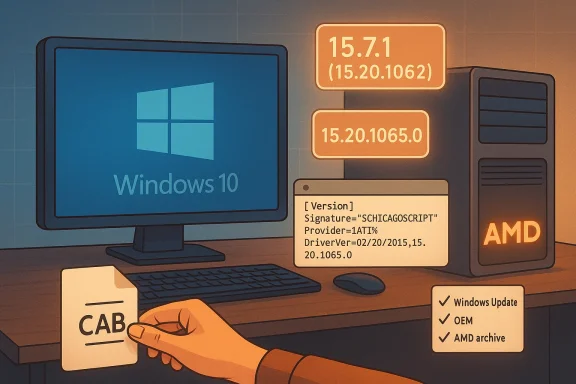
AMD’s late‑2015 Catalyst driver mess — the unofficial 15.20.1065.0 builds, the official Catalyst 15.7.1 (display driver 15.20.1062), and a marketplace full of “Free Shipping AMD Catalyst 15.20” product pages — still cause confusion and risk for anyone trying to update an older Radeon or install a second‑hand card on Windows 10. The practical truth is simple but often ignored: there is no single “best” 15.x Catalyst file for every system. Choosing the right driver in 2026 means understanding which package you actually need, where that package came from, and what tradeoffs you accept when you use archived installers or repackaged downloads.
AMD’s Catalyst family was the mainstream Windows graphics driver suite from roughly 2009 through 2015. The late‑Catalyst releases around July–August 2015 aimed to unify support for Windows 7, 8.1 and the then‑new Windows 10, and they introduced major features such as Virtual Super Resolution (VSR), Frame Rate Target Control (FRTC), and WDDM 2.0 / DirectX 12 support for Graphics Core Next (GCN)‑based GPUs. AMD’s own release notes for Catalyst 15.7.1 make those goals explicit and list the package’s display driver as 15.20.1062.
At the same time, community threads and driver archives documented driver builds with slightly different numeric identifiers — for example 15.20.1065.0 — that were circulated through Windows Update, leaked installs, or OEM driver bundles. Those variants sometimes worked as drop‑in replacements for the official Catalyst packages, and sometimes introduced compatibility quirks (Control Center not starting, INF mismatches, or missing features). The result: multiple “15.20” families live in the wild, and consumers who buy hardware listings or rely on third‑party driver collections can end up installing the wrong package for their hardware. Forum evidence from the time shows active debate about 15.20.1065.0 builds and whether they were official or OEM/Windows‑Update artifacts.
Concurrently, community‑hosted threads and driver archive sites collected variant builds labeled 15.20.1065 or 15.20.1065.0. These builds show up in forum threads as driver packages people installed from extracted .CAB files, vendor bundles, or leaked branches, and—crucially—some of those variants were compiled or assembled for OEM or workstation products (e.g., FirePro or motherboard chipset bundles). That means the presence of “15.20.1065” in a download name does not guarantee it’s the canonical AMD Catalyst desktop graphic driver for your card.
Independent tech press and driver aggregators of the time (TechSpot, Softpedia, TechPowerUp) also cataloged the 15.7.1 packages and noted their features and download dates. These sources corroborate AMD’s claims about which features arrived in Catalyst 15.7.1 and confirm the package’s role as a unified, WHQL‑signed driver family for a broad set of AMD GPUs.
Cautionary note: while AMD published 15.7.1 as the unified driver, vendors and Microsoft sometimes compiled variant builds for specific platforms (OEM bundles, FirePro workstation channels, Microsoft Update CABs). Those variants may carry a different build number in the 15.20 range. Treat those variants as platform‑specific artifacts rather than a replacement for AMD’s unified release unless they are explicitly published by AMD or your system OEM.
Source: Born2Invest https://born2invest.com/?b=style-237489212/
 Background / Overview
AMD’s Catalyst family was the mainstream Windows graphics driver suite from roughly 2009 through 2015. The late‑Catalyst releases around July–August 2015 aimed to unify support for Windows 7, 8.1 and the then‑new Windows 10, and they introduced major features such as Virtual Super Resolution (VSR), Frame Rate Target Control (FRTC), and WDDM 2.0 / DirectX 12 support for Graphics Core Next (GCN)‑based GPUs. AMD’s own release notes for Catalyst 15.7.1 make those goals explicit and list the package’s display driver as 15.20.1062. At the same time, community threads and driver archives documented driver builds with slightly different numeric identifiers — for example 15.20.1065.0 — that were circulated through Windows Update, leaked installs, or OEM driver bundles. Those variants sometimes worked as drop‑in replacements for the official Catalyst packages, and sometimes introduced compatibility quirks (Control Center not starting, INF mismatches, or missing features). The result: multiple “15.20” families live in the wild, and consumers who buy hardware listings or rely on third‑party driver collections can end up installing the wrong package for their hardware. Forum evidence from the time shows active debate about 15.20.1065.0 builds and whether they were official or OEM/Windows‑Update artifacts.
Why the 15.20.x confusion matters today
1) Multiple 15.20.x builds were circulating
AMD published an official Catalyst 15.7.1 package whose display driver was 15.20.1062 and whose release notes explain Windows 10 support and the key feature list. Independent coverage from TechPowerUp and AnandTech confirmed the 15.7 family and explained the Windows 10 timing around July 2015.Concurrently, community‑hosted threads and driver archive sites collected variant builds labeled 15.20.1065 or 15.20.1065.0. These builds show up in forum threads as driver packages people installed from extracted .CAB files, vendor bundles, or leaked branches, and—crucially—some of those variants were compiled or assembled for OEM or workstation products (e.g., FirePro or motherboard chipset bundles). That means the presence of “15.20.1065” in a download name does not guarantee it’s the canonical AMD Catalyst desktop graphic driver for your card.
2) INF files, CCC, and feature gaps
A recurring theme in community logs from July–August 2015 is that some 15.20.1065 installers did not provide a working Catalyst Control Center (CCC) experience or did not list certain mobility or legacy hardware IDs in their INF files. Users reported a working display driver binary but missing CCC, or needing to install 15.7.1 specifically to get the CCC and control panel features. That’s a practical compatibility problem: the numeric driver version alone doesn’t tell you whether the full installer bundle (Control Center, codecs, utilities) is present or whether the INF lists your device’s PCI VID/PID.3) Marketplace and “Free Shipky
Used‑card or clearance listings that advertise “AMD Catalyst 15.20” or bundle a driver on a flash drive often source installers from archives or repackagers. Those repackaged bundles can be convenient, but they also carry risks: altered INFs, unsigned binaries, bundled adware, or driver components mismatched to the OS build. Born2Invest and other community summaries highlighted the prevalence of repackaged drivers and the need to prefer Microsoft‑signed or OEM packages for stability and security.What AMD officially published (and what it did not)
AMD’s official Catalyst 15.7.1 release notes remain the primary source for what the company intended for July 2015: support for Windows 10 with WDDM 2.0, DirectX 12 compatibility for GCN products, and feature rollouts like VSR and FRTC. The package identified the display driver as 15.20.1062, and AMD documented hotfixes in August that bumped minor suffixes to 15.20.1062.1003/1004 to address TDR and BSOD issues. For users seeking an authoritative package, Catalyst 15.7.1 (15.20.1062) is the official late‑Catalyst entry point.Independent tech press and driver aggregators of the time (TechSpot, Softpedia, TechPowerUp) also cataloged the 15.7.1 packages and noted their features and download dates. These sources corroborate AMD’s claims about which features arrived in Catalyst 15.7.1 and confirm the package’s role as a unified, WHQL‑signed driver family for a broad set of AMD GPUs.
Cautionary note: while AMD published 15.7.1 as the unified driver, vendors and Microsoft sometimes compiled variant builds for specific platforms (OEM bundles, FirePro workstation channels, Microsoft Update CABs). Those variants may carry a different build number in the 15.20 range. Treat those variants as platform‑specific artifacts rather than a replacement for AMD’s unified release unless they are explicitly published by AMD or your system OEM.
How to choose the right driver — a practical decision flow
Choosing “the best AMD Catalyst 15.x” for an older GPU or second‑hand card comes down to three priorities: stability/security, feature parity, and ease of installation. Community and vendor guidance converge on a prioritized path that minimizes risk:- First, try Windows Update (Microsoft‑signed driver) — it’s the safest and often the most compatible option on modern Windows 10 builds.
- Second, prefer your OEM/vendor driver package if you use a laptop or a branded desktop. OEM packages can include vendor-specific modules for hybrid graphics, thermal management and hotkeys.
- Third, resort to AMD’s archived Catalyst / Adrenalin installers only when you need legacy features (Catalyst Control Center, specific hardware acceleration) and you’ve verified the INF contains your hardware ID. This is an advanced option that may require DDU and manual install steps.
Installation and recovery workflow (step‑by‑step)
If you are preparing to update or restore a legacy Radeon with a 15.practical, safety‑first plan:- Confirm the GPU’s hardware ID in Device Manager (Properties → Details → Hardware Ids — copy the PCI\VEN_1002&DEV_xxxx string). Use this to check whether an AMD If the INF doesn’t include your VID/PID, the installer will refuse or produce limited functionality.
- Try Windows Update first: open Settings → Windows Update → View optional updates, install the Microsoft‑provided display driver if present. This often yields a signed, stable driver with correct output and basic acceleration.
- If Windows Update is insufficient, check your system OEM support page for a Windows 10 driver for your exact model. OEM drivers are preferred for hybrid laptops and.
- If you must use an AMD archive: download the AMD or vendor installer from an official archive (not a random marketplace). Extract the package and verify the Display.Driver*.inf contains your hardware ID before proceeding.
- Before installing an archived Catalyst package, optionally use Display Driver Uninstaller (DDU) previous AMD/Intel/NVIDIA traces. Keep a full disk image or system restore point. Community experience shows DDU prevents many partial‑install problems.
- Install the driver (prefer a full AMD Catalyst 15.7.1 package if your hardware is listed there). Reboot, test resolution, multi‑monitor output, and hardware acceleration.
- If Windows Update reverts the driver automatically, temporarily pause Windows Update while validating. Re‑enable updates after you confirm stability.
Special case: buying used cards that advertise “Catalyst 15.20” or bundling drivers
If you are shopping on retail or auction sites and see “Free Shipping AMD HD 8490/HD 7400M/HD 3450 — includes AMD Catalyst 15.20 driver,” apply extra skepticism.- Ask the seller which build they include (full AMD installer or a repackaged .CAB?), and whether the package is the OEM driver for the card’s brand (Dell/HP) or an AMD archive.
-ers or drivers saved on USB sticks when the seller can’t show checksums or where the package originally came from. - Prefer a seller who offers just the hardware and lets you source the driver yourself from Microsoft Update, your OEM, or AMD’s archived support pages. The extra few minutes to download a verified package are worth it compared to installing a repackaged or unsigned driver. Born2Invest and community guides warn about repackaged drivers and the prevalence of third‑party driver shops — there’s a measurable risk when the distribution chain is opaque.
Common failure modes and how to respond
- “Installer reports ‘this device is not supported’” — the INF lacks your VID/PID. Fix: use OEM driver or Windows Update, or verify a different archived Catalyst build that explicitly lists your hardware. Do not edit INFs unless you understand driver signing and re‑signing.
- “Catalyst Control Center won’t start” — the driver binary may be present but CCC / application framework components are missing or incompatible. Fix: install the official Catalyst 15.7.1 unified package or the AMD CCC runtime that matches your display driver.
- “After installing a legacy Catalyst, Windows boots to a black screen” — typically an issue with hybrid graphics or leftover driver remnants. Fix: boot to Safe Mode, run DDU to remove the driver, then reinstall using the conservative path (Windows Update → OEM → AMD archive).
Security and maintainability considerations in 2026
Two long‑term facts should influence your decision today:- Microsoft ended mainstream support for Windows 10 on October 14, 2025, which changes how vendors prioritize driver listings and security updates. Running legacy Catalyst packages on an unsupported OS increases security exposure because those packages are not receiving new security patches.
- AMD moved from Catalyst to the Adrenalin family in later years; many legacy GPUs were moved to archive status. That means AMD no longer develops new features for many HD‑era devices, and archived installers are static snapshots rather than actively maintained packages. Use them only when necessary and with rollback plans in place.
Quick reference: which driver to try first (by scenario)
- Desktop with discrete, supported Radeon (R9 200 / 300 / Fury era): try AMD Adrenalin/modern drir GPU family. If you must use Catalyst-era drivers (for very old cards), try Catalyst 15.7.1 / display driver 15.20.1062 as the canonical late‑Catalyst family.
- Laptop with switchable graphics: start with the OEM vendor driver for your exact model (preferred). If unavailable, try Windows Update. Archive Catalyst installers are a last resort because they often lack vendor modules.
- Buying a cheap/used legacy card online: don’t rely on bundled drivers from the seller. Download your driver from Microsoft Update, AMD’s official archive, or the OEM support page; verify INF entries and checksums.
- If you need CCC or legacy Catalyst utilities on Windows 7: Catalyst 15.7.1 is the most recent unified Catalyst release appropriate for many HD‑era GPUs.
Final analysis — strengths, risks, and pragmatic tradeoffs
Strengths:- The late‑Catalyst family (notably 15.7.1 / 15.20.1062) consolidated many legacy features and added important Windows 10 support such as WDDM 2.0 and initial DirectX 12 compatibility for GCN GPUs. AMD’s documented features and third‑party archives corroborate that these packages were intended as the canonical legacy endpoint for many HD‑era devices.
- Community preservation of driver troubleshooting guides means users today can still restore functionality on vintage hardware — if they proceed with caution and the right workflow. Forum threads and community guides provide step‑by‑step practices that reduce risk.
- Variant builds (like 15.20.1065.0) appear in forums and archive sites but are not always the official, full Catalyst installer for every GPU. These variants may lack CCC, have mismatched INF entries, or be tailored for specific OEM/hardware classes, producing partial installs or regressions.
- Repackaged downloads and marketplace bundled drivers can introduce unsigned components, adware, or malicious modificationscrosoft Update, your OEM, or AMD’s official archive — not a random download attached to a product listing.
- Running legacy drivers on an unsupported OS increases security exposure. Where possible, upgrade to hardware supported by current drivers or run legacy setups in isolated, non‑production environments.
Conclusion — the checklist to follow now
- Verify your GPU hardware ID before you download any legacy package.
- Try Windows Update first; check the OEM vendor site second.
- Use AMD Catalyst 15.7.1 (15.20.1062) from AMD’s archive if you need the last unified Catalyst feature set; treat 15.20.1065 builds as platform‑specific variants unless AMD or your OEM confirms them for your hardware.
- If you install an archived driver, prepare a rollback plan: create a disk image or restore point, and use DDU to clean old drivers if you encounter problems.
- Avoid driver bundles from opaque sellers; insist on official checksums or download directly from Microsoft, AMD, or the OEM.
Source: Born2Invest https://born2invest.com/?b=style-237489212/
