

The Born2Invest-style clearance snippet that surfaced claiming “Shop radeon catalyst control center windows 10 Clearance AMD Catalyst 12.1 and 12.2 Preview drivers released” highlights an old but persistent problem in the Windows graphics ecosystem: nostalgia for the Catalyst era colliding with modern security, driver-signing, and operating-system lifecycle realities.
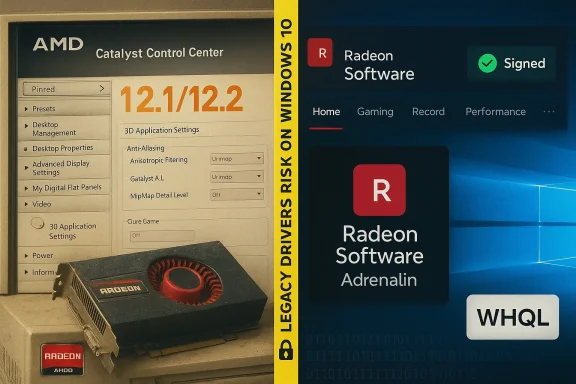
The AMD Catalyst driver family — and its user-facing front end, the Catalyst Control Center (CCC) — dominated AMD/ATI GPU software for more than a decade. Catalyst releases such as 12.1 and the 12.2 Preview were legitimate update bundles from early 2012 that added features like application profiles, HD3D/CrossFireX improvements, and Eyefinity enhancements. These releases were widely covered by mainstream hardware press at the time.
Over the years AMD rebranded and overhauled its driver stack: Catalyst was replaced by Radeon Software Crimson in late 2015 and then evolved into the modern Radeon Software: Adrenalin Edition family. That change is important because Catalyst-era installers are legacy artifacts — useful for restoring full features on vintage cards, but not fit-and-forget solutions for modern Windows 10 or later systems.
At the same time, Microsoft’s lifecycle changes matter: Windows 10 reached end of support on October 14, 2025, which alters how vendors publish compatibility and how businesses and enthusiasts should treat older drivers and repackaged downloads. After that date Microsoft stopped issuing regular security updates to consumer Windows 10, making safe sourcing and installation of kernel‑level software even more important.
However, legitimacy of the original release does not automatically validate a random “clearance” bundle offering them today. The critical distinction is between original vendor archives (trusted, signed) and third‑party repacks (untrusted).
But the practical reality for a modern Windows 10 user is more complicated:
In short: the Catalyst 12.1/12.2 story is a legitimate historical note, but the “clearance + one‑click Catalyst install for Windows 10” pitch is where the danger lies — treat bargain bundles with skepticism, verify provenance, and prefer official vendor channels when you install kernel‑level software on any Windows PC.
Source: Born2Invest https://born2invest.com/?b=style-236919112/
 Background
The AMD Catalyst driver family — and its user-facing front end, the Catalyst Control Center (CCC) — dominated AMD/ATI GPU software for more than a decade. Catalyst releases such as 12.1 and the 12.2 Preview were legitimate update bundles from early 2012 that added features like application profiles, HD3D/CrossFireX improvements, and Eyefinity enhancements. These releases were widely covered by mainstream hardware press at the time. Over the years AMD rebranded and overhauled its driver stack: Catalyst was replaced by Radeon Software Crimson in late 2015 and then evolved into the modern Radeon Software: Adrenalin Edition family. That change is important because Catalyst-era installers are legacy artifacts — useful for restoring full features on vintage cards, but not fit-and-forget solutions for modern Windows 10 or later systems.
At the same time, Microsoft’s lifecycle changes matter: Windows 10 reached end of support on October 14, 2025, which alters how vendors publish compatibility and how businesses and enthusiasts should treat older drivers and repackaged downloads. After that date Microsoft stopped issuing regular security updates to consumer Windows 10, making safe sourcing and installation of kernel‑level software even more important.
What the clearance listing actually offered — and why the snippet is suspicious
Short version: bargain “clearance” listings that pair cheap Radeon PCBs with a promise of an all‑in‑one older Catalyst installer they often hide two uncomfortable truths.- Many of the cards sold as “clearance” are mid‑2000s era designs (Radeon X3xxx, X1xxx, or low‑end HD 4000/5000 era) with very limited VRAM and no support for modern video codecs, and they were never designed to run modern WDDM features or heavy modern workloads. Expect limited resolution and legacy DirectX 9-era performance.
- The Catalyst installers themselves (12.x series and other legacy builds) were written for older Windows kernels; using them on later Windows 10 builds is an advanced, manual process that often requires INF edits, signature checks, or installing Microsoft’s fallback driver from Windows Update. Third‑party “repackagers” frequently remove signatures or bundle additional, unwanted softvague, fear‑mongering claims — they are the practical realities experienced by dozens of community threads and long‑form guides. Repackaged installers are a security vector because they can include unsigned kernel modules, edited INFs, adware, or simply a partial installer that leaves the system in a broken state.
The historical facts: Catalyst 12.1 and 12.2 (verified)
The Catalyst 12.1 WHQL driver and the Catalyst 12.2 Preview driver were published in January 2012 and covered by multiple independent outlets at the time. The feature highlights for those releases included:- Application profiles in the Catalyst Control Center (per‑application driver settings).
- AMD HD3D and CrossFireX enhancements, including Stereo 3D support over HDMI 1.4a.
- Eyefinity 2.1 improvements and increased resolution options in the 12.2 Preview build.
However, legitimacy of the original release does not automatically validate a random “clearance” bundle offering them today. The critical distinction is between original vendor archives (trusted, signed) and third‑party repacks (untrusted).
Why using legacy Catalyst installers on Windows 10 is risky today
There are three overlapping risk categories to understand: compatibility, security, and maintainability.Compatibility and system stability
Catalyst installers were written against Windows 7/Vista kernels and older versions of WDDM. They assume certain kernel behaviors and user‑mode helpers that may have changed in modern Windows 10 builds. Attemtalyst install on a contemporary Windows 10 system can produce:- Partial installs where the Catalyst UI appears but the display driver falls back to “Microsoft Basic Display Adapter.”
- Boot or black‑screen failures caused by incompatible kernel drivers.
- Loss of modern features (Radeon Overlay, updated power management) even when a driver nominally installs.
Security: signatures and provenance
Kernel drivers must be trustees strip digital signatures, modify INFs, or inject additional binaries. Installing unsigned or altered kernel modules defeats Windows driver‑signing enforcement and increases the attack surface for privilege escalation or persistent malware. Always treat any third‑party driver binary without an official AMD or OEM signature as untrusted.Maintainability and lifecycle
With Windows 10 out of mainstream support as of October 14, 2025, running older drivers on an unsupported OS increases long‑term risk. Vendors have also consolidated their engineering effort into modern Radeon Software branches (Crimson → Adrenalin), meaning ongoing driver fixes and features ship in those families — not in the old Catalyst channel. That makes Catalyst a one‑time, manual solution, not a sustainable long‑term path.A practical, safety‑first workflow for dealing with a clearance Radeon + Catalyst claims
If you’ve bought a cheap cle has linked you to an old Catalyst bundle, follow this conservative sequence. These steps synthesize community‑tested best practices and vendor guidance.- Inventory and backup (non‑negotiable). Record the GPU hardware ID from Device Manager → Display adapters → Properties → Detaiy the PCI\VEN_1002&DEV_xxxx entry). Create a System Restore point and, if possible, a full disk image. Driver changes can render a system unbootable.
- Try the trusted, low‑risk path first: Windows UpdUpdate & Security → Windows Update → View optional updates → Driver updates. If Microsoft offers a signed Radeon driver, install it. Microsoft’s catalog often contains safe, fallback drivers for legacy GPUs.
- Check the OEM. For laptops or branded desktops, use the OEM driver page for your exact model — the vendor package may include system‑specific patches that are safer than a generic Catalyst installer.
- If you need Catalyst features (Catalyst Control Center, legacy Eyefinity behaviors), only use an archived AMD package from AMD’s official archive or a documented AMD release that explicitly lists your exact device ID. n “clearance” repacks. Verify the installer’s digital signature and published checksums when available.
- Clean previous drivers before installing archived packages. Use AMD Cleanup Utility or community‑standard Display Driver Uninstaller (DDU) in Safe Mode to remove leftover artifacts. Community experience shows DDU reduces partial‑install failures.
- Manual INF install a the Catalyst package (often to C:\AMD), open Display.Driver*.inf and search for your VID/PID. If present, use Device Manager → Update driver → Have Disk to point to the extracted INF. This technique avoids running the entire legacy installer but rindows administration. Only advanced users should attempt this.
- Keep a rollback plan. Keep DDU, the Microsoft driver, and the archive installer on removable media so you can restore a working state if a boot or display failure occurs. Document the exact installer filename and checksum for later reference.
Step‑by‑step: safe manual INF install (advanced users only)
Below is a condensed, numbered recipe for the manual INF approach — this is the safest way to apply legacy Catalyst binaries to a modern system when you cannot use Microsoft or OEM drivers.- Record hardware ID: copy PCI\VEN_1002&DEV_xxxx.
- Create a full disk image and System Restore point.
- Boot into Safe Mode and run DDU to remove all traces of the current driver.
- Extract the Catalyst archive (it usually unpacks into C:\AMD).
- Open C:\AMD\Display.Driver and search Display.Driver.inf for your VID/PID string.
- If the INF includes your ID, right‑click Display adapter in Device Manager → Update driver → Browse my computer → Let me pick → Have Disk → point to the extracted INF.
- After installation, reboot and inspect Device Manager: confirm Device is recognized as an AMD driver, not Microsoft Basic Display Adapter.
- Verify Catalyst Control Center (if present) and test basic video playback, resolution, and multi‑monitor behavior.
- If anything fails, boot to Safe Mode and use DDU to revert, then reinstall the Microsoft fallback driver.
What to inspect when buying a clearance Radeon card
If you’re shoppicards explicitly to revive an older PC, be disciplined about inspection and expectations.- Ask for detailed PCB photos showing the board number and PCI‑bracket sticko test the card in a working system and offer a short return window.
- Examine capacitors for bulging or leakage, look for heat discoloration, and avoid cards with visible solder repairs. These are common failure points on older PCBs.
- Understand capace Radeon boards have 64–256 MB VRAM, narrow memory buses, and only legacy DirectX support. They are fine for low‑resolution desktop work or retro gaming, but not fodecs or recent game titles.
- Price vs. value: a cheap legacy card might be OK to add a second monitor, but a small modern low‑cost GPU is often a better investment for multimedia and gaming.
Security checklist before running any driver installer
- Verify digital signature in the installer’s Properties → Digital Signatures; prefer AMD or OEM signatures.
- If checksums (SHA‑256) are published by the vendor, verify them.
- Avoid repackaged bundles from marketplaces unless the seller can prove provenance and checksum.
- Run installers as Administrator only after backups and DDU cleanup.
- Consider installing on a non‑critical partition or test system first, especially if the drivers are legacy.
Why the vendor archives and Windows Update are the right first stop
The trusted sources for drivers remain, in ranked order: the OEM/vendor support page for branded systems, AMD’s official download/archive pages, and Microsoft Update/Windows Update driver catalog. Use community archives only as a last resort and then only with signature and checksum verification. This hierarchy prioritizes hardware‑specific fixes, driver signing, and vendor support commitments.The broader picture: driver evolution and why Catalyst feels “missing”
Many readers who remember Catalyst Control Center still look for the same functionality today. AMD’s software evolution addressed performance, stability, and feature cadence: Catalyst → Radeon Software Crimson (2015) → Radeon Software Adrenalin (2017 onward) is the path AMD used to modernize the UI and driver packaging. The result is a modern driver ecosystem with monthly updates, WHQL signing on many builds, and broader feature sets that Catalyst-era packages cannot match. For modern GPU users, Radeon Software/Adrenalin is the safe, supported choice.When legacy Catalyst is the only option (and how to reduce harm)
There are legitimate scenarios where a legacy Catalyst package is required: restoring a vintage workstation, preserving a retro gaming setup that expects legacy driver behavior, or recovering a laptop whose OEM never provided a modern driver. In those cases:- Use only AMD’s archived Catalyst package that explicitly lists your GPU’s hardware ID.
- Prefer INF‑based manual installs rather than running the full legacy GUI installer where possible.
- Isolate the system from sensitive networks while you test, and avoid storing credentials or banking data on machines running unsigned drivers.
- Keep an image backup and document the exact steps you used so you can reproduce or revert later.
Final verdict and recommendations
The Born2Invest-style clearance snippet conflates three different things — cheap hardware, legacy Catalyst nostalgia, and an easy‑fix promise — into a single, oversimplified claim. The historical fact is clean: Catalyst 12.1 and 12.2 Preview were real releases in January 2012, and they added features that mattered at the time.But the practical reality for a modern Windows 10 user is more complicated:
- Windoupport on October 14, 2025, changing the risk calculus for running legacy drivers on that OS.
- Catalyst-era installers are legacy software: they can be useful for vintage hardware but are not a safe shortcut for modern systems.
- Third‑party “clearance” repacks should be treated as untrusted: prefer AMD archives, OEM downloads, or Microsoft‑delivered drivers, and always verify signatures and checksums before installing.
- Record GPU hardware ID; make a full image backup.
- Try Windows Update / OEM driver first.
- If using legacy Catalyst, obtain it from AMD’s archive and verify signature/checksum.
- Use DDU in Safe Mode to clean previous drivers before installing.
- Keep rollback media and document steps.
In short: the Catalyst 12.1/12.2 story is a legitimate historical note, but the “clearance + one‑click Catalyst install for Windows 10” pitch is where the danger lies — treat bargain bundles with skepticism, verify provenance, and prefer official vendor channels when you install kernel‑level software on any Windows PC.
Source: Born2Invest https://born2invest.com/?b=style-236919112/
