

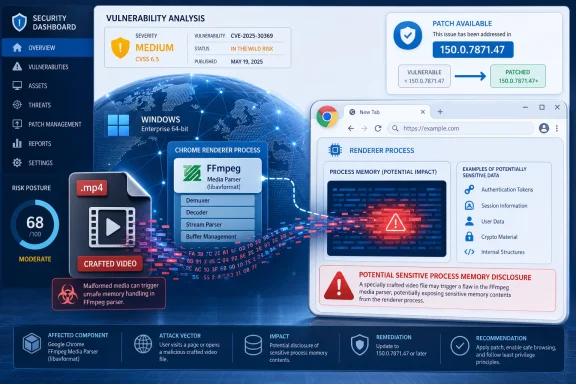
Google fixed CVE-2026-13858, a medium-severity out-of-bounds read in Chrome’s FFmpeg media component, in the June 30, 2026 Chrome 150 stable desktop release for Windows, Mac, and Linux, with vulnerable builds listed as earlier than 150.0.7871.47. The bug is not the scariest item in Chrome 150’s enormous security payload, but it is exactly the kind of quiet browser flaw administrators should not dismiss. A crafted video file is a familiar delivery mechanism, FFmpeg is a deep parsing surface, and the practical risk is not “Chrome crashes” so much as “Chrome may disclose memory it was never meant to reveal.” As documented by Google’s Chrome Releases blog and reflected in the NVD entry, this is a modestly rated vulnerability sitting inside a release that deserves urgent fleet attention.
CVE-2026-13858 is simple to describe and harder to operationalize: an out-of-bounds read in FFmpeg could allow a remote attacker to obtain potentially sensitive information from Chrome process memory via a crafted video file. CISA’s ADP scoring gives it a CVSS 3.1 base score of 6.5, with network attack vector, low complexity, no privileges required, and user interaction required. That places it in the uncomfortable middle ground where it is serious enough to patch quickly but not dramatic enough to force every organization into incident-response theater.
The Chrome team’s June 30 stable-channel post says Chrome 150 was promoted to stable for Windows, Mac, and Linux, with builds 150.0.7871.46 for Linux and 150.0.7871.46/.47 for Windows and Mac. It also says the release includes hundreds of security fixes. CVE-2026-13858 appears among the medium-severity issues, credited to Wongi Lee of Theori with Xint Code and Jungwoo Lee, with a listed reward of $3,000.
That reward and severity label are useful signals, but they should not be mistaken for a full threat model. Browser media parsers are high-value code paths because they sit close to untrusted content and are exercised constantly by ordinary behavior: previewing a file, visiting a page, using a web app, opening a shared link, or watching embedded media. A bug that leaks memory rather than executes code can still matter if that memory includes tokens, fragments of documents, URLs, cross-origin data, or other material that helps an attacker chain the next step.
The key phrase in the NVD description is potentially sensitive information from process memory. That is not a guarantee of cookie theft, password exposure, or cross-site data disclosure in every scenario. It is a warning that the boundary between attacker-supplied media and browser memory was not being enforced cleanly enough.
CVE-2026-13858 requires user interaction, according to CISA’s vector. That matters. The attacker must get the target to encounter or open crafted media rather than exploit a fully automatic wormable service. But user interaction in a browser context is a low bar. Users click videos, preview attachments, paste links into chat, and open customer-submitted files all day.
The absence of known exploitation in CISA’s SSVC entry is also meaningful, but it is not a reason to wait. “None observed” means there is no public or coordinated evidence of exploitation at the time of the assessment. It does not mean the bug is impractical, and it does not mean exploit developers will ignore it once release notes and patch diffs point toward the repaired area.
This is the tension at the heart of modern Chrome patching. Google is right to restrict bug details until users have updated, especially when third-party libraries are involved. Administrators are also right to demand enough information to prioritize. Between those two realities sits the only reliable answer: move fast on browser updates, even when the individual CVE does not look like a five-alarm fire.
An out-of-bounds read, mapped here to CWE-125, occurs when software reads memory outside the intended buffer. In the best case, that produces a crash or corrupted output. In the worse case, the program returns or processes adjacent memory that contains data the attacker should not see. In a browser process, the value of that leaked data depends on sandbox boundaries, process isolation, site isolation behavior, the media pipeline involved, and whether the attacker can shape repeated reads into a useful disclosure primitive.
That last point is important. The public CVE record does not say this bug enables remote code execution. It does not say it bypasses the sandbox. It does not say it is being exploited in the wild. But information disclosure bugs are often the supporting cast in larger exploit chains, especially where address-space layout randomization and other mitigations make memory disclosure useful.
Chrome’s architecture has improved dramatically over the years, and the browser’s multiprocess model is built to contain damage. But containment is not immunity. A leak inside the wrong process at the wrong moment can expose secrets, defeat mitigations, or help transform a second bug from theoretical to reliable.
That matters because many vulnerability-management systems still treat NVD enrichment as the center of gravity. If a scanner, dashboard, or ticketing workflow waits for NIST scoring or complete CPE metadata before acting, there can be a lag between vendor release and enterprise visibility. In this case, the Chrome advisory and CISA enrichment already gave administrators enough to act before every database field looked finished.
The user-facing question — “Are we missing a CPE here?” — is not just a quirk of the NVD page. It reflects the reality that CPE matching is brittle, especially for fast-moving applications distributed through auto-update channels and repackaged by operating systems, enterprise software catalogs, and third-party Chromium-based browsers. A vulnerability may be real and patched even while the machine-readable affected-products story is still catching up.
For Chrome itself, the actionable version boundary is clear: prior to 150.0.7871.47 on the Windows and Mac line is vulnerable according to the NVD change record and Chrome source data. Linux stable is listed by Google as 150.0.7871.46 for this promotion, which means administrators should follow Google’s platform-specific stable-channel versions rather than blindly assuming every platform uses the same final component number. The broader lesson is that version validation should be tied to vendor release channels, not just one CPE string in one database.
That relaunch gap is a perennial enterprise problem. Users keep browsers open for days, sometimes weeks, because the browser has become the workspace. The update prompt is treated like a nuisance, not a security boundary. A medium-severity media parsing flaw is exactly the kind of issue that can sit unremediated across a fleet because nobody wants to interrupt a Monday morning full of tabs.
Managed Chrome policies can help. Enterprises can set update policies, relaunch notification periods, and minimum-version enforcement to reduce exposure. The trick is to avoid turning every Chrome release into a help-desk event while still treating browser updates as security updates, not feature updates.
The same logic applies to Microsoft Edge, Brave, Vivaldi, Opera, and other Chromium-based browsers, though the timing and applicability depend on each vendor’s integration of the upstream Chromium fix. Administrators should not assume Chrome’s version number maps one-to-one to every Chromium derivative. They should track each vendor’s security release notes and deploy the corresponding patched build when it arrives.
That is why media bugs often matter in business environments that do not think of themselves as media-heavy. A legal team reviews evidence clips. A school receives student video submissions. A support organization asks customers to upload screen recordings. A marketing team opens campaign assets. A developer tests a web app’s upload pipeline. In each case, the user interaction requirement is satisfied by normal work.
Attackers do not need users to behave irrationally when the target workflow already involves opening untrusted content. The more mature mitigation is not “tell users never to open videos.” It is to keep the browser patched, isolate risky workflows, and avoid unnecessary exposure of privileged sessions in the same browser profile used for unknown content.
For security-conscious users, this is another argument for compartmentalization. Admin consoles, password vaults, production SaaS tools, and casual browsing do not all need to live in the same profile with the same cookies and extensions. Browser isolation does not make CVE-2026-13858 vanish, but it reduces what a memory disclosure might be able to observe in a given context.
Users see a browser update as a button moving, an extension breaking, or a restart prompt interrupting work. Administrators see a dependency graph: V8, Blink, Skia, ANGLE, Dawn, FFmpeg, WebRTC, PDFium, GPU code, network code, password handling, enterprise policy surfaces, and platform-specific integrations. Every one of those components is a potential place where untrusted input meets complex parsing or privileged state.
CVE-2026-13858 sits in the “not dramatic, still important” tier of that graph. It will not get the attention of a critical use-after-free or a confirmed zero-day. But a browser release with so many fixes should be treated as a cumulative risk event. The question is not whether this one CVE deserves a weekend bridge call. The question is whether the organization can move a patched browser to users before attackers finish reading the same release notes.
This is where consumer auto-update has an advantage over enterprise caution. Home users who close and reopen Chrome regularly may be patched quickly without thinking about it. Enterprises that freeze updates for compatibility testing can be more exposed, even though they have better tools. The gap is not capability; it is policy.
For a vulnerability like CVE-2026-13858, the patch window is the danger zone. Before release, only the reporter, vendor, and perhaps a small coordinated group know enough to act. After release, the vulnerable population begins shrinking, but attacker knowledge begins expanding. Organizations that wait for full public technical analysis may be waiting until the bug is easier to exploit.
That is why severity-based patching alone is insufficient for browsers. A medium information disclosure in an obscure local utility and a medium information disclosure in Chrome’s media stack are not equivalent operational risks. The asset exposed to the internet, the ease of delivering content, and the likelihood of exploit chaining all raise the priority.
The mature approach is to use severity as one input, not the decision engine. Internet-facing parsing surfaces, browser components, identity-bearing sessions, and cross-platform exposure should all push a patch upward in the queue.
Administrators should check version telemetry, not just deployment intent. They should look for machines with Chrome open across multiple days, users deferring relaunch, VDI images pinned to older builds, kiosk devices outside normal management, and secondary browsers installed outside the standard software catalog. The long tail is where supposedly fixed browser CVEs remain exploitable.
Security teams should also be careful with messaging. Overstating CVE-2026-13858 as a catastrophic video-file bug will create fatigue and invite skepticism. Understating it as “just medium” will leave real exposure. The right message is narrower and more credible: Chrome’s FFmpeg handling had a memory disclosure flaw fixed in 150.0.7871.47 for the relevant desktop channel, and users need to restart into the patched build.
For power users, the check is equally simple. Open Chrome’s About page, let it update if needed, and relaunch. If you handle untrusted media files for work, do not postpone the restart just because the CVE lacks a critical label.
 Chrome 150 Turns a Media Parser Bug Into a Fleet Hygiene Test
CVE-2026-13858 is simple to describe and harder to operationalize: an out-of-bounds read in FFmpeg could allow a remote attacker to obtain potentially sensitive information from Chrome process memory via a crafted video file. CISA’s ADP scoring gives it a CVSS 3.1 base score of 6.5, with network attack vector, low complexity, no privileges required, and user interaction required. That places it in the uncomfortable middle ground where it is serious enough to patch quickly but not dramatic enough to force every organization into incident-response theater.The Chrome team’s June 30 stable-channel post says Chrome 150 was promoted to stable for Windows, Mac, and Linux, with builds 150.0.7871.46 for Linux and 150.0.7871.46/.47 for Windows and Mac. It also says the release includes hundreds of security fixes. CVE-2026-13858 appears among the medium-severity issues, credited to Wongi Lee of Theori with Xint Code and Jungwoo Lee, with a listed reward of $3,000.
That reward and severity label are useful signals, but they should not be mistaken for a full threat model. Browser media parsers are high-value code paths because they sit close to untrusted content and are exercised constantly by ordinary behavior: previewing a file, visiting a page, using a web app, opening a shared link, or watching embedded media. A bug that leaks memory rather than executes code can still matter if that memory includes tokens, fragments of documents, URLs, cross-origin data, or other material that helps an attacker chain the next step.
The key phrase in the NVD description is potentially sensitive information from process memory. That is not a guarantee of cookie theft, password exposure, or cross-site data disclosure in every scenario. It is a warning that the boundary between attacker-supplied media and browser memory was not being enforced cleanly enough.
“Medium” Is a Severity Rating, Not a Permission Slip
Security teams often triage browser bugs by headline severity: Critical means emergency, High means patch this week, Medium means catch it in the next maintenance window. That shorthand is understandable, but it breaks down when the affected component is a ubiquitous parser reached by normal web content. The browser is not just another desktop application; it is the runtime where identity, SaaS data, admin consoles, email, file previews, and internal dashboards converge.CVE-2026-13858 requires user interaction, according to CISA’s vector. That matters. The attacker must get the target to encounter or open crafted media rather than exploit a fully automatic wormable service. But user interaction in a browser context is a low bar. Users click videos, preview attachments, paste links into chat, and open customer-submitted files all day.
The absence of known exploitation in CISA’s SSVC entry is also meaningful, but it is not a reason to wait. “None observed” means there is no public or coordinated evidence of exploitation at the time of the assessment. It does not mean the bug is impractical, and it does not mean exploit developers will ignore it once release notes and patch diffs point toward the repaired area.
This is the tension at the heart of modern Chrome patching. Google is right to restrict bug details until users have updated, especially when third-party libraries are involved. Administrators are also right to demand enough information to prioritize. Between those two realities sits the only reliable answer: move fast on browser updates, even when the individual CVE does not look like a five-alarm fire.
FFmpeg Remains One of the Internet’s Favorite Attack Surfaces
FFmpeg is not a decorative library. It is a sprawling multimedia engine that has to understand a zoo of containers, codecs, metadata formats, timing structures, and edge cases produced by decades of video tooling. That is precisely why attackers like media parsers: they are asked to handle hostile complexity while staying fast enough to feel invisible.An out-of-bounds read, mapped here to CWE-125, occurs when software reads memory outside the intended buffer. In the best case, that produces a crash or corrupted output. In the worse case, the program returns or processes adjacent memory that contains data the attacker should not see. In a browser process, the value of that leaked data depends on sandbox boundaries, process isolation, site isolation behavior, the media pipeline involved, and whether the attacker can shape repeated reads into a useful disclosure primitive.
That last point is important. The public CVE record does not say this bug enables remote code execution. It does not say it bypasses the sandbox. It does not say it is being exploited in the wild. But information disclosure bugs are often the supporting cast in larger exploit chains, especially where address-space layout randomization and other mitigations make memory disclosure useful.
Chrome’s architecture has improved dramatically over the years, and the browser’s multiprocess model is built to contain damage. But containment is not immunity. A leak inside the wrong process at the wrong moment can expose secrets, defeat mitigations, or help transform a second bug from theoretical to reliable.
The NVD Record Shows the New Vulnerability Data Reality
The NVD entry for CVE-2026-13858 is also a case study in today’s messy vulnerability-data pipeline. At publication, NVD had not provided its own CVSS score, while CISA-ADP supplied a CVSS 3.1 score of 6.5 and the vector string. NIST later added a CPE configuration indicating Google Chrome versions up to, but excluding, 150.0.7871.47.That matters because many vulnerability-management systems still treat NVD enrichment as the center of gravity. If a scanner, dashboard, or ticketing workflow waits for NIST scoring or complete CPE metadata before acting, there can be a lag between vendor release and enterprise visibility. In this case, the Chrome advisory and CISA enrichment already gave administrators enough to act before every database field looked finished.
The user-facing question — “Are we missing a CPE here?” — is not just a quirk of the NVD page. It reflects the reality that CPE matching is brittle, especially for fast-moving applications distributed through auto-update channels and repackaged by operating systems, enterprise software catalogs, and third-party Chromium-based browsers. A vulnerability may be real and patched even while the machine-readable affected-products story is still catching up.
For Chrome itself, the actionable version boundary is clear: prior to 150.0.7871.47 on the Windows and Mac line is vulnerable according to the NVD change record and Chrome source data. Linux stable is listed by Google as 150.0.7871.46 for this promotion, which means administrators should follow Google’s platform-specific stable-channel versions rather than blindly assuming every platform uses the same final component number. The broader lesson is that version validation should be tied to vendor release channels, not just one CPE string in one database.
Windows Administrators Have the Most Boring and Important Job Here
For Windows shops, the correct response is not exotic. Confirm Chrome is at 150.0.7871.47 or later where that is the applicable Windows stable build, force a relaunch where updates are staged, and verify reporting from endpoint management tools rather than trusting that auto-update has done its work. Chrome can download an update and still leave users on the old binary until the browser restarts.That relaunch gap is a perennial enterprise problem. Users keep browsers open for days, sometimes weeks, because the browser has become the workspace. The update prompt is treated like a nuisance, not a security boundary. A medium-severity media parsing flaw is exactly the kind of issue that can sit unremediated across a fleet because nobody wants to interrupt a Monday morning full of tabs.
Managed Chrome policies can help. Enterprises can set update policies, relaunch notification periods, and minimum-version enforcement to reduce exposure. The trick is to avoid turning every Chrome release into a help-desk event while still treating browser updates as security updates, not feature updates.
The same logic applies to Microsoft Edge, Brave, Vivaldi, Opera, and other Chromium-based browsers, though the timing and applicability depend on each vendor’s integration of the upstream Chromium fix. Administrators should not assume Chrome’s version number maps one-to-one to every Chromium derivative. They should track each vendor’s security release notes and deploy the corresponding patched build when it arrives.
The Video File Is the Social-Engineering Wrapper
The crafted video file detail makes CVE-2026-13858 easy to misunderstand. This is not a warning that local MP4 files are uniquely dangerous while streaming websites are safe. Browser media handling can be reached through uploaded files, embedded video, previews, collaboration tools, support portals, and content-management systems. The delivery wrapper changes; the parser risk remains.That is why media bugs often matter in business environments that do not think of themselves as media-heavy. A legal team reviews evidence clips. A school receives student video submissions. A support organization asks customers to upload screen recordings. A marketing team opens campaign assets. A developer tests a web app’s upload pipeline. In each case, the user interaction requirement is satisfied by normal work.
Attackers do not need users to behave irrationally when the target workflow already involves opening untrusted content. The more mature mitigation is not “tell users never to open videos.” It is to keep the browser patched, isolate risky workflows, and avoid unnecessary exposure of privileged sessions in the same browser profile used for unknown content.
For security-conscious users, this is another argument for compartmentalization. Admin consoles, password vaults, production SaaS tools, and casual browsing do not all need to live in the same profile with the same cookies and extensions. Browser isolation does not make CVE-2026-13858 vanish, but it reduces what a memory disclosure might be able to observe in a given context.
Chrome’s Giant Patch Drops Are Becoming Their Own Risk Signal
Chrome 150’s stable-channel update is notable not merely because it fixes CVE-2026-13858, but because Google says the release contains hundreds of security fixes. That scale cuts both ways. It demonstrates sustained investment in finding and repairing flaws before attackers can use them. It also underscores how much security-sensitive code is continuously moving underneath the browser’s familiar interface.Users see a browser update as a button moving, an extension breaking, or a restart prompt interrupting work. Administrators see a dependency graph: V8, Blink, Skia, ANGLE, Dawn, FFmpeg, WebRTC, PDFium, GPU code, network code, password handling, enterprise policy surfaces, and platform-specific integrations. Every one of those components is a potential place where untrusted input meets complex parsing or privileged state.
CVE-2026-13858 sits in the “not dramatic, still important” tier of that graph. It will not get the attention of a critical use-after-free or a confirmed zero-day. But a browser release with so many fixes should be treated as a cumulative risk event. The question is not whether this one CVE deserves a weekend bridge call. The question is whether the organization can move a patched browser to users before attackers finish reading the same release notes.
This is where consumer auto-update has an advantage over enterprise caution. Home users who close and reopen Chrome regularly may be patched quickly without thinking about it. Enterprises that freeze updates for compatibility testing can be more exposed, even though they have better tools. The gap is not capability; it is policy.
The Patch Window Is Where the Real Attack Surface Lives
Google’s standard advisory language says access to bug details and links may remain restricted until a majority of users are updated, and may remain restricted for third-party library issues affecting other projects. That is sound defensive practice, but it creates a predictable race. Attackers know a fix exists. Defenders know a fix exists. The details are hidden, but the component name, bug class, and patch range are often enough to start diffing.For a vulnerability like CVE-2026-13858, the patch window is the danger zone. Before release, only the reporter, vendor, and perhaps a small coordinated group know enough to act. After release, the vulnerable population begins shrinking, but attacker knowledge begins expanding. Organizations that wait for full public technical analysis may be waiting until the bug is easier to exploit.
That is why severity-based patching alone is insufficient for browsers. A medium information disclosure in an obscure local utility and a medium information disclosure in Chrome’s media stack are not equivalent operational risks. The asset exposed to the internet, the ease of delivering content, and the likelihood of exploit chaining all raise the priority.
The mature approach is to use severity as one input, not the decision engine. Internet-facing parsing surfaces, browser components, identity-bearing sessions, and cross-platform exposure should all push a patch upward in the queue.
The Answer Is Faster Relaunches, Not Louder Advisories
The concrete fix for CVE-2026-13858 is updating Chrome. The concrete failure mode is assuming that “Chrome updates automatically” means the patched binary is running everywhere. Those are not the same thing.Administrators should check version telemetry, not just deployment intent. They should look for machines with Chrome open across multiple days, users deferring relaunch, VDI images pinned to older builds, kiosk devices outside normal management, and secondary browsers installed outside the standard software catalog. The long tail is where supposedly fixed browser CVEs remain exploitable.
Security teams should also be careful with messaging. Overstating CVE-2026-13858 as a catastrophic video-file bug will create fatigue and invite skepticism. Understating it as “just medium” will leave real exposure. The right message is narrower and more credible: Chrome’s FFmpeg handling had a memory disclosure flaw fixed in 150.0.7871.47 for the relevant desktop channel, and users need to restart into the patched build.
For power users, the check is equally simple. Open Chrome’s About page, let it update if needed, and relaunch. If you handle untrusted media files for work, do not postpone the restart just because the CVE lacks a critical label.
The Useful Facts Before the Restart Prompt Disappears
CVE-2026-13858 is not a reason to panic, but it is a reason to distrust vague assurances that the browser is “probably current.” The useful response is version-specific, component-aware, and fast enough to beat the patch-diffing window.- Google fixed CVE-2026-13858 in the Chrome 150 stable desktop release announced on June 30, 2026.
- The vulnerability is an out-of-bounds read in Chrome’s FFmpeg component and is classified by Chromium as medium severity.
- The NVD description says a remote attacker could obtain potentially sensitive process-memory information through a crafted video file.
- CISA-ADP scored the issue at CVSS 3.1 6.5, with user interaction required and no observed exploitation noted in its SSVC data at the time.
- Windows and Mac administrators should verify Chrome 150.0.7871.47 or later where that is the applicable stable-channel build, and should ensure users actually relaunch the browser.
- Organizations relying only on CPE enrichment or delayed scanner metadata risk discovering the patch after the vendor has already given them enough information to act.
References
- Primary source: NVD / Chromium
Published: 2026-07-03T07:00:47-07:00
NVD - CVE-2026-13858
 nvd.nist.gov
- Security advisory: MSRC
Published: 2026-07-03T07:00:47-07:00
Original feed URL
Security Update Guide - Microsoft Security Response Center
 msrc.microsoft.com
- Related coverage: cvefeed.io
CVE-2026-13858 - FFmpeg Out-of-Bounds Read Information Disclosure
Out of bounds read in FFmpeg in Google Chrome prior to 150.0.7871.47 allowed a remote attacker to obtain potentially sensitive information from process memory via a crafted video file. (Chromium security severity: Medium)cvefeed.io - Official source: nist.gov
National Vulnerability Database
NIST maintains the National Vulnerability Database (NVD), a repository of information on software and hardware flaws that can compromise computer security. This is a key piece of the nation’s cybersecurity infrastructure.www.nist.gov - Related coverage: labs.cloudsecurityalliance.org
NVD Enrichment Triage: Enterprise Vulnerability Programs Must Adapt
PDF documentlabs.cloudsecurityalliance.org
