

Google’s June 30 Chrome 150 desktop release fixed CVE-2026-13782, a critical use-after-free flaw in the browser process that could let an attacker escape Chrome’s sandbox after compromising the renderer, with patched desktop builds shipping as Chrome 150.0.7871.46 for Linux and 150.0.7871.46/.47 for Windows and Mac. The uncomfortable part is not just the CVSS score, or even the “critical” label. It is that this bug sits at the seam Chrome users trust most: the boundary between a hostile web page and the operating system beneath it. As detailed by Google’s Chrome Releases blog and subsequently enriched in the National Vulnerability Database, CVE-2026-13782 is a reminder that browser security in 2026 is less about one bug than about how quickly platforms, vendors, and administrators can close the gap between disclosure and real-world patch coverage.
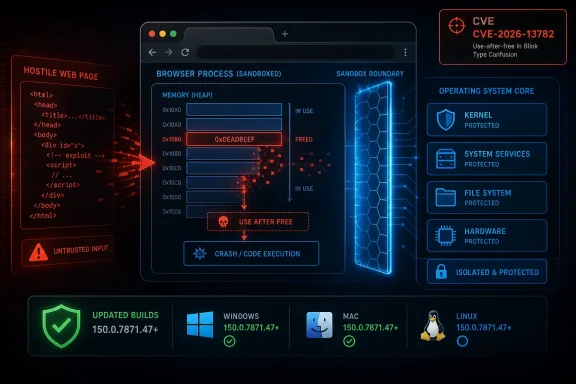
CVE-2026-13782 is described as a use-after-free vulnerability in Chrome’s Browser component. That phrase can sound like ordinary memory-safety boilerplate, but in this case the affected component matters more than the category. Chrome’s renderer process is where web content runs; the browser process is part of the higher-privilege machinery that coordinates tabs, permissions, files, devices, profiles, and operating-system interaction.
Google’s wording says exploitation required the attacker to have already compromised the renderer process. That condition is important because it makes this a second-stage bug rather than a simple “visit a page and lose the machine” vulnerability on its own. But it also makes the flaw more strategically valuable, because renderer bugs are common enough that serious exploit chains often pair one renderer escape with one sandbox escape.
That is why the NVD’s 10.0 CVSS 3.1 score and CISA-ADP’s 9.6 score should not be read as a contradiction so much as a warning about modeling. NVD’s vector treats the attack as network reachable, low complexity, no privileges required, no user interaction, and total impact across confidentiality, integrity, and availability. CISA’s enrichment adds user interaction, which better reflects the crafted-page scenario. Either way, both readings land in the same place: this is not a cosmetic Chrome patch.
The practical lesson is brutally simple. If an attacker can first get code running inside a renderer, CVE-2026-13782 may have offered a way to step outside the sandbox and reach the broader system context Chrome tries to deny to web content. That is the difference between a browser crash and a credible beachhead.
That breadth matters. Chrome is no longer merely a renderer wrapped in a window. It is a sprawling application runtime with graphics pipelines, hardware interfaces, remote-desktop plumbing, extension frameworks, web-app installation paths, media stacks, and a permission model that has to police all of them. A vulnerability in the “Browser” component sounds generic, but in Chromium architecture it points toward the machinery that makes the browser a broker between untrusted content and trusted resources.
Google’s advisory says CVE-2026-13782 was reported by Google on May 26, 2026. The stable-channel release followed on June 30. That is a fairly ordinary interval for an internally found or internally handled issue, and there is no public claim in the advisory or NVD record that this CVE is being exploited in the wild. CISA’s SSVC entry also lists exploitation as “none.”
But “no known exploitation” is not the same as “low urgency.” Browser exploitability is often time-sensitive precisely because details are restricted while users update. Google’s advisory repeats its standard line that bug details and links may remain restricted until most users have received the fix. That restraint is sensible, but it also means defenders are working from metadata: component, class, severity, version threshold, and the rough shape of a possible exploit chain.
For home users, that metadata says update now and relaunch. For administrators, it says verify version reporting rather than assume background update succeeded. Chrome’s updater is good, but a browser that has downloaded an update and not restarted is still the old browser in the place that matters.
That mismatch is not just trivia for vulnerability-management pedants. It is exactly the kind of edge case that can produce false negatives in scanning dashboards, especially in mixed fleets where Chrome reports slightly different build numbers by platform. If a scanner keys only on one CPE range and the enrichment later shifts, security teams can end up with a green dashboard and a browser estate that is not actually aligned with the vendor advisory.
The NVD page itself flags that the record was “modified after enrichment,” which is bureaucratic language for “do not treat the first machine-readable record as holy writ.” The change history shows CISA-ADP adding and then removing CWE data, NIST adding an initial CVSS vector and CPE configuration, and later enrichment changes. This is normal in the CVE ecosystem, but normal does not mean harmless.
For Windows administrators, the safest operational interpretation is to treat Chrome 150.0.7871.47 or later as the target for Windows and Mac, and to validate Linux against Google’s listed Linux stable build and the relevant distribution packaging. If you manage Chromium-based browsers rather than Google Chrome itself, you should track the downstream vendor’s Chromium rebase rather than assume the Google version number maps cleanly.
Chrome has invested heavily in sandboxing, site isolation, fuzzing, exploit mitigations, MiraclePtr-style hardening, and other defenses meant to make memory bugs harder to weaponize. The persistence of critical use-after-free flaws does not mean those investments failed. It means the attack surface is large enough that mitigation is a continuous race, not a finish line.
What makes CVE-2026-13782 stand out is its placement in the browser process. Renderer bugs are dangerous, but they are supposed to be contained. Browser-process bugs are dangerous because the browser process is part of the containment system. When the jailer has a memory-safety problem, the jail becomes less convincing.
This is also why Chrome’s security model now depends on layers rather than trust in any single layer. Site isolation can reduce cross-site data exposure. The sandbox can restrict renderer damage. Broker policies can limit what content processes ask the browser process to do. Operating-system mitigations can make exploitation harder. But when a chain links those layers together, a single “critical” CVE can become the bridge between a malicious page and meaningful host compromise.
Renderer compromise can mean code execution in a low-privilege process designed to handle web content. It does not automatically mean file-system access, credential theft, persistence, or control of the user’s operating system session. The sandbox escape is what turns a contained browser exploit into something closer to endpoint compromise.
That distinction is not academic for enterprise IT. Modern phishing and malvertising campaigns do not need every exploit to do everything. A typical chain may use one bug to get execution inside a renderer, another to escape the sandbox, and still another post-exploitation technique to steal tokens, abuse browser sessions, or establish persistence. CVE-2026-13782 appears to live in the middle of that chain, where containment either holds or collapses.
It also explains why user interaction scoring can be slippery. A crafted HTML page may require a user to visit or load content, but in the browser threat model that is barely a speed bump. Users browse. Tabs restore. Ads render. Embedded content loads. The web is an interaction machine, and a bug triggered by a crafted page is still a bug exposed to the web.
This is not an argument against NVD, CISA, CVSS, or machine-readable vulnerability data. It is an argument against treating enrichment as a substitute for reading the vendor advisory. In the first 48 to 72 hours after a major browser release, the authoritative source for patch targeting is usually the browser vendor’s release post, with NVD and other databases catching up as records are normalized.
Security teams know this, but tooling often pretends otherwise. Ticketing systems ingest CVEs. Vulnerability scanners map CPEs. Dashboards flatten nuance into red, yellow, and green. When the underlying record is still shifting, that automation can amplify ambiguity instead of resolving it.
The cure is not to abandon automation. The cure is to build exception handling for high-severity browser CVEs: compare vendor version guidance against scanner logic, sample actual endpoint versions, and do not close the incident solely because a CPE field says the fleet is clean.
For Microsoft Edge in particular, Windows administrators should watch Microsoft’s Edge release notes and enterprise update channels rather than relying only on Chrome’s version string. Edge has its own stable builds, policies, and update service, and Microsoft often rebases quickly after Chromium security updates. The operational question is not “Did Google patch Chrome?” but “Has every Chromium-derived browser in my environment received the corresponding fix?”
This is where consumer advice and enterprise advice diverge. A home user can open the browser’s About page and relaunch. A sysadmin has to account for portable browsers, stale VDI images, pinned application control rules, disconnected machines, kiosk systems, server jump boxes, and users who keep browsers open for weeks. Browser patching is nominally automatic, but browser risk is not automatically retired.
The forum audience knows the uncomfortable truth: the old “Windows patching” mental model is incomplete. The browser is one of the most exposed applications on the machine, updates outside Patch Tuesday, and carries a security boundary that attackers actively target. Treating Chromium updates as second-class compared with OS cumulative updates is backwards.
In managed Windows environments, that makes restart enforcement the hard part. Policies can control update cadence, target channel, rollback behavior, relaunch notifications, and forced relaunch windows. The right answer depends on the environment, but a critical sandbox-escape-class browser bug is not the moment to let “relaunch when convenient” stretch into next week.
Administrators should also distinguish between machine-wide Chrome installs and user-level installs. Legacy estates often contain both. Inventory that only checks one installation path can miss the browser a user actually launches. The same applies to developer workstations with Chrome Canary, Beta, Dev, Chromium snapshots, or embedded browser runtimes used for testing.
The cleanest validation is endpoint telemetry that reports the running browser process version, not merely the installed package version. If that sounds fussy, it is because browser security has become fussy. The attacker does not care that the patched installer is present; the attacker cares which code is executing when the page loads.
For organizations, the story is less neat. Browser update rings can lag. Security baselines can conflict with user workflows. Remote workers may be off VPN. Some organizations freeze browser versions for compatibility with internal apps, which is increasingly hard to defend when the browser is the front door to the enterprise.
There is also a subtle dependency problem. Security teams may track Chrome but not all applications embedding Chromium components. Electron applications, WebView2-based apps, and third-party tools can carry web-rendering risk in ways that do not show up as “Chrome” in a software inventory. CVE-2026-13782 is specifically a Google Chrome CVE as published, but the broader lesson is that Chromium patch management is now part of application governance.
That does not mean panic-patching every component based on one Chrome advisory. It means knowing which products embed Chromium, how they receive security updates, and whether their exposure model includes untrusted web content. In 2026, that inventory is no longer a nice-to-have.
But critical browser bugs do not need confirmed exploitation to deserve urgency. Once an advisory names the component, class, and fixed version, attackers can begin diffing patches, probing behavior, and looking for ways to chain the flaw with renderer vulnerabilities. Google restricts bug details for exactly this reason, but the patch itself changes the code, and determined researchers can learn from changes.
The risk window is therefore not just before disclosure. It is the period after disclosure when defenders are still waiting for automatic updates, users have not relaunched, and enterprise scanners have not reconciled shifting enrichment data. That is when a “patched” vulnerability remains operationally present.
The correct posture is measured urgency. Do not invent exploitation. Do not dismiss the bug because exploitation is not known. Push the patch, verify the relaunch, and keep an eye on downstream Chromium browsers.
CVE-2026-13782 demonstrates why that matters for WindowsForum readers. The vulnerable target is not an obscure server daemon. It is the application many users keep open all day, connected to email, identity providers, SaaS consoles, admin portals, password managers, file-sharing sites, and internal dashboards. A sandbox escape in that context is not merely a browser problem; it is an endpoint and identity problem.
It also shows why version literacy matters. “Chrome 150” is not precise enough. “Chrome 150.0.7871.47 or later on Windows and Mac” is the kind of operational detail that determines whether a fleet is actually remediated. Security communication often collapses those distinctions for readability, but administrators have to live in the decimals.
The uncomfortable future is that browser patching will become more like EDR alert handling than traditional software maintenance. It will require rapid triage, source comparison, deployment validation, and post-patch monitoring. That is tedious work, but it is now part of defending Windows endpoints.
 Chrome’s Sandbox Is the Story, Not the Score
CVE-2026-13782 is described as a use-after-free vulnerability in Chrome’s Browser component. That phrase can sound like ordinary memory-safety boilerplate, but in this case the affected component matters more than the category. Chrome’s renderer process is where web content runs; the browser process is part of the higher-privilege machinery that coordinates tabs, permissions, files, devices, profiles, and operating-system interaction.Google’s wording says exploitation required the attacker to have already compromised the renderer process. That condition is important because it makes this a second-stage bug rather than a simple “visit a page and lose the machine” vulnerability on its own. But it also makes the flaw more strategically valuable, because renderer bugs are common enough that serious exploit chains often pair one renderer escape with one sandbox escape.
That is why the NVD’s 10.0 CVSS 3.1 score and CISA-ADP’s 9.6 score should not be read as a contradiction so much as a warning about modeling. NVD’s vector treats the attack as network reachable, low complexity, no privileges required, no user interaction, and total impact across confidentiality, integrity, and availability. CISA’s enrichment adds user interaction, which better reflects the crafted-page scenario. Either way, both readings land in the same place: this is not a cosmetic Chrome patch.
The practical lesson is brutally simple. If an attacker can first get code running inside a renderer, CVE-2026-13782 may have offered a way to step outside the sandbox and reach the broader system context Chrome tries to deny to web content. That is the difference between a browser crash and a credible beachhead.
A Critical Bug Buried in a Monster Release
The Chrome 150 stable-channel update was not a surgical patch for a single CVE. Google said the desktop release included 433 security fixes, with a long list of critical and high-severity issues spanning Extensions, GPU, ANGLE, Dawn, WebUSB, Chromoting, Skia, Bluetooth, Ozone, Fullscreen, V8, Downloads, QUIC, and other parts of the Chromium stack.That breadth matters. Chrome is no longer merely a renderer wrapped in a window. It is a sprawling application runtime with graphics pipelines, hardware interfaces, remote-desktop plumbing, extension frameworks, web-app installation paths, media stacks, and a permission model that has to police all of them. A vulnerability in the “Browser” component sounds generic, but in Chromium architecture it points toward the machinery that makes the browser a broker between untrusted content and trusted resources.
Google’s advisory says CVE-2026-13782 was reported by Google on May 26, 2026. The stable-channel release followed on June 30. That is a fairly ordinary interval for an internally found or internally handled issue, and there is no public claim in the advisory or NVD record that this CVE is being exploited in the wild. CISA’s SSVC entry also lists exploitation as “none.”
But “no known exploitation” is not the same as “low urgency.” Browser exploitability is often time-sensitive precisely because details are restricted while users update. Google’s advisory repeats its standard line that bug details and links may remain restricted until most users have received the fix. That restraint is sensible, but it also means defenders are working from metadata: component, class, severity, version threshold, and the rough shape of a possible exploit chain.
For home users, that metadata says update now and relaunch. For administrators, it says verify version reporting rather than assume background update succeeded. Chrome’s updater is good, but a browser that has downloaded an update and not restarted is still the old browser in the place that matters.
The Version Boundary Is Messier Than It Looks
The CVE description says Chrome prior to 150.0.7871.47 is affected. Google’s release post lists Chrome 150.0.7871.46 for Linux and 150.0.7871.46/.47 for Windows and Mac. NVD’s initial CPE configuration, however, used “versions up to excluding 150.0.7871.46” in one change record, while the affected description and CVE record point to 150.0.7871.47 as the fixed threshold.That mismatch is not just trivia for vulnerability-management pedants. It is exactly the kind of edge case that can produce false negatives in scanning dashboards, especially in mixed fleets where Chrome reports slightly different build numbers by platform. If a scanner keys only on one CPE range and the enrichment later shifts, security teams can end up with a green dashboard and a browser estate that is not actually aligned with the vendor advisory.
The NVD page itself flags that the record was “modified after enrichment,” which is bureaucratic language for “do not treat the first machine-readable record as holy writ.” The change history shows CISA-ADP adding and then removing CWE data, NIST adding an initial CVSS vector and CPE configuration, and later enrichment changes. This is normal in the CVE ecosystem, but normal does not mean harmless.
For Windows administrators, the safest operational interpretation is to treat Chrome 150.0.7871.47 or later as the target for Windows and Mac, and to validate Linux against Google’s listed Linux stable build and the relevant distribution packaging. If you manage Chromium-based browsers rather than Google Chrome itself, you should track the downstream vendor’s Chromium rebase rather than assume the Google version number maps cleanly.
Use-After-Free Is Still the Browser Bug That Refuses to Die
A use-after-free bug occurs when software continues using memory after it has been released. In a memory-safe world, that should be boringly impossible. In a large C++ codebase with complex object lifetimes, asynchronous callbacks, GPU and UI plumbing, and cross-process coordination, it remains one of the classic routes from logic mistake to memory corruption.Chrome has invested heavily in sandboxing, site isolation, fuzzing, exploit mitigations, MiraclePtr-style hardening, and other defenses meant to make memory bugs harder to weaponize. The persistence of critical use-after-free flaws does not mean those investments failed. It means the attack surface is large enough that mitigation is a continuous race, not a finish line.
What makes CVE-2026-13782 stand out is its placement in the browser process. Renderer bugs are dangerous, but they are supposed to be contained. Browser-process bugs are dangerous because the browser process is part of the containment system. When the jailer has a memory-safety problem, the jail becomes less convincing.
This is also why Chrome’s security model now depends on layers rather than trust in any single layer. Site isolation can reduce cross-site data exposure. The sandbox can restrict renderer damage. Broker policies can limit what content processes ask the browser process to do. Operating-system mitigations can make exploitation harder. But when a chain links those layers together, a single “critical” CVE can become the bridge between a malicious page and meaningful host compromise.
The “Compromised Renderer” Caveat Should Not Comfort Anyone
The phrase “who had compromised the renderer process” can tempt readers into downgrading the bug mentally. After all, if an attacker already compromised something, isn’t the game already lost? In Chrome’s architecture, the answer is no. The whole point of the sandbox is that a renderer compromise should be ugly but contained.Renderer compromise can mean code execution in a low-privilege process designed to handle web content. It does not automatically mean file-system access, credential theft, persistence, or control of the user’s operating system session. The sandbox escape is what turns a contained browser exploit into something closer to endpoint compromise.
That distinction is not academic for enterprise IT. Modern phishing and malvertising campaigns do not need every exploit to do everything. A typical chain may use one bug to get execution inside a renderer, another to escape the sandbox, and still another post-exploitation technique to steal tokens, abuse browser sessions, or establish persistence. CVE-2026-13782 appears to live in the middle of that chain, where containment either holds or collapses.
It also explains why user interaction scoring can be slippery. A crafted HTML page may require a user to visit or load content, but in the browser threat model that is barely a speed bump. Users browse. Tabs restore. Ads render. Embedded content loads. The web is an interaction machine, and a bug triggered by a crafted page is still a bug exposed to the web.
NVD Enrichment Shows the Weakness of Automation Under Pressure
The user-visible oddity in this CVE record is the enrichment churn. NVD shows the record was modified after enrichment, with NIST and CISA-ADP data not perfectly synchronized. CWE-416 appears as the relevant weakness, then one CISA-ADP change record shows it removed, while the page still presents CWE-416 from Chrome as the weakness enumeration. The CPE configuration similarly deserves scrutiny because of the version-threshold discrepancy.This is not an argument against NVD, CISA, CVSS, or machine-readable vulnerability data. It is an argument against treating enrichment as a substitute for reading the vendor advisory. In the first 48 to 72 hours after a major browser release, the authoritative source for patch targeting is usually the browser vendor’s release post, with NVD and other databases catching up as records are normalized.
Security teams know this, but tooling often pretends otherwise. Ticketing systems ingest CVEs. Vulnerability scanners map CPEs. Dashboards flatten nuance into red, yellow, and green. When the underlying record is still shifting, that automation can amplify ambiguity instead of resolving it.
The cure is not to abandon automation. The cure is to build exception handling for high-severity browser CVEs: compare vendor version guidance against scanner logic, sample actual endpoint versions, and do not close the incident solely because a CPE field says the fleet is clean.
Edge, Brave, Vivaldi, and the Chromium Shadow
The CVE record names Google Chrome, but Windows users live in a Chromium ecosystem. Microsoft Edge, Brave, Vivaldi, Opera, and other browsers share substantial Chromium code, though they ship on their own schedules and may apply patches differently. A Chrome CVE does not automatically mean every Chromium-based browser is vulnerable in the same way, but it does create a patch-pressure event for the entire family.For Microsoft Edge in particular, Windows administrators should watch Microsoft’s Edge release notes and enterprise update channels rather than relying only on Chrome’s version string. Edge has its own stable builds, policies, and update service, and Microsoft often rebases quickly after Chromium security updates. The operational question is not “Did Google patch Chrome?” but “Has every Chromium-derived browser in my environment received the corresponding fix?”
This is where consumer advice and enterprise advice diverge. A home user can open the browser’s About page and relaunch. A sysadmin has to account for portable browsers, stale VDI images, pinned application control rules, disconnected machines, kiosk systems, server jump boxes, and users who keep browsers open for weeks. Browser patching is nominally automatic, but browser risk is not automatically retired.
The forum audience knows the uncomfortable truth: the old “Windows patching” mental model is incomplete. The browser is one of the most exposed applications on the machine, updates outside Patch Tuesday, and carries a security boundary that attackers actively target. Treating Chromium updates as second-class compared with OS cumulative updates is backwards.
Windows Admins Should Verify the Relaunch, Not Just the Install
Chrome’s update mechanism downloads updates in the background, but the patched code generally does not protect the active session until the browser restarts. That creates a familiar gray zone: the updater may be working, the package may be staged, the version may be available, and the user may still be running the vulnerable binary.In managed Windows environments, that makes restart enforcement the hard part. Policies can control update cadence, target channel, rollback behavior, relaunch notifications, and forced relaunch windows. The right answer depends on the environment, but a critical sandbox-escape-class browser bug is not the moment to let “relaunch when convenient” stretch into next week.
Administrators should also distinguish between machine-wide Chrome installs and user-level installs. Legacy estates often contain both. Inventory that only checks one installation path can miss the browser a user actually launches. The same applies to developer workstations with Chrome Canary, Beta, Dev, Chromium snapshots, or embedded browser runtimes used for testing.
The cleanest validation is endpoint telemetry that reports the running browser process version, not merely the installed package version. If that sounds fussy, it is because browser security has become fussy. The attacker does not care that the patched installer is present; the attacker cares which code is executing when the page loads.
The Patch Is Simple; the Fleet Reality Is Not
For individual Chrome users, the action is straightforward: update to the current stable build and relaunch the browser. On Windows, the About Chrome page remains the simplest manual check because it triggers an update check and shows the running version. Users who see 150.0.7871.47 or later on Windows and Mac are on the safe side of the version boundary described by the CVE.For organizations, the story is less neat. Browser update rings can lag. Security baselines can conflict with user workflows. Remote workers may be off VPN. Some organizations freeze browser versions for compatibility with internal apps, which is increasingly hard to defend when the browser is the front door to the enterprise.
There is also a subtle dependency problem. Security teams may track Chrome but not all applications embedding Chromium components. Electron applications, WebView2-based apps, and third-party tools can carry web-rendering risk in ways that do not show up as “Chrome” in a software inventory. CVE-2026-13782 is specifically a Google Chrome CVE as published, but the broader lesson is that Chromium patch management is now part of application governance.
That does not mean panic-patching every component based on one Chrome advisory. It means knowing which products embed Chromium, how they receive security updates, and whether their exposure model includes untrusted web content. In 2026, that inventory is no longer a nice-to-have.
The Absence of Known Exploitation Is a Narrow Comfort
Neither Google’s release post nor the NVD record says CVE-2026-13782 is being exploited in the wild. CISA’s SSVC enrichment lists exploitation as none. That is good news, and it should prevent exaggerated claims that this is already a live zero-day campaign.But critical browser bugs do not need confirmed exploitation to deserve urgency. Once an advisory names the component, class, and fixed version, attackers can begin diffing patches, probing behavior, and looking for ways to chain the flaw with renderer vulnerabilities. Google restricts bug details for exactly this reason, but the patch itself changes the code, and determined researchers can learn from changes.
The risk window is therefore not just before disclosure. It is the period after disclosure when defenders are still waiting for automatic updates, users have not relaunched, and enterprise scanners have not reconciled shifting enrichment data. That is when a “patched” vulnerability remains operationally present.
The correct posture is measured urgency. Do not invent exploitation. Do not dismiss the bug because exploitation is not known. Push the patch, verify the relaunch, and keep an eye on downstream Chromium browsers.
The Browser Has Become the New Patch Tuesday
Windows administrators once organized their month around Microsoft’s cumulative updates. That rhythm still matters, but browser security has broken the calendar. Chrome, Edge, Firefox, and their associated runtimes patch continuously, and high-impact browser vulnerabilities can appear between OS update cycles with little warning.CVE-2026-13782 demonstrates why that matters for WindowsForum readers. The vulnerable target is not an obscure server daemon. It is the application many users keep open all day, connected to email, identity providers, SaaS consoles, admin portals, password managers, file-sharing sites, and internal dashboards. A sandbox escape in that context is not merely a browser problem; it is an endpoint and identity problem.
It also shows why version literacy matters. “Chrome 150” is not precise enough. “Chrome 150.0.7871.47 or later on Windows and Mac” is the kind of operational detail that determines whether a fleet is actually remediated. Security communication often collapses those distinctions for readability, but administrators have to live in the decimals.
The uncomfortable future is that browser patching will become more like EDR alert handling than traditional software maintenance. It will require rapid triage, source comparison, deployment validation, and post-patch monitoring. That is tedious work, but it is now part of defending Windows endpoints.
The Concrete Moves After Chrome 150.0.7871.47
The immediate response to CVE-2026-13782 is not complicated, but it is easy to underdo. Google has shipped the fix, NVD has published and modified the record, and the remaining risk sits in lagging endpoints, derivative browsers, stale sessions, and overconfident dashboards.- Verify that Chrome on Windows and Mac is running 150.0.7871.47 or later, not merely that an update package has been downloaded.
- Treat Linux Chrome 150.0.7871.46 according to Google’s platform-specific stable-channel guidance rather than applying the Windows and Mac build number blindly.
- Check Microsoft Edge and other Chromium-based browsers separately, because Chrome’s patched version does not prove that every Chromium-derived browser in the environment has been updated.
- Prioritize relaunch enforcement for managed endpoints, since background updating does not protect users who keep vulnerable browser processes alive.
- Review scanner findings against Google’s advisory when NVD enrichment changes or CPE thresholds appear inconsistent.
- Do not describe CVE-2026-13782 as exploited in the wild unless new vendor or government reporting says so.
References
- Primary source: NVD / Chromium
Published: 2026-07-03T07:00:45-07:00
NVD - CVE-2026-13782
 nvd.nist.gov
- Security advisory: MSRC
Published: 2026-07-03T07:00:45-07:00
Original feed URL
Security Update Guide - Microsoft Security Response Center
 msrc.microsoft.com
- Related coverage: cvefeed.io
CVE-2026-13782 - Google Chrome Use-After-Free Sandbox Escape
Use after free in Browser in Google Chrome prior to 150.0.7871.47 allowed a remote attacker who had compromised the renderer process to potentially perform a sandbox escape via a crafted HTML page. (Chromium security severity: Critical)cvefeed.io
