

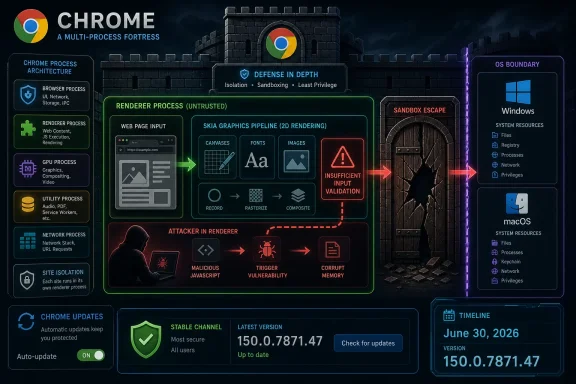
Google fixed CVE-2026-13781 in Chrome 150.0.7871.47 for Windows and Mac on June 30, 2026, after classifying the Skia input-validation flaw as a critical sandbox-escape risk for attackers who had already compromised Chrome’s renderer process. The important phrase is not merely “crafted HTML page,” but sandbox escape: this is the stage of a browser exploit chain where a bad web page stops being just a tab problem. As detailed by Google’s Chrome Releases blog and enriched by the National Vulnerability Database, this bug sits in the browser’s graphics plumbing, where modern web complexity meets a very old security truth: rendering hostile content safely is still hard.
Google’s June 30 Stable Channel update promoted Chrome 150 to stable for Windows, macOS, and Linux, with Windows and Mac receiving 150.0.7871.46/.47 and Linux receiving 150.0.7871.46. The release was not a tidy single-CVE emergency patch. Google said the update included 433 security fixes, and CVE-2026-13781 was one entry in a long list of critical and high-severity issues.
That scale matters. A browser release with hundreds of fixes is not just a maintenance event; it is a security boundary being rebuilt in public. Chrome’s security notes also repeated the usual warning that bug details and links may remain restricted until a majority of users are updated, particularly when third-party libraries are involved. That is not bureaucratic boilerplate. It is Google acknowledging that the difference between a vulnerability description and a working exploit can narrow quickly once enough technical breadcrumbs are exposed.
CVE-2026-13781 is described as insufficient validation of untrusted input in Skia. Skia is the 2D graphics library used by Chrome and Chromium-based software to draw the web’s visual surface. If V8 is the browser’s JavaScript brain, Skia is one of the hands constantly touching attacker-controlled data: images, canvases, fonts, layout artifacts, and rendered page elements.
The NVD description adds the condition that the attacker would first need to compromise the renderer process. That sounds reassuring only if one forgets how browser exploitation works. Renderer compromise is often the first leg of the race; sandbox escape is the second. A bug that helps with the second leg is exactly the sort of flaw defenders cannot afford to ignore.
That makes Skia a high-value target. An attacker does not need the user to download a strange executable if the browser is willing to process a hostile page. The page can be crafted to exercise obscure graphics paths, edge-case drawing operations, malformed input, or unusual combinations of browser features. The user sees a website; the browser sees a workload.
“Insufficient validation of untrusted input” is the kind of vulnerability phrase that sounds generic because it is. But generic does not mean mild. Input validation is the thin line between “the browser rejects nonsense” and “the browser processes nonsense in a privileged code path.” In graphics libraries, the nonsense can be deeply structured and hard to reason about: coordinates, buffers, color spaces, clipping regions, image metadata, shader-like paths, and platform-specific rendering behavior.
Chrome’s multi-process architecture is designed around the assumption that web content is hostile. The renderer should be disposable, isolated, and constrained. CVE-2026-13781 matters because the vulnerability description says that once the renderer is compromised, the flaw could potentially help the attacker escape the sandbox. That is the jump from “Chrome tab exploited” to “the attacker may be closer to the operating system.”
For Windows users, that distinction is practical. A renderer-only exploit may still be bad, especially for browser data, sessions, and web-app access. A sandbox escape raises the stakes because it may allow broader interaction with the local system, depending on the chain and the attacker’s next step. The browser sandbox is not decorative; it is one of the most important security controls on a modern desktop.
That discrepancy is not just pedantry. In enterprise vulnerability management, CPEs drive scanners, dashboards, ticket queues, and compliance reporting. If a CPE range is off by a patch digit, a scanner can mark the wrong hosts vulnerable or clean. When the product’s own advisory says Windows and Mac have 150.0.7871.46/.47 while the CVE says “prior to 150.0.7871.47,” administrators have to read past the headline.
The safest operational interpretation is straightforward: Chrome should be at 150.0.7871.47 or later where that build is available, and administrators should check platform-specific release channels rather than relying solely on one normalized CPE string. For Linux, Google’s release note named 150.0.7871.46, while the CVE text uses the .47 threshold. That may reflect platform packaging, metadata lag, or the usual awkwardness of mapping one vulnerability statement across multiple build trains.
NVD’s “Modified After Enrichment” banner is also worth noting. It means the CVE record changed after NVD had already added enrichment data, and that NVD’s data may need amendment. In plainer English: the database is useful, but it is not scripture. When Chrome’s vendor advisory, NVD enrichment, and CISA ADP metadata move within days of each other, defenders should treat the record as a living object.
CISA’s ADP entry assigned a CVSS 3.1 score of 9.6 critical, matching NVD’s displayed score. CISA’s SSVC metadata listed exploitation as “none,” automation as “no,” and technical impact as “total.” That combination is important: there is no public signal in the record that the flaw is being exploited in the wild, but the impact if chained successfully is severe.
That is exactly the profile of a chain component. Modern browser attacks are rarely one magic bug. They are combinations: one flaw gets code running in a renderer, another escapes the sandbox, another abuses a kernel or driver weakness, and still another handles persistence or credential theft. A sandbox escape may not be the first exploit in the chain, but it can be the difference between containment and compromise.
The “user interaction required” field in the CVSS vector should also be read carefully. For browser vulnerabilities, user interaction often means visiting or being directed to a malicious page. That is a low bar. Phishing, malvertising, compromised legitimate sites, poisoned search results, and malicious links in chat tools all exist because convincing a user to load a page remains one of the easiest things in computing.
The “attack complexity low” rating is the part that should keep patch managers attentive. CVSS is imperfect, but the combination of network attack vector, low complexity, no privileges required, changed scope, and high confidentiality, integrity, and availability impact is not subtle. It says the vulnerability belongs near the top of the browser patch queue even without evidence of active exploitation.
For home users, the answer is boring and correct: update Chrome and relaunch it. For managed environments, the answer is more complicated: confirm version reporting, watch for stalled update rings, and do not assume that a browser process left open for days has actually applied the fix.
That does not mean every Chromium-based browser is affected in exactly the same way, on exactly the same timeline, or with exactly the same version number. Vendors carry patches differently, ship on different cadences, and sometimes have platform-specific mitigations or build configurations. But for IT administrators, the practical lesson is clear: do not stop the audit at Chrome.
Microsoft Edge is particularly relevant for Windows shops because it is present by default, updated on its own schedule, and often used silently by applications through WebView2. Even if employees use Chrome as their primary browser, Edge and WebView2 may still process web content in enterprise workflows. The Chromium security model only helps if the Chromium-derived components are actually current.
This is where browser management has become a quiet part of endpoint security. Administrators who once focused on Windows Update now need parallel visibility into Chrome, Edge, WebView2 Runtime, Electron apps, embedded updaters, and third-party software that packages Chromium. The old model of “patch the OS and antivirus” is too narrow for a desktop where the browser is the application platform.
There is also a timing problem. Google can ship Chrome quickly, but downstream vendors and packaged apps may lag. Some will update promptly. Others may sit on vulnerable Chromium builds until their next scheduled release. When a vulnerability involves Skia or another shared graphics component, the lag becomes a security variable.
A sandbox escape is valuable because it attacks the trust boundary that separates hostile web content from the rest of the machine. The renderer is supposed to be a locked room where suspicious code can misbehave without reaching the hallway. A sandbox escape is a door handle.
That is why critical Chrome vulnerabilities often look underwhelming in prose. “Insufficient validation of untrusted input in Skia” does not sound like the plot of a cyber thriller. But the exploit developer reads that differently. They see a graphics component, a reachable web surface, a renderer compromise prerequisite, and a path toward escaping isolation.
The same dynamic applies to Windows hardening. Attack surface reduction rules, credential isolation, least privilege, EDR, and application control all matter more when a browser exploit breaks containment. A patched browser is the first line, but not the only line. If the browser falls, the rest of the endpoint posture decides how much room the attacker gets.
This is why enterprises should resist treating browser CVEs as user-support chores. A Chrome update is not merely about getting rid of a nagging relaunch button. It is part of the perimeter, because for many organizations the perimeter is now a user, a browser, an identity token, and a SaaS session.
None of that means the vulnerability is fake or overblown. It means the public vulnerability ecosystem is a synchronization machine with many moving parts. Google publishes an advisory. CVE records land. NVD enriches. CISA adds prioritization metadata. Scanners ingest CPEs. Vendors build detections. Admins see tickets. Somewhere in that chain, a minor mismatch can become operational noise.
The most obvious mismatch is the version threshold. The CVE description points to Chrome prior to 150.0.7871.47. NVD’s initial CPE line, as displayed in the change history, used versions up to excluding 150.0.7871.46. Google’s release note lists 150.0.7871.46 for Linux and 150.0.7871.46/.47 for Windows and Mac. That is enough ambiguity to produce inconsistent scanner output across platforms.
The right response is not to dismiss the CVE. It is to validate against the vendor advisory and local software inventory. If your fleet has Chrome 149, it is exposed to the broader Chrome 150 security batch. If your Windows or Mac fleet has Chrome 150.0.7871.46, you should determine whether the .47 build is available and expected in your channel. If your Linux fleet reports .46, compare it with Google’s Linux stable release note and your distribution packaging.
This is where mature vulnerability management differs from checkbox compliance. A checkbox says “CVE present or absent.” A mature process asks whether the detection logic matches the vendor’s release reality, whether the update has actually installed, whether the browser has relaunched, and whether other Chromium-based runtimes remain behind.
The downside is fatigue. Users ignore relaunch prompts. Administrators defer browser updates to avoid compatibility surprises. Developers pin browser engines in packaged apps because a moving runtime can break workflows. Every one of those choices is understandable. Every one of them creates a gap between the patch being available and the patch being real.
CVE-2026-13781 sits inside a Chrome 150 release that also includes numerous other critical vulnerabilities across components such as Extensions, GPU, ANGLE, Dawn, WebUSB, Chromoting, Browser, Views, Skia, Bluetooth, Ozone, and Fullscreen. That list reads like an architectural map of modern Chromium. The browser is not one attack surface; it is dozens of interlocking subsystems exposed to untrusted content and user behavior.
The presence of multiple Skia-related issues in the same release should not be overinterpreted without bug details, many of which remain restricted. But it does underscore the density of graphics-related risk in modern browsers. When rendering, GPU acceleration, canvas, WebGL, and cross-platform abstraction layers all converge, the security burden is immense.
For Windows administrators, the patch process should include browser relaunch enforcement. Chrome can download an update silently, but the running browser may remain on the old version until restarted. In a fleet where users keep sessions open for days, update availability and update application are not the same event.
Microsoft usually ships Edge updates quickly when Chromium security fixes land, but administrators still need to verify deployment rather than assume it. Edge has its own update policies, channels, and enterprise controls. In locked-down environments, those controls can help; in neglected ones, they can become the reason a critical browser fix never arrives.
WebView2 deserves special attention because it is embedded into business applications that may not look like browsers. A line-of-business app, a chat client, an installer, a help viewer, or a dashboard may use a web runtime under the hood. If that runtime lags behind Chromium security fixes, the user does not have to “open Chrome” to encounter browser-class risk.
Then there is the human layer. Chrome updates often require a relaunch, and users often postpone relaunches because browser tabs have become a workplace memory system. The tabs are the task list, the research stack, the authentication state, and the half-finished expense report. Security teams can lecture users about restarting, but better policy design accepts the reality and schedules enforcement windows.
The best browser patching programs are boring. They use managed update policies, monitor version distribution, enforce relaunches after a grace period, and treat outliers as endpoint hygiene failures. They do not wait for a CVE to show up in a weekly scanner report before asking whether the browser fleet is current.
Exploit chains are built from parts. One bug gets code execution in the renderer. Another escapes the sandbox. Another elevates privileges or disables defenses. Another steals tokens or deploys payloads. Defenders who look at each CVE in isolation can miss the way attackers assemble them.
That is also why Chrome’s restriction of bug details is rational. Once enough users are patched, technical details can be useful for research, transparency, and downstream remediation. Before then, they can help attackers complete the missing pieces of a chain. The security community often wants more detail; vendors often delay it. Both instincts have merit, but the operational answer is still patch first.
The NVD CVSS vector includes changed scope and high impact across confidentiality, integrity, and availability. In CVSS terms, changed scope means the exploited component can affect resources beyond its own security authority. In browser terms, that is the essence of sandbox escape risk. The renderer is supposed to be constrained; the vulnerability may help break that constraint.
For attackers, a bug like this becomes more attractive if paired with a reliable renderer exploit. For defenders, the lesson is to reduce the window in which such pairings are possible. That means fast browser updates, but also hardening against the first stage: blocking known-malicious sites, reducing risky extensions, isolating high-risk browsing, and keeping endpoint detection tuned for post-browser behavior.
That does not necessarily mean NVD is “missing” a CPE in the simple sense. It may mean the CPE enrichment is incomplete, stale, or in need of amendment after the CVE record changed. NVD’s own banner warns that enrichment data may require amendment due to post-enrichment changes. In other words, the page itself is telling vulnerability managers not to treat the current enrichment as final.
A cleaner CPE mapping would normally align the vulnerable Chrome application CPE with the correct fixed version threshold and avoid confusion between operating-system applicability and product versioning. The operating-system CPEs in the NVD configuration reflect the platforms on which Chrome runs, but they can make scanner logic look stranger than the underlying advisory. Chrome is the vulnerable application; Windows, macOS, and Linux are the affected host platforms.
The practical advice is to report the discrepancy through NVD’s correction mechanism if your tooling depends on the CPE data. That is not busywork. CPE quality affects vulnerability scanners, asset inventories, and compliance evidence. A one-digit version mismatch can create false positives or false negatives at enterprise scale.
But patching should not wait for metadata cleanup. The authoritative operational source is Google’s Chrome release, paired with the actual version installed on endpoints. If Chrome is older than the Chrome 150 stable build appropriate for the platform, update. If the platform has a .47 build available, target it. If a scanner disagrees, document the vendor advisory and version evidence while the enrichment catches up.
 Chrome’s Patch Notes Say Less Than the Risk Implies
Google’s June 30 Stable Channel update promoted Chrome 150 to stable for Windows, macOS, and Linux, with Windows and Mac receiving 150.0.7871.46/.47 and Linux receiving 150.0.7871.46. The release was not a tidy single-CVE emergency patch. Google said the update included 433 security fixes, and CVE-2026-13781 was one entry in a long list of critical and high-severity issues.That scale matters. A browser release with hundreds of fixes is not just a maintenance event; it is a security boundary being rebuilt in public. Chrome’s security notes also repeated the usual warning that bug details and links may remain restricted until a majority of users are updated, particularly when third-party libraries are involved. That is not bureaucratic boilerplate. It is Google acknowledging that the difference between a vulnerability description and a working exploit can narrow quickly once enough technical breadcrumbs are exposed.
CVE-2026-13781 is described as insufficient validation of untrusted input in Skia. Skia is the 2D graphics library used by Chrome and Chromium-based software to draw the web’s visual surface. If V8 is the browser’s JavaScript brain, Skia is one of the hands constantly touching attacker-controlled data: images, canvases, fonts, layout artifacts, and rendered page elements.
The NVD description adds the condition that the attacker would first need to compromise the renderer process. That sounds reassuring only if one forgets how browser exploitation works. Renderer compromise is often the first leg of the race; sandbox escape is the second. A bug that helps with the second leg is exactly the sort of flaw defenders cannot afford to ignore.
Skia Is Where Pretty Web Pages Become Attack Surface
The web is not a document platform anymore. It is a graphics runtime, an application framework, a video surface, a font parser, a GPU client, and a compatibility museum for every clever trick developers shipped over the past two decades. Skia lives in that mess because someone has to turn all of it into pixels quickly and consistently.That makes Skia a high-value target. An attacker does not need the user to download a strange executable if the browser is willing to process a hostile page. The page can be crafted to exercise obscure graphics paths, edge-case drawing operations, malformed input, or unusual combinations of browser features. The user sees a website; the browser sees a workload.
“Insufficient validation of untrusted input” is the kind of vulnerability phrase that sounds generic because it is. But generic does not mean mild. Input validation is the thin line between “the browser rejects nonsense” and “the browser processes nonsense in a privileged code path.” In graphics libraries, the nonsense can be deeply structured and hard to reason about: coordinates, buffers, color spaces, clipping regions, image metadata, shader-like paths, and platform-specific rendering behavior.
Chrome’s multi-process architecture is designed around the assumption that web content is hostile. The renderer should be disposable, isolated, and constrained. CVE-2026-13781 matters because the vulnerability description says that once the renderer is compromised, the flaw could potentially help the attacker escape the sandbox. That is the jump from “Chrome tab exploited” to “the attacker may be closer to the operating system.”
For Windows users, that distinction is practical. A renderer-only exploit may still be bad, especially for browser data, sessions, and web-app access. A sandbox escape raises the stakes because it may allow broader interaction with the local system, depending on the chain and the attacker’s next step. The browser sandbox is not decorative; it is one of the most important security controls on a modern desktop.
The Version Number Is Already a Story of Its Own
One oddity in the NVD record is the affected-version language. The CVE description says Google Chrome prior to 150.0.7871.47 is affected. The initial NVD CPE configuration, however, listed Google Chrome versions up to but excluding 150.0.7871.46, paired with operating-system CPEs for Windows, Linux, and macOS. The user-facing NVD page also displays the familiar “CPEs loading” area and invites corrections if configurations are missing.That discrepancy is not just pedantry. In enterprise vulnerability management, CPEs drive scanners, dashboards, ticket queues, and compliance reporting. If a CPE range is off by a patch digit, a scanner can mark the wrong hosts vulnerable or clean. When the product’s own advisory says Windows and Mac have 150.0.7871.46/.47 while the CVE says “prior to 150.0.7871.47,” administrators have to read past the headline.
The safest operational interpretation is straightforward: Chrome should be at 150.0.7871.47 or later where that build is available, and administrators should check platform-specific release channels rather than relying solely on one normalized CPE string. For Linux, Google’s release note named 150.0.7871.46, while the CVE text uses the .47 threshold. That may reflect platform packaging, metadata lag, or the usual awkwardness of mapping one vulnerability statement across multiple build trains.
NVD’s “Modified After Enrichment” banner is also worth noting. It means the CVE record changed after NVD had already added enrichment data, and that NVD’s data may need amendment. In plainer English: the database is useful, but it is not scripture. When Chrome’s vendor advisory, NVD enrichment, and CISA ADP metadata move within days of each other, defenders should treat the record as a living object.
CISA’s ADP entry assigned a CVSS 3.1 score of 9.6 critical, matching NVD’s displayed score. CISA’s SSVC metadata listed exploitation as “none,” automation as “no,” and technical impact as “total.” That combination is important: there is no public signal in the record that the flaw is being exploited in the wild, but the impact if chained successfully is severe.
“No Exploitation” Is Not the Same as “Low Priority”
Security teams often triage browser bugs by asking whether they are zero-days. That is understandable, but it can become a dangerous shortcut. CVE-2026-13781 is not currently described by NVD or CISA ADP as exploited in the wild. Yet it is critical, remotely reachable through a crafted HTML page, and relevant after renderer compromise.That is exactly the profile of a chain component. Modern browser attacks are rarely one magic bug. They are combinations: one flaw gets code running in a renderer, another escapes the sandbox, another abuses a kernel or driver weakness, and still another handles persistence or credential theft. A sandbox escape may not be the first exploit in the chain, but it can be the difference between containment and compromise.
The “user interaction required” field in the CVSS vector should also be read carefully. For browser vulnerabilities, user interaction often means visiting or being directed to a malicious page. That is a low bar. Phishing, malvertising, compromised legitimate sites, poisoned search results, and malicious links in chat tools all exist because convincing a user to load a page remains one of the easiest things in computing.
The “attack complexity low” rating is the part that should keep patch managers attentive. CVSS is imperfect, but the combination of network attack vector, low complexity, no privileges required, changed scope, and high confidentiality, integrity, and availability impact is not subtle. It says the vulnerability belongs near the top of the browser patch queue even without evidence of active exploitation.
For home users, the answer is boring and correct: update Chrome and relaunch it. For managed environments, the answer is more complicated: confirm version reporting, watch for stalled update rings, and do not assume that a browser process left open for days has actually applied the fix.
Chromium’s Shared Code Makes This Bigger Than Chrome
The CVE record names Google Chrome, but WindowsForum readers know that Chrome is only the most visible member of the Chromium family. Microsoft Edge, Brave, Vivaldi, Opera, and many embedded browser runtimes depend on large portions of the same upstream codebase. A Skia issue in Chromium’s rendering stack is therefore a supply-chain event for browsers, not merely a Google product note.That does not mean every Chromium-based browser is affected in exactly the same way, on exactly the same timeline, or with exactly the same version number. Vendors carry patches differently, ship on different cadences, and sometimes have platform-specific mitigations or build configurations. But for IT administrators, the practical lesson is clear: do not stop the audit at Chrome.
Microsoft Edge is particularly relevant for Windows shops because it is present by default, updated on its own schedule, and often used silently by applications through WebView2. Even if employees use Chrome as their primary browser, Edge and WebView2 may still process web content in enterprise workflows. The Chromium security model only helps if the Chromium-derived components are actually current.
This is where browser management has become a quiet part of endpoint security. Administrators who once focused on Windows Update now need parallel visibility into Chrome, Edge, WebView2 Runtime, Electron apps, embedded updaters, and third-party software that packages Chromium. The old model of “patch the OS and antivirus” is too narrow for a desktop where the browser is the application platform.
There is also a timing problem. Google can ship Chrome quickly, but downstream vendors and packaged apps may lag. Some will update promptly. Others may sit on vulnerable Chromium builds until their next scheduled release. When a vulnerability involves Skia or another shared graphics component, the lag becomes a security variable.
The Browser Sandbox Remains the Prize
Chrome’s sandbox is one of the great success stories of consumer security engineering. It made drive-by web compromise harder, forced attackers to chain bugs, and turned the browser into a collection of constrained processes rather than one giant privileged target. But the very existence of CVE-2026-13781 is a reminder that sandboxing is not a finish line. It is a pressure system.A sandbox escape is valuable because it attacks the trust boundary that separates hostile web content from the rest of the machine. The renderer is supposed to be a locked room where suspicious code can misbehave without reaching the hallway. A sandbox escape is a door handle.
That is why critical Chrome vulnerabilities often look underwhelming in prose. “Insufficient validation of untrusted input in Skia” does not sound like the plot of a cyber thriller. But the exploit developer reads that differently. They see a graphics component, a reachable web surface, a renderer compromise prerequisite, and a path toward escaping isolation.
The same dynamic applies to Windows hardening. Attack surface reduction rules, credential isolation, least privilege, EDR, and application control all matter more when a browser exploit breaks containment. A patched browser is the first line, but not the only line. If the browser falls, the rest of the endpoint posture decides how much room the attacker gets.
This is why enterprises should resist treating browser CVEs as user-support chores. A Chrome update is not merely about getting rid of a nagging relaunch button. It is part of the perimeter, because for many organizations the perimeter is now a user, a browser, an identity token, and a SaaS session.
NVD’s Metadata Problem Is Also an IT Problem
The NVD record for CVE-2026-13781 shows how vulnerability data becomes messy at the exact moment defenders want certainty. The record was published on June 30, modified on July 2, enriched by NVD, updated by CISA ADP, and marked as modified after enrichment. The CWE information shifted as well, with CWE-20 appearing from Chrome and NVD also showing insufficient information.None of that means the vulnerability is fake or overblown. It means the public vulnerability ecosystem is a synchronization machine with many moving parts. Google publishes an advisory. CVE records land. NVD enriches. CISA adds prioritization metadata. Scanners ingest CPEs. Vendors build detections. Admins see tickets. Somewhere in that chain, a minor mismatch can become operational noise.
The most obvious mismatch is the version threshold. The CVE description points to Chrome prior to 150.0.7871.47. NVD’s initial CPE line, as displayed in the change history, used versions up to excluding 150.0.7871.46. Google’s release note lists 150.0.7871.46 for Linux and 150.0.7871.46/.47 for Windows and Mac. That is enough ambiguity to produce inconsistent scanner output across platforms.
The right response is not to dismiss the CVE. It is to validate against the vendor advisory and local software inventory. If your fleet has Chrome 149, it is exposed to the broader Chrome 150 security batch. If your Windows or Mac fleet has Chrome 150.0.7871.46, you should determine whether the .47 build is available and expected in your channel. If your Linux fleet reports .46, compare it with Google’s Linux stable release note and your distribution packaging.
This is where mature vulnerability management differs from checkbox compliance. A checkbox says “CVE present or absent.” A mature process asks whether the detection logic matches the vendor’s release reality, whether the update has actually installed, whether the browser has relaunched, and whether other Chromium-based runtimes remain behind.
Patch Velocity Is Now a Browser Feature
Chrome’s rapid update cadence can feel relentless, especially when a major release arrives with hundreds of fixes. But that velocity is part of the product’s security model. Bugs are found continuously, fuzzed continuously, restricted until users update, and patched on a schedule that assumes the web is an active battlefield.The downside is fatigue. Users ignore relaunch prompts. Administrators defer browser updates to avoid compatibility surprises. Developers pin browser engines in packaged apps because a moving runtime can break workflows. Every one of those choices is understandable. Every one of them creates a gap between the patch being available and the patch being real.
CVE-2026-13781 sits inside a Chrome 150 release that also includes numerous other critical vulnerabilities across components such as Extensions, GPU, ANGLE, Dawn, WebUSB, Chromoting, Browser, Views, Skia, Bluetooth, Ozone, and Fullscreen. That list reads like an architectural map of modern Chromium. The browser is not one attack surface; it is dozens of interlocking subsystems exposed to untrusted content and user behavior.
The presence of multiple Skia-related issues in the same release should not be overinterpreted without bug details, many of which remain restricted. But it does underscore the density of graphics-related risk in modern browsers. When rendering, GPU acceleration, canvas, WebGL, and cross-platform abstraction layers all converge, the security burden is immense.
For Windows administrators, the patch process should include browser relaunch enforcement. Chrome can download an update silently, but the running browser may remain on the old version until restarted. In a fleet where users keep sessions open for days, update availability and update application are not the same event.
The Windows Angle Runs Through Edge, WebView2, and User Habits
Windows users often think of Chrome as an app they chose to install. Edge feels more like part of the operating system, and WebView2 feels invisible unless it breaks. But from a security perspective, all of them matter because all of them may parse hostile web content using Chromium-derived code.Microsoft usually ships Edge updates quickly when Chromium security fixes land, but administrators still need to verify deployment rather than assume it. Edge has its own update policies, channels, and enterprise controls. In locked-down environments, those controls can help; in neglected ones, they can become the reason a critical browser fix never arrives.
WebView2 deserves special attention because it is embedded into business applications that may not look like browsers. A line-of-business app, a chat client, an installer, a help viewer, or a dashboard may use a web runtime under the hood. If that runtime lags behind Chromium security fixes, the user does not have to “open Chrome” to encounter browser-class risk.
Then there is the human layer. Chrome updates often require a relaunch, and users often postpone relaunches because browser tabs have become a workplace memory system. The tabs are the task list, the research stack, the authentication state, and the half-finished expense report. Security teams can lecture users about restarting, but better policy design accepts the reality and schedules enforcement windows.
The best browser patching programs are boring. They use managed update policies, monitor version distribution, enforce relaunches after a grace period, and treat outliers as endpoint hygiene failures. They do not wait for a CVE to show up in a weekly scanner report before asking whether the browser fleet is current.
The Exploit Chain Is the Real Unit of Risk
CVE-2026-13781 is not described as a standalone “click and own the machine” bug. The attacker condition in the description matters: the renderer process must already be compromised. But in browser security, that does not make the bug peripheral. It makes it composable.Exploit chains are built from parts. One bug gets code execution in the renderer. Another escapes the sandbox. Another elevates privileges or disables defenses. Another steals tokens or deploys payloads. Defenders who look at each CVE in isolation can miss the way attackers assemble them.
That is also why Chrome’s restriction of bug details is rational. Once enough users are patched, technical details can be useful for research, transparency, and downstream remediation. Before then, they can help attackers complete the missing pieces of a chain. The security community often wants more detail; vendors often delay it. Both instincts have merit, but the operational answer is still patch first.
The NVD CVSS vector includes changed scope and high impact across confidentiality, integrity, and availability. In CVSS terms, changed scope means the exploited component can affect resources beyond its own security authority. In browser terms, that is the essence of sandbox escape risk. The renderer is supposed to be constrained; the vulnerability may help break that constraint.
For attackers, a bug like this becomes more attractive if paired with a reliable renderer exploit. For defenders, the lesson is to reduce the window in which such pairings are possible. That means fast browser updates, but also hardening against the first stage: blocking known-malicious sites, reducing risky extensions, isolating high-risk browsing, and keeping endpoint detection tuned for post-browser behavior.
The CPE Confusion Should Not Delay the Patch
The user’s question — “Are we missing a CPE here?” — is exactly the kind of question that matters in the real world. Based on the NVD record, there is at least a visible tension between the CVE description’s “prior to 150.0.7871.47” language and the initial CPE configuration shown as versions up to excluding 150.0.7871.46. There is also platform variation in Google’s own release note.That does not necessarily mean NVD is “missing” a CPE in the simple sense. It may mean the CPE enrichment is incomplete, stale, or in need of amendment after the CVE record changed. NVD’s own banner warns that enrichment data may require amendment due to post-enrichment changes. In other words, the page itself is telling vulnerability managers not to treat the current enrichment as final.
A cleaner CPE mapping would normally align the vulnerable Chrome application CPE with the correct fixed version threshold and avoid confusion between operating-system applicability and product versioning. The operating-system CPEs in the NVD configuration reflect the platforms on which Chrome runs, but they can make scanner logic look stranger than the underlying advisory. Chrome is the vulnerable application; Windows, macOS, and Linux are the affected host platforms.
The practical advice is to report the discrepancy through NVD’s correction mechanism if your tooling depends on the CPE data. That is not busywork. CPE quality affects vulnerability scanners, asset inventories, and compliance evidence. A one-digit version mismatch can create false positives or false negatives at enterprise scale.
But patching should not wait for metadata cleanup. The authoritative operational source is Google’s Chrome release, paired with the actual version installed on endpoints. If Chrome is older than the Chrome 150 stable build appropriate for the platform, update. If the platform has a .47 build available, target it. If a scanner disagrees, document the vendor advisory and version evidence while the enrichment catches up.
What Chrome 150’s Skia Bug Leaves Administrators Holding
The immediate response to CVE-2026-13781 is small, but the implications are broad. This is a critical browser flaw in a shared graphics component, patched as part of a large Chrome 150 security release, with public vulnerability metadata still settling days after publication. That combination is now normal enough that IT teams need a repeatable playbook rather than a special panic.- Chrome on Windows and macOS should be verified at 150.0.7871.47 or later where that build is available, and Linux systems should be checked against Google’s platform-specific stable-channel release.
- The NVD record’s CPE history appears potentially inconsistent with the CVE description, so scanner output should be validated against Google’s advisory before closing or escalating tickets.
- CISA ADP and NVD both show a critical CVSS 3.1 score of 9.6, while CISA’s SSVC metadata currently indicates no known exploitation.
- The bug is most dangerous as part of an exploit chain because it may help an attacker escape Chrome’s sandbox after renderer compromise.
- Chromium-based browsers and embedded runtimes should be audited separately, especially Microsoft Edge and WebView2 on Windows fleets.
- Browser relaunch enforcement matters because downloaded updates do not protect users who keep vulnerable browser processes running.
References
- Primary source: NVD / Chromium
Published: 2026-07-03T07:00:44-07:00
NVD - CVE-2026-13781
 nvd.nist.gov
- Security advisory: MSRC
Published: 2026-07-03T07:00:44-07:00
Original feed URL
Security Update Guide - Microsoft Security Response Center
 msrc.microsoft.com
- Related coverage: cvefeed.io
CVE-2026-13781 - Google Chrome Skia Sandbox Escape
Insufficient validation of untrusted input in Skia in Google Chrome prior to 150.0.7871.47 allowed a remote attacker who had compromised the renderer process to potentially perform a sandbox escape via a crafted HTML page. (Chromium security severity: Critical)cvefeed.io - Related coverage: radar.offseq.com
CVE-2026-13781: Insufficient validation of untrusted input in Google Chrome - Live Threat Intelligence - Threat Radar | OffSeq.com
Detailed information about CVE-2026-13781: Insufficient validation of untrusted input in Google Chrome affecting Google Chrome. Get real-time updates, technicalradar.offseq.com
