

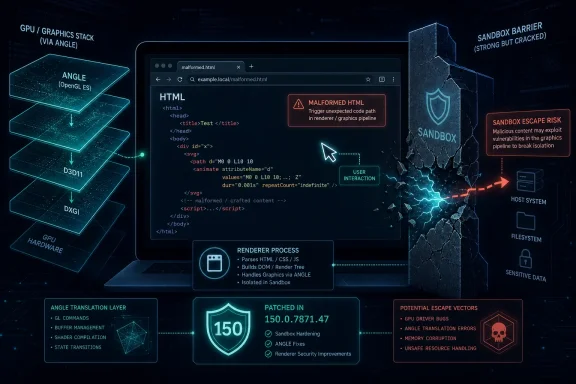
Google patched CVE-2026-13780 in Chrome 150.0.7871.47 for Windows and macOS after disclosing on June 30, 2026, that insufficient validation in ANGLE could let an attacker who had already compromised Chrome’s renderer escape the browser sandbox through a crafted HTML page. The NVD later rated the flaw 9.6 critical under CVSS 3.1, while CISA’s enrichment marked exploitation as “none” but technical impact as total. That combination tells the real story: this is not a drive-by miracle bug, but it is exactly the sort of second-stage browser flaw that turns a renderer compromise into a system-level incident.
The issue surfaced inside a large Chrome 150 security release that, according to Google’s Chrome Releases blog and follow-on coverage from PCWorld and Malwarebytes, fixed 382 security issues across desktop builds. CVE-2026-13780 is one line in that long ledger, but it sits in a sensitive place: ANGLE, the graphics translation layer that helps Chrome talk to Direct3D, OpenGL, Vulkan, Metal, and other platform graphics APIs. For Windows users and administrators, the uncomfortable lesson is familiar. The web browser is no longer just an app; it is a hardware-accelerated, GPU-facing, cross-platform runtime with enough moving parts to make “just update Chrome” both sound trivial and remain operationally essential.
Modern browser exploitation is usually a chain, not a single magic spell. The first bug gets code running where it should not, often inside a renderer process that handles untrusted web content. The second bug is the one defenders fear most: it breaks containment.
CVE-2026-13780 belongs to that second category. The public description is careful and conditional, saying an attacker would need to have compromised the renderer process first. That is not a trivial precondition, but it is also not a comfort blanket. Renderer bugs are the bread and butter of browser exploit chains, and a sandbox escape is what gives that first foothold a path toward the rest of the machine.
Chrome’s sandbox model exists because browsers are asked to parse hostile input every minute of every day. A renderer can be treated as semi-disposable, tightly restricted, and denied direct access to the operating system. That design does not eliminate bugs, but it forces attackers to spend more. A flaw like CVE-2026-13780 matters because it potentially lowers the cost of the second half of the attack.
The NVD and CISA scoring reflects that logic. The vector requires user interaction, because someone must land on or render malicious content, and it assumes no privileges are required. The scope is changed, with high impact to confidentiality, integrity, and availability. In plain English: if paired with the right first-stage bug, this is the sort of vulnerability that can move an attack from “Chrome crashed or misbehaved” to “the endpoint is in play.”
That translation role is exactly what makes ANGLE powerful and risky. It sits between untrusted web content and complicated graphics drivers, shader compilers, GPU processes, and operating-system-specific rendering machinery. The browser security model depends on that boundary being disciplined. “Insufficient validation of untrusted input” is bureaucratic language for a very old software sin: something from the outside world was not checked hard enough before being allowed deeper into the machine.
The phrase also explains why this flaw is more interesting than a generic memory bug. Many of the critical issues in Chrome 150 were use-after-free vulnerabilities, the classic memory-safety failure that still haunts C and C++ codebases. CVE-2026-13780 is instead categorized by Chrome as improper input validation. That does not make it safer. It means the failure may involve accepting malformed, unexpected, or maliciously structured data that ANGLE should have rejected before it reached sensitive code paths.
Graphics bugs are especially awkward for defenders because the browser’s graphics surface has grown with the modern web. Video conferencing, web games, AI dashboards, CAD-like browser tools, remote desktops, and richly animated enterprise apps all lean on accelerated rendering. Security teams cannot simply disable everything that makes Chrome fast and useful. They have to patch the plumbing.
That is why administrators should resist the temptation to reduce this to a single universal version string without checking platform context. The NVD change history also shows some messiness: the initial NIST CPE configuration listed Chrome versions up to, but excluding, 150.0.7871.46, while the CVE text itself uses 150.0.7871.47. This is precisely the kind of mismatch that creates scanner noise, vulnerability-management disputes, and awkward patch-compliance meetings.
The practical answer is still straightforward. On Windows and macOS, Chrome should be at 150.0.7871.47 or later. Linux fleet owners should track their distribution’s Chrome package and Google’s stable-channel packaging rather than blindly copy a Windows version requirement into a Linux compliance rule. Chromium-derived browsers need their own vendor updates, because a fix in Google Chrome does not instantly mean a fix in every downstream browser.
The “Are we missing a CPE?” message visible on the NVD page is not a conspiracy; it is a reminder that vulnerability metadata often lags reality. CPEs are useful for automation, but they are not the source of truth. For urgent browser issues, the vendor advisory and the actual installed build should carry more weight than a scanner’s first enriched interpretation.
The reason is simple: Chrome’s public advisory gives attackers a roadmap of areas that changed, even when bug details remain restricted. Google says it with almost every sensitive Chrome release: access to bug details and links may remain limited until most users have updated, especially where third-party libraries are involved. That policy exists because the patch itself becomes a signal. Attackers can diff old and new code, infer the vulnerable path, and begin looking for working exploit chains.
This is where browser risk differs from many enterprise server vulnerabilities. A server flaw may depend on whether an exposed service is reachable from the internet, whether a module is enabled, or whether an attacker has credentials. A browser flaw depends on whether a user can be convinced to load content. That is a much lower social bar, particularly in organizations where users open tickets, review documents, test customer portals, or click links in chat all day.
The “renderer already compromised” condition can also be misunderstood. It does not mean the attacker already owns the computer. It means the exploit chain needs a first stage inside Chrome’s web-content process. In a real-world campaign, that first stage could be a separate Chrome vulnerability, a bug in another browser component, or a compromised extension path. CVE-2026-13780 would then potentially serve as the breakout.
There are two ways to read that number. The alarmist reading is that Chrome is full of holes. The more useful reading is that Chrome is one of the largest attack surfaces installed on nearly every desktop, and Google is throwing enormous automated and human testing capacity at it. Both can be true.
The modern browser is an operating system disguised as an application. It has a JavaScript engine, a renderer, a network stack, a PDF viewer, a graphics stack, a permissions model, a password manager, sync, extensions, media handling, and enterprise policy hooks. It talks to GPUs, cameras, microphones, USB devices, Bluetooth devices, local files, cloud accounts, identity providers, and remote services. A 382-fix release is not an anomaly in a small codebase; it is a maintenance event in an enormous one.
That scale changes what “secure configuration” means. Hardening Chrome is not just blocking third-party cookies or managing extensions. It means accepting that the browser needs the same urgency as the operating system beneath it. Patch cadence, restart behavior, extension governance, browser isolation strategy, and telemetry all belong in the same conversation.
For home users, the fix is mundane: open Chrome’s About page, let it check for updates, and restart. For managed environments, the fix is policy. Enterprises using Google’s enterprise controls can set update deadlines and relaunch notifications, but those controls are only effective if they are actually enforced and monitored.
The restart gap is where vulnerability management often lies to itself. A console may report that an update package was delivered, while the running process remains old. Endpoint detection may show chrome.exe still alive from before the patch. A user may be technically “updated” on disk but still browsing with vulnerable code in memory.
This distinction matters for CVE-2026-13780 because browser exploits are opportunistic. Attackers do not care that the patch is staged. They care which code path is executing when the crafted page loads. Administrators should verify running versions, not merely installed packages, especially for critical browser updates.
That does not mean every Chromium-based browser is automatically exploitable in the same way on the same day. Build flags, feature exposure, release channels, platform differences, and vendor-specific hardening can matter. But the burden shifts quickly to downstream vendors to prove that they have shipped the relevant Chromium patch level.
For WindowsForum readers, Microsoft Edge deserves special attention because it is the default Chromium browser on Windows and is common in enterprise fleets even where Chrome is also installed. Edge has its own update channel, policies, and versioning. A Chrome fix does not update Edge, and an Edge fix does not update Chrome. Mixed-browser environments need inventory that sees both.
This is also where security teams should avoid a common blind spot: focusing only on the browser users admit to using. Developers may run Chrome Canary, Chrome Beta, Edge Dev, portable Chromium builds, Electron apps, embedded browsers, and vendor-bundled runtimes. ANGLE is not limited to the icon pinned to the taskbar. If a Chromium-based runtime ships its own copy of the vulnerable code, the patch story may be slower and less visible.
This kind of churn is not rare. CVE records are living documents, especially in the first days after publication. Vendors publish advisory text, CNA data lands, NVD enrichment follows, CISA may add SSVC fields, and scanners ingest all of it at different times. The result can be a 48-hour fog in which dashboards disagree.
That fog has consequences. A scanner may flag Chrome versions below 150.0.7871.46 while the public CVE says prior to 150.0.7871.47. A compliance rule may treat Windows, macOS, and Linux identically even though Google’s release numbering differs. An exception request may cite “no known exploitation” as a reason to defer even though the CVSS score is critical and the impact is a sandbox escape.
The right response is not to abandon automation. It is to treat automation as a triage aid rather than a judge. For fast-moving browser vulnerabilities, security teams should reconcile three things: the vendor advisory, the installed and running browser version, and the organization’s actual exposure through managed and unmanaged Chromium-based software. If the CPE metadata catches up later, that is useful. It should not be the gating factor for patching.
The public record does not describe active exploitation, indicators of compromise, or a working proof of concept. That means defenders should be careful not to invent detection logic that claims certainty. Still, the class of bug suggests what to examine if suspicious browsing activity coincides with endpoint anomalies: child processes spawned from the browser, unusual file writes under user context, credential-access behavior, suspicious network connections after a browser crash, and crash reports around the time of exposure.
On Windows, the most valuable signals will usually come from EDR telemetry rather than from Chrome alone. Process lineage, command-line arguments, module loads, script interpreters, and unusual access to credential stores all matter. Browser crashes are useful context, but crashes are noisy; Chrome can crash for banal reasons, especially after large updates or driver interactions.
The bigger operational point is that browser patching and endpoint detection are complementary. Patching reduces the window. Detection answers what happened during the window. CVE-2026-13780 is a reminder that the boundary between web security and endpoint security is thinner than most org charts suggest.
For administrators, the instruction is more demanding. Inventory every Chrome channel and Chromium-derived browser. Confirm that policies do not defer security updates longer than intended. Enforce relaunch deadlines. Watch for machines that have the new version installed but old browser processes still running. Check VDI images, golden images, kiosk machines, lab systems, and developer workstations.
The update should also trigger a review of browser extension exposure. CVE-2026-13780 is not an extension bug, but extension sprawl increases the chance of renderer compromise, malicious content handling, and policy bypasses. A hardened browser with unmanaged extensions is not hardened. It is merely patched.
This is where the browser becomes a governance problem. Security teams can mandate updates, but business units often own the workflows that keep users from restarting. Developers may resist losing sessions. Call centers may run browser-based line-of-business apps all day. The answer is not to shame users; it is to design restart and recovery practices that make updating survivable.
The concrete lessons are narrow but important:
The issue surfaced inside a large Chrome 150 security release that, according to Google’s Chrome Releases blog and follow-on coverage from PCWorld and Malwarebytes, fixed 382 security issues across desktop builds. CVE-2026-13780 is one line in that long ledger, but it sits in a sensitive place: ANGLE, the graphics translation layer that helps Chrome talk to Direct3D, OpenGL, Vulkan, Metal, and other platform graphics APIs. For Windows users and administrators, the uncomfortable lesson is familiar. The web browser is no longer just an app; it is a hardware-accelerated, GPU-facing, cross-platform runtime with enough moving parts to make “just update Chrome” both sound trivial and remain operationally essential.
 Chrome’s Sandbox Is Strongest When the Second Bug Never Arrives
Modern browser exploitation is usually a chain, not a single magic spell. The first bug gets code running where it should not, often inside a renderer process that handles untrusted web content. The second bug is the one defenders fear most: it breaks containment.CVE-2026-13780 belongs to that second category. The public description is careful and conditional, saying an attacker would need to have compromised the renderer process first. That is not a trivial precondition, but it is also not a comfort blanket. Renderer bugs are the bread and butter of browser exploit chains, and a sandbox escape is what gives that first foothold a path toward the rest of the machine.
Chrome’s sandbox model exists because browsers are asked to parse hostile input every minute of every day. A renderer can be treated as semi-disposable, tightly restricted, and denied direct access to the operating system. That design does not eliminate bugs, but it forces attackers to spend more. A flaw like CVE-2026-13780 matters because it potentially lowers the cost of the second half of the attack.
The NVD and CISA scoring reflects that logic. The vector requires user interaction, because someone must land on or render malicious content, and it assumes no privileges are required. The scope is changed, with high impact to confidentiality, integrity, and availability. In plain English: if paired with the right first-stage bug, this is the sort of vulnerability that can move an attack from “Chrome crashed or misbehaved” to “the endpoint is in play.”
ANGLE Is the Quiet Plumbing Behind the Pretty Web
ANGLE is one of those components most users never hear about until something goes wrong. Its job is to translate graphics calls so web content using technologies such as WebGL can run consistently across operating systems and graphics stacks. On Windows, that has historically meant a deep relationship with Direct3D; across the wider Chromium ecosystem, it also touches other backends.That translation role is exactly what makes ANGLE powerful and risky. It sits between untrusted web content and complicated graphics drivers, shader compilers, GPU processes, and operating-system-specific rendering machinery. The browser security model depends on that boundary being disciplined. “Insufficient validation of untrusted input” is bureaucratic language for a very old software sin: something from the outside world was not checked hard enough before being allowed deeper into the machine.
The phrase also explains why this flaw is more interesting than a generic memory bug. Many of the critical issues in Chrome 150 were use-after-free vulnerabilities, the classic memory-safety failure that still haunts C and C++ codebases. CVE-2026-13780 is instead categorized by Chrome as improper input validation. That does not make it safer. It means the failure may involve accepting malformed, unexpected, or maliciously structured data that ANGLE should have rejected before it reached sensitive code paths.
Graphics bugs are especially awkward for defenders because the browser’s graphics surface has grown with the modern web. Video conferencing, web games, AI dashboards, CAD-like browser tools, remote desktops, and richly animated enterprise apps all lean on accelerated rendering. Security teams cannot simply disable everything that makes Chrome fast and useful. They have to patch the plumbing.
The Version Number Tells a Small but Important Story
The CVE description says Chrome prior to 150.0.7871.47 is affected. Google’s desktop release, however, used slightly different numbers by platform: 150.0.7871.46 for Linux and 150.0.7871.46/.47 for Windows and macOS, according to the Chrome Releases blog and Malwarebytes. PCWorld also noted that the Extended Stable Channel for Windows and macOS moved to a Chromium build including 150.0.7871.47.That is why administrators should resist the temptation to reduce this to a single universal version string without checking platform context. The NVD change history also shows some messiness: the initial NIST CPE configuration listed Chrome versions up to, but excluding, 150.0.7871.46, while the CVE text itself uses 150.0.7871.47. This is precisely the kind of mismatch that creates scanner noise, vulnerability-management disputes, and awkward patch-compliance meetings.
The practical answer is still straightforward. On Windows and macOS, Chrome should be at 150.0.7871.47 or later. Linux fleet owners should track their distribution’s Chrome package and Google’s stable-channel packaging rather than blindly copy a Windows version requirement into a Linux compliance rule. Chromium-derived browsers need their own vendor updates, because a fix in Google Chrome does not instantly mean a fix in every downstream browser.
The “Are we missing a CPE?” message visible on the NVD page is not a conspiracy; it is a reminder that vulnerability metadata often lags reality. CPEs are useful for automation, but they are not the source of truth. For urgent browser issues, the vendor advisory and the actual installed build should carry more weight than a scanner’s first enriched interpretation.
No Known Exploitation Is Not the Same as Low Priority
CISA’s enrichment listed exploitation as none. PCWorld likewise reported that Google said none of the patched flaws were known to be exploited in the wild at the time of publication. That is good news, but it should not slow deployment.The reason is simple: Chrome’s public advisory gives attackers a roadmap of areas that changed, even when bug details remain restricted. Google says it with almost every sensitive Chrome release: access to bug details and links may remain limited until most users have updated, especially where third-party libraries are involved. That policy exists because the patch itself becomes a signal. Attackers can diff old and new code, infer the vulnerable path, and begin looking for working exploit chains.
This is where browser risk differs from many enterprise server vulnerabilities. A server flaw may depend on whether an exposed service is reachable from the internet, whether a module is enabled, or whether an attacker has credentials. A browser flaw depends on whether a user can be convinced to load content. That is a much lower social bar, particularly in organizations where users open tickets, review documents, test customer portals, or click links in chat all day.
The “renderer already compromised” condition can also be misunderstood. It does not mean the attacker already owns the computer. It means the exploit chain needs a first stage inside Chrome’s web-content process. In a real-world campaign, that first stage could be a separate Chrome vulnerability, a bug in another browser component, or a compromised extension path. CVE-2026-13780 would then potentially serve as the breakout.
The Big Chrome 150 Patch Is a Signal About Scale
The number attached to this release is hard to ignore: 382 security fixes. Malwarebytes called it a “whopper” update, while PCWorld framed it as nearly 400 flaws, including 15 critical ones. Google’s own advisory said most of the issues were found internally, with external researchers receiving bounties for reported vulnerabilities.There are two ways to read that number. The alarmist reading is that Chrome is full of holes. The more useful reading is that Chrome is one of the largest attack surfaces installed on nearly every desktop, and Google is throwing enormous automated and human testing capacity at it. Both can be true.
The modern browser is an operating system disguised as an application. It has a JavaScript engine, a renderer, a network stack, a PDF viewer, a graphics stack, a permissions model, a password manager, sync, extensions, media handling, and enterprise policy hooks. It talks to GPUs, cameras, microphones, USB devices, Bluetooth devices, local files, cloud accounts, identity providers, and remote services. A 382-fix release is not an anomaly in a small codebase; it is a maintenance event in an enormous one.
That scale changes what “secure configuration” means. Hardening Chrome is not just blocking third-party cookies or managing extensions. It means accepting that the browser needs the same urgency as the operating system beneath it. Patch cadence, restart behavior, extension governance, browser isolation strategy, and telemetry all belong in the same conversation.
Windows Admins Should Watch the Restart Gap
Chrome’s update model is better than the old download-and-pray era, but it still has a stubborn human problem: the update often does not fully apply until the browser restarts. Malwarebytes explicitly warned that users can lag behind if they never close Chrome or if something interferes with updating. Anyone who has managed a Windows fleet knows the pattern. The browser downloads the patch, the icon quietly asks for a relaunch, and the user keeps 47 tabs open for another week.For home users, the fix is mundane: open Chrome’s About page, let it check for updates, and restart. For managed environments, the fix is policy. Enterprises using Google’s enterprise controls can set update deadlines and relaunch notifications, but those controls are only effective if they are actually enforced and monitored.
The restart gap is where vulnerability management often lies to itself. A console may report that an update package was delivered, while the running process remains old. Endpoint detection may show chrome.exe still alive from before the patch. A user may be technically “updated” on disk but still browsing with vulnerable code in memory.
This distinction matters for CVE-2026-13780 because browser exploits are opportunistic. Attackers do not care that the patch is staged. They care which code path is executing when the crafted page loads. Administrators should verify running versions, not merely installed packages, especially for critical browser updates.
Chromium Browsers Inherit the Clock, Not Just the Code
Chrome is the headline, but Chromium is the ecosystem. Microsoft Edge, Brave, Vivaldi, Opera, and many other browsers depend on Chromium code to varying degrees. When the vulnerable component is in a shared subsystem such as ANGLE, downstream browsers may need to integrate the same fix and ship their own updates.That does not mean every Chromium-based browser is automatically exploitable in the same way on the same day. Build flags, feature exposure, release channels, platform differences, and vendor-specific hardening can matter. But the burden shifts quickly to downstream vendors to prove that they have shipped the relevant Chromium patch level.
For WindowsForum readers, Microsoft Edge deserves special attention because it is the default Chromium browser on Windows and is common in enterprise fleets even where Chrome is also installed. Edge has its own update channel, policies, and versioning. A Chrome fix does not update Edge, and an Edge fix does not update Chrome. Mixed-browser environments need inventory that sees both.
This is also where security teams should avoid a common blind spot: focusing only on the browser users admit to using. Developers may run Chrome Canary, Chrome Beta, Edge Dev, portable Chromium builds, Electron apps, embedded browsers, and vendor-bundled runtimes. ANGLE is not limited to the icon pinned to the taskbar. If a Chromium-based runtime ships its own copy of the vulnerable code, the patch story may be slower and less visible.
The NVD Metadata Glitch Is a Warning About Automated Compliance
The user-visible oddity in this CVE record is the CPE question. The NVD page shows affected software configurations loading and invites users to report missing CPEs, while the change history shows an initial configuration and later enrichment changes. It also shows CISA-ADP adding and then removing CWE-20 before the page still presents Chrome’s CWE-20 attribution.This kind of churn is not rare. CVE records are living documents, especially in the first days after publication. Vendors publish advisory text, CNA data lands, NVD enrichment follows, CISA may add SSVC fields, and scanners ingest all of it at different times. The result can be a 48-hour fog in which dashboards disagree.
That fog has consequences. A scanner may flag Chrome versions below 150.0.7871.46 while the public CVE says prior to 150.0.7871.47. A compliance rule may treat Windows, macOS, and Linux identically even though Google’s release numbering differs. An exception request may cite “no known exploitation” as a reason to defer even though the CVSS score is critical and the impact is a sandbox escape.
The right response is not to abandon automation. It is to treat automation as a triage aid rather than a judge. For fast-moving browser vulnerabilities, security teams should reconcile three things: the vendor advisory, the installed and running browser version, and the organization’s actual exposure through managed and unmanaged Chromium-based software. If the CPE metadata catches up later, that is useful. It should not be the gating factor for patching.
A Sandbox Escape Changes the Incident-Response Playbook
If an organization later suspects exploitation of CVE-2026-13780 or a related Chrome sandbox escape, the investigation should not stop at browser history. A renderer-only compromise and a sandbox escape imply different blast radii. The latter demands endpoint-level review.The public record does not describe active exploitation, indicators of compromise, or a working proof of concept. That means defenders should be careful not to invent detection logic that claims certainty. Still, the class of bug suggests what to examine if suspicious browsing activity coincides with endpoint anomalies: child processes spawned from the browser, unusual file writes under user context, credential-access behavior, suspicious network connections after a browser crash, and crash reports around the time of exposure.
On Windows, the most valuable signals will usually come from EDR telemetry rather than from Chrome alone. Process lineage, command-line arguments, module loads, script interpreters, and unusual access to credential stores all matter. Browser crashes are useful context, but crashes are noisy; Chrome can crash for banal reasons, especially after large updates or driver interactions.
The bigger operational point is that browser patching and endpoint detection are complementary. Patching reduces the window. Detection answers what happened during the window. CVE-2026-13780 is a reminder that the boundary between web security and endpoint security is thinner than most org charts suggest.
Users Get the Simple Instruction, Admins Get the Hard One
For an individual Windows user, the advice is not complicated. Open Chrome, go to the About Chrome page, allow the update to install, and relaunch the browser. Confirm that the version is 150.0.7871.47 or later. If you use Edge or another Chromium-based browser, check that browser’s update page too.For administrators, the instruction is more demanding. Inventory every Chrome channel and Chromium-derived browser. Confirm that policies do not defer security updates longer than intended. Enforce relaunch deadlines. Watch for machines that have the new version installed but old browser processes still running. Check VDI images, golden images, kiosk machines, lab systems, and developer workstations.
The update should also trigger a review of browser extension exposure. CVE-2026-13780 is not an extension bug, but extension sprawl increases the chance of renderer compromise, malicious content handling, and policy bypasses. A hardened browser with unmanaged extensions is not hardened. It is merely patched.
This is where the browser becomes a governance problem. Security teams can mandate updates, but business units often own the workflows that keep users from restarting. Developers may resist losing sessions. Call centers may run browser-based line-of-business apps all day. The answer is not to shame users; it is to design restart and recovery practices that make updating survivable.
The Real Patch Is a Shorter Exposure Window
CVE-2026-13780 is not the Chrome flaw most users will remember, if they remember any of them. It has no catchy name, no public exploit narrative, and no confirmed campaign attached to it. But it is a good test of whether an organization treats browser security as infrastructure or as an afterthought.The concrete lessons are narrow but important:
- Chrome on Windows and macOS should be updated to 150.0.7871.47 or later, with a browser relaunch required to complete protection in normal use.
- Linux administrators should follow Google’s Linux stable-channel package versioning and their distribution’s update state rather than relying on a Windows-oriented version string alone.
- CISA’s “no exploitation” enrichment lowers urgency less than the “sandbox escape” impact raises it, because exploit chains often combine a renderer bug with a containment bypass.
- Vulnerability scanners may temporarily disagree because NVD CPE and enrichment data can change after publication, so vendor advisory data and observed installed versions should drive remediation.
- Chromium-based browsers and embedded Chromium runtimes need separate verification because Chrome’s update does not automatically patch every downstream product.
- A staged browser update is not the same as a protected session if old Chrome processes remain running after the patch is installed.
References
- Primary source: NVD / Chromium
Published: 2026-07-03T07:00:43-07:00
NVD - CVE-2026-13780
 nvd.nist.gov
- Security advisory: MSRC
Published: 2026-07-03T07:00:43-07:00
Original feed URL
Security Update Guide - Microsoft Security Response Center
 msrc.microsoft.com
- Related coverage: cvefeed.io
CVE-2026-13780 - ANGLE Sandbox Escape
Insufficient validation of untrusted input in ANGLE in Google Chrome prior to 150.0.7871.47 allowed a remote attacker who had compromised the renderer process to potentially perform a sandbox escape via a crafted HTML page. (Chromium security severity: Critical)cvefeed.io - Related coverage: radar.offseq.com
CVE-2026-13780: Insufficient validation of untrusted input in Google Chrome - Live Threat Intelligence - Threat Radar | OffSeq.com
Detailed information about CVE-2026-13780: Insufficient validation of untrusted input in Google Chrome affecting Google Chrome. Get real-time updates, technicalradar.offseq.com
