

Google Chrome versions earlier than 150.0.7871.46 are within the documented affected range for CVE-2026-14400, a high-severity out-of-bounds write in ANGLE that could potentially help an attacker escape Chrome’s sandbox after the renderer process had already been compromised. The prerequisite matters: this is not documented as a stand-alone route from an ordinary webpage to unrestricted control of a Windows PC. It is nevertheless a security-boundary flaw that should be removed promptly.
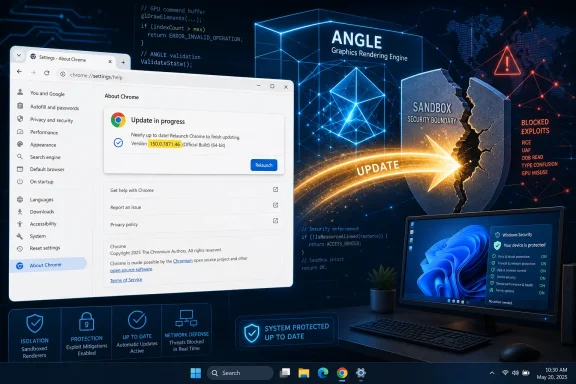
The direct fix is to update Chrome and relaunch it. Open the Chrome menu (⋮) and select Help > About Google Chrome. Wait while Chrome checks for and applies updates, confirm that the displayed version is 150.0.7871.46 or later, and then click Relaunch if that option appears. After Chrome reopens, return to the About page and verify the version again. Downloading an update is not enough if older Chrome processes are still running.
CVE-2026-14400 is easy to overstate because its description contains both a serious potential outcome and a significant prerequisite. According to the Chrome-submitted information displayed by the National Vulnerability Database, a remote attacker could potentially exploit the ANGLE flaw through crafted HTML after compromising the renderer process.
The supported interpretation is therefore a second-stage vulnerability. The attacker must first establish control in the renderer through some other vulnerability or condition. CVE-2026-14400 could then potentially be used against the sandbox boundary that is intended to contain that renderer compromise.
That distinction matters for accurate communication. The supplied record does not establish that CVE-2026-14400 alone provides an immediate route from encountering ordinary web content to taking over Windows. It also does not establish that the complete prerequisite-and-escape chain has been publicly demonstrated.
At the same time, the prerequisite does not make the flaw irrelevant. Browser sandboxes exist to reduce the consequences of renderer compromise. A vulnerability that could help cross that boundary can be useful as one part of a larger attack, even when it is not independently sufficient.
CISA-ADP’s CVSS vector records a network attack vector, High attack complexity, no privileges required, and required user interaction. Those fields should be reported without inventing a specific user action. The public information does not establish whether the required interaction consists of loading a page, clicking a control, performing a gesture, or taking some other action.
Likewise, “privileges required: none” means the CVSS assessment does not require the attacker to begin with authenticated privileges in the vulnerable system. It does not remove the documented renderer-compromise prerequisite, and it does not prove that no other exploit conditions would be needed.
The responsible conclusion is narrow but actionable: this is a browser security-boundary vulnerability with meaningful prerequisites, and the vulnerable code should be removed by updating Chrome beyond the published cutoff.
That classification establishes the broad defect category, but it does not disclose the vulnerable function, the exact input that reaches it, or the technique needed to turn the memory error into a sandbox escape. The linked Chromium issue is restricted, so the supplied information does not contain a developer-level explanation or public exploit recipe.
The phrase “potentially perform a sandbox escape” also needs to remain intact. It does not mean that every trigger of the out-of-bounds write necessarily produces an escape. It states the potential security result under the attack conditions described in the record.
Security reporting should not fill the missing technical details with guesses. The supplied evidence does not establish:
The attribution is important. This is a CISA-ADP assessment displayed by NVD, not an independently authored NVD score.
The changed-scope value is consistent with the record’s stated sandbox-escape potential: the modeled result crosses a security authority rather than remaining confined to the originally affected component. High confidentiality, integrity, and availability values describe potential consequences under the CVSS scoring assumptions.
They do not prove that a working public exploit can currently produce every modeled consequence on every Windows device. CVSS is a standardized technical assessment, not evidence of observed exploitation.
The High Chromium severity should also be presented as a published classification, not as a conclusion whose internal rationale can be reconstructed from the available data. The supplied record gives the rating and the CISA-ADP score, but it does not provide Chromium’s complete reasoning for assigning that severity.
CISA’s listed SSVC assessment reports:
“Exploitation: none” is a point-in-time status rather than a permanent safety guarantee. It does not establish that private research or undisclosed exploit development is impossible. Conversely, it should not be rewritten as evidence that an active attack campaign exists.
The practical posture is prompt remediation without breach assumptions. Administrators should patch because the affected range and corrected boundary are known, not because the supplied evidence proves active exploitation.
Version comparisons must be performed component by component. Chrome’s dotted version string is not a decimal number. Compare
The Chrome-submitted structured version entry may look awkward if individual fields are read in isolation. NIST’s affected configuration supplies the operational interpretation by identifying versions up to, but excluding, 150.0.7871.46.
That is enough to answer the reader’s immediate question. Unsupported platform-specific release-build assertions, promotion dates, rollout schedules, and record-modification timestamps are unnecessary to the remediation decision and should not be attached to the article without verified source material.
An unknown device should not be counted as safe. Offline systems, stale management records, conflicting scanner results, and devices that have not recently checked in belong in an exception queue until current evidence is collected.
If the About page says Chrome is managed or the update cannot be completed, the user should contact the organization’s administrator or help desk. Users should not attempt to bypass enterprise management controls. The objective is to obtain a current, supported Chrome build through the approved update process and then verify it after relaunch.
Installation inventory answers questions such as:
On an individual Windows device, an administrator can use PowerShell to inspect the executable paths used by running Chrome processes:
The following command reads the file version for each running Chrome executable:
This check is useful because it reports the executable associated with an active process rather than relying only on software inventory. Access controls may prevent one user from querying processes owned by another user, so enterprise tools should run the equivalent check with appropriate administrative context.
If the command reports an earlier version after the corrected release has been installed, close all Chrome windows and terminate the remaining Chrome processes through the organization’s normal support procedure. Start Chrome again and repeat the check.
For a simple local post-relaunch check, Chrome’s own About page remains the clearest user-facing evidence. For a managed fleet, administrators should collect current application inventory and, where supported, running-process or executable-version telemetry from their endpoint-management platform.
Different products can use different source revisions, build settings, update schedules, security boundaries, and version schemes. A Chrome cutoff should therefore not be copied into a Microsoft Edge or other Chromium-product compliance rule without that vendor’s confirmation.
The correct workflow is product-specific:
Administrators: Find every Chrome installation below the cutoff, deploy the current approved stable release, force or schedule a complete relaunch, and collect fresh post-restart version evidence. Check both installation inventory and the executable versions of running Chrome processes. Any device still below the cutoff should remain open as a failed remediation until it is updated or assigned a documented exception and containment plan.
Security teams: Preserve the supplied attribution. Chromium classifies the vulnerability as High. NVD displays a CISA-ADP CVSS 3.1 score of 8.3 High and the associated SSVC values. NIST’s configuration establishes that versions earlier than 150.0.7871.46 are affected. The Chrome-submitted description and restricted Chromium issue establish the component, weakness category, renderer-compromise prerequisite, and potential sandbox-escape outcome. Google Chrome Help supplies the user-facing update, version-check, and relaunch workflow.
The forward-looking test is whether new vendor-backed evidence changes the scope or threat status. A product-specific advisory could add another affected application. A revised configuration could alter the inventory filter. New exploitation evidence could justify additional investigation. Until that happens, the operational decision remains direct: remove Chrome versions earlier than 150.0.7871.46, relaunch the browser, verify what is actually running, and keep every unverified endpoint in the remediation queue.
The direct fix is to update Chrome and relaunch it. Open the Chrome menu (⋮) and select Help > About Google Chrome. Wait while Chrome checks for and applies updates, confirm that the displayed version is 150.0.7871.46 or later, and then click Relaunch if that option appears. After Chrome reopens, return to the About page and verify the version again. Downloading an update is not enough if older Chrome processes are still running.
 This Is a Second-Stage Escape, Not a One-Click Browser Takeover
CVE-2026-14400 is easy to overstate because its description contains both a serious potential outcome and a significant prerequisite. According to the Chrome-submitted information displayed by the National Vulnerability Database, a remote attacker could potentially exploit the ANGLE flaw through crafted HTML after compromising the renderer process.The supported interpretation is therefore a second-stage vulnerability. The attacker must first establish control in the renderer through some other vulnerability or condition. CVE-2026-14400 could then potentially be used against the sandbox boundary that is intended to contain that renderer compromise.
That distinction matters for accurate communication. The supplied record does not establish that CVE-2026-14400 alone provides an immediate route from encountering ordinary web content to taking over Windows. It also does not establish that the complete prerequisite-and-escape chain has been publicly demonstrated.
At the same time, the prerequisite does not make the flaw irrelevant. Browser sandboxes exist to reduce the consequences of renderer compromise. A vulnerability that could help cross that boundary can be useful as one part of a larger attack, even when it is not independently sufficient.
CISA-ADP’s CVSS vector records a network attack vector, High attack complexity, no privileges required, and required user interaction. Those fields should be reported without inventing a specific user action. The public information does not establish whether the required interaction consists of loading a page, clicking a control, performing a gesture, or taking some other action.
Likewise, “privileges required: none” means the CVSS assessment does not require the attacker to begin with authenticated privileges in the vulnerable system. It does not remove the documented renderer-compromise prerequisite, and it does not prove that no other exploit conditions would be needed.
The responsible conclusion is narrow but actionable: this is a browser security-boundary vulnerability with meaningful prerequisites, and the vulnerable code should be removed by updating Chrome beyond the published cutoff.
What the ANGLE Classification Establishes
The public record identifies the affected component as ANGLE and maps the flaw to CWE-787, Out-of-bounds Write. An out-of-bounds write is a memory-safety error in which software writes beyond the intended boundary of a memory region.That classification establishes the broad defect category, but it does not disclose the vulnerable function, the exact input that reaches it, or the technique needed to turn the memory error into a sandbox escape. The linked Chromium issue is restricted, so the supplied information does not contain a developer-level explanation or public exploit recipe.
The phrase “potentially perform a sandbox escape” also needs to remain intact. It does not mean that every trigger of the out-of-bounds write necessarily produces an escape. It states the potential security result under the attack conditions described in the record.
Security reporting should not fill the missing technical details with guesses. The supplied evidence does not establish:
- The exact process in which the vulnerable operation occurs.
- A specific memory-corruption technique or reliable exploitation method.
- Dependence on a particular graphics card, driver, Windows build, or hardware-acceleration setting.
- Kernel compromise, firmware compromise, or persistence.
- Automatic access to credentials, documents, or every resource on the device.
- A reliable antivirus, crash-log, or disk-artifact signature for this CVE.
- Active use of CVE-2026-14400 in a publicly documented campaign.
- Exposure in Microsoft Edge or every other Chromium-derived product.
The 8.3 Score Describes Potential Impact, Not Observed Attacks
The National Vulnerability Database displays a CISA-ADP CVSS 3.1 score of 8.3 High, using the vector:CVSS:3.1/AV:N/AC:H/PR:N/UI:R/S:C/C:H/I:H/A:HThe attribution is important. This is a CISA-ADP assessment displayed by NVD, not an independently authored NVD score.
| Assessment source | System | Result | What it establishes |
|---|---|---|---|
| Chromium | Product severity | High | Chromium’s stated security-severity classification |
| CISA-ADP | CVSS 3.1 | 8.3 High | A network vector, High complexity, no privileges required, required user interaction, changed scope, and High potential impact |
| NVD/NIST | CVSS 4.0 | Not provided in the supplied record | No NIST-authored CVSS 4.0 assessment is available in the supplied material |
| NVD/NIST | CVSS 3.x | Not provided in the supplied record | NVD displays the contributed CISA-ADP score but has not supplied its own score in the provided record |
| NVD/NIST | CVSS 2.0 | Not provided in the supplied record | No NIST-authored CVSS 2.0 assessment is available in the supplied material |
They do not prove that a working public exploit can currently produce every modeled consequence on every Windows device. CVSS is a standardized technical assessment, not evidence of observed exploitation.
The High Chromium severity should also be presented as a published classification, not as a conclusion whose internal rationale can be reconstructed from the available data. The supplied record gives the rating and the CISA-ADP score, but it does not provide Chromium’s complete reasoning for assigning that severity.
CISA’s listed SSVC assessment reports:
- Exploitation: none
- Automatable: no
- Technical impact: total
“Exploitation: none” is a point-in-time status rather than a permanent safety guarantee. It does not establish that private research or undisclosed exploit development is impossible. Conversely, it should not be rewritten as evidence that an active attack campaign exists.
The practical posture is prompt remediation without breach assumptions. Administrators should patch because the affected range and corrected boundary are known, not because the supplied evidence proves active exploitation.
The Version Boundary Is the Deciding Fact
The most useful rule in the supplied NIST configuration is straightforward:- Earlier than 150.0.7871.46: within the documented affected range.
- 150.0.7871.46: meets the supplied remediation boundary.
- Later than 150.0.7871.46: outside the supplied affected range.
Version comparisons must be performed component by component. Chrome’s dotted version string is not a decimal number. Compare
150, then 0, then 7871, and finally 46. A lower value at the first differing component means the installed version is earlier.The Chrome-submitted structured version entry may look awkward if individual fields are read in isolation. NIST’s affected configuration supplies the operational interpretation by identifying versions up to, but excluding, 150.0.7871.46.
That is enough to answer the reader’s immediate question. Unsupported platform-specific release-build assertions, promotion dates, rollout schedules, and record-modification timestamps are unnecessary to the remediation decision and should not be attached to the article without verified source material.
Version decision table
| Chrome version reported | Status for CVE-2026-14400 | Required action |
|---|---|---|
| Earlier than 150.0.7871.46 | Affected | Update, relaunch, and verify |
| Exactly 150.0.7871.46 | Meets the supplied fixed boundary | Confirm this is the running version |
| Later than 150.0.7871.46 | Outside the supplied affected range | Maintain normal update compliance |
| Missing, stale, or conflicting result | Unknown | Re-query or inspect the endpoint |
| Chrome not installed | Not installed | Record evidence rather than marking it patched |
End-User Update and Verification Procedure
Windows users can apply the direct remediation from Chrome itself:- Save important work in active browser tabs or web applications.
- Open Google Chrome.
- Select the three-dot Chrome menu, ⋮, in the upper-right corner.
- Select Help > About Google Chrome.
- Wait while Chrome checks for an available update.
- Allow the update to download and apply.
- Confirm that the page reports 150.0.7871.46 or later.
- Click Relaunch when Chrome offers that option.
- After Chrome reopens, return to ⋮ > Help > About Google Chrome.
- Verify again that the running browser reports 150.0.7871.46 or later.
chrome://settings/help in the address bar to open the same page.If the About page says Chrome is managed or the update cannot be completed, the user should contact the organization’s administrator or help desk. Users should not attempt to bypass enterprise management controls. The objective is to obtain a current, supported Chrome build through the approved update process and then verify it after relaunch.
Installation Inventory and Running-Process Verification Are Different
The WindowsForum value-add is in closing the gap between “an update was deployed” and “the corrected code is running.”Installation inventory answers questions such as:
- Is Google Chrome installed?
- Where is it installed?
- What version is recorded for the executable or package?
- Are there machine-wide and per-user copies?
- When did the management agent last report the result?
- Which Chrome executable is currently running, and what version does that executable report?
On an individual Windows device, an administrator can use PowerShell to inspect the executable paths used by running Chrome processes:
Code:
Get-Process chrome -ErrorAction SilentlyContinue |
    Select-Object -ExpandProperty Path -Unique
Code:
Get-Process chrome -ErrorAction SilentlyContinue |
    Select-Object -ExpandProperty Path -Unique |
    ForEach-Object {
        $item = Get-Item $_
        [PSCustomObject]@{
            Path        = $item.FullName
            FileVersion = $item.VersionInfo.FileVersion
        }
}If the command reports an earlier version after the corrected release has been installed, close all Chrome windows and terminate the remaining Chrome processes through the organization’s normal support procedure. Start Chrome again and repeat the check.
For a simple local post-relaunch check, Chrome’s own About page remains the clearest user-facing evidence. For a managed fleet, administrators should collect current application inventory and, where supported, running-process or executable-version telemetry from their endpoint-management platform.
Handling devices still below the cutoff
After a forced or scheduled relaunch, re-query the targeted devices. Sort the results into four operational states:- Remediated: Chrome reports 150.0.7871.46 or later after relaunch.
- Affected: Chrome still reports an earlier version.
- Not installed: Current evidence shows that Google Chrome is absent.
- Unknown: The device is offline, stale, conflicting, inaccessible, or otherwise unverifiable.
- Confirm which Chrome executable and path are being measured.
- Check whether more than one Chrome installation exists.
- Redeploy the approved current release.
- Ensure all older Chrome processes are closed.
- Start Chrome and collect a new version result.
- If it still remains below the boundary, assign the endpoint to support or endpoint engineering for investigation.
- Record an owner, current state, and next action for every unresolved exception.
Admin Checklist
- Inventory Google Chrome installations rather than searching only for generic Chromium components.
- Flag every reported Chrome version earlier than 150.0.7871.46.
- Deploy the organization’s current approved stable Chrome release.
- Require or schedule a complete Chrome relaunch.
- Verify the post-relaunch version, not merely the deployment status.
- Distinguish installation inventory from the versions of running Chrome processes.
- Search for machine-wide, per-user, virtual-desktop, kiosk, portable, and automation-host installations where those categories are part of the organization’s managed estate.
- Re-query endpoints after remediation and separate affected, remediated, not-installed, and unknown results.
- Treat stale or missing inventory as unknown rather than safe.
- Investigate devices that remain below 150.0.7871.46 after a forced relaunch.
- Assign an owner and documented action to every failed, offline, or unverifiable endpoint.
- Preserve pre-update and post-update version evidence in the remediation ticket.
- Record the 8.3 High score as a CISA-ADP CVSS 3.1 assessment displayed by NVD.
- Record Chromium’s High severity separately rather than treating the two measurements as interchangeable.
- Preserve the supplied SSVC values: exploitation none, automatable no, and technical impact total.
- Do not report active exploitation without new evidence.
- Do not extend the Chrome CPE automatically to Microsoft Edge or every Chromium-derived application.
- Monitor other vendors’ advisories for product-specific determinations and version guidance.
The Chrome CPE Does Not Automatically Cover Every Chromium Browser
The NVD configuration identifies Google Chrome. Although ANGLE is used in a wider software ecosystem, the presence of a shared component does not by itself prove that another product contains the vulnerable condition in a reachable form.Different products can use different source revisions, build settings, update schedules, security boundaries, and version schemes. A Chrome cutoff should therefore not be copied into a Microsoft Edge or other Chromium-product compliance rule without that vendor’s confirmation.
The correct workflow is product-specific:
- Remediate Google Chrome using the published Chrome boundary.
- Inventory other Chromium-derived products separately.
- Consult each product vendor’s own security guidance.
- Add another product to the affected scope only when supported by product-specific evidence.
- Do not treat updating another browser as proof that Chrome was updated.
- Do not treat updating Chrome as proof that every embedded Chromium runtime was updated.
What the Public Record Does—and Does Not—Support
The supplied material supports the following concise advisory:The record does not prove that CVE-2026-14400:CVE-2026-14400 is a High-severity out-of-bounds write in ANGLE affecting Google Chrome versions earlier than 150.0.7871.46. After first compromising the renderer process, a remote attacker could potentially use crafted HTML to perform a sandbox escape. CISA-ADP assigns a CVSS 3.1 score of 8.3 High, and the listed SSVC assessment reports exploitation as none, automatable as no, and technical impact as total. Update Chrome to 150.0.7871.46 or later, relaunch it, and verify the resulting version.
- Independently compromises Windows from an ordinary browser visit.
- Has been combined publicly with a renderer exploit.
- Is being actively exploited.
- Requires only the loading of a page as its user interaction.
- Avoids every permission prompt or authentication step.
- Produces a particular crash, file, log entry, or endpoint alert.
- Depends on or bypasses a specific antivirus product.
- Affects a particular GPU, driver, or graphics setting.
- Grants kernel privileges or persistence.
- Affects every Chromium-derived browser.
- Has a public proof of concept or complete technical analysis.
What to Do Now
Windows users: Open Chrome menu (⋮) > Help > About Google Chrome, wait for the update check, confirm 150.0.7871.46 or later, and click Relaunch. Return to the About page after Chrome reopens and verify the version again.Administrators: Find every Chrome installation below the cutoff, deploy the current approved stable release, force or schedule a complete relaunch, and collect fresh post-restart version evidence. Check both installation inventory and the executable versions of running Chrome processes. Any device still below the cutoff should remain open as a failed remediation until it is updated or assigned a documented exception and containment plan.
Security teams: Preserve the supplied attribution. Chromium classifies the vulnerability as High. NVD displays a CISA-ADP CVSS 3.1 score of 8.3 High and the associated SSVC values. NIST’s configuration establishes that versions earlier than 150.0.7871.46 are affected. The Chrome-submitted description and restricted Chromium issue establish the component, weakness category, renderer-compromise prerequisite, and potential sandbox-escape outcome. Google Chrome Help supplies the user-facing update, version-check, and relaunch workflow.
The forward-looking test is whether new vendor-backed evidence changes the scope or threat status. A product-specific advisory could add another affected application. A revised configuration could alter the inventory filter. New exploitation evidence could justify additional investigation. Until that happens, the operational decision remains direct: remove Chrome versions earlier than 150.0.7871.46, relaunch the browser, verify what is actually running, and keep every unverified endpoint in the remediation queue.
References
- Primary source: NVD / Chromium
Published: 2026-07-11T15:37:44-07:00
NVD - CVE-2026-14400
 nvd.nist.gov
- Security advisory: MSRC
Published: 2026-07-11T15:37:44-07:00
Original feed URL
Security Update Guide - Microsoft Security Response Center
 msrc.microsoft.com
- Related coverage: chromium.org