

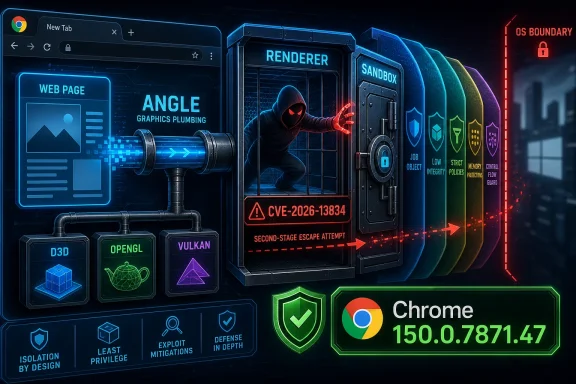
Google assigned CVE-2026-13834 to a high-severity Chromium flaw in ANGLE, fixed in Chrome 150.0.7871.47 after disclosure on June 30, 2026, because a crafted HTML page could let an attacker who had already compromised Chrome’s renderer attempt a sandbox escape. The bug is not a classic “visit a page and lose the machine” vulnerability by itself, but it is exactly the kind of second-stage browser weakness defenders cannot afford to hand-wave. As documented by NVD and Google’s Chrome Releases advisory, the interesting part is not merely the CVE number; it is the boundary it attacks. The renderer sandbox is supposed to be the blast door between hostile web content and the operating system, and ANGLE sits uncomfortably close to the machinery that makes that door worth having.
CVE-2026-13834 is easy to underestimate because its description includes an important condition: the attacker must already have compromised the renderer process. That sounds like a caveat until you remember how modern browser exploitation actually works. Attack chains rarely depend on one miraculous bug; they stitch together memory corruption, type confusion, logic flaws, GPU bugs, and sandbox escapes into something that survives the browser’s layered defenses.
The NVD entry describes the issue as “insufficient validation of untrusted input” in ANGLE, the Chromium graphics translation layer used to map web graphics APIs onto platform graphics back ends. Google’s own release notes classify it as a high-severity Chromium security issue and point users to Chrome 150.0.7871.47 as the fixed desktop build. CISA’s ADP enrichment gives it a CVSS 3.1 score of 8.3, with high confidentiality, integrity, and availability impact if exploited successfully.
That combination tells us what kind of bug this is. It is not a remote-code-execution headline in the lazy sense where any web page instantly owns the host. It is a sandbox-escape candidate: a post-renderer-compromise step that may turn a contained browser exploit into something with consequences outside the tab.
For Windows users, that distinction matters less than it seems. A browser sandbox is a promise that even if web content goes badly wrong, the attacker remains boxed in. A high-severity ANGLE validation flaw is therefore not just another Chrome CVE; it is a warning about the weak seam where web graphics, GPU acceleration, and platform isolation meet.
That makes it essential to the modern web. The browser is no longer just parsing documents and running JavaScript; it is rendering games, videoconferencing effects, 3D models, accelerated UI frameworks, maps, simulations, and GPU-backed media pipelines. The more the web behaves like an application platform, the more components like ANGLE become part of the browser’s trusted critical path.
The security problem is that graphics stacks have historically been complicated, highly privileged, and difficult to reason about. They process attacker-influenced data at high speed, cross process boundaries, interact with drivers, and often expose old assumptions made for native applications rather than hostile web pages. Chromium’s sandbox architecture tries to tame that complexity, but ANGLE remains a translator between untrusted web requests and powerful platform capabilities.
That is why the wording “insufficient validation of untrusted input” should not be dismissed as boilerplate. Input validation bugs in graphics layers can become boundary violations, and boundary violations are what attackers need when their first exploit lands inside a constrained renderer. The bug’s severity comes from where it sits, not from how dramatic the phrase sounds.
The fixed Chrome version matters because vulnerability scanners, enterprise inventory systems, and patch dashboards will reduce this entire story to a version comparison. If Chrome is older than 150.0.7871.47 on Windows or Mac, it should be considered exposed to this specific CVE. Linux builds in the same release family were also updated, though version numbering can differ slightly by platform and distribution channel.
NVD’s change history shows the CPE configuration was added after initial publication, covering Google Chrome versions before 150.0.7871.47. That is normal for new CVE records, but it also explains why scanners may disagree in the first days after disclosure. NVD enrichment, CISA scoring, vendor release notes, and third-party vulnerability feeds do not always converge at the same hour.
The result is familiar to administrators: the CVE appears, the Chrome advisory exists, CISA enrichment arrives, NVD initially lacks its own full assessment, and endpoint tools start arguing over whether a machine is red, yellow, or temporarily unknown. In that fog, the practical answer is simple. If the browser is below the fixed version, update it; if inventory cannot prove the version, assume you have work to do.
A renderer compromise can still be dangerous on its own. Attackers may interact with browser-exposed data, attempt credential theft, abuse web permissions, or chain the bug with other weaknesses. But the sandbox is supposed to prevent easy access to the broader operating system, user files, arbitrary processes, and persistence mechanisms.
A sandbox escape changes the risk equation. Once an attacker can escape the renderer boundary, the browser exploit starts to resemble a local compromise path launched from a web page. It may still face other mitigations — OS permissions, exploit protection, endpoint detection, user context limits — but the attacker is no longer trapped inside the most important browser cage.
This is why defenders should resist the temptation to rank CVE-2026-13834 below flashier “remote code execution” advisories. In a mature exploit chain, the sandbox escape may be the decisive move. The first bug gets code running in the renderer; the second bug decides whether that code stays in the browser or starts interacting with the host.
Microsoft Edge complicates this because it is both a browser and a Windows-adjacent platform component in many organizations. Edge follows Chromium closely, but Microsoft also maintains its own release notes, policies, enterprise channels, and Extended Stable cadence. Microsoft’s Edge documentation routinely notes when Stable updates incorporate Chromium security fixes, and the Microsoft Update Catalog already shows Edge 150 packages appearing in early July 2026.
That does not mean every Chromium CVE maps cleanly and instantly to every Edge build number in the same way. Vendors may backport fixes, ship different patch levels, or describe issues through their own security-release pages. But administrators should not treat a Chrome-only advisory as irrelevant merely because their standard browser is Edge.
The operational question is not “Do we use Google Chrome?” It is “Which Chromium-derived browsers are installed, which channels are they on, and which build numbers are actually running?” On Windows fleets, the honest answer often includes Chrome, Edge Stable, Edge Extended Stable, WebView2 runtimes, and a scattering of developer or portable browsers that escaped standard management.
That vector is worth unpacking. Network attack vector means the path begins remotely. No privileges required means the attacker does not need an account on the victim’s system. User interaction required means someone must visit or load malicious content. High attack complexity reflects the need for a renderer compromise and likely chaining conditions. Scope changed and high CIA impact explain why the sandbox boundary is central to the rating.
This is precisely the kind of vulnerability where a missing NVD score should not freeze remediation. NVD enrichment is useful for normalization and reporting, but browser patching is driven by vendor fixes, exploitability class, and exposure. Google says Chrome before 150.0.7871.47 is affected; CISA has enriched the issue as high severity; the bug class sits in a sensitive browser component.
The right enterprise posture is to treat the NVD gap as a data-quality artifact, not a risk signal. Waiting for one database to catch up makes sense for audit paperwork. It does not make sense for a browser sandbox escape class bug that already has a fixed release.
In enterprises, that answer becomes less neat. Chrome may be installed per-machine or per-user. Edge may be updated through Microsoft’s updater, Windows Update, Configuration Manager, Intune, WSUS workflows, or third-party patch tools. Some users keep alternative Chromium browsers for testing, extensions, customer portals, legacy workflows, or simple preference. Developers often run Beta, Dev, Canary, or standalone Chromium snapshots that do not follow the same policy path as the corporate standard browser.
The bigger blind spot is process reality. Inventory systems may tell you what is installed, but not what actually executed when the user clicked a link in Teams, Outlook, Slack, a PDF, a password manager, or a line-of-business app. Default-browser policy helps, but users and applications still find ways to launch whatever browser is registered, bundled, embedded, or convenient.
For CVE-2026-13834, defenders should verify the running browser estate rather than merely close a ticket against “Chrome.” That means checking installed versions, active processes, update-policy blocks, user-level installs, and any application that embeds Chromium or WebView technology. The vulnerability is in a browser component, but the exposure lives in daily workflow.
ANGLE’s purpose is to make graphics work consistently across back ends, which means the vulnerable logic may not map cleanly to one visible browser setting. A crafted HTML page does not need to announce that it is exploiting ANGLE. It can present as a normal web application, an ad, an embedded frame, a document preview, or some other piece of content that causes graphics code to run.
This is where endpoint defenses matter, but only after patching. Browser exploit chains often leave traces: crashes, unusual child processes, suspicious command interpreters spawned from browser processes, abnormal GPU-process behavior, or network activity around unfamiliar domains. Those signals can help incident responders, especially if a fleet had a delayed patch rollout.
But detection is not the cure for a patchable browser flaw. It is a backstop for the uncomfortable period between disclosure and deployment. In a browser world where updates ship constantly and attackers reverse patches quickly, that period is shrinking.
CVE-2026-13834 is part of a broader pattern in 2026: large Chrome security releases, repeated ANGLE and GPU-adjacent issues, and rapid downstream pressure on Chromium-based browsers. The individual CVE is important, but the maintenance model is the real story. Browser security is now continuous operations.
That creates tension for administrators. Fast browser updates can break extensions, application compatibility, identity plugins, kiosk environments, media workflows, and fragile enterprise web apps. Reddit threads and admin forums around Chrome and Edge updates regularly show users discovering extension changes, playback regressions, or policy surprises immediately after a security release.
The answer is not to slow-roll security fixes indefinitely. It is to separate emergency security patching from leisurely feature validation. Enterprises need rings, pilots, rollback plans, and compatibility telemetry, but they also need a rule that high-severity browser sandbox and renderer-chain bugs move faster than ordinary feature releases.
A scanner may flag Chrome and miss Edge. It may flag Edge and miss a bundled Chromium runtime. It may fail to detect a per-user install under a profile directory. It may identify a vulnerable executable that exists on disk but is never launched. Or it may miss a portable browser running from a developer tools folder because nobody thought to inventory it.
This does not make CPEs useless. It makes them a starting point. For a vulnerability like CVE-2026-13834, the better question is whether any user can reach untrusted web content through a vulnerable Chromium engine. That is broader than the CPE row and narrower than panicking about every package with the word “Chrome” in it.
The “Are we missing a CPE?” prompt on the NVD page is therefore more than bureaucratic housekeeping. It reflects a real difficulty in browser vulnerability accounting: shared code moves faster than databases, and downstream products do not always line up neatly on day one.
CVE-2026-13834 should push administrators to check update health, not just version state. A browser at 150.0.7871.47 today is good. A browser updater that has been failing silently for three weeks is the real incident waiting to happen. The difference becomes visible only if patch reporting includes update failures, restart debt, channel drift, and unmanaged installs.
For security teams, the most valuable query may not be “find CVE-2026-13834.” It may be “show me all Chromium-family browsers below their current security baseline, grouped by update mechanism.” That catches the systemic problem rather than one named vulnerability.
For Windows enthusiasts running multiple browsers, the advice is similar but simpler. Update Chrome. Update Edge. Update any Chromium-based secondary browser you actually use. Then restart them fully, because a downloaded browser update that has not relaunched is a promise, not a protection.
The sparse public detail around CVE-2026-13834 should not be mistaken for low confidence. The combination of component, weakness class, required precondition, affected version, and fixed build provides enough information to prioritize. The missing exploit narrative is not needed to decide whether to patch a high-severity sandbox-escape candidate in a web-facing application.
There is currently no public indication in the provided NVD and CISA data that CVE-2026-13834 is being exploited in the wild. CISA’s SSVC entry lists exploitation as “none” and automatable as “no,” while still assigning total technical impact. That is a useful distinction. It says defenders should not invent an active campaign where one has not been reported, but they also should not confuse “no known exploitation” with “safe to ignore.”
The history of browser exploitation is full of bugs that became more interesting after patches landed and attackers had something to reverse. A high-impact bug with no known exploitation is still a race, just one that defenders may currently be winning.
 The Browser Bug That Starts After the Browser Has Already Lost
CVE-2026-13834 is easy to underestimate because its description includes an important condition: the attacker must already have compromised the renderer process. That sounds like a caveat until you remember how modern browser exploitation actually works. Attack chains rarely depend on one miraculous bug; they stitch together memory corruption, type confusion, logic flaws, GPU bugs, and sandbox escapes into something that survives the browser’s layered defenses.The NVD entry describes the issue as “insufficient validation of untrusted input” in ANGLE, the Chromium graphics translation layer used to map web graphics APIs onto platform graphics back ends. Google’s own release notes classify it as a high-severity Chromium security issue and point users to Chrome 150.0.7871.47 as the fixed desktop build. CISA’s ADP enrichment gives it a CVSS 3.1 score of 8.3, with high confidentiality, integrity, and availability impact if exploited successfully.
That combination tells us what kind of bug this is. It is not a remote-code-execution headline in the lazy sense where any web page instantly owns the host. It is a sandbox-escape candidate: a post-renderer-compromise step that may turn a contained browser exploit into something with consequences outside the tab.
For Windows users, that distinction matters less than it seems. A browser sandbox is a promise that even if web content goes badly wrong, the attacker remains boxed in. A high-severity ANGLE validation flaw is therefore not just another Chrome CVE; it is a warning about the weak seam where web graphics, GPU acceleration, and platform isolation meet.
ANGLE Is Plumbing, and Plumbing Is Where the Pressure Goes
ANGLE is not a consumer feature with a friendly toggle and a marketing page. It is the kind of deep browser infrastructure that only becomes visible when something breaks. Short for Almost Native Graphics Layer Engine, ANGLE helps Chromium translate APIs such as WebGL and other graphics workloads across Direct3D, OpenGL, Vulkan, Metal, and other platform-specific graphics systems.That makes it essential to the modern web. The browser is no longer just parsing documents and running JavaScript; it is rendering games, videoconferencing effects, 3D models, accelerated UI frameworks, maps, simulations, and GPU-backed media pipelines. The more the web behaves like an application platform, the more components like ANGLE become part of the browser’s trusted critical path.
The security problem is that graphics stacks have historically been complicated, highly privileged, and difficult to reason about. They process attacker-influenced data at high speed, cross process boundaries, interact with drivers, and often expose old assumptions made for native applications rather than hostile web pages. Chromium’s sandbox architecture tries to tame that complexity, but ANGLE remains a translator between untrusted web requests and powerful platform capabilities.
That is why the wording “insufficient validation of untrusted input” should not be dismissed as boilerplate. Input validation bugs in graphics layers can become boundary violations, and boundary violations are what attackers need when their first exploit lands inside a constrained renderer. The bug’s severity comes from where it sits, not from how dramatic the phrase sounds.
Chrome 150 Was Not a Quiet Patch Tuesday
Google’s June 30 Stable Channel update was large even by modern browser standards. Malwarebytes characterized the release as a “whopper” because it addressed hundreds of security fixes across Chrome’s desktop and Android builds, with desktop versions moving to 150.0.7871.46 or 150.0.7871.47 depending on platform. CVE-2026-13834 was one entry in that crowded field, but its sandbox-escape shape makes it more operationally interesting than many ordinary memory-safety bugs.The fixed Chrome version matters because vulnerability scanners, enterprise inventory systems, and patch dashboards will reduce this entire story to a version comparison. If Chrome is older than 150.0.7871.47 on Windows or Mac, it should be considered exposed to this specific CVE. Linux builds in the same release family were also updated, though version numbering can differ slightly by platform and distribution channel.
NVD’s change history shows the CPE configuration was added after initial publication, covering Google Chrome versions before 150.0.7871.47. That is normal for new CVE records, but it also explains why scanners may disagree in the first days after disclosure. NVD enrichment, CISA scoring, vendor release notes, and third-party vulnerability feeds do not always converge at the same hour.
The result is familiar to administrators: the CVE appears, the Chrome advisory exists, CISA enrichment arrives, NVD initially lacks its own full assessment, and endpoint tools start arguing over whether a machine is red, yellow, or temporarily unknown. In that fog, the practical answer is simple. If the browser is below the fixed version, update it; if inventory cannot prove the version, assume you have work to do.
The Sandbox Escape Is the Second Half of the Attack
The most important phrase in the CVE description is “who had compromised the renderer process.” Chromium’s multi-process model isolates web content in renderer processes precisely because the web is hostile by design. JavaScript engines, HTML parsers, media codecs, and layout engines all parse attacker-supplied content, so the renderer is treated as a place where things may eventually go wrong.A renderer compromise can still be dangerous on its own. Attackers may interact with browser-exposed data, attempt credential theft, abuse web permissions, or chain the bug with other weaknesses. But the sandbox is supposed to prevent easy access to the broader operating system, user files, arbitrary processes, and persistence mechanisms.
A sandbox escape changes the risk equation. Once an attacker can escape the renderer boundary, the browser exploit starts to resemble a local compromise path launched from a web page. It may still face other mitigations — OS permissions, exploit protection, endpoint detection, user context limits — but the attacker is no longer trapped inside the most important browser cage.
This is why defenders should resist the temptation to rank CVE-2026-13834 below flashier “remote code execution” advisories. In a mature exploit chain, the sandbox escape may be the decisive move. The first bug gets code running in the renderer; the second bug decides whether that code stays in the browser or starts interacting with the host.
The Windows Angle Is Really an Edge Angle Too
For WindowsForum readers, the Chrome label is only half the story. Chromium is the engine family beneath Google Chrome, Microsoft Edge, Brave, Vivaldi, Opera, and many other browsers. A Chromium flaw in shared code can become a downstream problem for any browser that carries the vulnerable component, even if each vendor ships fixes on its own cadence.Microsoft Edge complicates this because it is both a browser and a Windows-adjacent platform component in many organizations. Edge follows Chromium closely, but Microsoft also maintains its own release notes, policies, enterprise channels, and Extended Stable cadence. Microsoft’s Edge documentation routinely notes when Stable updates incorporate Chromium security fixes, and the Microsoft Update Catalog already shows Edge 150 packages appearing in early July 2026.
That does not mean every Chromium CVE maps cleanly and instantly to every Edge build number in the same way. Vendors may backport fixes, ship different patch levels, or describe issues through their own security-release pages. But administrators should not treat a Chrome-only advisory as irrelevant merely because their standard browser is Edge.
The operational question is not “Do we use Google Chrome?” It is “Which Chromium-derived browsers are installed, which channels are they on, and which build numbers are actually running?” On Windows fleets, the honest answer often includes Chrome, Edge Stable, Edge Extended Stable, WebView2 runtimes, and a scattering of developer or portable browsers that escaped standard management.
NVD’s Missing Assessment Is Not a Reason to Wait
The user-facing CVE record currently has an awkward look: NVD has published the entry and last modified it on July 2, 2026, but its own CVSS assessment is not yet provided. CISA-ADP, however, has supplied a CVSS 3.1 vector of AV:N/AC:H/PR:N/UI:R/S:C/C:H/I:H/A:H, yielding a high score of 8.3.That vector is worth unpacking. Network attack vector means the path begins remotely. No privileges required means the attacker does not need an account on the victim’s system. User interaction required means someone must visit or load malicious content. High attack complexity reflects the need for a renderer compromise and likely chaining conditions. Scope changed and high CIA impact explain why the sandbox boundary is central to the rating.
This is precisely the kind of vulnerability where a missing NVD score should not freeze remediation. NVD enrichment is useful for normalization and reporting, but browser patching is driven by vendor fixes, exploitability class, and exposure. Google says Chrome before 150.0.7871.47 is affected; CISA has enriched the issue as high severity; the bug class sits in a sensitive browser component.
The right enterprise posture is to treat the NVD gap as a data-quality artifact, not a risk signal. Waiting for one database to catch up makes sense for audit paperwork. It does not make sense for a browser sandbox escape class bug that already has a fixed release.
The Hard Part Is Knowing Which Browser Actually Launched
On unmanaged home PCs, the remediation story is refreshingly direct. Open Chrome, go to the About page, let the updater run, and restart the browser. If the version is 150.0.7871.47 or later on affected desktop platforms, this specific CVE should be addressed.In enterprises, that answer becomes less neat. Chrome may be installed per-machine or per-user. Edge may be updated through Microsoft’s updater, Windows Update, Configuration Manager, Intune, WSUS workflows, or third-party patch tools. Some users keep alternative Chromium browsers for testing, extensions, customer portals, legacy workflows, or simple preference. Developers often run Beta, Dev, Canary, or standalone Chromium snapshots that do not follow the same policy path as the corporate standard browser.
The bigger blind spot is process reality. Inventory systems may tell you what is installed, but not what actually executed when the user clicked a link in Teams, Outlook, Slack, a PDF, a password manager, or a line-of-business app. Default-browser policy helps, but users and applications still find ways to launch whatever browser is registered, bundled, embedded, or convenient.
For CVE-2026-13834, defenders should verify the running browser estate rather than merely close a ticket against “Chrome.” That means checking installed versions, active processes, update-policy blocks, user-level installs, and any application that embeds Chromium or WebView technology. The vulnerability is in a browser component, but the exposure lives in daily workflow.
GPU Acceleration Is Not a Strategy, but It Is a Clue
Whenever a graphics-layer browser bug appears, someone inevitably asks whether disabling hardware acceleration mitigates the issue. Sometimes it may reduce exposure to a particular GPU path. Sometimes it breaks performance, video, conferencing, rendering, and user sanity while leaving other code paths reachable. Without a vendor-documented mitigation for this CVE, disabling GPU acceleration should be treated as a temporary troubleshooting or emergency containment step, not a primary fix.ANGLE’s purpose is to make graphics work consistently across back ends, which means the vulnerable logic may not map cleanly to one visible browser setting. A crafted HTML page does not need to announce that it is exploiting ANGLE. It can present as a normal web application, an ad, an embedded frame, a document preview, or some other piece of content that causes graphics code to run.
This is where endpoint defenses matter, but only after patching. Browser exploit chains often leave traces: crashes, unusual child processes, suspicious command interpreters spawned from browser processes, abnormal GPU-process behavior, or network activity around unfamiliar domains. Those signals can help incident responders, especially if a fleet had a delayed patch rollout.
But detection is not the cure for a patchable browser flaw. It is a backstop for the uncomfortable period between disclosure and deployment. In a browser world where updates ship constantly and attackers reverse patches quickly, that period is shrinking.
Patch Cadence Has Become the Browser Security Control
The modern browser is one of the fastest-moving pieces of software in the enterprise, and that speed is not a luxury. Google, Microsoft, and other Chromium vendors now ship security fixes at a rhythm that makes old monthly patch rituals look ceremonial. A browser left one or two minor releases behind can accumulate dozens or hundreds of known weaknesses.CVE-2026-13834 is part of a broader pattern in 2026: large Chrome security releases, repeated ANGLE and GPU-adjacent issues, and rapid downstream pressure on Chromium-based browsers. The individual CVE is important, but the maintenance model is the real story. Browser security is now continuous operations.
That creates tension for administrators. Fast browser updates can break extensions, application compatibility, identity plugins, kiosk environments, media workflows, and fragile enterprise web apps. Reddit threads and admin forums around Chrome and Edge updates regularly show users discovering extension changes, playback regressions, or policy surprises immediately after a security release.
The answer is not to slow-roll security fixes indefinitely. It is to separate emergency security patching from leisurely feature validation. Enterprises need rings, pilots, rollback plans, and compatibility telemetry, but they also need a rule that high-severity browser sandbox and renderer-chain bugs move faster than ordinary feature releases.
CPE Records Are Useful, but They Do Not Describe Your Fleet
The NVD record’s CPE addition for Chrome versions before 150.0.7871.47 is helpful for scanners. It gives vulnerability-management tools a machine-readable way to match affected products. But CPE matching is also a crude abstraction for the messy reality of Chromium distribution.A scanner may flag Chrome and miss Edge. It may flag Edge and miss a bundled Chromium runtime. It may fail to detect a per-user install under a profile directory. It may identify a vulnerable executable that exists on disk but is never launched. Or it may miss a portable browser running from a developer tools folder because nobody thought to inventory it.
This does not make CPEs useless. It makes them a starting point. For a vulnerability like CVE-2026-13834, the better question is whether any user can reach untrusted web content through a vulnerable Chromium engine. That is broader than the CPE row and narrower than panicking about every package with the word “Chrome” in it.
The “Are we missing a CPE?” prompt on the NVD page is therefore more than bureaucratic housekeeping. It reflects a real difficulty in browser vulnerability accounting: shared code moves faster than databases, and downstream products do not always line up neatly on day one.
The Practical Risk Is Highest Where Browsers Are Treated as Background Noise
Home users tend to notice browsers because the icon is in front of them. Enterprises often do the opposite: browsers become background plumbing, assumed to auto-update until a help-desk ticket proves otherwise. That assumption is dangerous when a security update depends on a restart, a stuck updater, a disabled service, a stale golden image, or a policy that intentionally defers updates.CVE-2026-13834 should push administrators to check update health, not just version state. A browser at 150.0.7871.47 today is good. A browser updater that has been failing silently for three weeks is the real incident waiting to happen. The difference becomes visible only if patch reporting includes update failures, restart debt, channel drift, and unmanaged installs.
For security teams, the most valuable query may not be “find CVE-2026-13834.” It may be “show me all Chromium-family browsers below their current security baseline, grouped by update mechanism.” That catches the systemic problem rather than one named vulnerability.
For Windows enthusiasts running multiple browsers, the advice is similar but simpler. Update Chrome. Update Edge. Update any Chromium-based secondary browser you actually use. Then restart them fully, because a downloaded browser update that has not relaunched is a promise, not a protection.
The Patch Notes Say Little Because the Patch Says Enough
Google, like other browser vendors, often keeps bug details restricted until most users have updated. That frustrates researchers and administrators who want exploit mechanics, affected code paths, and mitigation guidance. But it is also a practical defense against turning a patch diff into an exploit recipe before the update reaches the installed base.The sparse public detail around CVE-2026-13834 should not be mistaken for low confidence. The combination of component, weakness class, required precondition, affected version, and fixed build provides enough information to prioritize. The missing exploit narrative is not needed to decide whether to patch a high-severity sandbox-escape candidate in a web-facing application.
There is currently no public indication in the provided NVD and CISA data that CVE-2026-13834 is being exploited in the wild. CISA’s SSVC entry lists exploitation as “none” and automatable as “no,” while still assigning total technical impact. That is a useful distinction. It says defenders should not invent an active campaign where one has not been reported, but they also should not confuse “no known exploitation” with “safe to ignore.”
The history of browser exploitation is full of bugs that became more interesting after patches landed and attackers had something to reverse. A high-impact bug with no known exploitation is still a race, just one that defenders may currently be winning.
The Chrome 150 Lesson Fits in One Admin Window
The immediate response to CVE-2026-13834 is not complicated, but it does require discipline. Treat Chrome 150.0.7871.47 as the floor for this issue on affected desktop platforms, and treat adjacent Chromium browsers as candidates for vendor-specific verification. Do not wait for NVD to finish every enrichment field before updating.- Chrome installations older than 150.0.7871.47 should be updated and relaunched, because the vulnerable ANGLE code path was fixed in that release family.
- Edge and other Chromium-based browsers should be checked against their own vendor release notes and current build numbers, because shared Chromium code can create downstream exposure.
- Vulnerability scanners may lag or disagree while NVD, CISA, vendor advisories, and CPE data settle, so version verification should be used alongside CVE dashboards.
- Disabling GPU acceleration should not be treated as a substitute for patching unless a vendor or emergency response process specifically directs it.
- Administrators should look for update-policy failures, stale user-level installs, and browsers that exist outside the managed software catalog.
- Security teams should treat sandbox-escape bugs as chain enablers, even when the CVE requires an earlier renderer compromise.
References
- Primary source: NVD / Chromium
Published: 2026-07-03T07:00:27-07:00
NVD - CVE-2026-13834
 nvd.nist.gov
- Security advisory: MSRC
Published: 2026-07-03T07:00:27-07:00
Original feed URL
Security Update Guide - Microsoft Security Response Center
 msrc.microsoft.com
- Related coverage: cvefeed.io
CVE-2026-13834 - ANGLE Sandbox Escape
Insufficient validation of untrusted input in ANGLE in Google Chrome prior to 150.0.7871.47 allowed a remote attacker who had compromised the renderer process to potentially perform a sandbox escape via a crafted HTML page. (Chromium security severity: High)cvefeed.io
