

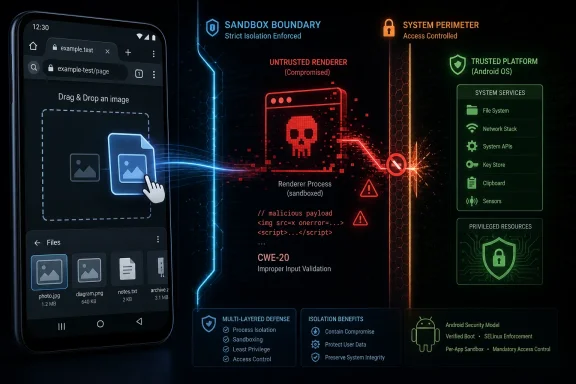
A Medium Bug With a High-Value Shape
On paper, CVE-2026-11029 carries Chromium’s “Medium” severity label. For casual readers, that may sound like a patch to take eventually rather than immediately. For anyone who has watched browser exploitation mature over the last decade, the phrase “sandbox escape” should stop the scroll.
The CVE description says exploitation required an attacker who had already compromised the renderer process. That is not a trivial precondition, but neither is it exotic in the browser threat model. The renderer is where untrusted web content is parsed, scripted, painted, and increasingly asked to perform complex interactions with device features, identity systems, media stacks, and native UI.
Chrome’s multiprocess architecture exists because Google assumes the renderer is the most exposed part of the browser. JavaScript engines, graphics pipelines, codecs, document parsers, and web APIs all live close enough to hostile content that defensive design starts with compartmentalization. A bug that helps move from that compartment toward the broader app or operating-system boundary is therefore strategically important even when it is not the first link in the chain.
That is why CVE-2026-11029 is more interesting than its severity label. It appears to sit in the gap between “attacker can run code in the browser’s least-trusted room” and “attacker can reach something outside that room.” In practical exploit development, those gap-crossing bugs are often the scarce resource.
Drag and Drop Is Not a Toy Feature Anymore
Drag and Drop sounds like a desktop-era convenience: move a file, drop an image, rearrange a tab, attach something to a form. On Android, the concept becomes more subtle because input, clipboard-like transfer, app boundaries, web content, and mobile UI conventions all meet in a smaller and more permission-sensitive environment.
The vulnerability is described as insufficient validation of untrusted input in Drag and Drop. That phrase is broad, but the category is familiar. Browsers must decide whether data coming from a web page, a UI action, another app, or an internal browser component is safe to accept, transform, or pass along. Any confusion there can turn a harmless interaction into a policy bypass.
The web platform has accumulated many “simple” gestures that are no longer simple under the hood. Copy and paste, file picking, sharing, autofill, screen capture, credential prompts, and drag-and-drop all involve trust decisions. They look like interface sugar, but they are really security boundaries wrapped in user experience.
That tension is especially sharp on mobile. Android users expect the browser to behave like an app, while websites expect the browser to behave like a platform. Chrome has to arbitrate between those expectations while keeping compromised web content from steering native behavior. CVE-2026-11029 suggests that one such arbitration point needed tightening.
The Renderer Precondition Is the Point, Not the Escape Hatch
The most important phrase in the CVE is “who had compromised the renderer process.” That should not be read as reassurance that the bug was harmless. It should be read as a map of how serious browser attacks are assembled.
A modern browser exploit chain typically needs multiple moves. One bug gets execution or meaningful control inside a renderer. Another escapes the sandbox. A third may elevate privileges, persist, bypass platform protections, or reach sensitive data. Each piece is valuable because none needs to do everything.
This is why “requires renderer compromise” can be misleading in enterprise risk discussions. If a vulnerability is only useful after another vulnerability, scanners and dashboards may rank it lower. Attackers, however, think in chains, not rows in a spreadsheet. A medium bug can become the enabling middle act of a high-impact campaign.
Chrome’s sandbox has forced attackers to become more disciplined. The old model of one browser memory-corruption bug leading directly to broad system control is less reliable than it once was. The newer model is modular: compromise a renderer, find a confused broker, abuse an IPC path, misuse a UI feature, or turn a trusted helper against its own assumptions. CVE-2026-11029 belongs in that second conversation.
Chrome 149 Was a Patch Train, Not a Patch
CVE-2026-11029 arrived in the broader Chrome 149 security cycle, a release that drew attention because of the sheer number of security fixes shipped with the stable-channel promotion. Google’s Chrome release notes for version 149.0.7827.53 on Linux and 149.0.7827.53/.54 on Windows and Mac listed hundreds of security fixes, including a long run of critical and high-severity issues.
That volume matters less as trivia than as context. Chrome is not one program in the old sense; it is a sprawling runtime made of rendering engines, JavaScript engines, graphics abstraction layers, networking code, media components, password handling, extension surfaces, mobile integrations, and operating-system glue. A single stable release can therefore look less like an application update and more like a platform service pack.
The oddity here is that CVE-2026-11029 is specifically described as affecting Google Chrome on Android prior to 149.0.7827.53, while the public reference points to the stable desktop update. That is not necessarily contradictory. Chromium advisories and release references often cover families of fixes across platforms, and the underlying code or fix vehicle may land in a shared release train even when a CVE’s impact statement names a specific platform.
For WindowsForum readers, the Android qualifier should not be dismissed as someone else’s problem. Chrome’s security model, Chromium’s codebase, and downstream browser behavior are deeply shared across platforms. A fix that teaches us something about trust validation in one surface often tells us something about the pressure on the whole browser architecture.
Windows Users Still Live in the Blast Radius
This CVE’s affected product wording points to Chrome on Android, not Chrome for Windows. That should shape the operational response: Windows admins should not mislabel it as a direct Windows endpoint vulnerability. But it would be equally wrong to treat it as irrelevant to Windows environments.
Most organizations are no longer Windows-only in the way they were fifteen years ago. Android devices read corporate mail, approve MFA prompts, access SaaS dashboards, open help-desk links, and sit inside conditional-access policies. A compromised mobile browser can become a foothold in identity workflows even if the original bug never touches a Windows kernel or desktop process.
The more subtle Windows angle is browser fleet hygiene. Enterprises that manage Chrome on Windows usually also have to care about Chrome on Android, Edge on Windows, WebView-based apps, and Chromium-derived browsers across unmanaged or semi-managed devices. Vulnerability management has become less about one OS inventory and more about whether the browser runtime is current wherever users authenticate and work.
That is why the right question is not “Does this CVE affect Windows?” The better question is whether the organization’s browser update machinery can absorb a Chrome security train quickly across desktop and mobile. CVE-2026-11029 is one entry in that test, not the whole exam.
NVD’s Empty Score Is a Signal About the Vulnerability Pipeline
At publication, the NVD entry for CVE-2026-11029 was still undergoing enrichment and did not yet include a NIST CVSS score. It did list CWE-20, improper input validation, and carried Chrome’s own description and medium security severity. That leaves defenders in an increasingly common limbo: the identifier exists, the vendor fix exists, the public description exists, but the government database has not yet added the familiar scoring furniture.
This is not merely clerical. Many vulnerability programs still depend heavily on NVD enrichment for severity, CPE applicability, CWE mapping, and automated routing. When those fields lag, organizations that wait for polished metadata can lose time even when the vendor has already shipped the answer.
The better model is vendor-first triage. If Chrome says a flaw can contribute to sandbox escape after renderer compromise, and the fixed version is available, the patch decision should not wait for a NIST vector string. CVSS is useful for comparison; it is a poor substitute for understanding exploit shape.
There is also a communication problem here. A vulnerability with no NVD score may appear less urgent to non-specialists than one with a dramatic number attached. But absence of a score is not absence of risk. It is often just evidence that the public vulnerability data supply chain is still catching up with the software supply chain.
Medium Severity Is Doing Too Much Work
Chromium’s “Medium” label is defensible if interpreted narrowly. The bug reportedly required prior renderer compromise, which means it was not a stand-alone remote code execution route from a clean starting point. That lowers exploitability in isolation.
But isolation is not how browsers are attacked. The severity label compresses too much context into one word. A bug that is hard to trigger alone but useful after another bug may be less urgent for a home user than a zero-click remote flaw, yet more important to a sophisticated attacker building reusable chains.
Security teams should therefore treat “Medium” as a starting point, not a conclusion. The right internal severity depends on browser exposure, mobile device management coverage, user population, threat model, and whether the organization handles high-value accounts through Android browsers. For a lightly managed consumer device, the answer is “update Chrome.” For a regulated enterprise, the answer is “prove Chrome updated, and prove the device can no longer run the vulnerable build.”
This is where patch dashboards can become dangerously theatrical. A red critical icon may get attention, while a medium browser sandbox escape component gets deferred. Attackers do not care which row looks scarier in a dashboard. They care which chain works.
The Crafted HTML Page Remains the Browser’s Oldest Trap
The CVE says exploitation could occur via a crafted HTML page. That wording is almost banal in browser advisories, but it remains one of the web’s enduring security facts: the browser is a machine for executing other people’s documents.
HTML is not just markup anymore, and has not been for a long time. A web page can invoke scripts, media decoders, rendering paths, storage APIs, input events, cross-document messaging, device integrations, authentication flows, and UI affordances that behave differently across platforms. That richness is the reason the web won. It is also the reason the browser remains a prime target.
The “crafted page” detail also matters for user behavior. Users cannot reliably distinguish a safe page from one built to exercise an obscure Drag and Drop validation bug after a renderer compromise. Training people not to click suspicious links helps at the margins, but it cannot carry the burden of browser exploitation defense.
The real controls are boring and structural: current browser builds, sandboxing, site isolation, exploit mitigations, restricted enterprise policies where appropriate, and rapid rollback when a bad update appears. The user is not supposed to be the validator of a hostile HTML page. Chrome is.
Android’s Browser Boundary Is Now an Enterprise Boundary
Android’s role in enterprise security has changed. It is no longer just a mobile endpoint category managed by a separate team with a separate checklist. It is part of the identity perimeter.
A Chrome-on-Android sandbox escape path may not immediately grant an attacker domain admin, but mobile browsers often sit adjacent to password managers, SSO sessions, authenticator prompts, device certificates, corporate chat, and email. That makes browser integrity on Android materially relevant to Microsoft 365 tenants, Entra ID policies, help-desk workflows, and remote-work assumptions.
This is particularly true in bring-your-own-device environments. A company may have tight controls over Windows laptops while allowing personal Android devices to access email or approve authentication. If the mobile browser is stale, the organization may have a blind spot exactly where users perform trust-granting actions.
The practical answer is not panic. It is policy consistency. If the desktop browser must be current to access sensitive resources, the mobile browser should not be treated as an honorary exception. Conditional access that checks device compliance, app version posture, and managed-browser requirements becomes more compelling as browser bugs increasingly matter across platforms.
Open Source Visibility Does Not Mean Instant Clarity
Chromium’s public development model can create a misleading sense that every vulnerability is instantly understandable. In reality, bug details are often restricted until enough users have received the fix, and for good reason. Publishing a precise exploit recipe while millions of devices remain vulnerable would be malpractice.
That leaves defenders with partial information. We know the affected component, the broad bug class, the platform, the fixed version, and the possible impact. We do not necessarily know the exact validation failure, exploit primitives, or how easily it composes with other bugs. This is enough to patch, but not enough to write a definitive exploit analysis.
The restraint is healthy. Security reporting often rewards instant certainty, but browser vulnerabilities rarely deserve it on day one. The right posture is to separate what is known from what is inferred: known that Chrome fixed an Android Drag and Drop input-validation flaw before 149.0.7827.53; known that it could potentially assist sandbox escape after renderer compromise; inferred that its real-world value would depend on chaining with another renderer issue.
That uncertainty should not slow remediation. It should improve communication. “We are patching because this is a sandbox-boundary bug in Chrome, not because a public exploit is confirmed” is a stronger message than pretending every CVE has the same shape.
Chromium Downstreams Have to Read Between the Lines
The Chromium ecosystem complicates the story. Chrome is the named product in the CVE, but Chromium code feeds a long list of downstream browsers and embedded runtimes. Not every Chrome CVE maps cleanly to every downstream product, and platform-specific code paths can make applicability messy.
For Linux distributions, Chromium packaging adds another layer. Debian’s tracker, for example, reflects fixed and vulnerable package states by release branch, which can differ from Google’s own binary distribution schedule. That matters for administrators who deploy Chromium through OS repositories rather than Chrome through Google’s updater.
For Windows users, the downstream question naturally turns to Microsoft Edge. Edge tracks Chromium closely but has its own release cadence, feature flags, and platform integrations. A Chrome-on-Android CVE should not automatically be treated as an Edge-on-Windows vulnerability, but Chromium-based products still need vendor-specific confirmation and timely updates.
The broader lesson is that “Chromium fixed it” is not the same as “every Chromium-based browser in your environment is fixed.” Inventory matters. Update channels matter. Vendor advisories matter. The browser monoculture is not one product; it is one code family expressed through many patch pipelines.
The Patch Is Simple; Proving the Patch Is Not
For individual users, the action is straightforward: update Chrome and verify the installed version is at or above the fixed build. On Android, that usually means the Play Store update path, though managed devices may receive app updates through enterprise mobility tooling. The important part is not memorizing the CVE; it is getting off vulnerable builds.
For administrators, the work is less glamorous. They need visibility into Chrome versions across Android devices, desktop fleets, virtual desktops, developer workstations, and any browser images baked into gold builds or test devices. They also need to know whether browser updates are blocked by app-control rules, delayed by staged rollout policies, or stranded on devices that rarely check in.
The Chrome 149 release cycle also illustrates why monthly patch rituals are too slow for browsers. Browser updates now land as continuous security maintenance. A fleet that treats Chrome like a quarterly application package is accepting a very different risk profile from one that treats it like exposed infrastructure.
The hard part is organizational. Everyone agrees browsers should be patched quickly until a line-of-business app breaks, a kiosk image resists change, or a mobile policy excludes personal devices. CVE-2026-11029 is the kind of vulnerability that rewards teams that solved those process problems before the advisory appeared.
This Is the Part of the Advisory That Should Change Behavior
The concrete response to CVE-2026-11029 is not complicated, but the advisory points to a bigger pattern that WindowsForum readers should internalize. Browser security is now a cross-device, cross-platform operational discipline, and sandbox-boundary bugs deserve more attention than their one-word severity labels often receive.
- Chrome on Android should be updated to version 149.0.7827.53 or later to receive the fix for CVE-2026-11029.
- The vulnerability is best understood as a potential sandbox-escape component after renderer compromise, not as a stand-alone proof of full device compromise.
- The lack of a NIST CVSS score at publication should not delay remediation when the vendor has already described the impact and shipped a fixed version.
- Windows-centric organizations should still account for Android browser exposure because mobile browsers increasingly touch corporate identity, email, SaaS, and MFA workflows.
- Chromium-based environments should verify vendor-specific update status rather than assuming that one Chrome advisory automatically maps cleanly to every downstream browser.
- “Medium” severity should be interpreted in context when a bug affects a browser security boundary that attackers may chain with other flaws.
CVE-2026-11029 will probably not be remembered as the defining Chrome vulnerability of 2026, and that is precisely why it is useful. The browser security story is no longer written only by spectacular zero-days with logo-ready names; it is written by steady pressure on the seams between untrusted content and trusted platform behavior. The organizations that handle this well will not be the ones that panic over every CVE, but the ones that understand which quiet bugs matter, patch browsers as living infrastructure, and treat every sandbox boundary as a place where tomorrow’s exploit chain may try to pass.