

Google Chrome for macOS before version 150.0.7871.47 contains CVE-2026-14097, a WebAppInstalls implementation flaw disclosed on June 30, 2026, that could let an attacker who already compromised Chrome’s renderer process potentially escape the browser sandbox through a crafted HTML page. The short version for administrators is simple: patch Chrome on Macs, but do not treat the NVD’s CPE presentation as proof that macOS itself is vulnerable. The long version is more interesting, because this is exactly the kind of vulnerability record that exposes the awkward seam between browser security engineering, vulnerability scoring, and asset-management reality.
As documented by the National Vulnerability Database and Google’s Chrome Releases blog, CVE-2026-14097 is fixed in Chrome 150.0.7871.47 for Mac. CISA’s enrichment gives the bug a CVSS 3.1 score of 9.6, while Chromium labels the same issue “Low” severity. That apparent contradiction is not a clerical curiosity; it is the central story of modern browser risk, where a bug can be technically gated, operationally narrow, and still catastrophic if it lands at the right point in an exploit chain.
The NVD change history for CVE-2026-14097 shows a configuration that combines Google Chrome versions up to but excluding 150.0.7871.47 with Apple macOS. That is not the same thing as saying Apple shipped a vulnerable operating-system component. It is a platform-scoped Chrome vulnerability: Chrome on Mac, not Chrome everywhere, and not macOS independent of Chrome.
That distinction matters because CPEs are often consumed by scanners, dashboards, compliance systems, and ticketing workflows with very little nuance. If a vulnerability record includes both a Chrome application CPE and a macOS operating-system CPE, some tools will correctly interpret that as “Chrome on macOS.” Others may flatten the relationship and turn it into a misleading macOS finding, especially if the product matching engine is weak or the inventory data lacks installed application versions.
So, are we missing a CPE? Based on the information in the supplied NVD record, the more likely issue is not that the record needs a separate Apple vulnerability CPE. It is that the record needs careful interpretation as an AND condition: vulnerable Chrome plus macOS as the affected platform. If a scanner reports this against Macs that do not have Chrome installed, or against Windows or Linux Chrome installations solely because they are below a nearby 150.0.7871 build, that is a scanner-mapping problem, not evidence that the CVE applies more broadly.
The oddity is amplified by the affected-version text, which describes “Google Chrome on Mac prior to 150.0.7871.47.” That phrasing is precise enough for a human reader but still easy for automated systems to mishandle. Browser vendors ship platform-specific builds, and Chrome’s version numbering often includes slightly different patch suffixes across Windows, macOS, Linux, and Android. Vulnerability databases must encode that reality into CPE logic, where precision is possible but not always painless.
For WindowsForum readers, the practical answer is therefore narrow but important: this CVE is about Chrome’s macOS build line. Windows administrators should still deploy the broader Chrome 150 stable update because that release carried a large batch of security fixes, but CVE-2026-14097 itself should not be treated as a Windows Chrome sandbox-escape finding unless new vendor data says otherwise.
Both views can be defensible because they are answering different questions. Chromium’s severity often reflects bug class, exploit preconditions, component exposure, and how the flaw fits into Chrome’s layered security model. CVSS, by contrast, tends to score the result once the modeled attack path is accepted: if the attacker can cross a sandbox boundary and gain broad impact, the numeric result climbs fast.
The key phrase in the CVE description is “who had compromised the renderer process.” That is not a throwaway clause. Chrome’s renderer processes are where untrusted web content is handled, and they are intentionally sandboxed because browsers assume web content is hostile. A sandbox escape is usually not the first bug in a real-world attack; it is the second-stage bug that turns a renderer compromise into something much more serious.
That is why Chromium can look at CVE-2026-14097 and say, in effect, “this is not a one-click full compromise by itself.” CISA’s scoring can look at the same record and say, “if the renderer is already compromised, the protection boundary failure can produce total technical impact.” These positions are not as contradictory as they look. They are two lenses: exploitability in isolation versus consequence in a chain.
Security teams get into trouble when they choose one lens and discard the other. Treating this as merely “Low” invites complacency, especially in organizations with high-value macOS users. Treating every chained sandbox escape as an immediate internet-wide catastrophe creates alert fatigue and obscures the fact that exploitation requires a prior renderer compromise or a paired renderer bug.
But modern browser security is not only about the places where code execution begins. It is also about the places where one layer asks another layer for trust. Installing a web app means crossing from web content into browser-managed UI, profile state, operating-system integration, icons, app manifests, launch handlers, and platform conventions. That makes it exactly the kind of component where a small implementation mistake can become security-relevant.
Chrome’s sandbox architecture is built on the idea that renderer compromise should be containable. A malicious page may exploit a memory-safety bug or logic bug in the renderer, but it should not automatically gain the ability to touch the host system freely. Every feature that lets renderer-originated data influence a browser process or OS-facing operation has to preserve that boundary.
The CVE description does not publicly spell out the mechanics, and the linked Chromium issue is permission-restricted, which is normal for recent security bugs. That lack of detail is frustrating for defenders who want to understand exposure, but it is also deliberate. Browser vendors routinely delay full technical disclosure until users have had time to patch, because exploit developers read advisories too.
What we can say with confidence is that WebAppInstalls is a plausible bridge component. It is not “just a UI feature” in the security sense. Anything that turns web-originated metadata into browser-mediated installation behavior deserves the same suspicion administrators already apply to extension installation, file handling, custom protocol registration, and native app integration.
In a mixed Windows and macOS fleet, this CVE should drive different operational messages. Mac users running Chrome below 150.0.7871.47 need the fixed build. Windows users need the current Chrome stable update for the many security fixes in the same release family, but CVE-2026-14097 should not be used as the reason unless the vendor expands applicability. Linux Chrome follows its own build number in the stable update and should likewise be assessed against the Chrome release notes, not guessed into the Mac-specific CVE.
This is where CPEs become more than taxonomy. A clean CPE configuration helps vulnerability management tools suppress false positives, prioritize real exposure, and avoid wasting endpoint teams’ time. A sloppy interpretation can turn a real browser bug into a messy fleet-wide ghost hunt.
The supplied NVD change record shows an AND relationship with the Chrome application CPE and the macOS operating-system CPE. That is a reasonable way to express “Chrome when installed on macOS.” The problem is that many enterprise workflows are built around simpler assumptions: one CVE maps to one product, one product maps to one remediation owner, and one ticket maps to one patch. Browser vulnerabilities repeatedly break that simplicity.
For a Windows-centric forum, the nuance is still relevant. Many Windows shops manage Macs for executives, developers, designers, mobile teams, or BYOD users. Those Macs are often outside the tightest patch rings, yet they handle sensitive mail, source code, admin consoles, identity-provider sessions, and cloud dashboards. A Mac-only Chrome sandbox escape can therefore be an enterprise Windows problem in the broader sense: it threatens the people and credentials that administer everything else.
A crafted HTML page can be the delivery mechanism, but the WebAppInstalls flaw is not described as the initial renderer exploit. In a real attack, the adversary would likely need another vulnerability, a maliciously crafted page exploiting an already-known renderer bug, or some other route to code execution inside the renderer. CVE-2026-14097 then becomes the escape hatch.
That is why sandbox escapes are prized. They convert a contained browser compromise into something closer to host compromise, depending on the operating system, process privileges, mitigations, and what the attacker can do next. Even when a sandbox escape does not immediately grant root or full disk access, it can provide the attacker with access that the sandbox was designed to deny.
The user-interaction flag in CISA’s CVSS vector also deserves sober interpretation. “User interaction required” does not mean the user must approve a scary security prompt with perfect knowledge. In browser CVEs, it can mean visiting a malicious page or otherwise interacting with web content. That is a low bar in phishing-heavy environments.
So the right operational posture is boring and urgent: patch Chrome. Do not wait for weaponized proof-of-concept code. Do not wait for NVD to complete its own CVSS assessment if your fleet has Mac users running vulnerable builds. The absence of known exploitation in the SSVC data is useful context, not a reason to leave a sandbox escape sitting in a browser.
That noise is a management problem. Browser teams ship rapidly because the browser is one of the most attacked pieces of software on the endpoint. Enterprise teams, meanwhile, still have to test line-of-business web apps, extension compatibility, policy templates, and update behavior. When a release contains hundreds of fixes, “prioritize the critical one” is less useful than it sounds because the package-level answer is the same: deploy the update.
Still, individual CVE analysis matters for exposure and communication. A macOS-only sandbox escape affects different people than a cross-platform V8 memory bug or a Windows-specific installer flaw. Security leaders need that distinction to explain why a subset of machines appears in a critical report, why some scanners disagree, and why the remediation ticket points to Chrome rather than macOS.
There is also a psychological trap in very large Chrome releases. If every monthly or near-monthly update contains a mountain of fixes, users stop seeing any one update as exceptional. The browser becomes background infrastructure, like DNS or certificate stores: essential, constantly changing, and noticed mainly when it breaks something.
That is where administrators need policy rather than persuasion. Chrome auto-update is effective for consumer users, but enterprise fleets often pin, delay, or govern updates through management platforms. Those controls are not wrong; unmanaged browser changes can break business workflows. But once a sandbox escape is in the fixed list, delay needs a reason stronger than habit.
This ecosystem is better than the old days of scattered advisories and mailing-list archaeology, but it creates an illusion of precision. A CVSS score looks mathematical. A CPE string looks authoritative. A CWE mapping looks categorical. In practice, all three can be right enough to guide action and still incomplete enough to mislead automation.
The CWE-693 mapping, Protection Mechanism Failure, is broad but sensible. A sandbox is a protection mechanism; a sandbox escape is a failure of that mechanism. The label does not tell administrators how the bug works, but it does place the issue in the right conceptual bucket.
The SSVC entry is also telling. It reports no known exploitation, not automatable, and total technical impact. That is a concise expression of the bug’s personality: not a mass exploitation commodity by itself, but severe if chained successfully. For defenders, that combination usually means “patch promptly, monitor normally, and do not overstate active exploitation.”
The pending NVD CVSS assessment should not block remediation. NVD’s own score may eventually differ from CISA’s, and that would not be surprising. The underlying facts that matter today are already available: affected product, affected platform, fixed version, attack precondition, and potential sandbox escape.
The phrase “or later” matters. Chrome stable releases roll forward quickly, and by the time a ticket is actioned, the exact fixed build may no longer be the newest available build. Administrators should not pin specifically to 150.0.7871.47 if a newer stable release is available and approved. The remediation target is the fixed security state, not nostalgia for the first patched version.
For Windows administrators, the equivalent lesson is to keep Chrome current even when a named CVE is platform-specific. The Chrome 150 stable update included fixes beyond CVE-2026-14097, and Windows Chrome had its own security exposure in the broader release. But vulnerability exceptions should be written carefully: “CVE-2026-14097 does not apply to Windows Chrome based on current vendor wording” is different from “Chrome 150 is not urgent.”
Security teams should also validate how their tools interpret the NVD CPE. A correct result should identify vulnerable Chrome on macOS prior to the fixed version. A suspicious result would flag macOS itself without Chrome evidence, or flag all Chrome installations across all operating systems for this specific CVE. Those false positives should be corrected at the scanner, rule, or exception layer before they pollute reporting.
The harder problem is unmanaged Chrome. Developers may install Chrome outside standard deployment channels. Users may run multiple Chromium-based browsers. Some organizations inventory the default browser and miss secondary browsers entirely. A sandbox escape in a non-default browser can still matter if users open links, test web apps, authenticate to services, or run admin consoles there.
That is especially true on macOS, where user expectations around app installation, dock integration, notifications, profiles, and privacy prompts create many small boundaries between web content and the desktop. Chrome has to fit into those conventions without letting malicious web content borrow trust from the browser or the operating system. Every integration feature is a negotiation with the sandbox.
Microsoft Edge, Brave, Vivaldi, and other Chromium-derived browsers complicate the picture further. A CVE assigned to Google Chrome may or may not apply to downstream Chromium browsers depending on whether they carry the vulnerable code path, how they configure the feature, and when they merge the upstream fix. Administrators should not automatically assume safety simply because the brand is not Chrome, but they also should not blindly assign a Google Chrome CPE to every Chromium-based browser.
This is where vendor advisories matter more than vulnerability-feed shortcuts. If Edge or another Chromium browser ships a corresponding update, track that vendor’s version and advisory. If a scanner maps CVE-2026-14097 to a non-Chrome browser, require evidence of applicability. Browser monoculture means shared code risk is real, but shared code does not eliminate the need for product-specific confirmation.
For WindowsForum’s audience, the operational message is familiar: Chromium is infrastructure now. Treat it with the same discipline you apply to Windows cumulative updates, Defender platform updates, VPN clients, and remote-management agents. The browser is too privileged in daily work to be handled as a casual user preference.
Attackers who target browsers rarely rely on one bug if they can help it. They assemble chains: a renderer bug, a sandbox escape, perhaps a privilege escalation, followed by credential theft, persistence, or lateral movement. A vulnerability like CVE-2026-14097 sits in the middle of that chain, which makes it less flashy than an initial remote code execution bug but potentially just as important.
The “crafted HTML page” language also has a practical implication. This is web-deliverable attack surface. The target does not need to install a traditional application or open a suspicious executable. If paired with a renderer compromise, malicious content in the browser can become the staging ground for a deeper breach.
That is why browser sandbox escapes often matter disproportionately for high-risk users. Developers, executives, journalists, administrators, cryptocurrency users, legal teams, and anyone with privileged cloud access are attractive targets. A MacBook used by a senior engineer may be a better target than a locked-down Windows kiosk, even in a Windows-heavy organization.
The defensive answer is not exotic. Keep browsers current, reduce extension sprawl, isolate high-risk browsing, use phishing-resistant authentication, monitor endpoint behavior, and make sure macOS security controls are actually enforced. CVE-2026-14097 does not require a new doctrine. It punishes organizations that have not implemented the old one.
As documented by the National Vulnerability Database and Google’s Chrome Releases blog, CVE-2026-14097 is fixed in Chrome 150.0.7871.47 for Mac. CISA’s enrichment gives the bug a CVSS 3.1 score of 9.6, while Chromium labels the same issue “Low” severity. That apparent contradiction is not a clerical curiosity; it is the central story of modern browser risk, where a bug can be technically gated, operationally narrow, and still catastrophic if it lands at the right point in an exploit chain.
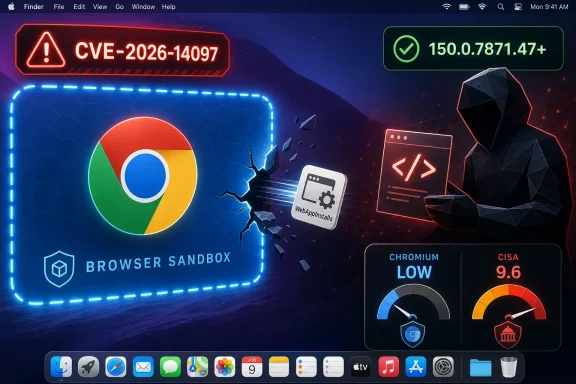 The CPE Looks Strange Because the Vulnerability Lives at the Browser–OS Boundary
The NVD change history for CVE-2026-14097 shows a configuration that combines Google Chrome versions up to but excluding 150.0.7871.47 with Apple macOS. That is not the same thing as saying Apple shipped a vulnerable operating-system component. It is a platform-scoped Chrome vulnerability: Chrome on Mac, not Chrome everywhere, and not macOS independent of Chrome.That distinction matters because CPEs are often consumed by scanners, dashboards, compliance systems, and ticketing workflows with very little nuance. If a vulnerability record includes both a Chrome application CPE and a macOS operating-system CPE, some tools will correctly interpret that as “Chrome on macOS.” Others may flatten the relationship and turn it into a misleading macOS finding, especially if the product matching engine is weak or the inventory data lacks installed application versions.
So, are we missing a CPE? Based on the information in the supplied NVD record, the more likely issue is not that the record needs a separate Apple vulnerability CPE. It is that the record needs careful interpretation as an AND condition: vulnerable Chrome plus macOS as the affected platform. If a scanner reports this against Macs that do not have Chrome installed, or against Windows or Linux Chrome installations solely because they are below a nearby 150.0.7871 build, that is a scanner-mapping problem, not evidence that the CVE applies more broadly.
The oddity is amplified by the affected-version text, which describes “Google Chrome on Mac prior to 150.0.7871.47.” That phrasing is precise enough for a human reader but still easy for automated systems to mishandle. Browser vendors ship platform-specific builds, and Chrome’s version numbering often includes slightly different patch suffixes across Windows, macOS, Linux, and Android. Vulnerability databases must encode that reality into CPE logic, where precision is possible but not always painless.
For WindowsForum readers, the practical answer is therefore narrow but important: this CVE is about Chrome’s macOS build line. Windows administrators should still deploy the broader Chrome 150 stable update because that release carried a large batch of security fixes, but CVE-2026-14097 itself should not be treated as a Windows Chrome sandbox-escape finding unless new vendor data says otherwise.
A “Low” Chromium Bug Can Still Score Like a Disaster
The most jarring part of CVE-2026-14097 is the severity split. Chromium calls it Low. CISA’s ADP enrichment assigns a 9.6 Critical CVSS score with network attack vector, low attack complexity, no privileges required, user interaction required, changed scope, and high confidentiality, integrity, and availability impact.Both views can be defensible because they are answering different questions. Chromium’s severity often reflects bug class, exploit preconditions, component exposure, and how the flaw fits into Chrome’s layered security model. CVSS, by contrast, tends to score the result once the modeled attack path is accepted: if the attacker can cross a sandbox boundary and gain broad impact, the numeric result climbs fast.
The key phrase in the CVE description is “who had compromised the renderer process.” That is not a throwaway clause. Chrome’s renderer processes are where untrusted web content is handled, and they are intentionally sandboxed because browsers assume web content is hostile. A sandbox escape is usually not the first bug in a real-world attack; it is the second-stage bug that turns a renderer compromise into something much more serious.
That is why Chromium can look at CVE-2026-14097 and say, in effect, “this is not a one-click full compromise by itself.” CISA’s scoring can look at the same record and say, “if the renderer is already compromised, the protection boundary failure can produce total technical impact.” These positions are not as contradictory as they look. They are two lenses: exploitability in isolation versus consequence in a chain.
Security teams get into trouble when they choose one lens and discard the other. Treating this as merely “Low” invites complacency, especially in organizations with high-value macOS users. Treating every chained sandbox escape as an immediate internet-wide catastrophe creates alert fatigue and obscures the fact that exploitation requires a prior renderer compromise or a paired renderer bug.
WebAppInstalls Is a Small Door Into a Large Trust Model
The vulnerable component, WebAppInstalls, sounds almost quaint. It suggests Progressive Web Apps, install prompts, desktop shortcuts, and the machinery that helps websites behave more like native apps. That is not the glamorous attack surface of a JavaScript engine, a GPU process, or a media parser.But modern browser security is not only about the places where code execution begins. It is also about the places where one layer asks another layer for trust. Installing a web app means crossing from web content into browser-managed UI, profile state, operating-system integration, icons, app manifests, launch handlers, and platform conventions. That makes it exactly the kind of component where a small implementation mistake can become security-relevant.
Chrome’s sandbox architecture is built on the idea that renderer compromise should be containable. A malicious page may exploit a memory-safety bug or logic bug in the renderer, but it should not automatically gain the ability to touch the host system freely. Every feature that lets renderer-originated data influence a browser process or OS-facing operation has to preserve that boundary.
The CVE description does not publicly spell out the mechanics, and the linked Chromium issue is permission-restricted, which is normal for recent security bugs. That lack of detail is frustrating for defenders who want to understand exposure, but it is also deliberate. Browser vendors routinely delay full technical disclosure until users have had time to patch, because exploit developers read advisories too.
What we can say with confidence is that WebAppInstalls is a plausible bridge component. It is not “just a UI feature” in the security sense. Anything that turns web-originated metadata into browser-mediated installation behavior deserves the same suspicion administrators already apply to extension installation, file handling, custom protocol registration, and native app integration.
The Mac-Only Scope Is the Detail Asset Teams Must Not Lose
The NVD wording says “Google Chrome on Mac prior to 150.0.7871.47.” That platform qualifier should survive every downstream transformation: vulnerability feed ingestion, scanner plugin logic, SIEM enrichment, asset tags, compliance reports, and executive dashboards. Too often it does not.In a mixed Windows and macOS fleet, this CVE should drive different operational messages. Mac users running Chrome below 150.0.7871.47 need the fixed build. Windows users need the current Chrome stable update for the many security fixes in the same release family, but CVE-2026-14097 should not be used as the reason unless the vendor expands applicability. Linux Chrome follows its own build number in the stable update and should likewise be assessed against the Chrome release notes, not guessed into the Mac-specific CVE.
This is where CPEs become more than taxonomy. A clean CPE configuration helps vulnerability management tools suppress false positives, prioritize real exposure, and avoid wasting endpoint teams’ time. A sloppy interpretation can turn a real browser bug into a messy fleet-wide ghost hunt.
The supplied NVD change record shows an AND relationship with the Chrome application CPE and the macOS operating-system CPE. That is a reasonable way to express “Chrome when installed on macOS.” The problem is that many enterprise workflows are built around simpler assumptions: one CVE maps to one product, one product maps to one remediation owner, and one ticket maps to one patch. Browser vulnerabilities repeatedly break that simplicity.
For a Windows-centric forum, the nuance is still relevant. Many Windows shops manage Macs for executives, developers, designers, mobile teams, or BYOD users. Those Macs are often outside the tightest patch rings, yet they handle sensitive mail, source code, admin consoles, identity-provider sessions, and cloud dashboards. A Mac-only Chrome sandbox escape can therefore be an enterprise Windows problem in the broader sense: it threatens the people and credentials that administer everything else.
The Renderer Clause Is the Difference Between Patch-Now and Panic-Now
The CVE requires that the attacker has already compromised the renderer process. That condition should shape the response, but it should not excuse delay. Renderer compromise is not science fiction; it is one of the recurring foundations of browser exploitation.A crafted HTML page can be the delivery mechanism, but the WebAppInstalls flaw is not described as the initial renderer exploit. In a real attack, the adversary would likely need another vulnerability, a maliciously crafted page exploiting an already-known renderer bug, or some other route to code execution inside the renderer. CVE-2026-14097 then becomes the escape hatch.
That is why sandbox escapes are prized. They convert a contained browser compromise into something closer to host compromise, depending on the operating system, process privileges, mitigations, and what the attacker can do next. Even when a sandbox escape does not immediately grant root or full disk access, it can provide the attacker with access that the sandbox was designed to deny.
The user-interaction flag in CISA’s CVSS vector also deserves sober interpretation. “User interaction required” does not mean the user must approve a scary security prompt with perfect knowledge. In browser CVEs, it can mean visiting a malicious page or otherwise interacting with web content. That is a low bar in phishing-heavy environments.
So the right operational posture is boring and urgent: patch Chrome. Do not wait for weaponized proof-of-concept code. Do not wait for NVD to complete its own CVSS assessment if your fleet has Mac users running vulnerable builds. The absence of known exploitation in the SSVC data is useful context, not a reason to leave a sandbox escape sitting in a browser.
Chrome 150’s Giant Patch Set Makes Single-CVE Triage Harder
CVE-2026-14097 did not arrive in a quiet release. Google’s late-June Chrome 150 stable update was part of a large security rollup, with third-party coverage from Malwarebytes and others noting hundreds of security fixes in the release. In that kind of patch set, individual CVEs can disappear into the noise.That noise is a management problem. Browser teams ship rapidly because the browser is one of the most attacked pieces of software on the endpoint. Enterprise teams, meanwhile, still have to test line-of-business web apps, extension compatibility, policy templates, and update behavior. When a release contains hundreds of fixes, “prioritize the critical one” is less useful than it sounds because the package-level answer is the same: deploy the update.
Still, individual CVE analysis matters for exposure and communication. A macOS-only sandbox escape affects different people than a cross-platform V8 memory bug or a Windows-specific installer flaw. Security leaders need that distinction to explain why a subset of machines appears in a critical report, why some scanners disagree, and why the remediation ticket points to Chrome rather than macOS.
There is also a psychological trap in very large Chrome releases. If every monthly or near-monthly update contains a mountain of fixes, users stop seeing any one update as exceptional. The browser becomes background infrastructure, like DNS or certificate stores: essential, constantly changing, and noticed mainly when it breaks something.
That is where administrators need policy rather than persuasion. Chrome auto-update is effective for consumer users, but enterprise fleets often pin, delay, or govern updates through management platforms. Those controls are not wrong; unmanaged browser changes can break business workflows. But once a sandbox escape is in the fixed list, delay needs a reason stronger than habit.
The NVD–CISA–Vendor Triangle Is Useful, But It Is Not a Single Voice
CVE-2026-14097 is also a case study in how vulnerability data now arrives through multiple overlapping authorities. Chrome assigns the CVE and publishes the release note. NVD ingests and enriches the record, including CPE configuration. CISA-ADP contributes CVSS, CWE, and SSVC data. Security vendors and vulnerability databases then repackage the same facts for their own audiences.This ecosystem is better than the old days of scattered advisories and mailing-list archaeology, but it creates an illusion of precision. A CVSS score looks mathematical. A CPE string looks authoritative. A CWE mapping looks categorical. In practice, all three can be right enough to guide action and still incomplete enough to mislead automation.
The CWE-693 mapping, Protection Mechanism Failure, is broad but sensible. A sandbox is a protection mechanism; a sandbox escape is a failure of that mechanism. The label does not tell administrators how the bug works, but it does place the issue in the right conceptual bucket.
The SSVC entry is also telling. It reports no known exploitation, not automatable, and total technical impact. That is a concise expression of the bug’s personality: not a mass exploitation commodity by itself, but severe if chained successfully. For defenders, that combination usually means “patch promptly, monitor normally, and do not overstate active exploitation.”
The pending NVD CVSS assessment should not block remediation. NVD’s own score may eventually differ from CISA’s, and that would not be surprising. The underlying facts that matter today are already available: affected product, affected platform, fixed version, attack precondition, and potential sandbox escape.
Patch Management Should Follow the Fixed Build, Not the Score
For macOS endpoints, the practical control is to get Chrome to 150.0.7871.47 or later. Users can check Chrome’s version through the browser’s About page, while managed environments should verify through MDM inventory, Chrome Browser Cloud Management, endpoint management agents, or vulnerability scanners that correctly report application versions.The phrase “or later” matters. Chrome stable releases roll forward quickly, and by the time a ticket is actioned, the exact fixed build may no longer be the newest available build. Administrators should not pin specifically to 150.0.7871.47 if a newer stable release is available and approved. The remediation target is the fixed security state, not nostalgia for the first patched version.
For Windows administrators, the equivalent lesson is to keep Chrome current even when a named CVE is platform-specific. The Chrome 150 stable update included fixes beyond CVE-2026-14097, and Windows Chrome had its own security exposure in the broader release. But vulnerability exceptions should be written carefully: “CVE-2026-14097 does not apply to Windows Chrome based on current vendor wording” is different from “Chrome 150 is not urgent.”
Security teams should also validate how their tools interpret the NVD CPE. A correct result should identify vulnerable Chrome on macOS prior to the fixed version. A suspicious result would flag macOS itself without Chrome evidence, or flag all Chrome installations across all operating systems for this specific CVE. Those false positives should be corrected at the scanner, rule, or exception layer before they pollute reporting.
The harder problem is unmanaged Chrome. Developers may install Chrome outside standard deployment channels. Users may run multiple Chromium-based browsers. Some organizations inventory the default browser and miss secondary browsers entirely. A sandbox escape in a non-default browser can still matter if users open links, test web apps, authenticate to services, or run admin consoles there.
The Browser Is Now an Operating-System Layer
Chrome vulnerabilities often get discussed as application bugs, but that framing is increasingly inadequate. The browser is now an application runtime, identity surface, document viewer, video stack, password manager, app launcher, PWA host, extension platform, and policy-controlled enterprise endpoint. A flaw in WebAppInstalls is a reminder that browsers do not merely display the web; they mediate the web’s attempt to become native.That is especially true on macOS, where user expectations around app installation, dock integration, notifications, profiles, and privacy prompts create many small boundaries between web content and the desktop. Chrome has to fit into those conventions without letting malicious web content borrow trust from the browser or the operating system. Every integration feature is a negotiation with the sandbox.
Microsoft Edge, Brave, Vivaldi, and other Chromium-derived browsers complicate the picture further. A CVE assigned to Google Chrome may or may not apply to downstream Chromium browsers depending on whether they carry the vulnerable code path, how they configure the feature, and when they merge the upstream fix. Administrators should not automatically assume safety simply because the brand is not Chrome, but they also should not blindly assign a Google Chrome CPE to every Chromium-based browser.
This is where vendor advisories matter more than vulnerability-feed shortcuts. If Edge or another Chromium browser ships a corresponding update, track that vendor’s version and advisory. If a scanner maps CVE-2026-14097 to a non-Chrome browser, require evidence of applicability. Browser monoculture means shared code risk is real, but shared code does not eliminate the need for product-specific confirmation.
For WindowsForum’s audience, the operational message is familiar: Chromium is infrastructure now. Treat it with the same discipline you apply to Windows cumulative updates, Defender platform updates, VPN clients, and remote-management agents. The browser is too privileged in daily work to be handled as a casual user preference.
The Real Risk Is Not the CVE Record, But the Chain It Enables
No public evidence in the supplied data says CVE-2026-14097 is being exploited in the wild. That is important, and it should keep the story grounded. But the absence of known exploitation is not the same as low strategic value.Attackers who target browsers rarely rely on one bug if they can help it. They assemble chains: a renderer bug, a sandbox escape, perhaps a privilege escalation, followed by credential theft, persistence, or lateral movement. A vulnerability like CVE-2026-14097 sits in the middle of that chain, which makes it less flashy than an initial remote code execution bug but potentially just as important.
The “crafted HTML page” language also has a practical implication. This is web-deliverable attack surface. The target does not need to install a traditional application or open a suspicious executable. If paired with a renderer compromise, malicious content in the browser can become the staging ground for a deeper breach.
That is why browser sandbox escapes often matter disproportionately for high-risk users. Developers, executives, journalists, administrators, cryptocurrency users, legal teams, and anyone with privileged cloud access are attractive targets. A MacBook used by a senior engineer may be a better target than a locked-down Windows kiosk, even in a Windows-heavy organization.
The defensive answer is not exotic. Keep browsers current, reduce extension sprawl, isolate high-risk browsing, use phishing-resistant authentication, monitor endpoint behavior, and make sure macOS security controls are actually enforced. CVE-2026-14097 does not require a new doctrine. It punishes organizations that have not implemented the old one.
The Signal Hidden in This Chrome Mac Bug
The concrete readout from CVE-2026-14097 is smaller than the severity number and larger than the component name. It is not a reason to declare macOS broken, and it is not a reason to shrug because Chromium called it Low. It is a reminder that platform-scoped browser bugs need platform-scoped remediation, and that exploit-chain components deserve respect even when they are not standalone catastrophes.- CVE-2026-14097 applies to Google Chrome on macOS before 150.0.7871.47, based on the current NVD and Chrome wording.
- The macOS CPE in the NVD configuration should be read as a platform condition for vulnerable Chrome, not as proof of a separate Apple operating-system vulnerability.
- The severity split between Chromium’s Low rating and CISA’s Critical CVSS score reflects different ways of measuring a chained sandbox-escape bug.
- The renderer-compromise prerequisite lowers standalone exploitability but does not make the issue safe to defer on managed Macs.
- Vulnerability teams should verify that scanners are not incorrectly flagging Windows, Linux, or Chrome-free macOS assets for this specific CVE.
- Administrators should patch Chrome to 150.0.7871.47 or later on Macs and continue deploying the broader Chrome 150 security update across supported desktop platforms.
References
- Primary source: NVD / Chromium
Published: 2026-07-03T07:00:24-07:00
NVD - CVE-2026-14097
 nvd.nist.gov
- Security advisory: MSRC
Published: 2026-07-03T07:00:24-07:00
Original feed URL
Security Update Guide - Microsoft Security Response Center
 msrc.microsoft.com
