

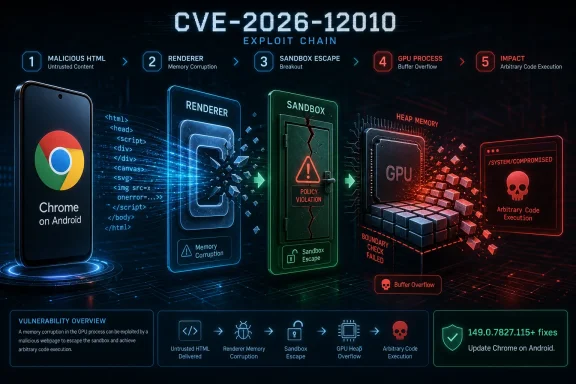
Google Chrome on Android before version 149.0.7827.115 is affected by CVE-2026-12010, a critical GPU heap buffer overflow disclosed on June 11, 2026, that could let an attacker escape Chrome’s sandbox after first compromising the renderer with a crafted HTML page. The important part is not just the word “critical,” but the shape of the attack chain: this is a browser bug that assumes one layer has already fallen and then threatens the next. For WindowsForum readers, the Android label should not be a reason to tune out. Chrome’s security model, Chromium’s shared codebase, and enterprise browser-management habits mean this vulnerability is a useful reminder that modern browser risk now lives in the seams between rendering, graphics acceleration, and isolation.
CVE-2026-12010 is not described as a one-click, instant device takeover. The wording matters: a remote attacker who had already compromised the renderer process could potentially perform a sandbox escape through a crafted HTML page. That places the bug in the second stage of a modern browser exploit chain, not necessarily the first.
That distinction is easy to miss because vulnerability write-ups often flatten everything into a single severity badge. A renderer compromise is already serious, but Chrome’s architecture is designed around the assumption that web content is hostile and must be boxed in. The sandbox is supposed to keep malicious JavaScript, malformed media, and hostile pages from freely reaching the rest of the browser or the operating system.
A sandbox escape is therefore the moment the browser’s defense-in-depth story starts to fail. If the renderer is the room where untrusted web content is allowed to misbehave, the sandbox is the locked door. CVE-2026-12010 is about a path through that door, and that is why Chromium rates it critical even though exploitation requires a prior foothold.
The affected component also matters. This is not a bookmark-sync bug or a cosmetic UI mistake. It sits in GPU handling, one of the most complicated and historically security-sensitive parts of the browser stack.
A heap buffer overflow is an old class of vulnerability in a very modern neighborhood. In plain English, it means code writes or reads beyond the bounds of memory it was supposed to use. In a graphics pipeline, that boundary mistake can happen amid complex object lifetimes, driver-facing abstractions, shader inputs, buffers, textures, and cross-process communication.
The awkward truth is that GPU code is attractive to attackers precisely because it is meant to be fast, permissive, and close to hardware-backed functionality. Browser vendors have spent years moving risky work into separate processes and wrapping it in sandboxes, but those sandboxes are not magic. They are engineering compromises, and complicated subsystems keep testing the edges.
On Android, the consequences are especially uncomfortable. The browser is not merely another app for many users; it is the front door to email, banking, messaging links, enterprise portals, identity providers, and cloud consoles. A browser sandbox escape on a phone can move a bug from “bad tab” territory toward the more dangerous world of device and account exposure.
Still, the Chromium ecosystem rarely respects neat mental boundaries. Chrome on Windows, Chrome on Android, Edge, Brave, Vivaldi, Opera, Electron-based applications, and WebView-heavy mobile apps do not all share identical exposure to a given CVE. But they do share design patterns, libraries, and development assumptions that make one Chrome security bulletin relevant far beyond the named platform.
That does not mean every Chromium-derived browser is automatically vulnerable to CVE-2026-12010. It means the appearance of another critical GPU memory bug should push IT teams to ask whether their browser-update posture is fast enough, visible enough, and broad enough. The specific CPE may say Chrome and Android; the operational habit should say all Chromium surfaces deserve scrutiny.
For Windows administrators, that habit includes Microsoft Edge update channels, legacy embedded browser components, kiosk machines, VDI images, and developer workstations where multiple browsers accumulate quietly. The risk is not that this Android CVE magically infects Windows. The risk is that teams treat browser patching as a consumer convenience when it has become core infrastructure hygiene.
That gap between “NVD assessment not yet provided” and “actionable vendor disclosure exists” is where many patch programs lose time. Organizations that wait for every enrichment field, every CPE mapping, and every dashboard widget to settle are often optimizing for administrative neatness rather than security outcome. Browser vulnerabilities do not become less urgent because metadata is late.
The CPE configuration in the NVD change history is also interesting because it models Chrome plus Android together. That reflects the product and platform pairing in the description, but it can look odd to anyone expecting a simple application-only CPE. In practice, the useful test is less “does my scanner show the perfect CPE?” and more “can I prove all managed Android Chrome installs are at or beyond 149.0.7827.115?”
This is one of those cases where asset management and vulnerability management diverge. A scanner may lag. A CVE record may still be filling in. A mobile-device-management console may show version distribution faster than a vulnerability database does. The team that patches from product reality, not just database completeness, is the team that closes the window sooner.
That staged model is exactly why sandbox escapes are so valuable. A renderer compromise alone may be trapped inside a lower-privilege process with limited access. Add a sandbox escape, and the attacker can potentially move into a more privileged browser process or interact with resources the renderer should not touch.
The crafted HTML page condition is also familiar. Attackers do not need to convince a victim to install an obvious executable when the browser itself is the parser, renderer, media engine, graphics client, and script runtime. A malicious page, a compromised legitimate site, a poisoned ad, or a link delivered through messaging can all become delivery mechanisms depending on the rest of the exploit chain.
There is no public indication in the supplied material that CVE-2026-12010 is being exploited in the wild. That matters, and it should keep the coverage honest. But “not known exploited” is not the same as “low priority,” particularly for a critical Chromium bug in a component that has repeatedly attracted serious research attention.
Some Android devices are offline for long stretches. Some users disable automatic updates. Some enterprise devices are pinned to managed versions. Some ruggedized or shared devices live in operational environments where app updates require maintenance windows. And some organizations simply do not have a reliable report showing which Chrome version is installed across every phone and tablet.
That is where CVE-2026-12010 becomes an administrative test. The fix version is concrete: 149.0.7827.115 or later for Chrome on Android. If an IT team cannot answer how many devices are below that version, the vulnerability has exposed a process weakness even before anyone discusses exploitability.
The same logic applies to BYOD environments. A company may not own the phone, but it often allows that phone to authenticate into mail, Teams, Slack, VPN portals, SSO dashboards, or internal web apps. If mobile browser patch levels are entirely invisible, the organization has accepted a browser risk it cannot measure.
Chrome on Android is both an application and part of a broader Android ecosystem. Depending on the device, it may be updated through Google Play, bundled in managed images, restricted by enterprise policy, or replaced by another browser as default while still installed and reachable. A single CPE string cannot capture all of that operational texture.
For vulnerability managers, the right response is to treat CPE as a starting point rather than a verdict. If a scanner misses the exposure because its software inventory does not collect Android app versions, the scanner is not giving a meaningful risk picture. If a dashboard shows “not applicable” simply because it keys off Windows endpoints, it is telling only part of the story.
This is not an argument against CPEs. It is an argument against pretending that standardized naming solves asset visibility. In 2026, a credible endpoint inventory needs operating-system versions, browser versions, mobile app versions, update-channel data, and management-state context. Anything less is a map with the roads missing.
The Windows angle is also practical rather than tribal. Many enterprises run Chrome and Edge side by side. Developers install Canary, Beta, Stable, and portable builds. Help desks use browsers to access admin consoles. Security teams rely on browser-based dashboards. A browser compromise is no longer a user productivity incident; it can become an identity, cloud, and administration incident.
Android adds another Microsoft wrinkle through enterprise mobility. Microsoft Intune, Entra ID Conditional Access, Defender for Endpoint, and managed app policies all sit in the path between mobile browsers and corporate resources. If Chrome on Android is outdated, the risk may land in a Microsoft identity environment even though the vulnerable code came from Google.
That is the modern platform story in miniature. Vendors draw product boundaries; attackers follow trust boundaries. A compromised browser tab does not care whether the next login prompt belongs to Google, Microsoft, Okta, or an internal app.
The better priority model asks three questions. Is the affected software exposed to untrusted input by design? Yes. Is the vulnerable component complex and historically bug-prone? Yes. Would successful exploitation cross a major security boundary? Yes. That combination belongs near the front of a browser patch queue.
For home users, the answer is simple: update Chrome from the Play Store and verify the version. For administrators, the answer is more procedural: query managed devices, enforce app-update policies, watch for stale devices, and do not assume desktop browser compliance tells you anything about Android browser compliance.
There is also a communications lesson here. Telling users “update Chrome” is easy but vague. Telling them “Chrome on Android must be 149.0.7827.115 or later” gives help desks, admins, and security teams something testable.
Security programs often prefer vulnerabilities that map to simple narratives: remote code execution, privilege escalation, information disclosure. Browser bugs resist that neatness because Chrome is already a small operating system with its own process model, permissions, IPC surfaces, and hardware-facing acceleration layers. A bug in the GPU process is not “just graphics” when graphics is part of how the modern web runs.
The most mature reading of this CVE is therefore architectural. Chrome’s sandbox remains one of the most important protections ordinary users have against the hostile web. But every sandbox is an engineered boundary, and every engineered boundary depends on assumptions about memory safety, process isolation, brokered access, and update speed.
When one of those assumptions breaks, patching is not optional housekeeping. It is the act that restores the design.
 The Browser Bug That Starts After the First Compromise
CVE-2026-12010 is not described as a one-click, instant device takeover. The wording matters: a remote attacker who had already compromised the renderer process could potentially perform a sandbox escape through a crafted HTML page. That places the bug in the second stage of a modern browser exploit chain, not necessarily the first.That distinction is easy to miss because vulnerability write-ups often flatten everything into a single severity badge. A renderer compromise is already serious, but Chrome’s architecture is designed around the assumption that web content is hostile and must be boxed in. The sandbox is supposed to keep malicious JavaScript, malformed media, and hostile pages from freely reaching the rest of the browser or the operating system.
A sandbox escape is therefore the moment the browser’s defense-in-depth story starts to fail. If the renderer is the room where untrusted web content is allowed to misbehave, the sandbox is the locked door. CVE-2026-12010 is about a path through that door, and that is why Chromium rates it critical even though exploitation requires a prior foothold.
The affected component also matters. This is not a bookmark-sync bug or a cosmetic UI mistake. It sits in GPU handling, one of the most complicated and historically security-sensitive parts of the browser stack.
GPU Acceleration Became Part of the Attack Surface
The browser GPU process exists because the web stopped being a document viewer years ago. Chrome now accelerates video, canvas, WebGL, compositing, animation, and increasingly rich application interfaces that behave more like native software than static pages. Performance demanded deeper access to graphics pipelines, and deeper access created more places where memory safety bugs could matter.A heap buffer overflow is an old class of vulnerability in a very modern neighborhood. In plain English, it means code writes or reads beyond the bounds of memory it was supposed to use. In a graphics pipeline, that boundary mistake can happen amid complex object lifetimes, driver-facing abstractions, shader inputs, buffers, textures, and cross-process communication.
The awkward truth is that GPU code is attractive to attackers precisely because it is meant to be fast, permissive, and close to hardware-backed functionality. Browser vendors have spent years moving risky work into separate processes and wrapping it in sandboxes, but those sandboxes are not magic. They are engineering compromises, and complicated subsystems keep testing the edges.
On Android, the consequences are especially uncomfortable. The browser is not merely another app for many users; it is the front door to email, banking, messaging links, enterprise portals, identity providers, and cloud consoles. A browser sandbox escape on a phone can move a bug from “bad tab” territory toward the more dangerous world of device and account exposure.
The Android Scope Is Narrow, but the Lesson Is Not
The CVE text specifically names Google Chrome on Android prior to 149.0.7827.115. That is the immediate remediation target: Android users running Chrome below that build need the update. Administrators managing Android fleets should treat this as a mobile browser patching issue, not a theoretical desktop concern.Still, the Chromium ecosystem rarely respects neat mental boundaries. Chrome on Windows, Chrome on Android, Edge, Brave, Vivaldi, Opera, Electron-based applications, and WebView-heavy mobile apps do not all share identical exposure to a given CVE. But they do share design patterns, libraries, and development assumptions that make one Chrome security bulletin relevant far beyond the named platform.
That does not mean every Chromium-derived browser is automatically vulnerable to CVE-2026-12010. It means the appearance of another critical GPU memory bug should push IT teams to ask whether their browser-update posture is fast enough, visible enough, and broad enough. The specific CPE may say Chrome and Android; the operational habit should say all Chromium surfaces deserve scrutiny.
For Windows administrators, that habit includes Microsoft Edge update channels, legacy embedded browser components, kiosk machines, VDI images, and developer workstations where multiple browsers accumulate quietly. The risk is not that this Android CVE magically infects Windows. The risk is that teams treat browser patching as a consumer convenience when it has become core infrastructure hygiene.
NVD’s Missing Score Is Not a Reason to Wait
The National Vulnerability Database entry was still incomplete in the way security teams know too well: NVD had not yet supplied its own CVSS 4.0 or CVSS 3.x base score at the time reflected in the supplied record. CISA-ADP, however, had contributed a CVSS 3.1 score of 8.3, rated high, with network attack vector, required user interaction, changed scope, and high confidentiality, integrity, and availability impact.That gap between “NVD assessment not yet provided” and “actionable vendor disclosure exists” is where many patch programs lose time. Organizations that wait for every enrichment field, every CPE mapping, and every dashboard widget to settle are often optimizing for administrative neatness rather than security outcome. Browser vulnerabilities do not become less urgent because metadata is late.
The CPE configuration in the NVD change history is also interesting because it models Chrome plus Android together. That reflects the product and platform pairing in the description, but it can look odd to anyone expecting a simple application-only CPE. In practice, the useful test is less “does my scanner show the perfect CPE?” and more “can I prove all managed Android Chrome installs are at or beyond 149.0.7827.115?”
This is one of those cases where asset management and vulnerability management diverge. A scanner may lag. A CVE record may still be filling in. A mobile-device-management console may show version distribution faster than a vulnerability database does. The team that patches from product reality, not just database completeness, is the team that closes the window sooner.
“Renderer First” Does Not Make This Safe
The phrase “who had compromised the renderer process” can sound reassuring if read too quickly. It should not. Browser exploit chains are commonly built in stages: one bug gets code running in a constrained renderer, another bug escapes the sandbox, and sometimes a third reaches deeper into the operating system or kernel.That staged model is exactly why sandbox escapes are so valuable. A renderer compromise alone may be trapped inside a lower-privilege process with limited access. Add a sandbox escape, and the attacker can potentially move into a more privileged browser process or interact with resources the renderer should not touch.
The crafted HTML page condition is also familiar. Attackers do not need to convince a victim to install an obvious executable when the browser itself is the parser, renderer, media engine, graphics client, and script runtime. A malicious page, a compromised legitimate site, a poisoned ad, or a link delivered through messaging can all become delivery mechanisms depending on the rest of the exploit chain.
There is no public indication in the supplied material that CVE-2026-12010 is being exploited in the wild. That matters, and it should keep the coverage honest. But “not known exploited” is not the same as “low priority,” particularly for a critical Chromium bug in a component that has repeatedly attracted serious research attention.
Chrome’s Rapid Patch Machine Still Depends on the Last Mile
Google’s Chrome update system is one of the stronger parts of the consumer software ecosystem. Desktop Chrome updates quickly, Android Chrome updates through Google Play on most devices, and the browser’s release machinery is designed for frequent security fixes. But the last mile remains messy.Some Android devices are offline for long stretches. Some users disable automatic updates. Some enterprise devices are pinned to managed versions. Some ruggedized or shared devices live in operational environments where app updates require maintenance windows. And some organizations simply do not have a reliable report showing which Chrome version is installed across every phone and tablet.
That is where CVE-2026-12010 becomes an administrative test. The fix version is concrete: 149.0.7827.115 or later for Chrome on Android. If an IT team cannot answer how many devices are below that version, the vulnerability has exposed a process weakness even before anyone discusses exploitability.
The same logic applies to BYOD environments. A company may not own the phone, but it often allows that phone to authenticate into mail, Teams, Slack, VPN portals, SSO dashboards, or internal web apps. If mobile browser patch levels are entirely invisible, the organization has accepted a browser risk it cannot measure.
CPE Confusion Is a Symptom of a Bigger Inventory Problem
The user-facing NVD note asking whether a CPE is missing is the kind of small metadata detail that often turns into a large operational headache. CPEs are supposed to help tools map vulnerabilities to affected software, but browsers on mobile platforms are not always cleanly represented in vulnerability pipelines built around traditional desktop software inventories.Chrome on Android is both an application and part of a broader Android ecosystem. Depending on the device, it may be updated through Google Play, bundled in managed images, restricted by enterprise policy, or replaced by another browser as default while still installed and reachable. A single CPE string cannot capture all of that operational texture.
For vulnerability managers, the right response is to treat CPE as a starting point rather than a verdict. If a scanner misses the exposure because its software inventory does not collect Android app versions, the scanner is not giving a meaningful risk picture. If a dashboard shows “not applicable” simply because it keys off Windows endpoints, it is telling only part of the story.
This is not an argument against CPEs. It is an argument against pretending that standardized naming solves asset visibility. In 2026, a credible endpoint inventory needs operating-system versions, browser versions, mobile app versions, update-channel data, and management-state context. Anything less is a map with the roads missing.
Microsoft Shops Should Care Even When the CVE Says Google
WindowsForum readers live in a Microsoft-centered world, but Chromium vulnerabilities have been Microsoft-adjacent since Edge moved to Chromium. Microsoft maintains its own release and patch cadence for Edge, and not every Chrome CVE maps directly to Edge in the same way or on the same day. Even so, the shared engine reality means Chrome security events are early-warning signals for the broader browser estate.The Windows angle is also practical rather than tribal. Many enterprises run Chrome and Edge side by side. Developers install Canary, Beta, Stable, and portable builds. Help desks use browsers to access admin consoles. Security teams rely on browser-based dashboards. A browser compromise is no longer a user productivity incident; it can become an identity, cloud, and administration incident.
Android adds another Microsoft wrinkle through enterprise mobility. Microsoft Intune, Entra ID Conditional Access, Defender for Endpoint, and managed app policies all sit in the path between mobile browsers and corporate resources. If Chrome on Android is outdated, the risk may land in a Microsoft identity environment even though the vulnerable code came from Google.
That is the modern platform story in miniature. Vendors draw product boundaries; attackers follow trust boundaries. A compromised browser tab does not care whether the next login prompt belongs to Google, Microsoft, Okta, or an internal app.
The Patch Priority Is Higher Than the CVSS Number Suggests
An 8.3 CVSS score is high, not the maximum. But CVSS can understate urgency when a vulnerability fits neatly into a plausible chain. CVE-2026-12010 requires user interaction and a prior renderer compromise, yet those are not exotic conditions in browser exploitation. Users click links. Renderers parse hostile content all day. Attack chains are built to bridge exactly these gaps.The better priority model asks three questions. Is the affected software exposed to untrusted input by design? Yes. Is the vulnerable component complex and historically bug-prone? Yes. Would successful exploitation cross a major security boundary? Yes. That combination belongs near the front of a browser patch queue.
For home users, the answer is simple: update Chrome from the Play Store and verify the version. For administrators, the answer is more procedural: query managed devices, enforce app-update policies, watch for stale devices, and do not assume desktop browser compliance tells you anything about Android browser compliance.
There is also a communications lesson here. Telling users “update Chrome” is easy but vague. Telling them “Chrome on Android must be 149.0.7827.115 or later” gives help desks, admins, and security teams something testable.
The Real Risk Is the Chain, Not the Single Bug
CVE-2026-12010 sits in the uncomfortable middle of the exploit story. It is not necessarily the first click and not necessarily the final privilege boundary, but it can be the step that turns a contained renderer compromise into something more consequential. That makes it harder to explain and easier to underestimate.Security programs often prefer vulnerabilities that map to simple narratives: remote code execution, privilege escalation, information disclosure. Browser bugs resist that neatness because Chrome is already a small operating system with its own process model, permissions, IPC surfaces, and hardware-facing acceleration layers. A bug in the GPU process is not “just graphics” when graphics is part of how the modern web runs.
The most mature reading of this CVE is therefore architectural. Chrome’s sandbox remains one of the most important protections ordinary users have against the hostile web. But every sandbox is an engineered boundary, and every engineered boundary depends on assumptions about memory safety, process isolation, brokered access, and update speed.
When one of those assumptions breaks, patching is not optional housekeeping. It is the act that restores the design.
The Version Number Is the Only Answer That Matters This Week
CVE-2026-12010 does not require panic, but it does require proof. The useful output from this incident is not a meeting, a risk memo, or a debate over whether NVD has finished enrichment. It is a list of devices and versions.- Chrome on Android installations below 149.0.7827.115 should be treated as exposed to CVE-2026-12010 until updated.
- The bug is a heap buffer overflow in Chrome’s GPU component and is classified by Chromium as critical.
- Exploitation, as described, requires a compromised renderer process and user interaction with crafted HTML content.
- The security consequence is potentially a sandbox escape, which is why this vulnerability matters beyond ordinary browser crash bugs.
- Enterprise teams should verify Android Chrome patch levels through mobile-device-management or app-inventory tooling rather than waiting for vulnerability scanners to catch up.
- Windows and Microsoft administrators should use this as a prompt to review Chromium-family browser visibility across desktops, mobile devices, kiosks, and managed app environments.
References
- Primary source: NVD / Chromium
Published: 2026-06-15T07:00:29-07:00
NVD - CVE-2026-12010
 nvd.nist.gov
- Security advisory: MSRC
Published: 2026-06-15T07:00:29-07:00
Original feed URL
Security Update Guide - Microsoft Security Response Center
 msrc.microsoft.com
- Related coverage: cvefeed.io
CVE-2026-12010 - Google Chrome GPU Heap Buffer Overflow Sandbox Escape
Heap buffer overflow in GPU in Google Chrome on Android prior to 149.0.7827.115 allowed a remote attacker who had compromised the renderer process to potentially perform a sandbox escape via a crafted HTML page. (Chromium security severity: Critical)cvefeed.io
