

Google fixed CVE-2026-13775, a critical use-after-free flaw in Chrome’s GPU component, in the June 30, 2026 Stable Channel update that moved desktop Chrome to version 150.0.7871.47 on Windows and Mac and 150.0.7871.46 on Linux. The bug matters less because it is exotic than because it sits exactly where modern browser security is most fragile: between an already-compromised renderer and the sandbox boundary meant to contain it. As detailed by Google’s Chrome Releases blog and subsequently enriched in the National Vulnerability Database, this is not a drive-by “one click to own the machine” advisory in the simple sense. It is a reminder that browser hardening increasingly fails in chains, not in single dramatic bugs.
CVE-2026-13775 is described by Chrome as a use-after-free vulnerability in the GPU component that could allow a remote attacker, after compromising the renderer process, to potentially perform a sandbox escape through a crafted HTML page. That phrasing is dense, but it says something important: the attacker is assumed to have already won one stage of the fight.
Chrome’s multi-process architecture is built around containment. Web content normally runs in renderer processes with limited privileges, while more sensitive work is isolated elsewhere. The GPU process exists because modern web pages are not just documents; they are composited, decoded, animated, accelerated, and increasingly powered by graphics APIs that blur the line between “browser feature” and “system interface.”
That is why GPU bugs have become recurring characters in Chrome security advisories. The browser can sandbox JavaScript all it wants, but if a compromised renderer can reach a memory-corruption flaw in a more privileged or differently trusted process, the security model becomes a sequence of locked doors. CVE-2026-13775 is one of those door-between-doors bugs.
The immediate practical instruction is simple: update Chrome. The more interesting story is that Chrome 150’s security section reads like a census of modern browser complexity, with critical flaws spanning Extensions, GPU, ANGLE, Dawn, WebUSB, Skia, Views, Bluetooth, Ozone, Chromoting, and other components. Google said the desktop Stable Channel update included hundreds of security fixes, and CVE-2026-13775 was only one of many critical entries in that release train.
The vulnerability description itself says the attacker must have compromised the renderer process. That is a major precondition, even if it is a realistic one in browser exploitation. A malicious page, a JavaScript engine bug, a compromised extension path, or another renderer-level exploit may provide the first foothold. CVE-2026-13775 is then the kind of bug that can turn a contained browser compromise into something more dangerous.
This is why CVSS can feel simultaneously useful and misleading. A 9.8 score conveys urgency, but it can flatten the sequence of events that actually matters to defenders. A sandbox escape is catastrophic when paired with a renderer exploit, but it is not necessarily the same operational risk as an unauthenticated network service bug sitting open on the internet.
CISA’s SSVC entry reportedly marked exploitation as “none,” automatable as “no,” and technical impact as “total.” That is a more operationally useful framing for many teams. It says, in effect, that there is no public sign of exploitation in that enrichment, that mass automation is not assumed, but that successful exploitation could be severe.
Chrome’s auto-update system will handle most consumer machines, provided the browser is allowed to restart. That last clause is where the real-world gap lives. Many users leave browsers open for days, sometimes weeks, with pending updates waiting behind a small relaunch prompt that has become part of the desktop wallpaper.
Managed environments have a different problem. Chrome can be deployed and updated through enterprise tooling, but administrators must confirm policy, update channels, restart behavior, and application compatibility. The patch may be available, but availability is not deployment.
For WindowsForum readers, the Windows angle is straightforward. If Chrome is installed directly, verify the version under the browser’s About page or through management inventory. If Chromium-based browsers are deployed alongside Chrome, track each vendor’s update cadence separately. Edge, Brave, Vivaldi, Opera, and other Chromium-based browsers do not necessarily land fixes at the same moment Google publishes a Chrome Stable update.
The change history shows the CVE was received from Chrome on June 30, 2026. NIST added CVSS and CPE configuration data on July 1. CISA-ADP then added its own CVSS vector, CWE, and SSVC assessment before later removing the CWE entry it had added. The Chrome-origin weakness enumeration still identifies CWE-416, use after free.
This is not unusual in the modern CVE pipeline. Vendor advisories, CNA records, NVD enrichment, CISA assessments, scanner feeds, and security-product databases often converge over several days. During that period, two tools can look at the same CVE and disagree on exploitability, user interaction, scope, affected platforms, or even whether the product matching logic is complete.
That matters because many organizations automate patch prioritization around these records. A vulnerability management system may trigger a critical alert based on NVD’s 9.8. Another may weight CISA’s user-interaction-required vector. A third may wait for CPE matching and temporarily miss a population of affected endpoints if the product mapping is incomplete or delayed.
The lesson is not that vulnerability databases are unreliable. It is that they are living systems. For a fast-moving browser advisory, the authoritative signal starts with the vendor release, then gets refined by NVD, CISA, and the broader ecosystem.
Chrome is an application, but it rides across operating systems, enterprise packaging formats, embedded browser runtimes, and downstream Chromium derivatives. The CPE model can describe the official Google Chrome product, yet it does not automatically answer whether a third-party browser, an Electron app, a packaged Chromium runtime, or a managed kiosk shell inherits the same vulnerable component.
For administrators, the better question is not only “does the CPE match?” It is “where does Chromium code exist in my environment, and who is responsible for updating it?” That includes obvious browsers and less obvious software that embeds Chromium for rendering, authentication, help panes, dashboards, or administrative consoles.
This is where endpoint inventory often lags behind reality. A scanner may flag Chrome but miss a Chromium runtime bundled with a legacy application. Conversely, it may over-report risk by matching a broad component without understanding whether the vulnerable code path is present or reachable. The practical answer is to treat the official Chrome patch as the first priority while continuing to track downstream advisories from vendors that ship Chromium-based products.
Browsers are particularly vulnerable to this class of flaw because they are large, concurrent, and performance-obsessed. A modern page may trigger rendering, GPU acceleration, media decoding, input handling, sandbox messaging, WebAssembly execution, extension hooks, permissions prompts, and network activity almost simultaneously. Lifetime management across that much machinery is brutally hard.
Chrome’s security architecture has improved dramatically over the years, but architecture cannot erase implementation bugs. Sandboxing, site isolation, process separation, Control Flow Integrity, MiraclePtr-style mitigations, and memory-safety work all raise the cost of exploitation. They do not make memory corruption disappear.
That is why the industry’s slow migration toward memory-safe languages matters. It is also why the transition is slow. GPU paths, graphics translation layers, and performance-critical rendering systems are among the hardest places to rewrite safely without breaking compatibility or speed. CVE-2026-13775 sits in precisely the sort of subsystem where the security future keeps colliding with the compatibility present.
In the case of CVE-2026-13775, the issue tracker entry is marked in a way that requires permissions. That leaves defenders with the vendor summary, the CVE description, scoring, affected version range, and whatever downstream analysis emerges. It is not enough to reconstruct the exploit path, and that is intentional.
The trade-off is familiar. Full technical disclosure helps defenders validate and detect. Delayed detail reduces the chance that patch-diffing immediately turns into weaponized exploit development while users are still waiting for automatic updates to land. Browser vendors usually choose staged transparency because their install bases are enormous and update adoption is uneven.
There is a middle ground, and Google’s advisory partially occupies it. It gives the component, bug class, severity, affected versions, and fixed versions. It does not provide a proof of concept, memory layout detail, or exploit primitive. For most enterprise defenders, that is enough to prioritize patching even if it is not enough to write a bespoke detection.
This has become one of the quiet annoyances of modern endpoint management. Operating system patching has formal maintenance windows, reboot policies, deferral settings, user prompts, and compliance reporting. Browser patching often happens faster, but with less ceremony. That is good for consumers and messy for enterprises.
Security teams should push browser restarts into the same operational category as OS reboots. Not every Chrome update requires an emergency interruption, but critical sandbox escape fixes should have a defined relaunch expectation. If a user can postpone a browser restart indefinitely, the organization has not actually accepted Chrome’s rapid-update security model.
There is also a communications problem. Users have been trained to fear interruptions more than vulnerabilities. A prompt that says “Relaunch to update” competes against active work, unsaved forms, open meetings, and the universal dread of losing tabs. Enterprises need policies that preserve session state while making clear that browser relaunches are not optional hygiene.
That chain-based model is why security teams should pay attention even when there is no evidence of exploitation. Sandbox escapes are valuable because they multiply the severity of other bugs. A renderer exploit that would otherwise be contained becomes much more dangerous when paired with a reliable escape.
This also explains why multiple critical Chrome bugs in the same release matter. Attackers do not need every vulnerability to be independently perfect. They need compatible primitives that can be chained. A graphics bug, a renderer bug, a permissions bypass, and an extension flaw may each be constrained on paper, yet devastating in combination.
Defenders should resist the temptation to downgrade urgency simply because the CVE is not described as actively exploited. Absence of known exploitation is not the same as low value. Browser sandbox escapes are among the kinds of vulnerabilities that sophisticated attackers collect, refine, and use selectively.
CVE-2026-13775 is a good example of why the old delay-first instinct no longer works. The fix arrived as part of a large Stable Channel update with many security changes. Holding it back because one internal app might behave differently means accepting exposure to a critical sandbox escape and many other vulnerabilities.
That does not mean enterprises should blindly update everything without testing. It means the testing system must be fast enough to match the browser threat model. Canary rings, pilot groups, automated smoke tests for critical web apps, and telemetry-driven rollback plans are not luxuries anymore. They are the price of using the modern browser as a production platform.
The uncomfortable truth is that some organizations still treat browser updates as user-level noise. They are not. Chrome is a privileged, internet-facing execution environment with direct access to identity sessions and enterprise data. A critical GPU use-after-free is not “just a browser bug” when the browser is where the business runs.
The risk model is less simple. Users often run several browsers, each with its own update mechanism. They also run apps built on Chromium technologies without thinking of them as browsers. A person who updates Chrome but ignores a Chromium-based secondary browser may still have a vulnerable web surface.
The average user also cannot meaningfully evaluate whether they have visited a crafted HTML page or whether a renderer compromise occurred. That is why patching remains the main defense. Browser exploit chains are designed to be invisible, and asking users to detect them is fantasy.
The best consumer habit is boring resilience. Keep automatic updates enabled, restart the browser regularly, update the operating system, remove extensions that are no longer needed, and avoid treating unknown downloads or prompts as routine. None of those habits is glamorous, but browser security is usually won through accumulated friction against attackers.
This is what happens when the browser becomes the universal runtime. Graphics, USB, Bluetooth, remote desktop, extensions, iOS-specific plumbing, rendering libraries, UI frameworks, and media paths all converge inside one application that parses hostile input all day. Every feature that makes the web more capable becomes another security boundary to maintain.
There is no realistic path back to a simpler browser. Users expect hardware acceleration, video conferencing, 3D graphics, device access, synced profiles, password managers, enterprise policy, extension ecosystems, and rich web apps. Removing capabilities would break the web people actually use.
So the burden shifts to engineering process and operational discipline. Google must keep finding and fixing bugs before attackers exploit them. Enterprises must deploy fixes quickly enough to matter. Users must tolerate restarts. Security vendors must avoid drowning teams in duplicated or low-context alerts. CVE-2026-13775 is a single entry in that machinery, but it exposes the whole machine.
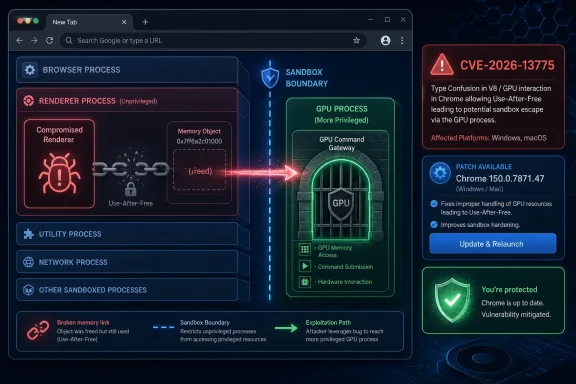 Chrome’s GPU Process Is Now Part of the Attack Surface, Not Just the Graphics Stack
CVE-2026-13775 is described by Chrome as a use-after-free vulnerability in the GPU component that could allow a remote attacker, after compromising the renderer process, to potentially perform a sandbox escape through a crafted HTML page. That phrasing is dense, but it says something important: the attacker is assumed to have already won one stage of the fight.Chrome’s multi-process architecture is built around containment. Web content normally runs in renderer processes with limited privileges, while more sensitive work is isolated elsewhere. The GPU process exists because modern web pages are not just documents; they are composited, decoded, animated, accelerated, and increasingly powered by graphics APIs that blur the line between “browser feature” and “system interface.”
That is why GPU bugs have become recurring characters in Chrome security advisories. The browser can sandbox JavaScript all it wants, but if a compromised renderer can reach a memory-corruption flaw in a more privileged or differently trusted process, the security model becomes a sequence of locked doors. CVE-2026-13775 is one of those door-between-doors bugs.
The immediate practical instruction is simple: update Chrome. The more interesting story is that Chrome 150’s security section reads like a census of modern browser complexity, with critical flaws spanning Extensions, GPU, ANGLE, Dawn, WebUSB, Skia, Views, Bluetooth, Ozone, Chromoting, and other components. Google said the desktop Stable Channel update included hundreds of security fixes, and CVE-2026-13775 was only one of many critical entries in that release train.
“Remote” Does Not Mean “No Preconditions”
The National Vulnerability Database initially scored CVE-2026-13775 at 9.8 critical under CVSS 3.1, with a network attack vector, low complexity, no privileges required, no user interaction, unchanged scope, and high impact to confidentiality, integrity, and availability. CISA’s ADP enrichment, however, listed a 9.6 critical score with user interaction required and changed scope. That discrepancy is not clerical trivia; it captures the ambiguity of browser exploit chains.The vulnerability description itself says the attacker must have compromised the renderer process. That is a major precondition, even if it is a realistic one in browser exploitation. A malicious page, a JavaScript engine bug, a compromised extension path, or another renderer-level exploit may provide the first foothold. CVE-2026-13775 is then the kind of bug that can turn a contained browser compromise into something more dangerous.
This is why CVSS can feel simultaneously useful and misleading. A 9.8 score conveys urgency, but it can flatten the sequence of events that actually matters to defenders. A sandbox escape is catastrophic when paired with a renderer exploit, but it is not necessarily the same operational risk as an unauthenticated network service bug sitting open on the internet.
CISA’s SSVC entry reportedly marked exploitation as “none,” automatable as “no,” and technical impact as “total.” That is a more operationally useful framing for many teams. It says, in effect, that there is no public sign of exploitation in that enrichment, that mass automation is not assumed, but that successful exploitation could be severe.
The Patch Is Boring, Which Is Exactly the Point
Google’s advisory says Chrome 150 was promoted to the stable channel for Windows, Mac, and Linux on June 30, 2026, with rollout occurring over the following days and weeks. On Windows and Mac, the patched build is listed as 150.0.7871.46/.47; the CVE record specifically identifies versions prior to 150.0.7871.47 as affected for this issue. For enterprise administrators, the distinction is not academic: inventory tools must report exact browser versions, not “Chrome 150-ish.”Chrome’s auto-update system will handle most consumer machines, provided the browser is allowed to restart. That last clause is where the real-world gap lives. Many users leave browsers open for days, sometimes weeks, with pending updates waiting behind a small relaunch prompt that has become part of the desktop wallpaper.
Managed environments have a different problem. Chrome can be deployed and updated through enterprise tooling, but administrators must confirm policy, update channels, restart behavior, and application compatibility. The patch may be available, but availability is not deployment.
For WindowsForum readers, the Windows angle is straightforward. If Chrome is installed directly, verify the version under the browser’s About page or through management inventory. If Chromium-based browsers are deployed alongside Chrome, track each vendor’s update cadence separately. Edge, Brave, Vivaldi, Opera, and other Chromium-based browsers do not necessarily land fixes at the same moment Google publishes a Chrome Stable update.
The NVD Record Shows How Vulnerability Data Gets Messy After Publication
One of the more interesting parts of CVE-2026-13775 is not the bug but the record around the bug. The NVD page carries a “Modified After Enrichment” notice, warning that the CVE record changed after NVD enrichment was completed and that supplied data may require amendment. That is the vulnerability-data equivalent of wet paint.The change history shows the CVE was received from Chrome on June 30, 2026. NIST added CVSS and CPE configuration data on July 1. CISA-ADP then added its own CVSS vector, CWE, and SSVC assessment before later removing the CWE entry it had added. The Chrome-origin weakness enumeration still identifies CWE-416, use after free.
This is not unusual in the modern CVE pipeline. Vendor advisories, CNA records, NVD enrichment, CISA assessments, scanner feeds, and security-product databases often converge over several days. During that period, two tools can look at the same CVE and disagree on exploitability, user interaction, scope, affected platforms, or even whether the product matching logic is complete.
That matters because many organizations automate patch prioritization around these records. A vulnerability management system may trigger a critical alert based on NVD’s 9.8. Another may weight CISA’s user-interaction-required vector. A third may wait for CPE matching and temporarily miss a population of affected endpoints if the product mapping is incomplete or delayed.
The lesson is not that vulnerability databases are unreliable. It is that they are living systems. For a fast-moving browser advisory, the authoritative signal starts with the vendor release, then gets refined by NVD, CISA, and the broader ecosystem.
The CPE Question Is a Symptom of a Larger Inventory Problem
The user-facing NVD page includes the familiar prompt asking whether a CPE is missing. In this case, NIST’s configuration data lists Google Chrome versions up to, but excluding, 150.0.7871.47, combined with Windows, Linux kernel, and macOS platform entries. That looks reasonable for desktop Chrome, but it also illustrates why browser vulnerability matching remains awkward.Chrome is an application, but it rides across operating systems, enterprise packaging formats, embedded browser runtimes, and downstream Chromium derivatives. The CPE model can describe the official Google Chrome product, yet it does not automatically answer whether a third-party browser, an Electron app, a packaged Chromium runtime, or a managed kiosk shell inherits the same vulnerable component.
For administrators, the better question is not only “does the CPE match?” It is “where does Chromium code exist in my environment, and who is responsible for updating it?” That includes obvious browsers and less obvious software that embeds Chromium for rendering, authentication, help panes, dashboards, or administrative consoles.
This is where endpoint inventory often lags behind reality. A scanner may flag Chrome but miss a Chromium runtime bundled with a legacy application. Conversely, it may over-report risk by matching a broad component without understanding whether the vulnerable code path is present or reachable. The practical answer is to treat the official Chrome patch as the first priority while continuing to track downstream advisories from vendors that ship Chromium-based products.
Use-After-Free Bugs Keep Surviving Because Browsers Keep Doing More
A use-after-free bug occurs when software continues using memory after it has been freed. In a safe world, the program would stop referring to that object. In the world of high-performance C++ systems, stale references can become opportunities for attackers to shape memory and turn a crash into code execution or privilege boundary abuse.Browsers are particularly vulnerable to this class of flaw because they are large, concurrent, and performance-obsessed. A modern page may trigger rendering, GPU acceleration, media decoding, input handling, sandbox messaging, WebAssembly execution, extension hooks, permissions prompts, and network activity almost simultaneously. Lifetime management across that much machinery is brutally hard.
Chrome’s security architecture has improved dramatically over the years, but architecture cannot erase implementation bugs. Sandboxing, site isolation, process separation, Control Flow Integrity, MiraclePtr-style mitigations, and memory-safety work all raise the cost of exploitation. They do not make memory corruption disappear.
That is why the industry’s slow migration toward memory-safe languages matters. It is also why the transition is slow. GPU paths, graphics translation layers, and performance-critical rendering systems are among the hardest places to rewrite safely without breaking compatibility or speed. CVE-2026-13775 sits in precisely the sort of subsystem where the security future keeps colliding with the compatibility present.
Google’s Restricted Bug Details Are Frustrating, but Defensible
Google’s advisory notes that access to bug details and links may remain restricted until a majority of users are updated, and that restrictions can remain if the bug exists in a third-party library other projects depend on. For security researchers and administrators, this can be maddening. The public wants enough information to assess exposure, but attackers also read advisories.In the case of CVE-2026-13775, the issue tracker entry is marked in a way that requires permissions. That leaves defenders with the vendor summary, the CVE description, scoring, affected version range, and whatever downstream analysis emerges. It is not enough to reconstruct the exploit path, and that is intentional.
The trade-off is familiar. Full technical disclosure helps defenders validate and detect. Delayed detail reduces the chance that patch-diffing immediately turns into weaponized exploit development while users are still waiting for automatic updates to land. Browser vendors usually choose staged transparency because their install bases are enormous and update adoption is uneven.
There is a middle ground, and Google’s advisory partially occupies it. It gives the component, bug class, severity, affected versions, and fixed versions. It does not provide a proof of concept, memory layout detail, or exploit primitive. For most enterprise defenders, that is enough to prioritize patching even if it is not enough to write a bespoke detection.
Windows Admins Should Treat Browser Restarts as Security Events
On Windows fleets, the most common failure mode is not that Chrome cannot update. It is that Chrome updates but does not fully activate the fix until restart. A patched binary sitting beside a long-running browser session is a half-finished remediation.This has become one of the quiet annoyances of modern endpoint management. Operating system patching has formal maintenance windows, reboot policies, deferral settings, user prompts, and compliance reporting. Browser patching often happens faster, but with less ceremony. That is good for consumers and messy for enterprises.
Security teams should push browser restarts into the same operational category as OS reboots. Not every Chrome update requires an emergency interruption, but critical sandbox escape fixes should have a defined relaunch expectation. If a user can postpone a browser restart indefinitely, the organization has not actually accepted Chrome’s rapid-update security model.
There is also a communications problem. Users have been trained to fear interruptions more than vulnerabilities. A prompt that says “Relaunch to update” competes against active work, unsaved forms, open meetings, and the universal dread of losing tabs. Enterprises need policies that preserve session state while making clear that browser relaunches are not optional hygiene.
The Exploit Chain Is the Real Threat Model
CVE-2026-13775 should not be read in isolation. Its description explicitly assumes a compromised renderer process, which means it belongs to the second stage of a browser attack chain. First, the attacker gains code execution or sufficient control inside the renderer. Then, the attacker escapes the sandbox through a vulnerability like this one. After that, the attacker may pursue persistence, credential theft, local privilege escalation, or lateral movement.That chain-based model is why security teams should pay attention even when there is no evidence of exploitation. Sandbox escapes are valuable because they multiply the severity of other bugs. A renderer exploit that would otherwise be contained becomes much more dangerous when paired with a reliable escape.
This also explains why multiple critical Chrome bugs in the same release matter. Attackers do not need every vulnerability to be independently perfect. They need compatible primitives that can be chained. A graphics bug, a renderer bug, a permissions bypass, and an extension flaw may each be constrained on paper, yet devastating in combination.
Defenders should resist the temptation to downgrade urgency simply because the CVE is not described as actively exploited. Absence of known exploitation is not the same as low value. Browser sandbox escapes are among the kinds of vulnerabilities that sophisticated attackers collect, refine, and use selectively.
The Enterprise Patch Window Is Shrinking Again
Chrome’s fast release cadence has always forced a cultural adjustment in enterprise IT. In the old desktop model, administrators could test browser updates like major application patches. In the modern web model, the browser is the operating system for SaaS, identity, admin portals, collaboration tools, and line-of-business apps. Waiting too long is its own compatibility and security risk.CVE-2026-13775 is a good example of why the old delay-first instinct no longer works. The fix arrived as part of a large Stable Channel update with many security changes. Holding it back because one internal app might behave differently means accepting exposure to a critical sandbox escape and many other vulnerabilities.
That does not mean enterprises should blindly update everything without testing. It means the testing system must be fast enough to match the browser threat model. Canary rings, pilot groups, automated smoke tests for critical web apps, and telemetry-driven rollback plans are not luxuries anymore. They are the price of using the modern browser as a production platform.
The uncomfortable truth is that some organizations still treat browser updates as user-level noise. They are not. Chrome is a privileged, internet-facing execution environment with direct access to identity sessions and enterprise data. A critical GPU use-after-free is not “just a browser bug” when the browser is where the business runs.
Consumers Get the Easy Button, but Not the Easy Risk Model
For individual users, the advice is almost insultingly simple: open Chrome’s About page, let it check for updates, and relaunch if prompted. If the browser reports version 150.0.7871.47 or later on Windows or Mac, the specific CVE-2026-13775 exposure described by the NVD record is addressed. On Linux, Google’s advisory lists 150.0.7871.46 for Chrome 150’s stable promotion, though package repositories and distributions may expose versioning differently.The risk model is less simple. Users often run several browsers, each with its own update mechanism. They also run apps built on Chromium technologies without thinking of them as browsers. A person who updates Chrome but ignores a Chromium-based secondary browser may still have a vulnerable web surface.
The average user also cannot meaningfully evaluate whether they have visited a crafted HTML page or whether a renderer compromise occurred. That is why patching remains the main defense. Browser exploit chains are designed to be invisible, and asking users to detect them is fantasy.
The best consumer habit is boring resilience. Keep automatic updates enabled, restart the browser regularly, update the operating system, remove extensions that are no longer needed, and avoid treating unknown downloads or prompts as routine. None of those habits is glamorous, but browser security is usually won through accumulated friction against attackers.
The Chrome 150 Advisory Is Really About Browser Sprawl
Google’s June 30 advisory for Chrome 150 is striking not merely because CVE-2026-13775 is critical, but because the security list is broad and deep. The release includes critical issues in many components and a long tail of high, medium, and lower-severity fixes. Google’s language about hundreds of security fixes underscores the scale of the maintenance burden.This is what happens when the browser becomes the universal runtime. Graphics, USB, Bluetooth, remote desktop, extensions, iOS-specific plumbing, rendering libraries, UI frameworks, and media paths all converge inside one application that parses hostile input all day. Every feature that makes the web more capable becomes another security boundary to maintain.
There is no realistic path back to a simpler browser. Users expect hardware acceleration, video conferencing, 3D graphics, device access, synced profiles, password managers, enterprise policy, extension ecosystems, and rich web apps. Removing capabilities would break the web people actually use.
So the burden shifts to engineering process and operational discipline. Google must keep finding and fixing bugs before attackers exploit them. Enterprises must deploy fixes quickly enough to matter. Users must tolerate restarts. Security vendors must avoid drowning teams in duplicated or low-context alerts. CVE-2026-13775 is a single entry in that machinery, but it exposes the whole machine.
The Chrome 150 Fix Turns Version Numbers Into a Security Boundary
The practical implications are concrete enough that this should not become an abstract debate about CVSS philosophy. CVE-2026-13775 is patched, the affected version range is known, and the operational task is to make sure the fixed browser is actually running.- Chrome installations older than 150.0.7871.47 on Windows and Mac should be treated as exposed to CVE-2026-13775 until updated and relaunched.
- The bug is a GPU use-after-free that matters most as part of an exploit chain after renderer compromise, not as a standalone network-service vulnerability.
- NVD and CISA scoring differ in important ways, but both classify the issue as critical and both point to severe impact if exploitation succeeds.
- The NVD record changed after enrichment, so vulnerability-management tools may briefly disagree on scoring, CPE matching, or weakness metadata.
- Administrators should inventory Chromium-based browsers and embedded runtimes, not just the official Google Chrome application.
- Browser relaunch compliance should be measured, because a downloaded update does not fully protect a long-running vulnerable session.
References
- Primary source: NVD / Chromium
Published: 2026-07-03T07:00:38-07:00
NVD - CVE-2026-13775
 nvd.nist.gov
- Security advisory: MSRC
Published: 2026-07-03T07:00:38-07:00
Original feed URL
Security Update Guide - Microsoft Security Response Center
 msrc.microsoft.com
- Related coverage: cvefeed.io
CVE-2026-13775 - Google Chrome Use-after-free Sandbox Escape
Use after free in GPU in Google Chrome prior to 150.0.7871.47 allowed a remote attacker who had compromised the renderer process to potentially perform a sandbox escape via a crafted HTML page. (Chromium security severity: Critical)cvefeed.io - Related coverage: radar.offseq.com
CVE-2026-13775: Use after free in Google Chrome - Live Threat Intelligence - Threat Radar | OffSeq.com
Detailed information about CVE-2026-13775: Use after free in Google Chrome affecting Google Chrome. Get real-time updates, technical details, and mitigation strradar.offseq.com - Related coverage: security.snyk.io
Use After Free in chromium | CVE-2026-13775 | Snyk
High severity (8.7) Use After Free in chromium | CVE-2026-13775security.snyk.io
