

Google fixed CVE-2026-14072 in Chrome 150.0.7871.47 for Windows and Mac on June 30, 2026, after documenting a low-severity SplitView flaw that could let a remote attacker spoof browser security UI through a crafted HTML page when user interaction occurs. That sounds modest, and by the arithmetic of modern browser security, it is. But UI spoofing bugs sit in the uncomfortable space between “not code execution” and “exactly the kind of deception users are trained to miss.” The right response is not panic; it is to treat this as another reminder that browser trust is now a product surface, not merely a cryptographic guarantee.
The National Vulnerability Database describes CVE-2026-14072 as an inappropriate implementation in Chrome’s SplitView component, affecting Google Chrome versions before 150.0.7871.47. CISA’s ADP enrichment assigns it a CVSS 3.1 score of 4.3, with network attack vector, low attack complexity, no privileges required, and user interaction required. Google’s own Chromium security severity is Low.
That combination tells us a lot. This is not a memory corruption bug promising arbitrary code execution. It is not a sandbox escape. It is not, based on CISA’s SSVC data, known to be exploited or automatable. But it is a browser UI deception issue, classified under CWE-451, the weakness category for misrepresentation of critical UI information.
The important word is critical. Browser security UI is where users are told whether they are on the site they think they are on, whether a permission prompt is genuine, whether an origin is trusted, and whether the browser or the page is speaking. A flaw that blurs that line does not need to own the machine to matter.
Google disclosed the issue as part of the Chrome Releases stable-channel update on June 30, according to the company’s own release blog. That update promoted Chrome 150 to stable for Windows, Mac, and Linux, with Windows and macOS receiving 150.0.7871.46/.47 and Linux receiving 150.0.7871.46. Google said the release contained 433 security fixes, an extraordinary number even by Chrome’s already aggressive patching cadence.
That scale matters because CVE-2026-14072 is easy to underrate when it appears beside dozens of more alarming entries. The Chrome 150 advisory includes many critical and high-severity vulnerabilities in areas such as Extensions, GPU, ANGLE, Dawn, Views, Bluetooth, Skia, and V8. Against that backdrop, a low-severity SplitView UI spoofing bug looks like housekeeping. It is not housekeeping; it is maintenance on the browser’s trust boundary.
That evolution is precisely why a UI spoofing bug in such a component deserves attention. The more Chrome becomes a container for side-by-side tasks, embedded apps, permissions, account workflows, and web-powered tools, the more its interface becomes part of the security model. A browser window is no longer just chrome around content; it is a negotiated boundary between content, identity, browser controls, extensions, and operating-system expectations.
UI spoofing attacks exploit that ambiguity. They do not necessarily break encryption, bypass authentication, or compromise memory. Instead, they try to make the user believe the wrong thing at the decisive moment. A crafted page may be able to visually imitate trusted browser UI, obscure the meaning of a control, or present a deceptive arrangement that nudges the user into granting trust where none is deserved.
The NVD description for CVE-2026-14072 is sparse, and that is normal. Google routinely restricts access to bug details until most users have received the fix, and its Chrome Releases advisory repeats that policy. The practical effect is that defenders get the shape of the risk before they get the exploit anatomy. In this case, the shape is clear enough: a remote attacker, a crafted HTML page, user interaction, and a misleading security UI condition in SplitView.
That is why “Low” should be read as a severity label, not as a dismissal. In the browser world, attackers do not always need a dramatic primitive. Sometimes they need a believable page, a real domain that looks adjacent to a trusted one, a user trying to finish a task, and a UI state that makes the browser less clear than it should be.
That conveyor belt is both reassuring and exhausting. It is reassuring because Google keeps finding, fixing, and shipping. Chrome’s release machinery can move patches to billions of users quickly, and the browser’s auto-update system remains one of the strongest pieces of consumer security infrastructure on the desktop. For most home users, the best security decision is still to let Chrome update and restart when prompted.
For administrators, the same cadence creates a different problem. Browser updates are now part of the enterprise risk calendar, not background noise. A release that fixes hundreds of security issues may also change extension behavior, media playback, web compatibility, enterprise policies, and browser-managed workflows. The tension is familiar: patch fast enough to reduce exposure, but not so blindly that you break the workflows that make patching politically survivable.
CVE-2026-14072 is a good example of why delaying browser updates is getting harder to justify. On paper, a UI spoofing bug with user interaction required may seem safe to defer behind higher-risk operational priorities. In practice, it arrives in a release train with critical use-after-free bugs and sandbox-relevant issues. You do not get to patch only the scary CVEs; you deploy the build.
The result is a lopsided conversation. Security teams read the advisory as a bundle of fixed risk. Help desks hear from users who noticed the restart, the changed control, the broken extension, or the subtle UI adjustment. The more Chrome becomes the default application runtime for businesses, the more every Chrome update looks less like browser maintenance and more like an operating-system update in miniature.
That makes scoring difficult. CVSS can say the attack is network-accessible, low complexity, requires user interaction, and has limited integrity impact. Those are useful labels. They do not capture the situational power of a fake prompt at the exact moment a user expects a real one.
The history of web security is full of these gray-zone attacks. Fake login forms, deceptive OAuth consent pages, clickjacking overlays, tabnabbing, fullscreen spoofing, permission prompt mimicry, and address-bar deception all work because users cannot continuously audit the entire context of a browser session. We ask them to inspect domains, certificate indicators, permission prompts, account switchers, passkey dialogs, and extension banners while also doing their jobs.
Browser vendors have responded by turning interface design into security engineering. Permission prompts have become more constrained. Fullscreen warnings became more explicit. Address bars gained anti-spoofing rules. Site information panels became standardized. Password managers increasingly bind credentials to origins instead of relying on visual recognition. But each new feature that changes layout or window semantics reopens the question: can web content make the browser say something it did not mean to say?
That is the conceptual risk in SplitView. Split interfaces multiply context. If the browser is showing more than one thing, or presenting page content alongside browser-managed surfaces, any ambiguity in boundaries becomes an attacker’s opportunity. The more app-like the browser gets, the more it must defend against app-like deception.
That timeline is useful for defenders because it shows how public vulnerability data becomes operationally useful in stages. The first disclosure tells you a CVE exists and that Chrome has shipped a fix. The CISA enrichment gives scanners and vulnerability managers a preliminary severity and decision-support frame. NIST’s CPE mapping makes it easier for asset tools to connect the CVE to installed software versions.
The user-submitted NVD text asks, “Are we missing a CPE here?” That line is boilerplate on NVD pages, but in this case NIST’s change history indicates that a Chrome CPE configuration was added on July 2. For vulnerability-management teams, the relevant configuration is straightforward: Google Chrome versions before 150.0.7871.47 are vulnerable according to NVD’s initial analysis.
The tricky part is platform nuance. Google’s release post lists 150.0.7871.46/.47 for Windows and Mac and 150.0.7871.46 for Linux, while the CVE record identifies Chrome prior to 150.0.7871.47. In practice, WindowsForum readers should avoid over-interpreting that mismatch without vendor-specific scanner logic. The safe desktop guidance for Windows is simple: update Chrome and confirm that the browser reports 150.0.7871.47 or later.
This is also where Chromium derivatives enter the conversation. Microsoft Edge, Brave, Vivaldi, Opera, and other Chromium-based browsers do not necessarily ship Google Chrome build numbers, even when they inherit Chromium fixes. Administrators should track each vendor’s advisory and browser version separately rather than assuming that a patched Chrome build means every Chromium browser on the fleet is patched.
Chrome’s auto-update model is effective, but it is not magic. Users can keep browser sessions open for days. Some enterprise images include policy controls that affect update timing. Virtual desktop pools may revert state. Kiosks and shared machines may be patched differently from knowledge-worker laptops. Security dashboards may see the installer version but miss the running process version until restart.
That matters because browser vulnerabilities are often exposed through normal behavior. A user does not have to open an attachment or run a binary. They have to browse. If an attacker can deliver a crafted page through a phishing email, malvertising chain, compromised site, internal wiki, or chat link, the browser becomes the execution and persuasion surface.
For CVE-2026-14072 specifically, CISA’s SSVC entry says exploitation is “none,” automatable is “no,” and technical impact is “partial.” Those are calming signals. They suggest this is not an internet-wide wormable emergency and not a known exploited zero-day. But enterprise patching should not be reserved only for active exploitation. The time to close a deception bug is before exploit details are widely understood.
The operational answer is boring, which is usually a good sign. Push the update through normal Chrome enterprise channels, verify deployment, prompt or force restart where policy allows, and check high-risk user groups first. Security teams should prioritize browsers used by help desk staff, finance teams, administrators, developers, and anyone with access to privileged web consoles.
That is especially true for UI spoofing. The attack class aligns with the places where users make trust decisions: sign-in pages, permission prompts, password autofill, file downloads, payment flows, device authorization, and admin approvals. Even if CVE-2026-14072 itself has limited impact, the category maps directly onto modern enterprise workflows.
Windows also complicates browser inventory. Chrome may be installed system-wide, per-user, bundled into golden images, delivered through management tools, or present on machines where Edge is supposed to be the default. Some organizations have excellent patch visibility for Windows Update but weaker telemetry for third-party browser versions. That gap is where low-severity browser CVEs linger.
Microsoft Edge deserves a mention here not because this CVE record names Edge, but because Edge shares the Chromium base. Microsoft maintains its own security advisories and release cadence, and Edge administrators should track Microsoft’s channel releases rather than infer status from Google Chrome alone. In Chromium land, the upstream fix is only half the story; downstream packaging is the other half.
For home Windows users, the instruction remains simpler. Open Chrome’s About page, let the update apply, and restart the browser. If the version is older than 150.0.7871.47 on Windows, treat the system as behind until Chrome updates. If you use multiple Chromium-based browsers, check each one individually.
But severity systems are optimized for vulnerability management, not lived consequences. A low-severity UI spoofing flaw may be irrelevant in one environment and meaningful in another. A consumer casually browsing news sites faces one risk profile. A domain admin logged into cloud consoles all day faces another. A help desk worker approving identity resets faces another still.
The integrity impact in CISA’s CVSS vector is limited, and confidentiality and availability are marked none. That suggests the flaw is about influencing what a user believes or does, not directly stealing data or crashing systems. Yet influence is often the opening move in real intrusions. The attacker who cannot break the lock may still trick someone into opening the door.
This is why security communication around browser bugs needs to be more nuanced than “update now” versus “nothing to see here.” CVE-2026-14072 does not justify emergency war-room treatment on its own. It does justify rapid routine patching, scanner validation, and a reminder that browser UI is part of the attack surface.
The best administrators already think this way. They do not wait for every CVE to become a headline. They keep browsers current because the web is hostile by default, because exploit chains combine small primitives, and because today’s low-severity patch note can become tomorrow’s phishing kit refinement.
A decade ago, much browser security discussion centered on rendering engines, JavaScript JITs, and sandbox escapes. Those still matter enormously, as Chrome 150’s critical fixes make clear. But the browser’s visible interface has become just as strategic. Attackers are not only trying to execute code; they are trying to choreograph belief.
That trend will intensify. AI sidebars, tab groups, split panes, web apps, extension panels, passkey prompts, account overlays, and cloud desktop integrations all make the browser more powerful and more crowded. Every added surface must answer the same security question: can a web page make itself look like the browser, the operating system, or a trusted service?
For WindowsForum readers, the practical answer is to keep Chrome updated and resist the temptation to rank UI spoofing as mere cosmetic trivia. A deceptive interface is not a cosmetic problem when the interface is where security decisions happen. The lock icon, the permission prompt, the account chooser, the origin display, and the browser-managed panel are all part of the defensive perimeter.
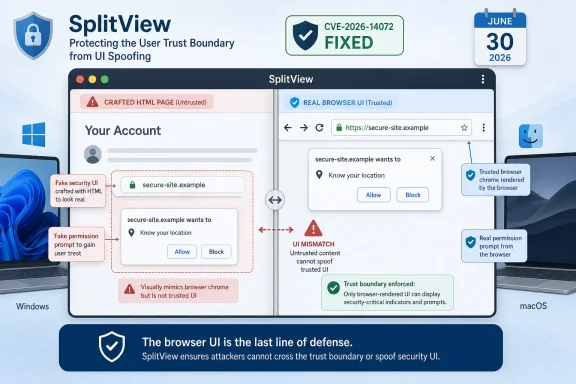 A Low-Severity Bug Lands in a High-Stakes Part of the Browser
The National Vulnerability Database describes CVE-2026-14072 as an inappropriate implementation in Chrome’s SplitView component, affecting Google Chrome versions before 150.0.7871.47. CISA’s ADP enrichment assigns it a CVSS 3.1 score of 4.3, with network attack vector, low attack complexity, no privileges required, and user interaction required. Google’s own Chromium security severity is Low.That combination tells us a lot. This is not a memory corruption bug promising arbitrary code execution. It is not a sandbox escape. It is not, based on CISA’s SSVC data, known to be exploited or automatable. But it is a browser UI deception issue, classified under CWE-451, the weakness category for misrepresentation of critical UI information.
The important word is critical. Browser security UI is where users are told whether they are on the site they think they are on, whether a permission prompt is genuine, whether an origin is trusted, and whether the browser or the page is speaking. A flaw that blurs that line does not need to own the machine to matter.
Google disclosed the issue as part of the Chrome Releases stable-channel update on June 30, according to the company’s own release blog. That update promoted Chrome 150 to stable for Windows, Mac, and Linux, with Windows and macOS receiving 150.0.7871.46/.47 and Linux receiving 150.0.7871.46. Google said the release contained 433 security fixes, an extraordinary number even by Chrome’s already aggressive patching cadence.
That scale matters because CVE-2026-14072 is easy to underrate when it appears beside dozens of more alarming entries. The Chrome 150 advisory includes many critical and high-severity vulnerabilities in areas such as Extensions, GPU, ANGLE, Dawn, Views, Bluetooth, Skia, and V8. Against that backdrop, a low-severity SplitView UI spoofing bug looks like housekeeping. It is not housekeeping; it is maintenance on the browser’s trust boundary.
SplitView Turns Layout Into a Security Surface
The phrase “SplitView” sounds innocuous because users experience it as convenience. Split views, side panels, multitasking layouts, tab organization features, and app-like browser surfaces are sold as productivity improvements. They let the browser behave less like a document viewer and more like an operating environment.That evolution is precisely why a UI spoofing bug in such a component deserves attention. The more Chrome becomes a container for side-by-side tasks, embedded apps, permissions, account workflows, and web-powered tools, the more its interface becomes part of the security model. A browser window is no longer just chrome around content; it is a negotiated boundary between content, identity, browser controls, extensions, and operating-system expectations.
UI spoofing attacks exploit that ambiguity. They do not necessarily break encryption, bypass authentication, or compromise memory. Instead, they try to make the user believe the wrong thing at the decisive moment. A crafted page may be able to visually imitate trusted browser UI, obscure the meaning of a control, or present a deceptive arrangement that nudges the user into granting trust where none is deserved.
The NVD description for CVE-2026-14072 is sparse, and that is normal. Google routinely restricts access to bug details until most users have received the fix, and its Chrome Releases advisory repeats that policy. The practical effect is that defenders get the shape of the risk before they get the exploit anatomy. In this case, the shape is clear enough: a remote attacker, a crafted HTML page, user interaction, and a misleading security UI condition in SplitView.
That is why “Low” should be read as a severity label, not as a dismissal. In the browser world, attackers do not always need a dramatic primitive. Sometimes they need a believable page, a real domain that looks adjacent to a trusted one, a user trying to finish a task, and a UI state that makes the browser less clear than it should be.
Chrome’s Patch Cadence Is Becoming Its Own Story
The Chrome 150 stable-channel update was not a small patch. Google said it included 433 security fixes, while Malwarebytes and other security outlets highlighted the sheer number of vulnerabilities addressed in the release. Whether one counts only externally visible CVEs or the broader internal security-fix total, the message is the same: modern Chromium security is a conveyor belt.That conveyor belt is both reassuring and exhausting. It is reassuring because Google keeps finding, fixing, and shipping. Chrome’s release machinery can move patches to billions of users quickly, and the browser’s auto-update system remains one of the strongest pieces of consumer security infrastructure on the desktop. For most home users, the best security decision is still to let Chrome update and restart when prompted.
For administrators, the same cadence creates a different problem. Browser updates are now part of the enterprise risk calendar, not background noise. A release that fixes hundreds of security issues may also change extension behavior, media playback, web compatibility, enterprise policies, and browser-managed workflows. The tension is familiar: patch fast enough to reduce exposure, but not so blindly that you break the workflows that make patching politically survivable.
CVE-2026-14072 is a good example of why delaying browser updates is getting harder to justify. On paper, a UI spoofing bug with user interaction required may seem safe to defer behind higher-risk operational priorities. In practice, it arrives in a release train with critical use-after-free bugs and sandbox-relevant issues. You do not get to patch only the scary CVEs; you deploy the build.
The result is a lopsided conversation. Security teams read the advisory as a bundle of fixed risk. Help desks hear from users who noticed the restart, the changed control, the broken extension, or the subtle UI adjustment. The more Chrome becomes the default application runtime for businesses, the more every Chrome update looks less like browser maintenance and more like an operating-system update in miniature.
UI Spoofing Is the Browser Version of Social Engineering
Security teams often separate technical exploitation from social engineering, but UI spoofing sits between them. It is technical because a browser implementation flaw enables the misrepresentation. It is social because the payload is usually a human decision.That makes scoring difficult. CVSS can say the attack is network-accessible, low complexity, requires user interaction, and has limited integrity impact. Those are useful labels. They do not capture the situational power of a fake prompt at the exact moment a user expects a real one.
The history of web security is full of these gray-zone attacks. Fake login forms, deceptive OAuth consent pages, clickjacking overlays, tabnabbing, fullscreen spoofing, permission prompt mimicry, and address-bar deception all work because users cannot continuously audit the entire context of a browser session. We ask them to inspect domains, certificate indicators, permission prompts, account switchers, passkey dialogs, and extension banners while also doing their jobs.
Browser vendors have responded by turning interface design into security engineering. Permission prompts have become more constrained. Fullscreen warnings became more explicit. Address bars gained anti-spoofing rules. Site information panels became standardized. Password managers increasingly bind credentials to origins instead of relying on visual recognition. But each new feature that changes layout or window semantics reopens the question: can web content make the browser say something it did not mean to say?
That is the conceptual risk in SplitView. Split interfaces multiply context. If the browser is showing more than one thing, or presenting page content alongside browser-managed surfaces, any ambiguity in boundaries becomes an attacker’s opportunity. The more app-like the browser gets, the more it must defend against app-like deception.
The NVD Record Shows the Patch Pipeline Working, Not Complete
The NVD record for CVE-2026-14072 was published on June 30, 2026, the same day Chrome received the CVE from Google, and it was modified on July 2 after NIST added a CPE configuration for Google Chrome versions up to but excluding 150.0.7871.47. CISA-ADP added the CVSS vector, CWE-451 classification, and SSVC assessment on July 1.That timeline is useful for defenders because it shows how public vulnerability data becomes operationally useful in stages. The first disclosure tells you a CVE exists and that Chrome has shipped a fix. The CISA enrichment gives scanners and vulnerability managers a preliminary severity and decision-support frame. NIST’s CPE mapping makes it easier for asset tools to connect the CVE to installed software versions.
The user-submitted NVD text asks, “Are we missing a CPE here?” That line is boilerplate on NVD pages, but in this case NIST’s change history indicates that a Chrome CPE configuration was added on July 2. For vulnerability-management teams, the relevant configuration is straightforward: Google Chrome versions before 150.0.7871.47 are vulnerable according to NVD’s initial analysis.
The tricky part is platform nuance. Google’s release post lists 150.0.7871.46/.47 for Windows and Mac and 150.0.7871.46 for Linux, while the CVE record identifies Chrome prior to 150.0.7871.47. In practice, WindowsForum readers should avoid over-interpreting that mismatch without vendor-specific scanner logic. The safe desktop guidance for Windows is simple: update Chrome and confirm that the browser reports 150.0.7871.47 or later.
This is also where Chromium derivatives enter the conversation. Microsoft Edge, Brave, Vivaldi, Opera, and other Chromium-based browsers do not necessarily ship Google Chrome build numbers, even when they inherit Chromium fixes. Administrators should track each vendor’s advisory and browser version separately rather than assuming that a patched Chrome build means every Chromium browser on the fleet is patched.
The Real Enterprise Risk Is Patch Visibility
For managed Windows environments, CVE-2026-14072 is less a standalone crisis than a visibility test. Can you identify where Chrome is installed? Can you tell which machines are still on a vulnerable version? Can you separate managed Chrome from unmanaged user installs? Can you verify restarts, not merely update downloads?Chrome’s auto-update model is effective, but it is not magic. Users can keep browser sessions open for days. Some enterprise images include policy controls that affect update timing. Virtual desktop pools may revert state. Kiosks and shared machines may be patched differently from knowledge-worker laptops. Security dashboards may see the installer version but miss the running process version until restart.
That matters because browser vulnerabilities are often exposed through normal behavior. A user does not have to open an attachment or run a binary. They have to browse. If an attacker can deliver a crafted page through a phishing email, malvertising chain, compromised site, internal wiki, or chat link, the browser becomes the execution and persuasion surface.
For CVE-2026-14072 specifically, CISA’s SSVC entry says exploitation is “none,” automatable is “no,” and technical impact is “partial.” Those are calming signals. They suggest this is not an internet-wide wormable emergency and not a known exploited zero-day. But enterprise patching should not be reserved only for active exploitation. The time to close a deception bug is before exploit details are widely understood.
The operational answer is boring, which is usually a good sign. Push the update through normal Chrome enterprise channels, verify deployment, prompt or force restart where policy allows, and check high-risk user groups first. Security teams should prioritize browsers used by help desk staff, finance teams, administrators, developers, and anyone with access to privileged web consoles.
The Windows Angle Is Broader Than Chrome
Windows users often think of Chrome as just another application, but in many organizations it is the primary shell for SaaS work. Identity, email, document editing, endpoint portals, cloud consoles, ticketing systems, password managers, remote access dashboards, and line-of-business apps all run through it. A browser UI flaw is therefore not limited to browsing; it reaches into the daily control plane of the business.That is especially true for UI spoofing. The attack class aligns with the places where users make trust decisions: sign-in pages, permission prompts, password autofill, file downloads, payment flows, device authorization, and admin approvals. Even if CVE-2026-14072 itself has limited impact, the category maps directly onto modern enterprise workflows.
Windows also complicates browser inventory. Chrome may be installed system-wide, per-user, bundled into golden images, delivered through management tools, or present on machines where Edge is supposed to be the default. Some organizations have excellent patch visibility for Windows Update but weaker telemetry for third-party browser versions. That gap is where low-severity browser CVEs linger.
Microsoft Edge deserves a mention here not because this CVE record names Edge, but because Edge shares the Chromium base. Microsoft maintains its own security advisories and release cadence, and Edge administrators should track Microsoft’s channel releases rather than infer status from Google Chrome alone. In Chromium land, the upstream fix is only half the story; downstream packaging is the other half.
For home Windows users, the instruction remains simpler. Open Chrome’s About page, let the update apply, and restart the browser. If the version is older than 150.0.7871.47 on Windows, treat the system as behind until Chrome updates. If you use multiple Chromium-based browsers, check each one individually.
Vendor Severity Is Not the Same as User Consequence
Google’s Low severity rating is credible. Browser vendors have to triage thousands of issues, and not every UI inconsistency deserves the same alarm as a remote code execution flaw. If everything is critical, nothing is critical.But severity systems are optimized for vulnerability management, not lived consequences. A low-severity UI spoofing flaw may be irrelevant in one environment and meaningful in another. A consumer casually browsing news sites faces one risk profile. A domain admin logged into cloud consoles all day faces another. A help desk worker approving identity resets faces another still.
The integrity impact in CISA’s CVSS vector is limited, and confidentiality and availability are marked none. That suggests the flaw is about influencing what a user believes or does, not directly stealing data or crashing systems. Yet influence is often the opening move in real intrusions. The attacker who cannot break the lock may still trick someone into opening the door.
This is why security communication around browser bugs needs to be more nuanced than “update now” versus “nothing to see here.” CVE-2026-14072 does not justify emergency war-room treatment on its own. It does justify rapid routine patching, scanner validation, and a reminder that browser UI is part of the attack surface.
The best administrators already think this way. They do not wait for every CVE to become a headline. They keep browsers current because the web is hostile by default, because exploit chains combine small primitives, and because today’s low-severity patch note can become tomorrow’s phishing kit refinement.
The Small SplitView Bug Says the Quiet Part About Browsers
The most concrete lesson from CVE-2026-14072 is not that SplitView is dangerous. It is that browser features increasingly blur the boundary between page content and trusted interface. That boundary is where users decide whether to type credentials, approve permissions, download files, or believe an identity claim.A decade ago, much browser security discussion centered on rendering engines, JavaScript JITs, and sandbox escapes. Those still matter enormously, as Chrome 150’s critical fixes make clear. But the browser’s visible interface has become just as strategic. Attackers are not only trying to execute code; they are trying to choreograph belief.
That trend will intensify. AI sidebars, tab groups, split panes, web apps, extension panels, passkey prompts, account overlays, and cloud desktop integrations all make the browser more powerful and more crowded. Every added surface must answer the same security question: can a web page make itself look like the browser, the operating system, or a trusted service?
For WindowsForum readers, the practical answer is to keep Chrome updated and resist the temptation to rank UI spoofing as mere cosmetic trivia. A deceptive interface is not a cosmetic problem when the interface is where security decisions happen. The lock icon, the permission prompt, the account chooser, the origin display, and the browser-managed panel are all part of the defensive perimeter.
Chrome 150 Is the Update to Verify, Not Merely Assume
The immediate action is refreshingly ordinary: verify that Chrome has updated beyond the vulnerable range. Google’s Chrome Releases blog says the stable-channel update began rolling out on June 30, and Chrome updates commonly arrive over days or weeks. That means “Google shipped it” and “every endpoint has it” are not the same statement.- Chrome on Windows should be checked for version 150.0.7871.47 or later if CVE-2026-14072 is in scope for your fleet.
- The NVD record identifies Google Chrome versions before 150.0.7871.47 as vulnerable after NIST added the Chrome CPE configuration on July 2.
- CISA-ADP rates the issue at CVSS 4.3 with user interaction required, no privileges required, and limited integrity impact.
- Google rates the underlying Chromium issue as Low severity, but the bug class affects security UI, which is where users make trust decisions.
- Administrators should verify running browser versions after restart, not merely whether the update package has been staged.
- Users of Chromium-based browsers other than Chrome should check their own vendor’s release notes instead of assuming Google’s build number applies.
References
- Primary source: NVD / Chromium
Published: 2026-07-03T07:00:57-07:00
NVD - CVE-2026-14072
 nvd.nist.gov
- Security advisory: MSRC
Published: 2026-07-03T07:00:57-07:00
Original feed URL
Security Update Guide - Microsoft Security Response Center
 msrc.microsoft.com
- Related coverage: malwarebytes.com
Chrome needs another whopper update to fix 382 security bugs | Malwarebytes
Google released a huge update of 382 security fixes, 15 of which were rated as critical. So, it's time to update againwww.malwarebytes.com - Related coverage: sqmagazine.co.uk
Chrome 150 Patches 382 Security Fixes, With 15 Critical Ones
Google's Chrome 150 stable release fixes 382 security bugs, including 15 Critical use-after-free flaws. Here's what changed and how to update now.sqmagazine.co.uk - Related coverage: techradar.com
Update Chrome now — Google patches new zero-day flaw already being exploited | TechRadar
A new bug could allow crooks to execute arbitrary code in Chromewww.techradar.com - Related coverage: edelivery.windriver.com
Wind River Linux End-April 2016 Security Bulletin
Wind River Linux End-April 2016 Security Bulletinedelivery.windriver.com
