

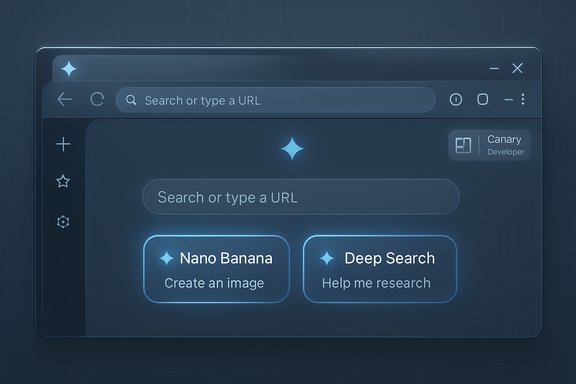
Google’s work on a next-generation visual refresh for Chrome — being tested under the internal label “Chrome Next” — is already visible in Canary builds as early infrastructure changes, new New Tab Page (NTP) experiments, and a reworked layout system that prepares the browser for deeper UI shifts and tighter Gemini AI integration. Early Canary flags and leaked interface artifacts show Google is quietly rewiring how Chrome composes its top chrome, side panels, and NTP so that future features — from full-height side panels to AI action chips like Nano Banana and Deep Search — can sit directly in the browser’s chrome without breaking layout or accessibility guarantees.
Chrome’s design has always favored minimalism and content-first presentation: that principle shaped the product when it launched in 2008 and has guided iterative refreshes ever since. The browser’s UI has been updated several times over the years — from early minimal chrome to big Material Design overhauls and the rounded-tab refreshes introduced in later milestones — but Google is now preparing a more structural change that touches the browser’s layout system itself as a foundation for future visual and functional additions. At a high level, the current Canary experimentation is not a single cosmetic toggle; it is a two-phase effort:
At the same time, the approach raises legitimate questions about stability, privacy, and user control. The structural layout work is the right engineering move, but its success will depend on Google’s execution: correct focus behavior, accessible navigation, explicit privacy controls, and measured rollout strategies. Users and admins should keep a close eye on Canary artifacts, but wait for Beta and Stable channels (and enterprise policy keys) before changing production environments.
For now, treat the Canary experiments as a preview of direction rather than a finalized product. Expect continued iteration, more Gemini surface integration, and ongoing developer discussion as Google polishes the “Next” look for Chrome.
Source: Windows Report Google is Preparing a Visual Redesign of Chrome, under “Chrome Next”
 Background / Overview
Chrome’s design has always favored minimalism and content-first presentation: that principle shaped the product when it launched in 2008 and has guided iterative refreshes ever since. The browser’s UI has been updated several times over the years — from early minimal chrome to big Material Design overhauls and the rounded-tab refreshes introduced in later milestones — but Google is now preparing a more structural change that touches the browser’s layout system itself as a foundation for future visual and functional additions. At a high level, the current Canary experimentation is not a single cosmetic toggle; it is a two-phase effort:- Phase 1: rework the internal layout plumbing and expose a developer/tester flag so engineers and early testers can validate the new composition without changing visible chrome yet.
- Phase 2: gradually enable visual and behavioral elements that take advantage of the new layout — notably, side panels that can extend up to the toolbar, deeper AI integration on the New Tab Page, and new interface motion/animation primitives intended to feel smoother and more integrated.
What WindowsReport and Canary leaks found
The new layout flag: “Tabbed Browser Use New Layout”
WindowsReport’s hands‑on reporting uncovered a Canary-only flag described as “Use the new Tabbed Browser Layout. Visually nothing should change.” That phrasing is important: Google is exposing the architecture change while keeping the immediate user-facing chrome identical, allowing engineers to dogfood the new layout without forcing a visible design shift on testers. The article suggests the flag exists to let developers test the new layout system and prepare the browser for future visible changes. This approach — exposing internal layout changes behind a flag — is a familiar pattern for Chrome’s development practice. It reduces rollout risk by separating mechanical/structural changes from the visible UI work that follows. Canary is the right place for that kind of staged experiment because it reaches engineers and power users willing to file detailed bug reports.Side panel behavior: reaching up to the toolbar
Commit-message excerpts reported by WindowsReport indicate the main technical aim: allow side panels (bookmarks, reading list, assistant panes, etc. to extend all the way up to the toolbar instead of being bounded to the content area alone. That change sounds small on paper but has several cascading effects: z‑ordering and stacking rules change, accessibility focus and tab order must be revisited, and compositor/animation handling (so the panel slides smoothly) needs new timing hooks. WindowsReport describes these commits as the reason behind the layout work. Readers should note that while the reporting is clear, public Chromium commit traces for the exact messages referenced were not independently located at the time of writing; treat the commit details as a strong signal rather than a verified shipping plan.What’s already visible in Canary: NTP AI chips and Gemini buttons
Nano Banana and Deep Search: new “AI Action Chips” on the New Tab Page
Canary builds show new action chips under the NTP search box labeled “Nano Banana” and “Deep Search.” These are clearly AI-oriented shortcuts that prefill the search field with prompts such as “Create an image of…” (Nano Banana) and “Help me research…” (Deep Search), letting users start image-generation or research-oriented queries without leaving the New Tab Page. Multiple hands‑on reports and screenshots from Canary confirm this experiment, and early testers report instability and crashes in some builds — typical for Canary.- Nano Banana appears to wire into Google’s image-generation stack, offering a prompt-driven entry point for generating images directly from the browser NTP.
- Deep Search aims at research workflows and appears to connect to broader Gemini-backed “deep search” capabilities that synthesize multi-source results into a single, detailed output.
Gemini integration across Chrome surfaces
Google’s broader plan to fold Gemini into Chrome is well-established: Gemini assistive features have been appearing across Chrome surfaces (omnibox AI mode, DevTools AI assistance, and the Gemini button in the top chrome in some channels). Chrome DevTools already contains an experimental AI assistance panel that uses Gemini for tasks like CSS debugging; the inclusion of Gemini in developer tooling demonstrates Google’s intent to make the model part of the browser’s internal toolset as well as a consumer-facing assistant.Why the layout change matters (technical and UX implications)
Technical reasons
Reworking the layout system before changing the chrome is a pragmatic engineering choice:- Z-order and hit-testing: If side panels now extend into the toolbar region, Chrome must unify how input events, focus management, and overlays are dispatched.
- Animation and composition: Full-height side panels require compositor changes so sliding and motion feel fluid without causing jank or layout thrash.
- Accessibility and keyboard navigation: A panel that overlaps the toolbar must preserve predictable keyboard order and screen-reader semantics.
- Cross-platform consistency: Chrome runs on Windows, macOS, Linux, and many window managers. The layout changes must be robust across OS-level chrome behaviors and windowing systems.
UX reasons
From a product perspective, allowing side panels to meet the toolbar removes a visual “gap” between the assistant/side content and the toolbar controls. That enables:- A unified assistant experience (Gemini sidebar that looks and behaves like a first-class pane).
- Persistent controls and context-aware actions that are always visually anchored to the top of the window.
- Motion patterns that feel consistent when panels appear or disappear (sliding under/over the toolbar vs. pushing content).
Security, privacy, and policy implications
Data surface and telemetry
Embedding Gemini and AI features directly into Chrome’s chrome expands the browser’s telemetry and data-surface footprint. Google’s product messaging indicates that Gemini features will offer opt-in settings and controls, but there are important privacy trade-offs:- Will Deep Search or Nano Banana send the full tab contents (DOM, cookies, local storage context) to Google’s servers or a proxied model endpoint by default?
- How will Chrome segregate telemetry from content used to improve Gemini models vs. telemetry used for diagnostics?
Security considerations
Any feature that pulls open tabs, page content, or local files into a central assistant surface must be engineered to avoid accidental leaks (e.g., sensitive fields harvested into prompts). The usual mitigations apply:- Per-feature permission prompts (don’t assume all users want cross-tab access).
- Clear UI indicators when content is being read or sent.
- Opt-out defaults for the most sensitive behaviors.
Enterprise and admin takeaways
- Enterprises should treat Canary artifacts as signals, not commitments. The experiments indicate direction but not firm timelines.
- IT administrators should watch Chrome Enterprise release notes and the Security/Privacy controls for Gemini features. Any new AI surface that could touch corporate data will need explicit admin policy controls.
- Avoid enabling experimental flags on production images; instead, test in isolated environments and use the Chrome for Business controls to block features if necessary.
How to try it today (Canary, flags, and caution)
For readers who want to test these changes in a safe environment, the usual Canary + flags approach applies:- Install Chrome Canary in a test profile (do not use your primary profile).
- Look for NTP and AI-related flags (reporting indicates flags like ntp-next-features or NTP-related toggles are used to gate the experience).
- Expect instability; Canary builds are experimental and may crash.
Strengths and opportunities in Google’s approach
- Forward-looking engineering: Reworking layout plumbing first reduces future breakage and allows Google to add radical features without rewriting foundational code repeatedly.
- Integrated AI workflows: Surface-level AI chips (Nano Banana, Deep Search) on the New Tab Page reduce friction for creative and research tasks and could meaningfully speed workflows.
- Consistent productization of Gemini: Bringing Gemini into DevTools, the omnibox, and the NTP is a coherent strategy: the model becomes a first-class feature across both developer and consumer surfaces.
Risks, unknowns, and things to watch closely
- Stability and performance: Structural layout changes can introduce regressions (mis-ordered focus, double titlebars, janky animations) that affect millions of users. Expect cautious incremental rollouts.
- Privacy and data residency: The “what, where, and how” of data sent to Gemini is the central question. On-device Nano models mitigate some concerns but are not as capable for deep multi‑source research tasks.
- Discoverability vs. distraction: Making the NTP an AI action center can be useful, but it also risks turning Chrome’s start surface into an attention-grabbing hub that competes with user intent to browse.
- Vendor lock-in and ecosystem effects: Tight Gemini integration could make Chrome an even stronger gate into Google’s ecosystem, raising competitive and regulatory questions for environments that prefer multi-vendor stacks.
- Unverified commit-level claims: Several write-ups reference commit messages that describe side-panel behavior changes. Independent verification of those specific commits in Chromium’s public repository was not found at time of reporting; treat those commit excerpts as plausible engineering artifacts rather than confirmed shipping code.
What to expect next (timeline signals)
Google’s development cadence for significant UI/platform changes typically follows a measured path:- Canary exposure (today): experimental flags and developer-facing tests.
- Dogfooding & telemetry collection: fix platform-level regressions and accessibility gaps.
- Beta-stage widening: staged exposure to larger testing populations with guardrails.
- Stable rollout: behind opt-in toggles or full opt-out controls depending on telemetry and user feedback.
Final assessment
Google’s “Chrome Next” experimentation is simultaneously a technical and product pivot: the company is investing in foundational layout work that lets it integrate assistant-style features more deeply into the browser without continually reworking surface chrome. The Canary-visible artifacts — the new layout flag, the promise of full-height side panels, and the NTP AI chips like Nano Banana and Deep Search — reveal a coherent strategy to make Chrome both a browsing tool and an AI-first productivity surface. Those features are promising: they streamline creative and research workflows and demonstrate practical ways large language and multimodal models can augment browsing.At the same time, the approach raises legitimate questions about stability, privacy, and user control. The structural layout work is the right engineering move, but its success will depend on Google’s execution: correct focus behavior, accessible navigation, explicit privacy controls, and measured rollout strategies. Users and admins should keep a close eye on Canary artifacts, but wait for Beta and Stable channels (and enterprise policy keys) before changing production environments.
For now, treat the Canary experiments as a preview of direction rather than a finalized product. Expect continued iteration, more Gemini surface integration, and ongoing developer discussion as Google polishes the “Next” look for Chrome.
Source: Windows Report Google is Preparing a Visual Redesign of Chrome, under “Chrome Next”
