

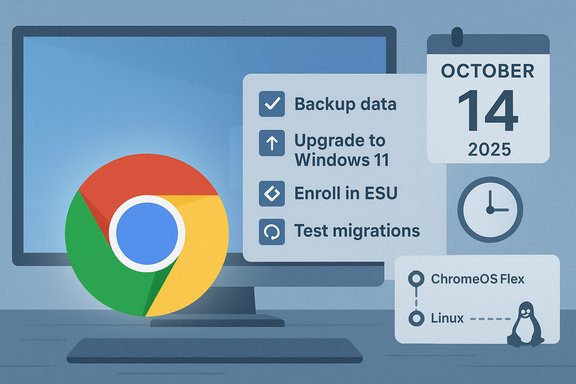
Chrome will probably keep working on Windows 10 for a while, but the underlying safety net is shrinking and the clock is real — plan now to avoid being cut off later.
Background / Overview
Windows 10 reached its formal end-of-support milestone on October 14, 2025, when Microsoft stopped shipping routine, free security and quality updates for the consumer Home and Pro editions. The company published lifecycle notices and guidance telling users to upgrade eligible PCs to Windows 11, enroll eligible devices in the consumer Extended Security Updates (ESU) program as a one-year bridge, or replace or repurpose older hardware. That calendar decision changed the threat model for millions of machines. An unsupported OS does not instantaneously “turn off,” but it does lose authoritative patching for kernel, driver, and platform vulnerabilities — the kinds of flaws that allow attackers to bypass application sandboxing and persist on a device. Browsers like Google Chrome address a critical slice of that surface (web-facing threats), but they cannot patch kernel-level flaws that only Microsoft fixes. The headline question for many users — “How long will Chrome keep working on Windows 10?” — has no single, definitive public answer from Google. Google has previously tied platform support to Microsoft lifecycles in some places and left others open-ended; the company’s public messaging about Windows 10 specifically is limited and cautious. The best available information comes from three threads of evidence: Microsoft’s official Windows 10 lifecycle and ESU program, Google’s past platform-sunset behavior (notably Windows 7), and recent reporting that Chrome started collecting anonymized metrics about Windows 11 upgrade eligibility. Each of those pieces changes the calculus for staying on Windows 10.What Microsoft actually said (and what that means)
Microsoft’s support pages and lifecycle documentation state plainly that Windows 10 (Home/Pro/Enterprise/IoT/LTSB variants) reached end of mainstream support on October 14, 2025. After that date, routine security updates and standard technical assistance ended for un‑enrolled consumer devices. Microsoft also published the consumer ESU pathway as a one‑year, time‑boxed bridge: systems that meet prerequisites (Windows 10 version 22H2 and required servicing updates) can enroll to receive security-only updates through October 13, 2026 via the consumer ESU program. Enrollment routes include linking the device to a Microsoft Account and using built-in enrollment flows, redeeming Microsoft Rewards, or a one-time paid option in some regions. This ESU is explicitly short-term and does not restore feature updates or broad technical support. Why this matters for Chrome users:- A patched browser reduces exposure to web-delivered exploits, but it cannot defend against new kernel or driver vulnerabilities that appear after Microsoft stops shipping OS-level fixes.
- ESU buys time for users who truly cannot upgrade hardware, but it is temporary; Chrome’s own support decisions are independent and could shorten practical usability sooner.
What Google has said (and what it hasn’t)
Google’s public statements about Chrome and Windows 10 are sparse. On Chrome support pages and forums, Google has historically framed support commitments conservatively and sometimes limited statements to specific SKUs — for example, noting that Chrome “will continue to receive security updates, bug fixes, and new features for as long as LTSC editions of Windows 10 are supported by Microsoft,” which explicitly applies to Long‑Term Servicing Channel (LTSC) editions, not necessarily ordinary Home/Pro installs. That kind of language leaves consumer Windows 10 users uncertain about guarantees.There is also a live precedent: when Google retired broad support for Windows 7 and Windows 8.1, Chrome 109 (promoted on January 10, 2023) was the last version that fully supported those older systems; Chrome 110 and later required Windows 10 or newer. Google provided a runway and coordinated messaging, but the eventual cutoff was real and consequential for older installs. Key takeaway: Google has not published a firm, public cutoff date for Chrome on consumer Windows 10. That absence of a date is itself meaningful — Chrome will likely remain usable for some time, but it is not guaranteed indefinitely.
Why Chrome will probably remain usable for a while — and why that’s fragile
Several technical and business realities make it likely Chrome will continue to work on many Windows 10 machines for some time after Microsoft’s free support ends:- Browsers are built to be portable. As long as the underlying Windows APIs Chrome depends on remain stable, the browser can often be compiled and run on older OS releases. Chrome developers have historically kept older OS support alive until maintaining it becomes too risky or costly.
- Market inertia. Millions of devices still ran Windows 10 at the time Microsoft set the October 2025 date. Vendors often extend support where large user bases remain — Google did this for Windows 7-era transitions — and telemetry about the installed base informs those choices.
- The practical trigger is upstream: Chromium (the open-source engine underpinning Chrome) controls a great deal of the ecosystem. If Chromium stops producing builds for Windows 10, Chrome and hundreds of Chromium-embedded apps (Electron apps, WebView2 hosts, Steam-like clients) would face pressure to follow. In the past Chromium’s vendor decisions have driven large downstream shifts.
- Security exposure grows every month. Unpatched OS-level holes are the most dangerous threats because they can bypass browser sandboxing. Even a fully patched Chrome cannot fully protect a Windows 10 device once Microsoft stops shipping kernel/driver fixes.
- Vendor economics change. Supporting legacy OSes consumes developer time for testing, security backports, and QA. If telemetry shows very small Windows 10 user shares or a preponderance of unupgradable machines, vendors may decide the cost outweighs the benefit and shorten support.
- The Chromium effect. Many apps embed Chromium; if Chromium vendors shrink platform support, the ecosystem’s ability to deliver updated, secure apps evaporates even if Chrome itself nominally runs. Past transitions show the “real” death of an OS is often defined by third‑party support withdrawal.
The telemetry angle: Chrome’s Windows 11 eligibility check (what it is, and why it matters)
Reports surfaced that Chrome added an internal metric which records a boolean indicating whether a Windows 10 machine appears capable of upgrading to Windows 11. Observers found Chromium commits and telemetry flags that log a “win11 upgrade-capable” metric at startup so Google can gauge how many Windows 10 users are on hardware that could move forward. This appears to be anonymized, aggregate telemetry rather than an individualized compatibility assistant.Why that matters:
- It gives Google real-world data on upgrade feasibility across its userbase, which in turn informs how long Chrome should realistically remain supported on Windows 10.
- If Chrome sees that a large share of Windows 10 users could upgrade to Windows 11, Google may accelerate a sunset; if many devices truly can’t upgrade, Google might extend support to avoid stranding users.
- The presence of a telemetry flag is not a policy statement. It is a signal that Google is measuring the problem, not that it will act one way or another. The company has not published a cutoff date tied to that metric. Users concerned about telemetry should review Chrome’s “usage statistics and crash reports” settings and their privacy controls.
What the Windows 7 precedent teaches us
When Google effectively ended Chrome’s active support for Windows 7 and 8.1 in early 2023, Chrome 109 served as the last full-support release, and Chrome 110 required Windows 10 or later. The company provided warning, a runway, and limited security fixes for known-exploit cases, but eventually the practical ability to receive updates ceased for those older OSes. That experience is instructive: vendor decisions can compress the usable life of an OS below the vendor-specified lifecycle deadlines if upstream maintainers move on. Key lessons:- Browser vendors can (and will) draw hard lines when engineering cost and real-world risk rise.
- Enterprises and home users who delay migrations are often the ones most acutely affected when a popular runtime like Chromium drops support.
- A generous runway is possible, but it’s not guaranteed; organizations should not treat vendor grace periods as indefinite.
Practical checklist — what to do now (immediate, near-term, and long-term)
If you depend on Chrome on a Windows 10 device, treat the post‑EOL period as a planning window, not a permanent state. Here’s a prioritized, actionable list.Immediate (today)
- Confirm your device’s Windows 10 version is 22H2 and that it has the latest cumulative updates. Microsoft requires 22H2 for ESU eligibility.
- Back up important files now to cloud storage and an external drive. Don’t procrastinate; file backups make migrations painless.
- Check whether your PC is eligible to upgrade to Windows 11 using Microsoft’s PC Health Check or Settings → Update & Security → Check for updates. Microsoft explicitly recommends this path where hardware allows.
- If eligible, plan and test the Windows 11 upgrade on a non-critical machine first. Keep driver and firmware updates current.
- If not eligible, evaluate the Microsoft consumer ESU as a short-term bridge (coverage through October 13, 2026) and verify the enrollment prerequisites (Microsoft Account link-up, version 22H2, required servicing updates).
- Harden Windows 10 machines you must keep: enable full-disk encryption, run reputable endpoint protection, minimize admin privileges, and reduce exposure (e.g., avoid using them for sensitive banking or email).
- Consider alternative OSes for machines that can’t upgrade: ChromeOS Flex, a modern Linux distribution, or migrating to a cloud-hosted Windows instance (Windows 365, Azure Virtual Desktop). ChromeOS Flex is a practical re‑use option for web-first devices.
- Inventory critical applications and test them on Windows 11 or alternative OSes — application compatibility is the real blocker for many organizations.
- Replace legacy hardware that cannot meet modern security baselines. Plan refresh cycles that align with vendor lifecycles rather than reacting to forced cutoffs.
Enterprise and IT team guidance
Enterprises should treat Microsoft’s October 14, 2025, cutoff and the ESU window as planning anchors, not a final solution. Inventory management and telemetry are essential.- Prioritize endpoints by business criticality and regulatory exposure. Use device telemetry, management tools, and vulnerability scanners to identify non-upgradable hardware.
- Pilot Windows 11 upgrades on representative hardware and validate vendor certifications for drivers, anti-cheat/DRM, and bespoke applications.
- Use ESU selectively and budget for the cost and technical overhead; ESU is temporary, and some enrollment flows require Microsoft account link-ups that may not be appropriate for all environments.
- Track Chromium and major browser vendor announcements; if Chromium signals a Windows 10 drop, many downstream apps will follow rapidly.
Risks, trade-offs, and what to watch for
Notable strengths of the current environment include a variety of migration paths (free Windows 11 upgrades for eligible hardware, one-year ESU bridge, ChromeOS Flex and Linux options) and the fact that major browser vendors have been pragmatic in past rollouts. But several risks merit attention:- Browser parity is not static. Vendors could change posture if telemetry shows a small, costly install base on Windows 10. Chrome’s telemetry work is precisely aimed at informing that calculus.
- Security layering has limits. A patched browser on an unpatched OS is better than an unpatched browser on an unpatched OS, but it is not as safe as a fully patched OS plus up-to-date applications. Attackers exploit chain vulnerabilities that may begin with a browser bug and finish with an unpatched kernel exploit.
- ESU is a stopgap, not a solution. Relying on ESU indefinitely increases operational complexity and cost and delays necessary hardware or platform refreshes.
- Ecosystem decisions matter. The real pivot point will likely be when Chromium maintainers set a minimum supported OS. When that happens, many applications that embed Chromium (Electron, WebView2, Steam/WebHelper) will have to follow, accelerating practical obsolescence.
- Any Google/Chromium announcement about platform “sunsetting” Windows 10 — that will be the clearest near‑term signal that users should accelerate migration plans.
- Browser vendors’ support matrices and enterprise help pages (Chrome Enterprise, Edge, Firefox) for explicit OS support timelines; these often change before or after upstream decisions.
Final assessment — realistic expectations and an action plan
- Chrome on Windows 10 will probably continue to function for many users for the foreseeable months after Microsoft’s October 14, 2025, cutoff, but “foreseeable” is not a promise. Google has not published a consumer Windows 10 cutoff date, and the company appears to be gathering telemetry to help decide when and how to set one.
- The Windows 7 experience shows vendors can give a generous runway — but they also cut support when engineering or security calculus demands it. Users who treat the post‑EOL period as a permanent safe zone risk being surprised by a vendor-driven functional cutoff.
- The defensible posture for consumers and IT teams is straightforward:
- Confirm Windows 11 eligibility and upgrade where possible.
- If you can’t upgrade, enroll eligible machines in the consumer ESU as a short bridge (through October 13, 2026), and harden the devices while you plan replacements.
- For devices that are web-first and non-critical, evaluate ChromeOS Flex or a modern Linux distribution as cost-effective, low-maintenance alternatives.
- Treat vendor telemetry and soft signals seriously. Chrome’s collection of Windows 11 eligibility metrics is an early, concrete indicator that Google is preparing to make data-driven choices about Windows 10 support. That prepares you to prioritize, test, and migrate before any sudden changes to browser or runtime support accelerate the timeline.
Source: How-To Geek Chrome will keep working on Windows 10, but not forever
