

Classic 7 is a fan-made Windows modification publicized in May 2026 that rebuilds Windows 10 IoT Enterprise LTSC 2021 to look and behave like Windows 7 while retaining the newer system’s support window and compatibility base. It is nostalgia with a servicing strategy attached, and that is what makes it more interesting than another desktop theme. The project lands at the exact moment when Windows 10’s mainstream afterlife has become a maze of editions, licensing exceptions, and user resentment. It also exposes a truth Microsoft would rather not dwell on: many people do not miss old Windows because it was technically superior; they miss it because it felt coherent.
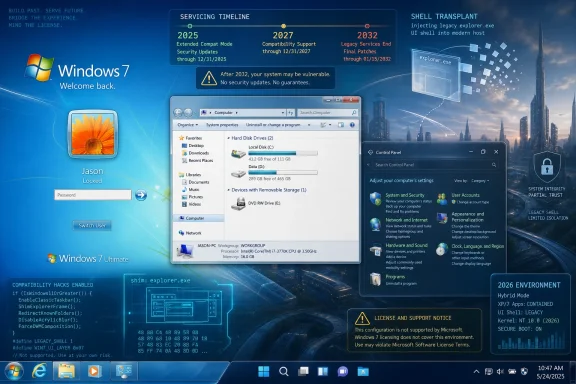
At first glance, Classic 7 looks like a screenshot from 2009 that wandered into 2026 by mistake. The sky-blue logon screen, translucent window frames, old Explorer chrome, and Windows 7-era control surfaces are all there to trigger the muscle memory of anyone who spent the last decade and a half resisting flat design. That would be charming enough if this were merely a theme pack.
But Classic 7 is not just a wallpaper, an icon set, and a Start menu replacement. According to reporting by The Register and the project’s own description, it is built from Windows 10 IoT Enterprise LTSC 2021 and then heavily modified with themes, shell work, restored components, and compatibility hacks. The point is not to make Windows 10 vaguely resemble Windows 7. The point is to make a supported Windows 10 base cosplay as Windows 7 convincingly enough that the illusion survives more than a glance.
That is why the project feels less like desktop customization and more like software archaeology. It reportedly includes real components from older Windows releases, adapted and grafted into a modern-ish Windows 10 environment. Explorer7, one of the credited pieces, is described as a wrapper that allows Windows 7’s explorer.exe to run on modern Windows versions. If accurate, that turns the shell into something closer to a transplant than a costume.
The result is an uncanny valley in reverse. Usually, modern software mimics older affordances poorly: a skeuomorphic icon here, a nostalgic boot sound there, all trapped inside the same contemporary design system. Classic 7’s trick is to make the host operating system disappear beneath enough recovered chrome that the user begins to believe the lie.
That date is the oxygen feeding projects like this. The Windows 10 codebase still runs a vast range of modern software and drivers, yet the IoT LTSC branch carries security updates deep into the next decade. For users who dislike Windows 11’s interface, hardware requirements, account pressure, advertising surfaces, and AI-era intrusions, that looks like a hidden exit.
The catch is that LTSC was never intended as a consumer refuge. Microsoft positions Long-Term Servicing Channel releases for specialized devices and tightly controlled environments where feature churn is a liability: kiosks, industrial systems, medical devices, point-of-sale terminals, and other machines that should not suddenly grow a new consumer feature because the calendar says so. In normal licensing channels, this is not a retail edition for nostalgic desktop hobbyists.
That tension is the whole story. Microsoft created a version of Windows designed to be stable, quiet, and long-supported, then spent years telling ordinary users they should want the opposite. Classic 7 is what happens when enthusiasts look at that product map and make the obvious emotional choice, even if the legal and operational footing is shaky.
That matters for WindowsForum readers because “it boots” is not the same as “it is licensed,” and “it receives updates” is not the same as “it belongs in production.” A modified Enterprise or IoT Enterprise image circulating outside normal licensing channels is not a clever upgrade path for a small business, school lab, shop floor, or family office. It is a risk bundle with a nostalgic theme.
There is also a trust problem. A heavily modified Windows image asks users to accept not only Microsoft’s binaries but also a chain of scripts, patches, wrappers, replacement components, themes, and third-party tools. Even if every contributor is acting in good faith, the security posture is fundamentally different from installing a supported Microsoft image and applying a documented configuration baseline.
For hobbyists, that may be part of the thrill. For administrators, it should be the end of the conversation. The same features that make Classic 7 fascinating — restored binaries, altered version reporting, shell replacement, modified system behavior — are precisely the features that make it inappropriate for managed environments.
Windows 7 represented one of Microsoft’s last broadly beloved desktop compromises. It had polish without feeling infantilized. It had visual depth without demanding constant attention. Its Control Panel and Explorer patterns were familiar, dense, and direct. Even its ornamentation, now filed under the wider “Frutiger Aero” revival, suggested a computer that was personal without being needy.
Windows 10 and Windows 11 solved many technical problems while introducing a different kind of fatigue. Settings migrated in fragments. Control surfaces duplicated each other. Ads and recommendations appeared in places users considered theirs. Default apps and account flows became more assertive. Windows 11 added visual consistency in some areas but also heightened the sense that the desktop was being steered toward Microsoft’s current business priorities rather than the user’s preferences.
Classic 7 is therefore not merely a wish to go back. It is an argument that the Windows desktop peaked, aesthetically and ergonomically, before Microsoft fully fused the operating system to cloud identity, telemetry, subscription services, and engagement surfaces. You do not have to agree with that argument to understand why it keeps finding an audience.
That is why Classic 7’s reported use of Windows 7 Explorer is so provocative. Explorer is not just a file manager; it is the Windows desktop’s spine. It mediates navigation, the shell namespace, taskbar behavior, window management expectations, and a thousand tiny rituals that users stop noticing until they are gone.
Microsoft has spent years modernizing around that spine rather than replacing it cleanly. Windows 11’s redesigned Explorer, evolving context menus, and Settings migration all show the tension between old infrastructure and new presentation. The company wants Windows to feel modern without breaking the workflows that make Windows valuable. The result is often neither the purity of a new system nor the confidence of the old one.
Classic 7 goes in the opposite direction. It accepts the modern base only where it is useful — driver compatibility, security servicing, application support — and then tries to pull the user-facing layer back to the Windows 7 era. That is not a sustainable platform strategy, but it is a remarkably clear editorial statement.
Firefox 115 ESR is also significant because it has become the last refuge for users on older operating systems, including Windows 7, Windows 8, and Windows 8.1. Mozilla has extended support for that ESR line longer than originally expected, with security updates currently stretching to late August 2026. That buys time, but it does not change the direction of travel: the real Windows 7 is aging out of the modern web.
Classic 7 tries to square the circle. It offers the look of an obsolete platform while leaning on the application compatibility of a newer one. A browser can pretend to be Internet Explorer while actually being Firefox. Windows can claim to be Windows 7 while really being Windows 10 IoT LTSC. The project is built on deliberate, layered deception in service of a user experience that many people find more honest than the modern default.
That irony is delicious. Microsoft’s current Windows interfaces often tell users they are being helped, recommended to, protected, or personalized, when what they often feel is steered. Classic 7 lies about its identity more blatantly, but it does so in the direction the user asked for.
For home experimenters, the risk may be bounded. A spare machine, an offline retro-gaming box, or a virtual machine used for curiosity is one thing. A primary work device with personal data, browser sessions, saved credentials, tax files, photos, and remote-work software is another. The more a machine matters, the less sense it makes to run an opaque operating system image maintained outside normal vendor channels.
For businesses, the answer is even simpler. Do not deploy this. Do not image lab machines with it. Do not treat it as a cheaper LTSC procurement strategy. Do not let its Windows Update behavior, if functional, lull you into thinking it has inherited the compliance posture of a properly licensed and managed Windows estate.
There is also a maintenance cliff hidden under the novelty. Projects like Classic 7 depend on the continued compatibility of hacks against monthly servicing updates. A cumulative update can break shell behavior, restored components, theming hooks, or activation assumptions. When that happens, the user is downstream of Microsoft, the modders, and every third-party component in the chain.
The demand is not simply “bring back Windows 7.” It is “give users a supported way to choose a quieter, denser, more traditional desktop.” That is a different request, and it is not unreasonable. Windows already contains enterprise policies, registry switches, optional components, accessibility modes, and legacy compatibility layers. The missing piece is not technical feasibility; it is product will.
A supported “classic desktop” mode would not need to resurrect every Windows 7 binary or pretend the OS version is different. It could restore compact taskbar behavior, richer window chrome, more complete Control Panel-style density in Settings, saner context menus, and fewer consumer-facing prompts. It could make local-first workflows feel like a first-class choice rather than a grudging exception.
Instead, Microsoft has tended to treat desktop resistance as something to be waited out. Each release removes a little, restores a little after backlash, and moves the baseline forward. Enthusiasts respond with tools, scripts, shell replacements, registry files, and now full nostalgia distributions. The ecosystem fills the gap Microsoft leaves.
That confusion creates room for folk wisdom. Users hear that “Windows 10 is unsupported,” then discover that some builds are not. They hear that “LTSC is supported until 2032,” then learn that the statement applies specifically to IoT Enterprise LTSC 2021, not every Windows 10 installation. They see modified ISOs online and infer that Microsoft’s servicing pipeline can be turned into a consumer escape hatch.
Microsoft’s own messaging has not always helped. The company wants migration to Windows 11, wants to preserve contractual servicing commitments, wants to keep enterprise customers calm, and wants to discourage unsupported consumer workarounds. Those goals are individually rational and collectively messy.
Classic 7 thrives in that mess. It turns lifecycle complexity into a pitch: here is the old Windows you wanted, riding on the supported Windows you were not supposed to use this way. It is not a Microsoft product, but it is very much a product of Microsoft’s product strategy.
There is nothing inherently wrong with theming Windows. There is nothing inherently wrong with running LTSC when properly licensed and appropriate for the device. There is also nothing inherently wrong with retrocomputing, preservation, or UI restoration as a hobby. The trouble begins when those impulses converge into an installable operating system image that ordinary users may mistake for a safe upgrade path.
Version spoofing is a particularly uncomfortable detail. If tools and dialogs are altered to report Windows 7 branding or version text, the experience may become more convincing, but diagnostics become less honest. Administrators, support volunteers, and even users themselves rely on accurate system identity when troubleshooting. A machine that lies beautifully is still a machine that lies.
The same applies to restored components. Windows Media Center, legacy Control Panel pieces, and older shell elements can be delightful, but old code carries old assumptions. The more deeply those pieces integrate into a modern system, the more important the integration quality becomes. Enthusiast ingenuity is impressive; it is not a substitute for a vendor-supported threat model.
If you want the Windows 7 feeling on a daily machine, start with reversible customization on a properly licensed and supported Windows installation. Use reputable tools, document changes, keep backups, and avoid anything that requires trusting a mystery image. If you need Windows 10 beyond the mainstream support horizon, investigate legitimate Extended Security Updates or properly licensed LTSC scenarios rather than downloading a repackaged edition.
If you are still on real Windows 7, the window is closing even if the machine still feels fine. Browser support has stretched longer than expected, but it is not permanent. Hardware vendors, game platforms, security tools, and application developers have already moved on or are moving now. The web, not Windows itself, is often what finally breaks the old desktop.
Classic 7 is best understood as a museum exhibit you can boot. It demonstrates what many users miss, what Microsoft no longer ships, and what enthusiasts can build when irritation meets skill. It should not be mistaken for a clean bridge to the future.
The concrete takeaways are less romantic but more useful:
Source: The Register Classic 7 is Windows 10 LTSC cosplaying as Windows 7
 The Windows 7 Skin Is the Least Interesting Part
At first glance, Classic 7 looks like a screenshot from 2009 that wandered into 2026 by mistake. The sky-blue logon screen, translucent window frames, old Explorer chrome, and Windows 7-era control surfaces are all there to trigger the muscle memory of anyone who spent the last decade and a half resisting flat design. That would be charming enough if this were merely a theme pack.But Classic 7 is not just a wallpaper, an icon set, and a Start menu replacement. According to reporting by The Register and the project’s own description, it is built from Windows 10 IoT Enterprise LTSC 2021 and then heavily modified with themes, shell work, restored components, and compatibility hacks. The point is not to make Windows 10 vaguely resemble Windows 7. The point is to make a supported Windows 10 base cosplay as Windows 7 convincingly enough that the illusion survives more than a glance.
That is why the project feels less like desktop customization and more like software archaeology. It reportedly includes real components from older Windows releases, adapted and grafted into a modern-ish Windows 10 environment. Explorer7, one of the credited pieces, is described as a wrapper that allows Windows 7’s explorer.exe to run on modern Windows versions. If accurate, that turns the shell into something closer to a transplant than a costume.
The result is an uncanny valley in reverse. Usually, modern software mimics older affordances poorly: a skeuomorphic icon here, a nostalgic boot sound there, all trapped inside the same contemporary design system. Classic 7’s trick is to make the host operating system disappear beneath enough recovered chrome that the user begins to believe the lie.
Microsoft’s Longest-Lived Windows 10 Has Become a Loophole With a Fan Club
The foundation matters because Classic 7 is not based on the Windows 10 Home or Pro installs still sitting on millions of PCs. It uses Windows 10 IoT Enterprise LTSC 2021, an edition with a radically different support trajectory. Regular Windows 10 reached its broad end-of-support moment on October 14, 2025, while Windows 10 Enterprise LTSC 2021 continues only to January 2027 and Windows 10 IoT Enterprise LTSC 2021 stretches to January 13, 2032.That date is the oxygen feeding projects like this. The Windows 10 codebase still runs a vast range of modern software and drivers, yet the IoT LTSC branch carries security updates deep into the next decade. For users who dislike Windows 11’s interface, hardware requirements, account pressure, advertising surfaces, and AI-era intrusions, that looks like a hidden exit.
The catch is that LTSC was never intended as a consumer refuge. Microsoft positions Long-Term Servicing Channel releases for specialized devices and tightly controlled environments where feature churn is a liability: kiosks, industrial systems, medical devices, point-of-sale terminals, and other machines that should not suddenly grow a new consumer feature because the calendar says so. In normal licensing channels, this is not a retail edition for nostalgic desktop hobbyists.
That tension is the whole story. Microsoft created a version of Windows designed to be stable, quiet, and long-supported, then spent years telling ordinary users they should want the opposite. Classic 7 is what happens when enthusiasts look at that product map and make the obvious emotional choice, even if the legal and operational footing is shaky.
The Legality Problem Is Not a Footnote
It is tempting to treat Classic 7 as harmless enthusiast theater, and for a disposable virtual machine that may be true enough. But the licensing problem is not cosmetic. If the underlying system is Windows 10 IoT Enterprise LTSC 2021, then legitimate use depends on legitimate access to that edition, generally through OEM or volume channels rather than a consumer download button.That matters for WindowsForum readers because “it boots” is not the same as “it is licensed,” and “it receives updates” is not the same as “it belongs in production.” A modified Enterprise or IoT Enterprise image circulating outside normal licensing channels is not a clever upgrade path for a small business, school lab, shop floor, or family office. It is a risk bundle with a nostalgic theme.
There is also a trust problem. A heavily modified Windows image asks users to accept not only Microsoft’s binaries but also a chain of scripts, patches, wrappers, replacement components, themes, and third-party tools. Even if every contributor is acting in good faith, the security posture is fundamentally different from installing a supported Microsoft image and applying a documented configuration baseline.
For hobbyists, that may be part of the thrill. For administrators, it should be the end of the conversation. The same features that make Classic 7 fascinating — restored binaries, altered version reporting, shell replacement, modified system behavior — are precisely the features that make it inappropriate for managed environments.
Nostalgia Is Doing Real Product Criticism Here
The easy dismissal is that Classic 7 is just nostalgia for users who cannot move on. That gets the psychology wrong. Nostalgia is certainly present, but it is attached to a critique of modern Windows that has only become sharper over time.Windows 7 represented one of Microsoft’s last broadly beloved desktop compromises. It had polish without feeling infantilized. It had visual depth without demanding constant attention. Its Control Panel and Explorer patterns were familiar, dense, and direct. Even its ornamentation, now filed under the wider “Frutiger Aero” revival, suggested a computer that was personal without being needy.
Windows 10 and Windows 11 solved many technical problems while introducing a different kind of fatigue. Settings migrated in fragments. Control surfaces duplicated each other. Ads and recommendations appeared in places users considered theirs. Default apps and account flows became more assertive. Windows 11 added visual consistency in some areas but also heightened the sense that the desktop was being steered toward Microsoft’s current business priorities rather than the user’s preferences.
Classic 7 is therefore not merely a wish to go back. It is an argument that the Windows desktop peaked, aesthetically and ergonomically, before Microsoft fully fused the operating system to cloud identity, telemetry, subscription services, and engagement surfaces. You do not have to agree with that argument to understand why it keeps finding an audience.
The Shell Is Where Users Feel the Operating System
Operating systems are often judged by kernels, security models, driver frameworks, and lifecycle charts, but most users experience them through much humbler surfaces. Explorer, the taskbar, window frames, file dialogs, Control Panel, fonts, icons, and context menus are the daily vocabulary of computing. Change those, and the same machine feels like a different place.That is why Classic 7’s reported use of Windows 7 Explorer is so provocative. Explorer is not just a file manager; it is the Windows desktop’s spine. It mediates navigation, the shell namespace, taskbar behavior, window management expectations, and a thousand tiny rituals that users stop noticing until they are gone.
Microsoft has spent years modernizing around that spine rather than replacing it cleanly. Windows 11’s redesigned Explorer, evolving context menus, and Settings migration all show the tension between old infrastructure and new presentation. The company wants Windows to feel modern without breaking the workflows that make Windows valuable. The result is often neither the purity of a new system nor the confidence of the old one.
Classic 7 goes in the opposite direction. It accepts the modern base only where it is useful — driver compatibility, security servicing, application support — and then tries to pull the user-facing layer back to the Windows 7 era. That is not a sustainable platform strategy, but it is a remarkably clear editorial statement.
The Browser Detail Gives the Game Away
One of the more telling touches is BeautyFox, an effort that skins Firefox to look like Internet Explorer. That sounds like a joke until you think about why it exists. Internet Explorer is not a browser anyone should be using as a daily driver in 2026, but its visual language remains part of the Windows 7 memory palace.Firefox 115 ESR is also significant because it has become the last refuge for users on older operating systems, including Windows 7, Windows 8, and Windows 8.1. Mozilla has extended support for that ESR line longer than originally expected, with security updates currently stretching to late August 2026. That buys time, but it does not change the direction of travel: the real Windows 7 is aging out of the modern web.
Classic 7 tries to square the circle. It offers the look of an obsolete platform while leaning on the application compatibility of a newer one. A browser can pretend to be Internet Explorer while actually being Firefox. Windows can claim to be Windows 7 while really being Windows 10 IoT LTSC. The project is built on deliberate, layered deception in service of a user experience that many people find more honest than the modern default.
That irony is delicious. Microsoft’s current Windows interfaces often tell users they are being helped, recommended to, protected, or personalized, when what they often feel is steered. Classic 7 lies about its identity more blatantly, but it does so in the direction the user asked for.
Modified Windows Images Are a Bad Answer to a Real Problem
The danger is that the emotional appeal of Classic 7 can make a bad operational idea look like a clever one. There is a real problem: millions of PCs remain capable, Windows 10 remains familiar, Windows 11 is not universally welcome, and the industry’s security lifecycle logic collides with household budgets and institutional inertia. That problem deserves better answers than unofficial OS images.For home experimenters, the risk may be bounded. A spare machine, an offline retro-gaming box, or a virtual machine used for curiosity is one thing. A primary work device with personal data, browser sessions, saved credentials, tax files, photos, and remote-work software is another. The more a machine matters, the less sense it makes to run an opaque operating system image maintained outside normal vendor channels.
For businesses, the answer is even simpler. Do not deploy this. Do not image lab machines with it. Do not treat it as a cheaper LTSC procurement strategy. Do not let its Windows Update behavior, if functional, lull you into thinking it has inherited the compliance posture of a properly licensed and managed Windows estate.
There is also a maintenance cliff hidden under the novelty. Projects like Classic 7 depend on the continued compatibility of hacks against monthly servicing updates. A cumulative update can break shell behavior, restored components, theming hooks, or activation assumptions. When that happens, the user is downstream of Microsoft, the modders, and every third-party component in the chain.
Microsoft Could Learn From the Hack Without Endorsing It
Microsoft cannot endorse a project like Classic 7, and it should not. The licensing issues alone make that impossible, and the security implications are obvious. But Microsoft would be foolish to ignore what the project signals.The demand is not simply “bring back Windows 7.” It is “give users a supported way to choose a quieter, denser, more traditional desktop.” That is a different request, and it is not unreasonable. Windows already contains enterprise policies, registry switches, optional components, accessibility modes, and legacy compatibility layers. The missing piece is not technical feasibility; it is product will.
A supported “classic desktop” mode would not need to resurrect every Windows 7 binary or pretend the OS version is different. It could restore compact taskbar behavior, richer window chrome, more complete Control Panel-style density in Settings, saner context menus, and fewer consumer-facing prompts. It could make local-first workflows feel like a first-class choice rather than a grudging exception.
Instead, Microsoft has tended to treat desktop resistance as something to be waited out. Each release removes a little, restores a little after backlash, and moves the baseline forward. Enthusiasts respond with tools, scripts, shell replacements, registry files, and now full nostalgia distributions. The ecosystem fills the gap Microsoft leaves.
The Windows 10 Afterlife Is Getting Weird
Classic 7 arrives in a strange post-support landscape. Windows 10 is both dead and not dead, depending on edition, enrollment, geography, and licensing. Consumers see end-of-support messaging. Enterprises see extended options. LTSC customers see different dates. IoT LTSC customers see a runway into 2032. The result is a support matrix that makes sense to licensing specialists and almost no one else.That confusion creates room for folk wisdom. Users hear that “Windows 10 is unsupported,” then discover that some builds are not. They hear that “LTSC is supported until 2032,” then learn that the statement applies specifically to IoT Enterprise LTSC 2021, not every Windows 10 installation. They see modified ISOs online and infer that Microsoft’s servicing pipeline can be turned into a consumer escape hatch.
Microsoft’s own messaging has not always helped. The company wants migration to Windows 11, wants to preserve contractual servicing commitments, wants to keep enterprise customers calm, and wants to discourage unsupported consumer workarounds. Those goals are individually rational and collectively messy.
Classic 7 thrives in that mess. It turns lifecycle complexity into a pitch: here is the old Windows you wanted, riding on the supported Windows you were not supposed to use this way. It is not a Microsoft product, but it is very much a product of Microsoft’s product strategy.
A Pretty Desktop Does Not Make a Secure Platform
Security-minded readers should separate three concepts that enthusiasts often blur together: supported code, trustworthy provenance, and safe configuration. Windows 10 IoT Enterprise LTSC 2021 can be supported. A modified third-party image based on it may still be untrustworthy. A system that receives updates can still be weakened by unsupported binaries, altered shell components, or unclear activation methods.There is nothing inherently wrong with theming Windows. There is nothing inherently wrong with running LTSC when properly licensed and appropriate for the device. There is also nothing inherently wrong with retrocomputing, preservation, or UI restoration as a hobby. The trouble begins when those impulses converge into an installable operating system image that ordinary users may mistake for a safe upgrade path.
Version spoofing is a particularly uncomfortable detail. If tools and dialogs are altered to report Windows 7 branding or version text, the experience may become more convincing, but diagnostics become less honest. Administrators, support volunteers, and even users themselves rely on accurate system identity when troubleshooting. A machine that lies beautifully is still a machine that lies.
The same applies to restored components. Windows Media Center, legacy Control Panel pieces, and older shell elements can be delightful, but old code carries old assumptions. The more deeply those pieces integrate into a modern system, the more important the integration quality becomes. Enthusiast ingenuity is impressive; it is not a substitute for a vendor-supported threat model.
The Practical Advice Is Boring Because the Hack Is Not
For WindowsForum readers, the sensible position is not to sneer at Classic 7. It is an impressive piece of community engineering and a revealing cultural artifact. But admiration should not become deployment advice.If you want the Windows 7 feeling on a daily machine, start with reversible customization on a properly licensed and supported Windows installation. Use reputable tools, document changes, keep backups, and avoid anything that requires trusting a mystery image. If you need Windows 10 beyond the mainstream support horizon, investigate legitimate Extended Security Updates or properly licensed LTSC scenarios rather than downloading a repackaged edition.
If you are still on real Windows 7, the window is closing even if the machine still feels fine. Browser support has stretched longer than expected, but it is not permanent. Hardware vendors, game platforms, security tools, and application developers have already moved on or are moving now. The web, not Windows itself, is often what finally breaks the old desktop.
Classic 7 is best understood as a museum exhibit you can boot. It demonstrates what many users miss, what Microsoft no longer ships, and what enthusiasts can build when irritation meets skill. It should not be mistaken for a clean bridge to the future.
The 2009 Desktop Still Has Lessons for the 2032 Support Window
Classic 7’s specifics are easy to overstate and easy to understate. It is not a magic legal copy of Windows 7 with modern security. It is not just a theme, either. It is a heavily modified Windows 10 IoT LTSC environment that uses the long tail of Microsoft’s enterprise servicing model to revive a consumer interface Microsoft left behind.The concrete takeaways are less romantic but more useful:
- Classic 7 is built around Windows 10 IoT Enterprise LTSC 2021, whose official extended support runs into January 2032 when properly licensed.
- The project reportedly goes beyond visual theming by using restored or adapted legacy components, including Windows 7 shell elements.
- Its licensing status is the central risk, because IoT Enterprise LTSC is not a normal consumer Windows edition.
- Its security posture cannot be assumed from Microsoft’s support dates, because the delivered system is a modified third-party image.
- Its popularity says something real about demand for a quieter, more coherent, more traditional Windows desktop.
- Its safest role is experimentation, preservation, and discussion — not production computing.
Source: The Register Classic 7 is Windows 10 LTSC cosplaying as Windows 7
