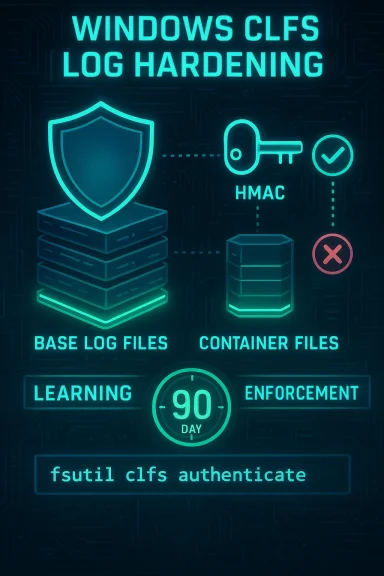
Microsoft has added a defensive integrity check to the Common Log File System (CLFS) driver: CLFS now attaches a hash‑based message authentication code (HMAC) to each Base Log File (.blf) and its containers, validates that HMAC before parsing, and will refuse to open any logfile whose authentication code is missing or invalid. This change hardens logfile parsing against forged or tampered files but also changes operational assumptions about logfile portability and lifecycle — administrators must plan for a 90‑day adoption window, new tooling (fsutil clfs authenticate) and registry/Group Policy controls to avoid service disruptions.
CLFS is a long‑running Windows kernel component used by system services and third‑party applications to create structured logfiles (.blf and container files). Historically, a number of privilege elevation and memory‑corruption vulnerabilities have targeted CLFS parsing paths, where maliciously crafted BLF files could be used to trigger kernel bugs. Microsoft’s new mitigation inserts an integrity gate: CLFS computes an HMAC over the file contents using a system‑unique cryptographic key, stores the authentication code in a reserved area of the logfile, and verifies that code whenever the logfile is opened. If verification fails, CLFS returns a metadata‑corruption error and refuses to parse the file. This is a defensive change that reduces the attack surface for logfile‑parsing exploits by preventing the kernel from blindly parsing externally‑modified BLF files. At the same time, the integrity requirement introduces operational consequences: BLF files that lack authentication codes or were created on a different host (hence signed with a different system key) will not open unless re‑authenticated or recreated. The vendor has included a phased adoption mode and administrative controls to ease rollout.
The mitigation’s phased design and provided tooling (fsutil) make adoption manageable, but do not underestimate the administrative tasks that come with rare or archived files that are not touched during the learning window. Treat registry Mode changes and disabled states as temporary exceptions, not solutions. Finally, validate assumptions about the storage and lifecycle of the system‑unique cryptographic key in your environment; public documentation is high‑level and your local risk posture depends on how keys are protected, backed up and rotated. Takeaway: harden your rollouts, inventory CLFS usage now, update collectors to avoid shipping raw BLF files, prepare scripted fsutil remediation for leftovers, and monitor carefully for metadata corruption errors once enforcement begins.
Source: Microsoft - Message Center Common Log File System (CLFS) Authentication Mitigation - Microsoft Support
 Background / Overview
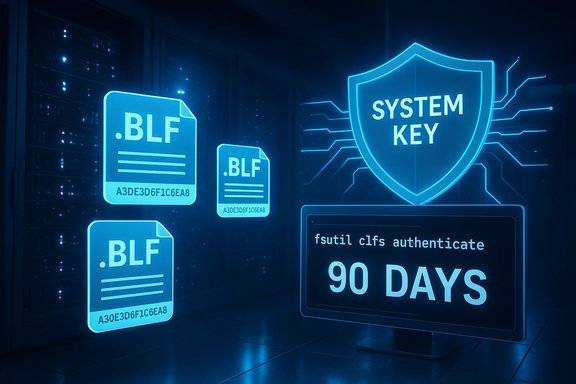
CLFS is a long‑running Windows kernel component used by system services and third‑party applications to create structured logfiles (.blf and container files). Historically, a number of privilege elevation and memory‑corruption vulnerabilities have targeted CLFS parsing paths, where maliciously crafted BLF files could be used to trigger kernel bugs. Microsoft’s new mitigation inserts an integrity gate: CLFS computes an HMAC over the file contents using a system‑unique cryptographic key, stores the authentication code in a reserved area of the logfile, and verifies that code whenever the logfile is opened. If verification fails, CLFS returns a metadata‑corruption error and refuses to parse the file. This is a defensive change that reduces the attack surface for logfile‑parsing exploits by preventing the kernel from blindly parsing externally‑modified BLF files. At the same time, the integrity requirement introduces operational consequences: BLF files that lack authentication codes or were created on a different host (hence signed with a different system key) will not open unless re‑authenticated or recreated. The vendor has included a phased adoption mode and administrative controls to ease rollout. How the CLFS authentication mitigation works
HMACs and the system‑unique key
- CLFS computes an HMAC across the logfile’s data and writes that authentication code into a reserved footer section of the Base Log File (.blf) and any associated container files.
- The HMAC is derived by hashing the file contents together with a system‑unique cryptographic key that is not intended to be available to unprivileged processes. On open, CLFS re‑computes the HMAC and compares it to the stored code; a mismatch is treated as external modification and the file is rejected.
Write‑time adoption (learning mode)
To avoid breakage when the mitigation is first introduced, Microsoft designed a learning (audit) mode: when a system boots with the updated CLFS driver it will spend a configurable adoption period in learning mode. During learning mode, when an application opens a BLF file that lacks authentication codes and the calling thread has write access to the file, CLFS will automatically generate and write valid authentication codes for that logfile. This automatic conversion guarantees that commonly accessed logs are upgraded without manual intervention.Enforcement mode
The default adoption / learning window currently lasts 90 days from the first boot with the updated driver. After that period the driver transitions to enforcement mode on next start and will refuse to open logfiles that do not contain valid authentication codes. Microsoft documents registry and policy options to control the mode and to extend or shorten the adoption period, but administrators should assume enforcement will eventually be applied and plan accordingly.Verified technical specifics (what administrators need to know)
The most critical operational facts — verified from vendor documentation and public administrative docs — are:- The mitigation is shipped as part of recent updates for Windows 11 (25H2) and Windows Server 2025 (and may be included in servicing updates for other supported SKUs). The Microsoft support article describing the mitigation is published under KB ID 5056852.
- The fsutil subcommand
fsutil clfs authenticate "<path>\file.blf"is provided to add or correct authentication codes on a logfile; this operation requires Administrator privileges and modifies the file in place. Use this tool when files were missed during the learning period or when moving logs between systems. - Registry and policy controls exist under HKLM\SYSTEM\CurrentControlSet\Services\CLFS\Authentication. The key values include a Mode flag and an EnforcementTransitionPeriod (measured in seconds). Mode values: 0 = enforced, 1 = learning, 2 = disabled. Administrators can set Mode to 2 to temporarily disable the mitigation, or adjust EnforcementTransitionPeriod to alter the learning window. Microsoft publishes PowerShell examples for changing Mode.
- Authentication codes are system‑specific: BLF files authored on one host will not validate on another until re‑authenticated with the destination host’s key (via fsutil or by recreating the logfile on the target). Expect non‑portability of raw BLF files.
Operational impact and compatibility risks
This mitigation is an important security improvement, but it creates several practical tradeoffs that administrators must manage.1) Non‑portable logs and broken collection pipelines
Because HMAC validation depends on a host‑specific key, raw BLF files copied between hosts will fail authentication unless re‑authenticated on the destination. That affects:- Centralised collectors that move raw .blf files from endpoints to collectors or archives.
- Forensic processes that copy BLF files from target systems to analysis workstations.
- Any cross‑host diagnostic workflow that expects raw BLF readability.
fsutil clfs authenticate or (b) export parsed events on the source and transport the exported records rather than raw BLF containers. 2) Silent failures and operational disruption after enforcement
When enforcement is active, CLFS will refuse to open unauthenticated files. Depending on how applications access CLFS, this could produce:- Application errors or startup failures for programs that expect to read historic log data.
- Diagnostic blind spots when logs are unexpectedly inaccessible.
- Failures in automated agents that run without Administrator privileges and therefore cannot trigger the auto‑write conversion during learning mode.
3) Administrative overhead for rare files
Files that are rarely opened during the 90‑day adoption period will not be automatically converted and will require manual intervention. Administrators should expect to script or schedulefsutil clfs authenticate runs to remediate large backlogs of legacy files. Because authentication modifies the file, preserve originals where possible until conversion has been validated.4) Key compromise and single‑point risks
The HMAC scheme relies on a system‑unique key: if that key is ever exposed or duplicated on a host, an attacker with that key could craft valid HMACs for malicious BLF files for that host. Microsoft indicates the key is protected and limited to SYSTEM and Administrators, but public documentation does not fully enumerate the key’s lifecycle, backup/restore behaviour, or cross‑SKU export/import semantics — treat claims about exact storage and access as operational assumptions that require validation. Hardening local registry permissions and limiting Administrator access remains critical.Detection, logging and incident response
- Watch for CLFS‑specific errors such as ERROR_LOG_METADATA_CORRUPT or STATUS_LOG_METADATA_CORRUPT in application and system logs; these indicate failed HMAC validation when opening BLF files. Correlate those events with recent configuration changes or updates.
- Monitor for unexpected increases in
fsutil clfs authenticateusage; legitimate bulk runs should be scheduled and logged, while unsanctioned usage outside maintenance windows may indicate suspicious activity. - Tune EDR and SIEM to flag large numbers of BLF files failing validation at enforcement time. Anomalous mass failures may require scheduled remediation rather than disabling the mitigation.
- Preserve original BLF files prior to manual
fsutil clfs authenticateoperations. Because authentication modifies logfiles, keep copies for forensic or reprocessing needs.
Practical admin playbook — step‑by‑step
This recommended playbook is designed for large estates that rely on CLFS either directly or via third‑party applications.- Inventory CLFS usage and raw files.
- Search key hosts for *.blf files, count and size them, and note ownership and creation dates.
- Identify services and third‑party apps that write CLFS logfiles. This informs which apps must be tested for compatibility.
- Build a pilot ring.
- Choose a small set of representative hosts (workstation, server, management jump host).
- Apply the update and monitor application behaviour during the 90‑day adoption window.
- Log all ERROR_LOG_METADATA_CORRUPT events and any application failures.
- Update collection/forensic pipelines.
- If you currently copy raw BLF files between hosts, either:
- Re‑authenticate files on the destination as Administrator using fsutil, or
- Convert logs to exported/parquet/JSON events prior to transfer and ship the exports instead of raw BLF files.
- Script controlled remediation.
- Prepare an auditable script that runs
fsutil clfs authenticate "<path>\file.blf"under Administrator context. - Ensure the script:
- Runs in maintenance windows,
- Logs every modified file,
- Verifies checksums and stores originals (or a secure archive) in case of mistakes.
- Use policy and registry controls when needed.
- If you must delay enforcement for a tracked reason, set EnforcementTransitionPeriod (seconds) under HKLM\SYSTEM\CurrentControlSet\Services\CLFS\Authentication to extend the learning window.
- Avoid setting Mode = 2 (disabled) as a permanent mitigation — document any temporary exception and schedule remediation. Example PowerShell to disable (not recommended):
- Set-ItemProperty -Path "HKLM:\SYSTEM\CurrentControlSet\Services\CLFS\Authentication" -Name Mode -Value 2.
- Communicate with vendors.
- Notify third‑party software providers that rely on BLF portability. Confirm whether they will adapt to the new model (e.g., by exporting parsed events or integrating re‑authentication into their collectors).
- Post‑rollout monitoring.
- After enforcement is enabled, watch for service errors and incident tickets related to inaccessible logs.
- Audit
fsutil clfs authenticateruns, and maintain an incident runbook for re‑authentication failures.
fsutil clfs authenticate across many files, run a lightweight pre‑check to list files without authentication codes first. This avoids unnecessary writes and gives you a clearer remediation estimate.Example commands and registry knobs (verified)
- To add authentication to a specific logfile (Administrator required):
- fsutil clfs authenticate "C:\path\to\mylog.blf". This command is documented in Microsoft’s fsutil reference.
- To set Mode to disabled (temporary and not recommended; do not use as permanent workaround):
- PowerShell: Set-ItemProperty -Path "HKLM:\SYSTEM\CurrentControlSet\Services\CLFS\Authentication" -Name Mode -Value 2. Microsoft documents Mode values and provides example commands in the drivers / mitigation pages.
- EnforcementTransitionPeriod:
- This registry value is expressed in seconds and controls how long the system remains in the adoption (learning) period. If set to zero, the system will not automatically transition into enforcement. Validate the desired interval and change via policy or configuration management.
fsutil clfs authenticate modifies files, accidental runs can complicate forensic reconstruction if originals are not preserved.Strengths, limitations and security tradeoffs
Strengths
- Concrete protective effect: by refusing to parse unauthenticated files, CLFS removes a large class of attack vectors where crafted files were used to exploit parsing bugs in kernel code. This raises exploitation cost and reduces successful exploitation opportunities.
- Pragmatic rollout: the learning mode and automatic write‑on‑open behaviour reduce immediate disruption for commonly used files.
- Policy controls: Mode and EnforcementTransitionPeriod provide enterprise controls to manage the adoption at scale.
Limitations / risks
- Compatibility shock: non‑portable raw BLF files can break collectors and forensic workflows if not anticipated.
- Administrative work: manual or scripted re‑authentication of rare files will be required.
- Key management opacity: the security of the scheme depends on how the system‑unique key is stored and protected; public material is high‑level and requires local validation. Administrators should not assume cross‑machine backup or rotation semantics without explicit testing.
Quick executive checklist (implement within 30/60/90 days)
- 0–30 days: Inventory BLF files and identify collection and forensic workflows that transport raw files. Pilot the update in a controlled ring.
- 30–60 days: Update collection pipelines (ship exports instead of raw BLF where possible) and draft automation to run
fsutil clfs authenticateon missing files. Communicate changes to vendors and SOC teams. - 60–90 days: Expand deployment to broader rings, monitor ERROR_LOG_METADATA_CORRUPT events, and evaluate whether EnforcementTransitionPeriod needs adjustment. Prepare for enforcement: ensure scheduled remediation is in place for files not converted during learning mode.
Final assessment — what this means for Windows environments
Microsoft’s CLFS authentication mitigation is a targeted, pragmatic hardening that directly addresses an often‑exploited class of kernel parsing bugs. The integrity‑first model is a sound engineering response: refuse to parse untrusted, externally altered files. Administrators should view this as a security win that requires operational changes — chiefly, handling non‑portable BLF files, scheduling controlled re‑authentication for legacy files, and updating log collection processes.The mitigation’s phased design and provided tooling (fsutil) make adoption manageable, but do not underestimate the administrative tasks that come with rare or archived files that are not touched during the learning window. Treat registry Mode changes and disabled states as temporary exceptions, not solutions. Finally, validate assumptions about the storage and lifecycle of the system‑unique cryptographic key in your environment; public documentation is high‑level and your local risk posture depends on how keys are protected, backed up and rotated. Takeaway: harden your rollouts, inventory CLFS usage now, update collectors to avoid shipping raw BLF files, prepare scripted fsutil remediation for leftovers, and monitor carefully for metadata corruption errors once enforcement begins.
Source: Microsoft - Message Center Common Log File System (CLFS) Authentication Mitigation - Microsoft Support