

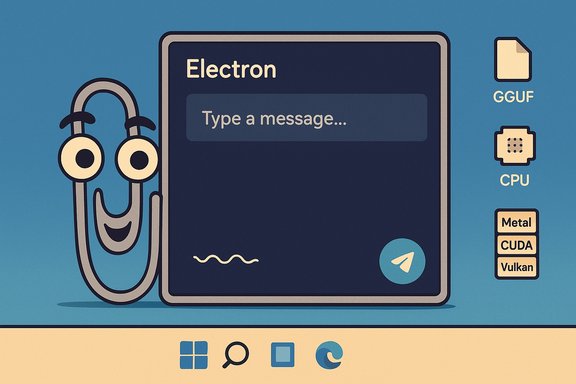
Clippy’s paperclip grin is back on the desktop — not as an official Microsoft resurrection, but as a DIY homage that runs entirely on your PC using local LLMs and the open-source LLM inference stack. What started as a nostalgic tinkering project has become a practical, privacy-conscious way to run lightweight assistants on Windows 11: an Electron-based wrapper that downloads compact models, chooses the most efficient inference backend (Metal, CUDA, Vulkan, or CPU), and speaks with the cheeky persona of the old Office Assistant — all without sending your text to a cloud API.
Clippy — officially Clippit — debuted with Office 97 as an animated, context-aware help agent that attempted to humanize software assistance. The idea was simple and earnest: give new users a friendly nudge when they were doing something the interface could help with. It was equally famous for its catchphrase (“It looks like you’re writing a letter…”) and its infuriating propensity to interrupt at the wrong time. Over the years the persona became a cultural touchstone — loved by nostalgists and loathed by productivity purists — and Microsoft ultimately retired the Office Assistant model. The past year’s wave of LLMs, however, has made the old dream of conversational, contextual assistants technically feasible in ways that early 2000s code could not deliver.
This new Clippy homage is not an official Microsoft product. It is a community-built, local-first assistant that uses compact LLMs and modern inference libraries to bring Clippy-style interactivity back to the desktop. The project is purposefully an homage — visually and behaviorally inspired by the original — and it is implemented as an Electron UI that connects to LLMs running locally via the llama.cpp family and Node bindings. The result is a desktop assistant that behaves like a tiny, private Copilot: responsive, quick, and under the user’s control.
Below are the verified model families referenced by the project and the public, vendor-provided sizing guidance and notes:
That difference matters for privacy and governance. Microsoft’s Copilot — and Mico by extension — integrates with connectors and long-term memory features that raise enterprise governance questions (default settings, retention, connectors). Local Clippy avoids many of those governance vectors by design: it runs locally, does not (by default) create persistent cross-service memories, and does not have privileged connectors. The trade-off is capability: Copilot’s cloud models and integrations can perform agentic, multi-step actions that a local model cannot without careful automation and explicit connectors.
Source: XDA Clippy didn't deserve to die off, so I resurrected him in Windows 11 thanks to a local LLM
 Background
Clippy — officially Clippit — debuted with Office 97 as an animated, context-aware help agent that attempted to humanize software assistance. The idea was simple and earnest: give new users a friendly nudge when they were doing something the interface could help with. It was equally famous for its catchphrase (“It looks like you’re writing a letter…”) and its infuriating propensity to interrupt at the wrong time. Over the years the persona became a cultural touchstone — loved by nostalgists and loathed by productivity purists — and Microsoft ultimately retired the Office Assistant model. The past year’s wave of LLMs, however, has made the old dream of conversational, contextual assistants technically feasible in ways that early 2000s code could not deliver.This new Clippy homage is not an official Microsoft product. It is a community-built, local-first assistant that uses compact LLMs and modern inference libraries to bring Clippy-style interactivity back to the desktop. The project is purposefully an homage — visually and behaviorally inspired by the original — and it is implemented as an Electron UI that connects to LLMs running locally via the llama.cpp family and Node bindings. The result is a desktop assistant that behaves like a tiny, private Copilot: responsive, quick, and under the user’s control.
Overview: what the resurrected Clippy does (and doesn’t)
This particular Clippy implementation focuses on three practical goals:- Local-first inference: models download and run on the user’s machine, eliminating per-query cloud costs and reducing data leakage risk.
- Lightweight models and automatic backend selection: the app provides a curated list of compact models — from tiny 1B variants to modest 12B options — and attempts to pick the fastest compute backend available on the host (Metal on Apple silicon, CUDA on NVIDIA, Vulkan on compatible GPUs, or CPU-based execution). The underlying inference stack that makes this possible is llama.cpp and Node bindings that expose efficient GPU/CPU acceleration.
- Persona and offline customization: Clippy’s voice and personality are implemented through prompt priming; users can tailor the assistant’s tone, verbosity, or behavior without touching external APIs. The Electron front end provides the familiar desktop animation and interactions for the nostalgic touch.
Technical architecture: components that make it work
Electron front end
The project is packaged as an Electron application to deliver cross-platform desktop UI, animations, and a lightweight installer experience. Electron simplifies building consistent interfaces across Windows, macOS, and Linux while keeping development overhead low. The UI mirrors the old Clippy charm — animations, a small floating window, and a text entry field — while wiring user text to a local inference back end.Local inference: llama.cpp and Node bindings
At the heart of the experience is the modern local inference toolkit:- llama.cpp (C/C++ implementation) powers efficient LLM inference on commodity machines. It supports a wide range of quantization formats and provides CPU- and GPU-accelerated execution paths, including Metal (Apple), CUDA (NVIDIA), Vulkan, and more. This allows models to run on everything from Intel/AMD laptops to Apple Silicon and dedicated GPU machines.
- Node bindings (node-llama.cpp / llama.node and similar projects) provide JavaScript/Node access to llama.cpp so the Electron front end can call a local model from a friendly JS API. These bindings support multiple backends and expose model loading/completion functions for desktop apps.
Model storage and format
The app downloads pre-packaged model files (typically in GGUF or quantized formats) to the user’s device. The selected model size and quantization format determine memory and VRAM requirements; quantized files allow large models to fit into modest hardware configurations. The project’s UI exposes a list of recommended models and pre-set prompts that prime the model to speak like Clippy.Models and sizing: what’s available and what to expect
The resurrected Clippy bundles or points to a set of compact, efficient models designed to run locally on everyday machines. The article that inspired this coverage lists a cross-section of models the app supports: Google’s Gemma 3 (1B, 4B, 12B), Microsoft’s Phi-4 Mini (3.8B), Qwen3 (4B), and Meta’s Llama 3.2 small models (1B, 3B). Those models and their approximate resource footprints align with published model cards and vendor documentation.Below are the verified model families referenced by the project and the public, vendor-provided sizing guidance and notes:
- Gemma 3 (Google) — available in several parameter counts (270M, 1B, 4B, 12B, 27B). Google publishes GPU/TPU memory estimates and quantization guidance; for example, Gemma 3 1B typically requires on the order of ~1.1–1.5 GB in 16-bit or ~800–900 MB when aggressively quantized depending on implementation. These numbers are vendor-provided estimates and depend on quantization and toolchain.
- Phi-4 Mini (Microsoft) — a compact Phi family model at ~3.8 billion parameters that Microsoft positions for on-device and edge scenarios. The model is explicitly engineered for reasoning and low-latency use cases, and documentation confirms the 3.8B parameter count and edge-focused design.
- Qwen3 (Qwen family) — the Qwen-3 family includes small dense variants such as Qwen3-4B; community repositories and distribution pages show quantized GGUF builds that range from ~1.5 GB (quantized Q2/Q3 variants) to much larger FP16 files depending on precision. Actual downloaded file size will vary by quantization.
- Llama 3.2 (Meta) — Meta’s Llama 3.2 lineup includes instruction-tuned small models (1B and 3B) that are explicitly targeted at local and edge deployment; community package pages and Ollama listings report GGUF files in the ~640–800 MB range for the 1B instruct models depending on quantization and variant.
- Vendors publish memory or VRAM estimates rather than exact file sizes for every quantization; the packager/quantizer you choose (AWQ, Q4, Q8, GGUF, etc. changes the final file footprint. For example, a Q4_0 quantized Gemma 3 1B will be notably smaller than an FP16 export. Always check the model card and quantization toolchain before downloading.
- Latency and throughput vary greatly by backend. Apple Metal on M1/M2/M3 chips often outperforms CPU-only runs, while CUDA acceleration on a discrete NVIDIA card will be fastest for many Windows desktops. llama.cpp and Node bindings support mixed CPU/GPU inference and will select or allow selection of the fastest available path.
Why run models locally? Practical benefits and trade-offs
Running LLMs locally becomes compelling for multiple reasons:- Privacy and data control: Your prompts and responses remain on your device unless you deliberately export them. That reduces exposure to cloud telemetry and third-party data handling. For sensitive or confidential queries, local inference is a major advantage.
- Lower recurring cost: Cloud APIs bill per token. For frequent or heavy use, local models remove per-query billing and make the assistant effectively free after the upfront setup and storage cost.
- Latency and offline capability: On-device execution avoids round-trip network latency and can work without an internet connection (beyond the initial model download).
- Customization: You can change prompts, persona files, or use community fine-tunes privately without relying on a vendor-managed model.
- Hardware limits: The most capable models still require significant RAM/VRAM. While compact 1B–4B models are practical on many laptops and desktops, larger models need dedicated GPUs or server-class hardware.
- Maintenance and security: Local models and the inference toolchain must be kept up to date. Users must be mindful of where they download model files and what license governs a model’s use.
- Quality delta: For many advanced tasks, cloud-hosted large models (70B+) may still outperform compact local models. That’s a practical limit for users who need top-tier generative quality.
How the app chooses the fastest backend (and what that actually means)
The app that revives Clippy integrates with the llama.cpp ecosystem and Node bindings that expose multiple backend options. In practice:- On Apple Silicon, the inference stack prefers Metal acceleration for better throughput and energy use compared to CPU-only runs.
- On Windows with an NVIDIA GPU, the CUDA path is typically the fastest, provided a compatible CUDA build of the inference library is available.
- When neither Metal nor CUDA applies, Vulkan or CPU inference are fallback options. llama.cpp supports Vulkan and other accelerated paths for cross-platform GPU usage.
Customization and safety: prompts, personas, and limits
The modern Clippy relies on prompt engineering to speak in the old Office Assistant voice. The app ships with a Clippy-ish system prompt and friendly animations, but that can be changed:- Swap the system prompt to make Clippy more helpful, more terse, or more sardonic.
- Swap models to balance speed vs. capability.
- Add local documents or paste web content for summarization and context.
- Running models locally doesn’t immunize you from hallucinations or incorrect outputs. Verification remains essential, especially for legal, medical, or financial advice. The persona flavoring can mask uncertainty, so users should treat outputs as drafts, not facts.
- Copyright and trademark: Clippy’s iconic paperclip is still Microsoft’s IP. The homage’s visual and behavioral choices should remain within safe creative boundaries; avoid claiming the assistant is “official” or providing Microsoft-branded integrations without permission. If a community project goes too close to trademarked imagery or tries to bundle official assets, the legal risk increases. This project appears to be a fan homage rather than an attempt at rebranding Microsoft’s Copilot or Mico.
The broader context: Mico, Copilot, and Microsoft’s approach to avatars
Microsoft’s modern Copilot strategy has taken an avatar-first turn with a stylized character named Mico that surfaces in voice and Learn Live flows. Microsoft positions Mico as a scoped, optional avatar to avoid the old pitfalls of persona-driven interruptions, and preview builds even include a controlled Clippy easter egg that briefly morphs Mico into the paperclip as nostalgia wink. This corporate approach contrasts with the independent, local-first Clippy homage: Microsoft’s Mico is a platform-level, cloud-connected persona tied into Copilot’s memory, connectors, and agentic actions, while the community Clippy is a local, opt-in assistant under the user’s control.That difference matters for privacy and governance. Microsoft’s Copilot — and Mico by extension — integrates with connectors and long-term memory features that raise enterprise governance questions (default settings, retention, connectors). Local Clippy avoids many of those governance vectors by design: it runs locally, does not (by default) create persistent cross-service memories, and does not have privileged connectors. The trade-off is capability: Copilot’s cloud models and integrations can perform agentic, multi-step actions that a local model cannot without careful automation and explicit connectors.
Practical setup notes for Windows 11 users (high-level)
- Hardware check: determine if your machine has an NVIDIA GPU (CUDA), Apple Silicon (Metal), or a Vulkan-capable GPU. This determines which backend will be fastest.
- Model selection: choose a compact 1B–4B model for laptops; expect 1–4 GB of storage per quantized model file depending on quantization. Larger models need more disk and RAM.
- Download and trust: obtain models and the Electron app from trusted sources. Verify the project’s README and community reviews before running.
- Controls and opt-out: ensure the app’s privacy settings and animation options meet your comfort level. Prefer local-only modes if you want strictly offline behavior.
Risks, caveats, and governance
This Clippy revival is delightful, but it’s important to be explicit about risks and limitations:- Model provenance and licensing: Not all compact models are permissively licensed for every use. Confirm the license (for example Apache-2.0, vendor license terms, or Meta’s Llama community license) before using a model for commercial or broadly distributed projects.
- Security of third-party builds: Community-built Electron wrappers and model packs can include inadvertent or malicious code. Run on a test machine or sandbox if you have doubts, and prefer signed or well-reviewed packages.
- Over-trust and hallucination: Persona-driven output can sound confident while being wrong. Treat local Clippy’s suggestions as starting points, and cross-check facts with authoritative sources for critical tasks.
- Resource exhaustion and user experience: Running models on modest hardware can still consume CPU/GPU cycles and battery. Monitor resource usage and choose appropriately quantized models to preserve usability.
- Legal/Copyright boundaries: Recreating Clippy’s exact animation frames or using Microsoft-owned assets may cross IP lines. The homage approach — new art and behavior inspired by the original — is safer than cloning trademarked resources. Exercise caution and avoid implying official endorsement.
Why this matters to Windows enthusiasts and power users
This project sits at the intersection of nostalgia, privacy, and practical on-device AI. For Windows power users, it demonstrates several important trends:- Local LLMs are practical today for many common productivity tasks. Compact models deliver summarization, code help, and conversation without recurring cloud costs. Verified vendor model releases (Gemma 3, Phi-4 Mini, Qwen, Llama 3.2 small variants) show that small-but-capable models are now mainstream.
- Open inference stacks (llama.cpp + Node bindings) remove friction for building desktop assistants and let developers choose the best backend for their hardware. This makes cross-platform desktop assistants realistic even for hobbyist developers.
- Aesthetic persona layering remains valuable — people respond to characterful interfaces. But the lessons from Clippy’s original failure are clear: keep personality optional, scoped, and controllable. That’s a design trade-off modern projects must honor.
Conclusion
Resurrecting Clippy as a local-LMM-powered assistant on Windows 11 is more than an exercise in nostalgia: it’s a practical demonstration of how privacy-conscious, offline AI can be approachable and useful for everyday tasks. The project stitches together modern inference libraries (llama.cpp and Node bindings), compact model releases (Gemma 3, Phi-4 Mini, Qwen3, Llama 3.2 small variants), and an Electron UI to deliver a desktop assistant that is fast, configurable, and under your control. While the homage won’t replace cloud-powered Copilot’s deep integrations or Microsoft’s Mico avatar and memory-enabled services, it offers a different, compelling value proposition: local control, low cost, and the pure joy of a friendly paperclip that listens only when you ask it to. If you try this path, verify model licenses, choose appropriate quantization for your hardware, and treat the assistant’s outputs as drafts. The Clippy project’s real legacy isn’t the paperclip itself — it’s the reminder that personality in software is only valuable when paired with respect for user control, transparency, and reliability.Source: XDA Clippy didn't deserve to die off, so I resurrected him in Windows 11 thanks to a local LLM
