

Microsoft used Ignite to push Windows recovery beyond traditional imaging: two new managed recovery actions — Point‑in‑Time Restore (PITR) and Cloud Rebuild — will let IT teams roll a machine back to a prior working state or fully reinstall and reprovision a device remotely via Intune and WinRE. These tools are presented as companions to Quick Machine Recovery and the connected Windows Recovery Environment (WinRE), forming a single, cloud‑centric recovery playbook intended to reduce hours or days of downtime to minutes in many common enterprise failure scenarios.
Microsoft’s Windows Resiliency Initiative reframes reliability as a platform priority: prevention, manageability, and rapid recovery. The initiative grew out of high‑impact incidents that exposed the operational limits of manual imaging and on‑site fixes; Microsoft now wants recovery to be a managed, auditable, cloud‑driven capability rather than a last‑resort toolkit. These recovery features integrate tightly with Intune, Windows Autopilot, OneDrive, and Windows Backup for Organizations to deliver repeatable, policy‑governed recovery flows. Quick Machine Recovery (QMR), introduced earlier under the same initiative, opened the door to pre‑boot networking in WinRE and remote delivery of targeted remediations. PITR and Cloud Rebuild are the next steps: one focuses on rapid rollback to a prior good state, the other on zero‑touch reimage and rehydration.
Microsoft’s resilience story is now operational: these new recovery actions move recovery into the same management plane used for everyday device management. For IT leaders, the immediate task is straightforward — pilot, validate, and harden the controls that make these powerful capabilities safe and reliable in your environment.
Source: BetaNews Microsoft unveils two new Windows 11 recovery tools: Cloud Rebuild and Point-in-Time Restore
 Background
Microsoft’s Windows Resiliency Initiative reframes reliability as a platform priority: prevention, manageability, and rapid recovery. The initiative grew out of high‑impact incidents that exposed the operational limits of manual imaging and on‑site fixes; Microsoft now wants recovery to be a managed, auditable, cloud‑driven capability rather than a last‑resort toolkit. These recovery features integrate tightly with Intune, Windows Autopilot, OneDrive, and Windows Backup for Organizations to deliver repeatable, policy‑governed recovery flows. Quick Machine Recovery (QMR), introduced earlier under the same initiative, opened the door to pre‑boot networking in WinRE and remote delivery of targeted remediations. PITR and Cloud Rebuild are the next steps: one focuses on rapid rollback to a prior good state, the other on zero‑touch reimage and rehydration. What Microsoft announced at Ignite: the essentials
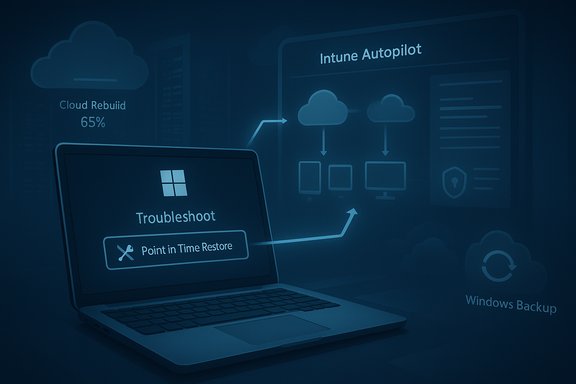
- Point‑in‑Time Restore (PITR): A WinRE‑triggered rollback that returns a PC (or group of PCs) to the exact state it was in at a chosen restore point — including OS, applications, settings and, where supported, local files. Microsoft positions PITR as a fast, local or remotely managed rollback intended to address update regressions, driver conflicts and configuration errors. PITR appears in WinRE as a Troubleshoot option and will be available for preview testing in Windows Insider channels.
- Cloud Rebuild: A managed, Intune‑triggered reinstall that downloads appropriate Windows installation media in WinRE, reinstalls the OS, reprovisions the device with Autopilot and Intune, and rehydrates user data and settings from OneDrive and Windows Backup for Organizations. Cloud Rebuild is designed for devices that are too corrupted to repair and aims to replace shipping hardware or service desk reimaging trips with a zero‑touch, cloud‑powered workflow.
How Point‑in‑Time Restore works — technical snapshot
What PITR promises
Point‑in‑Time Restore is a snapshot‑centric rollback tool that surfaces in WinRE under Troubleshoot → Point‑in‑Time Restore. It is intended to create and retain short‑term restore points that let a device be rolled back to a known good moment in minutes, rather than hours of manual remediation or a full reimage. The stated scope includes operating system state, installed applications and, where applicable, local user files and configuration settings.Default and configurable snapshot cadence (preview)
Documentation published for the preview shows configurable snapshot frequency and retention in the Windows UI or management policy:- Frequency options: every 4, 6, 12, 16 or 24 hours (default often 24 hours).
- Retention options: configurable up to 72 hours for short‑term restore points (default preview retention commonly set to 72 hours).
A small disk usage cap (minimum 2 GB, default percent of disk) is used to store these rolling snapshots. These values are configurable in preview and may change before GA.
Triggering and limitations
- Boot to WinRE.
- Choose Troubleshoot → Point‑in‑Time Restore.
- Enter BitLocker recovery key if prompted.
- Select a timestamped restore point and confirm restore.
What remains to be verified
Key operational limits — such as the maximum number of restore points retained, the precise disk usage policies, whether snapshots are stored locally versus cloud‑backed, and the behavior for firmware or kernel‑level changes — have limited public documentation at this stage and should be validated during pilot testing. Treat some claims about scope (for example, full recovery of all local data or third‑party driver states) as optimistic until Microsoft publishes detailed technical limits.How Cloud Rebuild works — the remote reinstall flow
High‑level workflow
- Administrator initiates a Cloud Rebuild from the Intune console and selects OS release and language options.
- The target PC boots into WinRE, downloads the installation media, and performs a clean reinstall.
- During or after install, the device enrolls in Autopilot/Intune; provisioned policies, apps and configurations are applied.
- User files and settings are restored from OneDrive and Windows Backup for Organizations where available.
The goal is zero‑touch reprovisioning so a corrupted device becomes a managed, compliant endpoint without manual reimaging.
Key dependencies and preconditions
- Network connectivity from WinRE (Ethernet and certain Wi‑Fi scenarios).
- Intune enrollment and Autopilot profiles in place.
- Healthy OneDrive and Windows Backup sync for user data rehydration.
- Availability of drivers (Windows Update/OEM driver catalogs) for the device during the reinstall.
If any of these are absent, Cloud Rebuild may require manual intervention or alternate recovery media.
Bandwidth and scale considerations
Cloud Rebuild moves gigabytes of image data across networks; for large fleets, plan for bandwidth impacts and consider connected cache strategies or staging to avoid congestion during mass remediations. IT teams must also confirm corporate policies for cloud upload/download and ensure rehydration targets (OneDrive/Windows Backup) are current and complete before enabling automated rebuild triggers.Intune + WinRE: the new pre‑boot management plane
Intune will now surface devices that have entered WinRE, offer live device state visibility, allow pushing recovery scripts into the pre‑boot session, and — crucially — trigger PITR or Cloud Rebuild operations for supported devices. This WinRE plug‑in model is designed to be extensible to third‑party EMMs and to Azure VM recovery scenarios, bringing pre‑boot recovery into a centralized management plane. This integration changes operational models: actions that formerly required hands‑on work or local bootable media can now be approved and executed remotely — but they must be treated as high‑privilege, destructive operations in governance and audit plans. Role‑based access control, approval gates, and activity logging are mandatory guardrails when the management plane can trigger full reinstalls.Security, privacy and compliance implications
Telemetry and diagnostic uploads
Quick Machine Recovery and remote recovery flows depend on transmitting diagnostic telemetry during WinRE sessions. For regulated customers or those with strict data residency/telemetry policies, this raises compliance questions: what telemetry is uploaded, where it is stored, and how long it is retained. Organizations should document consent, contractual protections, and acceptable telemetry policies before enabling remote recovery at scale.Centralization risk
Centralizing recovery through Intune and Autopatch reduces MTTR but increases concentration risk: if Intune or its dependent services are unreachable, several recovery workflows could be degraded. Maintain fallback plans (local recovery media, offline imaging processes) for air‑gapped, segmented or compliance‑sensitive environments.Cryptographic and encryption considerations
Pre‑boot restore and rebuild flows require careful BitLocker key management: devices must escrow recovery keys to Azure/Intune (or Microsoft account for consumer devices) to allow WinRE‑driven operations. Confirm key escrow and test recovery paths before depending on automated recoveries. Microsoft’s documentation highlights the importance of BitLocker recovery readiness for WinRE‑based recovery.Supply chain and update trust
Recovery is only as good as the remediations and drivers it installs. The initiative includes measures to raise driver‑signing and certification standards, but OEM and ISV readiness will vary. Organizations must continue canarying updates and maintain pilot rings to avoid broad regressions that even automated recovery might struggle to resolve.Operational checklist — what IT teams should do now
- Verify BitLocker recovery key escrow for all managed devices and document owner access and recovery procedures.
- Pilot WinRE networking: test wired and relevant Wi‑Fi chipsets, and prepare driver injection plans for chipsets that lack pre‑boot drivers.
- Confirm Intune, Autopilot and OneDrive/Windows Backup backup policies and test rehydration operations.
- Define governance: RBAC, approval gates, audit trails and change windows for destructive recovery actions like Cloud Rebuild.
- Keep fallback media and workflows for air‑gapped devices and hardware with unsupported drivers.
- Run recovery exercises in lab and pilot fleets, logging success rates, driver gaps and time‑to‑restore metrics.
Strengths: why this matters
- Dramatically reduced Mean Time To Repair (MTTR): PITR and Cloud Rebuild are designed to shorten repair windows from hours or days to minutes in many cases, especially for knowledge‑worker and distributed fleets.
- Integrated, policy‑governed recovery: Centralized management through Intune and Autopatch means recovery is auditable, can be staged, and can be combined with existing provisioning (Autopilot) to ensure compliance post‑rebuild.
- Reduced logistics and operational cost: fewer service desk visits and less shipping of devices for reprovisioning will lower capital and operational expense over time for organizations that adopt these flows.
Risks and limitations: what to watch out for
- Network dependency: Both PITR (when remote triggers are enabled) and Cloud Rebuild require a functioning network from WinRE. Air‑gapped or constrained networks will need alternative plans.
- Data loss risk: PITR is a rollback tool and may erase changes made since the chosen restore point. Cloud Rebuild relies on cloud backups; local‑only files that have not been synced will be lost. Treat both as part of a recovery portfolio — not a replacement for good backup discipline.
- Driver and OEM coverage: Some devices require vendor drivers that may not be present in the Windows Update driver catalog or usable from WinRE; those devices may still need hands‑on support.
- Telemetry, privacy and regulatory constraints: Diagnostic uploads and cloud orchestration of recovery flows have compliance implications that must be approved and documented.
- Timeline uncertainty: Microsoft has presented PITR and Cloud Rebuild as preview features with staged rollouts. Public materials indicate preview waves and intentions for broader availability, but GA timing and SKU restrictions remain to be clarified. Organizations should plan pilots and not assume GA timing or licensing until official product pages are updated.
Timeline and availability — what Microsoft has said (and what to expect)
Microsoft’s Ignite materials and the Windows Experience Blog present the recovery tools as part of a staged roll‑out under the Windows Resiliency Initiative. PITR was announced to appear in Windows Insider previews immediately after Ignite for testing, and broader preview availability for recovery tooling (Intune remote recovery, PITR and Cloud Rebuild) is described as rolling in forthcoming preview waves with some reporting pointing at preview windows into the first half of 2026 for broader capabilities. Exact GA dates, edition limitations, and licensing requirements remain to be confirmed in Microsoft's product pages and Intune documentation; treat public timelines as indicative and plan pilots accordingly.Practical scenarios and recommended adoption strategy
Small pilot (recommended first step)
- Choose a small, diverse pilot cohort (several OEMs, Wi‑Fi/Ethernet mixes).
- Validate WinRE networking, BitLocker key escrow, driver coverage and backup rehydration.
- Test PITR local restore flows from WinRE and record RTO/RPO metrics.
- Simulate Cloud Rebuild for devices with known clean backups to measure end‑to‑end reprovision times.
Scale and governance
- After pilot validation, expand to a staged production cohort with strict change control and an approval workflow for Cloud Rebuild actions.
- Integrate recovery steps into incident playbooks and SLAs; ensure service desk is trained to verify OneDrive/backup health prior to rebuilds.
When to prefer PITR vs Cloud Rebuild
- PITR — best for recent regressions (bad update, driver conflict, config change) where a snapshot exists and a fast surgical rollback is likely to fix the issue.
- Cloud Rebuild — use when QMR and PITR fail or the device shows irrecoverable corruption; chooses a full reinstall and reprovisioning pipeline.
Final assessment
Microsoft’s announcements at Ignite mark a pragmatic reinvention of recovery for Windows 11: instead of relying on manual imaging and on‑site labor, Microsoft is betting on a managed, cloud‑powered recovery stack that ties together WinRE networking, Intune management, Autopatch controls, Autopilot provisioning and cloud backup services. When combined, Quick Machine Recovery, Point‑in‑Time Restore and Cloud Rebuild form a coherent toolkit that promises materially lower downtime and lower operational cost for managed fleets — provided organizations do the preparatory work (BitLocker escrow, WinRE driver validation, backup hygiene and strict governance). However, the promise comes with caveats: these flows increase reliance on cloud and management services, demand rigorous telemetry/privacy decisions, and depend on OEM/driver readiness. For mission‑critical or air‑gapped deployments, the old recovery fallbacks must remain in place until these services are validated across your hardware estate. Treat PITR and Cloud Rebuild as powerful new tools that should be piloted and controlled — not as instant, organization‑wide switches.Microsoft’s resilience story is now operational: these new recovery actions move recovery into the same management plane used for everyday device management. For IT leaders, the immediate task is straightforward — pilot, validate, and harden the controls that make these powerful capabilities safe and reliable in your environment.
Source: BetaNews Microsoft unveils two new Windows 11 recovery tools: Cloud Rebuild and Point-in-Time Restore
