

Microsoft’s engineering team solved a deceptively hard problem: how to preserve absolute anonymity for sensitive employee groups while moving entirely to a cloud-first operating model—and to do it quickly, at enterprise scale, without adding new administrative burden. The result is a deliberately constrained, defensible pattern for “hidden membership groups” that separates the user-facing experience from the membership truth, uses first‑party services end‑to‑end, and forces privacy by architecture rather than policy. This article unpacks how the system works, why the design choices matter, what trade‑offs remain, and how organizations can adapt the pattern to protect anonymity at scale.
Microsoft supported email‑based hidden membership communities on-premises for more than a decade. Those groups served employee resource groups, confidential project teams, and other audiences where revealing who belongs could create real-world risk. As the company decommissioned legacy Exchange servers and accelerated a Secure Future Initiative to reduce non‑cloud risk, continuing to run a sensitive, special‑purpose system outside modern cloud controls became a concentration of risk.
The Microsoft Digital team set a clear mandate: preserve anonymity, eliminate on‑premises dependencies, and do it in a cloud‑only way—delivered fast. The constraints were strict: group membership must not be discoverable by users, owners, or typical administrators; the solution had to scale to tens of thousands of members per group; operations had to be automatable and auditable; and the user experience needed to remain simple and intuitive.
What the team shipped in under six months is not an incremental change to modern Microsoft 365 groups. It’s a new pattern: a two‑tenant architecture that isolates membership expansion, an API‑first control plane that automates lifecycle and bulk operations, and a Power Platform front end that brokers intent without exposing membership data.
Why this matters: if there is no interactive surface that lists members—or if that surface is not reachable by users or owners—membership cannot be accidentally exposed by directory queries, administrative UI, or third‑party tooling.
This approach balances the need to resolve recipients against the requirement to avoid creating another interactive directory surface. The team also minimizes privileged access to the isolated tenant; membership changes are driven by automation rather than broad UI administration.
Using Power Platform enabled rapid iteration on the UX without building and running a custom web stack, and Dataverse provided an auditable datastore for the app’s operational metadata—not a second copy of membership. The app acts as the broker of intent; the APIs and isolated tenant execute or enforce the membership truth.
Key defensive properties
No architecture removes every risk, but this pattern substantially reduces the common failure modes that make anonymous groups fragile in large organizations. For any enterprise grappling with anonymity requirements—employee affinity groups, witness support channels, confidential program teams—this cloud‑first model provides a pragmatic, repeatable, and secure way to protect people at scale.
Source: Microsoft Protecting anonymity at scale: How we built cloud-first hidden membership groups at Microsoft - Inside Track Blog
 Background
Microsoft supported email‑based hidden membership communities on-premises for more than a decade. Those groups served employee resource groups, confidential project teams, and other audiences where revealing who belongs could create real-world risk. As the company decommissioned legacy Exchange servers and accelerated a Secure Future Initiative to reduce non‑cloud risk, continuing to run a sensitive, special‑purpose system outside modern cloud controls became a concentration of risk.The Microsoft Digital team set a clear mandate: preserve anonymity, eliminate on‑premises dependencies, and do it in a cloud‑only way—delivered fast. The constraints were strict: group membership must not be discoverable by users, owners, or typical administrators; the solution had to scale to tens of thousands of members per group; operations had to be automatable and auditable; and the user experience needed to remain simple and intuitive.
What the team shipped in under six months is not an incremental change to modern Microsoft 365 groups. It’s a new pattern: a two‑tenant architecture that isolates membership expansion, an API‑first control plane that automates lifecycle and bulk operations, and a Power Platform front end that brokers intent without exposing membership data.
Overview: design goals that shaped the architecture
From the outset, the project was requirements‑led. Those requirements explain why the final architecture uses dramatic isolation rather than relying solely on access controls or process:- Absolute privacy. Membership must be hidden in practice—not just by policy. No one (owners, admins, or other users) should be able to query or enumerate members from the standard UI or admin tooling.
- Cloud only. All components must run in the cloud and align with modern identity, monitoring, and compliance controls.
- Scale. The system must support tiny groups and groups with tens of thousands of members, and it must perform predictable bulk operations.
- Separation of concerns. Users must interact with a simple front end that exposes discovery and membership actions; the canonical membership store and mail expansion must live somewhere users can’t access.
- Self‑service with guardrails. Lifecycle operations must be automated and auditable to reduce operational load without opening a new bottleneck.
- Simplicity for users. No special training; no tenant‑hopping, no mail‑routing concepts exposed to employees.
Architecture in detail
Two tenants, one experience
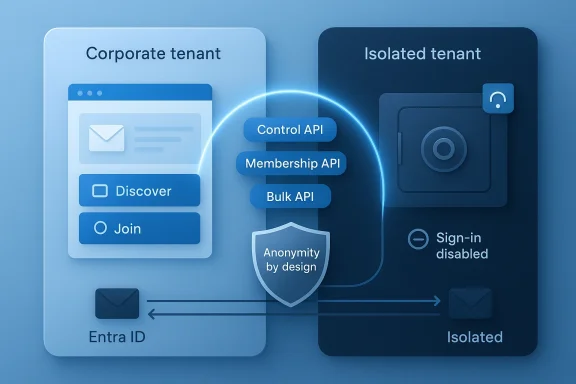
At the core is a two‑tenant model:- The corporate tenant is the only tenant employees see. It hosts authentication, the user experience (the front‑end application), and the visible mail contact objects that employees address. All discovery, join/leave requests, and administrative intents are initiated here.
- The isolated tenant (a locked‑down Microsoft 365 tenant under the organization’s control) contains the distribution groups and performs the actual membership expansion for mail delivery. Importantly, the isolated tenant is not intended for interactive use—sign‑in is disabled for the guest identities it stores, administrative access is tightly constrained, and UI‑based membership tools are intentionally unavailable to the broad admin population.
Why this matters: if there is no interactive surface that lists members—or if that surface is not reachable by users or owners—membership cannot be accidentally exposed by directory queries, administrative UI, or third‑party tooling.
Identity model: Entra and guest objects
For the isolated tenant to expand messages it must resolve recipients. The engineering team uses Microsoft Entra ID multi‑tenant organization sync to represent corporate users inside the isolated tenant as business guest identities. These guest identities are configured so sign‑in is disabled—allowing the isolated tenant to reference users for mail routing while preventing interactive access.This approach balances the need to resolve recipients against the requirement to avoid creating another interactive directory surface. The team also minimizes privileged access to the isolated tenant; membership changes are driven by automation rather than broad UI administration.
API‑first control plane
The implementation is explicitly API first. The backend is split into modular APIs to avoid fragility and to treat bulk operations as first‑class citizens:- Control API — group creation, configuration, and cross‑tenant coordination.
- Membership API — standard add/remove operations for routine membership changes.
- Bulk membership APIs — long‑lived services for high‑volume operations (tens of thousands of changes), with throttling, job management, and recovery semantics.
User experience: Power Apps + Dataverse
For the end user and owners, the team built a Canvas app in Power Apps backed by Dataverse. This surface handles group discovery, join/leave requests, and the minimal metadata required to operate the system. Dataverse enforces fine‑grained role‑based access, ensuring users and owners only see what they are entitled to see and that sensitive membership information never enters the client layer.Using Power Platform enabled rapid iteration on the UX without building and running a custom web stack, and Dataverse provided an auditable datastore for the app’s operational metadata—not a second copy of membership. The app acts as the broker of intent; the APIs and isolated tenant execute or enforce the membership truth.
What changed operationally and why it matters
The migration from the legacy on‑premises service to the cloud‑first architecture delivered measurable outcomes:- Migration of more than 2,200 hidden membership groups representing over 200,000 users into the cloud‑first architecture.
- Elimination of the on‑premises Exchange infrastructure that housed the legacy solution, reducing a concentrated non‑cloud risk and aligning with modern monitoring and control planes.
- Delivery of a minimum viable product in less than six months, driven by a strong mandate and executive sponsorship.
Why the design is defensible—but not magical
The architecture blends technical controls, process discipline, and deliberate limits. That makes the privacy guarantee strong, but it does not mean risk vanished.Key defensive properties
- Isolation prevents standard UI enumeration; membership expansion happens where owners and users can’t interact.
- API automation reduces the human error surface that often leads to accidental exposure.
- Role‑based Dataverse controls maintain a clean, minimal UX while preserving an auditable trail.
- Bulk operation separation ensures migrations and large changes don’t interfere with live operations.
- Privileged access remains a fact. No architecture can remove the need for high‑privilege emergency access entirely. The system minimizes and tightly restricts that access, but the isolated tenant still requires a very small operational set of administrators and a robust process for emergency use.
- Mail flow complexities. Inter‑tenant routing and forwarding can run into delivery and anti‑spoofing protections (SPF, DKIM, DMARC) and tenant‑level rate limits. Configuring connectors, send/receive rules, and anti‑spam exceptions is non‑trivial in some environments and must be tested thoroughly.
- Audit and eDiscovery trade‑offs. Ensuring auditors and compliance officers can meet lawful access requirements without exposing membership requires careful policy and tooling design. The pattern supports targeted auditing for approved administrators—but any expansion of auditing must be scrutinized to avoid leaks.
- Power Platform surface risks. Power Apps / Dataverse accelerate delivery, but they introduce their own governance considerations (app sharing, environment management, data export controls). Tight Power Platform governance is essential to prevent accidental exposure.
Technical validation: why the chosen components fit
The architecture’s core components are well suited to the problem space:- Entra ID multi‑tenant identity sync and guest objects let a tenant represent external or corporate users without granting interactive access, enabling the isolated tenant to resolve recipients while preventing sign‑in.
- Azure Functions (PowerShell runtime) and managed identities provide a serverless execution environment that supports PowerShell automation, native module management, and access to Microsoft Graph and Exchange admin tasks without managing secrets.
- Federated identity credentials / workload identity patterns enable secure cross‑tenant authentication patterns where long‑lived secrets are undesirable.
- Power Apps and Dataverse provide a governed app surface with role‑based access control for user workflows and a minimal metadata store that keeps membership canonicality in the isolated tenant and the API layer.
Practical risks and the mitigations you should plan for
If you are considering adopting this pattern or a variation of it, plan for the following practical concerns and the mitigations the Microsoft team used or that we recommend:- Mail routing and anti‑spoofing
- Risk: Inter‑tenant routing can be impacted by DMARC/SPF/DKIM enforcement and tenant outbound recipient rate limits.
- Mitigation: Design send/receive connectors explicitly, test with realistic volume and DMARC enforcement, use TLS connectors where appropriate, and consider message rewriting or shared transport patterns for problematic sources.
- Privileged access and emergency access
- Risk: A small operational group can still access the isolated tenant.
- Mitigation: Apply just‑in‑time privileged access, audited break‑glass workflows, and separate logging/storage for all admin actions. Use immutable logging where possible.
- Audit, compliance, and lawful access
- Risk: Compliance obligations may require visibility into membership data.
- Mitigation: Create carefully scoped privileged reporting endpoints that return only what is necessary for authorized auditing, and document the legal and technical controls used to produce such reports. Avoid ad hoc adoptions that reintroduce discoverable surfaces.
- Power Platform governance
- Risk: Misconfiguration or over‑sharing of the Power App or Dataverse environment can leak metadata.
- Mitigation: Apply environment, app, and connector governance; limit who can export Dataverse data; and use managed environments with DLP policies.
- Scaling bulk operations
- Risk: Running massive membership changes can cause transient failures or throttling.
- Mitigation: Treat bulk jobs as long‑lived, resumable jobs with checkpointing, backoff and retry logic, and separate API surfaces to protect routine operations.
- Cross‑team adoption and pattern misuse
- Risk: Once a pattern exists, teams may misuse it for scenarios that do not need anonymity.
- Mitigation: Publish clear guidance, guardrail provisioning with automatic approvals, and require design reviews for new use cases to avoid pattern creep.
Implementation checklist: turning the pattern into production
If you want to replicate this pattern in your organization, use this practical checklist as a starting point.- Define and document the threat model and success criteria.
- Be explicit about who must be prevented from discovering membership and why.
- Design tenant boundaries and ownership.
- Create a locked‑down tenant for membership expansion; restrict interactive sign‑in and limit admin roles.
- Plan mail flow.
- Design connectors, mail contacts, and transport rules; test DMARC/SPF behavior and tenant rate limits under load.
- Build an API control plane.
- Separate control, membership, and bulk operations; use managed identities and ephemeral/federated credentials for cross‑tenant calls.
- Create an auditable front end.
- Use Power Apps or a similarly governed UI to broker intent without exposing membership.
- Harden privileged access.
- Implement JIT, break‑glass with multi‑party approval, and immutable logging for the isolated tenant.
- Test end‑to‑end and at scale.
- Run migrations and membership churn scenarios to validate performance and failure modes.
- Lock governance and training.
- Implement Power Platform governance, Dataverse export controls, and administrator playbooks for incident response.
Lessons learned and strategic takeaways
This project offers several lessons that apply to privacy engineering more broadly:- Privacy by design beats privacy by process. If a sensitive property depends only on people following rules, it will eventually fail. Architecting the system so a surface that could reveal membership simply doesn’t exist is a much stronger posture.
- Treat scale features (bulk membership, migrations) as first‑class. Systems that only work for small groups will fail once adoption grows.
- Lean on first‑party services when you need deep integration with identity and mail flow. Using platform primitives (managed identities, enrollment/federation patterns) reduces custom surface area and maintenance.
- Automate, but keep guardrails. Self‑service is essential for operational scale, but automation must be auditable and limited to approved actions.
- Be explicit about residual risks and build compensating controls. No system is perfectly sealed; design for what you can realistically eliminate and mitigate what you cannot.
Moving forward: how the pattern can evolve
The Microsoft team positions Hidden Membership Groups as a reusable enterprise pattern, not a one‑off fix. Future work focuses on:- Improving lifecycle and ownership experiences without exposing membership.
- Strengthening approved auditing and reporting paths for compliance teams.
- Expanding self‑service workflows while preserving architectural privacy guarantees.
- Reusing the pattern for other anonymity‑sensitive scenarios so teams don’t invent insecure ad hoc workarounds.
Key recommendations (practical, prioritized)
- Prioritize privacy by design.
- If anonymity is required, make the system incapable of exposing membership through standard UI or APIs.
- Architect for scale from day one.
- Design separate paths for routine and bulk operations to preserve performance.
- Automate everything that would otherwise be manual and error‑prone.
- Use serverless functions and managed identities to reduce secrets and manual steps.
- Govern the front end tightly.
- Use a single, auditable UX surface with least‑privilege access and data export controls.
- Plan for mail flow edge cases early.
- Validate connectors, DMARC/SPF behavior, and tenant recipient limits under realistic conditions.
- Harden privileged access and auditing.
- Require just‑in‑time admin elevation, multi‑party approvals, and immutable logs for the isolated tenant.
- Publish the pattern and guardrails.
- Provide clear guidance so other teams can reuse the pattern safely.
Conclusion
Microsoft’s hidden membership groups project offers a clear blueprint for organizations that must protect identities and affiliations without sacrificing scale or operational simplicity. The core idea—isolate the membership truth, broker intent through a controlled front end, and automate the rest—is straightforward but powerful. It shifts trust away from people and process toward a design that makes exposure structurally difficult, while still integrating with the day‑to‑day realities of mail flow, identity resolution, and enterprise governance.No architecture removes every risk, but this pattern substantially reduces the common failure modes that make anonymous groups fragile in large organizations. For any enterprise grappling with anonymity requirements—employee affinity groups, witness support channels, confidential program teams—this cloud‑first model provides a pragmatic, repeatable, and secure way to protect people at scale.
Source: Microsoft Protecting anonymity at scale: How we built cloud-first hidden membership groups at Microsoft - Inside Track Blog
