

A no-frills 5.1 upgrade that promises to rescue aging desktops and slim 2U cases, the PCIe sound card built around the CMI8738 chipset is being sold as an inexpensive fix for failing onboard audio — but it’s also an example of how old silicon, inconsistent vendor labeling, and shaky driver support can create buyer confusion and compatibility headaches.
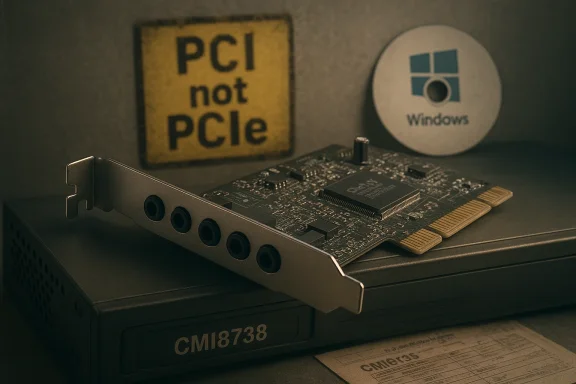
The silicon at the center of these bargain sound‑cards is the C‑Media CMI8738 family — a long‑serving audio controller designed originally for low‑cost PCI add‑in cards and on‑board audio implementations. The official C‑Media documentation for the CMI8738 describes a PCI‑based controller that supports HRTF 3D positional audio, 5.1 (6‑channel) output, legacy SBPro compatibility, and a 16‑bit full‑duplex CODEC with 44.1/48 kHz sampling rates. The chip was explicitly designed with PCI bus semantics in mind and includes features such as SPDIF I/O on certain variants and support for DirectSound 3D and EAX‑style effects. Retailers and low‑cost OEM cards built around the CMI8738 typically advertise a similar feature set: five analog jacks for mic/line/front/rear/center‑sub, an included low‑profile bracket for small form‑factor cases, and onboard support for 5.1 surround (side/rear channels plus a center/LFE). Many of these product pages list the card as plug‑and‑play on legacy Windows releases including Windows 2000/XP/7/8, and some sellers also list Windows 10/11 compatibility — but that compatibility claim is inconsistent across vendors.
Source: umlconnector.com https://umlconnector.com/itm/CMI8738-Chip-Low-Profile-Bracket-For-Windows-7-8-PC-Audio/832768/
 Background / Overview
The silicon at the center of these bargain sound‑cards is the C‑Media CMI8738 family — a long‑serving audio controller designed originally for low‑cost PCI add‑in cards and on‑board audio implementations. The official C‑Media documentation for the CMI8738 describes a PCI‑based controller that supports HRTF 3D positional audio, 5.1 (6‑channel) output, legacy SBPro compatibility, and a 16‑bit full‑duplex CODEC with 44.1/48 kHz sampling rates. The chip was explicitly designed with PCI bus semantics in mind and includes features such as SPDIF I/O on certain variants and support for DirectSound 3D and EAX‑style effects. Retailers and low‑cost OEM cards built around the CMI8738 typically advertise a similar feature set: five analog jacks for mic/line/front/rear/center‑sub, an included low‑profile bracket for small form‑factor cases, and onboard support for 5.1 surround (side/rear channels plus a center/LFE). Many of these product pages list the card as plug‑and‑play on legacy Windows releases including Windows 2000/XP/7/8, and some sellers also list Windows 10/11 compatibility — but that compatibility claim is inconsistent across vendors. What the product claims
- Interface: marketed as a PCI Express x1 card in many listings, or generically as a PCI/PCIe audio device by some sellers.
- Chip: CMI8738 (C‑Media family).
- Audio: 5.1 channel, typically described as 16‑bit, 44.1/48 kHz support.
- Ports: MIC, LINE IN, Front Out, Rear Out, Center/LFE (bass) — five 3.5 mm jacks.
- Physical: low‑profile bracket included, fits slim 2U cases.
- OS support: commonly advertised for Windows 2000/XP/7/8; some sellers explicitly claim Windows 10/11 support while other product text insists Windows 10 is not supported.
- Ease of install: sellers recommend disabling onboard audio in Device Manager after physically installing the card.
Reality check: PCI vs PCIe, and vendor labeling problems
The chipset’s intent: PCI, not native PCIe
The authoritative C‑Media datasheet for the CMI8738 identifies it as a PCI (32‑bit PCI bus master) audio controller. That datasheet is the canonical technical source for what the silicon does and how it was designed to be attached to a system. In short: the chip was built for PCI, not natively for PCI Express. Yet numerous retail listings advertise the final product as a PCIe x1 card. This mismatch happens for a few reasons:- Manufacturers sometimes build adapted PCBs that route a PCI‑oriented controller to a PCIe physical connector via a simple link or converter, or they rebrand older PCI boards as PCIe compatibles without clear technical explanation.
- Listing authors frequently reuse copy across SKUs and marketplaces; PCI vs PCIe is a common copy/paste error on low‑cost listings.
Drivers and OS support: the messy truth
Official driver story
CMI8738 drivers were produced in the era of Windows 98–Windows 7. Officially distributed drivers and driver packages are old (2000s era) and were written for the Windows driver model of the time. The chip’s ecosystem historically included WDM drivers for XP and Vista era systems and optional vendor control panels, wavetable synths, and utility bundles. The chip itself supports EAX/DirectSound3D features that were relevant in the Windows XP era.Windows 10/11 compatibility: conflicting claims
Some recent marketplace listings and resellers state Windows 10/11 compatibility — often without specifying whether they mean “basic stereo playback using generic class drivers” or “full 5.1 hardware decoding with vendor control panel and effects.” Several driver aggregator pages also claim the old C‑Media drivers will run on Windows 10 (particularly 32‑bit), but those installers are unsigned, dated, and not maintained. Community posts and user reports indicate variable success: some buyers report basic audio works after installing the supplied drivers (often from a mini‑CD or third‑party driver bundles), while others experience instability, missing channels, or inability to run the control software under Windows 10. In practice, the realistic picture is:- Basic stereo output and simple playback may work under newer Windows releases using generic Microsoft audio drivers, or by installing legacy C‑Media drivers in compatibility mode.
- Full 5.1 channel support, hardware 3D effects, and vendor control panels are less reliable on Windows 10/11 and often require unsigned legacy drivers that may trigger system warnings or fail on 64‑bit systems where driver signing enforcement is active.
- Driver availability varies by seller; C‑Media’s contemporary support pages do not maintain up‑to‑date Windows 10/11 installers for this legacy chipset, which leaves buyers dependent on third‑party driver archives and community‑provided packages.
Driver signing and 64‑bit Windows
Note: many of the legacy driver packages are not digitally signed. On modern 64‑bit Windows installations, unsigned drivers either require disabling driver signature enforcement or using test signing — both carry a security model cost and are not recommended for systems where stability and integrity matter. Driver managers and aggregator sites that host old installers can be convenient, but they also raise risk around bundled software and malware — only use trusted, scan‑checked sources.Tested audio performance and technical limits
Independent tests and codec comparisons give a sober view of the CMI8738’s audio quality:- RightMark Audio Analyzer testing of C‑Media 8738 hardware shows average class performance: dynamic range and noise figures in the ~80 dB region, reasonable THD numbers for basic playback, but poor IMD in some test chains. That aligns with the chip’s 16‑bit, 44.1/48 kHz design and its budget positioning. For critical listening, mastering, or high‑resolution audio, modern 24‑bit/96 kHz interfaces are superior.
- Comparative codec tables and component specs indicate the CMI8738 family targets 16‑bit operation and 48 kHz upper sample rates; SNR figures are typically reported by vendors in the ~80–100 dB range depending on the board design and measurement conditions — but those numbers vary by source and should be treated as vendor‑supplied or sample‑dependent.
Who should consider this card — and who should not
- Good fit:
- Users restoring or maintaining older desktops (Windows 7/8 era) who need simple 5.1 analog output.
- Home‑theater PCs where inexpensive multichannel analog jacks are needed, and extreme fidelity isn’t required.
- Slim or 2U chassis where a low‑profile bracket is useful and a cheap replacement card is the quickest fix.
- Poor fit:
- Windows 10/11 systems where official, signed drivers and stable vendor support are required.
- Audiophiles and pro audio workflows that need 24‑bit/96 kHz fidelity, low latency, and proven driver stacks.
- Buyers who expect robust post‑purchase support, firmware updates, or guarantees of future compatibility.
Installation and troubleshooting checklist
- Physically install into an available slot (many vendors list PCIe x1; verify whether your board expects PCI or PCIe). If the card includes a low‑profile bracket, install the appropriate bracket for your case.
- In Windows, before installing drivers, open Device Manager and disable any onboard audio device (Realtek or Intel HD Audio). This reduces driver conflicts and avoids the OS mapping default audio to the onboard device. Many sellers explicitly recommend this step.
- Install the driver package supplied with the card (mini‑CD or downloaded driver). If the installer fails on Windows 10, try compatibility mode for Windows 7/8, or install the driver manually via Device Manager by pointing to the driver INF.
- If you’re on 64‑bit Windows and the driver is unsigned, you may need to temporarily disable driver signature enforcement to install it — a step that reduces system protections and should be handled with care.
- After driver install, check Playback devices and open the sound card’s control panel (if present) to verify speaker configuration and route channels to the correct jacks. Play a 5.1 test file or use Windows’ speaker setup test to confirm each channel.
- If audio is absent or channels are missing, try:
- Rebooting after disabling onboard audio.
- Using a different driver revision (older WDM vs UDAX drivers).
- Trying the card in another PC to isolate hardware vs driver problems.
- For stubborn devices: record any error codes and consult community forums; many owners of budget CMI8738 cards share driver packages and install steps, but treat third‑party downloads cautiously.
Practical risks and red flags to watch for
- Vendor mislabeling: cards sold as “PCIe” may be built from PCI‑era controllers; ensure you confirm the exact form factor and compatibility with your motherboard.
- Driver availability and signing: legacy drivers are often unsigned and may not install cleanly on modern 64‑bit Windows without workarounds. That exposes you to stability and security tradeoffs.
- Variable audio quality: tests show the CMI8738 is serviceable but not exceptional; expect mid‑range SNR/dynamic range that’s fine for movies and games but below modern DACs.
- No vendor support guarantees: low‑cost resellers rarely provide long‑term driver updates or dedicated technical support. If long‑term compatibility matters, prefer established brands with maintained driver stacks.
Alternatives to consider
- For a low‑cost, well‑supported PCIe internal option: established mainstream models (for example, entry‑level PCIe cards from ASUS Xonar or Creative’s more current lines) offer better modern driver support and clearer specs.
- For small systems or laptops: USB DACs and USB 5.1/7.1 surround‑enabled adapters provide broad OS compatibility and are often plug‑and‑play on Windows 10/11 with vendor drivers.
- For home theater PCs prioritizing multichannel audio and pass‑through: consider sound cards that explicitly advertise SPDIF/optical AC‑3 passthrough and manufacturer support for current Windows versions.
Final assessment: buy with clear expectations
The CMI8738‑based PCI/PCIe budget cards are a pragmatic, inexpensive solution for breathing life into older desktops and restoring multichannel analog outputs in legacy setups. Verified technical details from C‑Media’s datasheet confirm the chip’s original PCI heritage, 16‑bit/48 kHz design point, and 5.1 capabilities; independent bench testing places its audio quality firmly in the useful but not high‑end category. However, the product’s marketing and marketplace listings suffer from inconsistent labeling and exaggerated compatibility claims. Driver availability for modern Windows releases is the real sticking point: while some users report success on Windows 10 by using legacy drivers or generic class drivers, others run into missing channels, instability, or driver‑signing obstacles. That makes these cards best suited to users who:- Are comfortable troubleshooting drivers and possibly using unsigned installers;
- Are restoring older Windows systems (Windows 7/8/XP era) where the driver stack was natively supported; or
- Need a cheap, temporary fix rather than a future‑proof audio upgrade.
Source: umlconnector.com https://umlconnector.com/itm/CMI8738-Chip-Low-Profile-Bracket-For-Windows-7-8-PC-Audio/832768/
