

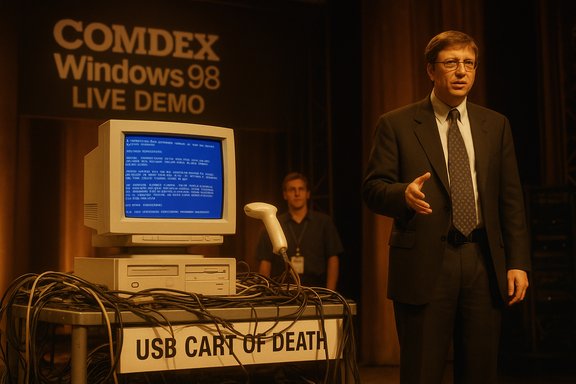
Bill Gates’ off‑hand quip—“That must be why we’re not shipping Windows 98 yet”—did more than defuse an embarrassing on‑stage moment; it helped redraw how Microsoft and the wider industry approach live demos, hardware compatibility, and presentation engineering. A plug‑and‑play scanner that hadn’t been vetted by the Windows team triggered a kernel crash during a high‑profile Windows 98 demonstration at COMDEX, producing one of the most famous Blue Screen of Death (BSoD) moments in tech lore. The incident prompted an immediate operational response inside Microsoft: dedicated staging rooms, stricter validation checklists, aggressive device stress testing, and a cultural shift that married product QA to presentation workflows. These measures are still relevant to any product team that relies on live demos today.
The COMDEX demonstration in April 1998 was meant to showcase Windows 98’s improved Plug‑and‑Play USB support to thousands of attendees and a global audience. Instead, a retail scanner plugged into the demo machine caused the system to blue‑screen in full public view. Bill Gates reacted quickly with a self‑deprecating line and moved on, but the engineering and PR teams inside Microsoft treated the incident as a systemic failure to be fixed at the process level—not just a one‑off gaffe. Two broad technical realities made the crash especially likely at the time: USB was a relatively new consumer interface, and early host controllers, hubs, and device firmware implemented the fledgling spec unevenly. A retail peripheral that drew more current or presented unexpected descriptors could push an immature driver stack into untested error paths. When that happened on stage at COMDEX, the result was a kernel stop error—the now‑iconic BSoD—played out for millions to see.
Source: Windows Central After Windows 98’s live demo crash, Bill Gates had Microsoft build a secret test lab to prevent future embarrassment — "That must be why we're not shipping yet."
 Background / Overview
The COMDEX demonstration in April 1998 was meant to showcase Windows 98’s improved Plug‑and‑Play USB support to thousands of attendees and a global audience. Instead, a retail scanner plugged into the demo machine caused the system to blue‑screen in full public view. Bill Gates reacted quickly with a self‑deprecating line and moved on, but the engineering and PR teams inside Microsoft treated the incident as a systemic failure to be fixed at the process level—not just a one‑off gaffe. Two broad technical realities made the crash especially likely at the time: USB was a relatively new consumer interface, and early host controllers, hubs, and device firmware implemented the fledgling spec unevenly. A retail peripheral that drew more current or presented unexpected descriptors could push an immature driver stack into untested error paths. When that happened on stage at COMDEX, the result was a kernel stop error—the now‑iconic BSoD—played out for millions to see.What happened on stage: the COMDEX 1998 BSOD
The setup and the failing component
Microsoft’s demo plan was straightforward: plug a scanner into a PC running a pre‑release Windows 98 build and let Plug‑and‑Play enumerate and install the device automatically. The demo assistant used a scanner purchased at a local electronics store at the last minute rather than the validated unit engineering had tested. The retail unit behaved differently than the lab-tested hardware; it attempted to draw more current from the USB port than the then‑new USB stack expected, which triggered a kernel fault and the full BSoD.A public moment, a private alarm
In front of the crowd and cameras, the blue screen became shorthand for “this thing isn’t ready.” Bill Gates’ off‑the‑cuff comment diminished immediate tension, but the internal reaction was far more consequential. Engineers, program managers, and presentation producers recognized a process gap: last‑minute retail hardware on stage could negate months of testing. That recognition spurred design changes in an important physical asset the company was already building—the Microsoft Production Studios—so the facility would explicitly support staging, validation, and controlled hand‑off of presentation equipment.The technical root cause: why a scanner crashed Windows 98
USB infancy and electrical edge cases
USB’s promise—unified connector, automatic driver installation, and hot‑plug convenience—depended on many moving parts working together: device firmware, electrical power behavior, hub controllers, and OS driver robustness. In the late 1990s, device vendors shipped a wide range of implementations, and early host stacks had to be defensive against malformed descriptors and non‑conforming power behavior. The COMDEX scanner combined one or more of these problematic characteristics with a code path in the pre‑release OS that hadn’t been stress‑hardened, and the result was a kernel panic.Errors that aren’t just software bugs
A crash that originates from mismatched electrical expectations or non‑standard descriptor handling is not merely a “driver bug” in the narrow sense; it’s a systems compatibility problem. The operating system must both tolerate bad behavior and fail gracefully. In 1998, that tolerance was still being implemented across hundreds of driver and device combinations, so the staging environment simply hadn’t exercised the precise retail combination used on stage. The lesson: software fixes alone can’t substitute for broad field‑fidelity testing.Raymond Chen, the staging room, and the helmeted scanner
A veteran engineer’s recollection
Raymond Chen—longtime Windows engineer and author of The Old New Thing blog—later recounted that the Windows 98 demo crash caused Microsoft to modify the design of its upcoming broadcast facility to include a dedicated staging room adjacent to the broadcast studio. The staging room’s purpose: set up the exact machines and peripherals that would be used live, rehearse the sequence, and hand validated hardware to presenters only after the run completed successfully. That procedural change formalized a simple rule: never put last‑minute, unvalidated retail hardware on stage.The scanner that wouldn’t die
Chen also recounted an anecdote that has become demo folklore: the retail scanner that caused the crash was not simply discarded. Instead, it was mounted on a World War II infantry helmet and taken to War Room meetings as a tongue‑in‑cheek talisman of the project’s travails. The prop became a reminder of the problem they had solved—and an impetus to prevent repetition. That small ritual underscores how cultural artifacts can travel from engineering frustration into institutional memory.How Microsoft rebuilt its demo playbook
Facilities and process: Production Studios’ staging room
Changing the physical design of a production facility is a visible, structural response. The new or modified Microsoft Production Studios included a room specifically designed to stage and validate demo equipment under the exact conditions of the live broadcast. This wasn’t mere theater: it replicated cabling, video paths, driver installs, and even the timing of presenter interactions so that the path to failure could be found and fixed before the camera rolled.The “USB cart of death” and adversarial testing
Microsoft’s engineers also embraced aggressive, adversarial test rigs—nicknamed the “USB cart of death”—to stress the USB stack. The cart was intentionally brutal: dozens of devices, hubs, and daisy chains that simulated chaotic connect/disconnect patterns, power draws, and descriptor edge cases. The objective was to convert unknown unknowns into repeatable bug reports engineers could fix. That kind of stress testing accelerated driver hardening and substantially reduced field crashes that previously only surfaced in customer environments.Operational rules and checklists
Beyond hardware and stress rigs, Microsoft created operational rules that aligned PR, presentations, and engineering:- Use only validated hardware for on‑stage demos.
- Maintain a “known‑good” inventory of devices and serial numbers.
- Run full dress rehearsals in the staging room immediately before the show.
- Require sign‑off from engineering before presenters touch the hardware.
BSoD: a short primer and the myth of a single author
Three different “blue” screens
The BSoD is now iconic, but the term masks nuance. Windows has had several visually similar screens across its history:- The Windows 3.1 Ctrl+Alt+Del “screen of unhappiness” (a task‑manager‑style dialog).
- The Windows 95-era kernel error (the so‑called “blue screen of lameness”), which allowed some recovery options and was refined by engineers like Raymond Chen.
- The Windows NT family’s kernel stop error—the true Blue Screen of Death—originally implemented by John Vert and intended to indicate an unrecoverable system failure.
Evolution of color and UX
The visual design of crash screens has also evolved. What began as silver text on a royal blue background later adopted other hues and UI changes: a sad face in Windows 8, a QR code in later Windows 10/11 builds, and—more recently—a shift away from blue to a simplified black crash screen in Windows 11 preview builds and releases tied to the Windows Resiliency Initiative. Those color changes have both practical and symbolic reasons, but the underlying kernel stop semantics remain the same. Be cautious with blanket claims about “the death of the blue screen”: Microsoft’s styling choices have changed several times, and different channels (Insider vs. production) have shown different backgrounds at different times.Why the COMDEX gaffe mattered beyond PR
Turning embarrassment into engineering leverage
The on‑stage BSoD was embarrassing, but Microsoft’s response turned it into leverage for cross‑functional improvement. The staging room forced presentation producers to adhere to engineering validation, the stress rigs accelerated USB robustness, and the process changes reduced the probability that a last‑minute hardware substitution could derail a keynote. That conversion of PR pain into operational resilience is an instructive model for other firms.Lessons for modern product teams
- Validate the exact unit: retail variants can differ from the engineering sample in unpredictable ways.
- Recreate the full path: cable runs, AV processors, firmware, and third‑party switches matter.
- Automate adversarial tests: make “weird things happening” part of continuous integration for hardware paths.
- Maintain a known‑good inventory and a sign‑off gate: demos should be permissioned, not ad hoc.
Strengths, limits, and residual risks of Microsoft’s response
Notable strengths
- Practical, low‑cost mitigation: adding a staging room and formalizing checklists delivers outsized protection compared with the investment required.
- Cultural alignment: the change forced PR, events, and engineering to share responsibility for live reliability.
- Defensive testing: adversarial rigs like the USB cart found edge cases that standard regression tests missed.
Potential blind spots and ongoing risks
- Narrow “known‑good” lists can create blind spots. Overfitting to a small validated device set can hide compatibility problems in the field.
- Staging rooms reduce but do not eliminate surprises; AV infrastructure, venue differences, and vendor firmware updates can still introduce new failure modes.
- Human shortcuts remain the primary risk: under deadline pressure, teams still sometimes take risky last‑minute decisions unless processes are enforced consistently.
Wider context: what the BSoD tells us about platform reliability
Crash screens as diagnostics, not just spectacle
The BSoD is a diagnostic artifact: it surfaces the bugcheck code, registers, and sometimes driver names so engineers can triage the root cause. Over time, Microsoft simplified the UX for end users (sad faces, QR codes) to be less intimidating, while retaining the developer‑oriented details in dump files and diagnostic tools. The manifest visibility of a crash—especially when it happens live—makes platform reliability a brand issue as well as a technical one.The modern resilience agenda
Contemporary Microsoft efforts—like the Windows Resiliency Initiative and changes to how third‑party security software interacts with the kernel—show that platform owners still must treat third‑party integration as a core reliability surface. A high‑profile outage that results from a vendor update is the same sort of lesson as the COMDEX crash: operational rules, validation, and containment plans reduce exposure. While the technical landscape has changed (telemetry, phased rollouts, remote recovery), the fundamental discipline remains: anticipate the unexpected, and practice for it before customers do.Practical takeaways for Windows enthusiasts, sysadmins, and product teams
- When building demos, replicate the exact environment end to end: same OS build, drivers, cables, and peripherals.
- Maintain “known‑good” hardware and serial numbers for mission‑critical presentations; prohibit last‑minute retail purchases for live runs.
- Adopt adversarial stress tests for any feature that interacts with external devices (USB, Bluetooth, network); these surface corner cases quickly.
- Keep a failover plan—recorded video, screenshots, or a scripted alternate path—to keep the presentation flowing when hardware misbehaves.
Conclusion
The COMDEX blue‑screen moment is more than demo lore; it’s a compact case study in risk management for complex systems. Microsoft’s pragmatic response—staging rooms, validated hardware, adversarial test rigs, and stricter sign‑offs—converted an embarrassing failure into lasting operational improvements. The Blue Screen of Death itself remains an important diagnostic artifact, and its visual evolution (blue, sad face, QR codes, and even a modern black variant) reflects both usability and strategic choices. For product teams building demonstrations that touch hardware, the lesson is simple and enduring: rehearse thoroughly, validate the exact units, test aggressively, and prepare a fallback. What was once a prop mounted on a helmet is now a suite of processes and infrastructure that helps prevent a repeat of that on‑stage humiliation—proof that good engineering can sometimes be learned the hard way.Source: Windows Central After Windows 98’s live demo crash, Bill Gates had Microsoft build a secret test lab to prevent future embarrassment — "That must be why we're not shipping yet."
