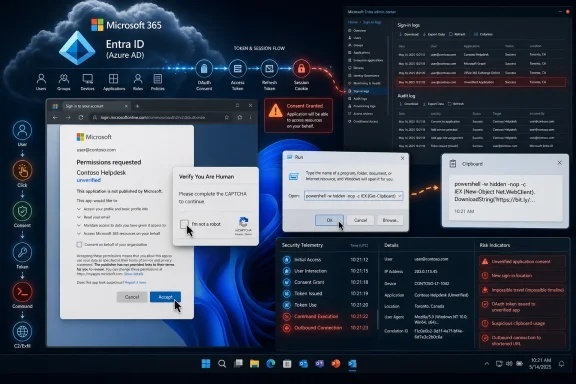
Admins should break the ConsentFix chain first by restricting Microsoft Entra user consent at Identity > Applications > Enterprise apps > Consent and permissions > User consent settings, then reviewing OAuth app trust and training users against ClickFix-style browser prompts. That order matters because ConsentFix can turn a legitimate Microsoft-hosted sign-in and approval flow into attacker-controlled access without the victim handing over a password. MFA may have completed correctly; the risk is what the user is tricked into authorizing afterward.
ConsentFix is uncomfortable because it does not look like the phishing story administrators have been teaching for years. The victim may not type a password into a fake form. The sign-in flow can be real, Microsoft-hosted, and protected by MFA.
The failure happens after trust is granted. WindowsForum user reports on ClickFix OAuth abuse, ConsentFix v3, Azure CLI-themed consent phishing, and OAuth token replay all point to the same practical lesson: attackers are trying to make a normal-looking identity workflow produce an authorization artifact or permission grant they can use. In other words, the user may think they completed a routine Microsoft approval, while the attacker is trying to turn that approval into access.
That makes the first defensive question brutally practical: which control breaks the chain earliest? In most Microsoft 365 tenants, the answer is not “more user awareness” and not “better password policy.” It is consent governance.
The setting path admins should check now is straightforward: in the Microsoft Entra admin center, go to Identity > Applications > Enterprise apps > Consent and permissions > User consent settings. From there, review whether users can consent to applications, whether consent is limited to verified publishers and low-risk permissions, or whether consent is disabled and routed through admin approval.
A safe configuration is one where ordinary users cannot grant broad delegated access to mail, files, directory data, or other sensitive Microsoft Graph permissions without review. If user consent is enabled, it should be limited to verified publishers and low-risk permissions that your organization has intentionally allowed. An unsafe configuration is broad user consent that lets any user approve unfamiliar apps or high-impact permissions without admin approval, ownership, or logging review.
This is not glamorous security work. It is tenant hygiene. But in an OAuth phishing campaign, boring tenant hygiene is the difference between a tricked user creating a manageable alert and a tricked user granting access that survives the initial click.
ConsentFix applies that approach to identity. The attacker does not need to own Microsoft’s login page. The attack depends on redirecting or steering the user through a legitimate-looking authorization sequence and capturing or abusing the result at the right point.
That is why this is more dangerous than a generic “don’t click suspicious links” story. Many users have been trained that a Microsoft sign-in page, MFA prompt, or device-code-style approval is a sign of safety. ConsentFix abuses that training by keeping enough of the journey legitimate to suppress suspicion.
The operational window can be short once the victim completes the relevant approval or authorization step, but defenders should avoid relying on dramatic stopwatch claims. The grounded point is simpler: once an attacker receives usable authorization material or obtains a malicious app grant, the incident has moved beyond password theft and into session, token, or delegated-access response.
WindowsForum user reports have been circling this shift from several angles. One report framed ClickFix as OAuth abuse inside Microsoft 365. Another focused on protecting Microsoft 365 tenants from ClickFix-style OAuth attacks. Others discussed ConsentFix v3, OAuth code theft, token replay, Azure CLI-themed lures, and Microsoft Graph access. The shared takeaway is what matters for administrators: these are not separate curiosities. They are variants of a broader attack pattern in which the user is pressured into completing a normal-looking action that transfers trust to the attacker.
In a ConsentFix-style attack, the attacker first presents a lure that pushes the victim into a Microsoft authorization flow. WindowsForum’s reports describe variants involving Microsoft 365, Microsoft Graph, Azure and Entra ID accounts, and Azure CLI-themed workflows. Those details matter because they explain why the event can feel routine to a technical user: the victim may see Microsoft branding, familiar permissions language, or a workflow that resembles normal cloud administration.
Microsoft’s reporting on related activity has emphasized redirection abuse and persistence across related campaigns. That should keep defenders precise. The issue is not that every OAuth phish uses the same token-theft mechanic. The issue is that attackers abuse trusted authorization flows, redirects, prompts, and user approvals to obtain usable access or keep activity alive after the initial interaction.
The key distinction for defenders is that MFA may have been satisfied honestly. The victim did authenticate. The attacker did not necessarily defeat MFA by cracking it; the attacker abused the approval or authorization process that came after authentication. Password training and MFA remain important, but they are not enough when the user is tricked into granting access or exposing authorization material after the login succeeds.
This is why mailbox takeover remains the practical nightmare. Once access is established, the attacker’s next objectives are predictable: read mail, search for invoices or reset messages, create persistence where possible, and use the compromised account as a trusted sender. The initial trick may be quick, but the business damage comes from what the attacker does quietly afterward.
ConsentFix shifts the center of gravity from the endpoint command to the identity permission. The operational difference is direct: ClickFix and CrashFix rely on browser-crash or fake-fix social engineering that pushes the user toward command execution, while ConsentFix relies on OAuth-consent social engineering that pushes the user toward authorizing access; the former makes endpoint controls and script restrictions central, while the latter makes Entra consent policy, app grants, token revocation, and identity logs central.
That shift matters for Microsoft 365 administrators because OAuth access often lives above the individual machine. Reimaging a laptop may remove malware, but it does not automatically revoke a cloud token or undo an application grant. If the attacker’s foothold is in delegated access, endpoint cleanup can create a false sense of closure.
The uncomfortable part is that many organizations still treat app consent as a productivity feature rather than a security boundary. Users are allowed to approve apps because it reduces tickets. Developers are allowed to move quickly because OAuth consent is routine. Shadow IT gets tolerated because the blast radius is not obvious until an incident.
ConsentFix makes that bargain look outdated. If user consent can be tricked, then user consent is no longer just a convenience setting. It is an attack surface.
That does not mean every tenant should instantly block every consent action forever. It does mean every tenant should make a conscious decision. The worst configuration is the accidental one: user consent left permissive because nobody remembered it was there.
A safer posture is to prevent users from granting risky permissions and require admin approval for anything beyond low-risk scenarios. Microsoft Entra supports configuration of user consent behavior, including limiting consent through policy rather than treating every user as a miniature application administrator. In many enterprises, the right answer is to disable broad user consent and use an admin consent workflow.
After checking the setting, validate the actual consent state. Pick a normal, non-admin test user and confirm whether that user can approve an unfamiliar app requesting delegated Microsoft Graph permissions. A safe result is that the user is blocked or routed into an admin approval workflow for anything beyond approved low-risk consent. An unsafe result is that the user can approve an unknown app with meaningful mailbox, file, directory, or offline access without administrative review.
The second action is to review existing enterprise applications and service principals. Look for unfamiliar apps, suspicious recent consent activity, unusual delegated permissions, and apps with access that does not match a business need. This is where OAuth incidents often hide: not in malware alerts, but in a quiet permission object that nobody owns.
The third action is log hunting. Administrators should review sign-in logs, audit logs, enterprise application consent events, and mailbox activity around the suspected time of compromise. The goal is not merely to prove the user clicked something; it is to determine whether an attacker successfully obtained authorization material, created or abused an app grant, or used the resulting access.
The fourth action is user communication, but it should be specific. Do not tell users vaguely to beware of phishing. Tell them that real Microsoft sign-in pages can still be abused when another page tells them to copy, paste, approve, authorize, or return output from a Microsoft flow. The warning has to match the attack.
If the attacker has a token, a valid session, or an app grant, the password reset may be only one part of cleanup. Tokens and consent grants can preserve access in ways that feel disconnected from the user’s password. That is the core reason OAuth abuse keeps producing outsized incidents.
Mailbox investigation should be mandatory. Check for new inbox rules, forwarding configurations, deleted messages, suspicious searches, and outbound messages sent after the suspected compromise. A fast OAuth hijack can become a business email compromise staging ground if the attacker finds finance threads, vendor conversations, or password reset messages.
Administrators should also look at lateral cloud exposure. Microsoft 365 is not just email; it is SharePoint, OneDrive, Teams, Graph-connected apps, and identity relationships. The permissions granted in the flow determine the damage path, so responders need to map what the attacker could actually access rather than assuming “email only.”
The most mature organizations will turn this into a tabletop exercise. Start with a single user who follows a fake browser prompt and completes a legitimate Microsoft authorization flow. Then ask which team sees it first, which log proves it, who can revoke the access, and how long the mailbox remains exposed.
That is the through-line connecting ClickFix and ConsentFix. The attacker’s target is not a specific dialog box. It is the user’s willingness to complete a small technical ritual under pressure.
Fake CAPTCHA lures are especially effective because they mimic a nuisance users already expect. The modern web has trained everyone to click tiles, prove they are human, approve notifications, and follow friction-heavy prompts before reaching content. ClickFix turns that ambient annoyance into execution.
ConsentFix turns identity familiarity into the same kind of trap. Microsoft sign-in prompts are everywhere in corporate life, and Azure CLI or device-oriented flows are normal in technical environments. The more comfortable a user is with Microsoft cloud tooling, the less alien the flow may feel.
That is why WindowsForum readers should resist the temptation to frame this as a “nontechnical users got fooled” story. Technical users may be more exposed, not less, when the lure resembles a workflow they already understand.
The cleanest model is one where user consent is tightly limited, admin consent is reviewed, and risky permissions require a documented owner. That adds friction, but the friction is the control. If a third-party app genuinely needs access to mail, files, or directory data, someone should be accountable for approving it.
Small businesses face a harder tradeoff. They often lack a dedicated identity team and may rely on user-driven app adoption. For them, the recommendation is still to restrict broad consent, but the process must be lightweight enough that employees do not route around it. A simple admin approval workflow, a short list of approved apps, and periodic review of enterprise applications can reduce risk without freezing work.
Large enterprises have no excuse for leaving this unmanaged. They already govern endpoint privilege, app deployment, data loss prevention, and conditional access. OAuth consent belongs in the same security review lane.
The important distinction is between blocking all productivity and blocking silent escalation. The goal is not to make Microsoft 365 unusable. The goal is to ensure that a user tricked by a browser prompt cannot accidentally authorize an attacker’s takeover path.
That means help desk scripts need updating. Asking “Did you type your password?” is no longer enough. Ask whether the user approved an app, copied or pasted a code, followed a command-line instruction, completed a CAPTCHA that asked for unusual steps, or saw a Microsoft login after clicking an unexpected link.
Security teams should correlate that user recollection with Entra and Microsoft 365 logs. Look for new consent grants, sign-ins associated with unusual applications, token refresh activity, and mailbox access that does not match the user’s normal pattern. The absence of a password failure is not exculpatory.
The most important hunting principle is to follow authorization. The user’s story may sound harmless because the UI looked legitimate. The logs decide whether trust changed hands.
This is where the WindowsForum user reports are useful for practitioners. The reports on ClickFix OAuth abuse, Microsoft 365-focused ClickFix defenses, ConsentFix v3 token replay, Azure CLI and Microsoft Graph consent phishing, and broader OAuth 2.0 abuse all point to a different compromise path with different artifacts. OAuth phishing is not merely credential phishing with a new costume. It requires defenders to inspect app consent, delegated permissions, sign-in behavior, mailbox rules, and persistence paths.
For Windows admins, the lesson is not to panic about every OAuth flow. The lesson is to inventory trust and decide who is allowed to create it. User consent, app permissions, token revocation, and mailbox hunting are no longer secondary identity tasks; they are frontline anti-phishing controls.
Microsoft 365 defense has spent years teaching users to protect passwords and approve MFA prompts carefully. That advice is still necessary, but it is no longer sufficient. The next wave of account takeover will not always ask for the secret. It may ask the user to authorize the attacker to stop needing it.
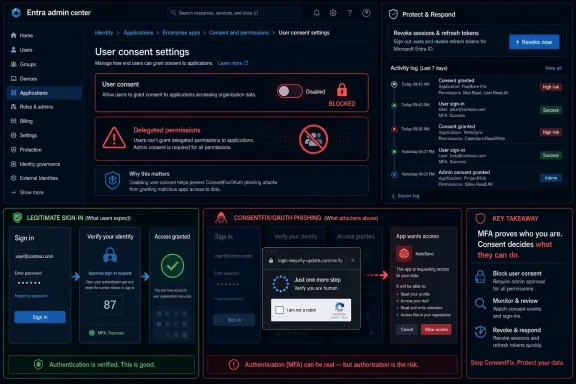 The First Control Is Consent, Not Another Password Lecture
ConsentFix is uncomfortable because it does not look like the phishing story administrators have been teaching for years. The victim may not type a password into a fake form. The sign-in flow can be real, Microsoft-hosted, and protected by MFA.The failure happens after trust is granted. WindowsForum user reports on ClickFix OAuth abuse, ConsentFix v3, Azure CLI-themed consent phishing, and OAuth token replay all point to the same practical lesson: attackers are trying to make a normal-looking identity workflow produce an authorization artifact or permission grant they can use. In other words, the user may think they completed a routine Microsoft approval, while the attacker is trying to turn that approval into access.
That makes the first defensive question brutally practical: which control breaks the chain earliest? In most Microsoft 365 tenants, the answer is not “more user awareness” and not “better password policy.” It is consent governance.
The setting path admins should check now is straightforward: in the Microsoft Entra admin center, go to Identity > Applications > Enterprise apps > Consent and permissions > User consent settings. From there, review whether users can consent to applications, whether consent is limited to verified publishers and low-risk permissions, or whether consent is disabled and routed through admin approval.
A safe configuration is one where ordinary users cannot grant broad delegated access to mail, files, directory data, or other sensitive Microsoft Graph permissions without review. If user consent is enabled, it should be limited to verified publishers and low-risk permissions that your organization has intentionally allowed. An unsafe configuration is broad user consent that lets any user approve unfamiliar apps or high-impact permissions without admin approval, ownership, or logging review.
This is not glamorous security work. It is tenant hygiene. But in an OAuth phishing campaign, boring tenant hygiene is the difference between a tricked user creating a manageable alert and a tricked user granting access that survives the initial click.
ConsentFix Abuses a Trusted Flow
ClickFix became famous because it trained attackers to weaponize user prompts. Fake CAPTCHA pages, browser warnings, and “run this command to fix the problem” lures turned the user’s desktop into the delivery mechanism. CrashFix-style variants add browser disruption to the same idea: create urgency, present a technical-looking fix, and push the victim into doing the attacker’s work.ConsentFix applies that approach to identity. The attacker does not need to own Microsoft’s login page. The attack depends on redirecting or steering the user through a legitimate-looking authorization sequence and capturing or abusing the result at the right point.
That is why this is more dangerous than a generic “don’t click suspicious links” story. Many users have been trained that a Microsoft sign-in page, MFA prompt, or device-code-style approval is a sign of safety. ConsentFix abuses that training by keeping enough of the journey legitimate to suppress suspicion.
The operational window can be short once the victim completes the relevant approval or authorization step, but defenders should avoid relying on dramatic stopwatch claims. The grounded point is simpler: once an attacker receives usable authorization material or obtains a malicious app grant, the incident has moved beyond password theft and into session, token, or delegated-access response.
WindowsForum user reports have been circling this shift from several angles. One report framed ClickFix as OAuth abuse inside Microsoft 365. Another focused on protecting Microsoft 365 tenants from ClickFix-style OAuth attacks. Others discussed ConsentFix v3, OAuth code theft, token replay, Azure CLI-themed lures, and Microsoft Graph access. The shared takeaway is what matters for administrators: these are not separate curiosities. They are variants of a broader attack pattern in which the user is pressured into completing a normal-looking action that transfers trust to the attacker.
The Takeover Path Is Short Because OAuth Is Doing What It Was Built to Do
OAuth is not broken in the simple sense. It is doing what delegated authorization systems are designed to do: allow an application to receive access after a user or administrator approves it. The problem is that attackers have learned how to package that approval moment as a help prompt, CAPTCHA, fix button, redirect, or command-line workflow.In a ConsentFix-style attack, the attacker first presents a lure that pushes the victim into a Microsoft authorization flow. WindowsForum’s reports describe variants involving Microsoft 365, Microsoft Graph, Azure and Entra ID accounts, and Azure CLI-themed workflows. Those details matter because they explain why the event can feel routine to a technical user: the victim may see Microsoft branding, familiar permissions language, or a workflow that resembles normal cloud administration.
Microsoft’s reporting on related activity has emphasized redirection abuse and persistence across related campaigns. That should keep defenders precise. The issue is not that every OAuth phish uses the same token-theft mechanic. The issue is that attackers abuse trusted authorization flows, redirects, prompts, and user approvals to obtain usable access or keep activity alive after the initial interaction.
The key distinction for defenders is that MFA may have been satisfied honestly. The victim did authenticate. The attacker did not necessarily defeat MFA by cracking it; the attacker abused the approval or authorization process that came after authentication. Password training and MFA remain important, but they are not enough when the user is tricked into granting access or exposing authorization material after the login succeeds.
This is why mailbox takeover remains the practical nightmare. Once access is established, the attacker’s next objectives are predictable: read mail, search for invoices or reset messages, create persistence where possible, and use the compromised account as a trusted sender. The initial trick may be quick, but the business damage comes from what the attacker does quietly afterward.
ClickFix and ConsentFix Differ in the Defender’s Control Point
ClickFix-style campaigns have trained defenders to watch for commands pasted into Run, PowerShell, Terminal, or browser developer consoles. That remains important. Fake CAPTCHA and browser-crash lures can still lead to malware execution, script abuse, or local endpoint compromise.ConsentFix shifts the center of gravity from the endpoint command to the identity permission. The operational difference is direct: ClickFix and CrashFix rely on browser-crash or fake-fix social engineering that pushes the user toward command execution, while ConsentFix relies on OAuth-consent social engineering that pushes the user toward authorizing access; the former makes endpoint controls and script restrictions central, while the latter makes Entra consent policy, app grants, token revocation, and identity logs central.
That shift matters for Microsoft 365 administrators because OAuth access often lives above the individual machine. Reimaging a laptop may remove malware, but it does not automatically revoke a cloud token or undo an application grant. If the attacker’s foothold is in delegated access, endpoint cleanup can create a false sense of closure.
The uncomfortable part is that many organizations still treat app consent as a productivity feature rather than a security boundary. Users are allowed to approve apps because it reduces tickets. Developers are allowed to move quickly because OAuth consent is routine. Shadow IT gets tolerated because the blast radius is not obvious until an incident.
ConsentFix makes that bargain look outdated. If user consent can be tricked, then user consent is no longer just a convenience setting. It is an attack surface.
That does not mean every tenant should instantly block every consent action forever. It does mean every tenant should make a conscious decision. The worst configuration is the accidental one: user consent left permissive because nobody remembered it was there.
The Admin Playbook Starts With Entra, Then Moves to Hunting
The first action is to review user consent settings in Microsoft Entra. In the Entra admin center, browse to Identity > Applications > Enterprise apps > Consent and permissions > User consent settings. If ordinary users can broadly consent to apps, tighten that policy immediately.A safer posture is to prevent users from granting risky permissions and require admin approval for anything beyond low-risk scenarios. Microsoft Entra supports configuration of user consent behavior, including limiting consent through policy rather than treating every user as a miniature application administrator. In many enterprises, the right answer is to disable broad user consent and use an admin consent workflow.
After checking the setting, validate the actual consent state. Pick a normal, non-admin test user and confirm whether that user can approve an unfamiliar app requesting delegated Microsoft Graph permissions. A safe result is that the user is blocked or routed into an admin approval workflow for anything beyond approved low-risk consent. An unsafe result is that the user can approve an unknown app with meaningful mailbox, file, directory, or offline access without administrative review.
The second action is to review existing enterprise applications and service principals. Look for unfamiliar apps, suspicious recent consent activity, unusual delegated permissions, and apps with access that does not match a business need. This is where OAuth incidents often hide: not in malware alerts, but in a quiet permission object that nobody owns.
The third action is log hunting. Administrators should review sign-in logs, audit logs, enterprise application consent events, and mailbox activity around the suspected time of compromise. The goal is not merely to prove the user clicked something; it is to determine whether an attacker successfully obtained authorization material, created or abused an app grant, or used the resulting access.
The fourth action is user communication, but it should be specific. Do not tell users vaguely to beware of phishing. Tell them that real Microsoft sign-in pages can still be abused when another page tells them to copy, paste, approve, authorize, or return output from a Microsoft flow. The warning has to match the attack.
Incident Response Checklist for Suspected ConsentFix
If a user may have completed a ConsentFix-style flow, treat the case as identity compromise, not merely credential exposure:- Revoke sessions and refresh tokens for the affected user so existing cloud access is invalidated.
- Remove suspicious enterprise app grants and delegated permissions tied to unfamiliar applications or recent consent events.
- Review Entra sign-in logs and audit logs for unusual applications, consent events, unfamiliar locations, impossible travel, token activity, and unexpected service-principal activity.
- Check mailbox forwarding and inbox rules, including hidden or suspicious rules, external forwarding, deleted-message handling, and outbound messages sent after the suspected compromise.
The Incident Response Mistake Is Treating This Like Classic Credential Theft
Classic credential theft has a familiar rhythm. Reset the password, revoke sessions, check MFA, scan the endpoint, and move on to containment. ConsentFix punishes that muscle memory when teams stop after the password reset.If the attacker has a token, a valid session, or an app grant, the password reset may be only one part of cleanup. Tokens and consent grants can preserve access in ways that feel disconnected from the user’s password. That is the core reason OAuth abuse keeps producing outsized incidents.
Mailbox investigation should be mandatory. Check for new inbox rules, forwarding configurations, deleted messages, suspicious searches, and outbound messages sent after the suspected compromise. A fast OAuth hijack can become a business email compromise staging ground if the attacker finds finance threads, vendor conversations, or password reset messages.
Administrators should also look at lateral cloud exposure. Microsoft 365 is not just email; it is SharePoint, OneDrive, Teams, Graph-connected apps, and identity relationships. The permissions granted in the flow determine the damage path, so responders need to map what the attacker could actually access rather than assuming “email only.”
The most mature organizations will turn this into a tabletop exercise. Start with a single user who follows a fake browser prompt and completes a legitimate Microsoft authorization flow. Then ask which team sees it first, which log proves it, who can revoke the access, and how long the mailbox remains exposed.
ClickFix Keeps Evolving Because It Exploits Muscle Memory
ClickFix-style attacks keep evolving because attackers are not attached to one prompt. If users learn not to paste commands into Run, the lure can move to Terminal. If users distrust obvious malware downloads, the lure can become a fake browser crash. If users learn that passwords are sensitive, the lure can ask for an authorization code or app approval instead.That is the through-line connecting ClickFix and ConsentFix. The attacker’s target is not a specific dialog box. It is the user’s willingness to complete a small technical ritual under pressure.
Fake CAPTCHA lures are especially effective because they mimic a nuisance users already expect. The modern web has trained everyone to click tiles, prove they are human, approve notifications, and follow friction-heavy prompts before reaching content. ClickFix turns that ambient annoyance into execution.
ConsentFix turns identity familiarity into the same kind of trap. Microsoft sign-in prompts are everywhere in corporate life, and Azure CLI or device-oriented flows are normal in technical environments. The more comfortable a user is with Microsoft cloud tooling, the less alien the flow may feel.
That is why WindowsForum readers should resist the temptation to frame this as a “nontechnical users got fooled” story. Technical users may be more exposed, not less, when the lure resembles a workflow they already understand.
Microsoft 365 Tenants Need Explicit Consent Governance
Every enterprise already makes risk decisions about software installation, administrator rights, external sharing, and device management. OAuth consent belongs in the same category. A tenant where any user can approve meaningful delegated access is effectively allowing identity-layer access decisions without security review.The cleanest model is one where user consent is tightly limited, admin consent is reviewed, and risky permissions require a documented owner. That adds friction, but the friction is the control. If a third-party app genuinely needs access to mail, files, or directory data, someone should be accountable for approving it.
Small businesses face a harder tradeoff. They often lack a dedicated identity team and may rely on user-driven app adoption. For them, the recommendation is still to restrict broad consent, but the process must be lightweight enough that employees do not route around it. A simple admin approval workflow, a short list of approved apps, and periodic review of enterprise applications can reduce risk without freezing work.
Large enterprises have no excuse for leaving this unmanaged. They already govern endpoint privilege, app deployment, data loss prevention, and conditional access. OAuth consent belongs in the same security review lane.
The important distinction is between blocking all productivity and blocking silent escalation. The goal is not to make Microsoft 365 unusable. The goal is to ensure that a user tricked by a browser prompt cannot accidentally authorize an attacker’s takeover path.
The Hunt Begins Where the User Says “Nothing Weird Happened”
ConsentFix investigations are hard because the victim may honestly report that nothing suspicious occurred. They did not enter a password on a strange site. They did not download a file. They may remember only a Microsoft prompt, a verification step, a command-line-looking instruction, or a page that asked them to continue.That means help desk scripts need updating. Asking “Did you type your password?” is no longer enough. Ask whether the user approved an app, copied or pasted a code, followed a command-line instruction, completed a CAPTCHA that asked for unusual steps, or saw a Microsoft login after clicking an unexpected link.
Security teams should correlate that user recollection with Entra and Microsoft 365 logs. Look for new consent grants, sign-ins associated with unusual applications, token refresh activity, and mailbox access that does not match the user’s normal pattern. The absence of a password failure is not exculpatory.
The most important hunting principle is to follow authorization. The user’s story may sound harmless because the UI looked legitimate. The logs decide whether trust changed hands.
This is where the WindowsForum user reports are useful for practitioners. The reports on ClickFix OAuth abuse, Microsoft 365-focused ClickFix defenses, ConsentFix v3 token replay, Azure CLI and Microsoft Graph consent phishing, and broader OAuth 2.0 abuse all point to a different compromise path with different artifacts. OAuth phishing is not merely credential phishing with a new costume. It requires defenders to inspect app consent, delegated permissions, sign-in behavior, mailbox rules, and persistence paths.
The Fastest Fixes Are Also the Least Dramatic
There is no single magic switch that eliminates ConsentFix, ClickFix, and every successor lure. But there are controls that materially reduce the odds that a moment of user deception becomes a Microsoft 365 takeover. The priority is to remove attacker leverage from the earliest part of the chain.- Review Microsoft Entra user consent settings and stop ordinary users from granting broad application permissions without oversight.
- Confirm that non-admin users cannot approve unfamiliar apps requesting sensitive Microsoft Graph permissions.
- Use admin consent workflow for apps that need meaningful access to mail, files, directory data, or offline access.
- Audit enterprise applications and remove suspicious, unused, or ownerless app grants from the tenant.
- Revoke sessions and refresh tokens during suspected ConsentFix response rather than relying only on password resets.
- Hunt for consent events, unusual application sign-ins, mailbox rule changes, forwarding, and post-compromise email activity.
- Train users that a real Microsoft sign-in page can still be part of an attack if another page tells them to copy, paste, approve, authorize, or return output.
- Treat fake CAPTCHA, browser crash, and “fix this problem” prompts as identity security issues, not only endpoint malware lures.
Frequently Asked Questions
Does ConsentFix mean Microsoft sign-in is unsafe?
No. The problem is not that Microsoft-hosted sign-in is fake or useless. The problem is that attackers can steer users into legitimate authorization flows and abuse the approval, code, redirect, or consent outcome. A real sign-in page can still be part of an attack chain if the surrounding instructions are malicious.Does MFA stop this attack?
MFA still matters, but it does not solve the whole problem. In these attacks, MFA may be completed correctly. The attacker’s goal is to abuse what happens after authentication, such as app consent, authorization output, or delegated access.Is this the same as ClickFix?
It is related, but the control point is different. ClickFix and CrashFix-style attacks use browser prompts, fake CAPTCHA pages, or crash messages to push users toward command execution. ConsentFix uses OAuth-consent social engineering to push users toward authorizing access or exposing authorization material. Endpoint controls matter more for the first category; Entra consent governance and identity logs matter more for the second.Should admins disable all user consent?
Not every tenant needs the same policy, but broad unmanaged user consent is risky. A safer baseline is to limit user consent to verified publishers and low-risk permissions, or disable user consent and route requests through admin approval. High-impact permissions should require review and a clear business owner.What should I check first if I suspect a user was hit?
Start with Entra sign-in logs, audit logs, recent consent events, enterprise application grants, and mailbox rules or forwarding. Then revoke sessions, remove suspicious app grants, and investigate mailbox and Microsoft 365 activity around the suspected time.Is a password reset enough?
No. A password reset may be useful, but it does not automatically remove all OAuth grants, invalidate every relevant session, or clean up mailbox persistence. Revoke sessions, remove suspicious enterprise app permissions, and check mailbox rules and forwarding.The Next OAuth Phish Will Look More Legitimate, Not Less
The direction of travel is clear. Attackers are moving away from crude credential forms and toward workflows that borrow legitimacy from the platforms defenders trust most. ConsentFix is alarming because it shows how a normal Microsoft sign-in and authorization sequence can be abused when the user is steered by a malicious prompt.For Windows admins, the lesson is not to panic about every OAuth flow. The lesson is to inventory trust and decide who is allowed to create it. User consent, app permissions, token revocation, and mailbox hunting are no longer secondary identity tasks; they are frontline anti-phishing controls.
Microsoft 365 defense has spent years teaching users to protect passwords and approve MFA prompts carefully. That advice is still necessary, but it is no longer sufficient. The next wave of account takeover will not always ask for the secret. It may ask the user to authorize the attacker to stop needing it.
References
- Primary source: learn.microsoft.com
Troubleshoot Consent Issues in Microsoft Entra ID | Microsoft Learn
Helps you troubleshoot and resolve consent issues in Microsoft Entra ID.learn.microsoft.com - Independent coverage: microsoft.com
New Clickfix variant ‘CrashFix’ deploying Python Remote Access Trojan | Microsoft Security Blog
CrashFix crashes browsers to coerce users into executing commands that deploy a Python RAT, abusing finger.exe and portable Python to evade detection and persist on high‑value systems.www.microsoft.com - Primary source: WindowsForum
The ClickFix Attack: How Cybercriminals Exploit OAuth in Microsoft 365 | Windows Forum
In today's rapidly evolving cybersecurity landscape, Microsoft 365 environments are facing a new breed of sophisticated attacks that exploit one of the most...windowsforum.com