

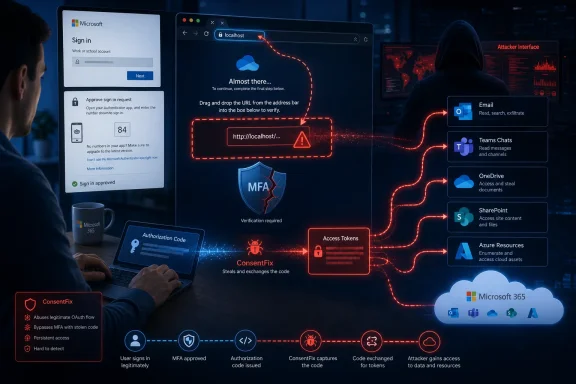
ConsentFix is forcing Microsoft 365 defenders to confront an uncomfortable reality: an employee can complete multifactor authentication correctly, never disclose a password, and still hand an attacker the means to access corporate cloud data. The ClickFix-inspired technique replaces the familiar instruction to paste a malicious PowerShell command with a deceptively simple OAuth maneuver, guiding the victim through a genuine Microsoft sign-in before persuading them to drag or copy a localhost redirect URL into an attacker-controlled page. The result can be a valid authorization code that the attacker exchanges for tokens, turning ordinary browser behavior into a route toward compromised email, exposed documents, business email compromise, and lateral movement across Microsoft’s cloud.
ClickFix emerged as a prominent social-engineering technique in 2024, when security researchers observed attackers presenting fake browser errors, document failures, software-update warnings, and CAPTCHA challenges. Rather than exploiting a conventional software vulnerability, those campaigns told victims to “fix” the problem by opening the Windows Run dialog, PowerShell, or a terminal and pasting a command placed on the clipboard by the malicious page.
That design was effective because it transferred execution to the user. Endpoint controls might block a downloaded executable, and browsers might warn about a suspicious file, but a command launched by an employee through a trusted Windows component can look superficially legitimate until its behavior is analyzed.
ConsentFix applies the same psychological model to cloud identity. Instead of persuading a victim to execute code on a Windows PC, it persuades the victim to complete part of an OAuth authorization flow and then disclose the browser’s redirected URL.
That distinction matters. ConsentFix can compromise an account without first compromising the Windows endpoint, potentially leaving defenders with fewer of the process, file, registry, and network artifacts associated with a conventional malware infection.
What ConsentFix contributes is a more usable social-engineering wrapper around those concepts. It turns a technical OAuth workflow into a sequence that resembles the repetitive verification rituals users encounter every day.
The campaign highlighted in July 2026 centers on a drag-and-drop variation. The victim is told to sign in with Microsoft, wait for a particular localhost address to appear, and then drag the browser’s information icon or address-bar content into a designated area on the phishing page.
In the documented authorization-code flow, the localhost redirect URL generally carries an OAuth authorization code, not necessarily a reusable Microsoft 365 session cookie or a finished access token. The code is still highly sensitive because an attacker who controls the rest of the authorization transaction may be able to redeem it for access and refresh tokens.
An access token allows an application to call a protected API, such as Microsoft Graph, within its assigned scope. A refresh token may permit continued acquisition of new access tokens, subject to Microsoft Entra ID policy, token lifetime rules, risk evaluation, revocation, and other controls.
The flow follows the classic ClickFix formula:
The landing page often imitates a familiar cloud-storage or document-sharing service. Its purpose is not always to steal the password; instead, it directs the victim into a genuine Microsoft authentication sequence connected to an OAuth client selected by the attacker.
A finance employee might receive a purported payment document. A legal department could see a contract-review invitation, while an IT administrator might receive an alert about an Azure resource or Microsoft 365 service.
This authenticity is central to the deception. The domain, certificate, branding, passwordless prompt, authenticator notification, passkey interaction, or Windows Hello ceremony may all be legitimate.
The user therefore receives many of the signals that conventional anti-phishing training has taught them to trust. There may be no counterfeit Microsoft password form to expose through poor design, an incorrect hostname, or a browser password-manager mismatch.
The malicious scenario is engineered so that the local receiver is absent or the flow appears to fail. The browser may display an error because nothing is listening on the relevant localhost port, but the address bar still contains a URL carrying the valuable authorization response.
Drag-and-drop improves the social engineering because it feels less like disclosing a long, incomprehensible security value. It can be framed as moving a verification badge, completing a browser check, or proving that Microsoft authentication succeeded.
The attacker can then access resources according to the resulting token’s audience, scopes, user privileges, tenant policies, and client context. The victim has effectively authenticated an attacker-controlled transaction without giving the attacker the password.
In ConsentFix, the victim may personally complete MFA on Microsoft’s legitimate infrastructure. The attacker is not necessarily defeating the second factor; the attacker is manipulating what happens after the second factor succeeds.
Security programs often treat those two stages as if they were interchangeable. ConsentFix exploits the gap by letting Microsoft authenticate the real user and then obtaining the authorization result needed to act against cloud services.
However, phishing-resistant authentication cannot compensate for every malicious or misdirected OAuth transaction. Organizations need controls over applications, client types, permissions, token use, device state, session risk, and user consent in addition to strong sign-in methods.
ConsentFix shows why that conclusion can be wrong. A successful MFA event can be part of the compromise rather than evidence that no compromise occurred.
Traditional consent phishing often asks a user to approve permissions for a malicious application registered by the attacker. That can create several detection opportunities: an unfamiliar app name, an unverified publisher, suspicious requested permissions, and a newly created service principal.
If an attacker can induce a victim to complete a valid flow and transfer the resulting authorization response, the risk shifts away from whether the client application itself is malicious. The focus becomes whether the transaction context, redirect handling, device, resource, and subsequent token use match legitimate activity.
Defenders should therefore avoid equating “Microsoft-owned application” with “safe transaction.” The client identity is only one signal among many.
The progression from manual copy-and-paste to drag-and-drop and then greater automation demonstrates predictable productization. Each refinement reduces friction, lowers the skill required of the operator, and makes the victim experience more consistent.
Even limited access can nevertheless produce a serious breach. Microsoft 365 connects identity, communications, files, collaboration, business processes, and—in many organizations—Azure or third-party software-as-a-service platforms.
An intruder may also search for financial conversations, create inbox rules, hide replies, monitor negotiations, or send messages from the victim’s account. Internal recipients are more likely to trust a request that arrives inside an existing email thread.
A compromised identity may also be used to send malicious links through Teams. Such messages can bypass the skepticism users apply to external email because they appear to come from a colleague in an established workspace.
Write access creates additional possibilities. Attackers could replace a trusted document, add a malicious link, upload payloads, alter shared content, or use an existing collaboration site to distribute a second-stage lure.
Connected SaaS applications can also inherit trust from Microsoft Entra ID through single sign-on. Compromising the cloud identity may therefore open routes into customer-support platforms, code repositories, expense systems, analytics services, and other resources beyond Microsoft 365.
A patient intruder can identify vendors, payment schedules, executives, assistants, and employees authorized to change banking information. They can then insert themselves at the point where a legitimate transaction is already expected.
The attacker can also reuse genuine language, signatures, document templates, and active conversation threads. This makes the resulting phishing or payment-diversion message substantially harder for recipients to recognize.
For example, a compromised employee could be used to send another ConsentFix lure to a colleague with greater privileges. A document obtained from SharePoint could supply the subject matter needed to make that follow-up message credible.
Privileged accounts should not routinely browse email or open external documents in the same session used for tenant administration. Combining everyday productivity and administrative power in one browser profile gives social engineering a direct route to the management plane.
ConsentFix does not need the victim to understand OAuth. It only needs the person to believe that dragging an icon is the final step required to open a document.
Attackers reinforce that behavior with urgency. A document may supposedly expire, an invoice may require same-day action, or a meeting recording may only be available to authenticated employees.
A user may reason that a criminal would simply ask for a password, while an elaborate procedure involving localhost, browser icons, and MFA appears too specialized to be fake. That intuition is precisely what ConsentFix exploits.
Training must now address intent. Employees should ask why a website needs them to transfer information from the address bar, use a command shell, paste a verification string, or perform a browser action that normal Microsoft sign-in does not require.
No single event is guaranteed to identify the attack. Investigators should correlate the sign-in, client application, token activity, device context, source addresses, mailbox operations, file access, and the user’s browsing history.
Investigators should not assume that the absence of PowerShell activity clears the device. Likewise, discovering no malware does not mean the Microsoft 365 identity remains safe.
Investigators should ask whether the user signed in on a real Microsoft page, saw a localhost error, copied a long URL, dragged an address-bar icon, returned to the original page, or received an unexpected document afterward. Those details can quickly separate ConsentFix from conventional password phishing.
The response must address sessions, tokens, applications, permissions, cloud activity, and any attacker-created persistence.
If the identity had administrative access, the investigation must expand beyond the user’s mailbox. Role assignments, application credentials, secrets, automation changes, Conditional Access modifications, and Azure resource activity all require review.
A layered defense should make the OAuth transaction harder to abuse, reduce token value, improve visibility, and limit the consequences of a successful compromise.
An admin-consent workflow gives users a safe way to request legitimate applications without granting broad access themselves. Security teams should regularly inventory OAuth applications and remove stale, excessive, or unexplained permissions.
Policies require careful testing. Poorly designed exclusions, legacy authentication paths, unmanaged browser access, and broad emergency exceptions can undermine an otherwise strong deployment.
Shorter or continuously evaluated sessions can also reduce exposure, although aggressive timeouts may frustrate users and generate more authentication fatigue. The objective is to balance usable security with rapid revocation when risk changes.
Organizations should also separate privileged activity from ordinary web browsing. A dedicated Windows device or hardened browser profile for administration limits the chance that a phishing page can interact with a high-value cloud session.
Future variants may combine OAuth abuse with attacker-in-the-middle phishing, malicious browser extensions, clipboard manipulation, QR codes, device-code flows, compromised websites, or information-stealing malware. A campaign does not have to choose between endpoint compromise and cloud compromise when it can attempt both.
Warnings could become more contextual, explaining that transferring a localhost URL may reveal authentication information. However, attackers will likely change the interaction as soon as a specific gesture becomes difficult.
Microsoft can also expand detection of improbable authorization sequences, first-party client misuse, suspicious token redemption, and rapid changes in device or network context. The challenge is distinguishing malicious handoffs from legitimate command-line, development, and administrative workflows.
That message must be paired with a low-friction reporting process. If reporting a suspicious document takes longer than completing its fake verification flow, many employees will choose the path the attacker designed.
ConsentFix marks another step in the transition from password theft to transaction and token theft. Microsoft 365 customers should not interpret it as proof that MFA has failed, but as evidence that strong authentication must sit inside a wider architecture controlling OAuth applications, token use, device trust, cloud permissions, and user intent. Attackers will continue refining the gestures and prompts, yet the defensive principle remains stable: no authentication result should be trusted solely because Microsoft issued it, and no user should be expected to recognize an identity attack without technical controls capable of containing the mistake.
 Background
ClickFix emerged as a prominent social-engineering technique in 2024, when security researchers observed attackers presenting fake browser errors, document failures, software-update warnings, and CAPTCHA challenges. Rather than exploiting a conventional software vulnerability, those campaigns told victims to “fix” the problem by opening the Windows Run dialog, PowerShell, or a terminal and pasting a command placed on the clipboard by the malicious page.That design was effective because it transferred execution to the user. Endpoint controls might block a downloaded executable, and browsers might warn about a suspicious file, but a command launched by an employee through a trusted Windows component can look superficially legitimate until its behavior is analyzed.
From malware execution to identity compromise
Early ClickFix campaigns commonly used PowerShell,cmd.exe, mshta, script interpreters, or other native Windows facilities to retrieve an information stealer, remote-access tool, or loader. The technique became associated with malware families including Lumma Stealer, Vidar, DarkGate, NetSupport RAT, AsyncRAT, and other credential-stealing or remote-control payloads.ConsentFix applies the same psychological model to cloud identity. Instead of persuading a victim to execute code on a Windows PC, it persuades the victim to complete part of an OAuth authorization flow and then disclose the browser’s redirected URL.
That distinction matters. ConsentFix can compromise an account without first compromising the Windows endpoint, potentially leaving defenders with fewer of the process, file, registry, and network artifacts associated with a conventional malware infection.
Not an entirely new threat category
OAuth abuse predates ConsentFix by years. Microsoft has repeatedly warned about consent phishing, illicit consent grants, malicious enterprise applications, token theft, and attacker-in-the-middle phishing designed to capture authenticated sessions.What ConsentFix contributes is a more usable social-engineering wrapper around those concepts. It turns a technical OAuth workflow into a sequence that resembles the repetitive verification rituals users encounter every day.
What ConsentFix Actually Is
The name ConsentFix describes a family of phishing techniques that combines ClickFix-style instructions with OAuth authorization abuse. Push Security researchers reported identifying and naming the original technique in late 2025, while subsequent demonstrations and criminal adaptations refined the user interaction.The campaign highlighted in July 2026 centers on a drag-and-drop variation. The victim is told to sign in with Microsoft, wait for a particular localhost address to appear, and then drag the browser’s information icon or address-bar content into a designated area on the phishing page.
The terminology requires care
Some descriptions characterize the exposed URL as containing a “session OAuth token.” That wording simplifies what happens but can blur important technical differences.In the documented authorization-code flow, the localhost redirect URL generally carries an OAuth authorization code, not necessarily a reusable Microsoft 365 session cookie or a finished access token. The code is still highly sensitive because an attacker who controls the rest of the authorization transaction may be able to redeem it for access and refresh tokens.
An access token allows an application to call a protected API, such as Microsoft Graph, within its assigned scope. A refresh token may permit continued acquisition of new access tokens, subject to Microsoft Entra ID policy, token lifetime rules, risk evaluation, revocation, and other controls.
Why the “Fix” label fits
The victim is not merely asked to approve a normal consent screen. Instead, the attacker manufactures an apparent technical problem and supplies a procedure that supposedly resolves it.The flow follows the classic ClickFix formula:
- The attacker creates a believable obstacle between the user and a desired document or service.
- The page presents an unusual action as a legitimate troubleshooting or verification step.
- The victim performs an operation outside the normal security boundary of the page.
- The attacker receives data or execution capability that the browser would not have sent directly.
- The victim may see an error, blank page, or decoy document and remain unaware that the account has been compromised.
How the Attack Chain Works
A ConsentFix campaign typically begins with phishing, a compromised website, malicious advertising, search-engine manipulation, or a message sent from an already compromised account. File-sharing invitations, invoices, contracts, voicemail notifications, human-resources documents, and secure-message alerts all provide plausible reasons to request a Microsoft 365 sign-in.The landing page often imitates a familiar cloud-storage or document-sharing service. Its purpose is not always to steal the password; instead, it directs the victim into a genuine Microsoft authentication sequence connected to an OAuth client selected by the attacker.
Stage one: The lure
The attacker sends a target a link to a page claiming that a protected file is waiting. Personalization gathered from LinkedIn, company websites, prior data breaches, email signatures, and other open sources can make the request appear relevant to the victim’s role.A finance employee might receive a purported payment document. A legal department could see a contract-review invitation, while an IT administrator might receive an alert about an Azure resource or Microsoft 365 service.
Stage two: A legitimate Microsoft login
The victim clicks a button such as Verify with Microsoft and reaches Microsoft’s real authentication infrastructure. If the person is not already signed in, Microsoft requests the work account’s credentials and may require MFA.This authenticity is central to the deception. The domain, certificate, branding, passwordless prompt, authenticator notification, passkey interaction, or Windows Hello ceremony may all be legitimate.
The user therefore receives many of the signals that conventional anti-phishing training has taught them to trust. There may be no counterfeit Microsoft password form to expose through poor design, an incorrect hostname, or a browser password-manager mismatch.
Stage three: The localhost redirect
After authentication and authorization, the browser is redirected toward a loopback or localhost address associated with a client application. In a legitimate native-application OAuth flow, a local application would receive the authorization response and continue the token exchange.The malicious scenario is engineered so that the local receiver is absent or the flow appears to fail. The browser may display an error because nothing is listening on the relevant localhost port, but the address bar still contains a URL carrying the valuable authorization response.
Stage four: Dragging data across the boundary
The phishing page instructs the victim to return to it and drag the browser’s site-information icon, address-bar indicator, or URL into a marked drop zone. Earlier versions relied on manually copying the localhost URL and pasting it into the malicious page.Drag-and-drop improves the social engineering because it feels less like disclosing a long, incomprehensible security value. It can be framed as moving a verification badge, completing a browser check, or proving that Microsoft authentication succeeded.
Stage five: Code redemption
Once the phishing page receives the complete redirected URL, attacker-controlled infrastructure extracts the authorization code. If the attacker possesses the corresponding transaction details and can satisfy the applicable OAuth requirements, the code may be exchanged for tokens.The attacker can then access resources according to the resulting token’s audience, scopes, user privileges, tenant policies, and client context. The victim has effectively authenticated an attacker-controlled transaction without giving the attacker the password.
Why Multifactor Authentication Does Not Solve It
MFA protects the authentication ceremony by requiring more than a password. It does not guarantee that every authenticated transaction serves the user’s intended purpose.In ConsentFix, the victim may personally complete MFA on Microsoft’s legitimate infrastructure. The attacker is not necessarily defeating the second factor; the attacker is manipulating what happens after the second factor succeeds.
Authentication is not authorization
Authentication answers a question such as, “Is this person the account holder?” Authorization determines what an application or session may do after identity has been established.Security programs often treat those two stages as if they were interchangeable. ConsentFix exploits the gap by letting Microsoft authenticate the real user and then obtaining the authorization result needed to act against cloud services.
Phishing-resistant MFA remains valuable
This does not make passkeys, FIDO2 security keys, Windows Hello for Business, or certificate-based authentication pointless. Phishing-resistant MFA remains one of the strongest defenses against credential phishing, attacker-in-the-middle frameworks, password reuse, and unauthorized sign-in attempts.However, phishing-resistant authentication cannot compensate for every malicious or misdirected OAuth transaction. Organizations need controls over applications, client types, permissions, token use, device state, session risk, and user consent in addition to strong sign-in methods.
The danger of an “MFA means safe” culture
Employees may assume that any workflow requiring Microsoft Authenticator must be genuine. Administrators may similarly close an investigation after confirming that the legitimate user approved an MFA request.ConsentFix shows why that conclusion can be wrong. A successful MFA event can be part of the compromise rather than evidence that no compromise occurred.
The Role of First-Party Microsoft Applications
One of the most consequential aspects of ConsentFix research is the reported abuse of first-party Microsoft clients, including flows associated with command-line or administrative tooling. These applications can already be familiar to Microsoft Entra ID tenants and may not present the same warning signals as an unknown, unverified third-party app.Traditional consent phishing often asks a user to approve permissions for a malicious application registered by the attacker. That can create several detection opportunities: an unfamiliar app name, an unverified publisher, suspicious requested permissions, and a newly created service principal.
Pre-consented does not mean universally safe
A first-party client has legitimate reasons to request tokens, and its identity may be trusted within Microsoft’s ecosystem. That trust does not make every authorization attempt involving the client benign.If an attacker can induce a victim to complete a valid flow and transfer the resulting authorization response, the risk shifts away from whether the client application itself is malicious. The focus becomes whether the transaction context, redirect handling, device, resource, and subsequent token use match legitimate activity.
Why application allowlists have limits
Restricting user consent and allowing only verified publishers are important defenses against illicit third-party applications. They are not a complete answer when the abused client is already approved or when the attack does not depend on registering an obviously malicious app in the victim’s tenant.Defenders should therefore avoid equating “Microsoft-owned application” with “safe transaction.” The client identity is only one signal among many.
ConsentFix v3 raises the stakes
By May 2026, reports described a ConsentFix v3 design circulating on criminal forums. This iteration reportedly automated more of the OAuth workflow and expanded the concept’s relevance to Azure environments.The progression from manual copy-and-paste to drag-and-drop and then greater automation demonstrates predictable productization. Each refinement reduces friction, lowers the skill required of the operator, and makes the victim experience more consistent.
What Attackers Can Reach in Microsoft 365
The impact of a successful attack depends on the token’s permissions, the target resource, the compromised user’s role, tenant configuration, licensing, and the organization’s Conditional Access policies. It is therefore inaccurate to assume that every ConsentFix incident automatically yields unrestricted control of the entire tenant.Even limited access can nevertheless produce a serious breach. Microsoft 365 connects identity, communications, files, collaboration, business processes, and—in many organizations—Azure or third-party software-as-a-service platforms.
Exchange Online and Outlook
Mailbox access can reveal contracts, invoices, customer conversations, password-reset messages, travel plans, legal discussions, acquisition details, and internal security notifications. Years of archived email provide attackers with both sensitive information and the context required for convincing impersonation.An intruder may also search for financial conversations, create inbox rules, hide replies, monitor negotiations, or send messages from the victim’s account. Internal recipients are more likely to trust a request that arrives inside an existing email thread.
Teams and collaboration data
Microsoft Teams can expose direct messages, group chats, meeting details, shared files, organizational relationships, and informal conversations that never appear in formal documents. Attackers can use this information to identify high-value employees and understand how approvals normally occur.A compromised identity may also be used to send malicious links through Teams. Such messages can bypass the skepticism users apply to external email because they appear to come from a colleague in an established workspace.
OneDrive and SharePoint
OneDrive and SharePoint often contain intellectual property, financial models, customer records, source materials, policy documents, credentials embedded in files, and exports from other business systems. Exfiltration may occur through APIs rather than through a suspicious interactive browser download.Write access creates additional possibilities. Attackers could replace a trusted document, add a malicious link, upload payloads, alter shared content, or use an existing collaboration site to distribute a second-stage lure.
Azure and connected services
The risk becomes more severe if the compromised identity has Azure privileges, access to subscriptions, development tooling, automation accounts, application registrations, secrets, or administrative interfaces. A standard Microsoft 365 user and a privileged cloud engineer do not present the same blast radius.Connected SaaS applications can also inherit trust from Microsoft Entra ID through single sign-on. Compromising the cloud identity may therefore open routes into customer-support platforms, code repositories, expense systems, analytics services, and other resources beyond Microsoft 365.
Business Email Compromise and Lateral Movement
ConsentFix is especially valuable for business email compromise because it can provide authenticated access without the obvious signal of a password reset. The attacker may operate quietly, learning how the organization communicates before attempting fraud.A patient intruder can identify vendors, payment schedules, executives, assistants, and employees authorized to change banking information. They can then insert themselves at the point where a legitimate transaction is already expected.
Internal trust becomes the attack surface
Messages sent from a compromised account benefit from the sender’s established reputation. Security gateways may assign them less risk than mail arriving from a newly registered external domain.The attacker can also reuse genuine language, signatures, document templates, and active conversation threads. This makes the resulting phishing or payment-diversion message substantially harder for recipients to recognize.
Cloud-native lateral movement
Lateral movement no longer requires remote desktop access, stolen local administrator credentials, or exploitation of a Windows server. An attacker can move through relationships among identities, applications, shared documents, Teams chats, guest accounts, and delegated permissions.For example, a compromised employee could be used to send another ConsentFix lure to a colleague with greater privileges. A document obtained from SharePoint could supply the subject matter needed to make that follow-up message credible.
Privileged users require special treatment
Administrators, developers, finance leaders, executives, and help-desk personnel deserve stricter controls because their accounts can expose disproportionate value. Separate administrative identities, privileged access workstations, just-in-time elevation, and tightly scoped roles can reduce the consequences of a stolen token.Privileged accounts should not routinely browse email or open external documents in the same session used for tenant administration. Combining everyday productivity and administrative power in one browser profile gives social engineering a direct route to the management plane.
Why the Social Engineering Works
Modern users have been trained to complete countless low-attention interactions: accept cookies, approve notifications, solve CAPTCHAs, sign in again, choose an account, confirm an authenticator prompt, and dismiss warnings. Attackers exploit the fatigue created by those legitimate demands.ConsentFix does not need the victim to understand OAuth. It only needs the person to believe that dragging an icon is the final step required to open a document.
Ritual replaces reasoning
Repetitive security prompts encourage users to focus on completing the sequence rather than understanding it. The more familiar the Microsoft sign-in looks, the easier it becomes to treat the unusual drag-and-drop step as another arbitrary browser requirement.Attackers reinforce that behavior with urgency. A document may supposedly expire, an invoice may require same-day action, or a meeting recording may only be available to authenticated employees.
Complexity can increase credibility
Security professionals often assume that strange, multi-step instructions will deter victims. ClickFix campaigns have shown that complexity can instead make the process appear technical and therefore authoritative.A user may reason that a criminal would simply ask for a password, while an elaborate procedure involving localhost, browser icons, and MFA appears too specialized to be fake. That intuition is precisely what ConsentFix exploits.
Traditional training leaves a gap
Many awareness programs emphasize checking the login domain and refusing unexpected MFA prompts. Those lessons are useful but incomplete when the victim reaches a legitimate Microsoft domain and expects the authentication request.Training must now address intent. Employees should ask why a website needs them to transfer information from the address bar, use a command shell, paste a verification string, or perform a browser action that normal Microsoft sign-in does not require.
Detection and Investigation
ConsentFix may produce identity and cloud-service evidence even when no malicious executable lands on the endpoint. Security teams need telemetry from Microsoft Entra ID, Microsoft Defender XDR, Defender for Cloud Apps, Exchange Online, Microsoft Graph activity, browser controls, and network security platforms.No single event is guaranteed to identify the attack. Investigators should correlate the sign-in, client application, token activity, device context, source addresses, mailbox operations, file access, and the user’s browsing history.
Signals worth prioritizing
Defenders should investigate activity such as:- A user authenticates through a client or flow that is unusual for their normal role.
- Token use appears from a new geography, hosting provider, autonomous system, browser profile, or unmanaged device shortly after a legitimate sign-in.
- Microsoft Graph calls access large volumes of mail, files, contacts, or directory information.
- New inbox rules, forwarding settings, delegate permissions, or mailbox configuration changes appear after the event.
- A user account sends an unusual volume of internal or external messages.
- SharePoint or OneDrive activity includes mass downloads, unfamiliar application access, or changes to widely shared documents.
- A privileged identity performs application, subscription, role, or service-principal operations outside its established pattern.
- Browser history shows a suspicious document-sharing page followed by Microsoft authentication and a localhost redirect.
Endpoint evidence still matters
Although the attack can remain cloud-focused, the endpoint may retain useful browser history, cached page content, clipboard artifacts, downloads, DNS records, proxy logs, or evidence of the malicious landing page. The victim may also have encountered a hybrid campaign that attempted both OAuth theft and malware delivery.Investigators should not assume that the absence of PowerShell activity clears the device. Likewise, discovering no malware does not mean the Microsoft 365 identity remains safe.
Ask the user precise questions
Generic questions such as “Did you click a phishing link?” often produce unreliable answers. A better interview reconstructs the actions in order.Investigators should ask whether the user signed in on a real Microsoft page, saw a localhost error, copied a long URL, dragged an address-bar icon, returned to the original page, or received an unexpected document afterward. Those details can quickly separate ConsentFix from conventional password phishing.
Incident Response and Containment
A password reset alone is not a sufficient response to suspected OAuth or token compromise. The password may never have been stolen, and already issued tokens or authorization grants may survive actions that only change credentials.The response must address sessions, tokens, applications, permissions, cloud activity, and any attacker-created persistence.
Recommended response sequence
- Disable or contain the affected identity. Temporarily block sign-in when operationally feasible and assess whether the account has privileged roles or access to sensitive systems.
- Revoke active sessions and refresh tokens. Force reauthentication and invalidate the attacker’s ability to continue obtaining access through previously issued session material.
- Review OAuth grants and enterprise applications. Remove suspicious delegated permissions, application assignments, service principals, or consent records associated with the incident.
- Inspect sign-in and token-related activity. Determine which clients, resources, locations, devices, and IP addresses were involved.
- Hunt across Exchange, Teams, OneDrive, SharePoint, Azure, and connected applications. Identify data access, forwarding rules, file changes, messages, administrative operations, and lateral phishing.
- Reset credentials when appropriate. A password change remains prudent if credential exposure cannot be ruled out, but it should be one part of a broader identity response.
- Preserve forensic evidence. Retain logs, browser artifacts, email messages, URLs, timestamps, and affected files before routine retention policies remove them.
- Notify potentially affected parties. Inform colleagues, customers, vendors, or financial institutions if the attacker sent messages, accessed regulated data, or attempted payment fraud.
Scope before recovery
Restoring the user’s access too quickly can allow an attacker to resume activity. The security team should first establish the probable token lifetime, affected resources, persistence mechanisms, and whether other employees interacted with messages sent from the compromised account.If the identity had administrative access, the investigation must expand beyond the user’s mailbox. Role assignments, application credentials, secrets, automation changes, Conditional Access modifications, and Azure resource activity all require review.
Hardening Microsoft 365 and Windows Environments
ConsentFix cannot be solved by disabling one keyboard shortcut or blocking PowerShell. Those measures may disrupt certain ClickFix payloads, but the broader technique is defined by persuading users to move trusted data or execute attacker-supplied instructions.A layered defense should make the OAuth transaction harder to abuse, reduce token value, improve visibility, and limit the consequences of a successful compromise.
Control application consent
Organizations should limit the applications and permissions to which users can consent. Low-risk permissions from verified publishers may be appropriate for some tenants, while sensitive scopes should require administrator review.An admin-consent workflow gives users a safe way to request legitimate applications without granting broad access themselves. Security teams should regularly inventory OAuth applications and remove stale, excessive, or unexplained permissions.
Apply Conditional Access thoughtfully
Conditional Access can restrict access according to user risk, sign-in risk, device compliance, client application, location, authentication strength, and resource sensitivity. Requiring a managed and compliant device can reduce the usefulness of tokens when the attacker attempts to use them elsewhere.Policies require careful testing. Poorly designed exclusions, legacy authentication paths, unmanaged browser access, and broad emergency exceptions can undermine an otherwise strong deployment.
Invest in token protection
Token protection and device-bound approaches can make stolen tokens less portable by linking their use to an approved device or cryptographic context. Availability and compatibility can vary by workload, client, license, and deployment state, so organizations should evaluate support rather than assuming universal coverage.Shorter or continuously evaluated sessions can also reduce exposure, although aggressive timeouts may frustrate users and generate more authentication fatigue. The objective is to balance usable security with rapid revocation when risk changes.
Secure the Windows browsing environment
Microsoft Edge security baselines, Defender SmartScreen, web-content filtering, attack-surface reduction rules, controlled administrative workstations, and endpoint detection can help block related delivery mechanisms. Browser isolation or protected browsing environments may be appropriate for high-risk users who routinely handle external documents.Organizations should also separate privileged activity from ordinary web browsing. A dedicated Windows device or hardened browser profile for administration limits the chance that a phishing page can interact with a high-value cloud session.
Strengths and Opportunities
ConsentFix exposes weaknesses, but it also gives defenders a clear opportunity to modernize identity protection beyond passwords and conventional phishing filters.- The attack chain requires user interaction. Timely browser warnings, targeted education, and safer document-opening workflows can interrupt the sequence before the authorization response is disclosed.
- OAuth activity creates cloud telemetry. Entra sign-in records, application data, Graph operations, mailbox auditing, and Defender alerts can support detection even without a malware sample.
- Least privilege reduces the blast radius. Users who lack unnecessary roles, broad file access, and excessive delegated permissions offer attackers fewer opportunities.
- Managed devices provide stronger policy options. Device compliance, token protection, Conditional Access, and endpoint telemetry can make stolen authorization material less useful.
- The technique is suitable for realistic simulations. Security teams can test whether employees recognize abnormal localhost, copy-and-paste, and drag-and-drop instructions without asking them to handle real malicious code.
- Cloud-focused incident playbooks can improve resilience. Organizations that rehearse token revocation, OAuth grant review, and Microsoft 365 hunting will respond faster to many identity attacks, not only ConsentFix.
Risks and Concerns
The technique’s continued evolution creates several practical concerns for Microsoft 365 customers.- Turnkey instructions lower the barrier to entry. Criminal forums reportedly distribute code, demonstrations, and operational guidance that help less-skilled actors reproduce the workflow.
- First-party application abuse can weaken simple allowlisting strategies. A legitimate Microsoft client does not guarantee that the surrounding authorization transaction is legitimate.
- MFA success may mislead investigators. Security teams can mistakenly treat the completed second factor as proof that the activity belonged to the user.
- Cloud compromise may leave limited endpoint evidence. Organizations focused mainly on malware and Windows process telemetry can miss identity-only attacks.
- Business email compromise can develop slowly. Attackers may monitor conversations for days or weeks before changing payment details or impersonating an executive.
- Broad Microsoft 365 integration increases the impact. Email, files, chats, Azure resources, and federated SaaS applications can all depend on the same identity.
- Security prompts contribute to user fatigue. More warnings will not help if employees are conditioned to approve every prompt that blocks their work.
- Incomplete token revocation can prolong access. Resetting a password without addressing sessions, grants, and refresh capability may leave the attacker operational.
What to Watch Next
ConsentFix will probably continue to evolve toward fewer visible steps. Criminal developers have a strong incentive to automate code collection, improve redirect handling, tailor instructions to different browsers, and hide the transfer of authorization data behind more familiar gestures.Future variants may combine OAuth abuse with attacker-in-the-middle phishing, malicious browser extensions, clipboard manipulation, QR codes, device-code flows, compromised websites, or information-stealing malware. A campaign does not have to choose between endpoint compromise and cloud compromise when it can attempt both.
Browser-level mitigations
Browser vendors may examine whether drag-and-drop operations expose overly sensitive address-bar data or whether localhost URLs containing authorization responses deserve additional protection. Any change must avoid breaking legitimate development tools and native application sign-in flows.Warnings could become more contextual, explaining that transferring a localhost URL may reveal authentication information. However, attackers will likely change the interaction as soon as a specific gesture becomes difficult.
Tighter OAuth clients and redirect flows
Identity providers and client developers can reduce exposure by strengthening proof-of-possession mechanisms, enforcing modern authorization safeguards, binding transactions more closely to the initiating client, and minimizing the value of intercepted authorization codes. Public clients and loopback redirects require particular care because they operate in environments where conventional client secrets cannot always remain confidential.Microsoft can also expand detection of improbable authorization sequences, first-party client misuse, suspicious token redemption, and rapid changes in device or network context. The challenge is distinguishing malicious handoffs from legitimate command-line, development, and administrative workflows.
Better security-awareness design
Training should move away from long annual presentations and toward short, recurring exercises based on current behavior. Employees need a simple rule: a website should never require them to paste commands, copy localhost addresses, or drag information from the browser’s address bar to complete authentication.That message must be paired with a low-friction reporting process. If reporting a suspicious document takes longer than completing its fake verification flow, many employees will choose the path the attacker designed.
ConsentFix marks another step in the transition from password theft to transaction and token theft. Microsoft 365 customers should not interpret it as proof that MFA has failed, but as evidence that strong authentication must sit inside a wider architecture controlling OAuth applications, token use, device trust, cloud permissions, and user intent. Attackers will continue refining the gestures and prompts, yet the defensive principle remains stable: no authentication result should be trusted solely because Microsoft issued it, and no user should be expected to recognize an identity attack without technical controls capable of containing the mistake.
References
- Primary source: Kaspersky
Published: 2026-07-21T15:28:43+00:00
ConsentFix: a new ClickFix variation for compromising Microsoft 365 accounts
Discover how attackers use the ConsentFix attack to hijack Microsoft 365 sessions, what risks it poses to organizations, and how to protect your corporate infrastructure.www.kaspersky.com - Official source: microsoft.com
Think before you Click(Fix): Analyzing the ClickFix social engineering technique | Microsoft Security Blog
The ClickFix social engineering technique has been growing in popularity, with campaigns targeting thousands of enterprise and end-user devices daily. This technique exploits users’ tendency to resolve technical issues by tricking them into running malicious commands. These commands, in turn...www.microsoft.com - Related coverage: mitiga.io
ConsentFix: OAuth Phishing That Bypasses MFA in Microsoft Entra ID
ConsentFix abuses OAuth consent in Microsoft Entra ID to steal access tokens without triggering MFA. How the attack works and how to detect it.www.mitiga.io