

Microsoft’s latest update folds deep C++ understanding into GitHub Copilot’s agent workflows in Visual Studio Code, giving the Copilot agent access to symbol-level code navigation and CMake-aware build/test tools so it can reason about and change C++ code the same way an experienced human developer would.
C++ development has always relied on two tightly coupled systems: a semantic, language-aware view of code (symbols, types, inheritance, call graphs) and a reproducible build model (CMake presets, targets, and test harnesses). Historically, AI assistants in editors have been constrained to surface-level signals — text search, file scanning, and local context windows — which limits correctness when edits must span headers, implementations, and build configurations. Microsoft’s C++ team announced on February 19, 2026, that GitHub Copilot’s agent mode in Visual Studio Code now exposes those deeper, language- and build-system semantics to the agent via a new set of tools surfaced through the C/C++ DevTools extension.
Those capabilities are not entirely new: Microsoft has iterated on C++-specific Copilot features across Visual Studio and Copilot’s broader tooling set since 2025. What changed with this announcement is a direct mapping of the established editor tooling (the same services that power “Go to Definition”, “Find All References”, and CMake integration) into Copilot’s agent toolset inside VS Code. This aligns the agent’s mental model with the one developers already trust in their IDE. Independent coverage and prior previews of C++ Copilot tooling show the team’s multi-stage rollout and earlier integrations into Visual Studio Insiders; the February 19 blog post is a formal public description of the VS Code integration and the tool list.
Inside Microsoft’s own release notes and blog posts, the messaging is careful and prescriptive: these tools are a grounding layer for safer AI assistance, but users must enable them deliberately and tune configurations for performance. The company also calls for feedback and issues reports in the respective repositories — a sign these features will continue to iterate rapidly.
That said, capability does not equal turnkey trust. Real-world safety and value will depend on three things: agent reliability (model and tool orchestration), team governance (review and CI practices), and operational hygiene (reproducible builds, tests, and secrets handling). Organizations that pilot these tools thoughtfully — with clear policies, sandboxed environments, and strict review gates — will likely extract the most value while minimizing risk. Community reporting and academic work on agent configuration and governance underscore that careful operational practices will determine whether these advances become productivity multipliers or additional sources of risk.
For C++ teams curious about adoption, the immediate next step is pragmatic: install the C/C++ DevTools via the C/C++ Extension Pack, enable the Cpp Code Editing Tools setting, run a measured pilot on a low-risk component, and enforce PR and CI gates for every agent-driven change. The promise is real — but it will be realized only by pairing technical capability with disciplined processes.
(Community threads and preliminary coverage discussed the evolution of Copilot agent mode and preview releases; they’re useful context for practitioners evaluating the feature.)
Source: InfoWorld Microsoft brings C++ smarts to GitHub Copilot in Visual Studio Code
 Background / Overview
C++ development has always relied on two tightly coupled systems: a semantic, language-aware view of code (symbols, types, inheritance, call graphs) and a reproducible build model (CMake presets, targets, and test harnesses). Historically, AI assistants in editors have been constrained to surface-level signals — text search, file scanning, and local context windows — which limits correctness when edits must span headers, implementations, and build configurations. Microsoft’s C++ team announced on February 19, 2026, that GitHub Copilot’s agent mode in Visual Studio Code now exposes those deeper, language- and build-system semantics to the agent via a new set of tools surfaced through the C/C++ DevTools extension.Those capabilities are not entirely new: Microsoft has iterated on C++-specific Copilot features across Visual Studio and Copilot’s broader tooling set since 2025. What changed with this announcement is a direct mapping of the established editor tooling (the same services that power “Go to Definition”, “Find All References”, and CMake integration) into Copilot’s agent toolset inside VS Code. This aligns the agent’s mental model with the one developers already trust in their IDE. Independent coverage and prior previews of C++ Copilot tooling show the team’s multi-stage rollout and earlier integrations into Visual Studio Insiders; the February 19 blog post is a formal public description of the VS Code integration and the tool list.
What Microsoft shipped (technical summary)
New tooling exposed to Copilot Agent Mode
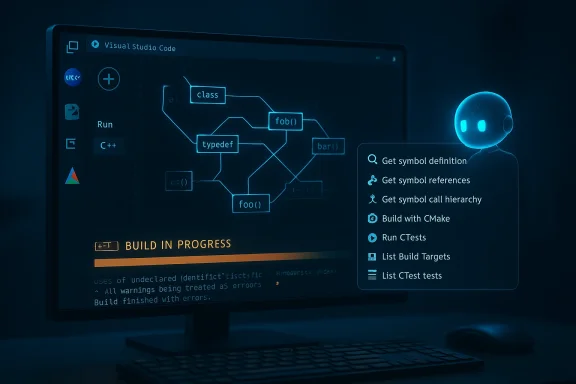
The update exposes two classes of tools to Copilot’s agent mode in VS Code:- C++ code understanding tools — Symbol-aware capabilities that let the agent reason about code elements across a workspace:
- Get symbol definition — locate a symbol’s definition and metadata.
- Get symbol references — enumerate all references to a symbol across the codebase.
- Get symbol call hierarchy — inspect incoming and outgoing call relationships for a function.
- CMake build and test configuration tools — Actions that let the agent interact with the project’s active CMake configuration:
- Build with CMake — build using the active configuration/preset.
- Run CTests — run the configured test suite.
- List Build Targets — enumerate available build targets.
- List CTest tests — enumerate discovered tests.
Distribution and enablement
- The tools are packaged in the C/C++ DevTools extension, which ships as part of the C/C++ Extension Pack for VS Code; users enable the features via an “Enable Cpp Code Editing Tools” setting in VS Code. Microsoft’s blog post is explicit about the extension and the enablement steps.
- Historically, similar C++ Copilot features were introduced first in Visual Studio Insiders and private previews; coverage from late 2025 documented these earlier steps. The VS Code release completes the cross-editor expansion of those capabilities.
Why this matters to C++ developers
C++ is unforgiving: build failures, ABI mismatches, subtle ownership bugs, and preprocessor complexity make automated changes risky if the tool lacks a language-aware model. The new integration addresses three persistent pain points:- Context fidelity: Instead of guessing where a symbol is used, Copilot agent mode now queries the editor’s language services directly, dramatically reducing false positives and risky edits in header/implementation separation scenarios. This turns broad “search-and-replace” style proposals into targeted, symbol-aware refactors.
- Build-aware verification: Many AI edits look syntactically plausible but break a build. Giving the agent access to the active CMake configuration and test harness lets it build and iterate locally — a significant step toward safe, agent-driven change loops that produce working code, not just pretty diffs.
- Scale for large codebases: In enterprise C++ repos with thousands of symbols and multiple build presets, symbol-level queries and call hierarchies let agents reason about impact zones and dependency chains, which is essential for cross-file refactors and API surface changes. Earlier previews showed the same trajectory in Visual Studio and related tooling.
Example workflows — what you can now ask Copilot to do
These are practical scenarios developers should expect to benefit from immediately:- Memory-safety modernizations: Ask the agent to locate all allocations and ownership transfers for a class or function, propose safer alternatives (smart pointers, RAII-based wrappers), and validate by building and running associated unit tests. The agent can gather references and call hierarchies first, then apply edits knowing where changes will ripple.
- API contractions/renames: Perform symbol-level renames or API surface trims by enumerating all references and call graphs, updating usages across translation units, and verifying the change by building the active CMake target and running tests.
- Fixing build regressions: Have the agent run the CMake build for the active configuration, analyze compiler/linker diagnostics, and iteratively propose targeted fixes until the build passes — all within the agent loop.
Cross-checking the claim set: what we verified
I verified the most load-bearing claims against multiple independent sources:- The Microsoft C++ team blog (Feb 19, 2026) documents the exact tool names, enablement guidance, and rationale for grounding Copilot agent mode in language and build context. This is the authoritative technical announcement.
- Independent trade coverage and prior previews (InfoWorld; Visual Studio Magazine) corroborate the rollout path — earlier Visual Studio previews and private previews of C++ Copilot tools, followed by expansion into VS Code — and provide additional practical context about adoption and preview history.
- The CMake Tools repository and the Visual Studio Marketplace listing for the C/C++ Extension Pack show the shipping vehicle for these capabilities (the extension pack and its constituent extensions), confirming distribution and linkage with the existing CMake integration developers already use.
- Community feedback threads and research into agentic configuration show real-world frictions around agent mode, tool reliability, and configuration practices — useful context when assessing operational risk. These community signals highlight known issues with agent mode’s context management and robustness that remain relevant even as new tools improve capability.
Critical analysis — strengths, limitations, and real risks
Strengths (what’s undeniably valuable)
- Grounded reasoning: Giving an LLM-based agent access to the same semantic services as the human editor reduces hallucination risk for code changes. Symbol-aware queries mean a proposal will be based on actual declarations, types, and references instead of fuzzy string matches. This is a concrete improvement for correctness in C++.
- Test-and-build loop: Agents that can compile and run tests close the feedback loop. Errors are caught early, and fixes can be iterated against the same build configuration developers use manually. That raises the baseline safety of automated edits relative to previous “apply suggestion, hope for the best” workflows.
- Familiar toolchain alignment: By using the existing CMake Tools and C/C++ language services, Microsoft reduces surprise: the agent uses the same configuration the developer expects, rather than inventing an alternate workflow. This lowers the cognitive friction of adopting agent-driven edits.
Limitations and caveats
- Agent competence is not perfect: Agent success depends on the model quality, prompt engineering, and tool orchestration. Community reports have repeatedly documented flaky behavior in agent mode — truncated edits, context mismanagement, or repeated erroneous loops — particularly when agents try to orchestrate multiple tools or interpret noisy build output. Integrating deeper tools reduces some classes of error but does not eliminate them. Expect iterative improvement rather than instant reliability.
- Performance and scale trade-offs: Symbol and build queries are more expensive than simple text search. For very large workspaces, enumerating call hierarchies or references across tens of thousands of files can be slow or require on-disk indexes. The Microsoft guidance includes tips to optimize tool performance (enable only relevant tools), but teams should plan for resource and latency considerations when enabling automated workflows.
- Editor and extension compatibility: Microsoft’s C/C++ extension has had tussles with forks and third-party VS Code builds in recent years; companies relying on alternative VS Code builds (VSCodium, editor forks, or specialized cloud IDEs) may find these extensions restricted or incompatible, limiting who can use the new agent features. This vendor compatibility dimension is operationally relevant.
Security, governance, and operational risks
- Automated code edits must be governed
Agents that can change multiple files and then build/test introduce powerful automation. Without proper guardrails (approval gates, review requirements, branch protections, and CI checks), teams risk accidental regressions or undesired design drift. The tool’s power mandates process controls: require PRs, audit logs, and human in-the-loop signoffs for anything beyond low-risk, localized edits. - Supply-chain exposure via tools and telemetry
The agent relies on editor services, extensions, and possibly telemetry. Organizations with strict supply-chain controls should validate the extension’s telemetry and network dependencies, and consider internal packaging of approved extension versions. The CMake Tools and C/C++ extensions collect telemetry controlled by VS Code settings; teams must confirm policy alignment before widespread use. - Secrets and data leakage
When an agent builds and runs tests, it may access environment variables, local credentials, or corporate secrets if not carefully sandboxed. Admins must ensure developer machines and CI environments have appropriate secret-scanning and least-privilege policies to avoid accidental exfiltration during agent runs. - Model and tool failures cause cascading loops
Agent orchestration logic can loop: run build → see error → apply a change → build fails with another error → repeat. Community reports show agents sometimes get stuck in such cycles. Build and edit operations should be rate-limited, logged, and bounded by iteration counts to prevent runaway edits.
Practical recommendations for teams and individual developers
If you’re evaluating or rolling out these C++ Copilot features, here’s a pragmatic checklist:- Pilot on a small codebase or a non-critical component first.
Let the agent handle low-risk, well-tested modules to build experience. - Enforce change review policies.
Always require pull requests (PRs) and CI gates for agent-driven edits beyond trivial fixes. - Configure build sandboxes and limit secrets exposure.
Use isolated test environments for agent builds or a disposable containered environment to minimize risk. - Tune the agent’s capabilities.
Enable only the C++ code understanding and CMake tools needed for the task to prevent context bloat and reduce tool-call surface area. Microsoft explicitly recommends optimizing tool performance by only enabling relevant tools. - Capture and audit logs.
Ensure every agent edit generates a traceable log with the invoked tool calls, before/after diffs, and the build/test outputs that validated the change. - Keep extension versions stable.
Pin the C/C++ DevTools and CMake Tools extension versions in developer images or repos to prevent unexpected behavior from rolling updates. The C/C++ tools team maintains GitHub releases and versioning; treat those as part of your dependency policy.
Broader implications for developer workflows and the C++ ecosystem
This shift — surfacing rich language and build context as first-class tools for agents — changes the calculus for how teams adopt AI:- It makes end-to-end automation feasible: agents can be asked to not only propose a code change but also ensure it compiles and passes tests in the exact configuration developers use daily. That’s a fundamental step beyond mere completions toward actionable, verifiable automation.
- It increases the importance of environment hygiene: if agents are expected to build and test reliably, teams must invest in reproducible CMake presets, stable dependency management, and robust tests. Without that investment, automation’s ROI will be reduced by flaky builds and brittle edits.
- It raises the bar for agent governance and CI/PR integration: the natural next frontier is integrating agent-driven edits into GitOps-like flows where agents propose PRs, run CI, and annotate failures — but always with art work on agent configuration patterns highlights the diversity of approaches teams use and the need for standards around agent config files and policies.
Community signals — what practitioners are saying
Community posts from VS Code and Copilot forums show both excitement and caution. Practitioners praise the idea of symbolic navigation for agent tasks but also report practical pain: poor context management, rate limits, flaky editing behavior, and occasional destructive edits when agents lose sight of scope. These community threads are a reminder: capability alone does not equal readiness — reliability, UI ergonomics, and robust tool orchestration still matter.Inside Microsoft’s own release notes and blog posts, the messaging is careful and prescriptive: these tools are a grounding layer for safer AI assistance, but users must enable them deliberately and tune configurations for performance. The company also calls for feedback and issues reports in the respective repositories — a sign these features will continue to iterate rapidly.
What to watch next
- Adoption curve and reliability metrics: watch for community reports and vendor notes on how well symbol queries and build-invocations scale on very large codebases. Latency and index freshness will determine practical usability.
- CI/PR integration patterns: expect third-party extensions and internal tooling to build workflows where agents propose PRs, CI runs, and human reviewers accept or reject — the operational story will define real adoption.
- Governance controls and enterprise settings: Microsoft and GitHub will likely introduce administrative controls and audit features for agent tools; enterprises should follow closely and adopt policies early.
- Broader language support: C++ is first in this deep integration lineage, but the pattern will likely expand to other compiled languages (Rust, Go, Java) where build/test loops and symbol-level semantics similarly matter.
Final assessment
Microsoft’s decision to expose C++ symbol context and CMake build awareness to GitHub Copilot in VS Code is an important, technically grounded advance. By aligning agent reasoning with established editor services and the project’s canonical build configuration, the update reduces a major source of AI mistakes — lack of semantic context — and opens the door to safer, test-verified, agent-driven changes in C++ projects.That said, capability does not equal turnkey trust. Real-world safety and value will depend on three things: agent reliability (model and tool orchestration), team governance (review and CI practices), and operational hygiene (reproducible builds, tests, and secrets handling). Organizations that pilot these tools thoughtfully — with clear policies, sandboxed environments, and strict review gates — will likely extract the most value while minimizing risk. Community reporting and academic work on agent configuration and governance underscore that careful operational practices will determine whether these advances become productivity multipliers or additional sources of risk.
For C++ teams curious about adoption, the immediate next step is pragmatic: install the C/C++ DevTools via the C/C++ Extension Pack, enable the Cpp Code Editing Tools setting, run a measured pilot on a low-risk component, and enforce PR and CI gates for every agent-driven change. The promise is real — but it will be realized only by pairing technical capability with disciplined processes.
(Community threads and preliminary coverage discussed the evolution of Copilot agent mode and preview releases; they’re useful context for practitioners evaluating the feature.)
Source: InfoWorld Microsoft brings C++ smarts to GitHub Copilot in Visual Studio Code
