

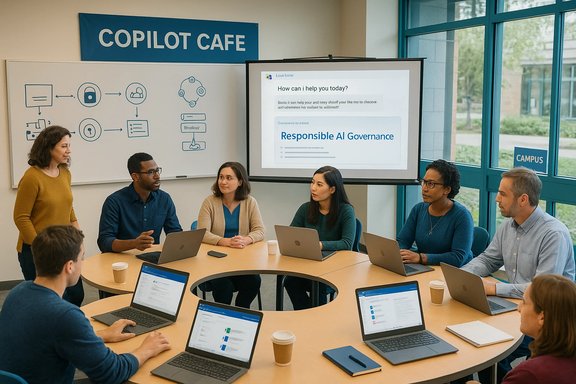
The University of Vermont’s Enterprise Technology Services (ETS) is running a new series of drop‑in sessions called Copilot Café, inviting faculty, staff, and students to explore Microsoft Copilot, ask practical questions, and see live demonstrations of how generative AI can be used inside Microsoft 365 to save time and improve productivity. These office‑hours style workshops meet regularly (first Wednesdays at 12:00 PM and third Thursdays at 9:30 AM), cover both the freely available Copilot Chat experience and the step‑up paid Copilot for Microsoft 365 offering, and are explicitly intended as a low‑pressure space for hands‑on learning, troubleshooting, and policy conversation around generative AI in campus settings.
Microsoft has layered several Copilot experiences across consumer, Windows, and Microsoft 365 products. At its simplest, Copilot Chat provides a chat‑based, web‑grounded assistant that is available to organizations with Microsoft 365 subscriptions and to individual users in different forms. Copilot for Microsoft 365 (often shortened to Microsoft 365 Copilot) is the licensed, deeper integration that ties generative AI directly into Word, Excel, PowerPoint, Outlook, Teams, and the organizational Microsoft Graph to deliver context‑aware drafting, summarization, data analysis, meeting synthesis, and custom agent capabilities.
University IT teams — like the ETS Collaboration Services group at UVM — have adopted a pragmatic approach: offer hands‑on workshops to show the tools in action, explain the differences between free chat experiences and paid licensed functionality, and surface the governance, privacy, and pedagogical issues that departments must evaluate before encouraging wide adoption. These practical workshops serve three clear functions: demonstration, question‑and‑answer, and policy education.
The decision to adopt licensed Copilot features or to rely on included chat tools should be made with clear technical understanding, alignment to student privacy protections, and coordinated academic policy updates. When coupled with careful pilot programs, clear identity and retention configurations, and instructor training on assignment design and tool literacy, Copilot can be a productive addition to campus workflows. Conversely, rolling out without those guardrails risks privacy exposure, academic integrity issues, and operational surprises.
Campus IT teams and academic leaders planning to integrate generative AI should take a phased approach: test with volunteers, document policies, train users, and iterate. Drop‑in workshops like Copilot Café are one of the most direct and effective ways to do that work—offering practical demos, frank discussions about limitations, and an inclusive forum for the community to learn and make informed choices together.
Source: University of Vermont ETS offers Copilot Café drop-in workshops | Enterprise Technology Services | The University of Vermont
 Background / Overview
Microsoft has layered several Copilot experiences across consumer, Windows, and Microsoft 365 products. At its simplest, Copilot Chat provides a chat‑based, web‑grounded assistant that is available to organizations with Microsoft 365 subscriptions and to individual users in different forms. Copilot for Microsoft 365 (often shortened to Microsoft 365 Copilot) is the licensed, deeper integration that ties generative AI directly into Word, Excel, PowerPoint, Outlook, Teams, and the organizational Microsoft Graph to deliver context‑aware drafting, summarization, data analysis, meeting synthesis, and custom agent capabilities.University IT teams — like the ETS Collaboration Services group at UVM — have adopted a pragmatic approach: offer hands‑on workshops to show the tools in action, explain the differences between free chat experiences and paid licensed functionality, and surface the governance, privacy, and pedagogical issues that departments must evaluate before encouraging wide adoption. These practical workshops serve three clear functions: demonstration, question‑and‑answer, and policy education.
Why university workshops matter
Generative AI is not a single product but a rapidly evolving set of capabilities that interact with institutional data, student privacy rules, and academic integrity expectations. Campus IT workshops such as UVM’s Copilot Café address several urgent needs:- Demystification: Many staff and faculty have seen headlines but lack concrete knowledge about how Copilot integrates with campus systems and what it can (and cannot) do.
- Safe experimentation: Guided, IT‑led sessions let participants try features in a controlled context where admins can explain data‑handling behaviors and safe usage patterns.
- Policy alignment: Workshops create touchpoints for IT to explain how Copilot’s features interact with existing identity, access, and records retention policies.
- Community building: Drop‑in formats lower the barrier for attendance and help staff and faculty share use cases and concerns across units.
What ETS’ Copilot Café will likely demonstrate
Practical Copilot demos in an institutional workshop normally focus on repeatable, campus‑relevant tasks that show tangible time savings and quality improvements. Expect demos and short tutorials covering:- Drafting or rewriting a syllabus segment or announcement using Copilot in Word.
- Generating slide decks from an uploaded document or outline with Copilot in PowerPoint.
- Summarizing long email threads and generating meeting notes or action items using Copilot in Outlook and Teams.
- Quick Excel analysis: creating formulas, generating pivot tables, or explaining charts with Copilot in Excel.
- Using Copilot Chat for research help, brainstorming, or generating code snippets and how to safely ground chat outputs with uploaded files.
- Exploring Copilot Agents or Copilot Studio capabilities at a high level, showing how reusable assistants can be built or configured for specific workflows.
Key technical distinctions attendees should leave with
Understanding the boundary between free chat features and licensed, tenant‑integrated capabilities is the most important takeaway for admins and end users.- Copilot Chat (included/basic): A secure chat experience accessible to Microsoft 365 organizations that is web‑grounded by default and includes enterprise data protection controls. Users can upload files or use in‑app context to make chat sessions aware of open documents, but the default chat mode primarily draws on web information and the underlying LLM.
- Copilot for Microsoft 365 (paid/licensed): A licensed product that brings work grounding into chat by using the Microsoft Graph to access a user’s emails, files, chats, and calendar. This enables in‑app editing and deep workflows (e.g., summarize a mailbox, author a research brief using internal documents, or generate a spreadsheet built from tenant data).
- Data handling and training: Microsoft’s current technical commitments state that prompts, responses, and content accessed through Microsoft Graph for organizational accounts are not used to train the public foundation models. Tenant data remains within contractual protections and is handled under Microsoft’s enterprise data protection and Data Protection Addendum frameworks.
- Priority and capacity: Licensed Copilot users often receive priority access to advanced model capabilities (for example, higher‑capacity or advanced reasoning variants), while unlicensed users may have standard or metered access to some features.
Privacy, compliance, and student data: what campus leaders must know
Copilot’s promise of improved productivity is coupled with important privacy and compliance considerations that every university must evaluate before broad rollouts.- Data access is permission‑scoped. Copilot can only retrieve or act on content that a user already has permission to access. That protects closed resources but does not prevent Copilot from surfacing content that is over‑shared inside the tenant.
- Organizational accounts vs personal accounts. Organizational (Entra) accounts are treated differently than consumer accounts. For the organizational variants, prompts and responses tied to tenant data are, per Microsoft’s contractual statements, not used to train public foundation models. Personal Copilot subscriptions or consumer Copilot experiences may have different defaults and training opt‑out options.
- Retention and audit trails. Copilot activity history and related interaction metadata are stored in the environment (for example, Exchange mailbox stores and Microsoft Purview retention). Data retention, eDiscovery, and legal hold policies continue to apply; institutions must configure retention consistent with records policies and legal obligations.
- Age and consent issues. Microsoft’s education eligibility rules and age thresholds (e.g., special handling for users under 13 or policies for 13–18 year‑olds) require that student accounts and consent settings be configured correctly in Entra ID to ensure the intended protections apply.
- Cross‑border processing and data residency. Microsoft’s product terms and data boundary programs provide options and commitments for regional data residency, but these vary by product, geography, and service configuration. Institutions with strict residency requirements should validate configuration options and product terms.
Academic integrity and instructional risk management
Generative AI changes how students can draft work and how instructors design assessment. Workshops should explicitly address academic integrity and practical classroom strategies.- Reframe assignment design. Encourage assignments that emphasize process, iteration, and reflection (e.g., drafts, annotated bibliographies, or oral defenses) rather than single, static deliverables that can be easily generated.
- Teach tool literacy. Include instruction on how to cite AI assistance, how to validate model outputs, and how to identify hallucinations or factual errors produced by generative systems.
- Use Copilot as a scaffolding tool. Encourage students to use Copilot for brainstorming, improving clarity, or learning technical steps, while requiring submissions that demonstrate their reasoning and original insight.
- Define acceptable usage. Create explicit policies for what constitutes permitted use of AI for graded work and how AI must be disclosed or documented.
- Leverage the tech for assessment design. Use Copilot to create rubrics, generate formative feedback templates, or simulate student questions to make grading more consistent.
Operational recommendations for campus IT teams
When a university offers workshops like Copilot Café, the IT team should also prepare operational guardrails and resources to help departments adopt responsibly.- Publish a clear usage guidance page that differentiates between personal Copilot subscriptions and institutional Copilot services, explains privacy choices, and provides instructions for opting out of training where appropriate.
- Configure Entra ID attributes (age group, consent flags) and test workflows so students are placed in the correct eligibility buckets for enterprise data protection.
- Run pilot programs in specific departments that pair technical onboarding with pedagogical partners and legal review before a full rollout.
- Enable auditing and reporting so Copilot usage patterns can be monitored for unusual data access or exfiltration attempts, and integrate logs with existing SIEM systems where appropriate.
- Provide training materials and sample prompts for common faculty tasks (e.g., syllabus drafting, lecture summarization) and for staff-facing workflows (HR communications, grant proposal drafting).
- Maintain a Frequently Asked Questions resource for students and staff explaining what data is and isn’t used for model training, how to delete or manage Copilot history, and how to request account changes.
Practical tips and example prompts to show at Copilot Café
Demonstrations are most effective when attendees walk away with reusable tips. Examples that resonate in a university setting include:- Drafting a syllabus update: “Draft a 300‑word policy paragraph about late assignments and accommodations for a first‑year psychology course; include links to campus disability services and suggest two formative assessment options.”
- Email triage: “Summarize the last five messages in this thread and propose three action items with suggested owners and due dates.”
- Research synthesis: “Create a one‑page summary of the attached literature review highlighting the top three methodological debates and two recommended next steps for research.”
- Data analysis help: “Explain the steps to create a pivot table that compares enrollment by major and semester, and produce the Excel formulas needed to calculate percentage growth.”
- Accessibility checks: “Suggest plain‑language rewrites for this announcement to comply with web accessibility readability standards and provide an alternative short version for social media.”
Addressing known limitations and risks
Workshops should also candidly discuss Copilot limitations so attendees develop appropriate skepticism and verification habits.- Hallucinations and factual errors: LLMs can confidently invent facts or attribution. Always verify facts that matter, especially in public communications or research reporting.
- Context thinning and prompt leakage: Long or complex multi‑document prompts can produce misleading summaries if the grounding is incomplete. Teach users to chunk and verify content.
- Overreliance: Relying on Copilot for core professional judgement (legal interpretation, clinical advice, or student grading decisions) is inappropriate without human oversight.
- Permission misconfigurations: Over‑shared documents or misconfigured group permissions can expose more context to Copilot than intended; regular permission audits are critical.
- Evolving product terms: Microsoft’s features and contractual commitments have changed rapidly since the product’s introduction. Administrators should expect feature and policy updates and maintain a cadence of re‑evaluation.
Governance checklist for campus leaders
A concise checklist helps speed decisions while ensuring necessary safeguards are in place before broad adoption.- Verify identity and age attributes for student accounts in Entra ID and document consent processes.
- Confirm whether the institution will purchase Copilot for Microsoft 365 licenses or rely on included Copilot Chat capabilities and define allowed use cases for each.
- Map high‑risk data sets (PHI, student records, legal documents) and define exclusion rules or additional controls.
- Update acceptable use and academic integrity policies to include AI usage and disclosure requirements.
- Configure retention, discovery, and audit settings in Microsoft Purview consistent with institutional records policies.
- Conduct pilot programs with paired instructional support to test pedagogy and technical configuration.
- Train support staff and maintain an FAQ and onboarding material for faculty and students.
What to expect from future Copilot developments
Copilot is evolving rapidly: model improvements, new integration points, agent workflows, and administrative controls will continue to appear. Two trends to expect and watch closely are:- Deeper LMS integration: Vendors and Microsoft are actively exploring tighter integration between Copilot and learning management systems to bring AI assistance into assignment workflows. This will raise new assessment design and privacy questions.
- Institutional customization: Tools for institutionally‑tuned agents and Copilot Studio capabilities will lower the barrier for creating campus‑specific assistants, which can be valuable but also increase responsibility for data governance and lifecycle management.
Conclusion
UVM’s Copilot Café is a pragmatic and timely initiative: it provides faculty, staff, and students a low‑risk environment to learn how Microsoft Copilot and Copilot Chat perform real campus tasks and to surface the governance, privacy, and teaching concerns that matter for responsible adoption. The workshops bridge the gap between product marketing and everyday institutional realities by combining demonstrations with policy conversations and hands‑on practice.The decision to adopt licensed Copilot features or to rely on included chat tools should be made with clear technical understanding, alignment to student privacy protections, and coordinated academic policy updates. When coupled with careful pilot programs, clear identity and retention configurations, and instructor training on assignment design and tool literacy, Copilot can be a productive addition to campus workflows. Conversely, rolling out without those guardrails risks privacy exposure, academic integrity issues, and operational surprises.
Campus IT teams and academic leaders planning to integrate generative AI should take a phased approach: test with volunteers, document policies, train users, and iterate. Drop‑in workshops like Copilot Café are one of the most direct and effective ways to do that work—offering practical demos, frank discussions about limitations, and an inclusive forum for the community to learn and make informed choices together.
Source: University of Vermont ETS offers Copilot Café drop-in workshops | Enterprise Technology Services | The University of Vermont
