Microsoft’s internal UI leak suggests Copilot is moving from chat panes into a full visual workspace: a canvas-style, AI-first whiteboard that blends image generation, streaming AI responses, and agent-like automation — a heavy hint that Microsoft is experimenting with a new product internally called Copilot Canvas (a.k.a. “Project Firenze”). ([windowslatest.com]atest.com/2026/03/01/microsofts-copilot-canvas-leak-reveals-an-ai-powered-whiteboard-with-image-generation-ai-streaming-and-more/)
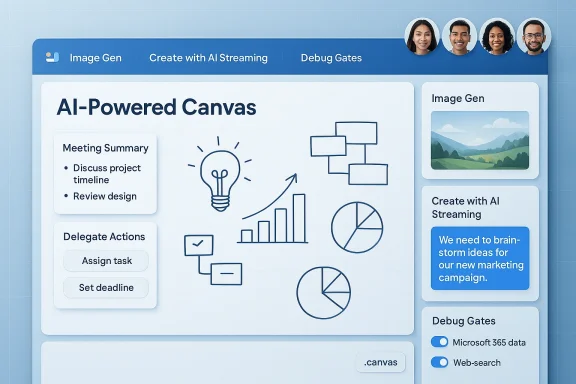
The leak, surfaced via a Windows-focused writeup that reproduces screenshots posted by Windows leakers, shows a web-based canvas environment that looks and feels like Microsoft Whiteboard but layered with Copilot-grade AI controls: model selectors for image generation, a “Create with AI Streaming” toggle, developer-mode gates, meeting-summary toggles, and explicit switches for connecting to Microsoft 365 data and web search. Those screenshots — whether early test UI or an internal prototype — imply a shift in how Microsoft envisions collaborative work: from text-and-prompt interactions to a continuous, visual, and multimodal workspace.
This isn’t coming out of nowhere. Microsoft has publicly been folding Copilot into canvas-style tools and productivity flows elsewhere (for example, Copilot chat in Power Apps’ canvas apps), which makes the concept of a Copilot-dril product experiment. At the same time, Microsoft and partner/model ecosystems are actively testing or shipping image-capable models (including GPT-4o–style image generators and Microsoft’s own MAI image efforts), providing the model plumbing that a visual Copilot would require.
This idea parallels industry trends toward multimodal, persistent workspaces: OpenAI’s own Canvas for collaborative ChatGPT-style projects and other canvas-like products (Notion/Notion AI, Canva Whiteboards, Miro, FigJam) are moving toward richer AI support. Microsoft’s advantage would be scale (enterprise accounts), compliance controls, and deep app integration.
At the same time, the leaked model names (references to GPT‑4o image generations) reflect the ongoing hybrid landscape of model sourcing: contracts and partnerships (OpenAI), in-house MAI model development, and Azure-hosted OpenAI model endpoints. Enterprises should expect model names and backend architectures to shift before any public release.
Watch for these signals from Microsoft:
That power comes with responsibilities. Enterprises will need to demand transparency about data flows, model provenance, and auditability. IT teams should update AI governance playbooks now: consider policy templates for model choice, DLP integration, action permissions, and pilot programs. For individual users and creative teams, the promise is enormous — imagine sketching an idea and having a Copilot render drafts, suggest revisions, and produce assets in seconds. But for companies and compliance teams, the potential for inadvertent exposure or unauthorized automation is non-trivial.
At present, the Copilot Canvas signals in the leak are plausible and consistent with Microsoft’s broader Copilot ambitions, yet unconfirmed. Treat the screenshots as an early look at what might be next for AI and collaboration: a workspace where visual thinking, generative models, and enterprise context converge. Stay prepared, test cautiously, and push vendors to make security, transparency, and governance central to any shipped Copilot Canvas experience.
Source: Windows Latest Microsoft Copilot Canvas leak reveals an AI-powered Whiteboard with image generation, AI streaming, and more
 Background / Overview
The leak, surfaced via a Windows-focused writeup that reproduces screenshots posted by Windows leakers, shows a web-based canvas environment that looks and feels like Microsoft Whiteboard but layered with Copilot-grade AI controls: model selectors for image generation, a “Create with AI Streaming” toggle, developer-mode gates, meeting-summary toggles, and explicit switches for connecting to Microsoft 365 data and web search. Those screenshots — whether early test UI or an internal prototype — imply a shift in how Microsoft envisions collaborative work: from text-and-prompt interactions to a continuous, visual, and multimodal workspace.This isn’t coming out of nowhere. Microsoft has publicly been folding Copilot into canvas-style tools and productivity flows elsewhere (for example, Copilot chat in Power Apps’ canvas apps), which makes the concept of a Copilot-dril product experiment. At the same time, Microsoft and partner/model ecosystems are actively testing or shipping image-capable models (including GPT-4o–style image generators and Microsoft’s own MAI image efforts), providing the model plumbing that a visual Copilot would require.
What the leak claims — key features and UI signals
The leaked screenshots and configuration lists show a surprisingly feature-rich prototype. The most salient items:- Canvas landing and freeform workspace — A simple “Create your first canvas” landing screen and an ink-capable freeform board reminiscent of Microsoft Whiteboard. The UI appears web-based and autosaves work.
- AI Image Model Selector — A drop-down offering choices such as GPT‑4o Image Gen (Default), GPT‑4o Image Gen 1p5, and GPT Image 1.5, indicating built-in image-generation options directly inside the workspace. If accurate, this means users could produce visuals in-place without switching apps.
- Create with AI Streaming — A toggle that suggests incremental generation: the canvas could render diagrams, layouts, or visual elements progressively as users type/draw, rather than waiting for a single completed prompt. That points to live AI assistance while people brainstorm.
- Advanced Developer / Agent Controls — A “Developer Mode” with panels named Debug Gates, AI Gates, Meeting Summary, One Shot Grounding, Post Grounding, Intent Detection, Solve Math, Delegate Actions to AugLoop, and Handoff Actions. These options look like the plumbing to run agent-style behaviors and automated workflows off the canvas content.
- Enterprise data and search toggles — Explicit switches to allow Microsoft 365 data and web search access indicate the canvas could pull contextual data from an organization or the web for richer, grounded AI responses. That’s a meaningful power/privilege vector for enterprises.
- Export/import .canvas files — Options to persist, exchange, and move canvases as files, enabling portability and long-term storage of AI-assisted workspaces.
Why this matters: product strategy and market placement
Microsoft already owns several advantages in the productivity and collaboration stack:- Deep integration with Microsoft 365 (Teams, OneDrive, SharePoint) and enterprise identity/management.
- Existing Whiteboard distribution inside Microsoft 365 and Windows ecosystems.
- Fast access to large model capabilities via partnerships (OpenAI) and emerging first‑party models (Microsoft AI / MAI series).
This idea parallels industry trends toward multimodal, persistent workspaces: OpenAI’s own Canvas for collaborative ChatGPT-style projects and other canvas-like products (Notion/Notion AI, Canva Whiteboards, Miro, FigJam) are moving toward richer AI support. Microsoft’s advantage would be scale (enterprise accounts), compliance controls, and deep app integration.
Technical signals and plausibility: is the leak credible?
A few points argue the leak is plausible — but not definitive:- The screenshots show references to both development and production Azure endpoints, which typically indicate an internally tested service rather than a mockup. That increases plausibility but doesn’t prove release intent.
- The presence of model options that reference GPT‑4o and GPT Image variants aligns with recent movements in the model ecosystem (Copilot integrations with image-capable GPT versions and Microsoft’s own MAI image work). Internal forum traces and public updates show Microsoft and partners experimenting with multimodal image models, so the naming isn’t outlandish. However, model-labeling in UI screenshots can be ephemeral and may change before any release.
- The long list of developer-style toggles (intent detection, grounding, handoff) is consistent with Microsoft’s larger Copilot/agent architecture ambitions (autonomous agent behaviors and action orchestration). Still, those are infrastructure-level features that may exist behind the scenes and not all would ship to end users.
Strengths and upside: how Copilot Canvas could change collaboration
If Microsoft ships a polished Copilot Canvas, the potential benefits are substantial:- Visual-first AI workflows. Teams could brainstorm with AI that draws and iterates visually in real time — faster than toggling between chat, slide decks, and image tools.
- Multimodal generation inside one workspace. Text, sketches, and generated images living in the same canvas reduces context switching and accelerates iteration.
- Enterprise grounding. If the canvas can legitimately and safely query Microsoft 365 data, Copilot could use corporate documents, calendars, and contact data to create meeting notes or action items that are contextually accurate.
- Action automation and continuity. Developer-mode features hint at the ability to summarize meetings, extract next actions, and kick off automated workflows — valuable for distributed teams and project handoffs.
- File portability. Export/import .canvas support would help teams archive, version, or reuse AI-assisted canvases like any other artifact.
Risks, unknowns, and governance challenges
The same features that make Copilot Canvas powerful also create technical, legal, and operational risks. Below are the most significant concerns enterprises and admins should anticipate.Data security and privacy
- Broad data access — The canvas UI indicates toggles for Microsoft 365 data and web search. Without strict controls, an AI assistant that can access organizational documents and conversation histories could surface sensitive content into a shared visual workspace. That raises data exfiltration and exposure risks.
- Modeling and telemetry — If image generation and streaming are routed through cloud models (external or in-house), telemetry and prompt context could be logged externally. Enterprises will need clear boundaries on what leaves tenant boundaries, who can opt in/out, and where logs are retained.
- Third-party content and copyright — Generated images can incorporate learned patterns from training data. Enterprises should have policies around IP provenance, reuse rights, and potential copyright contamination.
Safety and hallucination risks
- Streaming AI behavior — Real-time, incremental generation is convenient but also harder to validate. Streaming responses produced while users are mid-idea could contain inaccurate diagrams, numbers, or inferred conclusions presented as fact.
- Agent automation — The presence of "Delegate Actions" and "Handoff" options suggests automated follow-ups. Autonomous actions (e.g., sending emails, creating tasks) require rigorous permissions, approvals, and rollback mechanisms to avoid mistaken or malicious automation.
Compliance, auditing, and governance complexity
- Audit trails and records — When AI edits a canvas or summarizes a meeting, compliance teams will require reliable, tamper-evident logs showing what changed, who approved it, and what external data was consumed.
- Model choice and legal footprint — The Image Model Selector exposes model options — different models have different data handling and licensing characteristics. Admins must know which model was used for a given canvas and its legal implications.
Usability and workflow fragmentation
- Feature overload — The developer-focused toggles in the leaked UI are powerful but risk creating a confusing surface for non-technical users. Microsoft will need to balance simplicity vs. power via tiered UI roles (basic vs. admin/developer modes) and sane defaults.
- **Interoperability with existing Whiteboard userss diverges significantly from Microsoft Whiteboard, migration, compatibility, and training will be non-trivial for organizations already invested in Whiteboard workflows.
Practical recommendations for IT admins and teams
If you run Microsoft 365 or manage enterprise collaboration, prudence now will reduce headaches later. The leaked featu concrete steps:- Prepare governance guardrails.
- Define allowed data sources for AI features.
- Create policies for image generation, exporting, and sharing.
- Enforce least-privilege for autonomous actions.
- Disable or require approvals for any automated “delegate” or “handoff” actions by default.
- Audit and logging readiness.
- Ensure DLP, eDiscovery, and audit logs capture AI-generated changes and model choices.
- Educate end users.
- Publish plain-language rules: what can be asked of Copilot Canvas, what not to put into canvases (secrets, PII), and how to verify AI outputs.
- Evaluate model provenance.
- Ask vendors (or Microsoft) to document which model powers each image option, and the data handling guarantees (retention, training exclusion, red-teaming status).
- Pilot on controlled workloads.
- Run early trials with a small group, focus on reproducibility of outputs, and test fail-safe automation scenarios.
How this fits Microsoft’s broader AI trajectory
The leak — whether a near-term product or an internal research environment — aligns with Microsoft’s documented push to make Copilot a platform that can act across modalities and apps. Microsoft has been integrating Copilot into canvas-style apps and embedding Copilot Chat into canvas-like experiences, and the company is also pursuing first‑party image models and multimodal stacks that could reduce third-party dependencies. Those public signals strengthen the case that an internal Copilot Canvas prototype would be a natural experiment in Microsoft’s roadmap.At the same time, the leaked model names (references to GPT‑4o image generations) reflect the ongoing hybrid landscape of model sourcing: contracts and partnerships (OpenAI), in-house MAI model development, and Azure-hosted OpenAI model endpoints. Enterprises should expect model names and backend architectures to shift before any public release.
What remains unverified or unclear
No internal Microsoft announcement accompanies the leak. Key unknowns include:- Whether Copilot Canvas is intended to replace Microsoft Whiteboard, sit alongside it, or target a different class of users.
- Which models will be offered in public releases and whether image generation will be restricted by tenant, region, or subscription tier.
- The exact security and compliance guarantees (on‑tenant inference, data retention, training exclusions).
- The final UI, role-based access controls, and the degree to which agent-like automation will be available to end users vs. admins.
A realis to watch for
Leaks like this usually follow a predictable cadence: private experiments → restricted internal testing → limited public preview (Insider/preview channels) → wider rollouts if feedback is positive. Given the UI elements and backend endpoint references in the screenshots, expect Microsoft to test internally first and then surface preview options to Insiders or enterprise preview customers if the feature proves stable and safe.Watch for these signals from Microsoft:
- Official blog posts or docs announcing Copilot Canvas preview or a rebrand of Whiteboard.
- Admin center controls that surface Copilot Canvas tenant settings and DLP integrations.
- Microsoft Learn or release-plan pages describing Copilot experiences in collaborative canvases (which would be a formalization of the leaked features).
Conclusion — a cautious but consequential experiment
The Copilot Canvas leak paints a compelling picture: Microsoft exploring a visual Copilot that brings AI streaming, image generation, and agent-style automation into a persistent, sharable canvas. The concept is powerful because it moves AI from being a peripheral chat tool to a workspace collaborator — one that can sketch, summarize, and potentially act on behalf of teams.That power comes with responsibilities. Enterprises will need to demand transparency about data flows, model provenance, and auditability. IT teams should update AI governance playbooks now: consider policy templates for model choice, DLP integration, action permissions, and pilot programs. For individual users and creative teams, the promise is enormous — imagine sketching an idea and having a Copilot render drafts, suggest revisions, and produce assets in seconds. But for companies and compliance teams, the potential for inadvertent exposure or unauthorized automation is non-trivial.
At present, the Copilot Canvas signals in the leak are plausible and consistent with Microsoft’s broader Copilot ambitions, yet unconfirmed. Treat the screenshots as an early look at what might be next for AI and collaboration: a workspace where visual thinking, generative models, and enterprise context converge. Stay prepared, test cautiously, and push vendors to make security, transparency, and governance central to any shipped Copilot Canvas experience.
Source: Windows Latest Microsoft Copilot Canvas leak reveals an AI-powered Whiteboard with image generation, AI streaming, and more